<!DOCTYPE html>
    <html lang="vi" xmlns="http://www.w3.org/1999/xhtml" prefix="og: http://ogp.me/ns#">
    <head>
<title>Windows Update Blocker</title>
<meta name="description" content="Windows Update Blocker - Savefile - Tin Tức - https&#x3A;&#x002F;&#x002F;www.nguoicodonvn2008.info&#x002F;vi&#x002F;news&#x002F;savefile&#x002F;phan-mem&#x002F;windows-update-blocker-4884.html">
<meta name="author" content=".: Nguoicodonvn2008.info - Cõi lòng người cô đơn :.">
<meta name="copyright" content=".: Nguoicodonvn2008.info - Cõi lòng người cô đơn :. [admin@nguoicodonvn2008.info]">
<meta name="robots" content="index, archive, follow, noodp">
<meta name="googlebot" content="index,archive,follow,noodp">
<meta name="msnbot" content="all,index,follow">
<meta name="generator" content="NukeViet v4.5">
<meta http-equiv="Content-Type" content="text/html; charset=utf-8">
<meta property="og:title" content="Windows Update Blocker">
<meta property="og:type" content="website">
<meta property="og:description" content="Savefile - Tin Tức - https&#x3A;&#x002F;&#x002F;www.nguoicodonvn2008.info&#x002F;vi&#x002F;news&#x002F;savefile&#x002F;phan-mem&#x002F;windows-update-blocker-4884.html">
<meta property="og:site_name" content=".&#x3A; Nguoicodonvn2008.info - Cõi lòng người cô đơn &#x3A;.">
<meta property="og:url" content="https://www.nguoicodonvn2008.info/vi/news/savefile/phan-mem/windows-update-blocker-4884.html">
<link rel="shortcut icon" href="https://www.nguoicodonvn2008.info/favicon.ico">
<link rel="canonical" href="https://www.nguoicodonvn2008.info/vi/news/savefile/phan-mem/windows-update-blocker-4884.html">
<link rel="alternate" href="https://www.nguoicodonvn2008.info/vi/news/rss/" title="Tin Tức" type="application/rss+xml">
<link rel="alternate" href="https://www.nguoicodonvn2008.info/vi/news/rss/karaoke-dual/" title="Tin Tức - Karaoke Dual" type="application/rss+xml">
<link rel="alternate" href="https://www.nguoicodonvn2008.info/vi/news/rss/nhac-tre/" title="Tin Tức - Nhạc trẻ" type="application/rss+xml">
<link rel="alternate" href="https://www.nguoicodonvn2008.info/vi/news/rss/tru-tinh/" title="Tin Tức - Trữ tình" type="application/rss+xml">
<link rel="alternate" href="https://www.nguoicodonvn2008.info/vi/news/rss/nuoc-ngoai/" title="Tin Tức - Nước ngoài" type="application/rss+xml">
<link rel="alternate" href="https://www.nguoicodonvn2008.info/vi/news/rss/remix/" title="Tin Tức - Remix" type="application/rss+xml">
<link rel="alternate" href="https://www.nguoicodonvn2008.info/vi/news/rss/tam-su-tinh-yeu/" title="Tin Tức - Tâm sự tình yêu" type="application/rss+xml">
<link rel="alternate" href="https://www.nguoicodonvn2008.info/vi/news/rss/tho-suu-tam/" title="Tin Tức - Thơ sưu tầm" type="application/rss+xml">
<link rel="alternate" href="https://www.nguoicodonvn2008.info/vi/news/rss/cuoc-song/" title="Tin Tức - Cuộc sống" type="application/rss+xml">
<link rel="alternate" href="https://www.nguoicodonvn2008.info/vi/news/rss/phan-mem/" title="Tin Tức - Phần mềm" type="application/rss+xml">
<link rel="alternate" href="https://www.nguoicodonvn2008.info/vi/news/rss/kien-thuc-may-tinh/" title="Tin Tức - Kiến thức máy tính" type="application/rss+xml">
<link rel="alternate" href="https://www.nguoicodonvn2008.info/vi/news/rss/hoc-tap/" title="Tin Tức - Học tập" type="application/rss+xml">
<link rel="alternate" href="https://www.nguoicodonvn2008.info/vi/news/rss/tai-lieu/" title="Tin Tức - Tài liệu" type="application/rss+xml">
<link rel="alternate" href="https://www.nguoicodonvn2008.info/vi/news/rss/de-thi/" title="Tin Tức - Đề thi" type="application/rss+xml">
<link rel="preload" as="style" href="https://www.nguoicodonvn2008.info/assets/css/font-awesome.min.css" type="text/css">
<link rel="preload" as="style" href="https://www.nguoicodonvn2008.info/themes/default/css/bootstrap.non-responsive.css" type="text/css">
<link rel="preload" as="style" href="https://www.nguoicodonvn2008.info/themes/default/css/style.css" type="text/css">
<link rel="preload" as="style" href="https://www.nguoicodonvn2008.info/themes/default/css/style.non-responsive.css" type="text/css">
<link rel="preload" as="style" href="https://www.nguoicodonvn2008.info/themes/default/css/news.css" type="text/css">
<link rel="preload" as="style" href="https://www.nguoicodonvn2008.info/themes/default/css/custom.css" type="text/css">
<link rel="preload" as="script" href="https://www.nguoicodonvn2008.info/assets/js/jquery/jquery.min.js" type="text/javascript">
<link rel="preload" as="script" href="https://www.nguoicodonvn2008.info/assets/js/language/vi.js" type="text/javascript">
<link rel="preload" as="script" href="https://www.nguoicodonvn2008.info/assets/js/DOMPurify/purify3.js" type="text/javascript">
<link rel="preload" as="script" href="https://www.nguoicodonvn2008.info/assets/js/global.js" type="text/javascript">
<link rel="preload" as="script" href="https://www.nguoicodonvn2008.info/assets/js/site.js" type="text/javascript">
<link rel="preload" as="script" href="https://www.nguoicodonvn2008.info/themes/default/js/news.js" type="text/javascript">
<link rel="preload" as="script" href="https://www.nguoicodonvn2008.info/themes/default/js/main.js" type="text/javascript">
<link rel="preload" as="script" href="https://www.nguoicodonvn2008.info/themes/default/js/custom.js" type="text/javascript">
<link rel="preload" as="script" href="https://www.nguoicodonvn2008.info/themes/default/js/bootstrap.min.js" type="text/javascript">
<link rel="stylesheet" href="https://www.nguoicodonvn2008.info/assets/css/font-awesome.min.css">
<link rel="stylesheet" href="https://www.nguoicodonvn2008.info/themes/default/css/bootstrap.non-responsive.css">
<link rel="stylesheet" href="https://www.nguoicodonvn2008.info/themes/default/css/style.css">
<link rel="stylesheet" href="https://www.nguoicodonvn2008.info/themes/default/css/style.non-responsive.css">
<link rel="StyleSheet" href="https://www.nguoicodonvn2008.info/themes/default/css/news.css">
<link rel="stylesheet" href="https://www.nguoicodonvn2008.info/themes/default/css/custom.css">
<style type="text/css">
	body{background: #fff;}
</style>
    </head>
    <body>
<div id="print">
	<div id="hd_print">
		<h2 class="pull-left">.&#x3A; Nguoicodonvn2008.info - Cõi lòng người cô đơn &#x3A;.</h2>
		<p class="pull-right"><a title=".&#x3A; Nguoicodonvn2008.info - Cõi lòng người cô đơn &#x3A;." href="https://www.nguoicodonvn2008.info/">https://www.nguoicodonvn2008.info</a></p>
	</div>
	<div class="clear"></div>
	<hr />
	<div id="content">
		<h1>Windows Update Blocker</h1>
		<ul class="list-inline">
			<li>Thứ hai - 13/12/2021 23:47</li>
			<li class="hidden-print txtrequired"><em class="fa fa-print">&nbsp;</em><a title="In ra" href="javascript:;" onclick="window.print()">In ra</a></li>
			<li class="hidden-print txtrequired"><em class="fa fa-power-off">&nbsp;</em><a title="Đóng cửa sổ này" href="javascript:;" onclick="window.close()">Đóng cửa sổ này</a></li>
		</ul>
		<div class="clear"></div>
		<div id="hometext">
		</div>
				<div class="imghome">
			<img alt="Windows Update Blocker" src="https://st.quantrimang.com/photos/image/2021/12/13/windows-update-blocker-1.jpg" width="460" class="img-thumbnail" />
		</div>
		<div class="clear"></div>
		<div id="bodytext" class="clearfix">
			Tải xuống:&nbsp;<span style="color:rgb(192, 57, 43);"><strong>quantrimang.com/download/windows-update-blocker-186574</strong></span>
<p>Windows 10 cung cấp ít quyền kiểm soát giao diện người dùng hơn đối với hành vi cập nhật của hệ điều hành so với các phiên bản trước của Windows. Không có tùy chọn để&nbsp;tắt Windows Updates&nbsp;bằng&nbsp;Control Panel&nbsp;hoặc ứng dụng Settings trong Windows 10. Hệ điều hành sẽ tự động kiểm tra các bản cập nhật và cài đặt bất kỳ bản cập nhật nào, cho dù bạn muốn hay không.</p>

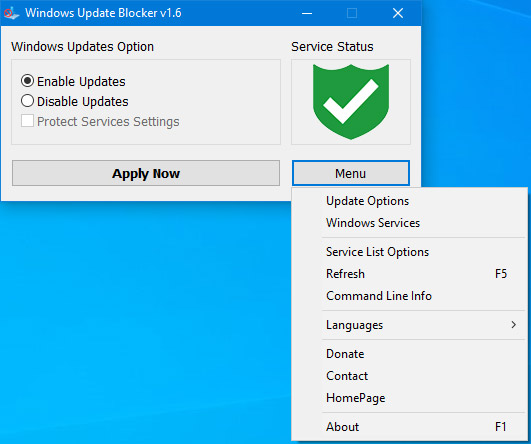
<p>Tính năng mới này thực sự khá tiện lợi cho hầu hết người dùng. Nhưng nếu muốn kiểm soát quá trình cập nhật, bạn có thể tắt service Windows Update. Điều này yêu cầu bạn mở Services Manager, định vị service, sau đó thay đổi trạng thái và thông số khởi động của nó. Sau đó, bạn sẽ phải kích hoạt lại service bất cứ khi nào bạn muốn hệ điều hành kiểm tra các bản cập nhật.</p>

<figure><img alt="Windows Update Blocker" data-i="0" data-src="https://st.quantrimang.com/photos/image/2021/12/13/windows-update-blocker-1.jpg" data-was-processed="true" height="444" src="https://st.quantrimang.com/photos/image/2021/12/13/windows-update-blocker-1.jpg" width="531" />
<figcaption>Windows Update Blocker</figcaption>
</figure>

<h2>Windows Update Blocker là gì?</h2>

<p>Windows Update Blocker là một phần mềm miễn phí giúp bạn vô hiệu hóa hoàn toàn hoặc kích hoạt các bản cập nhật tự động trên hệ thống Windows của mình, chỉ với một cú nhấp chuột. Tiện ích này có dạng portable, nghĩa là bạn không cần phải thực hiện quá trình cài đặt và không có file rác nào còn xuất hiện trên ổ cứng sau khi gỡ bỏ. Nếu đặt file chương trình vào thiết bị lưu trữ ngoài, bạn có thể mang theo Windows Update Blocker bên mình và sử dụng nó trên bất kỳ máy tính nào bạn muốn. Nếu bạn muốn có mọi thứ được cấu hình phù hợp và không muốn chịu rủi ro một bản cập nhật có thể làm hỏng hệ thống, tiện ích này là dành cho bạn.</p>

<h2>Windows Update Blocker hoạt động như thế nào?</h2>

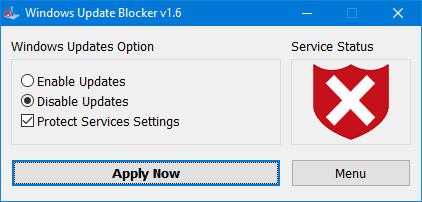
<p>Sau khi tải xuống, hãy giải nén Windows Update Blocker đến vị trí mong muốn, sau đó chạy nó.</p>

<figure><img alt="3 tùy chọn trong Windows Update Blocker" data-i="1" data-src="https://st.quantrimang.com/photos/image/2021/12/13/windows-update-blocker-2.jpg" data-was-processed="true" height="202" src="https://st.quantrimang.com/photos/image/2021/12/13/windows-update-blocker-2.jpg" width="422" />
<figcaption>3 tùy chọn trong Windows Update Blocker</figcaption>
</figure>

<p>Biểu tượng&nbsp;<strong>Service Status</strong>&nbsp;sẽ hiển thị trạng thái service Windows Update, nếu bạn muốn chặn&nbsp;<strong>Automatic Windows Updates</strong>, hãy chọn&nbsp;<strong>Disable Service</strong>&nbsp;và nhấp vào nút&nbsp;<strong>Apply Now</strong>.&nbsp;<strong>Protect Service Settings</strong>&nbsp;có thể ngăn chặn thay đổi không kiểm soát (được khuyến nghị).</p>

<h2>Cách chặn bất kỳ service nào và bảo vệ cài đặt</h2>

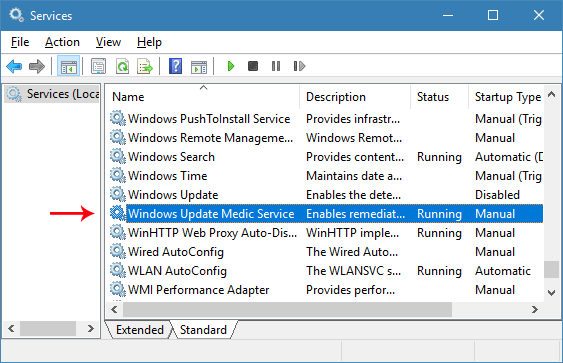
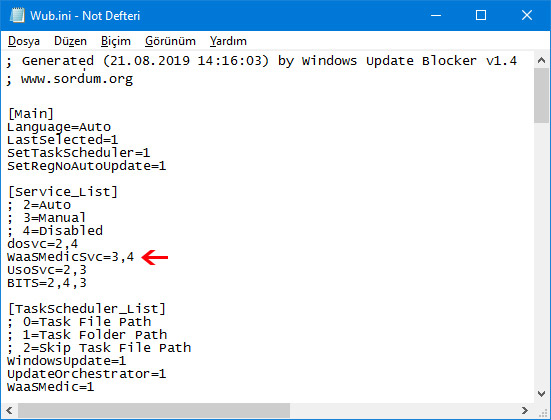
<p>Windows Update Blocker phiên bản mới cho phép người dùng thêm bất kỳ service nào khác vào file Wub.ini để chặn nó, trước tiên hãy chỉnh sửa file Wub.ini và thêm tên service mong muốn của bạn dưới dòng&nbsp;<strong>“dosvc=2,4”</strong>, chẳng hạn như nếu bạn muốn để chặn&nbsp;<strong>“Windows</strong>&nbsp;<strong>Update medic Service”</strong>, hãy mở&nbsp;<strong>Services</strong>&nbsp;và tìm nó…</p>

<figure><img alt="Tìm service" data-i="2" data-src="https://st.quantrimang.com/photos/image/2021/12/13/windows-update-blocker-3.png" data-was-processed="true" height="363" src="https://st.quantrimang.com/photos/image/2021/12/13/windows-update-blocker-3.png" width="563" />
<figcaption>Tìm service</figcaption>
</figure>

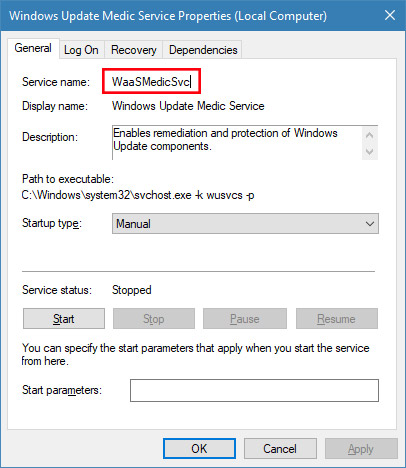
<p>… sau đó nhấp vào service và sao chép&nbsp;<strong>Service Name.</strong></p>

<figure><img alt="Sao chép Service Name" data-i="3" data-src="https://st.quantrimang.com/photos/image/2021/12/13/windows-update-blocker-4.jpg" data-was-processed="true" height="468" src="https://st.quantrimang.com/photos/image/2021/12/13/windows-update-blocker-4.jpg" width="406" />
<figcaption>Sao chép Service Name</figcaption>
</figure>

<p>Viết hoặc dán tên service dưới dòng&nbsp;<strong>dosvc=2,4.</strong></p>

<figure><img alt="Thêm tên service dưới dòng dosvc=2,4" data-i="4" data-src="https://st.quantrimang.com/photos/image/2021/12/13/windows-update-blocker-5.jpg" data-was-processed="true" height="420" src="https://st.quantrimang.com/photos/image/2021/12/13/windows-update-blocker-5.jpg" width="551" />
<figcaption>Thêm tên service dưới dòng dosvc=2,4</figcaption>
</figure>

<p>Cuối cùng, mở Windows Update Blocker và sử dụng nút&nbsp;<strong>Apply now</strong>. Nếu bạn muốn xóa service đã thêm gần đây sau một thời gian, vui lòng làm theo các bước sau:</p>

<p>1. Mở Windows Update Blocker và chọn tùy chọn<strong>&nbsp;Enable Service</strong>, sau đó sử dụng nút&nbsp;<strong>Apply now.</strong></p>

<p>2. Xóa dòng service mong muốn khỏi file&nbsp;<strong>Wub.ini.</strong></p>

<p>3. Bây giờ, bạn có thể chọn các tùy chọn&nbsp;<strong>Disable Service</strong>&nbsp;và&nbsp;<strong>Protect Service Settings</strong>.</p>

<h2>Service List Options</h2>

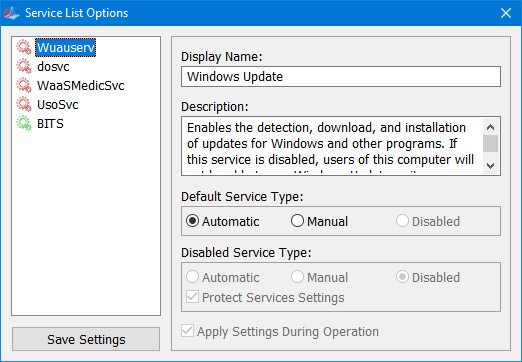
<p>Dưới nút&nbsp;<strong>Menu</strong>&nbsp;có lựa chọn&nbsp;<strong>Service List Options</strong>. Nếu bạn nhấp vào nó, cửa sổ pop-up&nbsp;<strong>Service List Options</strong>&nbsp;sẽ mở ra. Với GUI này, bạn có thể dễ dàng kiểm soát các service được thêm vào phần&nbsp;<strong>&#91;Service_List&#93;</strong>&nbsp;của&nbsp;<strong>Wub.ini.</strong>&nbsp;Bạn có thể thêm tối đa 25 service vào Wub.ini. Service&nbsp;<strong>Wuausrv</strong>&nbsp;chỉ hiển thị cho mục đích cung cấp thông tin do đó bạn không thể chỉnh sửa nó.</p>

<figure><img alt="Service List Options" data-i="5" data-src="https://st.quantrimang.com/photos/image/2021/12/13/windows-update-blocker-6.jpg" data-was-processed="true" height="362" src="https://st.quantrimang.com/photos/image/2021/12/13/windows-update-blocker-6.jpg" width="522" />
<figcaption>Service List Options</figcaption>
</figure>

<p><strong>LƯU Ý</strong>: Nếu Windows Update Blocker không thể quản lý một số service, chúng có thể đã bị hỏng, vui lòng sử dụng Windows Update Troubleshooter từ Microsoft. Nếu bạn không làm theo các bước trên và chỉ xóa bất kỳ service nào khỏi file Wub.ini, trạng thái service sẽ vẫn được bảo vệ.</p>

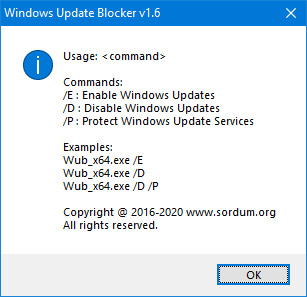
<p>Windows Update Blocker hỗ trợ các tùy chọn dòng lệnh để tự động hóa những tác vụ của Windows Update Blocker:</p>

<figure><img alt="Windows Update Blocker hỗ trợ các tùy chọn dòng lệnh để tự động hóa những tác vụ" data-i="6" data-src="https://st.quantrimang.com/photos/image/2021/12/13/windows-update-blocker-7.jpg" data-was-processed="true" height="297" src="https://st.quantrimang.com/photos/image/2021/12/13/windows-update-blocker-7.jpg" width="307" />
<figcaption>Windows Update Blocker hỗ trợ các tùy chọn dòng lệnh để tự động hóa những tác vụ</figcaption>
</figure>

<h2>Hệ điều hành được hỗ trợ</h2>

<p>Windows 11, Windows 10, Windows 8.1, Windows 8, Windows 7, Windows Vista, Windows XP (32/64-bit).</p>

<h2>Ngôn ngữ được hỗ trợ</h2>

<p>Tiếng Anh, tiếng Thổ Nhĩ Kỳ, tiếng Đức, tiếng Do Thái, tiếng Slovenia, tiếng Pháp, tiếng Nga, tiếng Bồ Đào Nha, tiếng Ý, tiếng Ba Lan, tiếng Tây Ban Nha, tiếng Séc, tiếng Ukraina, tiếng Hà Lan, tiếng Hy Lạp, tiếng Hungary, tiếng Trung giản thể, tiếng Trung Phồn thể, tiếng Bồ Đào Nha (Brasil), tiếng Thái, tiếng Ả Rập, Tiếng Hàn, tiếng Việt, tiếng Nhật, tiếng Indonesia, tiếng Ba Tư, tiếng Thụy Điển, tiếng Thái, tiếng Gruzia, tiếng Đan Mạch (Dansk), tiếng Albania, tiếng Azerbaijan, tiếng Bungari, tiếng Serbia, tiếng Uzbek, tiếng Tajik, tiếng Abkhazian, tiếng Romania, tiếng Slovak.</p>
		</div>
				<div id="author">
						<p>
				<strong>Nguồn tin:</strong>
				Quantrimang.com
			</p>
		</div>
	</div>
	<div id="footer" class="clearfix">
		<div id="url">
			<strong>URL của bản tin này: </strong><a href="https://www.nguoicodonvn2008.info/vi/news/savefile/phan-mem/windows-update-blocker-4884.html" title="Windows Update Blocker">https://www.nguoicodonvn2008.info/vi/news/savefile/phan-mem/windows-update-blocker-4884.html</a>

		</div>
		<div class="clear"></div>
		<div class="copyright">
			&copy; .&#x3A; Nguoicodonvn2008.info - Cõi lòng người cô đơn &#x3A;.
		</div>
		<div id="contact">
			<a href="mailto:admin@nguoicodonvn2008.info">admin@nguoicodonvn2008.info</a>
		</div>
	</div>
</div>
        <div id="timeoutsess" class="chromeframe">
            Bạn đã không sử dụng Site, <a onclick="timeoutsesscancel();" href="https://www.nguoicodonvn2008.info/#">Bấm vào đây để duy trì trạng thái đăng nhập</a>. Thời gian chờ: <span id="secField"> 60 </span> giây
        </div>
        <div id="openidResult" class="nv-alert" style="display:none"></div>
        <div id="openidBt" data-result="" data-redirect=""></div>
		</script>
		<div class="car-top">
  <span><img src="https://www.nguoicodonvn2008.info/themes/default/images/car.png" alt=""></span>
</div>
<script src="https://www.nguoicodonvn2008.info/assets/js/jquery/jquery.min.js"></script>
<script>var nv_base_siteurl="/",nv_lang_data="vi",nv_lang_interface="vi",nv_name_variable="nv",nv_fc_variable="op",nv_lang_variable="language",nv_module_name="news",nv_func_name="savefile",nv_is_user=0, nv_my_ofs=-4,nv_my_abbr="EDT",nv_cookie_prefix="nv4c_e856T",nv_check_pass_mstime=1738000,nv_area_admin=0,nv_safemode=0,theme_responsive=0,nv_recaptcha_ver=2,nv_recaptcha_sitekey="",nv_recaptcha_type="image",XSSsanitize=1;</script>
<script src="https://www.nguoicodonvn2008.info/assets/js/language/vi.js"></script>
<script src="https://www.nguoicodonvn2008.info/assets/js/DOMPurify/purify3.js"></script>
<script src="https://www.nguoicodonvn2008.info/assets/js/global.js"></script>
<script src="https://www.nguoicodonvn2008.info/assets/js/site.js"></script>
<script src="https://www.nguoicodonvn2008.info/themes/default/js/news.js"></script>
<script src="https://www.nguoicodonvn2008.info/themes/default/js/main.js"></script>
<script src="https://www.nguoicodonvn2008.info/themes/default/js/custom.js"></script>
<script type="application/ld+json">
        {
            "@context": "https://schema.org",
            "@type": "Organization",
            "url": "https://www.nguoicodonvn2008.info",
            "logo": "https://www.nguoicodonvn2008.info/uploads/angel.gif"
        }
        </script>
<script src="https://www.nguoicodonvn2008.info/themes/default/js/bootstrap.min.js"></script>
<script type="text/javascript">
var $scrolltop = $('.car-top');
$scrolltop.on('click', function () {
    $('html,body').animate({
        scrollTop: 0
    }, 800);
    $(this).addClass("car-run");
    setTimeout(function(){ $scrolltop.removeClass('car-run');}, 1000);
    return false;
});
$(window).on('scroll', function ()
{ 
    if($(window).scrollTop() >= 200)
    {
        $scrolltop.addClass("show");
        $scrolltop.addClass("car-down");
    }
    else
    {
       $scrolltop.removeClass("show");
       setTimeout(function(){ $scrolltop.removeClass('car-down');}, 300);
    }
});
</script>
</body>
</html>