<!DOCTYPE html>
    <html lang="vi" xmlns="http://www.w3.org/1999/xhtml" prefix="og: http://ogp.me/ns#">
    <head>
<title>ViVeTool là gì? Cách sử dụng ViVeTool để kích hoạt các tính năng ẩn trên Windows</title>
<meta name="description" content="ViVeTool là gì? Cách sử dụng ViVeTool để kích hoạt các tính năng ẩn trên Windows - Savefile - Tin Tức -...">
<meta name="author" content=".: Nguoicodonvn2008.info - Cõi lòng người cô đơn :.">
<meta name="copyright" content=".: Nguoicodonvn2008.info - Cõi lòng người cô đơn :. [admin@nguoicodonvn2008.info]">
<meta name="robots" content="index, archive, follow, noodp">
<meta name="googlebot" content="index,archive,follow,noodp">
<meta name="msnbot" content="all,index,follow">
<meta name="generator" content="NukeViet v4.5">
<meta http-equiv="Content-Type" content="text/html; charset=utf-8">
<meta property="og:title" content="ViVeTool là gì? Cách sử dụng ViVeTool để kích hoạt các tính năng ẩn trên Windows">
<meta property="og:type" content="website">
<meta property="og:description" content="Savefile - Tin Tức - https&#x3A;&#x002F;&#x002F;www.nguoicodonvn2008.info&#x002F;vi&#x002F;news&#x002F;savefile&#x002F;phan-mem&#x002F;vivetool-la-gi-cach-su-dung-vivetool-de-kich-hoat-cac-tinh-nang-an-tren-windows-9933.html">
<meta property="og:site_name" content=".&#x3A; Nguoicodonvn2008.info - Cõi lòng người cô đơn &#x3A;.">
<meta property="og:url" content="https://www.nguoicodonvn2008.info/vi/news/savefile/phan-mem/vivetool-la-gi-cach-su-dung-vivetool-de-kich-hoat-cac-tinh-nang-an-tren-windows-9933.html">
<link rel="shortcut icon" href="https://www.nguoicodonvn2008.info/favicon.ico">
<link rel="canonical" href="https://www.nguoicodonvn2008.info/vi/news/savefile/phan-mem/vivetool-la-gi-cach-su-dung-vivetool-de-kich-hoat-cac-tinh-nang-an-tren-windows-9933.html">
<link rel="alternate" href="https://www.nguoicodonvn2008.info/vi/news/rss/" title="Tin Tức" type="application/rss+xml">
<link rel="alternate" href="https://www.nguoicodonvn2008.info/vi/news/rss/karaoke-dual/" title="Tin Tức - Karaoke Dual" type="application/rss+xml">
<link rel="alternate" href="https://www.nguoicodonvn2008.info/vi/news/rss/nhac-tre/" title="Tin Tức - Nhạc trẻ" type="application/rss+xml">
<link rel="alternate" href="https://www.nguoicodonvn2008.info/vi/news/rss/tru-tinh/" title="Tin Tức - Trữ tình" type="application/rss+xml">
<link rel="alternate" href="https://www.nguoicodonvn2008.info/vi/news/rss/nuoc-ngoai/" title="Tin Tức - Nước ngoài" type="application/rss+xml">
<link rel="alternate" href="https://www.nguoicodonvn2008.info/vi/news/rss/remix/" title="Tin Tức - Remix" type="application/rss+xml">
<link rel="alternate" href="https://www.nguoicodonvn2008.info/vi/news/rss/tam-su-tinh-yeu/" title="Tin Tức - Tâm sự tình yêu" type="application/rss+xml">
<link rel="alternate" href="https://www.nguoicodonvn2008.info/vi/news/rss/tho-suu-tam/" title="Tin Tức - Thơ sưu tầm" type="application/rss+xml">
<link rel="alternate" href="https://www.nguoicodonvn2008.info/vi/news/rss/cuoc-song/" title="Tin Tức - Cuộc sống" type="application/rss+xml">
<link rel="alternate" href="https://www.nguoicodonvn2008.info/vi/news/rss/phan-mem/" title="Tin Tức - Phần mềm" type="application/rss+xml">
<link rel="alternate" href="https://www.nguoicodonvn2008.info/vi/news/rss/kien-thuc-may-tinh/" title="Tin Tức - Kiến thức máy tính" type="application/rss+xml">
<link rel="alternate" href="https://www.nguoicodonvn2008.info/vi/news/rss/hoc-tap/" title="Tin Tức - Học tập" type="application/rss+xml">
<link rel="alternate" href="https://www.nguoicodonvn2008.info/vi/news/rss/tai-lieu/" title="Tin Tức - Tài liệu" type="application/rss+xml">
<link rel="alternate" href="https://www.nguoicodonvn2008.info/vi/news/rss/de-thi/" title="Tin Tức - Đề thi" type="application/rss+xml">
<link rel="preload" as="style" href="https://www.nguoicodonvn2008.info/assets/css/font-awesome.min.css" type="text/css">
<link rel="preload" as="style" href="https://www.nguoicodonvn2008.info/themes/default/css/bootstrap.non-responsive.css" type="text/css">
<link rel="preload" as="style" href="https://www.nguoicodonvn2008.info/themes/default/css/style.css" type="text/css">
<link rel="preload" as="style" href="https://www.nguoicodonvn2008.info/themes/default/css/style.non-responsive.css" type="text/css">
<link rel="preload" as="style" href="https://www.nguoicodonvn2008.info/themes/default/css/news.css" type="text/css">
<link rel="preload" as="style" href="https://www.nguoicodonvn2008.info/themes/default/css/custom.css" type="text/css">
<link rel="preload" as="script" href="https://www.nguoicodonvn2008.info/assets/js/jquery/jquery.min.js" type="text/javascript">
<link rel="preload" as="script" href="https://www.nguoicodonvn2008.info/assets/js/language/vi.js" type="text/javascript">
<link rel="preload" as="script" href="https://www.nguoicodonvn2008.info/assets/js/DOMPurify/purify3.js" type="text/javascript">
<link rel="preload" as="script" href="https://www.nguoicodonvn2008.info/assets/js/global.js" type="text/javascript">
<link rel="preload" as="script" href="https://www.nguoicodonvn2008.info/assets/js/site.js" type="text/javascript">
<link rel="preload" as="script" href="https://www.nguoicodonvn2008.info/themes/default/js/news.js" type="text/javascript">
<link rel="preload" as="script" href="https://www.nguoicodonvn2008.info/themes/default/js/main.js" type="text/javascript">
<link rel="preload" as="script" href="https://www.nguoicodonvn2008.info/themes/default/js/custom.js" type="text/javascript">
<link rel="preload" as="script" href="https://www.nguoicodonvn2008.info/themes/default/js/bootstrap.min.js" type="text/javascript">
<link rel="stylesheet" href="https://www.nguoicodonvn2008.info/assets/css/font-awesome.min.css">
<link rel="stylesheet" href="https://www.nguoicodonvn2008.info/themes/default/css/bootstrap.non-responsive.css">
<link rel="stylesheet" href="https://www.nguoicodonvn2008.info/themes/default/css/style.css">
<link rel="stylesheet" href="https://www.nguoicodonvn2008.info/themes/default/css/style.non-responsive.css">
<link rel="StyleSheet" href="https://www.nguoicodonvn2008.info/themes/default/css/news.css">
<link rel="stylesheet" href="https://www.nguoicodonvn2008.info/themes/default/css/custom.css">
<style type="text/css">
	body{background: #fff;}
</style>
    </head>
    <body>
<div id="print">
	<div id="hd_print">
		<h2 class="pull-left">.&#x3A; Nguoicodonvn2008.info - Cõi lòng người cô đơn &#x3A;.</h2>
		<p class="pull-right"><a title=".&#x3A; Nguoicodonvn2008.info - Cõi lòng người cô đơn &#x3A;." href="https://www.nguoicodonvn2008.info/">https://www.nguoicodonvn2008.info</a></p>
	</div>
	<div class="clear"></div>
	<hr />
	<div id="content">
		<h1>ViVeTool là gì? Cách sử dụng ViVeTool để kích hoạt các tính năng ẩn trên Windows</h1>
		<ul class="list-inline">
			<li>Thứ tư - 05/03/2025 22:52</li>
			<li class="hidden-print txtrequired"><em class="fa fa-print">&nbsp;</em><a title="In ra" href="javascript:;" onclick="window.print()">In ra</a></li>
			<li class="hidden-print txtrequired"><em class="fa fa-power-off">&nbsp;</em><a title="Đóng cửa sổ này" href="javascript:;" onclick="window.close()">Đóng cửa sổ này</a></li>
		</ul>
		<div class="clear"></div>
		<div id="hometext">
		</div>
				<div class="imghome">
			<img alt="ViVeTool là gì? Cách sử dụng ViVeTool để kích hoạt các tính năng ẩn trên Windows" src="https://st.quantrimang.com/photos/image/2023/02/28/dung-vivetool-kich-hoat-tinh-nang-an-tren-windows-1.jpg" width="460" class="img-thumbnail" />
		</div>
		<div class="clear"></div>
		<div id="bodytext" class="clearfix">
			<p style="text-align: justify;">ViveTool là một công cụ dòng lệnh mã nguồn mở để kích hoạt các tính năng thử nghiệm bị ẩn trên máy tính Windows. Nó cũng có sẵn trong phiên bản GUI, giúp bật hoặc tắt một số tính năng nhất định trên Windows dễ dàng hơn nhiều.</p>

<p style="text-align: justify;">Nó cho phép bạn dùng thử những tính năng mới và chưa được phát hành trên các bản phát hành Windows ổn định hoặc dành cho nhà phát triển, chẳng hạn như tính năng Multi-tab trong File Explorer hoặc&nbsp;khôi phục menu ngữ cảnh cổ điển của Windows 11. Nhưng liệu bạn có nên sử dụng ViVeTool không? Hãy cùng tìm hiểu qua bài viết sau đây nhé!</p>

<h2 style="text-align: justify;">&nbsp;</h2>

<h2 id="mcetoc_1iliid0ni1pv" style="text-align: justify;">ViveTool là gì và nó hoạt động như thế nào?</h2>

<p style="text-align: justify;">ViveTool là ứng dụng console và thư viện C# nguồn mở của bên thứ ba để kích hoạt các tính năng chưa được phát hành trên máy tính Windows. Bạn cũng có thể sử dụng nó để khôi phục hoặc vô hiệu hóa một số tính năng.</p>

<p style="text-align: justify;">ViveTool sử dụng Feature ID, một phần của Windows Feature Management, một phương pháp phát triển phần mềm, để xác định các tính năng khả dụng. Sau đó, bạn có thể sử dụng Feature ID để bật hoặc tắt một số tính năng nhất định trên máy tính Windows của mình bằng cách sử dụng tiện ích GUI hoặc dòng lệnh ViVeTool.</p>

<p style="text-align: justify;">Ví dụ, nếu muốn xóa hộp tìm kiếm mới và thay thế bằng biểu tượng tìm kiếm cổ điển, bạn sẽ cần chạy lệnh ViVetool&nbsp;<strong>/disable /id:39263329</strong>&nbsp;bằng tiện ích dòng lệnh ViVeTool.</p>

<p style="text-align: justify;">Feature ID&nbsp;<strong>id:39263329</strong>&nbsp;trong lệnh trên nói cho ViVeTool và API tiếp theo yêu cầu bật tính năng nào trên máy tính Windows của bạn.</p>

<p style="text-align: justify;">Ngoài ra, bạn có thể sử dụng phiên bản GUI của ViveTool để tìm và bật hoặc tắt các tính năng trên máy tính Windows của mình.</p>

<h2 id="mcetoc_1iliid0ni1q0" style="text-align: justify;">ViVeTool có an toàn để sử dụng không?</h2>

<p style="text-align: justify;">ViVeTool không tự thêm các tính năng mới. Nó chỉ đơn giản là chuyển đổi các tính năng hiện có để bật hoặc tắt chúng cho hệ thống Windows của bạn. Tuy nhiên, vì các tính năng này về bản chất là thử nghiệm nên việc kích hoạt chúng đôi khi có thể gây ra một số vấn đề.</p>

<p style="text-align: justify;">Nếu bạn muốn sử dụng ViVeTool trên driver hàng ngày của mình, hãy xem qua các tùy chọn sao lưu và phục hồi dữ liệu Windows và tiến hành các bước bên dưới. Tốt nhất, hãy sử dụng máy ảo để thử nghiệm các tính năng mới và nếu thấy ổn định, hãy áp dụng chúng vào driver hàng ngày của bạn.</p>

<h2 id="mcetoc_1iliid0ni1q1" style="text-align: justify;">Cách tải xuống và cài đặt ViVeTool GUI</h2>

<p style="text-align: justify;">ViveTool GUI là phiên bản nhánh của tiện ích dòng lệnh ViveTool. Nó ít phức tạp hơn để sử dụng và loại bỏ rắc rối khi thực thi các lệnh hoặc ghi nhớ chúng ngay từ đầu.</p>

<p style="text-align: justify;">Phiên bản GUI có sẵn dưới dạng trình cài đặt thực thi hoặc trong phiên bản phiên bản portable. Đây là cách cài đặt và sử dụng ViVeTool GUI trên Windows.</p>

<p style="text-align: justify;">Để tải xuống ViVeTool GUI:</p>

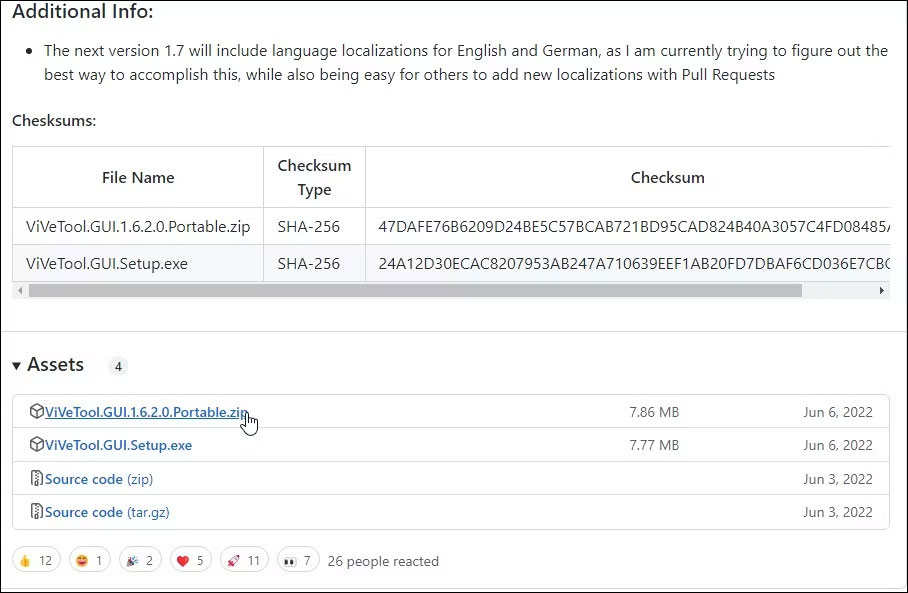
<p style="text-align: justify;">1.&nbsp;Truy cập trang GUI ViveTool trên GitHub.</p>

<figure>
<div style="text-align: justify;"><img alt="Tải vivetool gui zip" data-i="0" data-src="https://st.quantrimang.com/photos/image/2023/02/28/dung-vivetool-kich-hoat-tinh-nang-an-tren-windows-1.jpg" data-was-processed="true" height="593" src="https://st.quantrimang.com/photos/image/2023/02/28/dung-vivetool-kich-hoat-tinh-nang-an-tren-windows-1.jpg" width="908" /></div>

<figcaption>
<div style="text-align: justify;">Tải vivetool gui zip</div>
</figcaption>
</figure>

<p style="text-align: justify;">2. Tải xuống phiên bản mới nhất của file Setup.exe hiện có. Bạn cũng có thể tải xuống phiên bản portable nếu muốn.</p>

<p style="text-align: justify;">3. Chạy file thiết lập và giữ cài đặt mặc định. Làm theo hướng dẫn trên màn hình để cài đặt ứng dụng.</p>

<p style="text-align: justify;">4. Giờ đây, ứng dụng đã được cài đặt, bạn có thể sử dụng ứng dụng này để tìm và cài đặt các tính năng chưa được phát hành trên máy tính Windows của mình. Đây là cách để làm điều đó.</p>

<p style="text-align: justify;">5. Khởi chạy ViVeTool bằng desktop shortcut hoặc từ menu Start.</p>

<figure>
<div style="text-align: justify;"><img alt="ViVeTool GUI chọn bản build" data-adbro-processed="true" data-i="1" data-src="https://st.quantrimang.com/photos/image/2023/02/28/dung-vivetool-kich-hoat-tinh-nang-an-tren-windows-2.jpg" data-was-processed="true" height="600" src="https://st.quantrimang.com/photos/image/2023/02/28/dung-vivetool-kich-hoat-tinh-nang-an-tren-windows-2.jpg" width="804" /></div>

<figcaption>
<div style="text-align: justify;">ViVeTool GUI chọn bản build</div>
</figcaption>
</figure>

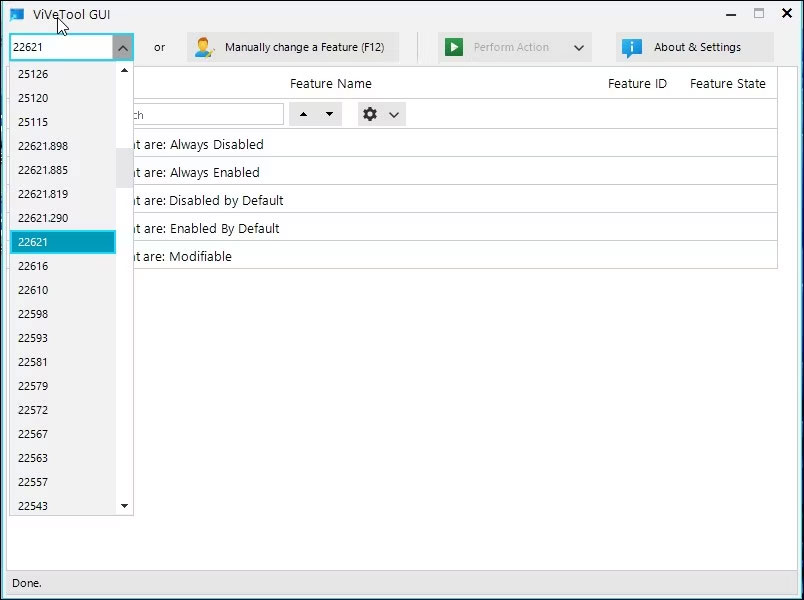
<p style="text-align: justify;">6. Nhấp vào menu drop-down ở góc trên cùng bên trái và chọn bản build Windows của bạn. Bạn có thể kiểm tra phiên bản và bản build Windows 11 bằng bảng điều khiển&nbsp;<strong>Settings</strong>.</p>

<p style="text-align: justify;">7. ViVeTool GUI bây giờ sẽ bắt đầu tìm kiếm tất cả các tính năng có sẵn cho bản build đã chọn. Quá trình này có thể mất vài phút, vì vậy hãy đợi cho đến khi danh sách hoàn tất.</p>

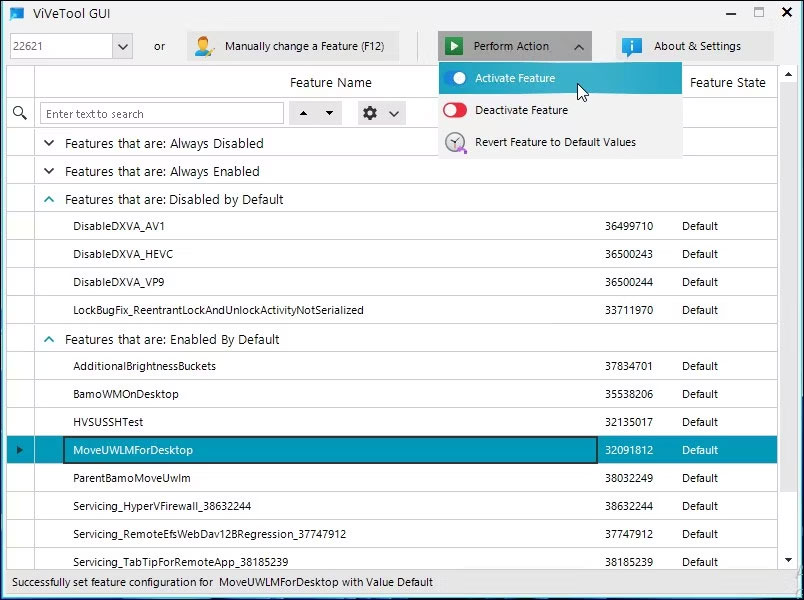
<p style="text-align: justify;">8. ViVeTool GUI phân loại các tính năng có sẵn thành các danh mục khác nhau. Bạn có thể mở rộng danh mục và chọn tính năng để cài đặt. Ngoài ra, hãy nhập tên tính năng vào thanh tìm kiếm để tìm bất kỳ tính năng nào.</p>

<p style="text-align: justify;">9. Chọn tính năng bạn muốn bật hoặc tắt và nhấp vào menu drop-down&nbsp;<strong>Perform Action.</strong></p>

<figure>
<div style="text-align: justify;"><img alt="Kích hoạt tính năng ViVeTool GUI" data-i="2" data-src="https://st.quantrimang.com/photos/image/2023/02/28/dung-vivetool-kich-hoat-tinh-nang-an-tren-windows-3.jpg" data-was-processed="true" height="600" src="https://st.quantrimang.com/photos/image/2023/02/28/dung-vivetool-kich-hoat-tinh-nang-an-tren-windows-3.jpg" width="804" /></div>

<figcaption>
<div style="text-align: justify;">Kích hoạt tính năng ViVeTool GUI</div>
</figcaption>
</figure>

<p style="text-align: justify;">10. Chọn&nbsp;<strong>Activate</strong>&nbsp;để bật tính năng và&nbsp;<strong>Deactivate</strong>&nbsp;để tắt tính năng. Đợi thông báo thành công và bấm &nbsp;<strong>Close</strong>.</p>

<p style="text-align: justify;">11. Bạn có thể cần&nbsp;khởi động lại PC&nbsp;để áp dụng các thay đổi.</p>

<figure>
<div style="text-align: justify;"><img alt="Hoàn nguyên về giá trị mặc định tính năng ViVeTool GUI" data-i="3" data-src="https://st.quantrimang.com/photos/image/2023/02/28/dung-vivetool-kich-hoat-tinh-nang-an-tren-windows-4.jpg" data-was-processed="true" height="599" src="https://st.quantrimang.com/photos/image/2023/02/28/dung-vivetool-kich-hoat-tinh-nang-an-tren-windows-4.jpg" width="800" /></div>

<figcaption>
<div style="text-align: justify;">Hoàn nguyên về giá trị mặc định tính năng ViVeTool GUI</div>
</figcaption>
</figure>

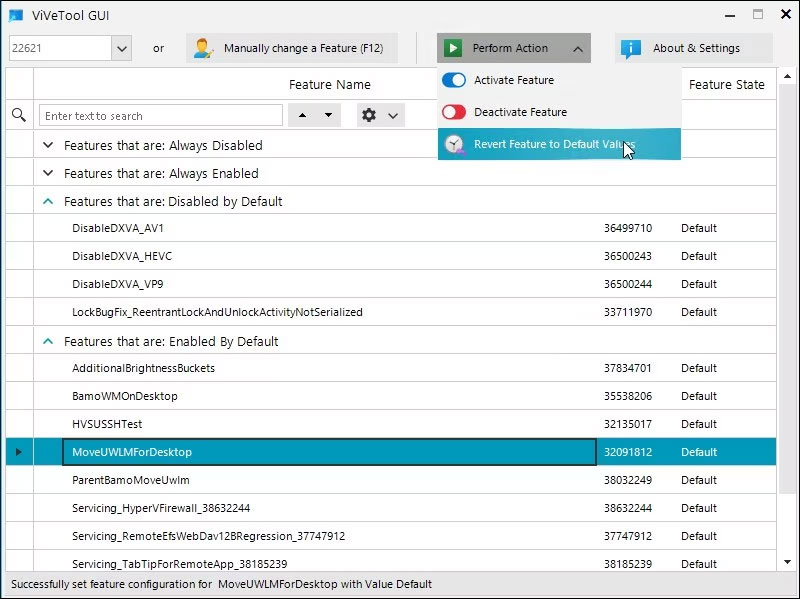
<p style="text-align: justify;">12. Để hoàn nguyên tính năng về trạng thái mặc định, hãy chọn tính năng đã sửa đổi, nhấp vào&nbsp;<strong>Perform Action</strong>&nbsp;và chọn&nbsp;<strong>Revert Feature to Default Values</strong>.</p>

<h3 id="mcetoc_1iliid0ni1q2" style="text-align: justify;">Kích hoạt Feature ID</h3>

<p style="text-align: justify;">Sau khi cài đặt thành công, hãy chọn ID bạn muốn kích hoạt (tham khảo diễn đàn Windows Insider, như PhantomOfEarth hoặc TheBobPony hoặc kiểm tra diễn đàn trực tuyến để tìm Feature ID cụ thể).</p>

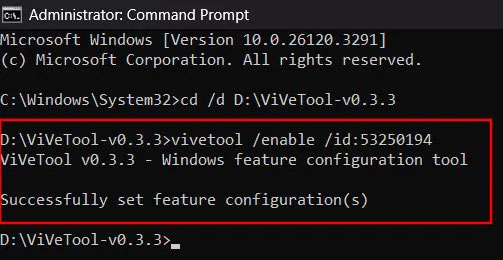
<p style="text-align: justify;">Để kích hoạt Feature ID, hãy thực thi “/enable” trong Command Prompt (vẫn trong thư mục ViVeTool):</p>

<pre id="pre0">
<code>vivetool /enable /id:&lt;feature-id&gt;</code></pre>

<p style="text-align: justify;">Ví dụ đang kích hoạt 53250194, lệnh này sẽ kích hoạt tính năng cắt mới cho Windows Snipping Tool.</p>

<figure>
<div style="text-align: justify;"><img alt="" data-i="4" data-src="https://st.quantrimang.com/photos/image/2025/03/05/dung-vivetool-kich-hoat-tinh-nang-an-tren-windows-1.jpg" data-was-processed="true" height="260" src="https://st.quantrimang.com/photos/image/2025/03/05/dung-vivetool-kich-hoat-tinh-nang-an-tren-windows-1.jpg" width="503" /></div>
</figure>

<p style="text-align: justify;">Sau khi bạn thấy kết quả cấu hình tính năng thành công, như trong hình trên, hãy đóng cửa sổ Command Prompt và khởi động lại máy tính để áp dụng các thay đổi. Các tinh chỉnh hoặc tính năng UI được đánh giá cao sẽ có hiệu lực.</p>

<h3 id="mcetoc_1iliid0ni1q3" style="text-align: justify;">Vô hiệu hóa Feature ID</h3>

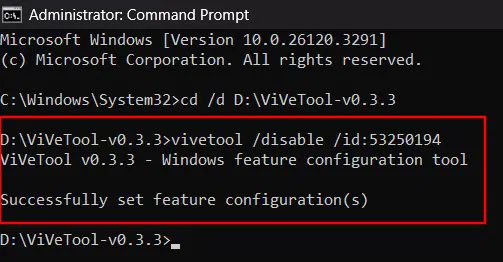
<p style="text-align: justify;">Nếu bạn nhận thấy lỗi hoặc các thành phần UI bị hỏng hoặc muốn tắt hoàn toàn tính năng, hãy làm theo các bước trên để điều hướng đến thư mục ViVeTool và sử dụng lệnh sau.</p>

<pre id="pre1">
<code>vivetool /disable /id:&lt;feature-id&gt;</code></pre>

<figure>
<div style="text-align: justify;"><img alt="" data-i="5" data-src="https://st.quantrimang.com/photos/image/2025/03/05/dung-vivetool-kich-hoat-tinh-nang-an-tren-windows-2.jpg" data-was-processed="true" height="262" src="https://st.quantrimang.com/photos/image/2025/03/05/dung-vivetool-kich-hoat-tinh-nang-an-tren-windows-2.jpg" width="503" /></div>
</figure>

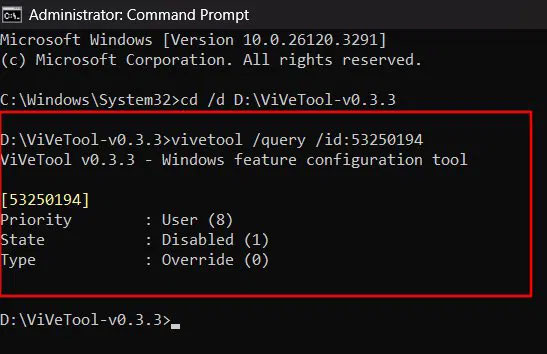
<p style="text-align: justify;">Lệnh /disable sẽ vô hiệu hóa tính năng và việc khởi động lại sẽ áp dụng các thay đổi. Để kiểm tra xem Feature ID được bật hay tắt, hãy sử dụng lệnh /query:</p>

<pre id="pre2">
<code>vivetool /query /id:&lt;feature-id&gt;</code></pre>

<p style="text-align: justify;">Hãy đảm bảo thay thế &lt;feature-id&gt; bằng ID thực tế. Sử dụng lệnh trên sẽ hiển thị các trạng thái sau theo sau là một số:</p>

<ul>
	<li style="text-align: justify;"><strong>Default (0)</strong>: Tính năng ở trạng thái mặc định.</li>
	<li style="text-align: justify;"><strong>Enabled (2)</strong>: Ghi đè trạng thái mặc định và buộc tính năng phải bật.</li>
	<li style="text-align: justify;"><strong>Disable (1)</strong>: Tính năng bị tắt.</li>
</ul>

<figure>
<div style="text-align: justify;"><img alt="Kiểm tra trạng thái truy vấn trong ViVeTool" data-i="6" data-src="https://st.quantrimang.com/photos/image/2025/03/05/dung-vivetool-kich-hoat-tinh-nang-an-tren-windows-3.jpg" data-was-processed="true" height="354" src="https://st.quantrimang.com/photos/image/2025/03/05/dung-vivetool-kich-hoat-tinh-nang-an-tren-windows-3.jpg" width="547" /></div>

<figcaption>
<div style="text-align: justify;">Kiểm tra trạng thái truy vấn trong ViVeTool</div>
</figcaption>
</figure>

<p style="text-align: justify;">ViVeTool cung cấp quyền truy cập dễ dàng vào các tính năng beta mới. Tuy nhiên, do bản chất thử nghiệm của các flag này, bạn có thể gặp một số lỗi hoặc sự cố chưa từng có. Do đó, điều quan trọng là phải tiến hành thận trọng và bảo vệ hệ thống của bạn bằng bản sao lưu.</p>

<h2 id="mcetoc_1iliid0ni1q4" style="text-align: justify;">Cách sử dụng phiên bản dòng lệnh ViveTool</h2>

<p style="text-align: justify;">Phiên bản gốc của ViVeTool là một tiện ích dòng lệnh. Mặc dù nó cung cấp chức năng tương tự như phiên bản GUI, nhưng đây là một cách hiệu quả để bật và tắt các tính năng của Windows một cách nhanh chóng.</p>

<p style="text-align: justify;">Tuy nhiên, để bật bất kỳ tính năng nào, bạn phải nhập Feature ID. Bạn có thể lấy Feature ID từ Internet, chẳng hạn như tài liệu dành cho nhà phát triển của Microsoft hoặc phiên bản GUI của ViveTool.</p>

<p style="text-align: justify;">Sau khi có Feature ID, bạn có thể sử dụng phiên bản dòng lệnh ViVeTool để bật hoặc tắt các tính năng trên máy tính Windows của mình. Đây là cách để làm điều đó.</p>

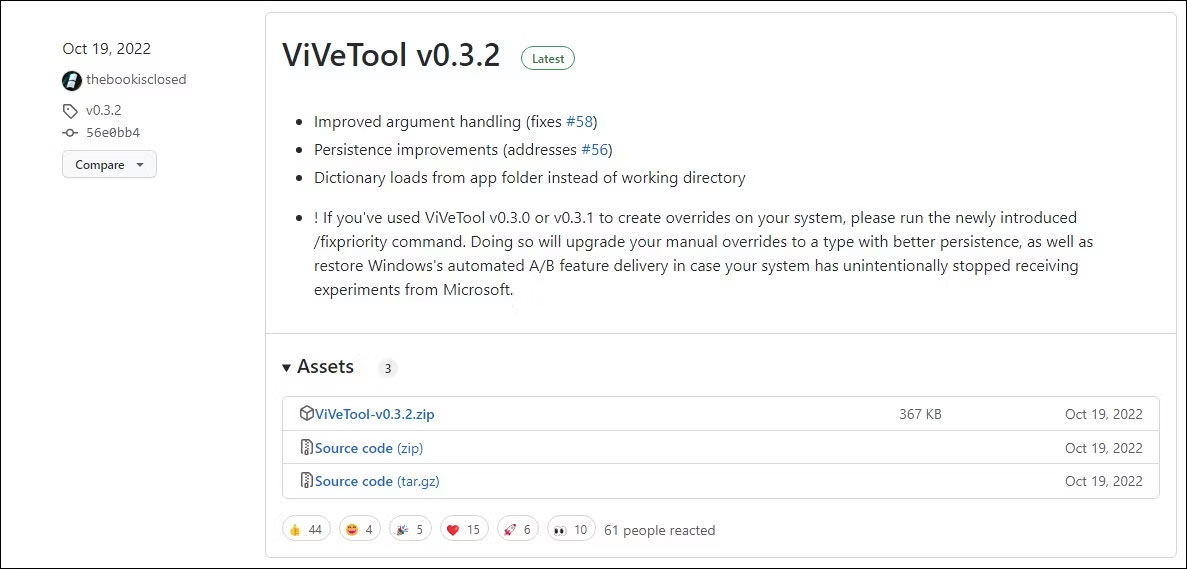
<p style="text-align: justify;">1.&nbsp;Truy cập trang ViveTool trên GitHub.:<span style="color:rgb(231, 76, 60);"><strong>&nbsp;https://github.com/thebookisclosed/ViVe/releases</strong></span></p>

<figure>
<div style="text-align: justify;"><img alt="Tải xuống zip dòng lệnh ViveTool" data-i="7" data-src="https://st.quantrimang.com/photos/image/2023/02/28/dung-vivetool-kich-hoat-tinh-nang-an-tren-windows-5.jpg" data-was-processed="true" height="569" src="https://st.quantrimang.com/photos/image/2023/02/28/dung-vivetool-kich-hoat-tinh-nang-an-tren-windows-5.jpg" width="1187" /></div>

<figcaption>
<div style="text-align: justify;">Tải xuống zip dòng lệnh ViveTool</div>
</figcaption>
</figure>

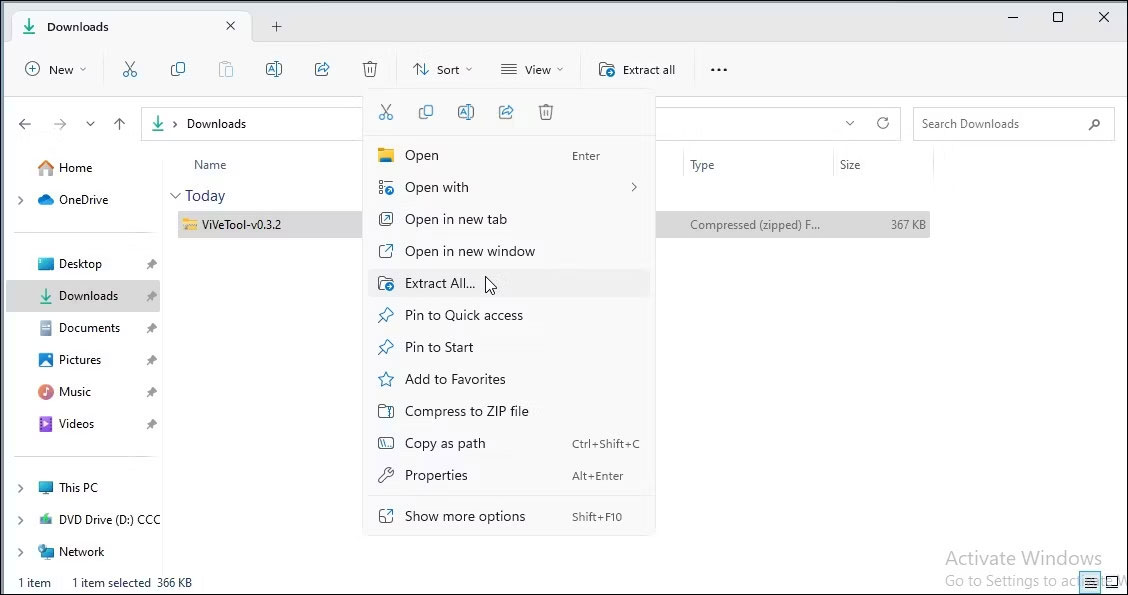
<p style="text-align: justify;">2. Nhấp vào file&nbsp;<strong>ViVeToo.xxx.zip</strong>&nbsp;để tải phiên bản mới nhất về ổ cục bộ của bạn.</p>

<figure>
<div style="text-align: justify;"><img alt="Thư mục giải nén vivetool zip" data-i="8" data-src="https://st.quantrimang.com/photos/image/2023/02/28/dung-vivetool-kich-hoat-tinh-nang-an-tren-windows-6.jpg" data-was-processed="true" height="595" src="https://st.quantrimang.com/photos/image/2023/02/28/dung-vivetool-kich-hoat-tinh-nang-an-tren-windows-6.jpg" width="1128" /></div>

<figcaption>
<div style="text-align: justify;">Thư mục giải nén vivetool zip</div>
</figcaption>
</figure>

<p style="text-align: justify;">3. Nhấp chuột phải vào file Zip và chọn&nbsp;<strong>Extract</strong>&nbsp;<strong>all</strong>. Chọn một điểm đích và nhấp vào&nbsp;<strong>Extract</strong>. Lưu ý thư mục giải nén.</p>

<p style="text-align: justify;">4. Tiếp theo, nhấn phím&nbsp;<strong>Win</strong>&nbsp;và gõ&nbsp;<strong>cmd.</strong></p>

<p style="text-align: justify;">5. Nhấp chuột phải vào&nbsp;<strong>Command Prompt</strong>&nbsp;và chọn&nbsp;<strong>Run as administrator</strong>.</p>

<figure>
<div style="text-align: justify;"><img alt="Dấu nhắc lệnh ViveTool thay đổi thư mục" data-i="9" data-src="https://st.quantrimang.com/photos/image/2023/02/28/dung-vivetool-kich-hoat-tinh-nang-an-tren-windows-7.jpg" data-was-processed="true" height="283" src="https://st.quantrimang.com/photos/image/2023/02/28/dung-vivetool-kich-hoat-tinh-nang-an-tren-windows-7.jpg" width="972" /></div>

<figcaption>
<div style="text-align: justify;">Dấu nhắc lệnh ViveTool thay đổi thư mục</div>
</figcaption>
</figure>

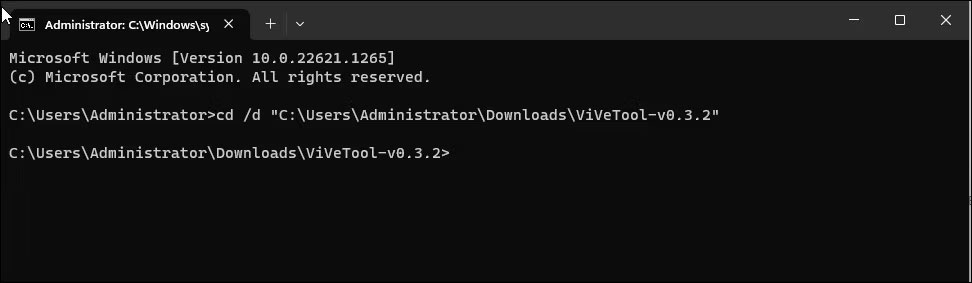
<p style="text-align: justify;">6. Trong &nbsp;Command Prompt, thay đổi thư mục thành thư mục giải nén ViVeTool. Vì vậy, hãy gõ lệnh sau và nhấn&nbsp;<strong>Enter</strong>&nbsp;để thay đổi thư mục:</p>

<pre id="pre3">
<code> cd /d &#91;ViveToolFolderPath&#93; </code></pre>

<p style="text-align: justify;">7. Ví dụ, nếu bạn lưu thư mục ViVeTool trong&nbsp;<strong>C:\Users\username\Downloads\ViVeTool-v0.3.2,</strong>&nbsp;thì lệnh đầy đủ sẽ như sau:</p>

<pre id="pre4">
<code>cd /d C:\Users\username\Downloads\ViVeTool-v0.3.2</code></pre>

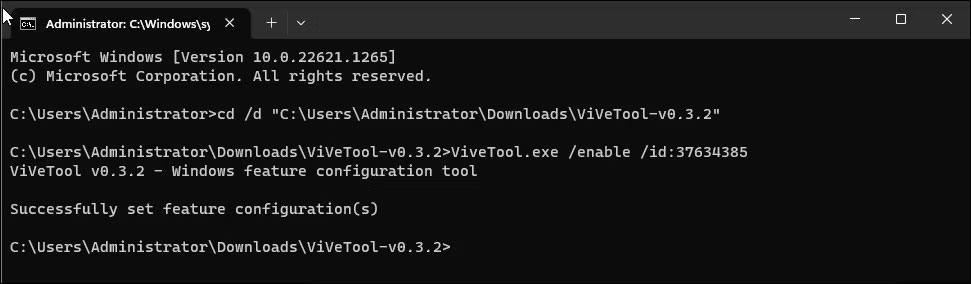
<p style="text-align: justify;">8. Tiếp theo, để bật một tính năng, hãy sử dụng lệnh sau và nhấn&nbsp;<strong>Enter:</strong></p>

<pre id="pre5">
<code>ViveTool.exe /enable /id:featureID</code></pre>

<p style="text-align: justify;">9. Trong lệnh trên, thay thế featureID bằng Feature ID bạn muốn bật.</p>

<figure>
<div style="text-align: justify;"><img alt="Dấu nhắc lệnh kích hoạt tính năng ViVeTool" data-i="10" data-src="https://st.quantrimang.com/photos/image/2023/02/28/dung-vivetool-kich-hoat-tinh-nang-an-tren-windows-8.jpg" data-was-processed="true" height="284" src="https://st.quantrimang.com/photos/image/2023/02/28/dung-vivetool-kich-hoat-tinh-nang-an-tren-windows-8.jpg" width="971" /></div>

<figcaption>
<div style="text-align: justify;">Dấu nhắc lệnh kích hoạt tính năng ViVeTool</div>
</figcaption>
</figure>

<p style="text-align: justify;">10. Ví dụ, để bật tính năng tab trong File Explorer, Feature ID là id:37634385, lệnh đầy đủ sẽ trông như thế này:</p>

<pre id="pre6">
<code> ViveTool.exe /enable /id:37634385 </code></pre>

<p style="text-align: justify;">11. Nếu bạn muốn tắt một tính năng, thì lệnh sẽ như thế này:</p>

<pre id="pre7">
<code>ViveTool.exe /disable /id:featureID </code></pre>

<p style="text-align: justify;">12. Khi lệnh được thực thi, hãy nhập&nbsp;<strong>exit</strong>&nbsp;và nhấn&nbsp;<strong>Enter</strong>&nbsp;để đóng Command Prompt.</p>

<p style="text-align: justify;">13. Khởi động lại PC để áp dụng các thay đổi. Sau khi PC khởi động lại, các thay đổi sẽ hiển thị.</p>
<h2 id="mcetoc_1iliid0ni1q5" style="text-align: justify;">Các lệnh được hỗ trợ của ViveTool</h2>

<p style="text-align: justify;">Ngoài lệnh /enable và /disable, ViVeTools còn hỗ trợ nhiều lệnh khác để reset cấu hình tùy chỉnh cho một số hoặc tất cả các tính năng, cập nhật ViVeTool, xuất và nhập cấu hình tính năng tùy chỉnh.</p>

<table border="1">
	<tbody>
		<tr>
			<td>
			<p style="text-align: justify;"><strong>Lệnh ViVeTool</strong></p>
			</td>
			<td>
			<p style="text-align: justify;"><strong>Hành động</strong></p>
			</td>
		</tr>
		<tr>
			<td>
			<p style="text-align: justify;">/enable</p>
			</td>
			<td>
			<p style="text-align: justify;">Kích hoạt một tính năng</p>
			</td>
		</tr>
		<tr>
			<td>
			<p style="text-align: justify;">/disable</p>
			</td>
			<td>
			<p style="text-align: justify;">Vô hiệu hóa một tính năng</p>
			</td>
		</tr>
		<tr>
			<td>
			<p style="text-align: justify;">/query</p>
			</td>
			<td>
			<p style="text-align: justify;">Tìm danh sách tất cả các cấu hình tính năng hiện có</p>
			</td>
		</tr>
		<tr>
			<td>
			<p style="text-align: justify;">/reset</p>
			</td>
			<td>
			<p style="text-align: justify;">Reset cấu hình tùy chỉnh cho một tính năng cụ thể</p>
			</td>
		</tr>
		<tr>
			<td>
			<p style="text-align: justify;">/resetall</p>
			</td>
			<td>
			<p style="text-align: justify;">Reset cấu hình tùy chỉnh cho tất cả các tính năng</p>
			</td>
		</tr>
		<tr>
			<td>
			<p style="text-align: justify;">/addsubs</p>
			</td>
			<td>
			<p style="text-align: justify;">Thêm đăng ký sử dụng tính năng</p>
			</td>
		</tr>
		<tr>
			<td>
			<p style="text-align: justify;">/delsub</p>
			</td>
			<td>
			<p style="text-align: justify;">Xóa đăng ký sử dụng tính năng</p>
			</td>
		</tr>
		<tr>
			<td>
			<p style="text-align: justify;">/export</p>
			</td>
			<td>
			<p style="text-align: justify;">Xuất cấu hình tính năng tùy chỉnh</p>
			</td>
		</tr>
		<tr>
			<td>
			<p style="text-align: justify;">/import</p>
			</td>
			<td>
			<p style="text-align: justify;">Nhập cấu hình tính năng tùy chỉnh</p>
			</td>
		</tr>
		<tr>
			<td>
			<p style="text-align: justify;">/fixlkg</p>
			</td>
			<td>
			<p style="text-align: justify;">Sửa lỗi hệ thống khôi phục &#039;Last known good&#039; hiện tại</p>
			</td>
		</tr>
		<tr>
			<td>
			<p style="text-align: justify;">/appupdate</p>
			</td>
			<td>
			<p style="text-align: justify;">Tìm kiếm các bản cập nhật ViVeTool mới</p>
			</td>
		</tr>
		<tr>
			<td>
			<p style="text-align: justify;">/notifyusage</p>
			</td>
			<td>
			<p style="text-align: justify;">Hiển thị thông báo tính năng</p>
			</td>
		</tr>
	</tbody>
</table>

<p style="text-align: justify;">ViVeTool giúp dễ dàng tìm kiếm và kiểm tra các tính năng thử nghiệm mới trước khi chúng được phát hành ra công chúng. Cho dù bạn sử dụng GUI hay phiên bản dòng lệnh, nó đều cho phép bạn dễ dàng bật và tắt một số tính năng thú vị.</p>

<p style="text-align: justify;">Tuy nhiên, nhiều tính năng ẩn trong số này có thể bị lỗi và gây ra sự cố hệ thống. Vì vậy, hãy chuẩn bị sẵn bản sao lưu hệ thống trước khi sửa đổi ViVeTool.</p>
		</div>
				<div id="author">
						<p>
				<strong>Nguồn tin:</strong>
				Quantrimang.com:
			</p>
		</div>
	</div>
	<div id="footer" class="clearfix">
		<div id="url">
			<strong>URL của bản tin này: </strong><a href="https://www.nguoicodonvn2008.info/vi/news/savefile/phan-mem/vivetool-la-gi-cach-su-dung-vivetool-de-kich-hoat-cac-tinh-nang-an-tren-windows-9933.html" title="ViVeTool là gì? Cách sử dụng ViVeTool để kích hoạt các tính năng ẩn trên Windows">https://www.nguoicodonvn2008.info/vi/news/savefile/phan-mem/vivetool-la-gi-cach-su-dung-vivetool-de-kich-hoat-cac-tinh-nang-an-tren-windows-9933.html</a>

		</div>
		<div class="clear"></div>
		<div class="copyright">
			&copy; .&#x3A; Nguoicodonvn2008.info - Cõi lòng người cô đơn &#x3A;.
		</div>
		<div id="contact">
			<a href="mailto:admin@nguoicodonvn2008.info">admin@nguoicodonvn2008.info</a>
		</div>
	</div>
</div>
        <div id="timeoutsess" class="chromeframe">
            Bạn đã không sử dụng Site, <a onclick="timeoutsesscancel();" href="https://www.nguoicodonvn2008.info/#">Bấm vào đây để duy trì trạng thái đăng nhập</a>. Thời gian chờ: <span id="secField"> 60 </span> giây
        </div>
        <div id="openidResult" class="nv-alert" style="display:none"></div>
        <div id="openidBt" data-result="" data-redirect=""></div>
		</script>
		<div class="car-top">
  <span><img src="https://www.nguoicodonvn2008.info/themes/default/images/car.png" alt=""></span>
</div>
<div id="run_cronjobs" style="visibility:hidden;display:none;"><img alt="cron" src="/index.php?second=cronjobs&amp;p=n4Q5aetl" width="1" height="1" /></div>
<script src="https://www.nguoicodonvn2008.info/assets/js/jquery/jquery.min.js"></script>
<script>var nv_base_siteurl="/",nv_lang_data="vi",nv_lang_interface="vi",nv_name_variable="nv",nv_fc_variable="op",nv_lang_variable="language",nv_module_name="news",nv_func_name="savefile",nv_is_user=0, nv_my_ofs=-4,nv_my_abbr="EDT",nv_cookie_prefix="nv4c_e856T",nv_check_pass_mstime=1738000,nv_area_admin=0,nv_safemode=0,theme_responsive=0,nv_recaptcha_ver=2,nv_recaptcha_sitekey="",nv_recaptcha_type="image",XSSsanitize=1;</script>
<script src="https://www.nguoicodonvn2008.info/assets/js/language/vi.js"></script>
<script src="https://www.nguoicodonvn2008.info/assets/js/DOMPurify/purify3.js"></script>
<script src="https://www.nguoicodonvn2008.info/assets/js/global.js"></script>
<script src="https://www.nguoicodonvn2008.info/assets/js/site.js"></script>
<script src="https://www.nguoicodonvn2008.info/themes/default/js/news.js"></script>
<script src="https://www.nguoicodonvn2008.info/themes/default/js/main.js"></script>
<script src="https://www.nguoicodonvn2008.info/themes/default/js/custom.js"></script>
<script type="application/ld+json">
        {
            "@context": "https://schema.org",
            "@type": "Organization",
            "url": "https://www.nguoicodonvn2008.info",
            "logo": "https://www.nguoicodonvn2008.info/uploads/angel.gif"
        }
        </script>
<script src="https://www.nguoicodonvn2008.info/themes/default/js/bootstrap.min.js"></script>
<script type="text/javascript">
var $scrolltop = $('.car-top');
$scrolltop.on('click', function () {
    $('html,body').animate({
        scrollTop: 0
    }, 800);
    $(this).addClass("car-run");
    setTimeout(function(){ $scrolltop.removeClass('car-run');}, 1000);
    return false;
});
$(window).on('scroll', function ()
{ 
    if($(window).scrollTop() >= 200)
    {
        $scrolltop.addClass("show");
        $scrolltop.addClass("car-down");
    }
    else
    {
       $scrolltop.removeClass("show");
       setTimeout(function(){ $scrolltop.removeClass('car-down');}, 300);
    }
});
</script>
</body>
</html>