<!DOCTYPE html>
    <html lang="vi" xmlns="http://www.w3.org/1999/xhtml" prefix="og: http://ogp.me/ns#">
    <head>
<title>Dev-C++ 5.11.4.9.2</title>
<meta name="description" content="Dev-C++ 5.11.4.9.2 - Savefile - Tin Tức - https&#x3A;&#x002F;&#x002F;www.nguoicodonvn2008.info&#x002F;vi&#x002F;news&#x002F;savefile&#x002F;phan-mem&#x002F;dev-c-5-11-4-9-2-3523.html">
<meta name="author" content=".: Nguoicodonvn2008.info - Cõi lòng người cô đơn :.">
<meta name="copyright" content=".: Nguoicodonvn2008.info - Cõi lòng người cô đơn :. [admin@nguoicodonvn2008.info]">
<meta name="robots" content="index, archive, follow, noodp">
<meta name="googlebot" content="index,archive,follow,noodp">
<meta name="msnbot" content="all,index,follow">
<meta name="generator" content="NukeViet v4.5">
<meta http-equiv="Content-Type" content="text/html; charset=utf-8">
<meta property="og:title" content="Dev-C++ 5.11.4.9.2">
<meta property="og:type" content="website">
<meta property="og:description" content="Savefile - Tin Tức - https&#x3A;&#x002F;&#x002F;www.nguoicodonvn2008.info&#x002F;vi&#x002F;news&#x002F;savefile&#x002F;phan-mem&#x002F;dev-c-5-11-4-9-2-3523.html">
<meta property="og:site_name" content=".&#x3A; Nguoicodonvn2008.info - Cõi lòng người cô đơn &#x3A;.">
<meta property="og:url" content="https://www.nguoicodonvn2008.info/vi/news/savefile/phan-mem/dev-c-5-11-4-9-2-3523.html">
<link rel="shortcut icon" href="https://www.nguoicodonvn2008.info/favicon.ico">
<link rel="canonical" href="https://www.nguoicodonvn2008.info/vi/news/savefile/phan-mem/dev-c-5-11-4-9-2-3523.html">
<link rel="alternate" href="https://www.nguoicodonvn2008.info/vi/news/rss/" title="Tin Tức" type="application/rss+xml">
<link rel="alternate" href="https://www.nguoicodonvn2008.info/vi/news/rss/karaoke-dual/" title="Tin Tức - Karaoke Dual" type="application/rss+xml">
<link rel="alternate" href="https://www.nguoicodonvn2008.info/vi/news/rss/nhac-tre/" title="Tin Tức - Nhạc trẻ" type="application/rss+xml">
<link rel="alternate" href="https://www.nguoicodonvn2008.info/vi/news/rss/tru-tinh/" title="Tin Tức - Trữ tình" type="application/rss+xml">
<link rel="alternate" href="https://www.nguoicodonvn2008.info/vi/news/rss/nuoc-ngoai/" title="Tin Tức - Nước ngoài" type="application/rss+xml">
<link rel="alternate" href="https://www.nguoicodonvn2008.info/vi/news/rss/remix/" title="Tin Tức - Remix" type="application/rss+xml">
<link rel="alternate" href="https://www.nguoicodonvn2008.info/vi/news/rss/tam-su-tinh-yeu/" title="Tin Tức - Tâm sự tình yêu" type="application/rss+xml">
<link rel="alternate" href="https://www.nguoicodonvn2008.info/vi/news/rss/tho-suu-tam/" title="Tin Tức - Thơ sưu tầm" type="application/rss+xml">
<link rel="alternate" href="https://www.nguoicodonvn2008.info/vi/news/rss/cuoc-song/" title="Tin Tức - Cuộc sống" type="application/rss+xml">
<link rel="alternate" href="https://www.nguoicodonvn2008.info/vi/news/rss/phan-mem/" title="Tin Tức - Phần mềm" type="application/rss+xml">
<link rel="alternate" href="https://www.nguoicodonvn2008.info/vi/news/rss/kien-thuc-may-tinh/" title="Tin Tức - Kiến thức máy tính" type="application/rss+xml">
<link rel="alternate" href="https://www.nguoicodonvn2008.info/vi/news/rss/hoc-tap/" title="Tin Tức - Học tập" type="application/rss+xml">
<link rel="alternate" href="https://www.nguoicodonvn2008.info/vi/news/rss/tai-lieu/" title="Tin Tức - Tài liệu" type="application/rss+xml">
<link rel="alternate" href="https://www.nguoicodonvn2008.info/vi/news/rss/de-thi/" title="Tin Tức - Đề thi" type="application/rss+xml">
<link rel="preload" as="style" href="https://www.nguoicodonvn2008.info/assets/css/font-awesome.min.css" type="text/css">
<link rel="preload" as="style" href="https://www.nguoicodonvn2008.info/themes/default/css/bootstrap.non-responsive.css" type="text/css">
<link rel="preload" as="style" href="https://www.nguoicodonvn2008.info/themes/default/css/style.css" type="text/css">
<link rel="preload" as="style" href="https://www.nguoicodonvn2008.info/themes/default/css/style.non-responsive.css" type="text/css">
<link rel="preload" as="style" href="https://www.nguoicodonvn2008.info/themes/default/css/news.css" type="text/css">
<link rel="preload" as="style" href="https://www.nguoicodonvn2008.info/themes/default/css/custom.css" type="text/css">
<link rel="preload" as="script" href="https://www.nguoicodonvn2008.info/assets/js/jquery/jquery.min.js" type="text/javascript">
<link rel="preload" as="script" href="https://www.nguoicodonvn2008.info/assets/js/language/vi.js" type="text/javascript">
<link rel="preload" as="script" href="https://www.nguoicodonvn2008.info/assets/js/DOMPurify/purify3.js" type="text/javascript">
<link rel="preload" as="script" href="https://www.nguoicodonvn2008.info/assets/js/global.js" type="text/javascript">
<link rel="preload" as="script" href="https://www.nguoicodonvn2008.info/assets/js/site.js" type="text/javascript">
<link rel="preload" as="script" href="https://www.nguoicodonvn2008.info/themes/default/js/news.js" type="text/javascript">
<link rel="preload" as="script" href="https://www.nguoicodonvn2008.info/themes/default/js/main.js" type="text/javascript">
<link rel="preload" as="script" href="https://www.nguoicodonvn2008.info/themes/default/js/custom.js" type="text/javascript">
<link rel="preload" as="script" href="https://www.nguoicodonvn2008.info/themes/default/js/bootstrap.min.js" type="text/javascript">
<link rel="stylesheet" href="https://www.nguoicodonvn2008.info/assets/css/font-awesome.min.css">
<link rel="stylesheet" href="https://www.nguoicodonvn2008.info/themes/default/css/bootstrap.non-responsive.css">
<link rel="stylesheet" href="https://www.nguoicodonvn2008.info/themes/default/css/style.css">
<link rel="stylesheet" href="https://www.nguoicodonvn2008.info/themes/default/css/style.non-responsive.css">
<link rel="StyleSheet" href="https://www.nguoicodonvn2008.info/themes/default/css/news.css">
<link rel="stylesheet" href="https://www.nguoicodonvn2008.info/themes/default/css/custom.css">
<style type="text/css">
	body{background: #fff;}
</style>
    </head>
    <body>
<div id="print">
	<div id="hd_print">
		<h2 class="pull-left">.&#x3A; Nguoicodonvn2008.info - Cõi lòng người cô đơn &#x3A;.</h2>
		<p class="pull-right"><a title=".&#x3A; Nguoicodonvn2008.info - Cõi lòng người cô đơn &#x3A;." href="https://www.nguoicodonvn2008.info/">https://www.nguoicodonvn2008.info</a></p>
	</div>
	<div class="clear"></div>
	<hr />
	<div id="content">
		<h1>Dev-C++ 5.11.4.9.2</h1>
		<ul class="list-inline">
			<li>Thứ tư - 20/01/2021 23:51</li>
			<li class="hidden-print txtrequired"><em class="fa fa-print">&nbsp;</em><a title="In ra" href="javascript:;" onclick="window.print()">In ra</a></li>
			<li class="hidden-print txtrequired"><em class="fa fa-power-off">&nbsp;</em><a title="Đóng cửa sổ này" href="javascript:;" onclick="window.close()">Đóng cửa sổ này</a></li>
		</ul>
		<div class="clear"></div>
		<div id="hometext">
		</div>
				<div class="imghome">
			<img alt="Dev-C++ 5.11.4.9.2" src="https://st.quantrimang.com/photos/image/2021/01/20/dev-c-plus-plus-2.jpg" width="460" class="img-thumbnail" />
		</div>
		<div class="clear"></div>
		<div id="bodytext" class="clearfix">
			<ul>
	<li style="text-align: justify;">Phần mềm miễn phí</li>
	<li style="text-align: justify;">Phiên bản: 5.11.4.9.2</li>
	<li style="text-align: justify;">Ngày cập nhật: 26/08/2020</li>
	<li style="text-align: justify;">Nền tảng: Windows</li>
</ul>

<p style="text-align: justify;">Tải Dev-C++:&nbsp;<span style="color:rgb(192, 57, 43);"><strong>http://www.bloodshed.net/</strong></span></p>

<p style="text-align: justify;">Hãy bước vào thế giới lập trình C và&nbsp;C++&nbsp;với Bloodshed Dev-C++. Chương trình thuộc lĩnh vực IT và phát triển này là một trình biên dịch và hiệu đính được sử dụng chung và hiệu quả trong các ngôn ngữ C và C++. Bên cạnh đó, Dev-C++ hỗ trợ các nhiệm vụ lập trình phổ biến và lặp đi lặp lại để cho phép nhà phát triển xoay quanh cấu trúc thực và việc xây dựng chương trình.</p>

<h2 style="text-align: justify;">Dev-C++ là gì?</h2>

<p style="text-align: justify;">Dev-C++, được phát triển bởi Bloodshed Software, là một&nbsp;IDE&nbsp;(môi trường phát triển tích hợp) đồ họa đầy đủ tính năng, có thể tạo các chương trình C/C++ dựa trên Windows hoặc console bằng cách sử dụng hệ thống biên dịch MinGW. MinGW (Minimalist GNU* dành cho Windows) sử dụng GCC (bộ sưu tập trình biên dịch GNU g++), về cơ bản là cùng một hệ thống biên dịch trong Cygwin (chương trình môi trường Unix dành cho Windows) và hầu hết các phiên bản của Linux.</p>

<h2 style="text-align: justify;">Dev C++ được sử dụng để làm gì?</h2>

<p style="text-align: justify;">Như đã nói ở trên, Dev-C++ là một môi trường phát triển tích hợp nhỏ gọn (IDE) từ GNU General Public License, giúp bạn có thể tạo các chương trình bằng ngôn ngữ lập trình C và C++. Được viết bằng Delphi và đi kèm với MinGW hay TDM-GCC, chương trình cũng có thể được sử dụng với Cygwin hoặc các trình biên dịch dựa trên GCC khác. Một phần bổ sung của Dev-C++ là việc sử dụng DevPak.</p>

<p style="text-align: justify;">DevPak là các gói mở rộng trên môi trường lập trình với những thư viện, bố cục và tiện ích bổ sung. Chúng thường chứa các tiện ích GUI, bao gồm những hộp công cụ nổi tiếng như GTK+, wxWidgets và FLTK. Các DevPak khác nhau kết hợp những thư viện theo nhiều cách để sử dụng triệt để hơn. Bạn có thể tải xuống các thư viện Dev-C++ bổ sung hoặc những gói code mở rộng mức độ và tính hữu ích của Dev-C++, như hình minh họa, đồ họa, nén, hoạt ảnh, âm thanh, v.v...</p>

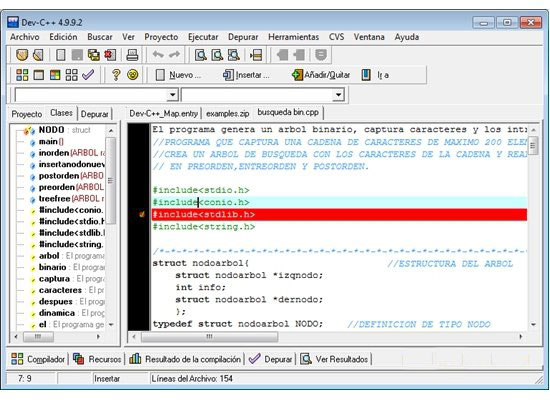
<p style="text-align: justify;">Bạn có thể tự tạo các DevPak và phân phối chúng. DevPak sẽ hoạt động với bất kỳ chương trình nào dựa trên MinGW. Dev-C++ được tạo ra cho hệ điều hành Windows, nhưng nó cũng là một chương trình rất giàu khả năng dành cho Linux. Trình chỉnh sửa tích hợp giúp tạo cấu trúc cú pháp, trong khi trình tự động điền sẽ đề xuất câu trả lời cho bất kỳ điều gì bạn đang cố gắng viết code.</p>

<figure>
<div style="text-align: justify;"><img alt="Giao diện của Dev-C++" data-i="0" data-src="https://st.quantrimang.com/photos/image/2021/01/20/dev-c-plus-plus-2.jpg" data-was-processed="true" height="400" src="https://st.quantrimang.com/photos/image/2021/01/20/dev-c-plus-plus-2.jpg" width="550" /></div>

<figcaption>
<div style="text-align: justify;">Giao diện của Dev-C++</div>
</figcaption>
</figure>

<h2 style="text-align: justify;">Có thể học Dev-C++ như thế nào?</h2>

<p style="text-align: justify;">Nếu bạn quên phần tiếp theo của đoạn code, hãy bắt đầu sáng tác những gì bạn nghĩ nó phải là như vậy, và studio sẽ hỗ trợ bạn tìm chiếc thứ bạn cần. Hãy thực hiện truy vấn thông qua các thư viện để biết khả năng và những đoạn code có giá trị khác, hoặc truy cập vào mạng để tìm sự trợ giúp. Bạn sẽ có thể viết code cho ứng dụng của mình ngay lập tức. Trình giám sát ngầm sẽ cho phép bạn ở lại Dev-C++ trong suốt quá trình.</p>

<p style="text-align: justify;">Hãy hình thành code của bạn và chạy thông qua trình gỡ lỗi từng dòng để tìm ra các vấn đề. Khi những phần code đang được ghép nối với nhau một cách hiệu quả và không có lỗi, hãy sử dụng trình biên dịch để tạo bản ghi EXE để phổ biến nó với những người khác. Dev-C++ là studio cải tiến miễn phí để giúp doanh nghiệp của bạn phát triển. Dev-C++ hỗ trợ các trình biên dịch dựa trên GCC, bao gồm Cygwin, MinGW, v.v...</p>

<div style="text-align: justify;">&nbsp;</div>

<p style="text-align: justify;">Bạn có thể giới thiệu Dev-C++ IDE cùng với trình biên dịch hoặc chỉ IDE trong trường hợp bạn có trình biên dịch trên framework. Cũng có thể sử dụng công cụ khắc phục sự cố phối hợp với IDE này thông qua trình gỡ lỗi. Nó cho phép người dùng thực hiện tất cả các quy trình xử lý sự cố chung trên mã nguồn. Dev-C++ còn có một ưu điểm nữa là cung cấp trợ giúp cho nhiều ngôn ngữ lập trình khác nhau.</p>

<h2 style="text-align: justify;">Cách cài đặt Dev-C++</h2>

<p style="text-align: justify;">&nbsp;</p>

<h2 style="text-align: justify;">Sử dụng Dev-C++</h2>

<p style="text-align: justify;">Giống như bất kỳ trình biên dịch nào khác, Dev-C++ có tùy chọn để tạo dự án. File dự án này chứa cài đặt và tất cả thông tin file liên quan đến ứng dụng của bạn. Để tạo dự án, bạn phải thực hiện các bước sau: Chuyển đến menu&nbsp;<strong>File</strong>&nbsp;và chọn&nbsp;<strong>New &gt; Project</strong>. Điều này làm xuất hiện hộp thoại mới cho các thuộc tính của dự án. Chọn&nbsp;<strong>Empty Project</strong>&nbsp;và sau đó chọn&nbsp;<strong>C++ Project</strong>&nbsp;hoặc<strong>&nbsp;C Project</strong>, tùy theo từng dự án. Đặt tên phù hợp cho dự án và nhấp vào&nbsp;<strong>OK.</strong>&nbsp;Dev-C++ bây giờ sẽ hỏi bạn nơi lưu dự án. Chọn vị trí đúng cho thư mục code của bạn, sau đó nhấp vào Save.</p>

<p style="text-align: justify;">Nếu bạn muốn làm việc với các file nguồn, hãy chuyển đến menu&nbsp;<strong>File</strong>&nbsp;và chọn&nbsp;<strong>New &gt; Source</strong>. Tại đây, bạn sẽ không được yêu cầu lưu file bằng trình biên dịch cho đến khi và trừ khi bạn biên dịch hoặc lưu file hay thoát khỏi Dev-C++.</p>

<h2 style="text-align: justify;">Công cụ giúp thực hiện dự án từ đầu đến cuối</h2>

<p style="text-align: justify;">Bạn có thể chọn ngôn ngữ trong lần chạy đầu tiên với IDE. Việc thay đổi ngôn ngữ cũng được phép thực hiện thông qua phần cài đặt. Giống như các IDE khác, Dev-C++ cũng cung cấp tính năng Auto-Completion (tự động hoàn thành) để có thể sửa code bạn đã soạn. Đó là một phần mềm hỗ trợ tốt cho một cấu trúc viết code có thể điều chỉnh, vì nó có một trình quản lý chỉnh sửa có thể làm cho mã nguồn trở nên rõ ràng hơn.</p>

<p style="text-align: justify;">Ưu điểm</p>

<ul>
	<li style="text-align: justify;">Giúp tạo và định dạng cú pháp</li>
	<li style="text-align: justify;">Tích hợp trình biên dịch</li>
	<li style="text-align: justify;">Có trình test ứng dụng tích hợp</li>
</ul>

<div style="text-align: justify;"><br />
&nbsp;</div>

<p style="text-align: justify;">Nhược điểm</p>

<ul>
	<li style="text-align: justify;">Phù hợp với các lập trình viên có kinh nghiệm</li>
</ul>
		</div>
				<div id="author">
						<p>
				<strong>Nguồn tin:</strong>
				Quantrimang.com
			</p>
		</div>
	</div>
	<div id="footer" class="clearfix">
		<div id="url">
			<strong>URL của bản tin này: </strong><a href="https://www.nguoicodonvn2008.info/vi/news/savefile/phan-mem/dev-c-5-11-4-9-2-3523.html" title="Dev-C++ 5.11.4.9.2">https://www.nguoicodonvn2008.info/vi/news/savefile/phan-mem/dev-c-5-11-4-9-2-3523.html</a>

		</div>
		<div class="clear"></div>
		<div class="copyright">
			&copy; .&#x3A; Nguoicodonvn2008.info - Cõi lòng người cô đơn &#x3A;.
		</div>
		<div id="contact">
			<a href="mailto:admin@nguoicodonvn2008.info">admin@nguoicodonvn2008.info</a>
		</div>
	</div>
</div>
        <div id="timeoutsess" class="chromeframe">
            Bạn đã không sử dụng Site, <a onclick="timeoutsesscancel();" href="https://www.nguoicodonvn2008.info/#">Bấm vào đây để duy trì trạng thái đăng nhập</a>. Thời gian chờ: <span id="secField"> 60 </span> giây
        </div>
        <div id="openidResult" class="nv-alert" style="display:none"></div>
        <div id="openidBt" data-result="" data-redirect=""></div>
		</script>
		<div class="car-top">
  <span><img src="https://www.nguoicodonvn2008.info/themes/default/images/car.png" alt=""></span>
</div>
<script src="https://www.nguoicodonvn2008.info/assets/js/jquery/jquery.min.js"></script>
<script>var nv_base_siteurl="/",nv_lang_data="vi",nv_lang_interface="vi",nv_name_variable="nv",nv_fc_variable="op",nv_lang_variable="language",nv_module_name="news",nv_func_name="savefile",nv_is_user=0, nv_my_ofs=-4,nv_my_abbr="EDT",nv_cookie_prefix="nv4c_e856T",nv_check_pass_mstime=1738000,nv_area_admin=0,nv_safemode=0,theme_responsive=0,nv_recaptcha_ver=2,nv_recaptcha_sitekey="",nv_recaptcha_type="image",XSSsanitize=1;</script>
<script src="https://www.nguoicodonvn2008.info/assets/js/language/vi.js"></script>
<script src="https://www.nguoicodonvn2008.info/assets/js/DOMPurify/purify3.js"></script>
<script src="https://www.nguoicodonvn2008.info/assets/js/global.js"></script>
<script src="https://www.nguoicodonvn2008.info/assets/js/site.js"></script>
<script src="https://www.nguoicodonvn2008.info/themes/default/js/news.js"></script>
<script src="https://www.nguoicodonvn2008.info/themes/default/js/main.js"></script>
<script src="https://www.nguoicodonvn2008.info/themes/default/js/custom.js"></script>
<script type="application/ld+json">
        {
            "@context": "https://schema.org",
            "@type": "Organization",
            "url": "https://www.nguoicodonvn2008.info",
            "logo": "https://www.nguoicodonvn2008.info/uploads/angel.gif"
        }
        </script>
<script src="https://www.nguoicodonvn2008.info/themes/default/js/bootstrap.min.js"></script>
<script type="text/javascript">
var $scrolltop = $('.car-top');
$scrolltop.on('click', function () {
    $('html,body').animate({
        scrollTop: 0
    }, 800);
    $(this).addClass("car-run");
    setTimeout(function(){ $scrolltop.removeClass('car-run');}, 1000);
    return false;
});
$(window).on('scroll', function ()
{ 
    if($(window).scrollTop() >= 200)
    {
        $scrolltop.addClass("show");
        $scrolltop.addClass("car-down");
    }
    else
    {
       $scrolltop.removeClass("show");
       setTimeout(function(){ $scrolltop.removeClass('car-down');}, 300);
    }
});
</script>
</body>
</html>