<!DOCTYPE html>
    <html lang="vi" xmlns="http://www.w3.org/1999/xhtml" prefix="og: http://ogp.me/ns#">
    <head>
<title>Cách dùng Terabox lưu trữ với 1TB miễn phí</title>
<meta name="description" content="Cách dùng Terabox lưu trữ với 1TB miễn phí - Savefile - Tin Tức -...">
<meta name="author" content=".: Nguoicodonvn2008.info - Cõi lòng người cô đơn :.">
<meta name="copyright" content=".: Nguoicodonvn2008.info - Cõi lòng người cô đơn :. [admin@nguoicodonvn2008.info]">
<meta name="robots" content="index, archive, follow, noodp">
<meta name="googlebot" content="index,archive,follow,noodp">
<meta name="msnbot" content="all,index,follow">
<meta name="generator" content="NukeViet v4.5">
<meta http-equiv="Content-Type" content="text/html; charset=utf-8">
<meta property="og:title" content="Cách dùng Terabox lưu trữ với 1TB miễn phí">
<meta property="og:type" content="website">
<meta property="og:description" content="Savefile - Tin Tức - https&#x3A;&#x002F;&#x002F;www.nguoicodonvn2008.info&#x002F;vi&#x002F;news&#x002F;savefile&#x002F;phan-mem&#x002F;cach-dung-terabox-luu-tru-voi-1tb-mien-phi-11493.html">
<meta property="og:site_name" content=".&#x3A; Nguoicodonvn2008.info - Cõi lòng người cô đơn &#x3A;.">
<meta property="og:url" content="https://www.nguoicodonvn2008.info/vi/news/savefile/phan-mem/cach-dung-terabox-luu-tru-voi-1tb-mien-phi-11493.html">
<link rel="shortcut icon" href="https://www.nguoicodonvn2008.info/favicon.ico">
<link rel="canonical" href="https://www.nguoicodonvn2008.info/vi/news/savefile/phan-mem/cach-dung-terabox-luu-tru-voi-1tb-mien-phi-11493.html">
<link rel="alternate" href="https://www.nguoicodonvn2008.info/vi/news/rss/" title="Tin Tức" type="application/rss+xml">
<link rel="alternate" href="https://www.nguoicodonvn2008.info/vi/news/rss/karaoke-dual/" title="Tin Tức - Karaoke Dual" type="application/rss+xml">
<link rel="alternate" href="https://www.nguoicodonvn2008.info/vi/news/rss/nhac-tre/" title="Tin Tức - Nhạc trẻ" type="application/rss+xml">
<link rel="alternate" href="https://www.nguoicodonvn2008.info/vi/news/rss/tru-tinh/" title="Tin Tức - Trữ tình" type="application/rss+xml">
<link rel="alternate" href="https://www.nguoicodonvn2008.info/vi/news/rss/nuoc-ngoai/" title="Tin Tức - Nước ngoài" type="application/rss+xml">
<link rel="alternate" href="https://www.nguoicodonvn2008.info/vi/news/rss/remix/" title="Tin Tức - Remix" type="application/rss+xml">
<link rel="alternate" href="https://www.nguoicodonvn2008.info/vi/news/rss/tam-su-tinh-yeu/" title="Tin Tức - Tâm sự tình yêu" type="application/rss+xml">
<link rel="alternate" href="https://www.nguoicodonvn2008.info/vi/news/rss/tho-suu-tam/" title="Tin Tức - Thơ sưu tầm" type="application/rss+xml">
<link rel="alternate" href="https://www.nguoicodonvn2008.info/vi/news/rss/cuoc-song/" title="Tin Tức - Cuộc sống" type="application/rss+xml">
<link rel="alternate" href="https://www.nguoicodonvn2008.info/vi/news/rss/phan-mem/" title="Tin Tức - Phần mềm" type="application/rss+xml">
<link rel="alternate" href="https://www.nguoicodonvn2008.info/vi/news/rss/kien-thuc-may-tinh/" title="Tin Tức - Kiến thức máy tính" type="application/rss+xml">
<link rel="alternate" href="https://www.nguoicodonvn2008.info/vi/news/rss/hoc-tap/" title="Tin Tức - Học tập" type="application/rss+xml">
<link rel="alternate" href="https://www.nguoicodonvn2008.info/vi/news/rss/tai-lieu/" title="Tin Tức - Tài liệu" type="application/rss+xml">
<link rel="alternate" href="https://www.nguoicodonvn2008.info/vi/news/rss/de-thi/" title="Tin Tức - Đề thi" type="application/rss+xml">
<link rel="preload" as="style" href="https://www.nguoicodonvn2008.info/assets/css/font-awesome.min.css" type="text/css">
<link rel="preload" as="style" href="https://www.nguoicodonvn2008.info/themes/default/css/bootstrap.non-responsive.css" type="text/css">
<link rel="preload" as="style" href="https://www.nguoicodonvn2008.info/themes/default/css/style.css" type="text/css">
<link rel="preload" as="style" href="https://www.nguoicodonvn2008.info/themes/default/css/style.non-responsive.css" type="text/css">
<link rel="preload" as="style" href="https://www.nguoicodonvn2008.info/themes/default/css/news.css" type="text/css">
<link rel="preload" as="style" href="https://www.nguoicodonvn2008.info/themes/default/css/custom.css" type="text/css">
<link rel="preload" as="script" href="https://www.nguoicodonvn2008.info/assets/js/jquery/jquery.min.js" type="text/javascript">
<link rel="preload" as="script" href="https://www.nguoicodonvn2008.info/assets/js/language/vi.js" type="text/javascript">
<link rel="preload" as="script" href="https://www.nguoicodonvn2008.info/assets/js/DOMPurify/purify3.js" type="text/javascript">
<link rel="preload" as="script" href="https://www.nguoicodonvn2008.info/assets/js/global.js" type="text/javascript">
<link rel="preload" as="script" href="https://www.nguoicodonvn2008.info/assets/js/site.js" type="text/javascript">
<link rel="preload" as="script" href="https://www.nguoicodonvn2008.info/themes/default/js/news.js" type="text/javascript">
<link rel="preload" as="script" href="https://www.nguoicodonvn2008.info/themes/default/js/main.js" type="text/javascript">
<link rel="preload" as="script" href="https://www.nguoicodonvn2008.info/themes/default/js/custom.js" type="text/javascript">
<link rel="preload" as="script" href="https://www.nguoicodonvn2008.info/themes/default/js/bootstrap.min.js" type="text/javascript">
<link rel="stylesheet" href="https://www.nguoicodonvn2008.info/assets/css/font-awesome.min.css">
<link rel="stylesheet" href="https://www.nguoicodonvn2008.info/themes/default/css/bootstrap.non-responsive.css">
<link rel="stylesheet" href="https://www.nguoicodonvn2008.info/themes/default/css/style.css">
<link rel="stylesheet" href="https://www.nguoicodonvn2008.info/themes/default/css/style.non-responsive.css">
<link rel="StyleSheet" href="https://www.nguoicodonvn2008.info/themes/default/css/news.css">
<link rel="stylesheet" href="https://www.nguoicodonvn2008.info/themes/default/css/custom.css">
<style type="text/css">
	body{background: #fff;}
</style>
    </head>
    <body>
<div id="print">
	<div id="hd_print">
		<h2 class="pull-left">.&#x3A; Nguoicodonvn2008.info - Cõi lòng người cô đơn &#x3A;.</h2>
		<p class="pull-right"><a title=".&#x3A; Nguoicodonvn2008.info - Cõi lòng người cô đơn &#x3A;." href="https://www.nguoicodonvn2008.info/">https://www.nguoicodonvn2008.info</a></p>
	</div>
	<div class="clear"></div>
	<hr />
	<div id="content">
		<h1>Cách dùng Terabox lưu trữ với 1TB miễn phí</h1>
		<ul class="list-inline">
			<li>Thứ năm - 30/10/2025 22:04</li>
			<li class="hidden-print txtrequired"><em class="fa fa-print">&nbsp;</em><a title="In ra" href="javascript:;" onclick="window.print()">In ra</a></li>
			<li class="hidden-print txtrequired"><em class="fa fa-power-off">&nbsp;</em><a title="Đóng cửa sổ này" href="javascript:;" onclick="window.close()">Đóng cửa sổ này</a></li>
		</ul>
		<div class="clear"></div>
		<div id="hometext">
		</div>
				<div class="imghome">
			<img alt="Cách dùng Terabox lưu trữ với 1TB miễn phí" src="https://st.quantrimang.com/photos/image/2022/03/01/Terabox-luu-tru-du-lieu-1.jpg" width="460" class="img-thumbnail" />
		</div>
		<div class="clear"></div>
		<div id="bodytext" class="clearfix">
			<h1><span style="font-size: 13px;">Dịch vụ Terabox lưu trữ dữ liệu với dung lượng miễn phí lên tới 1024GB để bạn có thể thoải mái lưu dữ liệu đa nền tảng trên điện thoại và máy tính. Với Terabox mọi dữ liệu lưu trữ trong tài khoản đều được bảo mật an toàn, ngăn tình trạng đánh cắp. Người dùng có thể sao lưu, đồng bộ, truy cập và chia sẻ nội dung ngay trên ứng dụng. Bài viết dưới đây sẽ hướng dẫn bạn sao lưu dữ liệu trên Terabox.</span></h1>
&nbsp;

<h2>Terabox là gì?</h2>

<p>Đúng như tên gọi, ứng dụng TeraBox cung cấp một terabyte (1TB) dung lượng lưu trữ, nhưng không giống như các đối thủ cạnh tranh khác trong ngành lưu trữ đám mây, điều này hoàn toàn miễn phí. Tuy nhiên, có những hạn chế, bao gồm quảng cáo, kích thước file và giới hạn số lượng cũng như điều chỉnh băng thông.</p>

<p>Các gói trả phí cải thiện những nhược điểm này và cung cấp 2TB dung lượng lưu trữ đám mây. Giá cả ở mức phải chăng, tuy nhiên đã có những lo ngại về quyền riêng tư và bảo mật với TeraBox, vì vậy, hãy sử dụng nó một cách an toàn và hợp lý.</p>

<p>Giống như Google Drive, rất có thể người dùng TeraBox sẽ truy cập file của họ - cho dù đó là để upload, tải xuống hay xem - bằng cách sử dụng trình duyệt. Tại đây, có các thư mục chạy dọc phía bên trái dành cho các loại file, như tài liệu, ảnh, video và nhạc. Công cụ Thùng rác cũng được truy cập tại đây - các file bị xóa sẽ nằm ở đó trong 10 ngày trước khi chúng bị xóa vĩnh viễn (thời gian này có thể được nâng cấp lên 30 ngày với các tài khoản Premium trả phí).</p>

<p>Để chia sẻ file, người dùng có thể chọn giữa các mục đã có trong ổ lưu trữ đám mây hoặc từ máy tính hoặc thiết bị khác. Ngoài việc chọn cách chia sẻ file (qua email hoặc bằng một liên kết duy nhất), người dùng TeraBox có thể chọn khoảng thời gian file sẽ khả dụng (24 giờ, 1 tháng, 6 tháng hoặc vĩnh viễn) và thêm mật khẩu truy cập vào phần nào cần tăng cường bảo mật.</p>

<h2>Terabox có thể lưu trữ những gì?</h2>

<ul>
	<li><strong>Phim</strong>: Nếu bạn cần dung lượng cho phim, TeraBox là nền tảng lưu trữ đám mây phù hợp với bạn. Để biết rõ dung lượng mà TeraBox cung cấp miễn phí cho bạn, bạn có thể lưu trữ tới 500 phim độ phân giải cao khác nhau ngay cả khi mỗi phim có kích thước 2GB với bộ nhớ đám mây miễn phí 1TB.</li>
	<li><strong>Hình ảnh</strong>: Không phải là người hâm mộ phim? Bạn có thích tạo ra những kỷ niệm dưới dạng hình ảnh không? Với TeraBox bạn có thể lưu trữ 300.000 bức ảnh, giải phóng dung lượng trên thiết bị di động và máy tính của bạn.</li>
	<li><strong>Tài liệu</strong>: Bạn có tài liệu cần lưu trữ? Với TeraBox 1 Terabyte miễn phí, bạn có thể lưu trữ 6,5 triệu tài liệu.</li>
	<li><strong>Game</strong>: Tất cả chúng ta đều thích game và như bạn biết, các game nâng cao đòi hỏi yêu cầu bộ nhớ cao hơn rất nhiều. Hãy tưởng tượng bạn có thể lưu trữ nhiều hơn 2 game nâng cao. Đó là dung lượng mà TeraBox cung cấp miễn phí cho bạn.</li>
</ul>

<h2>Hướng dẫn dùng Terabox lưu dữ liệu</h2>

<p><strong>Bước 1:</strong></p>

<p>Người dùng nhấn vào link dưới đây để vào giao diện Terabox trên máy tính.</p>

<p>&nbsp;</p>

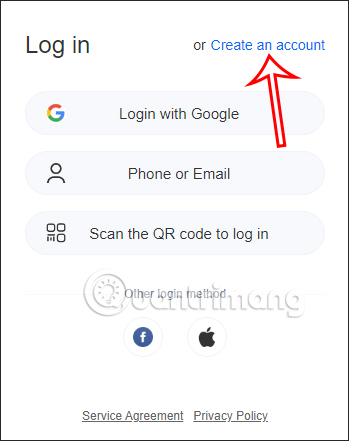
<p>Tại giao diện trang web chúng ta nhấn vào&nbsp;<strong>Create an account</strong>&nbsp;để tạo tài khoản sử dụng.</p>

<p><img alt="Tạo tài khoản Terabox" data-i="0" data-src="https://st.quantrimang.com/photos/image/2022/03/01/Terabox-luu-tru-du-lieu-1.jpg" data-was-processed="true" height="441" src="https://st.quantrimang.com/photos/image/2022/03/01/Terabox-luu-tru-du-lieu-1.jpg" width="349" /></p>

<p><strong>Bước 2:</strong></p>

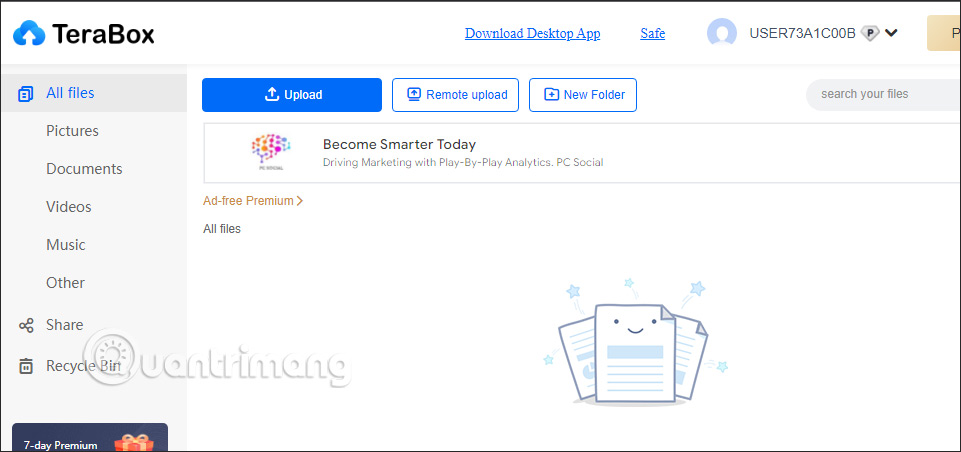
<p>Sau đó bạn chọn tạo tài khoản qua email hay số điện thoại để dùng. Ngay lập tức bạn sẽ được chuyển vào giao diện chính của Terabox để thực hiện quá trình lưu trữ dữ liệu.</p>

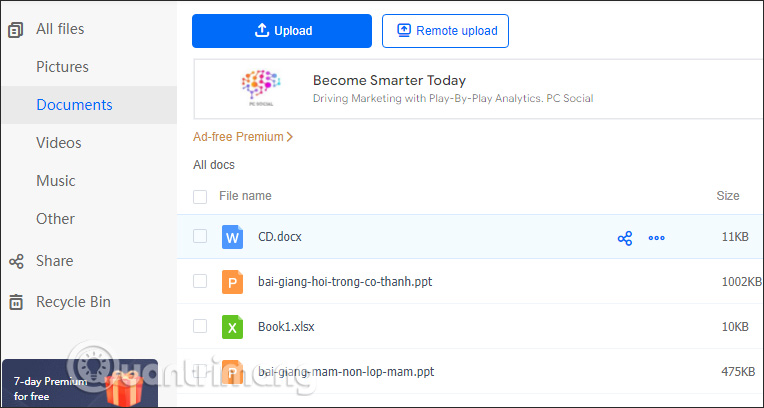
<p>Bạn sẽ nhìn thấy dịch vụ Terabox phân loại các định dạng dữ liệu lưu trữ để chúng ta có thể dễ dàng tìm kiếm nhanh chóng.</p>

<p><img alt="Giao diện Terabox" data-adbro-processed="true" data-i="1" data-src="https://st.quantrimang.com/photos/image/2022/03/01/Terabox-luu-tru-du-lieu-2.jpg" data-was-processed="true" height="301" src="https://st.quantrimang.com/photos/image/2022/03/01/Terabox-luu-tru-du-lieu-2.jpg" width="640" /></p>

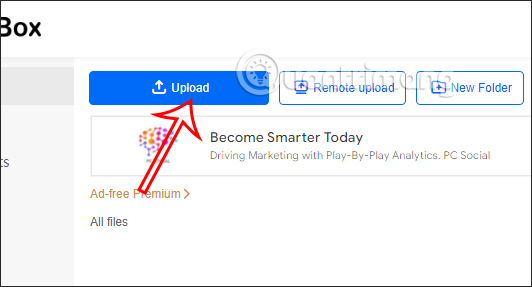
<p>Chúng ta&nbsp;<strong>nhấn Upload&nbsp;</strong>để tải file hay thư mục lên dịch vụ. Ngoài ra thì bạn có thể tạo thư mục ngay trên dịch vụ để lưu trữ dữ liệu.</p>

<p><img alt="Tải dữ liệu lên Terabox" data-i="2" data-src="https://st.quantrimang.com/photos/image/2022/03/01/Terabox-luu-tru-du-lieu-3.jpg" data-was-processed="true" height="287" src="https://st.quantrimang.com/photos/image/2022/03/01/Terabox-luu-tru-du-lieu-3.jpg" width="532" /></p>

<p><strong>Bước 3:</strong></p>

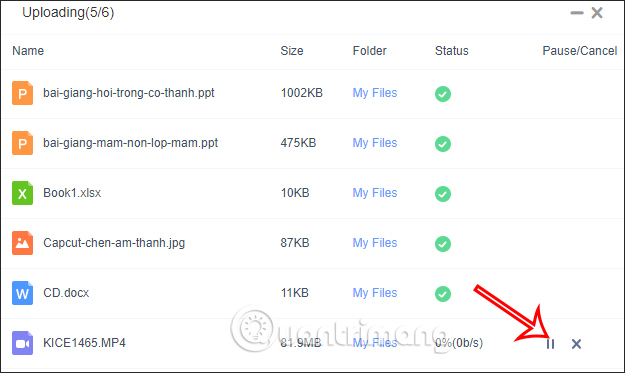
<p>Ngay sau đó quá trình tải dữ liệu lên Terabox sẽ được tiến hành. Trong khi tải dữ liệu thì người dùng có thể nhấn dừng để hoãn quá trình tải dữ liệu.</p>

<p><img alt="Quá trình tải dữ liệu lên Terabox" data-i="3" data-src="https://st.quantrimang.com/photos/image/2022/03/01/Terabox-luu-tru-du-lieu-4.jpg" data-was-processed="true" height="373" src="https://st.quantrimang.com/photos/image/2022/03/01/Terabox-luu-tru-du-lieu-4.jpg" width="625" /></p>

<p>Sau khi tải xong thì dịch vụ tự động chuyển các tập tin vào đúng mục loại file để bạn nhấn chọn ngay khi muốn tìm dữ liệu.</p>

<p><img alt="Phân loại dữ liệu lên Terabox" data-i="4" data-src="https://st.quantrimang.com/photos/image/2022/03/01/Terabox-luu-tru-du-lieu-5.jpg" data-was-processed="true" height="320" src="https://st.quantrimang.com/photos/image/2022/03/01/Terabox-luu-tru-du-lieu-5.jpg" width="600" /></p>

<p><strong>Bước 4:</strong></p>

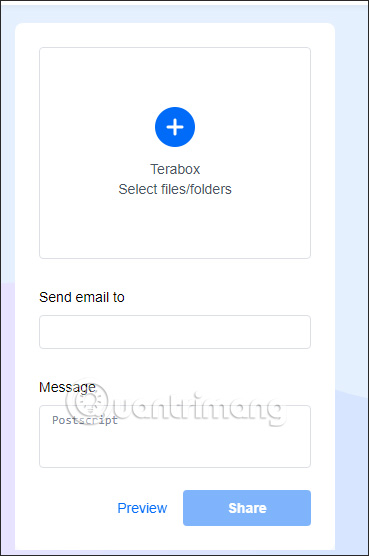
<p>Ngoài ra trong dịch vụ Terabox, bạn có thể chia sẻ file đang lưu trữ trong dịch vụ bằng cách&nbsp;<strong>nhấn vào Share</strong>. Tại đây người dùng tải file hoặc thư mục có trong dịch vụ lên giao diện,&nbsp;<strong>điền email nhận file&nbsp;</strong>rồi&nbsp;<strong>nhấn Share</strong>&nbsp;để gửi.</p>

<p><img alt="Chia sẻ dữ liệu trên Terabox" data-i="5" data-src="https://st.quantrimang.com/photos/image/2022/03/01/Terabox-luu-tru-du-lieu-6.jpg" data-was-processed="true" height="556" src="https://st.quantrimang.com/photos/image/2022/03/01/Terabox-luu-tru-du-lieu-6.jpg" width="369" /></p>

<p><strong>Bước 5:</strong></p>

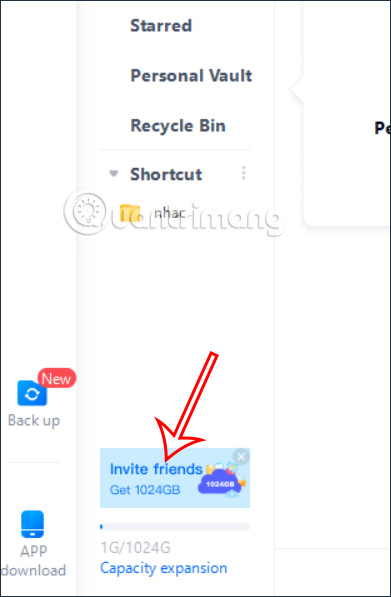
<p>Để nhận 1024GB, bạn sẽ nhấn vào thông báo Invite friends để nhận 1024GB.</p>

<p><img alt="Mời bạn bè nhạn 1TB" data-i="6" data-src="https://st.quantrimang.com/photos/image/2022/11/26/Terabox-luu-tru.jpg" data-was-processed="true" height="597" src="https://st.quantrimang.com/photos/image/2022/11/26/Terabox-luu-tru.jpg" width="391" /></p>

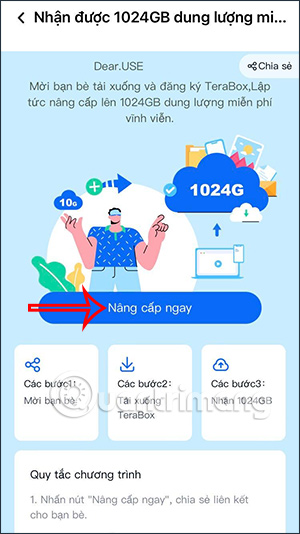
<p>Lúc này bạn sẽ chuyển trang trang web hướng dẫn. Chúng ta sẽ&nbsp;<strong>quét mã QR</strong>&nbsp;để tiến hành&nbsp;<strong>cài đặt ứng dụng Terabox trên điện thoại của bạn</strong>. Đăng nhập tài khoản của mình và sẽ nhìn thấy hướng dẫn gửi link chia sẻ cài Terabox cho bạn.</p>

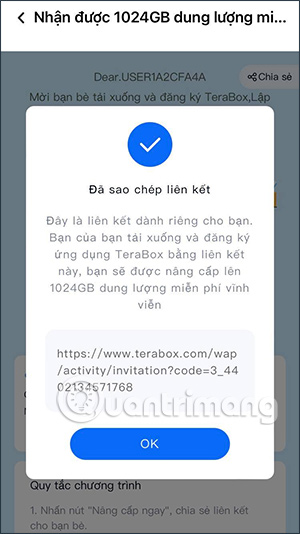
<p>Chúng ta&nbsp;<strong>nhấn vào Nâng cấp ngay&nbsp;</strong>và sau đó nhìn thấy link chia sẻ tới bạn bè để họ cài đặt ứng dụng. Với mỗi tài khoản Terabox sẽ chỉ có 1 link duy nhất mời bạn bè và 1 lần duy nhất nhận 1TB. Sau khi bạn bè đăng ký tài khoản Terabox thì link này tự đông biến mất.</p>

<figure><img alt="Nâng cấp tài khoản Terabox" data-i="7" data-src="https://st.quantrimang.com/photos/image/2022/11/26/Terabox-luu-tru-2.jpg" data-was-processed="true" height="534" src="https://st.quantrimang.com/photos/image/2022/11/26/Terabox-luu-tru-2.jpg" width="300" /></figure>

<figure><img alt="Link mời bạn bè cài Terabox" data-i="8" data-src="https://st.quantrimang.com/photos/image/2022/11/26/Terabox-luu-tru-3.jpg" data-was-processed="true" height="534" src="https://st.quantrimang.com/photos/image/2022/11/26/Terabox-luu-tru-3.jpg" width="300" /></figure>
&nbsp;

<p>Kết quả bạn đã có 1TB miễn phí như hình dưới đây.</p>

<p><img alt="1TB miễn phí" data-i="9" data-src="https://st.quantrimang.com/photos/image/2022/11/26/Terabox-luu-tru-4.jpg" data-was-processed="true" height="612" src="https://st.quantrimang.com/photos/image/2022/11/26/Terabox-luu-tru-4.jpg" width="353" /></p>

<p>Sau khi đọc thông tin ở trên, bây giờ bạn đã biết TeraBox là gì, cách dùng ra sao. Nếu bạn quan tâm đến các thuộc tính mà không gian lưu trữ này sở hữu thì dung lượng lưu trữ miễn phí 1TB sẽ sẵn sàng để bạn sử dụng. Đây là cơ hội tuyệt vời nhất để lưu các file của bạn một cách an toàn và bảo mật mà không bị ảnh hưởng gì với tư cách cá nhân. Với TeraBox, bạn sẽ không còn cần sự trợ giúp từ bạn bè để lưu file của mình nữa.</p>
&nbsp;
		</div>
				<div id="author">
						<p>
				<strong>Nguồn tin:</strong>
				quanttrimang.com
			</p>
		</div>
	</div>
	<div id="footer" class="clearfix">
		<div id="url">
			<strong>URL của bản tin này: </strong><a href="https://www.nguoicodonvn2008.info/vi/news/savefile/phan-mem/cach-dung-terabox-luu-tru-voi-1tb-mien-phi-11493.html" title="Cách dùng Terabox lưu trữ với 1TB miễn phí">https://www.nguoicodonvn2008.info/vi/news/savefile/phan-mem/cach-dung-terabox-luu-tru-voi-1tb-mien-phi-11493.html</a>

		</div>
		<div class="clear"></div>
		<div class="copyright">
			&copy; .&#x3A; Nguoicodonvn2008.info - Cõi lòng người cô đơn &#x3A;.
		</div>
		<div id="contact">
			<a href="mailto:admin@nguoicodonvn2008.info">admin@nguoicodonvn2008.info</a>
		</div>
	</div>
</div>
        <div id="timeoutsess" class="chromeframe">
            Bạn đã không sử dụng Site, <a onclick="timeoutsesscancel();" href="https://www.nguoicodonvn2008.info/#">Bấm vào đây để duy trì trạng thái đăng nhập</a>. Thời gian chờ: <span id="secField"> 60 </span> giây
        </div>
        <div id="openidResult" class="nv-alert" style="display:none"></div>
        <div id="openidBt" data-result="" data-redirect=""></div>
		</script>
		<div class="car-top">
  <span><img src="https://www.nguoicodonvn2008.info/themes/default/images/car.png" alt=""></span>
</div>
<script src="https://www.nguoicodonvn2008.info/assets/js/jquery/jquery.min.js"></script>
<script>var nv_base_siteurl="/",nv_lang_data="vi",nv_lang_interface="vi",nv_name_variable="nv",nv_fc_variable="op",nv_lang_variable="language",nv_module_name="news",nv_func_name="savefile",nv_is_user=0, nv_my_ofs=-4,nv_my_abbr="EDT",nv_cookie_prefix="nv4c_e856T",nv_check_pass_mstime=1738000,nv_area_admin=0,nv_safemode=0,theme_responsive=0,nv_recaptcha_ver=2,nv_recaptcha_sitekey="",nv_recaptcha_type="image",XSSsanitize=1;</script>
<script src="https://www.nguoicodonvn2008.info/assets/js/language/vi.js"></script>
<script src="https://www.nguoicodonvn2008.info/assets/js/DOMPurify/purify3.js"></script>
<script src="https://www.nguoicodonvn2008.info/assets/js/global.js"></script>
<script src="https://www.nguoicodonvn2008.info/assets/js/site.js"></script>
<script src="https://www.nguoicodonvn2008.info/themes/default/js/news.js"></script>
<script src="https://www.nguoicodonvn2008.info/themes/default/js/main.js"></script>
<script src="https://www.nguoicodonvn2008.info/themes/default/js/custom.js"></script>
<script type="application/ld+json">
        {
            "@context": "https://schema.org",
            "@type": "Organization",
            "url": "https://www.nguoicodonvn2008.info",
            "logo": "https://www.nguoicodonvn2008.info/uploads/angel.gif"
        }
        </script>
<script src="https://www.nguoicodonvn2008.info/themes/default/js/bootstrap.min.js"></script>
<script type="text/javascript">
var $scrolltop = $('.car-top');
$scrolltop.on('click', function () {
    $('html,body').animate({
        scrollTop: 0
    }, 800);
    $(this).addClass("car-run");
    setTimeout(function(){ $scrolltop.removeClass('car-run');}, 1000);
    return false;
});
$(window).on('scroll', function ()
{ 
    if($(window).scrollTop() >= 200)
    {
        $scrolltop.addClass("show");
        $scrolltop.addClass("car-down");
    }
    else
    {
       $scrolltop.removeClass("show");
       setTimeout(function(){ $scrolltop.removeClass('car-down');}, 300);
    }
});
</script>
</body>
</html>