<!DOCTYPE html>
    <html lang="vi" xmlns="http://www.w3.org/1999/xhtml" prefix="og: http://ogp.me/ns#">
    <head>
<title>Cách dễ dàng truy cập lưu trữ đám mây ngay trong Windows File Explorer</title>
<meta name="description" content="Cách dễ dàng truy cập lưu trữ đám mây ngay trong Windows File Explorer - Savefile - Tin Tức -...">
<meta name="author" content=".: Nguoicodonvn2008.info - Cõi lòng người cô đơn :.">
<meta name="copyright" content=".: Nguoicodonvn2008.info - Cõi lòng người cô đơn :. [admin@nguoicodonvn2008.info]">
<meta name="robots" content="index, archive, follow, noodp">
<meta name="googlebot" content="index,archive,follow,noodp">
<meta name="msnbot" content="all,index,follow">
<meta name="generator" content="NukeViet v4.5">
<meta http-equiv="Content-Type" content="text/html; charset=utf-8">
<meta property="og:title" content="Cách dễ dàng truy cập lưu trữ đám mây ngay trong Windows File Explorer">
<meta property="og:type" content="website">
<meta property="og:description" content="Savefile - Tin Tức - https&#x3A;&#x002F;&#x002F;www.nguoicodonvn2008.info&#x002F;vi&#x002F;news&#x002F;savefile&#x002F;phan-mem&#x002F;cach-de-dang-truy-cap-luu-tru-dam-may-ngay-trong-windows-file-explorer-10860.html">
<meta property="og:site_name" content=".&#x3A; Nguoicodonvn2008.info - Cõi lòng người cô đơn &#x3A;.">
<meta property="og:url" content="https://www.nguoicodonvn2008.info/vi/news/savefile/phan-mem/cach-de-dang-truy-cap-luu-tru-dam-may-ngay-trong-windows-file-explorer-10860.html">
<link rel="shortcut icon" href="https://www.nguoicodonvn2008.info/favicon.ico">
<link rel="canonical" href="https://www.nguoicodonvn2008.info/vi/news/savefile/phan-mem/cach-de-dang-truy-cap-luu-tru-dam-may-ngay-trong-windows-file-explorer-10860.html">
<link rel="alternate" href="https://www.nguoicodonvn2008.info/vi/news/rss/" title="Tin Tức" type="application/rss+xml">
<link rel="alternate" href="https://www.nguoicodonvn2008.info/vi/news/rss/karaoke-dual/" title="Tin Tức - Karaoke Dual" type="application/rss+xml">
<link rel="alternate" href="https://www.nguoicodonvn2008.info/vi/news/rss/nhac-tre/" title="Tin Tức - Nhạc trẻ" type="application/rss+xml">
<link rel="alternate" href="https://www.nguoicodonvn2008.info/vi/news/rss/tru-tinh/" title="Tin Tức - Trữ tình" type="application/rss+xml">
<link rel="alternate" href="https://www.nguoicodonvn2008.info/vi/news/rss/nuoc-ngoai/" title="Tin Tức - Nước ngoài" type="application/rss+xml">
<link rel="alternate" href="https://www.nguoicodonvn2008.info/vi/news/rss/remix/" title="Tin Tức - Remix" type="application/rss+xml">
<link rel="alternate" href="https://www.nguoicodonvn2008.info/vi/news/rss/tam-su-tinh-yeu/" title="Tin Tức - Tâm sự tình yêu" type="application/rss+xml">
<link rel="alternate" href="https://www.nguoicodonvn2008.info/vi/news/rss/tho-suu-tam/" title="Tin Tức - Thơ sưu tầm" type="application/rss+xml">
<link rel="alternate" href="https://www.nguoicodonvn2008.info/vi/news/rss/cuoc-song/" title="Tin Tức - Cuộc sống" type="application/rss+xml">
<link rel="alternate" href="https://www.nguoicodonvn2008.info/vi/news/rss/phan-mem/" title="Tin Tức - Phần mềm" type="application/rss+xml">
<link rel="alternate" href="https://www.nguoicodonvn2008.info/vi/news/rss/kien-thuc-may-tinh/" title="Tin Tức - Kiến thức máy tính" type="application/rss+xml">
<link rel="alternate" href="https://www.nguoicodonvn2008.info/vi/news/rss/hoc-tap/" title="Tin Tức - Học tập" type="application/rss+xml">
<link rel="alternate" href="https://www.nguoicodonvn2008.info/vi/news/rss/tai-lieu/" title="Tin Tức - Tài liệu" type="application/rss+xml">
<link rel="alternate" href="https://www.nguoicodonvn2008.info/vi/news/rss/de-thi/" title="Tin Tức - Đề thi" type="application/rss+xml">
<link rel="preload" as="style" href="https://www.nguoicodonvn2008.info/assets/css/font-awesome.min.css" type="text/css">
<link rel="preload" as="style" href="https://www.nguoicodonvn2008.info/themes/default/css/bootstrap.non-responsive.css" type="text/css">
<link rel="preload" as="style" href="https://www.nguoicodonvn2008.info/themes/default/css/style.css" type="text/css">
<link rel="preload" as="style" href="https://www.nguoicodonvn2008.info/themes/default/css/style.non-responsive.css" type="text/css">
<link rel="preload" as="style" href="https://www.nguoicodonvn2008.info/themes/default/css/news.css" type="text/css">
<link rel="preload" as="style" href="https://www.nguoicodonvn2008.info/themes/default/css/custom.css" type="text/css">
<link rel="preload" as="script" href="https://www.nguoicodonvn2008.info/assets/js/jquery/jquery.min.js" type="text/javascript">
<link rel="preload" as="script" href="https://www.nguoicodonvn2008.info/assets/js/language/vi.js" type="text/javascript">
<link rel="preload" as="script" href="https://www.nguoicodonvn2008.info/assets/js/DOMPurify/purify3.js" type="text/javascript">
<link rel="preload" as="script" href="https://www.nguoicodonvn2008.info/assets/js/global.js" type="text/javascript">
<link rel="preload" as="script" href="https://www.nguoicodonvn2008.info/assets/js/site.js" type="text/javascript">
<link rel="preload" as="script" href="https://www.nguoicodonvn2008.info/themes/default/js/news.js" type="text/javascript">
<link rel="preload" as="script" href="https://www.nguoicodonvn2008.info/themes/default/js/main.js" type="text/javascript">
<link rel="preload" as="script" href="https://www.nguoicodonvn2008.info/themes/default/js/custom.js" type="text/javascript">
<link rel="preload" as="script" href="https://www.nguoicodonvn2008.info/themes/default/js/bootstrap.min.js" type="text/javascript">
<link rel="stylesheet" href="https://www.nguoicodonvn2008.info/assets/css/font-awesome.min.css">
<link rel="stylesheet" href="https://www.nguoicodonvn2008.info/themes/default/css/bootstrap.non-responsive.css">
<link rel="stylesheet" href="https://www.nguoicodonvn2008.info/themes/default/css/style.css">
<link rel="stylesheet" href="https://www.nguoicodonvn2008.info/themes/default/css/style.non-responsive.css">
<link rel="StyleSheet" href="https://www.nguoicodonvn2008.info/themes/default/css/news.css">
<link rel="stylesheet" href="https://www.nguoicodonvn2008.info/themes/default/css/custom.css">
<style type="text/css">
	body{background: #fff;}
</style>
    </head>
    <body>
<div id="print">
	<div id="hd_print">
		<h2 class="pull-left">.&#x3A; Nguoicodonvn2008.info - Cõi lòng người cô đơn &#x3A;.</h2>
		<p class="pull-right"><a title=".&#x3A; Nguoicodonvn2008.info - Cõi lòng người cô đơn &#x3A;." href="https://www.nguoicodonvn2008.info/">https://www.nguoicodonvn2008.info</a></p>
	</div>
	<div class="clear"></div>
	<hr />
	<div id="content">
		<h1>Cách dễ dàng truy cập lưu trữ đám mây ngay trong Windows File Explorer</h1>
		<ul class="list-inline">
			<li>Thứ ba - 29/07/2025 00:43</li>
			<li class="hidden-print txtrequired"><em class="fa fa-print">&nbsp;</em><a title="In ra" href="javascript:;" onclick="window.print()">In ra</a></li>
			<li class="hidden-print txtrequired"><em class="fa fa-power-off">&nbsp;</em><a title="Đóng cửa sổ này" href="javascript:;" onclick="window.close()">Đóng cửa sổ này</a></li>
		</ul>
		<div class="clear"></div>
		<div id="hometext">
		</div>
				<div class="imghome">
			<img alt="Cách dễ dàng truy cập lưu trữ đám mây ngay trong Windows File Explorer" src="https://st.quantrimang.com/photos/image/2025/07/29/truy-cap-luu-tru-dam-may-trong-windows-file-explorer-1.jpg" width="460" class="img-thumbnail" />
		</div>
		<div class="clear"></div>
		<div id="bodytext" class="clearfix">
			<p style="text-align: justify;">Việc quản lý file trên&nbsp;các dịch vụ đám mây&nbsp;khác nhau có thể rất nhàm chán. Bạn bị mắc kẹt khi phải tải xuống, chỉnh sửa và upload lại tài liệu hoặc liên tục chuyển đổi giữa các ứng dụng. Các công cụ lưu trữ đám mây giải quyết vấn đề này bằng cách biến bộ nhớ đám mây của bạn trở thành một phần tự nhiên của File Explorer.</p>

<h2 style="text-align: justify;">5. CloudMounter</h2>

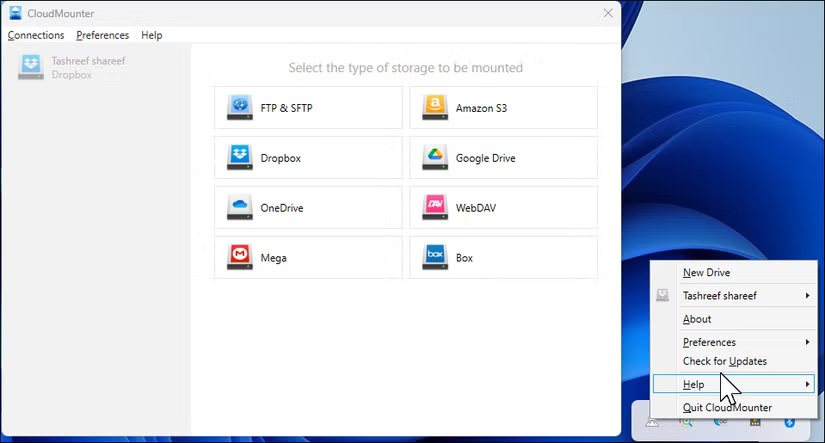
<p style="text-align: justify;">Điểm thu hút lớn nhất của CloudMounter là giao diện trực quan, không làm bạn choáng ngợp với quá nhiều tùy chọn. Quy trình thiết lập cực kỳ đơn giản: Chọn dịch vụ đám mây và CloudMounter sẽ mở trình duyệt để xác thực. Cấp quyền, và ngay lập tức, bộ nhớ đám mây của bạn sẽ xuất hiện dưới dạng ký tự ổ trong File Explorer.</p>

<figure>
<div style="text-align: justify;"><img alt="Hộp thoại màn hình chính của CloudMounter trên desktop Windows 11" data-i="0" data-src="https://st.quantrimang.com/photos/image/2025/07/29/truy-cap-luu-tru-dam-may-trong-windows-file-explorer-1.jpg" data-was-processed="true" height="443" src="https://st.quantrimang.com/photos/image/2025/07/29/truy-cap-luu-tru-dam-may-trong-windows-file-explorer-1.jpg" width="825" /></div>

<figcaption>
<div style="text-align: justify;">Hộp thoại màn hình chính của CloudMounter trên desktop&nbsp;&nbsp;Windows&nbsp;11</div>
</figcaption>
</figure>

<p style="text-align: justify;">Ứng dụng xử lý nhiều dịch vụ đám mây một cách xuất sắc. Bài viết đã thử nghiệm nó với&nbsp;Google Drive,&nbsp;Dropbox&nbsp;và&nbsp;OneDrive, tất cả đều được mount cùng một lúc (nếu bạn còn đang phân vân, OneDrive thường vượt trội hơn Google Drive). Mỗi dịch vụ đều hiển thị ký tự ổ riêng, giúp việc di chuyển file giữa các dịch vụ trở nên đơn giản. Chỉ cần kéo và thả, giống như việc sắp xếp những thư mục trên desktop.</p>

<ul>
	<li style="text-align: justify;">Tải CloudMounter&nbsp;(Dùng thử miễn phí, giấy phép trọn đời 29,99 USD)</li>
</ul>

<div style="text-align: justify;"><span style="color:rgb(39, 174, 96);"><strong>https://cloudmounter.net/</strong></span></div>

<h2 style="text-align: justify;">4. ExpandDrive</h2>

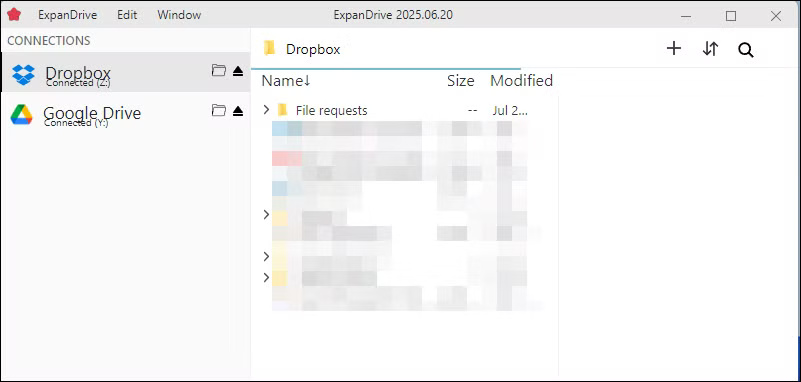
<p style="text-align: justify;">ExpanDrive gần đây đã được miễn phí cho mục đích sử dụng cá nhân, khiến nó trở thành lựa chọn hàng đầu dễ dàng trong số các công cụ quản lý lưu trữ đám mây. Ứng dụng cung cấp hai giao diện: trình gắn kết khay hệ thống truyền thống và cửa sổ Storage Browser riêng biệt. Trình duyệt tích hợp đặc biệt hữu ích cho việc tìm kiếm trên nhiều đám mây hoặc kiểm tra phiên bản file.</p>

<figure>
<div style="text-align: justify;"><img alt="Màn hình chính ExpanDrive mở trong Windows 11" data-adbro-processed="true" data-i="1" data-src="https://st.quantrimang.com/photos/image/2025/07/29/truy-cap-luu-tru-dam-may-trong-windows-file-explorer-2.jpg" data-was-processed="true" height="382" src="https://st.quantrimang.com/photos/image/2025/07/29/truy-cap-luu-tru-dam-may-trong-windows-file-explorer-2.jpg" width="801" /></div>

<figcaption>
<div style="text-align: justify;">Màn hình chính ExpanDrive mở trong Windows 11</div>
</figcaption>
</figure>

<p style="text-align: justify;">Hiệu suất của ExpanDrive nhanh hơn hầu hết các lựa chọn thay thế khác. Những file lớn được truyền với tốc độ gần như tốc độ gốc và ứng dụng sử dụng tính năng sao chép phía server khi di chuyển file trong cùng một dịch vụ đám mây. Khi sắp xếp lại các thư mục Google Drive, những file không thực sự tải xuống - chúng chỉ được xáo trộn trong đám mây. ExpanDrive cũng cung cấp tính năng đồng bộ ngoại tuyến có chọn lọc (file tự động đồng bộ khi được kết nối lại) và mã hóa tích hợp để tăng cường bảo mật.</p>

<ul>
	<li style="text-align: justify;">Tải ExpanDrive&nbsp;(Miễn phí)</li>
</ul>

<div style="text-align: justify;"><span style="color:rgb(22, 160, 133);"><strong>https://www.expandrive.com/</strong></span></div>

<h2 style="text-align: justify;">3. Mountain Duck</h2>

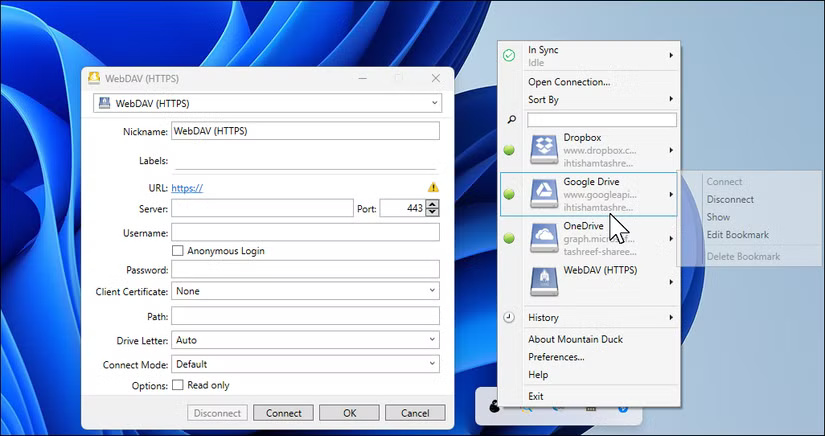
<p style="text-align: justify;">Mountain Duck là một trình quản lý lưu trữ đám mây phổ biến, và khả năng sử dụng của nó cho thấy điều đó. Mặc dù xử lý tốt các tác vụ mount tiêu chuẩn, nhưng tính năng nổi bật là tích hợp Cryptomator. Không giống như mã hóa cơ bản của CloudMounter, Cryptomator tạo ra các kho lưu trữ zero-knowledge, nơi ngay cả tên file cũng bị xáo trộn, mang lại khả năng bảo mật tốt hơn cho những tài liệu thực sự nhạy cảm.</p>

<p style="text-align: justify;">Ứng dụng cung cấp 3 chế độ đồng bộ khi thêm kết nối:&nbsp;<strong>Online</strong>&nbsp;stream mọi thứ từ đám mây mà không sử dụng dung lượng cục bộ,&nbsp;<strong>Smart Sync</strong>&nbsp;lưu trữ cache các file khi chúng được truy cập và&nbsp;<strong>Offline</strong>&nbsp;tải xuống mọi thứ cục bộ để truy cập ngoại tuyến đầy đủ.</p>

<figure>
<div style="text-align: justify;"><img alt="Hộp thoại Open Connection của Mountain Duck mở trên desktop Windows 11" data-i="2" data-src="https://st.quantrimang.com/photos/image/2025/07/29/truy-cap-luu-tru-dam-may-trong-windows-file-explorer-3.jpg" data-was-processed="true" height="436" src="https://st.quantrimang.com/photos/image/2025/07/29/truy-cap-luu-tru-dam-may-trong-windows-file-explorer-3.jpg" width="825" /></div>

<figcaption>
<div style="text-align: justify;">Hộp thoại Open Connection của Mountain Duck mở trên desktop Windows 11</div>
</figcaption>
</figure>

<p style="text-align: justify;">Xử lý các bộ sưu tập file lớn là điểm mạnh của Mountain Duck. Trong khi một số công cụ khác chậm lại khi xử lý các lần chuyển dữ liệu hàng loạt, ứng dụng này vẫn giữ cho mọi thứ hoạt động trơn tru. Nhờ cache liên tục, cấu trúc thư mục và danh sách file được load ngay lập tức sau khi khởi động lại, không bị lag hoặc độ trễ refresh thông thường.</p>

<ul>
	<li style="text-align: justify;">Tải Mountain Duck&nbsp;(Dùng thử miễn phí, giấy phép 47 USD)</li>
</ul>

<div style="text-align: justify;"><span style="color:rgb(231, 76, 60);"><strong>https://mountainduck.io/</strong></span></div>

<h2 style="text-align: justify;">2. Air Live Drive</h2>

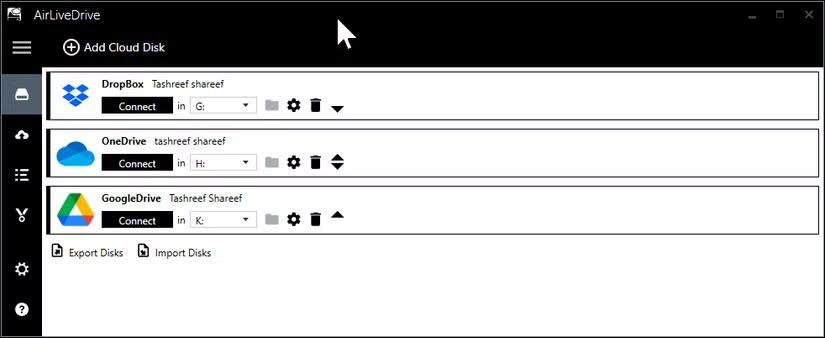
<p style="text-align: justify;">Air Live Drive có cách tiếp cận đơn giản, chỉ trực tuyến. Nó không đồng bộ thư mục hoặc lưu trữ các bản sao cục bộ, vì vậy sẽ không chiếm dung lượng trên ổ lưu trữ của bạn. Khi mở một file, bạn đang làm việc trực tiếp với phiên bản được lưu trữ trên đám mây và mọi thay đổi sẽ được lưu tại đó ngay khi bạn đóng file.</p>

<figure>
<div style="text-align: justify;"><img alt="Hộp thoại màn hình chính Air Live Drive mở trong Windows 11" data-i="3" data-src="https://st.quantrimang.com/photos/image/2025/07/29/truy-cap-luu-tru-dam-may-trong-windows-file-explorer-4.jpg" data-was-processed="true" height="338" src="https://st.quantrimang.com/photos/image/2025/07/29/truy-cap-luu-tru-dam-may-trong-windows-file-explorer-4.jpg" width="825" /></div>

<figcaption>
<div style="text-align: justify;">Hộp thoại màn hình chính Air Live Drive mở trong&nbsp;&nbsp;Windows&nbsp;11</div>
</figcaption>
</figure>

<p style="text-align: justify;">Giao diện theo phong cách&nbsp;Windows 10&nbsp;gọn gàng và dễ điều hướng, cung cấp mọi thứ bạn cần để quản lý ổ đám mây, đồng bộ cài đặt và truy cập các tùy chọn nâng cao. Việc thêm ổ mới rất đơn giản - chỉ cần nhấp vào&nbsp;<strong>Add Cloud Disk</strong>, chọn dịch vụ đám mây của bạn, đăng nhập và gán ký tự ổ. Sau khi kết nối, tài khoản sẽ hiển thị dưới dạng ổ đĩa ảo trong File Explorer, sẵn sàng sử dụng.</p>

<ul>
	<li style="text-align: justify;">Tải Air Live Drive&nbsp;(Miễn phí, bản quyền trọn đời 25 USD)</li>
</ul>

<div style="text-align: justify;"><span style="color:rgb(192, 57, 43);"><strong>https://www.airlivedrive.com/en/</strong></span></div>

<h2 style="text-align: justify;">1. RaiDrive</h2>

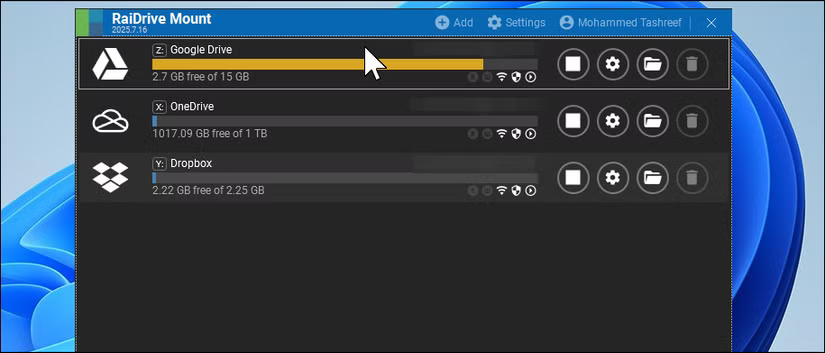
<p style="text-align: justify;">RaiDrive nổi bật với gói miễn phí hào phóng nhất, cho phép bạn kết nối tối đa 8 ổ với quyền đọc và ghi đầy đủ vào tất cả các dịch vụ đám mây phổ biến. Mặc dù ứng dụng có hiển thị lời nhắc nâng cấp trong cửa sổ chính, nhưng chúng khá kín đáo. Lưu ý rằng RaiDrive yêu cầu bạn tạo tài khoản trước khi có thể bắt đầu sử dụng. Đây là công cụ duy nhất trong danh sách này yêu cầu đăng nhập bắt buộc - không phải là một nhược điểm lớn, nhưng đáng lưu ý nếu bạn muốn bỏ qua bước tạo tài khoản.</p>

<p style="text-align: justify;">Việc thiết lập rất đơn giản, vì trình hướng dẫn giúp bạn kết nối chỉ với vài cú nhấp chuột. Điểm mạnh nhất của RaiDrive là stream media. Tác giả bài viết đã thử nghiệm phát 4K trực tiếp từ Google Drive trên kết nối gigabit và nó chạy rất mượt mà. Ứng dụng được tinh chỉnh để đọc tuần tự, rất phù hợp với các media server.</p>

<figure>
<div style="text-align: justify;"><img alt="Hộp thoại RaiDrive Mount Connected Drives trên desktop Windows 11" data-i="4" data-src="https://st.quantrimang.com/photos/image/2025/07/29/truy-cap-luu-tru-dam-may-trong-windows-file-explorer-5.jpg" data-was-processed="true" height="353" src="https://st.quantrimang.com/photos/image/2025/07/29/truy-cap-luu-tru-dam-may-trong-windows-file-explorer-5.jpg" width="825" /></div>

<figcaption>
<div style="text-align: justify;">Hộp thoại RaiDrive Mount Connected Drives trên desktop Windows 11</div>
</figcaption>
</figure>

<ul>
	<li style="text-align: justify;">Tải RaiDrive&nbsp;(Miễn phí, Pro từ 1,84 USD/tháng)</li>
</ul>

<div style="text-align: justify;"><span style="color:rgb(231, 76, 60);"><strong>https://www.raidrive.com/vi/</strong></span></div>
		</div>
				<div id="author">
						<p>
				<strong>Nguồn tin:</strong>
				Quantrimang.com:
			</p>
		</div>
	</div>
	<div id="footer" class="clearfix">
		<div id="url">
			<strong>URL của bản tin này: </strong><a href="https://www.nguoicodonvn2008.info/vi/news/savefile/phan-mem/cach-de-dang-truy-cap-luu-tru-dam-may-ngay-trong-windows-file-explorer-10860.html" title="Cách dễ dàng truy cập lưu trữ đám mây ngay trong Windows File Explorer">https://www.nguoicodonvn2008.info/vi/news/savefile/phan-mem/cach-de-dang-truy-cap-luu-tru-dam-may-ngay-trong-windows-file-explorer-10860.html</a>

		</div>
		<div class="clear"></div>
		<div class="copyright">
			&copy; .&#x3A; Nguoicodonvn2008.info - Cõi lòng người cô đơn &#x3A;.
		</div>
		<div id="contact">
			<a href="mailto:admin@nguoicodonvn2008.info">admin@nguoicodonvn2008.info</a>
		</div>
	</div>
</div>
        <div id="timeoutsess" class="chromeframe">
            Bạn đã không sử dụng Site, <a onclick="timeoutsesscancel();" href="https://www.nguoicodonvn2008.info/#">Bấm vào đây để duy trì trạng thái đăng nhập</a>. Thời gian chờ: <span id="secField"> 60 </span> giây
        </div>
        <div id="openidResult" class="nv-alert" style="display:none"></div>
        <div id="openidBt" data-result="" data-redirect=""></div>
		</script>
		<div class="car-top">
  <span><img src="https://www.nguoicodonvn2008.info/themes/default/images/car.png" alt=""></span>
</div>
<script src="https://www.nguoicodonvn2008.info/assets/js/jquery/jquery.min.js"></script>
<script>var nv_base_siteurl="/",nv_lang_data="vi",nv_lang_interface="vi",nv_name_variable="nv",nv_fc_variable="op",nv_lang_variable="language",nv_module_name="news",nv_func_name="savefile",nv_is_user=0, nv_my_ofs=-4,nv_my_abbr="EDT",nv_cookie_prefix="nv4c_e856T",nv_check_pass_mstime=1738000,nv_area_admin=0,nv_safemode=0,theme_responsive=0,nv_recaptcha_ver=2,nv_recaptcha_sitekey="",nv_recaptcha_type="image",XSSsanitize=1;</script>
<script src="https://www.nguoicodonvn2008.info/assets/js/language/vi.js"></script>
<script src="https://www.nguoicodonvn2008.info/assets/js/DOMPurify/purify3.js"></script>
<script src="https://www.nguoicodonvn2008.info/assets/js/global.js"></script>
<script src="https://www.nguoicodonvn2008.info/assets/js/site.js"></script>
<script src="https://www.nguoicodonvn2008.info/themes/default/js/news.js"></script>
<script src="https://www.nguoicodonvn2008.info/themes/default/js/main.js"></script>
<script src="https://www.nguoicodonvn2008.info/themes/default/js/custom.js"></script>
<script type="application/ld+json">
        {
            "@context": "https://schema.org",
            "@type": "Organization",
            "url": "https://www.nguoicodonvn2008.info",
            "logo": "https://www.nguoicodonvn2008.info/uploads/angel.gif"
        }
        </script>
<script src="https://www.nguoicodonvn2008.info/themes/default/js/bootstrap.min.js"></script>
<script type="text/javascript">
var $scrolltop = $('.car-top');
$scrolltop.on('click', function () {
    $('html,body').animate({
        scrollTop: 0
    }, 800);
    $(this).addClass("car-run");
    setTimeout(function(){ $scrolltop.removeClass('car-run');}, 1000);
    return false;
});
$(window).on('scroll', function ()
{ 
    if($(window).scrollTop() >= 200)
    {
        $scrolltop.addClass("show");
        $scrolltop.addClass("car-down");
    }
    else
    {
       $scrolltop.removeClass("show");
       setTimeout(function(){ $scrolltop.removeClass('car-down');}, 300);
    }
});
</script>
</body>
</html>