<!DOCTYPE html>
    <html lang="vi" xmlns="http://www.w3.org/1999/xhtml" prefix="og: http://ogp.me/ns#">
    <head>
<title>6 phần mềm miễn phí để xóa các thư mục trống trong Windows 10</title>
<meta name="description" content="6 phần mềm miễn phí để xóa các thư mục trống trong Windows 10 - Savefile - Tin Tức -...">
<meta name="author" content=".: Nguoicodonvn2008.info - Cõi lòng người cô đơn :.">
<meta name="copyright" content=".: Nguoicodonvn2008.info - Cõi lòng người cô đơn :. [admin@nguoicodonvn2008.info]">
<meta name="robots" content="index, archive, follow, noodp">
<meta name="googlebot" content="index,archive,follow,noodp">
<meta name="msnbot" content="all,index,follow">
<meta name="generator" content="NukeViet v4.5">
<meta http-equiv="Content-Type" content="text/html; charset=utf-8">
<meta property="og:title" content="6 phần mềm miễn phí để xóa các thư mục trống trong Windows 10">
<meta property="og:type" content="website">
<meta property="og:description" content="Savefile - Tin Tức - https&#x3A;&#x002F;&#x002F;www.nguoicodonvn2008.info&#x002F;vi&#x002F;news&#x002F;savefile&#x002F;phan-mem&#x002F;6-phan-mem-mien-phi-de-xoa-cac-thu-muc-trong-trong-windows-10-2978.html">
<meta property="og:site_name" content=".&#x3A; Nguoicodonvn2008.info - Cõi lòng người cô đơn &#x3A;.">
<meta property="og:url" content="https://www.nguoicodonvn2008.info/vi/news/savefile/phan-mem/6-phan-mem-mien-phi-de-xoa-cac-thu-muc-trong-trong-windows-10-2978.html">
<link rel="shortcut icon" href="https://www.nguoicodonvn2008.info/favicon.ico">
<link rel="canonical" href="https://www.nguoicodonvn2008.info/vi/news/savefile/phan-mem/6-phan-mem-mien-phi-de-xoa-cac-thu-muc-trong-trong-windows-10-2978.html">
<link rel="alternate" href="https://www.nguoicodonvn2008.info/vi/news/rss/" title="Tin Tức" type="application/rss+xml">
<link rel="alternate" href="https://www.nguoicodonvn2008.info/vi/news/rss/karaoke-dual/" title="Tin Tức - Karaoke Dual" type="application/rss+xml">
<link rel="alternate" href="https://www.nguoicodonvn2008.info/vi/news/rss/nhac-tre/" title="Tin Tức - Nhạc trẻ" type="application/rss+xml">
<link rel="alternate" href="https://www.nguoicodonvn2008.info/vi/news/rss/tru-tinh/" title="Tin Tức - Trữ tình" type="application/rss+xml">
<link rel="alternate" href="https://www.nguoicodonvn2008.info/vi/news/rss/nuoc-ngoai/" title="Tin Tức - Nước ngoài" type="application/rss+xml">
<link rel="alternate" href="https://www.nguoicodonvn2008.info/vi/news/rss/remix/" title="Tin Tức - Remix" type="application/rss+xml">
<link rel="alternate" href="https://www.nguoicodonvn2008.info/vi/news/rss/tam-su-tinh-yeu/" title="Tin Tức - Tâm sự tình yêu" type="application/rss+xml">
<link rel="alternate" href="https://www.nguoicodonvn2008.info/vi/news/rss/tho-suu-tam/" title="Tin Tức - Thơ sưu tầm" type="application/rss+xml">
<link rel="alternate" href="https://www.nguoicodonvn2008.info/vi/news/rss/cuoc-song/" title="Tin Tức - Cuộc sống" type="application/rss+xml">
<link rel="alternate" href="https://www.nguoicodonvn2008.info/vi/news/rss/phan-mem/" title="Tin Tức - Phần mềm" type="application/rss+xml">
<link rel="alternate" href="https://www.nguoicodonvn2008.info/vi/news/rss/kien-thuc-may-tinh/" title="Tin Tức - Kiến thức máy tính" type="application/rss+xml">
<link rel="alternate" href="https://www.nguoicodonvn2008.info/vi/news/rss/hoc-tap/" title="Tin Tức - Học tập" type="application/rss+xml">
<link rel="alternate" href="https://www.nguoicodonvn2008.info/vi/news/rss/tai-lieu/" title="Tin Tức - Tài liệu" type="application/rss+xml">
<link rel="alternate" href="https://www.nguoicodonvn2008.info/vi/news/rss/de-thi/" title="Tin Tức - Đề thi" type="application/rss+xml">
<link rel="preload" as="style" href="https://www.nguoicodonvn2008.info/assets/css/font-awesome.min.css" type="text/css">
<link rel="preload" as="style" href="https://www.nguoicodonvn2008.info/themes/default/css/bootstrap.non-responsive.css" type="text/css">
<link rel="preload" as="style" href="https://www.nguoicodonvn2008.info/themes/default/css/style.css" type="text/css">
<link rel="preload" as="style" href="https://www.nguoicodonvn2008.info/themes/default/css/style.non-responsive.css" type="text/css">
<link rel="preload" as="style" href="https://www.nguoicodonvn2008.info/themes/default/css/news.css" type="text/css">
<link rel="preload" as="style" href="https://www.nguoicodonvn2008.info/themes/default/css/custom.css" type="text/css">
<link rel="preload" as="script" href="https://www.nguoicodonvn2008.info/assets/js/jquery/jquery.min.js" type="text/javascript">
<link rel="preload" as="script" href="https://www.nguoicodonvn2008.info/assets/js/language/vi.js" type="text/javascript">
<link rel="preload" as="script" href="https://www.nguoicodonvn2008.info/assets/js/DOMPurify/purify3.js" type="text/javascript">
<link rel="preload" as="script" href="https://www.nguoicodonvn2008.info/assets/js/global.js" type="text/javascript">
<link rel="preload" as="script" href="https://www.nguoicodonvn2008.info/assets/js/site.js" type="text/javascript">
<link rel="preload" as="script" href="https://www.nguoicodonvn2008.info/themes/default/js/news.js" type="text/javascript">
<link rel="preload" as="script" href="https://www.nguoicodonvn2008.info/themes/default/js/main.js" type="text/javascript">
<link rel="preload" as="script" href="https://www.nguoicodonvn2008.info/themes/default/js/custom.js" type="text/javascript">
<link rel="preload" as="script" href="https://www.nguoicodonvn2008.info/themes/default/js/bootstrap.min.js" type="text/javascript">
<link rel="stylesheet" href="https://www.nguoicodonvn2008.info/assets/css/font-awesome.min.css">
<link rel="stylesheet" href="https://www.nguoicodonvn2008.info/themes/default/css/bootstrap.non-responsive.css">
<link rel="stylesheet" href="https://www.nguoicodonvn2008.info/themes/default/css/style.css">
<link rel="stylesheet" href="https://www.nguoicodonvn2008.info/themes/default/css/style.non-responsive.css">
<link rel="StyleSheet" href="https://www.nguoicodonvn2008.info/themes/default/css/news.css">
<link rel="stylesheet" href="https://www.nguoicodonvn2008.info/themes/default/css/custom.css">
<style type="text/css">
	body{background: #fff;}
</style>
    </head>
    <body>
<div id="print">
	<div id="hd_print">
		<h2 class="pull-left">.&#x3A; Nguoicodonvn2008.info - Cõi lòng người cô đơn &#x3A;.</h2>
		<p class="pull-right"><a title=".&#x3A; Nguoicodonvn2008.info - Cõi lòng người cô đơn &#x3A;." href="https://www.nguoicodonvn2008.info/">https://www.nguoicodonvn2008.info</a></p>
	</div>
	<div class="clear"></div>
	<hr />
	<div id="content">
		<h1>6 phần mềm miễn phí để xóa các thư mục trống trong Windows 10</h1>
		<ul class="list-inline">
			<li>Thứ năm - 29/10/2020 00:46</li>
			<li class="hidden-print txtrequired"><em class="fa fa-print">&nbsp;</em><a title="In ra" href="javascript:;" onclick="window.print()">In ra</a></li>
			<li class="hidden-print txtrequired"><em class="fa fa-power-off">&nbsp;</em><a title="Đóng cửa sổ này" href="javascript:;" onclick="window.close()">Đóng cửa sổ này</a></li>
		</ul>
		<div class="clear"></div>
		<div id="hometext">
		</div>
				<div class="imghome">
			<img alt="6 phần mềm miễn phí để xóa các thư mục trống trong Windows 10" src="https://st.quantrimang.com/photos/image/2020/10/29/xoa-cac-thu-muc-trong-trong-windows-6.jpg" width="460" class="img-thumbnail" />
		</div>
		<div class="clear"></div>
		<div id="bodytext" class="clearfix">
			<p style="text-align: justify;">Có rất nhiều phần mềm miễn phí giúp xóa thư mục trống trên Windows 10. Mặc dù bạn sẽ không tiết kiệm được không gian thực sự (vì chúng chiếm 0 byte), nhưng nếu đó là cách dọn dẹp mà bạn đang tìm kiếm, thì danh sách sau đây có thể là một ý tưởng hay.</p>

<h2 style="text-align: justify;">Xóa các thư mục trống</h2>

<p style="text-align: justify;">Có một số phần mềm miễn phí có sẵn để xóa các thư mục trống. Sau đây là một số gợi ý mà&nbsp;<strong>Quantrimang</strong>&nbsp;muốn giới thiệu đến bạn đọc!</p>

<div style="text-align: justify;">&nbsp;</div>

<h3 style="text-align: justify;">1.&nbsp;Find Empty Files and Folder</h3>

<div style="text-align: justify;"><strong><span style="color:rgb(192, 57, 43);">https://www.ashisoft.com/find-empty-folders.htm</span></strong></div>

<figure>
<div style="text-align: justify;"><img alt="Find Empty Files and Folder" data-i="0" data-src="https://st.quantrimang.com/photos/image/2020/10/29/xoa-cac-thu-muc-trong-trong-windows-1.png" data-was-processed="true" height="338" src="https://st.quantrimang.com/photos/image/2020/10/29/xoa-cac-thu-muc-trong-trong-windows-1.png" width="500" /></div>

<figcaption>
<div style="text-align: justify;">Find Empty Files and Folder</div>
</figcaption>
</figure>

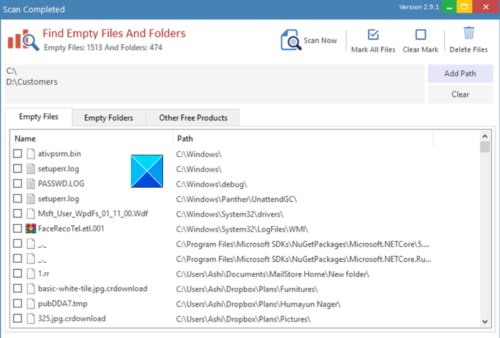
<p style="text-align: justify;">Find Empty Files and Folder quét toàn bộ ổ, phân tích các thư mục trong đó và hiển thị tất cả những thư mục trống nếu tìm thấy. Khi danh sách đã sẵn sàng, hãy nhấn vào nút&nbsp;<strong>Delete</strong>&nbsp;và xem các file được loại bỏ. Các thư mục không thể xóa khỏi công cụ này có thể bao gồm những file ẩn hoặc được kết nối với một chương trình dựa vào chúng. Vì vậy, tốt hơn là không nên xóa. Find Empty Files and Folder cũng cho phép bạn xóa các file 0-byte.</p>

<h3 style="text-align: justify;">2.&nbsp;Remove Empty Directories</h3>

<div style="text-align: justify;"><strong><span style="color:rgb(155, 89, 182);">https://download.com.vn/remove-empty-directories-9410</span></strong></div>

<figure>
<div style="text-align: justify;"><img alt="Remove Empty Directories" data-i="1" data-src="https://st.quantrimang.com/photos/image/2020/10/29/xoa-cac-thu-muc-trong-trong-windows-2.jpg" data-was-processed="true" height="293" src="https://st.quantrimang.com/photos/image/2020/10/29/xoa-cac-thu-muc-trong-trong-windows-2.jpg" width="400" /></div>

<figcaption>
<div style="text-align: justify;">Remove Empty Directories</div>
</figcaption>
</figure>

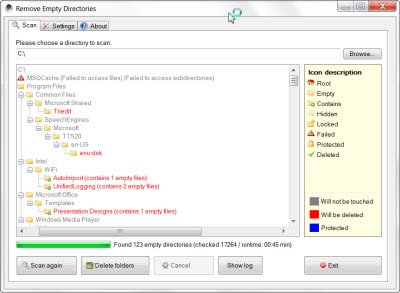
<p style="text-align: justify;">Remove Empty Directories hiển thị các thư mục trống trước khi xóa chúng, hỗ trợ nhiều chế độ xóa (bao gồm đưa vào thùng rác), cho phép lập danh sách trắng và đen các thư mục, bằng cách sử dụng danh sách bộ lọc và có thể phát hiện những thư mục có file trống. Công cụ cho phép bạn bỏ qua các thư mục nhất định và cung cấp nhiều tùy chọn khác, đồng thời cũng xác định các thư mục được bảo vệ.</p>

<p style="text-align: justify;">Remove Empty Directories cho phép bạn tìm và xóa các thư mục trống ngay từ chính menu ngữ cảnh. Điều này khá thuận tiện. Bạn phải mở phần&nbsp;<strong>Settings</strong>&nbsp;và nhấp vào nút&nbsp;<strong>Integrate</strong>&nbsp;để tích hợp mục nhập của chương trình vào menu ngữ cảnh của&nbsp;<strong>Explorer.</strong></p>

<div style="text-align: justify;">&nbsp;</div>

<h3 style="text-align: justify;">3.&nbsp;Empty Folder Cleaner</h3>

<div style="text-align: justify;"><strong><span style="color:rgb(192, 57, 43);">https://download.com.vn/empty-folder-cleaner-49961</span></strong></div>

<figure>
<div style="text-align: justify;"><img alt="Empty Folder Cleaner" data-i="2" data-src="https://st.quantrimang.com/photos/image/2020/10/29/xoa-cac-thu-muc-trong-trong-windows-3.png" data-was-processed="true" height="268" src="https://st.quantrimang.com/photos/image/2020/10/29/xoa-cac-thu-muc-trong-trong-windows-3.png" width="500" /></div>

<figcaption>
<div style="text-align: justify;">Empty Folder Cleaner</div>
</figcaption>
</figure>

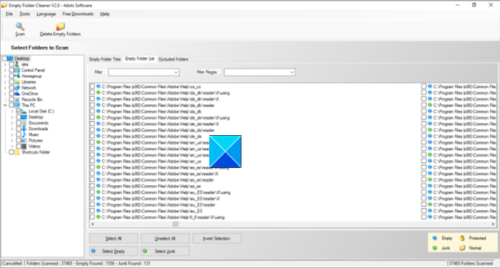
<p style="text-align: justify;">Công cụ miễn phí này cho phép bạn xóa vĩnh viễn các thư mục trống, đưa chúng vào thùng rác hoặc lưu trữ dưới dạng bản sao lưu, được nén trong một file zip. Hơn nữa, nếu được yêu cầu, có thể hoàn tác mỗi lần xóa.</p>

<h3 style="text-align: justify;">4.&nbsp;Empty Folder Nuker</h3>

<div style="text-align: justify;"><strong><span style="color:rgb(192, 57, 43);">https://download.com.vn/empty-folder-nuker-5089</span></strong></div>

<figure>
<div style="text-align: justify;"><img alt="Empty Folder Nuker" data-i="3" data-src="https://st.quantrimang.com/photos/image/2020/10/29/xoa-cac-thu-muc-trong-trong-windows-4.jpg" data-was-processed="true" height="338" src="https://st.quantrimang.com/photos/image/2020/10/29/xoa-cac-thu-muc-trong-trong-windows-4.jpg" width="400" /></div>

<figcaption>
<div style="text-align: justify;">Empty Folder Nuker</div>
</figcaption>
</figure>

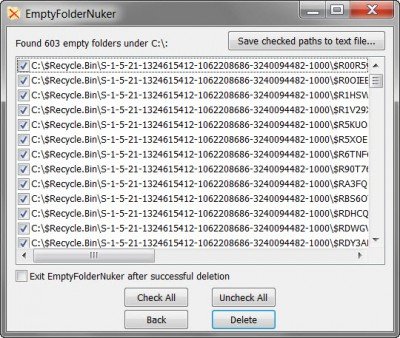
<p style="text-align: justify;">Đây là một&nbsp;ứng dụng portable&nbsp;có thể tìm và xóa tất cả mọi thư mục trống (với các thư mục con trống), bắt đầu từ một thư mục cơ sở mà bạn chọn. Nó cho phép bạn đưa các file vào&nbsp;Recycle Bin&nbsp;nếu có sẵn. Một điểm cộng ở đây là Empty Folder Nuker cho phép tích hợp Shell, do đó cho phép bạn nhấp chuột phải vào bất kỳ thư mục nào trong Windows Explorer và tìm các thư mục trống trong đó.</p>

<h3 style="text-align: justify;">5.&nbsp;FMS Empty Folder Remover</h3>

<div style="text-align: justify;"><strong><span style="color:rgb(41, 128, 185);">https://download.com.vn/fms-empty-folder-remover-39274</span></strong></div>

<figure>
<div style="text-align: justify;"><img alt="FMS Empty Folder Remover" data-i="4" data-src="https://st.quantrimang.com/photos/image/2020/10/29/xoa-cac-thu-muc-trong-trong-windows-5.jpg" data-was-processed="true" height="324" src="https://st.quantrimang.com/photos/image/2020/10/29/xoa-cac-thu-muc-trong-trong-windows-5.jpg" width="400" /></div>

<figcaption>
<div style="text-align: justify;">FMS Empty Folder Remover</div>
</figcaption>
</figure>

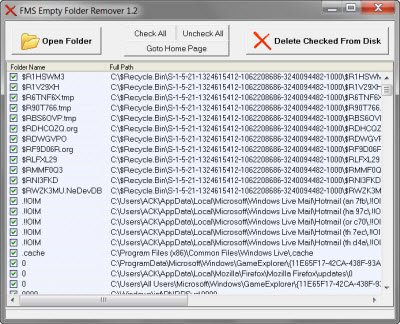
<p style="text-align: justify;">Đây là một công cụ phần mềm miễn phí khác vô cùng hữu ích, cho phép bạn dễ dàng loại bỏ các thư mục không mong muốn. Công cụ gọn nhẹ này quét một thư mục nguồn và xác định ngay lập tức các thư mục trống bên trong.</p>

<div style="text-align: justify;">&nbsp;</div>

<h3 style="text-align: justify;">6.&nbsp;Fast Empty Folder Finder</h3>

<div style="text-align: justify;"><strong><span style="color:rgb(192, 57, 43);">https://download.com.vn/fast-empty-folder-finder-0-7-4-112-16168</span></strong></div>

<figure>
<div style="text-align: justify;"><img alt="Fast Empty Folder Finder" data-i="5" data-src="https://st.quantrimang.com/photos/image/2020/10/29/xoa-cac-thu-muc-trong-trong-windows-6.jpg" data-was-processed="true" height="260" src="https://st.quantrimang.com/photos/image/2020/10/29/xoa-cac-thu-muc-trong-trong-windows-6.jpg" width="400" /></div>

<figcaption>
<div style="text-align: justify;">Fast Empty Folder Finder</div>
</figcaption>
</figure>

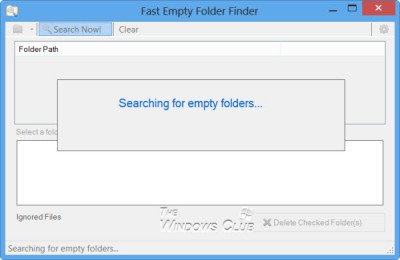
<p style="text-align: justify;">Fast Empty Folder Finder nhanh chóng tìm thấy các thư mục trống, hiển thị cho bạn bản xem trước nội dung và cung cấp cho bạn tùy chọn đưa những thư mục đó vào Recycle Bin hoặc xóa trực tiếp.</p>

<p style="text-align: justify;">Nếu cẩn thận, trước tiên, bạn nên&nbsp;dọn sạch Recycle Bin&nbsp;của mình,&nbsp;tạo điểm khôi phục hệ thống&nbsp;và sau đó, nếu phần mềm cho phép bạn, hãy chọn đưa các thư mục trống vào Recycle Bin, thay vì trực tiếp xóa chúng.</p>
		</div>
				<div id="author">
						<p>
				<strong>Nguồn tin:</strong>
				Quantrimang.com
			</p>
		</div>
	</div>
	<div id="footer" class="clearfix">
		<div id="url">
			<strong>URL của bản tin này: </strong><a href="https://www.nguoicodonvn2008.info/vi/news/savefile/phan-mem/6-phan-mem-mien-phi-de-xoa-cac-thu-muc-trong-trong-windows-10-2978.html" title="6 phần mềm miễn phí để xóa các thư mục trống trong Windows 10">https://www.nguoicodonvn2008.info/vi/news/savefile/phan-mem/6-phan-mem-mien-phi-de-xoa-cac-thu-muc-trong-trong-windows-10-2978.html</a>

		</div>
		<div class="clear"></div>
		<div class="copyright">
			&copy; .&#x3A; Nguoicodonvn2008.info - Cõi lòng người cô đơn &#x3A;.
		</div>
		<div id="contact">
			<a href="mailto:admin@nguoicodonvn2008.info">admin@nguoicodonvn2008.info</a>
		</div>
	</div>
</div>
        <div id="timeoutsess" class="chromeframe">
            Bạn đã không sử dụng Site, <a onclick="timeoutsesscancel();" href="https://www.nguoicodonvn2008.info/#">Bấm vào đây để duy trì trạng thái đăng nhập</a>. Thời gian chờ: <span id="secField"> 60 </span> giây
        </div>
        <div id="openidResult" class="nv-alert" style="display:none"></div>
        <div id="openidBt" data-result="" data-redirect=""></div>
		</script>
		<div class="car-top">
  <span><img src="https://www.nguoicodonvn2008.info/themes/default/images/car.png" alt=""></span>
</div>
<script src="https://www.nguoicodonvn2008.info/assets/js/jquery/jquery.min.js"></script>
<script>var nv_base_siteurl="/",nv_lang_data="vi",nv_lang_interface="vi",nv_name_variable="nv",nv_fc_variable="op",nv_lang_variable="language",nv_module_name="news",nv_func_name="savefile",nv_is_user=0, nv_my_ofs=-4,nv_my_abbr="EDT",nv_cookie_prefix="nv4c_e856T",nv_check_pass_mstime=1738000,nv_area_admin=0,nv_safemode=0,theme_responsive=0,nv_recaptcha_ver=2,nv_recaptcha_sitekey="",nv_recaptcha_type="image",XSSsanitize=1;</script>
<script src="https://www.nguoicodonvn2008.info/assets/js/language/vi.js"></script>
<script src="https://www.nguoicodonvn2008.info/assets/js/DOMPurify/purify3.js"></script>
<script src="https://www.nguoicodonvn2008.info/assets/js/global.js"></script>
<script src="https://www.nguoicodonvn2008.info/assets/js/site.js"></script>
<script src="https://www.nguoicodonvn2008.info/themes/default/js/news.js"></script>
<script src="https://www.nguoicodonvn2008.info/themes/default/js/main.js"></script>
<script src="https://www.nguoicodonvn2008.info/themes/default/js/custom.js"></script>
<script type="application/ld+json">
        {
            "@context": "https://schema.org",
            "@type": "Organization",
            "url": "https://www.nguoicodonvn2008.info",
            "logo": "https://www.nguoicodonvn2008.info/uploads/angel.gif"
        }
        </script>
<script src="https://www.nguoicodonvn2008.info/themes/default/js/bootstrap.min.js"></script>
<script type="text/javascript">
var $scrolltop = $('.car-top');
$scrolltop.on('click', function () {
    $('html,body').animate({
        scrollTop: 0
    }, 800);
    $(this).addClass("car-run");
    setTimeout(function(){ $scrolltop.removeClass('car-run');}, 1000);
    return false;
});
$(window).on('scroll', function ()
{ 
    if($(window).scrollTop() >= 200)
    {
        $scrolltop.addClass("show");
        $scrolltop.addClass("car-down");
    }
    else
    {
       $scrolltop.removeClass("show");
       setTimeout(function(){ $scrolltop.removeClass('car-down');}, 300);
    }
});
</script>
</body>
</html>