<!DOCTYPE html>
    <html lang="vi" xmlns="http://www.w3.org/1999/xhtml" prefix="og: http://ogp.me/ns#">
    <head>
<title>Xóa file khỏi thư mục Windows&#x005C;Installer trong Windows 10 có an toàn không?</title>
<meta name="description" content="Xóa file khỏi thư mục Windows&#x005C;Installer trong Windows 10 có an toàn không? - Savefile - Tin Tức -...">
<meta name="author" content=".: Nguoicodonvn2008.info - Cõi lòng người cô đơn :.">
<meta name="copyright" content=".: Nguoicodonvn2008.info - Cõi lòng người cô đơn :. [admin@nguoicodonvn2008.info]">
<meta name="robots" content="index, archive, follow, noodp">
<meta name="googlebot" content="index,archive,follow,noodp">
<meta name="msnbot" content="all,index,follow">
<meta name="generator" content="NukeViet v4.5">
<meta http-equiv="Content-Type" content="text/html; charset=utf-8">
<meta property="og:title" content="Xóa file khỏi thư mục Windows&#x005C;Installer trong Windows 10 có an toàn không?">
<meta property="og:type" content="website">
<meta property="og:description" content="Savefile - Tin Tức -...">
<meta property="og:site_name" content=".&#x3A; Nguoicodonvn2008.info - Cõi lòng người cô đơn &#x3A;.">
<meta property="og:url" content="https://www.nguoicodonvn2008.info/vi/news/savefile/kien-thuc-may-tinh/xoa-file-khoi-thu-muc-windows-installer-trong-windows-10-co-an-toan-khong-1843.html">
<link rel="shortcut icon" href="https://www.nguoicodonvn2008.info/favicon.ico">
<link rel="canonical" href="https://www.nguoicodonvn2008.info/vi/news/savefile/kien-thuc-may-tinh/xoa-file-khoi-thu-muc-windows-installer-trong-windows-10-co-an-toan-khong-1843.html">
<link rel="alternate" href="https://www.nguoicodonvn2008.info/vi/news/rss/" title="Tin Tức" type="application/rss+xml">
<link rel="alternate" href="https://www.nguoicodonvn2008.info/vi/news/rss/karaoke-dual/" title="Tin Tức - Karaoke Dual" type="application/rss+xml">
<link rel="alternate" href="https://www.nguoicodonvn2008.info/vi/news/rss/nhac-tre/" title="Tin Tức - Nhạc trẻ" type="application/rss+xml">
<link rel="alternate" href="https://www.nguoicodonvn2008.info/vi/news/rss/tru-tinh/" title="Tin Tức - Trữ tình" type="application/rss+xml">
<link rel="alternate" href="https://www.nguoicodonvn2008.info/vi/news/rss/nuoc-ngoai/" title="Tin Tức - Nước ngoài" type="application/rss+xml">
<link rel="alternate" href="https://www.nguoicodonvn2008.info/vi/news/rss/remix/" title="Tin Tức - Remix" type="application/rss+xml">
<link rel="alternate" href="https://www.nguoicodonvn2008.info/vi/news/rss/tam-su-tinh-yeu/" title="Tin Tức - Tâm sự tình yêu" type="application/rss+xml">
<link rel="alternate" href="https://www.nguoicodonvn2008.info/vi/news/rss/tho-suu-tam/" title="Tin Tức - Thơ sưu tầm" type="application/rss+xml">
<link rel="alternate" href="https://www.nguoicodonvn2008.info/vi/news/rss/cuoc-song/" title="Tin Tức - Cuộc sống" type="application/rss+xml">
<link rel="alternate" href="https://www.nguoicodonvn2008.info/vi/news/rss/phan-mem/" title="Tin Tức - Phần mềm" type="application/rss+xml">
<link rel="alternate" href="https://www.nguoicodonvn2008.info/vi/news/rss/kien-thuc-may-tinh/" title="Tin Tức - Kiến thức máy tính" type="application/rss+xml">
<link rel="alternate" href="https://www.nguoicodonvn2008.info/vi/news/rss/hoc-tap/" title="Tin Tức - Học tập" type="application/rss+xml">
<link rel="alternate" href="https://www.nguoicodonvn2008.info/vi/news/rss/tai-lieu/" title="Tin Tức - Tài liệu" type="application/rss+xml">
<link rel="alternate" href="https://www.nguoicodonvn2008.info/vi/news/rss/de-thi/" title="Tin Tức - Đề thi" type="application/rss+xml">
<link rel="preload" as="style" href="https://www.nguoicodonvn2008.info/assets/css/font-awesome.min.css" type="text/css">
<link rel="preload" as="style" href="https://www.nguoicodonvn2008.info/themes/default/css/bootstrap.non-responsive.css" type="text/css">
<link rel="preload" as="style" href="https://www.nguoicodonvn2008.info/themes/default/css/style.css" type="text/css">
<link rel="preload" as="style" href="https://www.nguoicodonvn2008.info/themes/default/css/style.non-responsive.css" type="text/css">
<link rel="preload" as="style" href="https://www.nguoicodonvn2008.info/themes/default/css/news.css" type="text/css">
<link rel="preload" as="style" href="https://www.nguoicodonvn2008.info/themes/default/css/custom.css" type="text/css">
<link rel="preload" as="script" href="https://www.nguoicodonvn2008.info/assets/js/jquery/jquery.min.js" type="text/javascript">
<link rel="preload" as="script" href="https://www.nguoicodonvn2008.info/assets/js/language/vi.js" type="text/javascript">
<link rel="preload" as="script" href="https://www.nguoicodonvn2008.info/assets/js/DOMPurify/purify3.js" type="text/javascript">
<link rel="preload" as="script" href="https://www.nguoicodonvn2008.info/assets/js/global.js" type="text/javascript">
<link rel="preload" as="script" href="https://www.nguoicodonvn2008.info/assets/js/site.js" type="text/javascript">
<link rel="preload" as="script" href="https://www.nguoicodonvn2008.info/themes/default/js/news.js" type="text/javascript">
<link rel="preload" as="script" href="https://www.nguoicodonvn2008.info/themes/default/js/main.js" type="text/javascript">
<link rel="preload" as="script" href="https://www.nguoicodonvn2008.info/themes/default/js/custom.js" type="text/javascript">
<link rel="preload" as="script" href="https://www.nguoicodonvn2008.info/themes/default/js/bootstrap.min.js" type="text/javascript">
<link rel="stylesheet" href="https://www.nguoicodonvn2008.info/assets/css/font-awesome.min.css">
<link rel="stylesheet" href="https://www.nguoicodonvn2008.info/themes/default/css/bootstrap.non-responsive.css">
<link rel="stylesheet" href="https://www.nguoicodonvn2008.info/themes/default/css/style.css">
<link rel="stylesheet" href="https://www.nguoicodonvn2008.info/themes/default/css/style.non-responsive.css">
<link rel="StyleSheet" href="https://www.nguoicodonvn2008.info/themes/default/css/news.css">
<link rel="stylesheet" href="https://www.nguoicodonvn2008.info/themes/default/css/custom.css">
<style type="text/css">
	body{background: #fff;}
</style>
    </head>
    <body>
<div id="print">
	<div id="hd_print">
		<h2 class="pull-left">.&#x3A; Nguoicodonvn2008.info - Cõi lòng người cô đơn &#x3A;.</h2>
		<p class="pull-right"><a title=".&#x3A; Nguoicodonvn2008.info - Cõi lòng người cô đơn &#x3A;." href="https://www.nguoicodonvn2008.info/">https://www.nguoicodonvn2008.info</a></p>
	</div>
	<div class="clear"></div>
	<hr />
	<div id="content">
		<h1>Xóa file khỏi thư mục Windows&#x005C;Installer trong Windows 10 có an toàn không?</h1>
		<ul class="list-inline">
			<li>Thứ bảy - 14/03/2020 01:08</li>
			<li class="hidden-print txtrequired"><em class="fa fa-print">&nbsp;</em><a title="In ra" href="javascript:;" onclick="window.print()">In ra</a></li>
			<li class="hidden-print txtrequired"><em class="fa fa-power-off">&nbsp;</em><a title="Đóng cửa sổ này" href="javascript:;" onclick="window.close()">Đóng cửa sổ này</a></li>
		</ul>
		<div class="clear"></div>
		<div id="hometext">
		</div>
				<div class="imghome">
			<img alt="Xóa file khỏi thư mục Windows&#x005C;Installer trong Windows 10 có an toàn không?" src="https://st.quantrimang.com/photos/image/2020/03/14/xoa-file-khoi-thu-muc-windows-installer-1.jpg" width="460" class="img-thumbnail" />
		</div>
		<div class="clear"></div>
		<div id="bodytext" class="clearfix">
			<p style="text-align: justify;">Nếu đang đọc bài viết này, rất có thể, bạn muốn xóa thư mục&nbsp;<strong>Windows\Installer</strong>&nbsp;khổng lồ, nhưng không chắc chắn liệu có an toàn để xóa nó không.</p>

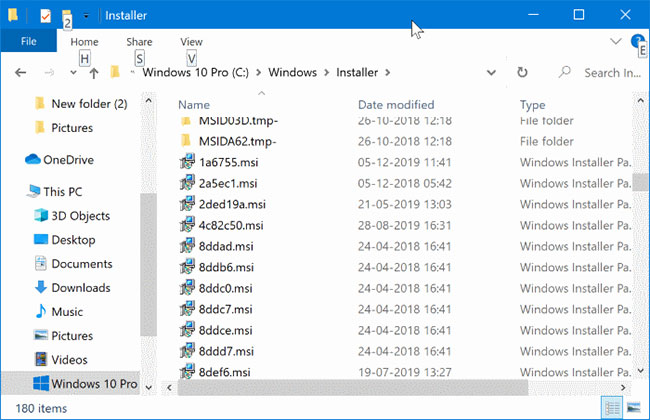
<p style="text-align: justify;">Thư mục&nbsp;<strong>Installer</strong>&nbsp;nằm trong&nbsp;<strong>C:\Windows</strong>&nbsp;là thư mục hệ thống ẩn và không thể nhìn thấy mà không cần cấu hình File Explorer để hiển thị các file hệ điều hành được bảo vệ, cũng như những file/thư mục ẩn. Tùy thuộc vào số lượng chương trình được cài đặt trên PC, thư mục&nbsp;<strong>Windows\Installer</strong>&nbsp;có thể tiêu tốn một vài MB đến vài GB dung lượng ổ đĩa.</p>

<h2 style="text-align: justify;">Tại sao thư mục Windows\Installer lại được sử dụng?</h2>

<figure>
<div style="text-align: justify;"><img alt="Thư mục Windows\Installer" data-i="0" data-src="https://st.quantrimang.com/photos/image/2020/03/14/xoa-file-khoi-thu-muc-windows-installer-1.jpg" data-was-processed="true" height="420" src="https://st.quantrimang.com/photos/image/2020/03/14/xoa-file-khoi-thu-muc-windows-installer-1.jpg" width="650" /></div>

<figcaption>
<div style="text-align: justify;">Thư mục Windows\Installer</div>
</figcaption>
</figure>

<p style="text-align: justify;">Windows 10&nbsp;sử dụng thư mục&nbsp;<strong>Windows\Installer</strong>&nbsp;để lưu các file dữ liệu của trình cài đặt (.msi) và những file patch (.msp) cho các ứng dụng dựa trên service Windows Installer. Kích thước của thư mục tùy thuộc vào số lượng ứng dụng được cài đặt trên PC, sử dụng service Windows Installer.</p>

<h2 style="text-align: justify;">Xóa các file khỏi thư mục Windows\Installer có an toàn không?</h2>

<p style="text-align: justify;">Không. Bạn không nên xóa các file khỏi thư mục&nbsp;<strong>Windows\Installer</strong>&nbsp;vì các file này là yêu cầu bắt buộc để sửa chữa, cập nhật và gỡ cài đặt các ứng dụng.</p>

<div style="text-align: justify;">&nbsp;</div>

<h2 style="text-align: justify;">Điều gì xảy ra nếu bạn xóa các file khỏi thư mục Windows\Installer?</h2>

<p style="text-align: justify;">Nếu xóa các file khỏi thư mục&nbsp;<strong>Windows\Installer</strong>, bạn có thể gặp lỗi khi cố cập nhật, sửa chữa hoặc gỡ cài đặt các chương trình có file cài đặt mà bạn đã xóa. Do lỗi, bạn không thể gỡ cài đặt hoàn toàn một số chương trình.</p>

<p style="text-align: justify;">Trong khi đó, nếu bạn đang tìm cách giải phóng một số dung lượng ổ đĩa bằng cách xóa các file khỏi thư mục&nbsp;<strong>Windows\Installer</strong>,</p>

<h2 style="text-align: justify;">Làm cách nào để xóa các orphaned file khỏi Windows\Installer?</h2>

<p style="text-align: justify;"><strong>CẢNH BÁO</strong>: Bạn chỉ nên sử dụng chương trình này sau khi sao lưu các file từ thư mục&nbsp;<strong>Windows\Installer.</strong>&nbsp;Bài viết không chịu trách nhiệm cho bất kỳ vấn đề nào bạn có thể gặp phải sau khi xóa các file khỏi thư mục&nbsp;<strong>Windows\Installer.</strong></p>

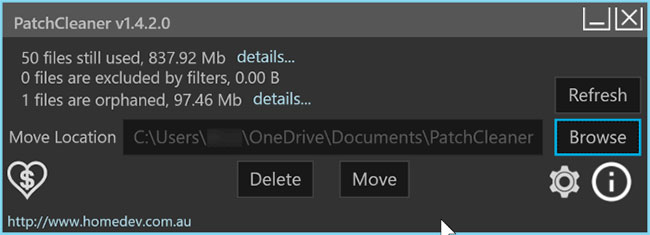
<p style="text-align: justify;"><strong>PatchCleaner</strong>&nbsp;là một tiện ích miễn phí được thiết kế để giúp bạn xóa các orphaned file (file hỗ trợ không còn có tác dụng nữa, do ứng dụng &quot;cha&quot; mà nó liên kết đã bị di chuyển hoặc gỡ cài đặt) một cách an toàn khỏi thư mục&nbsp;<strong>Windows\Installer.</strong>&nbsp;Nó giúp bạn xóa các trình cài đặt và file patch bị bỏ lại bởi chương trình.</p>

<figure>
<div style="text-align: justify;"><img alt="PatchCleaner là một tiện ích miễn phí được thiết kế để giúp bạn xóa các orphaned file" data-i="1" data-src="https://st.quantrimang.com/photos/image/2020/03/14/xoa-file-khoi-thu-muc-windows-installer-2.jpg" data-was-processed="true" height="235" src="https://st.quantrimang.com/photos/image/2020/03/14/xoa-file-khoi-thu-muc-windows-installer-2.jpg" width="650" /></div>

<figcaption>
<div style="text-align: justify;">PatchCleaner là một tiện ích miễn phí được thiết kế để giúp bạn xóa các orphaned file</div>
</figcaption>
</figure>

<p style="text-align: justify;">Chương trình cho phép bạn di chuyển các file từ thư mục&nbsp;<strong>Windows\Installer</strong>&nbsp;sang vị trí khác hoặc xóa hoàn toàn chúng.</p>

<p style="text-align: justify;">Chương trình được cập nhật lần cuối vào năm 2016, nhưng nó cũng hoạt động với phiên bản mới nhất (phiên bản 1909) của Windows 10.</p>

<ul>
	<li style="text-align: justify;">Tải PatchCleaner&nbsp;:&nbsp;<strong><span style="color:rgb(192, 57, 43);">https://www.homedev.com.au/free/patchcleaner</span></strong></li>
</ul>
		</div>
				<div id="author">
						<p>
				<strong>Nguồn tin:</strong>
				Quantrimang.com
			</p>
		</div>
	</div>
	<div id="footer" class="clearfix">
		<div id="url">
			<strong>URL của bản tin này: </strong><a href="https://www.nguoicodonvn2008.info/vi/news/savefile/kien-thuc-may-tinh/xoa-file-khoi-thu-muc-windows-installer-trong-windows-10-co-an-toan-khong-1843.html" title="Xóa file khỏi thư mục Windows&#x005C;Installer trong Windows 10 có an toàn không?">https://www.nguoicodonvn2008.info/vi/news/savefile/kien-thuc-may-tinh/xoa-file-khoi-thu-muc-windows-installer-trong-windows-10-co-an-toan-khong-1843.html</a>

		</div>
		<div class="clear"></div>
		<div class="copyright">
			&copy; .&#x3A; Nguoicodonvn2008.info - Cõi lòng người cô đơn &#x3A;.
		</div>
		<div id="contact">
			<a href="mailto:admin@nguoicodonvn2008.info">admin@nguoicodonvn2008.info</a>
		</div>
	</div>
</div>
        <div id="timeoutsess" class="chromeframe">
            Bạn đã không sử dụng Site, <a onclick="timeoutsesscancel();" href="https://www.nguoicodonvn2008.info/#">Bấm vào đây để duy trì trạng thái đăng nhập</a>. Thời gian chờ: <span id="secField"> 60 </span> giây
        </div>
        <div id="openidResult" class="nv-alert" style="display:none"></div>
        <div id="openidBt" data-result="" data-redirect=""></div>
		</script>
		<div class="car-top">
  <span><img src="https://www.nguoicodonvn2008.info/themes/default/images/car.png" alt=""></span>
</div>
<script src="https://www.nguoicodonvn2008.info/assets/js/jquery/jquery.min.js"></script>
<script>var nv_base_siteurl="/",nv_lang_data="vi",nv_lang_interface="vi",nv_name_variable="nv",nv_fc_variable="op",nv_lang_variable="language",nv_module_name="news",nv_func_name="savefile",nv_is_user=0, nv_my_ofs=-4,nv_my_abbr="EDT",nv_cookie_prefix="nv4c_e856T",nv_check_pass_mstime=1738000,nv_area_admin=0,nv_safemode=0,theme_responsive=0,nv_recaptcha_ver=2,nv_recaptcha_sitekey="",nv_recaptcha_type="image",XSSsanitize=1;</script>
<script src="https://www.nguoicodonvn2008.info/assets/js/language/vi.js"></script>
<script src="https://www.nguoicodonvn2008.info/assets/js/DOMPurify/purify3.js"></script>
<script src="https://www.nguoicodonvn2008.info/assets/js/global.js"></script>
<script src="https://www.nguoicodonvn2008.info/assets/js/site.js"></script>
<script src="https://www.nguoicodonvn2008.info/themes/default/js/news.js"></script>
<script src="https://www.nguoicodonvn2008.info/themes/default/js/main.js"></script>
<script src="https://www.nguoicodonvn2008.info/themes/default/js/custom.js"></script>
<script type="application/ld+json">
        {
            "@context": "https://schema.org",
            "@type": "Organization",
            "url": "https://www.nguoicodonvn2008.info",
            "logo": "https://www.nguoicodonvn2008.info/uploads/angel.gif"
        }
        </script>
<script src="https://www.nguoicodonvn2008.info/themes/default/js/bootstrap.min.js"></script>
<script type="text/javascript">
var $scrolltop = $('.car-top');
$scrolltop.on('click', function () {
    $('html,body').animate({
        scrollTop: 0
    }, 800);
    $(this).addClass("car-run");
    setTimeout(function(){ $scrolltop.removeClass('car-run');}, 1000);
    return false;
});
$(window).on('scroll', function ()
{ 
    if($(window).scrollTop() >= 200)
    {
        $scrolltop.addClass("show");
        $scrolltop.addClass("car-down");
    }
    else
    {
       $scrolltop.removeClass("show");
       setTimeout(function(){ $scrolltop.removeClass('car-down');}, 300);
    }
});
</script>
</body>
</html>