<!DOCTYPE html>
    <html lang="vi" xmlns="http://www.w3.org/1999/xhtml" prefix="og: http://ogp.me/ns#">
    <head>
<title>Word 2019 &#40;Phần 12&#41;&#x3A; In tài liệu</title>
<meta name="description" content="Word 2019 &#40;Phần 12&#41;&#x3A; In tài liệu - Savefile - Tin Tức - https&#x3A;&#x002F;&#x002F;www.nguoicodonvn2008.info&#x002F;vi&#x002F;news&#x002F;savefile&#x002F;kien-thuc-may-tinh&#x002F;word-2019-phan-12-in-tai-lieu-5079.html">
<meta name="author" content=".: Nguoicodonvn2008.info - Cõi lòng người cô đơn :.">
<meta name="copyright" content=".: Nguoicodonvn2008.info - Cõi lòng người cô đơn :. [admin@nguoicodonvn2008.info]">
<meta name="robots" content="index, archive, follow, noodp">
<meta name="googlebot" content="index,archive,follow,noodp">
<meta name="msnbot" content="all,index,follow">
<meta name="generator" content="NukeViet v4.5">
<meta http-equiv="Content-Type" content="text/html; charset=utf-8">
<meta property="og:title" content="Word 2019 &#40;Phần 12&#41;&#x3A; In tài liệu">
<meta property="og:type" content="website">
<meta property="og:description" content="Savefile - Tin Tức - https&#x3A;&#x002F;&#x002F;www.nguoicodonvn2008.info&#x002F;vi&#x002F;news&#x002F;savefile&#x002F;kien-thuc-may-tinh&#x002F;word-2019-phan-12-in-tai-lieu-5079.html">
<meta property="og:site_name" content=".&#x3A; Nguoicodonvn2008.info - Cõi lòng người cô đơn &#x3A;.">
<meta property="og:url" content="https://www.nguoicodonvn2008.info/vi/news/savefile/kien-thuc-may-tinh/word-2019-phan-12-in-tai-lieu-5079.html">
<link rel="shortcut icon" href="https://www.nguoicodonvn2008.info/favicon.ico">
<link rel="canonical" href="https://www.nguoicodonvn2008.info/vi/news/savefile/kien-thuc-may-tinh/word-2019-phan-12-in-tai-lieu-5079.html">
<link rel="alternate" href="https://www.nguoicodonvn2008.info/vi/news/rss/" title="Tin Tức" type="application/rss+xml">
<link rel="alternate" href="https://www.nguoicodonvn2008.info/vi/news/rss/karaoke-dual/" title="Tin Tức - Karaoke Dual" type="application/rss+xml">
<link rel="alternate" href="https://www.nguoicodonvn2008.info/vi/news/rss/nhac-tre/" title="Tin Tức - Nhạc trẻ" type="application/rss+xml">
<link rel="alternate" href="https://www.nguoicodonvn2008.info/vi/news/rss/tru-tinh/" title="Tin Tức - Trữ tình" type="application/rss+xml">
<link rel="alternate" href="https://www.nguoicodonvn2008.info/vi/news/rss/nuoc-ngoai/" title="Tin Tức - Nước ngoài" type="application/rss+xml">
<link rel="alternate" href="https://www.nguoicodonvn2008.info/vi/news/rss/remix/" title="Tin Tức - Remix" type="application/rss+xml">
<link rel="alternate" href="https://www.nguoicodonvn2008.info/vi/news/rss/tam-su-tinh-yeu/" title="Tin Tức - Tâm sự tình yêu" type="application/rss+xml">
<link rel="alternate" href="https://www.nguoicodonvn2008.info/vi/news/rss/tho-suu-tam/" title="Tin Tức - Thơ sưu tầm" type="application/rss+xml">
<link rel="alternate" href="https://www.nguoicodonvn2008.info/vi/news/rss/cuoc-song/" title="Tin Tức - Cuộc sống" type="application/rss+xml">
<link rel="alternate" href="https://www.nguoicodonvn2008.info/vi/news/rss/phan-mem/" title="Tin Tức - Phần mềm" type="application/rss+xml">
<link rel="alternate" href="https://www.nguoicodonvn2008.info/vi/news/rss/kien-thuc-may-tinh/" title="Tin Tức - Kiến thức máy tính" type="application/rss+xml">
<link rel="alternate" href="https://www.nguoicodonvn2008.info/vi/news/rss/hoc-tap/" title="Tin Tức - Học tập" type="application/rss+xml">
<link rel="alternate" href="https://www.nguoicodonvn2008.info/vi/news/rss/tai-lieu/" title="Tin Tức - Tài liệu" type="application/rss+xml">
<link rel="alternate" href="https://www.nguoicodonvn2008.info/vi/news/rss/de-thi/" title="Tin Tức - Đề thi" type="application/rss+xml">
<link rel="preload" as="style" href="https://www.nguoicodonvn2008.info/assets/css/font-awesome.min.css" type="text/css">
<link rel="preload" as="style" href="https://www.nguoicodonvn2008.info/themes/default/css/bootstrap.non-responsive.css" type="text/css">
<link rel="preload" as="style" href="https://www.nguoicodonvn2008.info/themes/default/css/style.css" type="text/css">
<link rel="preload" as="style" href="https://www.nguoicodonvn2008.info/themes/default/css/style.non-responsive.css" type="text/css">
<link rel="preload" as="style" href="https://www.nguoicodonvn2008.info/themes/default/css/news.css" type="text/css">
<link rel="preload" as="style" href="https://www.nguoicodonvn2008.info/themes/default/css/custom.css" type="text/css">
<link rel="preload" as="script" href="https://www.nguoicodonvn2008.info/assets/js/jquery/jquery.min.js" type="text/javascript">
<link rel="preload" as="script" href="https://www.nguoicodonvn2008.info/assets/js/language/vi.js" type="text/javascript">
<link rel="preload" as="script" href="https://www.nguoicodonvn2008.info/assets/js/DOMPurify/purify3.js" type="text/javascript">
<link rel="preload" as="script" href="https://www.nguoicodonvn2008.info/assets/js/global.js" type="text/javascript">
<link rel="preload" as="script" href="https://www.nguoicodonvn2008.info/assets/js/site.js" type="text/javascript">
<link rel="preload" as="script" href="https://www.nguoicodonvn2008.info/themes/default/js/news.js" type="text/javascript">
<link rel="preload" as="script" href="https://www.nguoicodonvn2008.info/themes/default/js/main.js" type="text/javascript">
<link rel="preload" as="script" href="https://www.nguoicodonvn2008.info/themes/default/js/custom.js" type="text/javascript">
<link rel="preload" as="script" href="https://www.nguoicodonvn2008.info/themes/default/js/bootstrap.min.js" type="text/javascript">
<link rel="stylesheet" href="https://www.nguoicodonvn2008.info/assets/css/font-awesome.min.css">
<link rel="stylesheet" href="https://www.nguoicodonvn2008.info/themes/default/css/bootstrap.non-responsive.css">
<link rel="stylesheet" href="https://www.nguoicodonvn2008.info/themes/default/css/style.css">
<link rel="stylesheet" href="https://www.nguoicodonvn2008.info/themes/default/css/style.non-responsive.css">
<link rel="StyleSheet" href="https://www.nguoicodonvn2008.info/themes/default/css/news.css">
<link rel="stylesheet" href="https://www.nguoicodonvn2008.info/themes/default/css/custom.css">
<style type="text/css">
	body{background: #fff;}
</style>
    </head>
    <body>
<div id="print">
	<div id="hd_print">
		<h2 class="pull-left">.&#x3A; Nguoicodonvn2008.info - Cõi lòng người cô đơn &#x3A;.</h2>
		<p class="pull-right"><a title=".&#x3A; Nguoicodonvn2008.info - Cõi lòng người cô đơn &#x3A;." href="https://www.nguoicodonvn2008.info/">https://www.nguoicodonvn2008.info</a></p>
	</div>
	<div class="clear"></div>
	<hr />
	<div id="content">
		<h1>Word 2019 &#40;Phần 12&#41;&#x3A; In tài liệu</h1>
		<ul class="list-inline">
			<li>Thứ hai - 24/01/2022 22:53</li>
			<li class="hidden-print txtrequired"><em class="fa fa-print">&nbsp;</em><a title="In ra" href="javascript:;" onclick="window.print()">In ra</a></li>
			<li class="hidden-print txtrequired"><em class="fa fa-power-off">&nbsp;</em><a title="Đóng cửa sổ này" href="javascript:;" onclick="window.close()">Đóng cửa sổ này</a></li>
		</ul>
		<div class="clear"></div>
		<div id="hometext">
		</div>
				<div class="imghome">
			<img alt="Word 2019 &#40;Phần 12&#41;&#x3A; In tài liệu" src="https://st.quantrimang.com/photos/image/2022/01/25/in-tai-lieu-1.png" width="460" class="img-thumbnail" />
		</div>
		<div class="clear"></div>
		<div id="bodytext" class="clearfix">
			<p>Khi đã tạo xong tài liệu của mình, bạn có thể muốn in nó để xem và chia sẻ công việc của mình ngoại tuyến. Thật dễ dàng để xem trước và in tài liệu trong Word bằng bảng điều khiển&nbsp;<strong>Print.</strong></p>

<h2>Cách truy cập bảng điều khiển Print</h2>

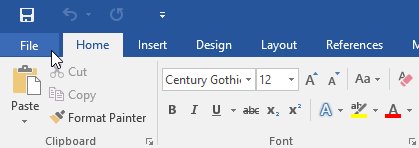
<p>1. Chọn tab&nbsp;<strong>File</strong>.&nbsp;<strong>Backstage view</strong>&nbsp;sẽ xuất hiện.</p>

<figure><img alt="Chọn tab File" data-i="0" data-src="https://st.quantrimang.com/photos/image/2022/01/25/in-tai-lieu-1.png" data-was-processed="true" height="148" src="https://st.quantrimang.com/photos/image/2022/01/25/in-tai-lieu-1.png" width="419" />
<figcaption>Chọn tab File</figcaption>
</figure>

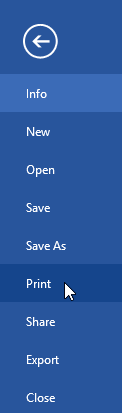
<p>2. Chọn&nbsp;<strong>Print.</strong></p>

<figure><img alt="Chọn Print" data-i="1" data-src="https://st.quantrimang.com/photos/image/2022/01/25/in-tai-lieu-2.png" data-was-processed="true" height="413" src="https://st.quantrimang.com/photos/image/2022/01/25/in-tai-lieu-2.png" width="122" />
<figcaption>Chọn Print</figcaption>
</figure>

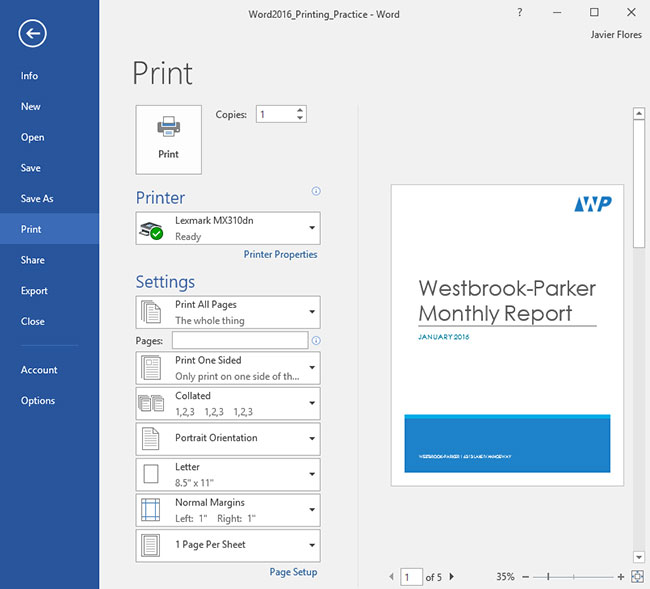
<p>Bảng điều khiển&nbsp;<strong>Print</strong>&nbsp;sẽ xuất hiện.</p>

<figure><img alt="Bảng điều khiển Print" data-i="2" data-src="https://st.quantrimang.com/photos/image/2022/01/25/in-tai-lieu-3.jpg" data-was-processed="true" height="589" src="https://st.quantrimang.com/photos/image/2022/01/25/in-tai-lieu-3.jpg" width="650" />
<figcaption>Bảng điều khiển Print</figcaption>
</figure>

<p><strong>Lưu ý</strong>: Bạn cũng có thể truy cập bảng điều khiển&nbsp;<strong>Print</strong>&nbsp;bằng cách nhấn&nbsp;<strong>Ctrl + P</strong>&nbsp;trên bàn phím.</p>

<h2>Cách in tài liệu</h2>

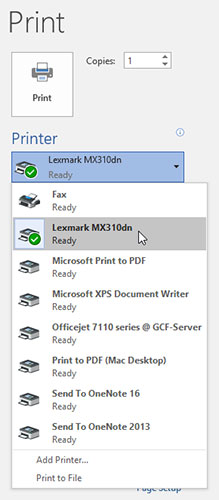
<p>1. Điều hướng đến bảng điều khiển&nbsp;<strong>Print</strong>, sau đó chọn máy in mong muốn.</p>

<figure><img alt="Chọn máy in" data-i="3" data-src="https://st.quantrimang.com/photos/image/2022/01/25/in-tai-lieu-4.jpg" data-was-processed="true" height="500" src="https://st.quantrimang.com/photos/image/2022/01/25/in-tai-lieu-4.jpg" width="219" />
<figcaption>Chọn máy in</figcaption>
</figure>

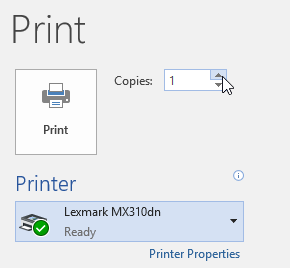
<p>2. Nhập số lượng bản sao bạn muốn in.</p>

<figure><img alt="Nhập số lượng bản in " data-i="4" data-src="https://st.quantrimang.com/photos/image/2022/01/25/in-tai-lieu-5.png" data-was-processed="true" height="268" src="https://st.quantrimang.com/photos/image/2022/01/25/in-tai-lieu-5.png" width="290" />
<figcaption>Nhập số lượng bản in</figcaption>
</figure>

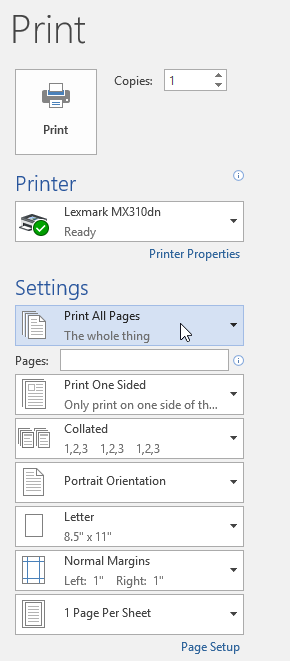
<p>3. Chọn bất kỳ cài đặt bổ sung nào nếu cần.</p>

<figure><img alt="Chọn cài đặt bổ sung" data-i="5" data-src="https://st.quantrimang.com/photos/image/2022/01/25/in-tai-lieu-6.png" data-was-processed="true" height="661" src="https://st.quantrimang.com/photos/image/2022/01/25/in-tai-lieu-6.png" width="290" />
<figcaption>Chọn cài đặt bổ sung</figcaption>
</figure>

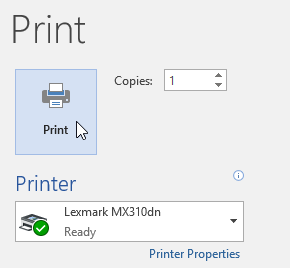
<p>4. Nhấp vào&nbsp;<strong>Print.</strong></p>

<figure><img alt="Nhấp vào Print" data-i="6" data-src="https://st.quantrimang.com/photos/image/2022/01/25/in-tai-lieu-7.png" data-was-processed="true" height="268" src="https://st.quantrimang.com/photos/image/2022/01/25/in-tai-lieu-7.png" width="290" />
<figcaption>Nhấp vào Print</figcaption>
</figure>

<h2>In tùy chỉnh</h2>

<p>Đôi khi bạn có thể thấy không cần thiết phải in toàn bộ tài liệu của mình, trong trường hợp này, chế độ in tùy chỉnh có thể phù hợp hơn với nhu cầu của bạn. Cho dù bạn đang in một số trang riêng lẻ hay nhiều trang,&nbsp;Microsoft Word&nbsp;đều cho phép bạn chỉ định chính xác những trang nào bạn muốn in.</p>

<h3>Cách tùy chỉnh việc in tài liệu</h3>

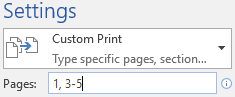
<p>Nếu bạn muốn in các trang hoặc phạm vi trang riêng lẻ, bạn sẽ cần phân tách từng mục nhập bằng dấu phẩy (ví dụ: 1, 3, 5-7 hoặc 10-14).</p>

<p>1. Điều hướng bảng điều khiển&nbsp;<strong>Print.</strong></p>

<p>2. Trong trường&nbsp;<strong>Pages:</strong>, hãy nhập các trang bạn muốn in.</p>

<figure><img alt="Nhập các trang muốn in" data-i="7" data-src="https://st.quantrimang.com/photos/image/2022/01/25/in-tai-lieu-8.png" data-was-processed="true" height="97" src="https://st.quantrimang.com/photos/image/2022/01/25/in-tai-lieu-8.png" width="235" />
<figcaption>Nhập các trang muốn in</figcaption>
</figure>

<p>3. Nhấp vào&nbsp;<strong>Print.</strong></p>

<figure><img alt="Nhấp vào Print" data-i="8" data-src="https://st.quantrimang.com/photos/image/2022/01/25/in-tai-lieu-7.png" data-was-processed="true" height="268" src="https://st.quantrimang.com/photos/image/2022/01/25/in-tai-lieu-7.png" width="290" />
<figcaption>Nhấp vào Print</figcaption>
</figure>

<p>Nếu tài liệu không được in theo cách bạn muốn, bạn có thể cần điều chỉnh một số cài đặt&nbsp;bố cục trang.</p>
		</div>
				<div id="author">
						<p>
				<strong>Nguồn tin:</strong>
				Quantrimang.com
			</p>
		</div>
	</div>
	<div id="footer" class="clearfix">
		<div id="url">
			<strong>URL của bản tin này: </strong><a href="https://www.nguoicodonvn2008.info/vi/news/savefile/kien-thuc-may-tinh/word-2019-phan-12-in-tai-lieu-5079.html" title="Word 2019 &#40;Phần 12&#41;&#x3A; In tài liệu">https://www.nguoicodonvn2008.info/vi/news/savefile/kien-thuc-may-tinh/word-2019-phan-12-in-tai-lieu-5079.html</a>

		</div>
		<div class="clear"></div>
		<div class="copyright">
			&copy; .&#x3A; Nguoicodonvn2008.info - Cõi lòng người cô đơn &#x3A;.
		</div>
		<div id="contact">
			<a href="mailto:admin@nguoicodonvn2008.info">admin@nguoicodonvn2008.info</a>
		</div>
	</div>
</div>
        <div id="timeoutsess" class="chromeframe">
            Bạn đã không sử dụng Site, <a onclick="timeoutsesscancel();" href="https://www.nguoicodonvn2008.info/#">Bấm vào đây để duy trì trạng thái đăng nhập</a>. Thời gian chờ: <span id="secField"> 60 </span> giây
        </div>
        <div id="openidResult" class="nv-alert" style="display:none"></div>
        <div id="openidBt" data-result="" data-redirect=""></div>
		</script>
		<div class="car-top">
  <span><img src="https://www.nguoicodonvn2008.info/themes/default/images/car.png" alt=""></span>
</div>
<script src="https://www.nguoicodonvn2008.info/assets/js/jquery/jquery.min.js"></script>
<script>var nv_base_siteurl="/",nv_lang_data="vi",nv_lang_interface="vi",nv_name_variable="nv",nv_fc_variable="op",nv_lang_variable="language",nv_module_name="news",nv_func_name="savefile",nv_is_user=0, nv_my_ofs=-4,nv_my_abbr="EDT",nv_cookie_prefix="nv4c_e856T",nv_check_pass_mstime=1738000,nv_area_admin=0,nv_safemode=0,theme_responsive=0,nv_recaptcha_ver=2,nv_recaptcha_sitekey="",nv_recaptcha_type="image",XSSsanitize=1;</script>
<script src="https://www.nguoicodonvn2008.info/assets/js/language/vi.js"></script>
<script src="https://www.nguoicodonvn2008.info/assets/js/DOMPurify/purify3.js"></script>
<script src="https://www.nguoicodonvn2008.info/assets/js/global.js"></script>
<script src="https://www.nguoicodonvn2008.info/assets/js/site.js"></script>
<script src="https://www.nguoicodonvn2008.info/themes/default/js/news.js"></script>
<script src="https://www.nguoicodonvn2008.info/themes/default/js/main.js"></script>
<script src="https://www.nguoicodonvn2008.info/themes/default/js/custom.js"></script>
<script type="application/ld+json">
        {
            "@context": "https://schema.org",
            "@type": "Organization",
            "url": "https://www.nguoicodonvn2008.info",
            "logo": "https://www.nguoicodonvn2008.info/uploads/angel.gif"
        }
        </script>
<script src="https://www.nguoicodonvn2008.info/themes/default/js/bootstrap.min.js"></script>
<script type="text/javascript">
var $scrolltop = $('.car-top');
$scrolltop.on('click', function () {
    $('html,body').animate({
        scrollTop: 0
    }, 800);
    $(this).addClass("car-run");
    setTimeout(function(){ $scrolltop.removeClass('car-run');}, 1000);
    return false;
});
$(window).on('scroll', function ()
{ 
    if($(window).scrollTop() >= 200)
    {
        $scrolltop.addClass("show");
        $scrolltop.addClass("car-down");
    }
    else
    {
       $scrolltop.removeClass("show");
       setTimeout(function(){ $scrolltop.removeClass('car-down');}, 300);
    }
});
</script>
</body>
</html>