<!DOCTYPE html>
    <html lang="vi" xmlns="http://www.w3.org/1999/xhtml" prefix="og: http://ogp.me/ns#">
    <head>
<title>Windows Sandbox&#x3A; Ứng dụng bí mật cho phép bạn mở bất cứ thứ gì mà không có rủi ro</title>
<meta name="description" content="Windows Sandbox&#x3A; Ứng dụng bí mật cho phép bạn mở bất cứ thứ gì mà không có rủi ro - Savefile - Tin Tức -...">
<meta name="author" content=".: Nguoicodonvn2008.info - Cõi lòng người cô đơn :.">
<meta name="copyright" content=".: Nguoicodonvn2008.info - Cõi lòng người cô đơn :. [admin@nguoicodonvn2008.info]">
<meta name="robots" content="index, archive, follow, noodp">
<meta name="googlebot" content="index,archive,follow,noodp">
<meta name="msnbot" content="all,index,follow">
<meta name="generator" content="NukeViet v4.5">
<meta http-equiv="Content-Type" content="text/html; charset=utf-8">
<meta property="og:title" content="Windows Sandbox&#x3A; Ứng dụng bí mật cho phép bạn mở bất cứ thứ gì mà không có rủi ro">
<meta property="og:type" content="website">
<meta property="og:description" content="Savefile - Tin Tức -...">
<meta property="og:site_name" content=".&#x3A; Nguoicodonvn2008.info - Cõi lòng người cô đơn &#x3A;.">
<meta property="og:url" content="https://www.nguoicodonvn2008.info/vi/news/savefile/kien-thuc-may-tinh/windows-sandbox-ung-dung-bi-mat-cho-phep-ban-mo-bat-cu-thu-gi-ma-khong-co-rui-ro-10651.html">
<link rel="shortcut icon" href="https://www.nguoicodonvn2008.info/favicon.ico">
<link rel="canonical" href="https://www.nguoicodonvn2008.info/vi/news/savefile/kien-thuc-may-tinh/windows-sandbox-ung-dung-bi-mat-cho-phep-ban-mo-bat-cu-thu-gi-ma-khong-co-rui-ro-10651.html">
<link rel="alternate" href="https://www.nguoicodonvn2008.info/vi/news/rss/" title="Tin Tức" type="application/rss+xml">
<link rel="alternate" href="https://www.nguoicodonvn2008.info/vi/news/rss/karaoke-dual/" title="Tin Tức - Karaoke Dual" type="application/rss+xml">
<link rel="alternate" href="https://www.nguoicodonvn2008.info/vi/news/rss/nhac-tre/" title="Tin Tức - Nhạc trẻ" type="application/rss+xml">
<link rel="alternate" href="https://www.nguoicodonvn2008.info/vi/news/rss/tru-tinh/" title="Tin Tức - Trữ tình" type="application/rss+xml">
<link rel="alternate" href="https://www.nguoicodonvn2008.info/vi/news/rss/nuoc-ngoai/" title="Tin Tức - Nước ngoài" type="application/rss+xml">
<link rel="alternate" href="https://www.nguoicodonvn2008.info/vi/news/rss/remix/" title="Tin Tức - Remix" type="application/rss+xml">
<link rel="alternate" href="https://www.nguoicodonvn2008.info/vi/news/rss/tam-su-tinh-yeu/" title="Tin Tức - Tâm sự tình yêu" type="application/rss+xml">
<link rel="alternate" href="https://www.nguoicodonvn2008.info/vi/news/rss/tho-suu-tam/" title="Tin Tức - Thơ sưu tầm" type="application/rss+xml">
<link rel="alternate" href="https://www.nguoicodonvn2008.info/vi/news/rss/cuoc-song/" title="Tin Tức - Cuộc sống" type="application/rss+xml">
<link rel="alternate" href="https://www.nguoicodonvn2008.info/vi/news/rss/phan-mem/" title="Tin Tức - Phần mềm" type="application/rss+xml">
<link rel="alternate" href="https://www.nguoicodonvn2008.info/vi/news/rss/kien-thuc-may-tinh/" title="Tin Tức - Kiến thức máy tính" type="application/rss+xml">
<link rel="alternate" href="https://www.nguoicodonvn2008.info/vi/news/rss/hoc-tap/" title="Tin Tức - Học tập" type="application/rss+xml">
<link rel="alternate" href="https://www.nguoicodonvn2008.info/vi/news/rss/tai-lieu/" title="Tin Tức - Tài liệu" type="application/rss+xml">
<link rel="alternate" href="https://www.nguoicodonvn2008.info/vi/news/rss/de-thi/" title="Tin Tức - Đề thi" type="application/rss+xml">
<link rel="preload" as="style" href="https://www.nguoicodonvn2008.info/assets/css/font-awesome.min.css" type="text/css">
<link rel="preload" as="style" href="https://www.nguoicodonvn2008.info/themes/default/css/bootstrap.non-responsive.css" type="text/css">
<link rel="preload" as="style" href="https://www.nguoicodonvn2008.info/themes/default/css/style.css" type="text/css">
<link rel="preload" as="style" href="https://www.nguoicodonvn2008.info/themes/default/css/style.non-responsive.css" type="text/css">
<link rel="preload" as="style" href="https://www.nguoicodonvn2008.info/themes/default/css/news.css" type="text/css">
<link rel="preload" as="style" href="https://www.nguoicodonvn2008.info/themes/default/css/custom.css" type="text/css">
<link rel="preload" as="script" href="https://www.nguoicodonvn2008.info/assets/js/jquery/jquery.min.js" type="text/javascript">
<link rel="preload" as="script" href="https://www.nguoicodonvn2008.info/assets/js/language/vi.js" type="text/javascript">
<link rel="preload" as="script" href="https://www.nguoicodonvn2008.info/assets/js/DOMPurify/purify3.js" type="text/javascript">
<link rel="preload" as="script" href="https://www.nguoicodonvn2008.info/assets/js/global.js" type="text/javascript">
<link rel="preload" as="script" href="https://www.nguoicodonvn2008.info/assets/js/site.js" type="text/javascript">
<link rel="preload" as="script" href="https://www.nguoicodonvn2008.info/themes/default/js/news.js" type="text/javascript">
<link rel="preload" as="script" href="https://www.nguoicodonvn2008.info/themes/default/js/main.js" type="text/javascript">
<link rel="preload" as="script" href="https://www.nguoicodonvn2008.info/themes/default/js/custom.js" type="text/javascript">
<link rel="preload" as="script" href="https://www.nguoicodonvn2008.info/themes/default/js/bootstrap.min.js" type="text/javascript">
<link rel="stylesheet" href="https://www.nguoicodonvn2008.info/assets/css/font-awesome.min.css">
<link rel="stylesheet" href="https://www.nguoicodonvn2008.info/themes/default/css/bootstrap.non-responsive.css">
<link rel="stylesheet" href="https://www.nguoicodonvn2008.info/themes/default/css/style.css">
<link rel="stylesheet" href="https://www.nguoicodonvn2008.info/themes/default/css/style.non-responsive.css">
<link rel="StyleSheet" href="https://www.nguoicodonvn2008.info/themes/default/css/news.css">
<link rel="stylesheet" href="https://www.nguoicodonvn2008.info/themes/default/css/custom.css">
<style type="text/css">
	body{background: #fff;}
</style>
    </head>
    <body>
<div id="print">
	<div id="hd_print">
		<h2 class="pull-left">.&#x3A; Nguoicodonvn2008.info - Cõi lòng người cô đơn &#x3A;.</h2>
		<p class="pull-right"><a title=".&#x3A; Nguoicodonvn2008.info - Cõi lòng người cô đơn &#x3A;." href="https://www.nguoicodonvn2008.info/">https://www.nguoicodonvn2008.info</a></p>
	</div>
	<div class="clear"></div>
	<hr />
	<div id="content">
		<h1>Windows Sandbox&#x3A; Ứng dụng bí mật cho phép bạn mở bất cứ thứ gì mà không có rủi ro</h1>
		<ul class="list-inline">
			<li>Thứ tư - 25/06/2025 23:22</li>
			<li class="hidden-print txtrequired"><em class="fa fa-print">&nbsp;</em><a title="In ra" href="javascript:;" onclick="window.print()">In ra</a></li>
			<li class="hidden-print txtrequired"><em class="fa fa-power-off">&nbsp;</em><a title="Đóng cửa sổ này" href="javascript:;" onclick="window.close()">Đóng cửa sổ này</a></li>
		</ul>
		<div class="clear"></div>
		<div id="hometext">
		</div>
				<div class="imghome">
			<img alt="Windows Sandbox&#x3A; Ứng dụng bí mật cho phép bạn mở bất cứ thứ gì mà không có rủi ro" src="https://st.quantrimang.com/photos/image/2025/06/25/windows-sandbox-mo-bat-cu-gi-khong-co-rui-ro-6.jpg" width="460" class="img-thumbnail" />
		</div>
		<div class="clear"></div>
		<div id="bodytext" class="clearfix">
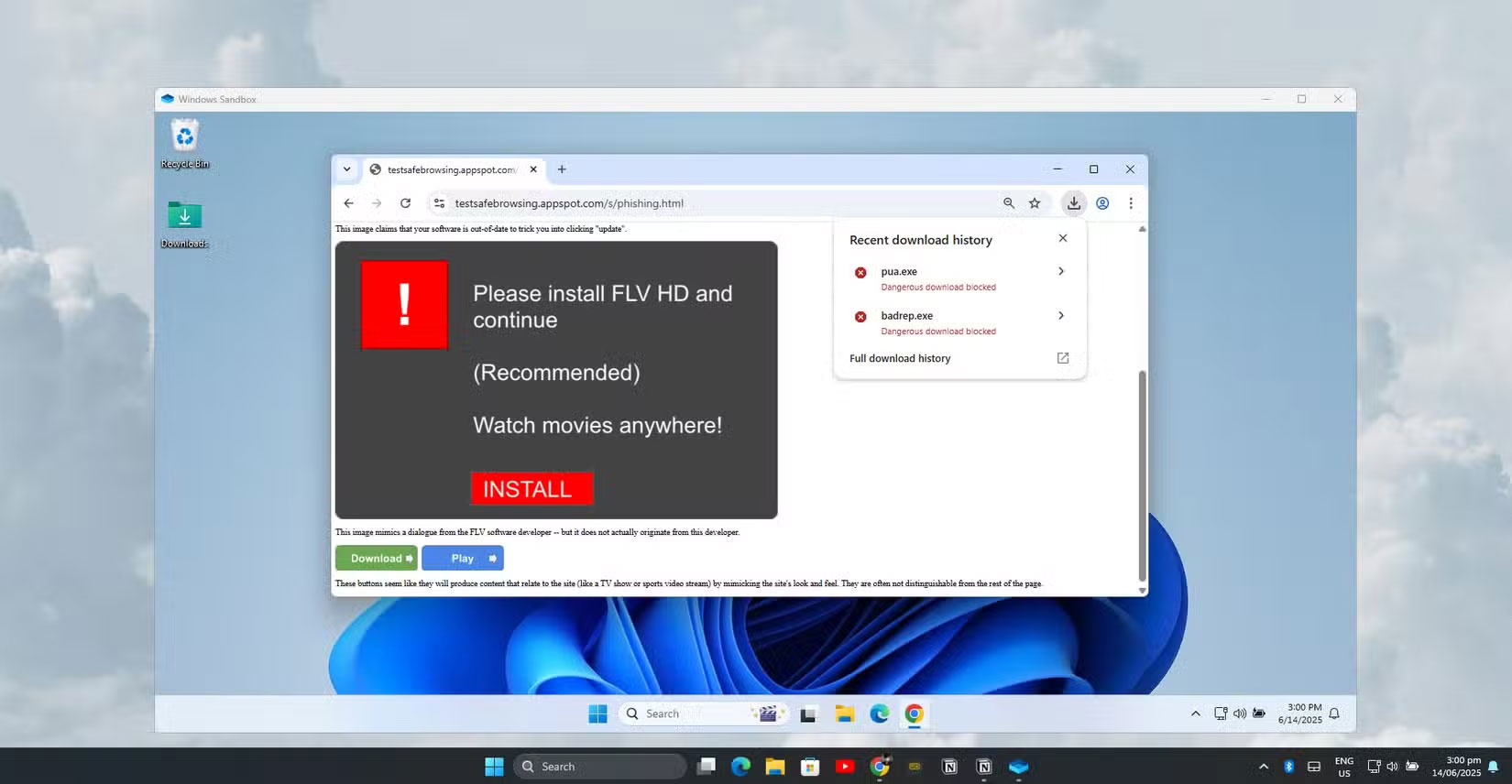
			<p style="text-align: justify;">Windows có một công cụ tích hợp tạo ra một môi trường hoàn toàn biệt lập. Khi sử dụng công cụ này, bạn có thể kiểm tra an toàn các file đáng ngờ, cài đặt phần mềm đáng ngờ hoặc duyệt những trang web nguy hiểm mà không gây nguy cơ làm hỏng máy tính chính của mình.</p>

<h2 style="text-align: justify;">Tìm hiểu về Windows Sandbox</h2>

<p style="text-align: justify;">Windows Sandbox là tính năng bảo mật tích hợp có trên các phiên bản Windows 10 và 11 Pro, Enterprise và Education. Tính năng này tạo ra một môi trường Windows tạm thời, biệt lập, hoàn toàn tách biệt với hệ thống chính của bạn. Hãy nghĩ về tính năng này như một máy tính dùng một lần bên trong máy tính của bạn. Mọi thứ bạn làm trong&nbsp;sandbox&nbsp;sẽ vẫn ở đó và khi bạn đóng nó, mọi dấu vết sẽ biến mất. Điều đó khiến tính năng này trở thành một trong những cách dễ nhất để kiểm tra xem bản tải xuống có an toàn hay không mà không gây nguy hiểm cho các file hoặc cài đặt của bạn.</p>

<p style="text-align: justify;">Không giống như các&nbsp;<a data-type="internal" href="https://quantrimang.com/cong-nghe/tim-hieu-ve-may-ao-88905" title="Tìm hiểu về máy ảo">máy ảo</a>&nbsp;truyền thống yêu cầu bạn phải cài đặt hệ điều hành và dành một phần ổ lưu trữ, Windows Sandbox sử dụng các file Windows hiện có của bạn để tạo một desktop tạm thời, nhẹ trong vài giây. Tính năng này được thiết kế để nhanh chóng, hiệu quả và cực kỳ đơn giản để bất kỳ ai cũng có thể sử dụng - không cần đến phép thuật công nghệ!</p>

<p style="text-align: justify;">Bản chất tạm thời của Windows Sandbox vừa là điểm mạnh lớn nhất vừa là đặc điểm đặc trưng của nó. Mỗi lần khởi chạy, bạn sẽ nhận được một bản cài đặt Windows hoàn toàn mới. Khi bạn đóng sandbox, mọi thứ sẽ biến mất vĩnh viễn. Tất cả phần mềm đã cài đặt, file đã tải xuống, thay đổi registry và sửa đổi hệ thống đều biến mất không dấu vết.</p>

<h2 style="text-align: justify;">Bắt đầu với sandbox ảo đầu tiên</h2>

<figure>
<div style="text-align: justify;"><img alt="Windows Sandbox đang hoạt động" data-i="0" data-src="https://st.quantrimang.com/photos/image/2025/06/25/windows-sandbox-mo-bat-cu-gi-khong-co-rui-ro-1.jpg" data-was-processed="true" height="856" src="https://st.quantrimang.com/photos/image/2025/06/25/windows-sandbox-mo-bat-cu-gi-khong-co-rui-ro-1.jpg" width="1650" /></div>

<figcaption>
<div style="text-align: justify;">Windows Sandbox đang hoạt động</div>
</figcaption>
</figure>

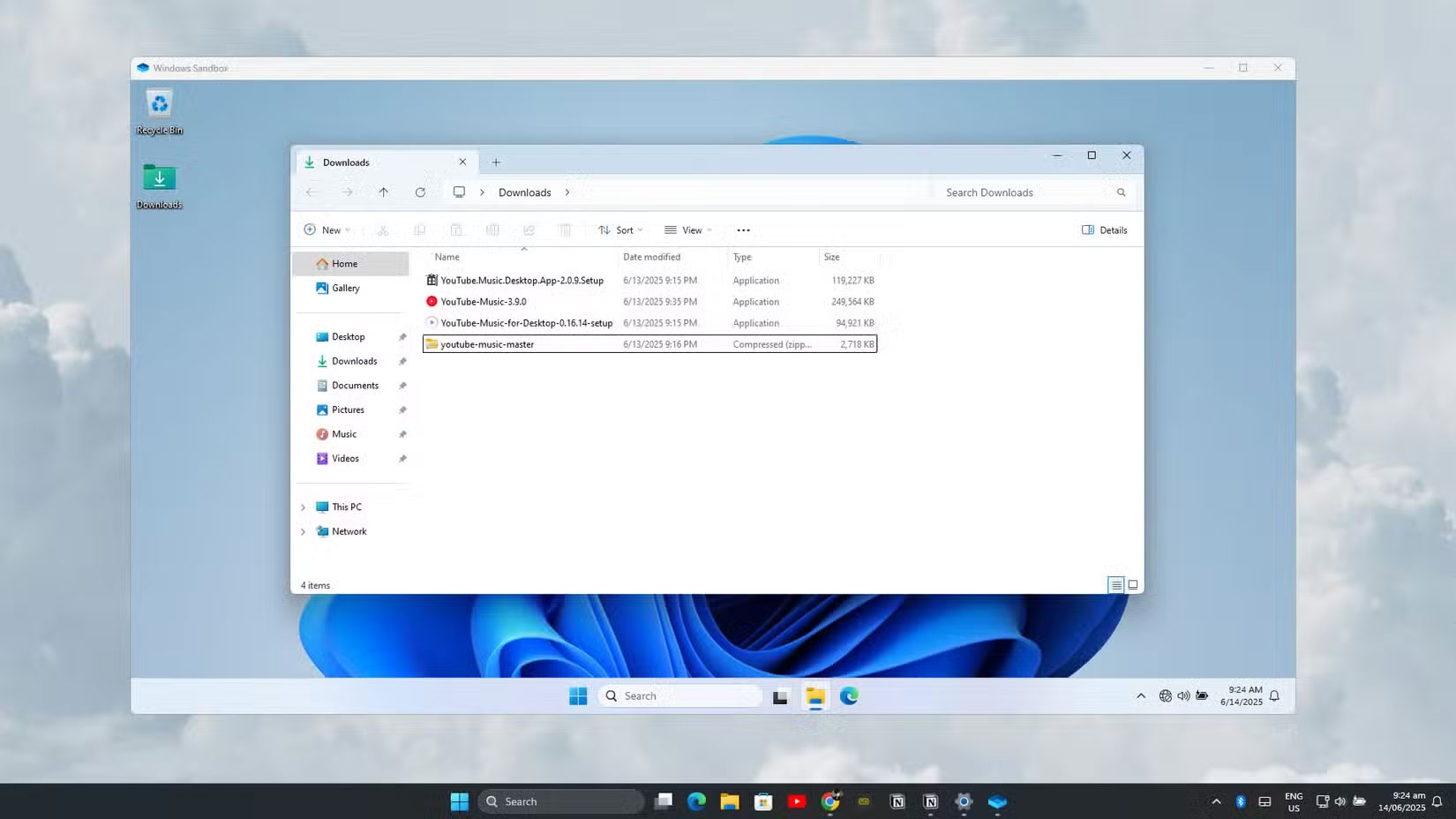
<p style="text-align: justify;">Windows Sandbox kết hợp các lợi ích bảo mật của máy ảo với hiệu quả của công nghệ container. Thay vì chạy như máy ảo Hyper-V truyền thống, sandbox hoạt động giống với một tiến trình trong hệ điều hành chính của bạn hơn, mang lại hiệu suất và quản lý tài nguyên tốt hơn. Hệ thống sử dụng chia sẻ bộ nhớ thông minh trong đó sandbox và máy chủ chia sẻ cùng một trang bộ nhớ vật lý cho các file thực thi, thông qua công nghệ có tên là &quot;bản đồ trực tiếp&quot;.</p>

<p style="text-align: justify;">Trước khi bạn có thể sử dụng Windows Sandbox, máy tính cần đáp ứng các yêu cầu cụ thể. Bạn cần&nbsp;Windows 10&nbsp;hoặc 11 Pro/Enterprise/ Education. Bạn phải bật Hyper-V và bật ảo hóa trong&nbsp;BIOS&nbsp;của mình.</p>

<p style="text-align: justify;">Cuối cùng, bạn cũng cần ít nhất 4GB RAM (khuyến nghị 8GB) và ít nhất 1GB dung lượng ổ đĩa trống.</p>

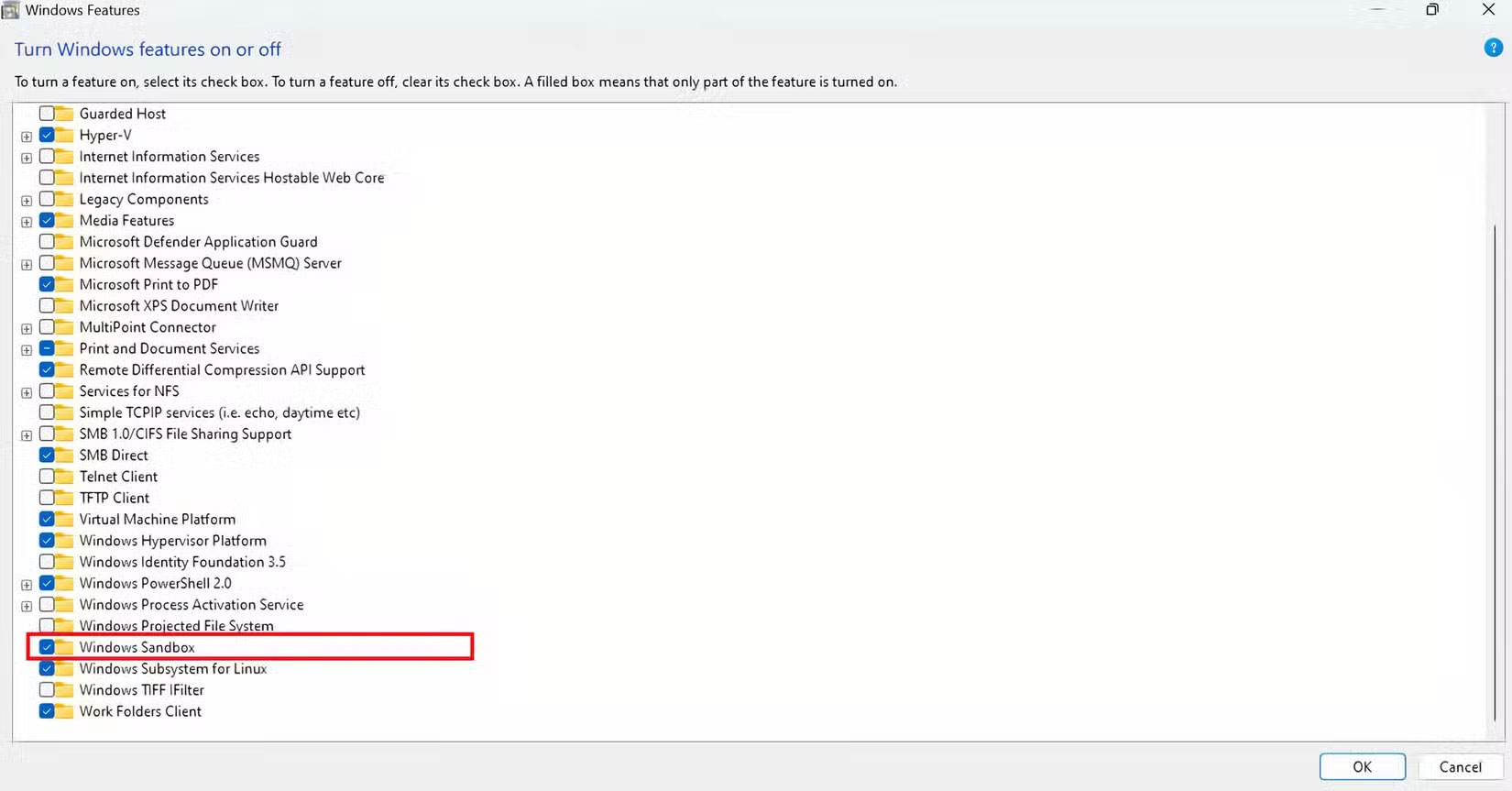
<p style="text-align: justify;">Để bật Windows Sandbox, bạn cần bật tính năng này trong hệ điều hành. Mở menu Start và nhập &quot;Turn Windows features on or off&quot;. Ngoài ra, bạn có thể điều hướng đến Control Panel, mở&nbsp;<strong>Programs and Features</strong>, sau đó nhấp vào&nbsp;<strong>Turn Windows features on or off</strong>.</p>

<p style="text-align: justify;">Trong hộp thoại&nbsp;<strong>Windows Features</strong>, cuộn xuống và đánh dấu vào ô bên cạnh&nbsp;<strong>Windows Sandbox</strong>. Nhấp vào&nbsp;<strong>OK</strong>&nbsp;và&nbsp;khởi động lại máy tính&nbsp;khi được nhắc. Quá trình cài đặt sẽ tải xuống và cấu hình các thành phần cần thiết.</p>

<figure>
<div style="text-align: justify;"><img alt="Kích hoạt Windows Sandbox" data-i="1" data-src="https://st.quantrimang.com/photos/image/2025/06/25/windows-sandbox-mo-bat-cu-gi-khong-co-rui-ro-2.jpg" data-was-processed="true" height="863" src="https://st.quantrimang.com/photos/image/2025/06/25/windows-sandbox-mo-bat-cu-gi-khong-co-rui-ro-2.jpg" width="1650" /></div>

<figcaption>
<div style="text-align: justify;">Kích hoạt Windows Sandbox</div>
</figcaption>
</figure>

<h3 style="text-align: justify;">Sử dụng Sandbox</h3>

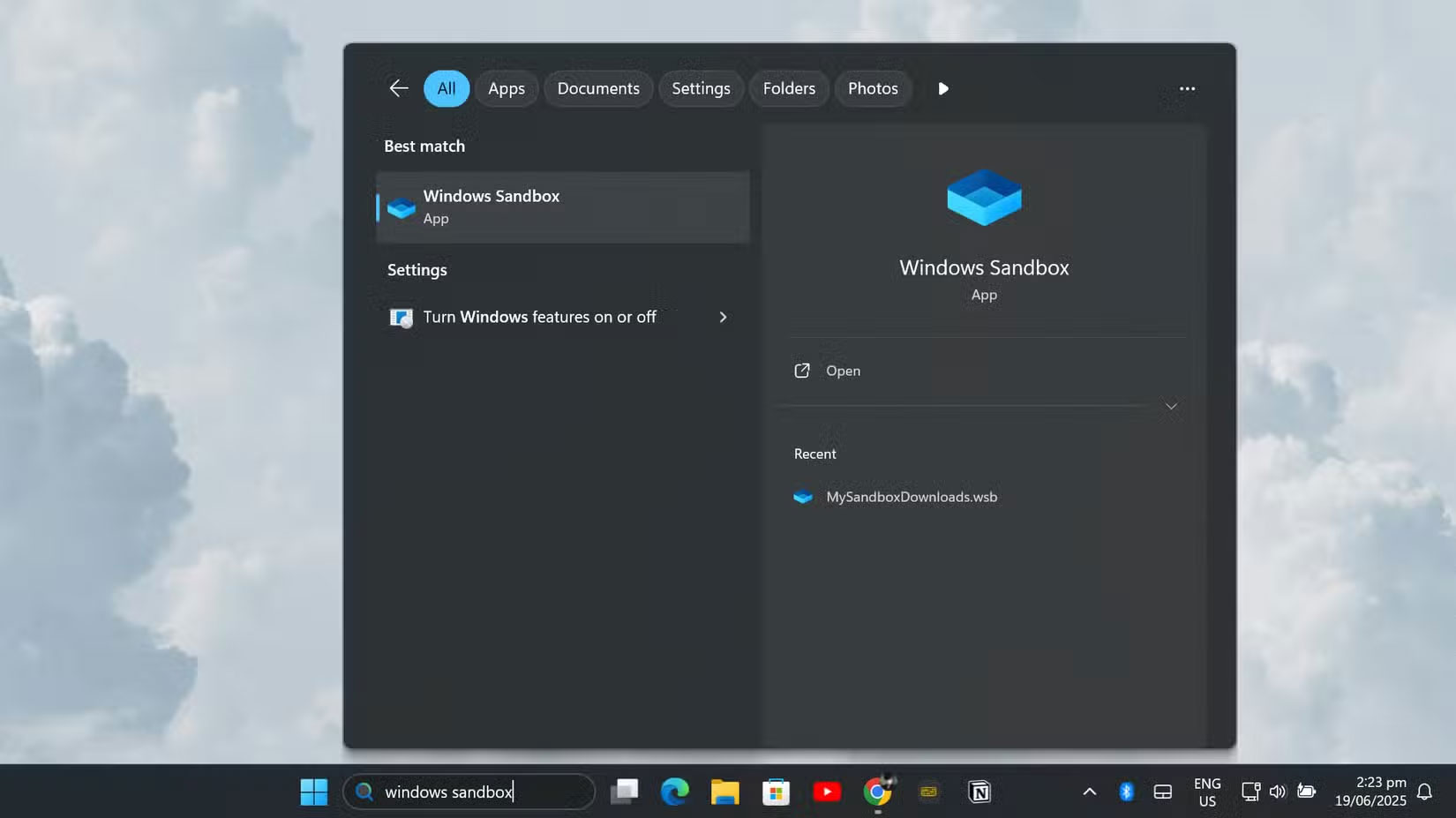
<p style="text-align: justify;">Sau khi bật, việc khởi chạy Windows Sandbox rất đơn giản. Chỉ cần mở menu Start, nhập &quot;Windows Sandbox&quot; và nhấp vào đó. Sandbox sẽ khởi chạy trong cửa sổ riêng, hiển thị desktop Windows sạch sẽ chỉ có các ứng dụng tích hợp cơ bản như File Explorer, Control Panel, Notepad và&nbsp;Microsoft Edge. Bạn có thể thay đổi kích thước cửa sổ hoặc phóng to cửa sổ để sử dụng toàn màn hình, giống như bất kỳ ứng dụng nào khác.</p>

<figure>
<div style="text-align: justify;"><img alt="Truy cập Windows Sandbox" data-i="2" data-src="https://st.quantrimang.com/photos/image/2025/06/25/windows-sandbox-mo-bat-cu-gi-khong-co-rui-ro-3.jpg" data-was-processed="true" height="927" src="https://st.quantrimang.com/photos/image/2025/06/25/windows-sandbox-mo-bat-cu-gi-khong-co-rui-ro-3.jpg" width="1650" /></div>

<figcaption>
<div style="text-align: justify;">Truy cập Windows Sandbox</div>
</figcaption>
</figure>

<p style="text-align: justify;">Việc đưa file vào sandbox rất đơn giản nhờ tích hợp clipboard. Bạn có thể sao chép file từ máy tính chính và dán trực tiếp vào môi trường sandbox. Ngoài ra, bạn có thể sử dụng trình duyệt Microsoft Edge tích hợp trong sandbox để tải file trực tiếp từ&nbsp;<a data-type="internal" href="https://quantrimang.com/cong-nghe/internet-va-www-khac-nhau-nhu-the-nao-127708" title="Internet là gì? Internet và WWW khác nhau như thế nào?">Internet</a>.</p>

<p style="text-align: justify;">Sandbox có quyền truy cập mạng theo mặc định, do đó bạn có thể duyệt các trang web, tải phần mềm và truy cập tài nguyên trực tuyến.</p>

<h2 style="text-align: justify;">Cách thiết lập và sử dụng Windows Sandbox</h2>

<p style="text-align: justify;">Windows Sandbox cung cấp một không gian mới, an toàn để kiểm tra các ứng dụng và file, nhưng việc tải xuống cùng một trình cài đặt hoặc file nhiều lần sẽ nhanh chóng trở nên nhàm chán. Đó là lý do tại sao bạn nên thiết lập Sandbox của mình để nó luôn có quyền truy cập vào thư mục&nbsp;<strong>Downloads</strong>. Theo cách này, bất cứ khi nào muốn dùng thử một chương trình mới hoặc kiểm tra xem file có an toàn không, bạn không phải mất thời gian tải xuống lại bên trong Sandbox. Chỉ cần mở file từ thư mục Downloads thực của mình, kiểm tra và tiếp tục.</p>

<p style="text-align: justify;">Việc thiết lập này dễ hơn nhiều so với bạn nghĩ. Đây là cách thực hiện:</p>

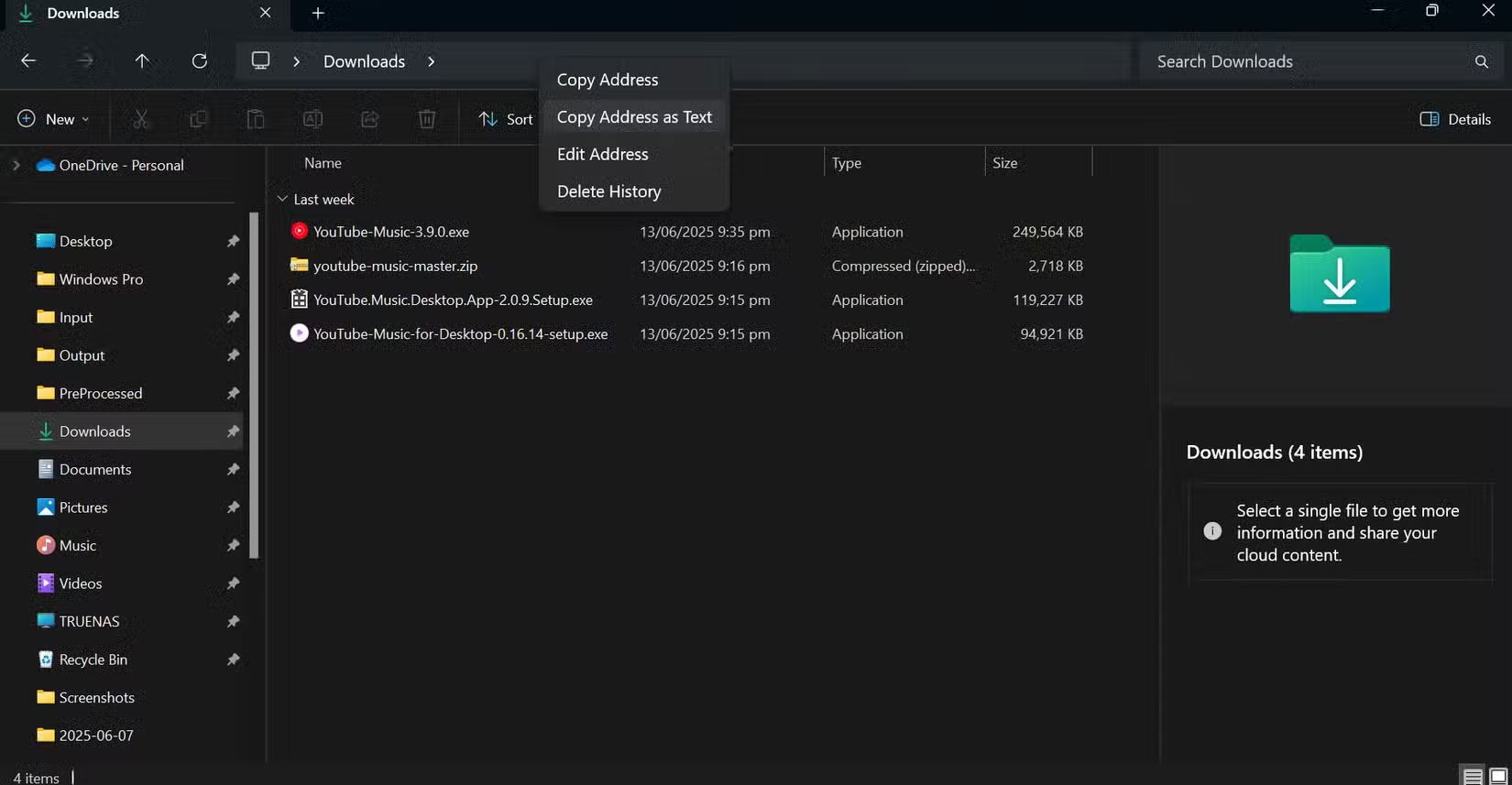
<p style="text-align: justify;">Đầu tiên, trên desktop Windows thông thường (không phải bên trong Sandbox), hãy&nbsp;mở File Explorer&nbsp;và đi đến thư mục&nbsp;<strong>Downloads</strong>. Ở đầu cửa sổ, bạn sẽ thấy thanh địa chỉ hiển thị đường dẫn của thư mục. Nhấp chuột phải vào thanh địa chỉ đó và chọn&nbsp;<strong>Copy address as text</strong>&nbsp;từ menu.</p>

<figure>
<div style="text-align: justify;"><img alt="Sao chép địa chỉ thư mục Downloads dưới dạng văn bản" data-i="3" data-src="https://st.quantrimang.com/photos/image/2025/06/25/windows-sandbox-mo-bat-cu-gi-khong-co-rui-ro-4.jpg" data-was-processed="true" height="857" src="https://st.quantrimang.com/photos/image/2025/06/25/windows-sandbox-mo-bat-cu-gi-khong-co-rui-ro-4.jpg" width="1650" /></div>

<figcaption>
<div style="text-align: justify;">Sao chép địa chỉ thư mục Downloads dưới dạng văn bản</div>
</figcaption>
</figure>

<p style="text-align: justify;">Tiếp theo, mở Notepad và dán code bên dưới:</p>

<pre id="pre0">
<code>&lt;Configuration&gt;
&lt;MappedFolders&gt;
&lt;MappedFolder&gt;
&lt;HostFolder&gt;ENTER_FOLDER_ADDRESS_HERE/HostFolder&gt;
&lt;ReadOnly&gt;true&lt;/ReadOnly&gt;
&lt;/MappedFolder&gt;
&lt;/MappedFolders&gt;
&lt;/Configuration&gt;</code></pre>

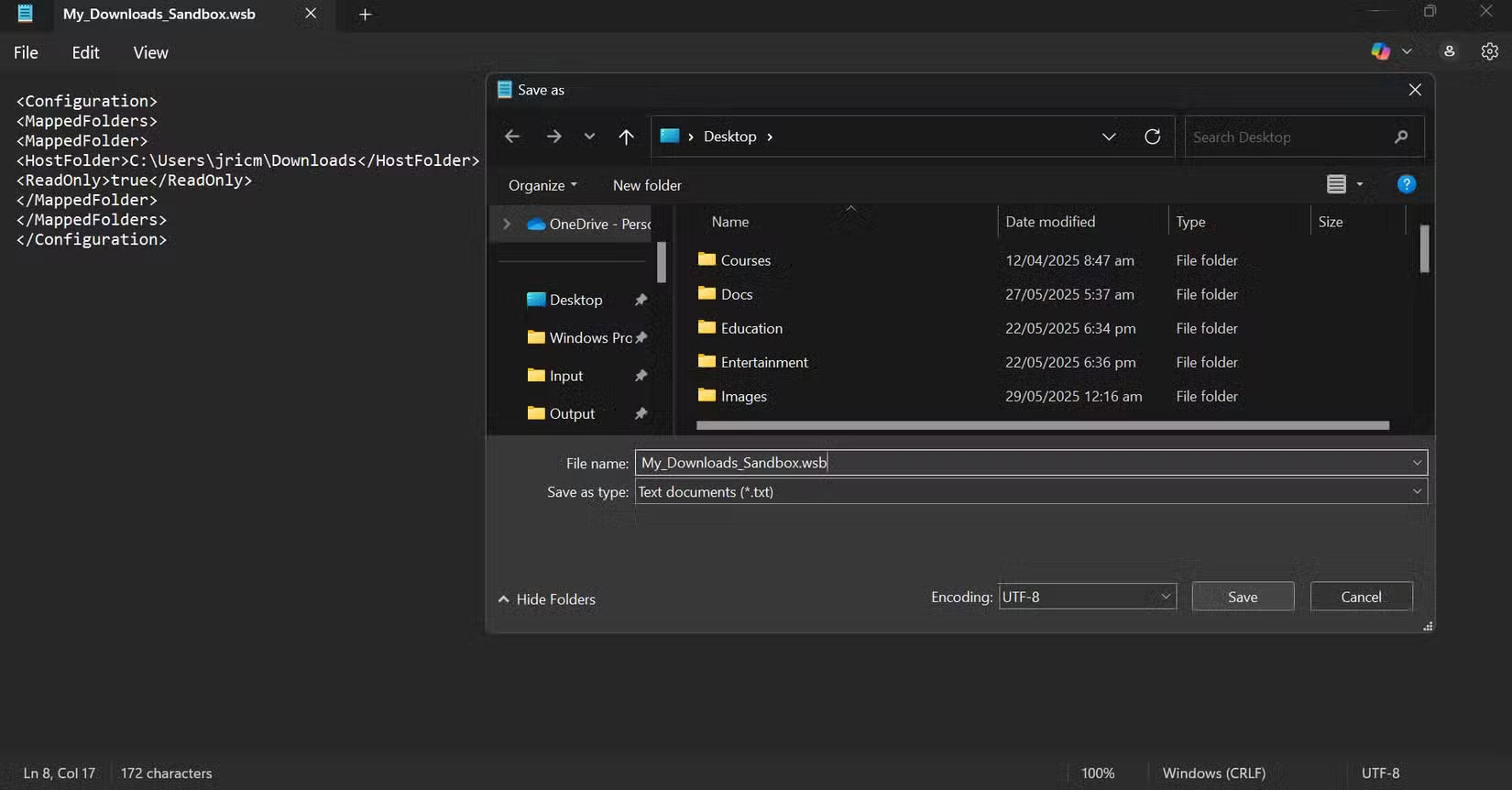
<p style="text-align: justify;">Thay đổi phần trước&nbsp;<strong>HostFolder</strong>&nbsp;thành địa chỉ thư mục&nbsp;<strong>Downloads&nbsp;</strong>đã sao chép trước đó. Trong ví dụ này, tên người dùng máy tính là “jricm”, vì vậy đường dẫn sẽ trông như thế này:</p>

<pre id="pre1">
<code>&lt;HostFolder&gt;C:\Users\jricm\Downloads&lt;/HostFolder&gt;</code></pre>

<p style="text-align: justify;">Sau đó, lưu file văn bản này dưới dạng &quot;My-Desktop-Sandbox.wsb&quot; trên desktop (để dễ truy cập). Sau khi lưu, file sẽ có biểu tượng Windows SandBox (.wsb).</p>

<figure>
<div style="text-align: justify;"><img alt="Tạo file cấu hình sandbox" data-i="4" data-src="https://st.quantrimang.com/photos/image/2025/06/25/windows-sandbox-mo-bat-cu-gi-khong-co-rui-ro-5.jpg" data-was-processed="true" height="862" src="https://st.quantrimang.com/photos/image/2025/06/25/windows-sandbox-mo-bat-cu-gi-khong-co-rui-ro-5.jpg" width="1650" /></div>

<figcaption>
<div style="text-align: justify;">Tạo file cấu hình sandbox</div>
</figcaption>
</figure>

<p style="text-align: justify;">Bây giờ, bất cứ khi nào muốn mở Windows Sandbox, bạn chỉ cần nhấp đúp vào file này. Ngay lập tức, thư mục Downloads sẽ xuất hiện trên desktop Sandbox và bạn có thể mở hoặc kiểm tra bất kỳ thứ gì đã lưu ở đó. Vì nó được ánh xạ là chỉ đọc, nên bạn không bao giờ phải lo lắng về việc vô tình thay đổi hoặc xóa bất kỳ thứ gì trong thư mục Downloads thực của mình. Tất cả đều là sự tiện lợi và sự an tâm.</p>

<p style="text-align: justify;">Đôi khi muốn tiến xa hơn một bước, đặc biệt là nếu bạn đang kiểm tra một file có thể gây rủi ro. Trong những trường hợp đó, hãy khóa Sandbox chặt hơn bằng cách tắt kết nối Internet của nó. Theo cách đó, ngay cả khi có thứ gì đó cố gắng gọi về nhà hoặc tải xuống nhiều thứ rác hơn, nó cũng không thể trực tuyến được.</p>

<p style="text-align: justify;">Để thực hiện việc này, chỉ cần thêm một dòng vào đầu file cấu hình của mình để tắt mạng:</p>

<pre id="pre2">
<code>&lt;Configuration&gt;
&lt;Networking&gt;disable&lt;/Networking&gt;
&lt;MappedFolders&gt;
&lt;MappedFolder&gt;
&lt;HostFolder&gt;C:\Users\jricm\Downloads&lt;/HostFolder&gt;
&lt;ReadOnly&gt;true&lt;/ReadOnly&gt;
&lt;/MappedFolder&gt;
&lt;/MappedFolders&gt;
&lt;/Configuration&gt;</code></pre>

<p style="text-align: justify;">Vậy là xong! Bây giờ, khi khởi chạy Sandbox bằng file này, bạn không chỉ có quyền truy cập tức thời, chỉ đọc vào Downloads mà bản thân Sandbox cũng hoàn toàn bị ngắt khỏi Internet. Không tải xuống, không upload và không có kết nối nền lén lút.</p>

<figure>
<div style="text-align: justify;"><img alt="Windows Sandbox với chức năng ánh xạ thư mục và vô hiệu hóa mạng" data-i="5" data-src="https://st.quantrimang.com/photos/image/2025/06/25/windows-sandbox-mo-bat-cu-gi-khong-co-rui-ro-6.jpg" data-was-processed="true" height="928" src="https://st.quantrimang.com/photos/image/2025/06/25/windows-sandbox-mo-bat-cu-gi-khong-co-rui-ro-6.jpg" width="1650" /></div>

<figcaption>
<div style="text-align: justify;">Windows Sandbox với chức năng ánh xạ thư mục và vô hiệu hóa mạng</div>
</figcaption>
</figure>

<p style="text-align: justify;">Thiết lập này khiến Windows Sandbox giống như một phòng thí nghiệm thử nghiệm cá nhân thực sự. Bạn có thể nhanh chóng thử bất kỳ thứ gì trong thư mục Downloads của mình, tự tin rằng không có gì có thể làm hỏng các file thực hoặc lọt ra ngoài trên web. Và nếu muốn quay lại mặc định, tất cả những gì bạn phải làm là mở&nbsp;ứng dụng Sandbox&nbsp;thông thường từ menu Start.</p>

<p style="text-align: justify;">Windows Sandbox cung cấp sự cân bằng hoàn hảo giữa bảo mật và khả năng sử dụng. Nó cung cấp khả năng cô lập cấp doanh nghiệp theo cách mà người dùng hàng ngày có thể truy cập được. Bằng cách tận dụng các cấu hình tùy chỉnh và thiết lập tự động, bạn có thể tạo ra các môi trường thử nghiệm mạnh mẽ, an toàn để bảo vệ máy tính chính của mình đồng thời cho phép khám phá thế giới kỹ thuật số một cách an toàn.</p>

<div style="text-align: justify;">&nbsp;</div>
		</div>
				<div id="author">
						<p>
				<strong>Nguồn tin:</strong>
				Quantrimang.com:
			</p>
		</div>
	</div>
	<div id="footer" class="clearfix">
		<div id="url">
			<strong>URL của bản tin này: </strong><a href="https://www.nguoicodonvn2008.info/vi/news/savefile/kien-thuc-may-tinh/windows-sandbox-ung-dung-bi-mat-cho-phep-ban-mo-bat-cu-thu-gi-ma-khong-co-rui-ro-10651.html" title="Windows Sandbox&#x3A; Ứng dụng bí mật cho phép bạn mở bất cứ thứ gì mà không có rủi ro">https://www.nguoicodonvn2008.info/vi/news/savefile/kien-thuc-may-tinh/windows-sandbox-ung-dung-bi-mat-cho-phep-ban-mo-bat-cu-thu-gi-ma-khong-co-rui-ro-10651.html</a>

		</div>
		<div class="clear"></div>
		<div class="copyright">
			&copy; .&#x3A; Nguoicodonvn2008.info - Cõi lòng người cô đơn &#x3A;.
		</div>
		<div id="contact">
			<a href="mailto:admin@nguoicodonvn2008.info">admin@nguoicodonvn2008.info</a>
		</div>
	</div>
</div>
        <div id="timeoutsess" class="chromeframe">
            Bạn đã không sử dụng Site, <a onclick="timeoutsesscancel();" href="https://www.nguoicodonvn2008.info/#">Bấm vào đây để duy trì trạng thái đăng nhập</a>. Thời gian chờ: <span id="secField"> 60 </span> giây
        </div>
        <div id="openidResult" class="nv-alert" style="display:none"></div>
        <div id="openidBt" data-result="" data-redirect=""></div>
		</script>
		<div class="car-top">
  <span><img src="https://www.nguoicodonvn2008.info/themes/default/images/car.png" alt=""></span>
</div>
<script src="https://www.nguoicodonvn2008.info/assets/js/jquery/jquery.min.js"></script>
<script>var nv_base_siteurl="/",nv_lang_data="vi",nv_lang_interface="vi",nv_name_variable="nv",nv_fc_variable="op",nv_lang_variable="language",nv_module_name="news",nv_func_name="savefile",nv_is_user=0, nv_my_ofs=-4,nv_my_abbr="EDT",nv_cookie_prefix="nv4c_e856T",nv_check_pass_mstime=1738000,nv_area_admin=0,nv_safemode=0,theme_responsive=0,nv_recaptcha_ver=2,nv_recaptcha_sitekey="",nv_recaptcha_type="image",XSSsanitize=1;</script>
<script src="https://www.nguoicodonvn2008.info/assets/js/language/vi.js"></script>
<script src="https://www.nguoicodonvn2008.info/assets/js/DOMPurify/purify3.js"></script>
<script src="https://www.nguoicodonvn2008.info/assets/js/global.js"></script>
<script src="https://www.nguoicodonvn2008.info/assets/js/site.js"></script>
<script src="https://www.nguoicodonvn2008.info/themes/default/js/news.js"></script>
<script src="https://www.nguoicodonvn2008.info/themes/default/js/main.js"></script>
<script src="https://www.nguoicodonvn2008.info/themes/default/js/custom.js"></script>
<script type="application/ld+json">
        {
            "@context": "https://schema.org",
            "@type": "Organization",
            "url": "https://www.nguoicodonvn2008.info",
            "logo": "https://www.nguoicodonvn2008.info/uploads/angel.gif"
        }
        </script>
<script src="https://www.nguoicodonvn2008.info/themes/default/js/bootstrap.min.js"></script>
<script type="text/javascript">
var $scrolltop = $('.car-top');
$scrolltop.on('click', function () {
    $('html,body').animate({
        scrollTop: 0
    }, 800);
    $(this).addClass("car-run");
    setTimeout(function(){ $scrolltop.removeClass('car-run');}, 1000);
    return false;
});
$(window).on('scroll', function ()
{ 
    if($(window).scrollTop() >= 200)
    {
        $scrolltop.addClass("show");
        $scrolltop.addClass("car-down");
    }
    else
    {
       $scrolltop.removeClass("show");
       setTimeout(function(){ $scrolltop.removeClass('car-down');}, 300);
    }
});
</script>
</body>
</html>