<!DOCTYPE html>
    <html lang="vi" xmlns="http://www.w3.org/1999/xhtml" prefix="og: http://ogp.me/ns#">
    <head>
<title>&quot;Windows Feature Experience Pack” trên Windows 10 là gì?</title>
<meta name="description" content="&quot;Windows Feature Experience Pack” trên Windows 10 là gì? - Savefile - Tin Tức -...">
<meta name="author" content=".: Nguoicodonvn2008.info - Cõi lòng người cô đơn :.">
<meta name="copyright" content=".: Nguoicodonvn2008.info - Cõi lòng người cô đơn :. [admin@nguoicodonvn2008.info]">
<meta name="robots" content="index, archive, follow, noodp">
<meta name="googlebot" content="index,archive,follow,noodp">
<meta name="msnbot" content="all,index,follow">
<meta name="generator" content="NukeViet v4.5">
<meta http-equiv="Content-Type" content="text/html; charset=utf-8">
<meta property="og:title" content="&quot;Windows Feature Experience Pack” trên Windows 10 là gì?">
<meta property="og:type" content="website">
<meta property="og:description" content="Savefile - Tin Tức - https&#x3A;&#x002F;&#x002F;www.nguoicodonvn2008.info&#x002F;vi&#x002F;news&#x002F;savefile&#x002F;kien-thuc-may-tinh&#x002F;windows-feature-experience-pack-tren-windows-10-la-gi-3081.html">
<meta property="og:site_name" content=".&#x3A; Nguoicodonvn2008.info - Cõi lòng người cô đơn &#x3A;.">
<meta property="og:url" content="https://www.nguoicodonvn2008.info/vi/news/savefile/kien-thuc-may-tinh/windows-feature-experience-pack-tren-windows-10-la-gi-3081.html">
<link rel="shortcut icon" href="https://www.nguoicodonvn2008.info/favicon.ico">
<link rel="canonical" href="https://www.nguoicodonvn2008.info/vi/news/savefile/kien-thuc-may-tinh/windows-feature-experience-pack-tren-windows-10-la-gi-3081.html">
<link rel="alternate" href="https://www.nguoicodonvn2008.info/vi/news/rss/" title="Tin Tức" type="application/rss+xml">
<link rel="alternate" href="https://www.nguoicodonvn2008.info/vi/news/rss/karaoke-dual/" title="Tin Tức - Karaoke Dual" type="application/rss+xml">
<link rel="alternate" href="https://www.nguoicodonvn2008.info/vi/news/rss/nhac-tre/" title="Tin Tức - Nhạc trẻ" type="application/rss+xml">
<link rel="alternate" href="https://www.nguoicodonvn2008.info/vi/news/rss/tru-tinh/" title="Tin Tức - Trữ tình" type="application/rss+xml">
<link rel="alternate" href="https://www.nguoicodonvn2008.info/vi/news/rss/nuoc-ngoai/" title="Tin Tức - Nước ngoài" type="application/rss+xml">
<link rel="alternate" href="https://www.nguoicodonvn2008.info/vi/news/rss/remix/" title="Tin Tức - Remix" type="application/rss+xml">
<link rel="alternate" href="https://www.nguoicodonvn2008.info/vi/news/rss/tam-su-tinh-yeu/" title="Tin Tức - Tâm sự tình yêu" type="application/rss+xml">
<link rel="alternate" href="https://www.nguoicodonvn2008.info/vi/news/rss/tho-suu-tam/" title="Tin Tức - Thơ sưu tầm" type="application/rss+xml">
<link rel="alternate" href="https://www.nguoicodonvn2008.info/vi/news/rss/cuoc-song/" title="Tin Tức - Cuộc sống" type="application/rss+xml">
<link rel="alternate" href="https://www.nguoicodonvn2008.info/vi/news/rss/phan-mem/" title="Tin Tức - Phần mềm" type="application/rss+xml">
<link rel="alternate" href="https://www.nguoicodonvn2008.info/vi/news/rss/kien-thuc-may-tinh/" title="Tin Tức - Kiến thức máy tính" type="application/rss+xml">
<link rel="alternate" href="https://www.nguoicodonvn2008.info/vi/news/rss/hoc-tap/" title="Tin Tức - Học tập" type="application/rss+xml">
<link rel="alternate" href="https://www.nguoicodonvn2008.info/vi/news/rss/tai-lieu/" title="Tin Tức - Tài liệu" type="application/rss+xml">
<link rel="alternate" href="https://www.nguoicodonvn2008.info/vi/news/rss/de-thi/" title="Tin Tức - Đề thi" type="application/rss+xml">
<link rel="preload" as="style" href="https://www.nguoicodonvn2008.info/assets/css/font-awesome.min.css" type="text/css">
<link rel="preload" as="style" href="https://www.nguoicodonvn2008.info/themes/default/css/bootstrap.non-responsive.css" type="text/css">
<link rel="preload" as="style" href="https://www.nguoicodonvn2008.info/themes/default/css/style.css" type="text/css">
<link rel="preload" as="style" href="https://www.nguoicodonvn2008.info/themes/default/css/style.non-responsive.css" type="text/css">
<link rel="preload" as="style" href="https://www.nguoicodonvn2008.info/themes/default/css/news.css" type="text/css">
<link rel="preload" as="style" href="https://www.nguoicodonvn2008.info/themes/default/css/custom.css" type="text/css">
<link rel="preload" as="script" href="https://www.nguoicodonvn2008.info/assets/js/jquery/jquery.min.js" type="text/javascript">
<link rel="preload" as="script" href="https://www.nguoicodonvn2008.info/assets/js/language/vi.js" type="text/javascript">
<link rel="preload" as="script" href="https://www.nguoicodonvn2008.info/assets/js/DOMPurify/purify3.js" type="text/javascript">
<link rel="preload" as="script" href="https://www.nguoicodonvn2008.info/assets/js/global.js" type="text/javascript">
<link rel="preload" as="script" href="https://www.nguoicodonvn2008.info/assets/js/site.js" type="text/javascript">
<link rel="preload" as="script" href="https://www.nguoicodonvn2008.info/themes/default/js/news.js" type="text/javascript">
<link rel="preload" as="script" href="https://www.nguoicodonvn2008.info/themes/default/js/main.js" type="text/javascript">
<link rel="preload" as="script" href="https://www.nguoicodonvn2008.info/themes/default/js/custom.js" type="text/javascript">
<link rel="preload" as="script" href="https://www.nguoicodonvn2008.info/themes/default/js/bootstrap.min.js" type="text/javascript">
<link rel="stylesheet" href="https://www.nguoicodonvn2008.info/assets/css/font-awesome.min.css">
<link rel="stylesheet" href="https://www.nguoicodonvn2008.info/themes/default/css/bootstrap.non-responsive.css">
<link rel="stylesheet" href="https://www.nguoicodonvn2008.info/themes/default/css/style.css">
<link rel="stylesheet" href="https://www.nguoicodonvn2008.info/themes/default/css/style.non-responsive.css">
<link rel="StyleSheet" href="https://www.nguoicodonvn2008.info/themes/default/css/news.css">
<link rel="stylesheet" href="https://www.nguoicodonvn2008.info/themes/default/css/custom.css">
<style type="text/css">
	body{background: #fff;}
</style>
    </head>
    <body>
<div id="print">
	<div id="hd_print">
		<h2 class="pull-left">.&#x3A; Nguoicodonvn2008.info - Cõi lòng người cô đơn &#x3A;.</h2>
		<p class="pull-right"><a title=".&#x3A; Nguoicodonvn2008.info - Cõi lòng người cô đơn &#x3A;." href="https://www.nguoicodonvn2008.info/">https://www.nguoicodonvn2008.info</a></p>
	</div>
	<div class="clear"></div>
	<hr />
	<div id="content">
		<h1>&quot;Windows Feature Experience Pack” trên Windows 10 là gì?</h1>
		<ul class="list-inline">
			<li>Thứ sáu - 13/11/2020 23:59</li>
			<li class="hidden-print txtrequired"><em class="fa fa-print">&nbsp;</em><a title="In ra" href="javascript:;" onclick="window.print()">In ra</a></li>
			<li class="hidden-print txtrequired"><em class="fa fa-power-off">&nbsp;</em><a title="Đóng cửa sổ này" href="javascript:;" onclick="window.close()">Đóng cửa sổ này</a></li>
		</ul>
		<div class="clear"></div>
		<div id="hometext">
		</div>
				<div class="imghome">
			<img alt="&quot;Windows Feature Experience Pack” trên Windows 10 là gì?" src="https://st.quantrimang.com/photos/image/2020/11/13/windows-feature-experience-pack-1.png" width="460" class="img-thumbnail" />
		</div>
		<div class="clear"></div>
		<div id="bodytext" class="clearfix">
			<p style="text-align: justify;">Windows 10&nbsp;hiện có một thông số kỹ thuật lạ có tên là&nbsp;<strong>“Experience”.</strong>&nbsp;Phiên bản tiêu chuẩn dành cho desktop của Windows 10 cho biết bạn đã cài đặt&nbsp;<strong>“Windows Feature Experience Pack”</strong>. Điều đó nghĩa là gì? Microsoft luôn giữ bí mật nhưng đây là những gì bài viết muốn bật mí cho bạn.</p>

<h2 style="text-align: justify;">Bí ẩn khác về Windows 10</h2>

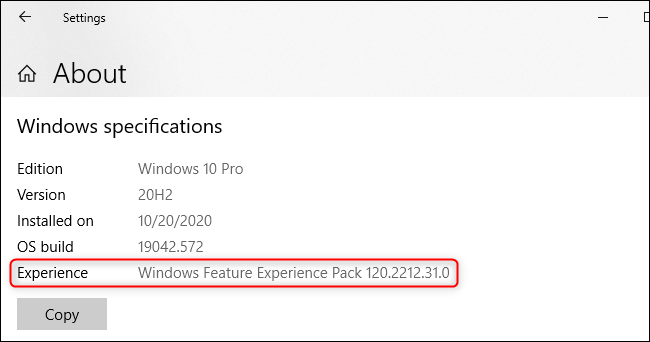
<p style="text-align: justify;">Nếu bạn đi tới&nbsp;<strong>Settings &gt; System &gt; About</strong>&nbsp;và cuộn xuống&nbsp;<strong>“Windows specifications”</strong>, bạn sẽ thấy một dòng có tên&nbsp;<strong>“Experience”.</strong>&nbsp;Nó có thể cho biết bạn đã cài đặt&nbsp;<strong>“Windows Feature Experience Pack”</strong>.</p>

<figure>
<div style="text-align: justify;"><img alt="“Windows Feature Experience Pack” đã được cài đặt trên hệ thống của bạn" data-i="0" data-src="https://st.quantrimang.com/photos/image/2020/11/13/windows-feature-experience-pack-1.png" data-was-processed="true" height="342" src="https://st.quantrimang.com/photos/image/2020/11/13/windows-feature-experience-pack-1.png" width="650" /></div>

<figcaption>
<div style="text-align: justify;">“Windows Feature Experience Pack” đã được cài đặt trên hệ thống của bạn</div>
</figcaption>
</figure>

<p style="text-align: justify;">Phần này cũng cho bạn biết bạn đã cài đặt phiên bản Windows 10 nào, phiên bản cập nhật nào bạn đã cài đặt, thời điểm cài đặt và số bản build hệ điều hành.</p>

<p style="text-align: justify;">Vậy&nbsp;<strong>“Windows Feature Experience Pack”</strong>&nbsp;là gì? Rất tiếc, Microsoft sẽ không giải thích điều đó!</p>

<div style="text-align: justify;">&nbsp;</div>

<h2 style="text-align: justify;">Một số tính năng của Windows 10 là một phần của gói này</h2>

<p style="text-align: justify;">Windows Feature Experience Pack được liệt kê là một trong nhiều&nbsp;<em>“Features on Demand”</em>&nbsp;- tính năng theo yêu cầu trong Windows 10. Ví dụ, Microsoft Paint hiện là một “tính năng theo yêu cầu”.</p>

<p style="text-align: justify;">Tính năng cụ thể này được cài đặt sẵn với Windows. Microsoft cho biết nó “bao gồm các tính năng quan trọng đối với chức năng của Windows” và nói rằng bạn “không nên xóa gói này”.</p>

<p style="text-align: justify;">Tài liệu tương tự cho biết Windows Feature Experience Pack lần đầu tiên được giới thiệu trong Windows 10 phiên bản 2004 — đó là bản cập nhật May 2020 Update.</p>

<p style="text-align: justify;">Gói này hiện bao gồm các tính năng như&nbsp;công cụ Snipping tool để chụp ảnh màn hình&nbsp;và bảng điều khiển việc nhập văn bản. Thay vì là một phần trong phiên bản cơ bản của Windows 10, các tính năng này là một phần của “gói” được cài đặt sẵn. Microsoft có thể chuyển nhiều tính năng hơn từ Windows 10 sang gói “tính năng theo yêu cầu” này.</p>

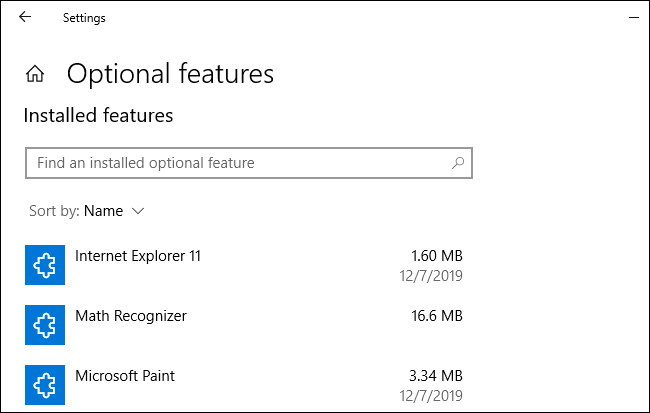
<p style="text-align: justify;">Hầu hết các “tính năng theo yêu cầu” này đều được liệt kê trong&nbsp;<strong>Settings &gt; Apps &gt; Apps &amp; features &gt; Optional features</strong>, nhưng&nbsp;<strong>“Experience Pack”</strong>&nbsp;đã cài đặt không xuất hiện ở đây.</p>

<figure>
<div style="text-align: justify;"><img alt="Các tính năng tùy chọn trong Windows" data-i="1" data-src="https://st.quantrimang.com/photos/image/2020/11/13/windows-feature-experience-pack-2.png" data-was-processed="true" height="413" src="https://st.quantrimang.com/photos/image/2020/11/13/windows-feature-experience-pack-2.png" width="650" /></div>

<figcaption>
<div style="text-align: justify;">Các tính năng tùy chọn trong Windows</div>
</figcaption>
</figure>

<h2 style="text-align: justify;">Lần theo manh mối trong Windows Store</h2>

<p style="text-align: justify;">Vậy, tại sao Feature Experience Pack này lại còn tồn tại? Tại sao không chỉ để các tính năng này trong Windows 10?</p>

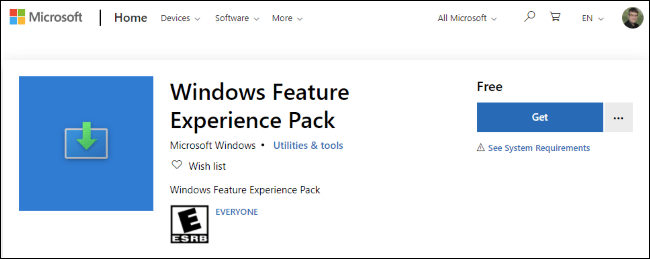
<p style="text-align: justify;">Microsoft sẽ không nói cho người dùng biết câu trả lời, nhưng có một số ý tưởng về điều này. Hãy xem phần này: Microsoft Store có danh sách cho&nbsp;<strong>“Windows Feature Experience Pack”</strong>&nbsp;và<strong>&nbsp;“Windows 10X Feature Experience Pack”</strong>&nbsp;riêng biệt.&nbsp;</p>

<figure>
<div style="text-align: justify;"><img alt="Feature Experience Pack vẫn tồn tại" data-i="2" data-src="https://st.quantrimang.com/photos/image/2020/11/13/windows-feature-experience-pack-3.png" data-was-processed="true" height="259" src="https://st.quantrimang.com/photos/image/2020/11/13/windows-feature-experience-pack-3.png" width="650" /></div>

<figcaption>
<div style="text-align: justify;">Feature Experience Pack vẫn tồn tại</div>
</figcaption>
</figure>

<div style="text-align: justify;">&nbsp;</div>

<h2 style="text-align: justify;">Cập nhật nhanh hơn cho các thành phần Windows?</h2>

<p style="text-align: justify;">Kể từ bản cập nhật October 2020 Update, không có dấu hiệu nào cho thấy gói trải nghiệm tính năng này đang được cập nhật thông qua Store. Tuy nhiên, nó có thể đã được cập nhật!</p>

<p style="text-align: justify;">Nếu Microsoft cập nhật gói trải nghiệm tính năng thông qua Store, thì hãng có thể cập nhật phần mềm bên trong gói này thường xuyên hơn mức 6 tháng một lần.</p>

<p style="text-align: justify;">Bất kỳ thứ gì được chuyển từ Windows sang gói này - có thể là ứng dụng tích hợp sẵn như File Explorer hoặc một thành phần như thanh tác vụ Windows hay menu Start - sẽ được cập nhật nhanh hơn nhiều.</p>

<h2 style="text-align: justify;">Một hệ điều hành duy nhất cho tất cả các thiết bị của Microsoft?</h2>

<p style="text-align: justify;">Microsoft đang dồn sức vào Windows 10X, vốn sẽ được thiết kế cho các thiết bị màn hình kép, nhưng bây giờ có vẻ như nó sẽ chỉ là một phiên bản Windows “hiện đại” hơn, giới hạn các ứng dụng desktop truyền thống trong những container.</p>

<p style="text-align: justify;">Các phiên bản Windows khác nhau này có thể có cùng một hệ điều hành cơ bản và chỉ khác nhau về “Feature Experience Pack”.</p>

<p style="text-align: justify;">Nói cách khác, điều này có thể giúp nâng cao các mục tiêu về Windows Core OS của Microsoft: Có một hệ điều hành Windows Core duy nhất cung cấp năng lượng cho tất cả các thiết bị, với nhiều trải nghiệm khác nhau được cài đặt trên chúng. Hãy tưởng tượng nếu Xbox trong tương lai có thể chạy Windows 10 với “Xbox Feature Experience Pack” hoặc Windows Phone trong tương lai có thể chạy Windows 10 với “Windows Phone Experience Pack”.</p>

<h2 style="text-align: justify;">Hãy quên &quot;Windows Feature Experience&quot; đi!</h2>

<p style="text-align: justify;">Kể từ bản cập nhật October 2020 Update của Windows 10 vào cuối năm 2020, bạn nên bỏ qua dòng&nbsp;<strong>&quot;Experience&quot;</strong>&nbsp;trong màn hình&nbsp;<strong>Settings</strong>&nbsp;và quên&nbsp;<strong>&quot;Windows Feature Experience&quot;</strong>&nbsp;ngay bây giờ. Nó không thực sự có ý nghĩa gì.</p>

<p style="text-align: justify;">Sự hiện diện của nó là một thành phần lạ trong quá trình phát triển của Microsoft: Công ty này luôn thử nghiệm nội bộ và các dấu hiệu của thử nghiệm đó đang xuất hiện trong các phiên bản đã phát hành của Windows 10. Thông tin này có thể quan trọng đối với các kỹ sư của Microsoft, những người đang thử nghiệm và khắc phục sự cố, nhưng nó không có ý nghĩa gì với người dùng Windows bên ngoài Microsoft.</p>
		</div>
				<div id="author">
						<p>
				<strong>Nguồn tin:</strong>
				Quantrimang.com
			</p>
		</div>
	</div>
	<div id="footer" class="clearfix">
		<div id="url">
			<strong>URL của bản tin này: </strong><a href="https://www.nguoicodonvn2008.info/vi/news/savefile/kien-thuc-may-tinh/windows-feature-experience-pack-tren-windows-10-la-gi-3081.html" title="&quot;Windows Feature Experience Pack” trên Windows 10 là gì?">https://www.nguoicodonvn2008.info/vi/news/savefile/kien-thuc-may-tinh/windows-feature-experience-pack-tren-windows-10-la-gi-3081.html</a>

		</div>
		<div class="clear"></div>
		<div class="copyright">
			&copy; .&#x3A; Nguoicodonvn2008.info - Cõi lòng người cô đơn &#x3A;.
		</div>
		<div id="contact">
			<a href="mailto:admin@nguoicodonvn2008.info">admin@nguoicodonvn2008.info</a>
		</div>
	</div>
</div>
        <div id="timeoutsess" class="chromeframe">
            Bạn đã không sử dụng Site, <a onclick="timeoutsesscancel();" href="https://www.nguoicodonvn2008.info/#">Bấm vào đây để duy trì trạng thái đăng nhập</a>. Thời gian chờ: <span id="secField"> 60 </span> giây
        </div>
        <div id="openidResult" class="nv-alert" style="display:none"></div>
        <div id="openidBt" data-result="" data-redirect=""></div>
		</script>
		<div class="car-top">
  <span><img src="https://www.nguoicodonvn2008.info/themes/default/images/car.png" alt=""></span>
</div>
<script src="https://www.nguoicodonvn2008.info/assets/js/jquery/jquery.min.js"></script>
<script>var nv_base_siteurl="/",nv_lang_data="vi",nv_lang_interface="vi",nv_name_variable="nv",nv_fc_variable="op",nv_lang_variable="language",nv_module_name="news",nv_func_name="savefile",nv_is_user=0, nv_my_ofs=-4,nv_my_abbr="EDT",nv_cookie_prefix="nv4c_e856T",nv_check_pass_mstime=1738000,nv_area_admin=0,nv_safemode=0,theme_responsive=0,nv_recaptcha_ver=2,nv_recaptcha_sitekey="",nv_recaptcha_type="image",XSSsanitize=1;</script>
<script src="https://www.nguoicodonvn2008.info/assets/js/language/vi.js"></script>
<script src="https://www.nguoicodonvn2008.info/assets/js/DOMPurify/purify3.js"></script>
<script src="https://www.nguoicodonvn2008.info/assets/js/global.js"></script>
<script src="https://www.nguoicodonvn2008.info/assets/js/site.js"></script>
<script src="https://www.nguoicodonvn2008.info/themes/default/js/news.js"></script>
<script src="https://www.nguoicodonvn2008.info/themes/default/js/main.js"></script>
<script src="https://www.nguoicodonvn2008.info/themes/default/js/custom.js"></script>
<script type="application/ld+json">
        {
            "@context": "https://schema.org",
            "@type": "Organization",
            "url": "https://www.nguoicodonvn2008.info",
            "logo": "https://www.nguoicodonvn2008.info/uploads/angel.gif"
        }
        </script>
<script src="https://www.nguoicodonvn2008.info/themes/default/js/bootstrap.min.js"></script>
<script type="text/javascript">
var $scrolltop = $('.car-top');
$scrolltop.on('click', function () {
    $('html,body').animate({
        scrollTop: 0
    }, 800);
    $(this).addClass("car-run");
    setTimeout(function(){ $scrolltop.removeClass('car-run');}, 1000);
    return false;
});
$(window).on('scroll', function ()
{ 
    if($(window).scrollTop() >= 200)
    {
        $scrolltop.addClass("show");
        $scrolltop.addClass("car-down");
    }
    else
    {
       $scrolltop.removeClass("show");
       setTimeout(function(){ $scrolltop.removeClass('car-down');}, 300);
    }
});
</script>
</body>
</html>