<!DOCTYPE html>
    <html lang="vi" xmlns="http://www.w3.org/1999/xhtml" prefix="og: http://ogp.me/ns#">
    <head>
<title>Window Function trong SQL&#x3A; Mọi điều bạn cần biết</title>
<meta name="description" content="Window Function trong SQL&#x3A; Mọi điều bạn cần biết - Savefile - Tin Tức -...">
<meta name="author" content=".: Nguoicodonvn2008.info - Cõi lòng người cô đơn :.">
<meta name="copyright" content=".: Nguoicodonvn2008.info - Cõi lòng người cô đơn :. [admin@nguoicodonvn2008.info]">
<meta name="robots" content="index, archive, follow, noodp">
<meta name="googlebot" content="index,archive,follow,noodp">
<meta name="msnbot" content="all,index,follow">
<meta name="generator" content="NukeViet v4.5">
<meta http-equiv="Content-Type" content="text/html; charset=utf-8">
<meta property="og:title" content="Window Function trong SQL&#x3A; Mọi điều bạn cần biết">
<meta property="og:type" content="website">
<meta property="og:description" content="Savefile - Tin Tức - https&#x3A;&#x002F;&#x002F;www.nguoicodonvn2008.info&#x002F;vi&#x002F;news&#x002F;savefile&#x002F;kien-thuc-may-tinh&#x002F;window-function-trong-sql-moi-dieu-ban-can-biet-6722.html">
<meta property="og:site_name" content=".&#x3A; Nguoicodonvn2008.info - Cõi lòng người cô đơn &#x3A;.">
<meta property="og:url" content="https://www.nguoicodonvn2008.info/vi/news/savefile/kien-thuc-may-tinh/window-function-trong-sql-moi-dieu-ban-can-biet-6722.html">
<link rel="shortcut icon" href="https://www.nguoicodonvn2008.info/favicon.ico">
<link rel="canonical" href="https://www.nguoicodonvn2008.info/vi/news/savefile/kien-thuc-may-tinh/window-function-trong-sql-moi-dieu-ban-can-biet-6722.html">
<link rel="alternate" href="https://www.nguoicodonvn2008.info/vi/news/rss/" title="Tin Tức" type="application/rss+xml">
<link rel="alternate" href="https://www.nguoicodonvn2008.info/vi/news/rss/karaoke-dual/" title="Tin Tức - Karaoke Dual" type="application/rss+xml">
<link rel="alternate" href="https://www.nguoicodonvn2008.info/vi/news/rss/nhac-tre/" title="Tin Tức - Nhạc trẻ" type="application/rss+xml">
<link rel="alternate" href="https://www.nguoicodonvn2008.info/vi/news/rss/tru-tinh/" title="Tin Tức - Trữ tình" type="application/rss+xml">
<link rel="alternate" href="https://www.nguoicodonvn2008.info/vi/news/rss/nuoc-ngoai/" title="Tin Tức - Nước ngoài" type="application/rss+xml">
<link rel="alternate" href="https://www.nguoicodonvn2008.info/vi/news/rss/remix/" title="Tin Tức - Remix" type="application/rss+xml">
<link rel="alternate" href="https://www.nguoicodonvn2008.info/vi/news/rss/tam-su-tinh-yeu/" title="Tin Tức - Tâm sự tình yêu" type="application/rss+xml">
<link rel="alternate" href="https://www.nguoicodonvn2008.info/vi/news/rss/tho-suu-tam/" title="Tin Tức - Thơ sưu tầm" type="application/rss+xml">
<link rel="alternate" href="https://www.nguoicodonvn2008.info/vi/news/rss/cuoc-song/" title="Tin Tức - Cuộc sống" type="application/rss+xml">
<link rel="alternate" href="https://www.nguoicodonvn2008.info/vi/news/rss/phan-mem/" title="Tin Tức - Phần mềm" type="application/rss+xml">
<link rel="alternate" href="https://www.nguoicodonvn2008.info/vi/news/rss/kien-thuc-may-tinh/" title="Tin Tức - Kiến thức máy tính" type="application/rss+xml">
<link rel="alternate" href="https://www.nguoicodonvn2008.info/vi/news/rss/hoc-tap/" title="Tin Tức - Học tập" type="application/rss+xml">
<link rel="alternate" href="https://www.nguoicodonvn2008.info/vi/news/rss/tai-lieu/" title="Tin Tức - Tài liệu" type="application/rss+xml">
<link rel="alternate" href="https://www.nguoicodonvn2008.info/vi/news/rss/de-thi/" title="Tin Tức - Đề thi" type="application/rss+xml">
<link rel="preload" as="style" href="https://www.nguoicodonvn2008.info/assets/css/font-awesome.min.css" type="text/css">
<link rel="preload" as="style" href="https://www.nguoicodonvn2008.info/themes/default/css/bootstrap.non-responsive.css" type="text/css">
<link rel="preload" as="style" href="https://www.nguoicodonvn2008.info/themes/default/css/style.css" type="text/css">
<link rel="preload" as="style" href="https://www.nguoicodonvn2008.info/themes/default/css/style.non-responsive.css" type="text/css">
<link rel="preload" as="style" href="https://www.nguoicodonvn2008.info/themes/default/css/news.css" type="text/css">
<link rel="preload" as="style" href="https://www.nguoicodonvn2008.info/themes/default/css/custom.css" type="text/css">
<link rel="preload" as="script" href="https://www.nguoicodonvn2008.info/assets/js/jquery/jquery.min.js" type="text/javascript">
<link rel="preload" as="script" href="https://www.nguoicodonvn2008.info/assets/js/language/vi.js" type="text/javascript">
<link rel="preload" as="script" href="https://www.nguoicodonvn2008.info/assets/js/DOMPurify/purify3.js" type="text/javascript">
<link rel="preload" as="script" href="https://www.nguoicodonvn2008.info/assets/js/global.js" type="text/javascript">
<link rel="preload" as="script" href="https://www.nguoicodonvn2008.info/assets/js/site.js" type="text/javascript">
<link rel="preload" as="script" href="https://www.nguoicodonvn2008.info/themes/default/js/news.js" type="text/javascript">
<link rel="preload" as="script" href="https://www.nguoicodonvn2008.info/themes/default/js/main.js" type="text/javascript">
<link rel="preload" as="script" href="https://www.nguoicodonvn2008.info/themes/default/js/custom.js" type="text/javascript">
<link rel="preload" as="script" href="https://www.nguoicodonvn2008.info/themes/default/js/bootstrap.min.js" type="text/javascript">
<link rel="stylesheet" href="https://www.nguoicodonvn2008.info/assets/css/font-awesome.min.css">
<link rel="stylesheet" href="https://www.nguoicodonvn2008.info/themes/default/css/bootstrap.non-responsive.css">
<link rel="stylesheet" href="https://www.nguoicodonvn2008.info/themes/default/css/style.css">
<link rel="stylesheet" href="https://www.nguoicodonvn2008.info/themes/default/css/style.non-responsive.css">
<link rel="StyleSheet" href="https://www.nguoicodonvn2008.info/themes/default/css/news.css">
<link rel="stylesheet" href="https://www.nguoicodonvn2008.info/themes/default/css/custom.css">
<style type="text/css">
	body{background: #fff;}
</style>
    </head>
    <body>
<div id="print">
	<div id="hd_print">
		<h2 class="pull-left">.&#x3A; Nguoicodonvn2008.info - Cõi lòng người cô đơn &#x3A;.</h2>
		<p class="pull-right"><a title=".&#x3A; Nguoicodonvn2008.info - Cõi lòng người cô đơn &#x3A;." href="https://www.nguoicodonvn2008.info/">https://www.nguoicodonvn2008.info</a></p>
	</div>
	<div class="clear"></div>
	<hr />
	<div id="content">
		<h1>Window Function trong SQL&#x3A; Mọi điều bạn cần biết</h1>
		<ul class="list-inline">
			<li>Thứ hai - 13/02/2023 23:54</li>
			<li class="hidden-print txtrequired"><em class="fa fa-print">&nbsp;</em><a title="In ra" href="javascript:;" onclick="window.print()">In ra</a></li>
			<li class="hidden-print txtrequired"><em class="fa fa-power-off">&nbsp;</em><a title="Đóng cửa sổ này" href="javascript:;" onclick="window.close()">Đóng cửa sổ này</a></li>
		</ul>
		<div class="clear"></div>
		<div id="hometext">
		</div>
				<div class="imghome">
			<img alt="Window Function trong SQL&#x3A; Mọi điều bạn cần biết" src="https://st.quantrimang.com/photos/image/2023/02/14/window-function-sql-7.jpg" width="460" class="img-thumbnail" />
		</div>
		<div class="clear"></div>
		<div id="bodytext" class="clearfix">
			<p style="text-align: justify;"><strong>Window Function trong SQL</strong>&nbsp;là gì? Hãy cùng nhau khám phá&nbsp;<strong>cách dùng các window function để tiến hành phân tích thống kê chỉ bằng một truy vấn SQL</strong>.</p>

<p style="text-align: justify;"><img alt="Window Function trong SQL " data-i="0" data-src="https://st.quantrimang.com/photos/image/2023/02/14/sql-window-function-7.jpg" data-was-processed="true" height="340" src="https://st.quantrimang.com/photos/image/2023/02/14/sql-window-function-7.jpg" width="650" /></p>

<p style="text-align: justify;">Tính linh hoạt của SQL dưới dạng ngôn ngữ truy vấn DBMS ngày càng được sử dụng nhiều suốt những năm qua. Tiện ích mở rộng của nó và tính linh hoạt khiến nó trở thành lựa chọn yêu thích cho mọi nhà phân tích dữ liệu.</p>

<p style="text-align: justify;">Hiện có một số hàm cấp nâng cao bên cạnh những hàm thông thường của SQL. Những hàm này thường được gọi là window function. Nếu đang phải xử lý dữ liệu phức tạp và muốn thực hiện các phép tính nâng cao, bạn có thể dùng chúng để tận dụng dữ liệu tốt nhất.</p>

<h2 style="text-align: justify;">Tầm quan trọng của window function</h2>

<p style="text-align: justify;">Một số window function có sẵn trong SQL. Mỗi window function sẽ giúp bạn thực hiện một chuỗi phép tính. Từ việc tạo các phần tới xếp hạng hàng hoặc gắn số hàng. Những window function này đều có thể mỗi thứ một ít.</p>

<p style="text-align: justify;">Window function hữu ích khi bạn áp dụng các hàm tổng hợp trên một tập hợp dữ liệu cụ thể hoặc bộ sưu tập các hàng. Những function này vượt xa các hàm tổng hợp mà GROUP By cung cấp. Tuy nhiên, đó chính là sự khác biệt chính, khác hàm nhóm, dữ liệu của bạn không được kết hợp thành một hàng đơn lẻ.</p>

<p style="text-align: justify;">Bạn không thể dùng các window function trong lệnh WHERE, FROM và GROUP BY.</p>

<h2 style="text-align: justify;">Công thức của Window Function</h2>

<p style="text-align: justify;">Khi tham chiếu tới window function bất kỳ, bạn cần làm theo cấu trúc cú pháp mặcđinh để nó chạy chính xác. Nếu sai cấu trúc lệnh, bạn sẽ gặp lỗi và không thể chạy code.</p>

<p style="text-align: justify;">Đây là cú pháp mặc định:</p>

<pre id="pre0" style="text-align: justify;">
SELECT columnname1,
{window_function}(columnname2)
OVER(&#91;PARTITION BY columnname1&#93; &#91;ORDER BY columnname3&#93;) AS new_column
FROM table_name;</pre>

<p style="text-align: justify;">Cụ thể:</p>

<ul>
	<li style="text-align: justify;"><strong>coulmnname1</strong>&nbsp;là tên cột đầu tiên bạn muốn chọn.</li>
	<li style="text-align: justify;"><strong>{window_function}</strong>&nbsp;là tên của một hàm tổng hợp như sum, avg, count, row_number, rank hoặc dense_rank.</li>
	<li style="text-align: justify;"><strong>columnname2</strong>&nbsp;là tên của cột mà bạn áp dụng window function.</li>
	<li style="text-align: justify;"><strong>columnname3</strong>&nbsp;là tên cột thứ ba, sẽ tạo cơ sở cho phân vùng.</li>
	<li style="text-align: justify;"><strong>new_column</strong>&nbsp;là nhãn cho cột mới mà bạn có thể áp dụng bằng từ khóa AS.</li>
	<li style="text-align: justify;"><strong>table_name</strong>&nbsp;là tên của bảng nguồn.</li>
</ul>

<p style="text-align: justify;">Các window function khác với một số lệnh SQL cơ bản. Không giốn hàm tổng hợp trong SQL, bạn có thể dùng những window function để triển khai các hàm nâng cao.</p>

<h2 style="text-align: justify;">Chuẩn bị dataset</h2>

<p style="text-align: justify;">Bạn có thể dùng lệnh CREATE TABLE để tạo một bảng mới trong SQL. Dưới đây là một dataset mẫu mà hướng dẫn này sẽ dùng để xác định một số window function:</p>

<table border="1" cellpadding="3" cellspacing="3">
		<tr>
			<th>
			<p style="text-align: justify;">Order Date</p>
			</th>
			<th>
			<p style="text-align: justify;">Category</p>
			</th>
			<th>
			<p style="text-align: justify;">Color</p>
			</th>
			<th>
			<p style="text-align: justify;">Sale Price</p>
			</th>
			<th>
			<p style="text-align: justify;">Quantity</p>
			</th>
		</tr>
	<tbody>
		<tr>
			<td>
			<p style="text-align: justify;">08-11-2016</p>
			</td>
			<td>
			<p style="text-align: justify;">Phones</p>
			</td>
			<td>
			<p style="text-align: justify;">Black</p>
			</td>
			<td>
			<p style="text-align: justify;">907.152</p>
			</td>
			<td>
			<p style="text-align: justify;">6</p>
			</td>
		</tr>
		<tr>
			<td>
			<p style="text-align: justify;">12-06-2016</p>
			</td>
			<td>
			<p style="text-align: justify;">Binders</p>
			</td>
			<td>
			<p style="text-align: justify;">Green</p>
			</td>
			<td>
			<p style="text-align: justify;">18.504</p>
			</td>
			<td>
			<p style="text-align: justify;">3</p>
			</td>
		</tr>
		<tr>
			<td>
			<p style="text-align: justify;">11-10-2015</p>
			</td>
			<td>
			<p style="text-align: justify;">Appliances</p>
			</td>
			<td>
			<p style="text-align: justify;">Yellow</p>
			</td>
			<td>
			<p style="text-align: justify;">114.9</p>
			</td>
			<td>
			<p style="text-align: justify;">5</p>
			</td>
		</tr>
		<tr>
			<td>
			<p style="text-align: justify;">11-10-2015</p>
			</td>
			<td>
			<p style="text-align: justify;">Tables</p>
			</td>
			<td>
			<p style="text-align: justify;">Brown</p>
			</td>
			<td>
			<p style="text-align: justify;">1706.184</p>
			</td>
			<td>
			<p style="text-align: justify;">9</p>
			</td>
		</tr>
		<tr>
			<td>
			<p style="text-align: justify;">09-06-2014</p>
			</td>
			<td>
			<p style="text-align: justify;">Phones</p>
			</td>
			<td>
			<p style="text-align: justify;">Red</p>
			</td>
			<td>
			<p style="text-align: justify;">911.424</p>
			</td>
			<td>
			<p style="text-align: justify;">4</p>
			</td>
		</tr>
		<tr>
			<td>
			<p style="text-align: justify;">09-06-2014</p>
			</td>
			<td>
			<p style="text-align: justify;">Paper</p>
			</td>
			<td>
			<p style="text-align: justify;">White</p>
			</td>
			<td>
			<p style="text-align: justify;">15.552</p>
			</td>
			<td>
			<p style="text-align: justify;">3</p>
			</td>
		</tr>
		<tr>
			<td>
			<p style="text-align: justify;">09-06-2014</p>
			</td>
			<td>
			<p style="text-align: justify;">Binders</p>
			</td>
			<td>
			<p style="text-align: justify;">Black</p>
			</td>
			<td>
			<p style="text-align: justify;">407.976</p>
			</td>
			<td>
			<p style="text-align: justify;">3</p>
			</td>
		</tr>
		<tr>
			<td>
			<p style="text-align: justify;">09-06-2014</p>
			</td>
			<td>
			<p style="text-align: justify;">Appliances</p>
			</td>
			<td>
			<p style="text-align: justify;">Yellow</p>
			</td>
			<td>
			<p style="text-align: justify;">68.81</p>
			</td>
			<td>
			<p style="text-align: justify;">5</p>
			</td>
		</tr>
		<tr>
			<td>
			<p style="text-align: justify;">09-06-2014</p>
			</td>
			<td>
			<p style="text-align: justify;">Binders</p>
			</td>
			<td>
			<p style="text-align: justify;">Green</p>
			</td>
			<td>
			<p style="text-align: justify;">2.544</p>
			</td>
			<td>
			<p style="text-align: justify;">3</p>
			</td>
		</tr>
		<tr>
			<td>
			<p style="text-align: justify;">09-06-2014</p>
			</td>
			<td>
			<p style="text-align: justify;">Storage</p>
			</td>
			<td>
			<p style="text-align: justify;">Orange</p>
			</td>
			<td>
			<p style="text-align: justify;">665.88</p>
			</td>
			<td>
			<p style="text-align: justify;">6</p>
			</td>
		</tr>
		<tr>
			<td>
			<p style="text-align: justify;">09-06-2014</p>
			</td>
			<td>
			<p style="text-align: justify;">Storage</p>
			</td>
			<td>
			<p style="text-align: justify;">Orange</p>
			</td>
			<td>
			<p style="text-align: justify;">55.5</p>
			</td>
			<td>
			<p style="text-align: justify;">2</p>
			</td>
		</tr>
		<tr>
			<td>
			<p style="text-align: justify;">15-04-2017</p>
			</td>
			<td>
			<p style="text-align: justify;">Phones</p>
			</td>
			<td>
			<p style="text-align: justify;">Black</p>
			</td>
			<td>
			<p style="text-align: justify;">213.48</p>
			</td>
			<td>
			<p style="text-align: justify;">3</p>
			</td>
		</tr>
		<tr>
			<td>
			<p style="text-align: justify;">05-12-2016</p>
			</td>
			<td>
			<p style="text-align: justify;">Binders</p>
			</td>
			<td>
			<p style="text-align: justify;">Green</p>
			</td>
			<td>
			<p style="text-align: justify;">22.72</p>
			</td>
			<td>
			<p style="text-align: justify;">4</p>
			</td>
		</tr>
		<tr>
			<td>
			<p style="text-align: justify;">22-11-2015</p>
			</td>
			<td>
			<p style="text-align: justify;">Appliances</p>
			</td>
			<td>
			<p style="text-align: justify;">Green</p>
			</td>
			<td>
			<p style="text-align: justify;">60.34</p>
			</td>
			<td>
			<p style="text-align: justify;">7</p>
			</td>
		</tr>
		<tr>
			<td>
			<p style="text-align: justify;">22-11-2015</p>
			</td>
			<td>
			<p style="text-align: justify;">Chairs</p>
			</td>
			<td>
			<p style="text-align: justify;">Dark Brown</p>
			</td>
			<td>
			<p style="text-align: justify;">71.372</p>
			</td>
			<td>
			<p style="text-align: justify;">2</p>
			</td>
		</tr>
		<tr>
			<td>
			<p style="text-align: justify;">13-05-2014</p>
			</td>
			<td>
			<p style="text-align: justify;">Furniture</p>
			</td>
			<td>
			<p style="text-align: justify;">Orange</p>
			</td>
			<td>
			<p style="text-align: justify;">190.92</p>
			</td>
			<td>
			<p style="text-align: justify;">5</p>
			</td>
		</tr>
	</tbody>
</table>

<h2 style="text-align: justify;">Giải thích chi tiết hàm Sum</h2>

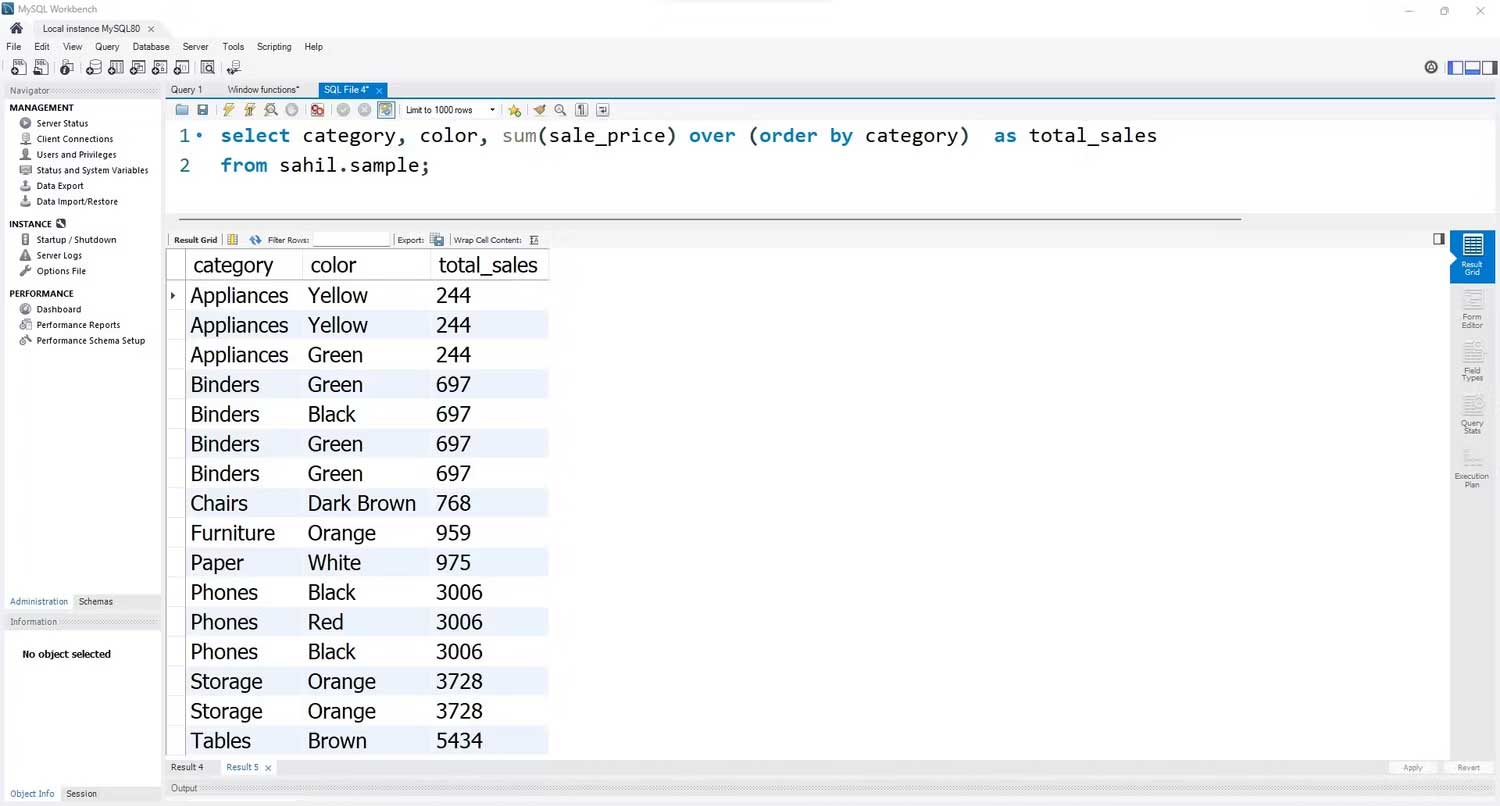
<p style="text-align: justify;">Giả sử bạn muốn tính tổng doanh số cho mỗi giá trị trong cột thư mục. Dưới đây là cách bạn có thể làm việc này:</p>

<pre id="pre1" style="text-align: justify;">
SELECT category, color,
sum(sale_price)
OVER (order by category) AS total_sales
FROM sahil.sample;</pre>

<p style="text-align: justify;">Ở code trên, lệnh SQL lấy danh mục và màu sắc từ dataset gốc. Hàm sum thêm cột sale_price. Nó làm việc này theo danh mục bởi mệnh đề OVER xác định thứ tự theo cột danh mục. Kết quả cuối cùng như sau:</p>

<p style="text-align: justify;"><img alt="Ví dụ cách dùng Windows Function trong SQL" data-i="1" data-src="https://st.quantrimang.com/photos/image/2023/02/14/window-function-sql-1.jpg" data-was-processed="true" height="349" src="https://st.quantrimang.com/photos/image/2023/02/14/window-function-sql-1.jpg" width="650" /></p>

<h2 style="text-align: justify;">Cách dùng window function Avg()</h2>

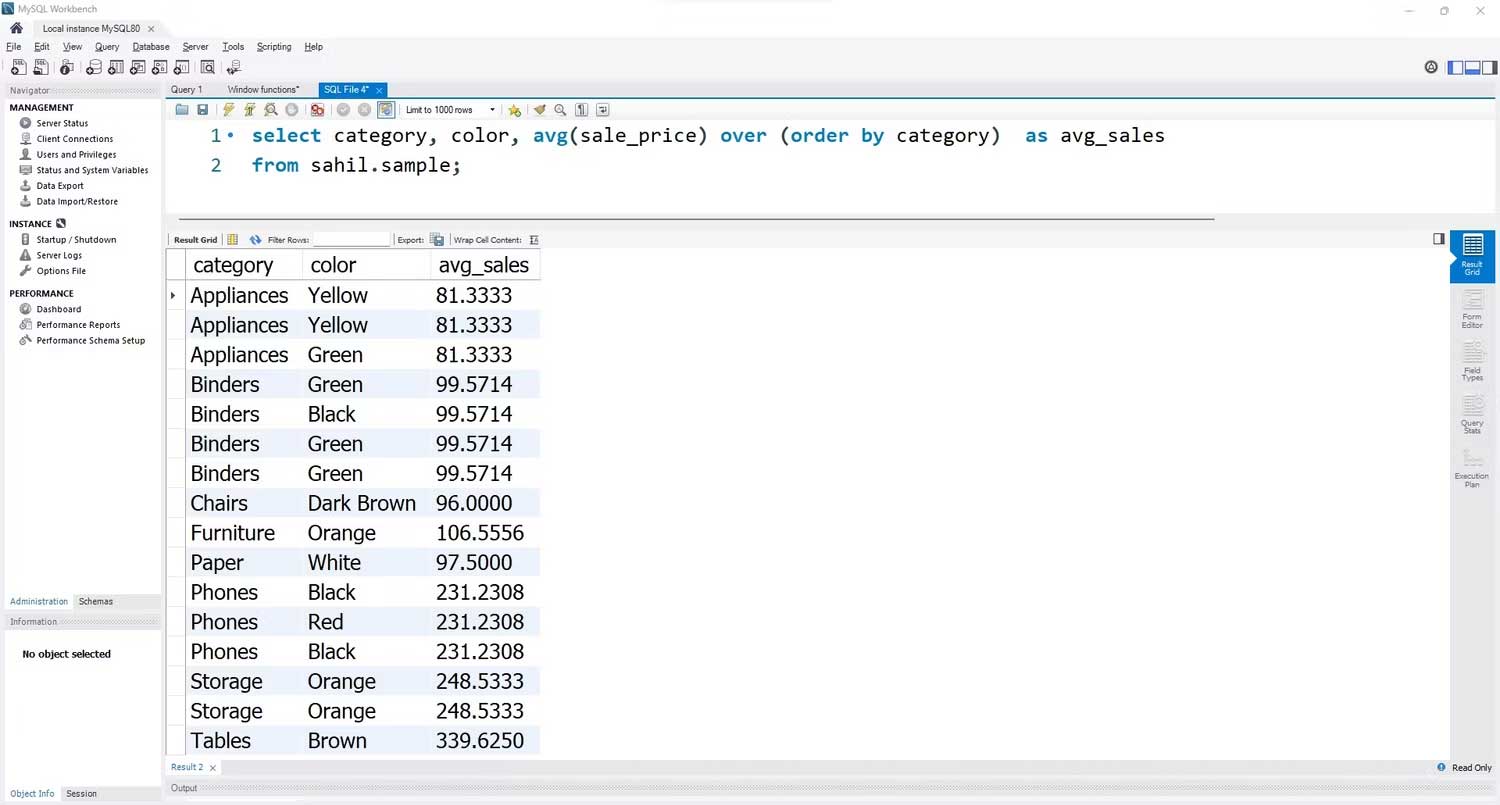
<p style="text-align: justify;">Giống như hàm sum, bạn có thể tính trung bình mỗi hàng của dữ liệu bằng hàm avg. Thay vì tổng số, bạn sẽ có một cột chứa doanh thu trung bình.</p>

<pre id="pre2" style="text-align: justify;">
SELECT category, color,
avg(sale_price)
OVER (order by category) AS avg_sales
FROM sahil.sample;</pre>

<p style="text-align: justify;"><img alt="Hàm tổng hợp trong SQL" data-i="2" data-src="https://st.quantrimang.com/photos/image/2023/02/14/window-function-sql-2.jpg" data-was-processed="true" height="349" src="https://st.quantrimang.com/photos/image/2023/02/14/window-function-sql-2.jpg" width="650" /></p>

<h2 style="text-align: justify;">Cách dùng window function Count()</h2>

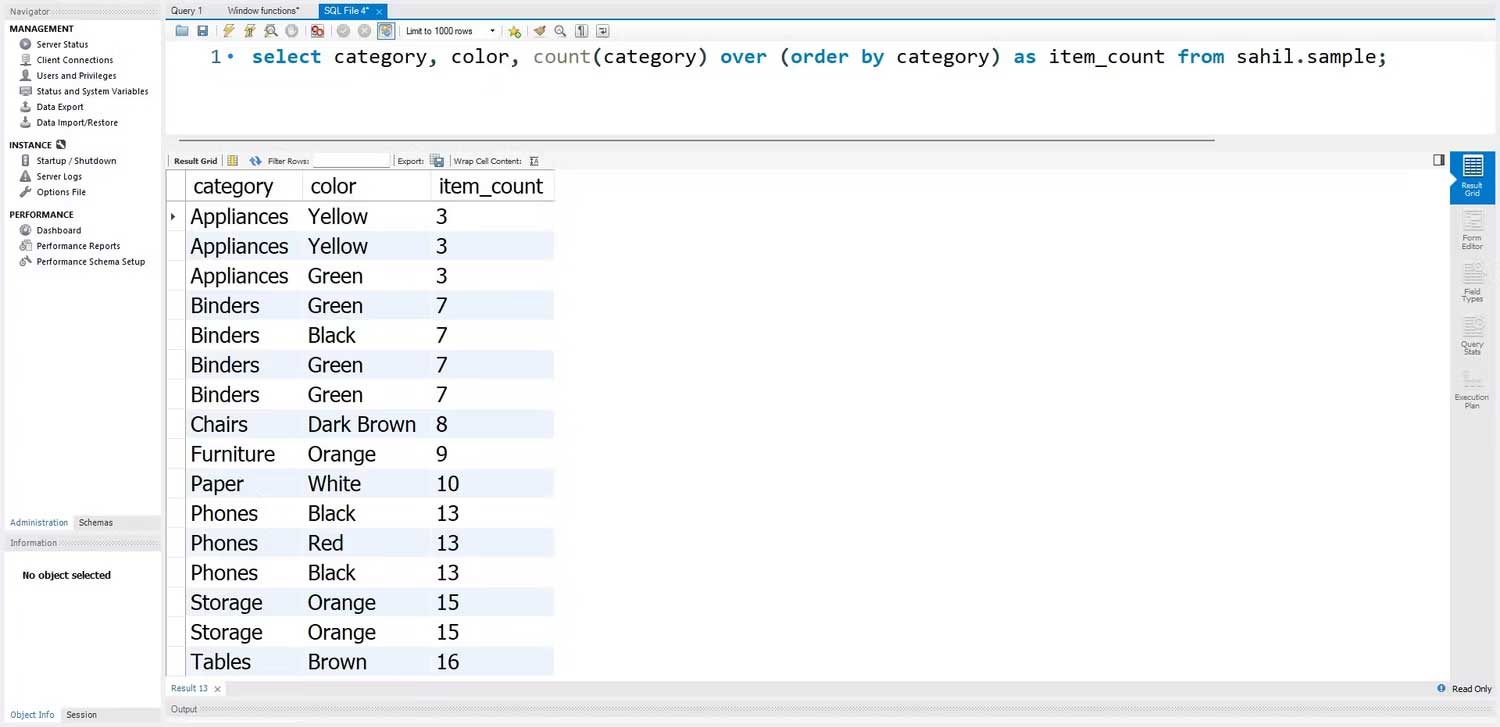
<p style="text-align: justify;">Tương tự như hàm sum và avg, window function count trong SQL khá đơn giản và hoạt động giống hai hàm còn lại. Khi chuyển sang hàm count, bạn sẽ nhận được tổng số lượng từng giá trị trong cột mới.</p>

<p style="text-align: justify;">Đây là cách bạn có thể tính tổng số:</p>

<pre id="pre3" style="text-align: justify;">
SELECT category, color,
count(category)
OVER (order by category) AS item_count
FROM sahil.sample;</pre>

<p style="text-align: justify;"><img alt="Hàm Count() trong SQL" data-i="3" data-src="https://st.quantrimang.com/photos/image/2023/02/14/window-function-sql-4.jpg" data-was-processed="true" height="315" src="https://st.quantrimang.com/photos/image/2023/02/14/window-function-sql-4.jpg" width="650" /></p>

<h2 style="text-align: justify;">Window Function Row_Number()</h2>

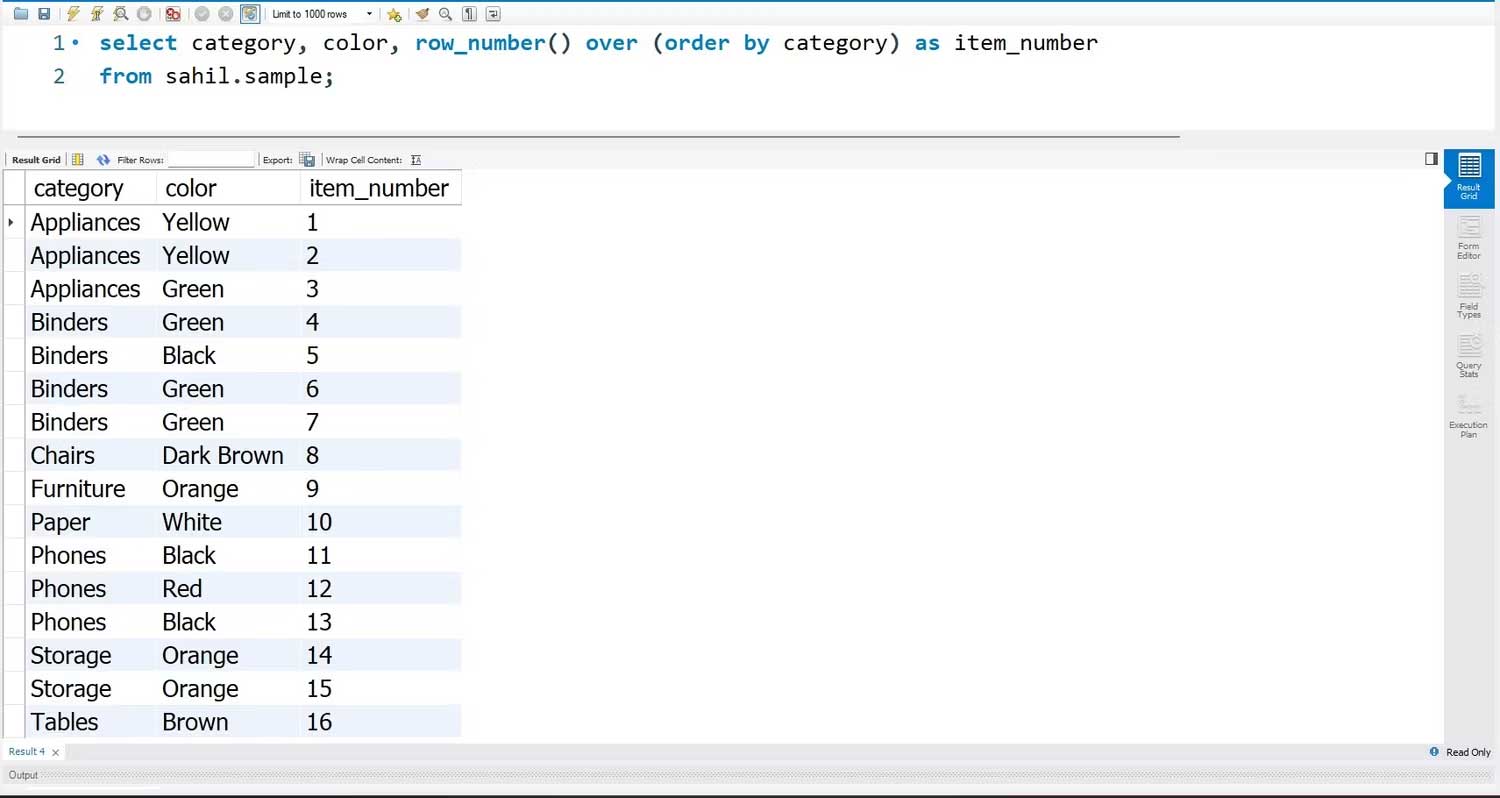
<p style="text-align: justify;">row_number() hoạt động hơi khác một chút so với các window function kể trên. Hàm row_number() gắn một số hàng cho từng hàng, phụ thuộc vào thứ tự mệnh đề. Số hàng khởi đầu là 1. row_number gắn một giá trị tương ứng cho từng hàng cho tới khi kết thúc.</p>

<p style="text-align: justify;">Đây là cấu trúc cơ bản của một hàm row_number():</p>

<pre id="pre4" style="text-align: justify;">
SELECT category, color,
row_number()
OVER (order by category) AS item_number
FROM sahil.sample;</pre>

<p style="text-align: justify;"><img alt="Hàm row_number trong SQL" data-i="4" data-src="https://st.quantrimang.com/photos/image/2023/02/14/window-function-sql-5.jpg" data-was-processed="true" height="346" src="https://st.quantrimang.com/photos/image/2023/02/14/window-function-sql-5.jpg" width="650" /></p>

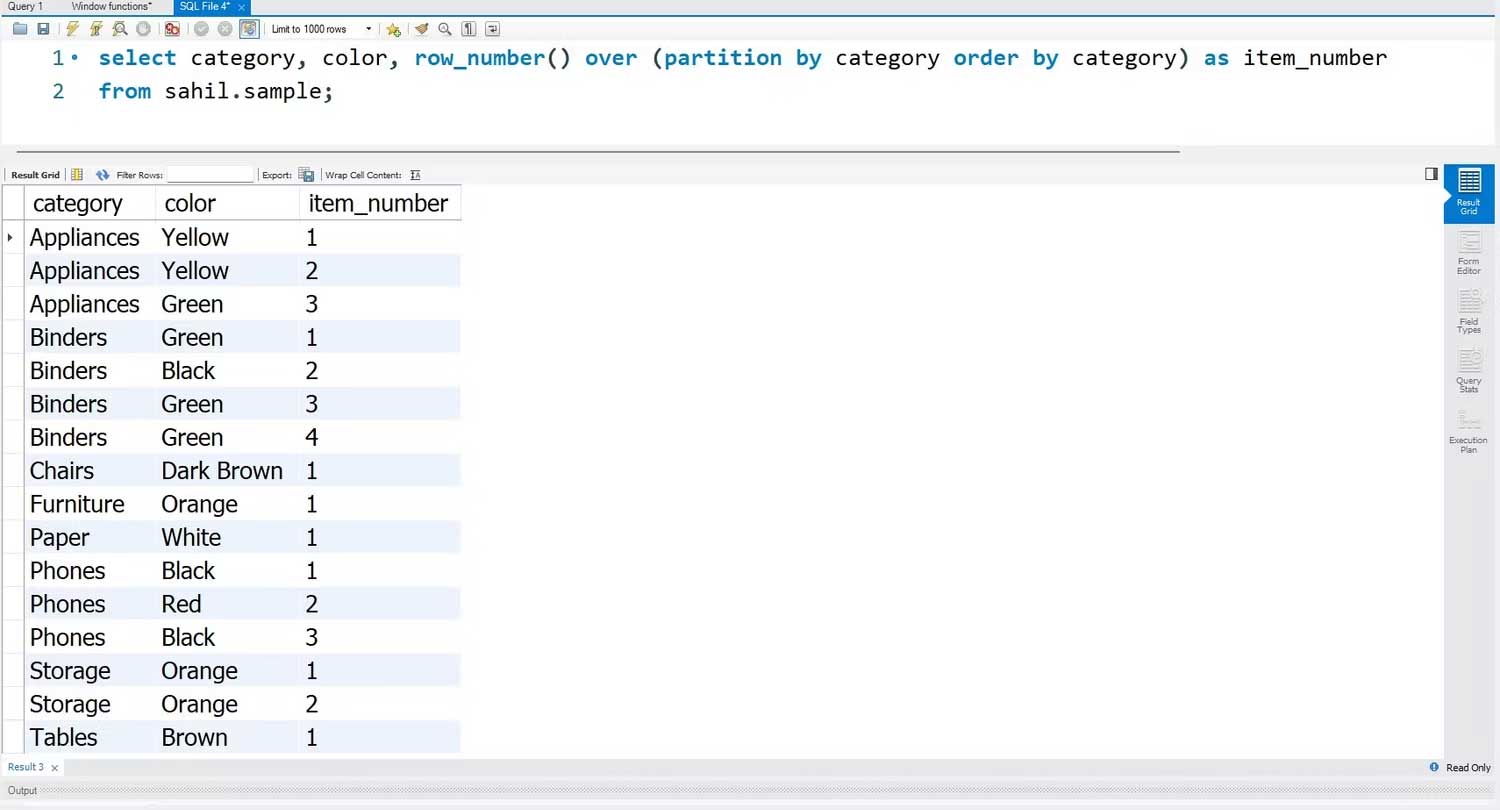
<p style="text-align: justify;">Thế nhưng điều gì xảy ra nếu bạn muốn gán các số hàng riêng biệt cho từng mục trong danh mục? Cú pháp trên thiết lập một số seri luân phiên, không phân biệt các mặt hàng được lưu trữ trong danh mục. Ví dụ, danh mục thiết bị cần được đánh số riêng…</p>

<p style="text-align: justify;">Bạn có thể dùng hàm&nbsp;<strong>partition</strong>&nbsp;để thực hiện nhiệm vụ đơn giản nhưng thực tế này. Từ khóa partition gắn số hàng được chỉ định dựa trên mỗi mặt hàng trong danh mục.</p>

<pre id="pre5" style="text-align: justify;">
SELECT category, color,
row_number()
OVER (partition by category order by category) AS item_number
FROM sahil.sample;</pre>

<p style="text-align: justify;"><img alt="Cách dùng window function sql" data-i="5" data-src="https://st.quantrimang.com/photos/image/2023/02/14/window-function-sql-6.jpg" data-was-processed="true" height="351" src="https://st.quantrimang.com/photos/image/2023/02/14/window-function-sql-6.jpg" width="650" /></p>

<h2 style="text-align: justify;">Hàm Rank() và Dense_Rank()</h2>

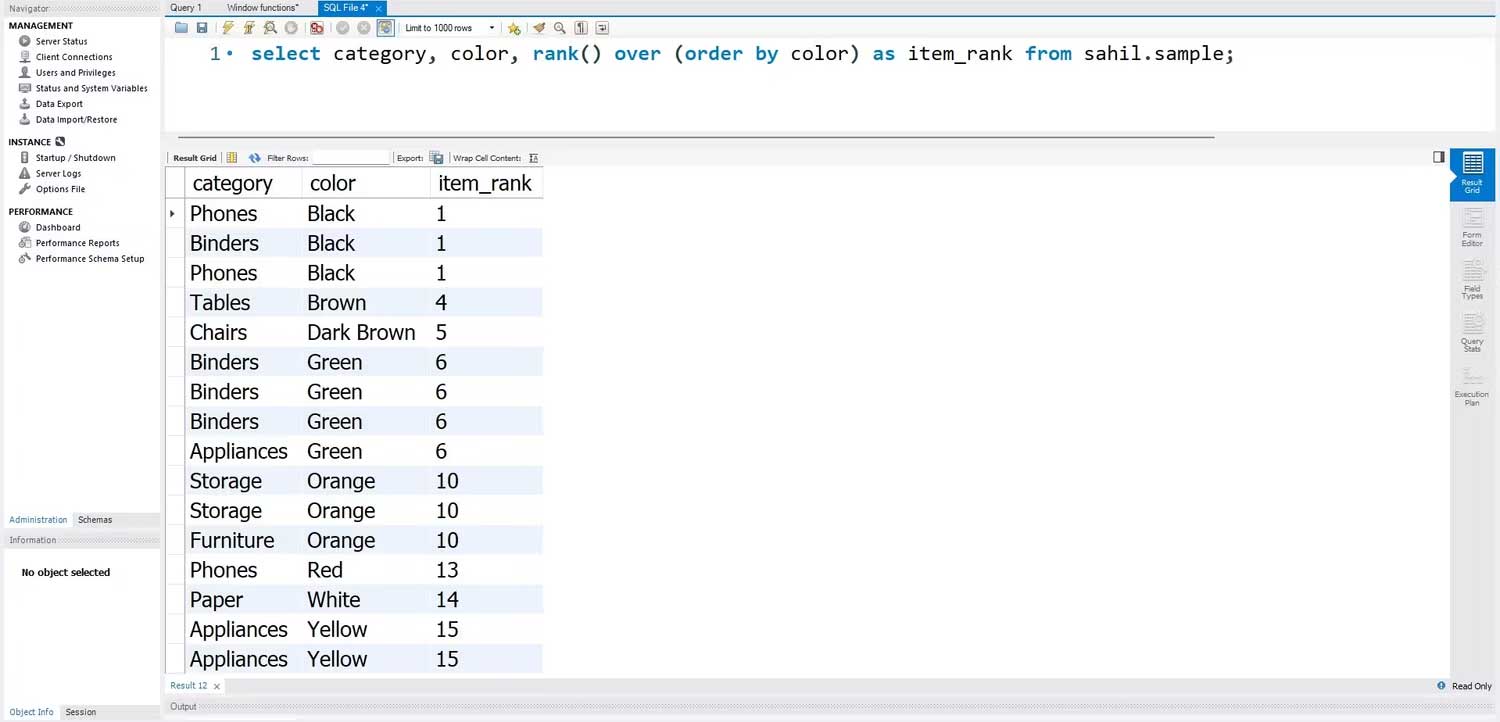
<p style="text-align: justify;">Hàm rank() hoạt động khác hàm row_number(). Bạn cần xác định tên cột trong thứ tự theo hàm, để dùng nó làm cơ sở xác định giá trị hàm. Ví dụ, trong code dưới đây, bạn có thể dùng cột màu sắc trong hàm order by. Truy vấn này sau đó sẽ dùng thứ tự đó để gắn giá trị xếp hạng cho từng hàng.</p>

<p style="text-align: justify;">Bạn có thể dùng cú pháp code bên dưới để chuyển một hàm xếp hạng trong SQL:</p>

<pre id="pre6" style="text-align: justify;">
SELECT category, color,
rank()
OVER (order by color) AS item_rank
FROM sahil.sample;</pre>

<p style="text-align: justify;">Kết quả:</p>

<p style="text-align: justify;"><img alt="Hàm Rank trong SQL" data-i="6" data-src="https://st.quantrimang.com/photos/image/2023/02/14/window-function-sql-7.jpg" data-was-processed="true" height="313" src="https://st.quantrimang.com/photos/image/2023/02/14/window-function-sql-7.jpg" width="650" /></p>

<p style="text-align: justify;">Hàm order by phân loại thư mục màu sắc, còn hàm rank xếp hạng theo từng màu. Tuy nhiên, tất cả giá trị màu giống nhau đều có chung xếp hạng, còn màu khác có xếp hạng riêng. Màu đen xuất hiện 3 lần trong dataset; thay vì gắn một giá trị xếp hạng 1, 2, 3, các mục màu đen được xếp hạng 1.</p>

<p style="text-align: justify;">Tuy nhiên, màu nâu Brown sẽ là 4, không phải 2. Rank function bỏ qua các giá trị và gắn giá trị theo trình tự thời gian cho các mục khác nhau. Nếu muốn gắn một giá trị xếp hạng ý nghĩa hơn, bạn có thể dùng hàm dense_rank().</p>

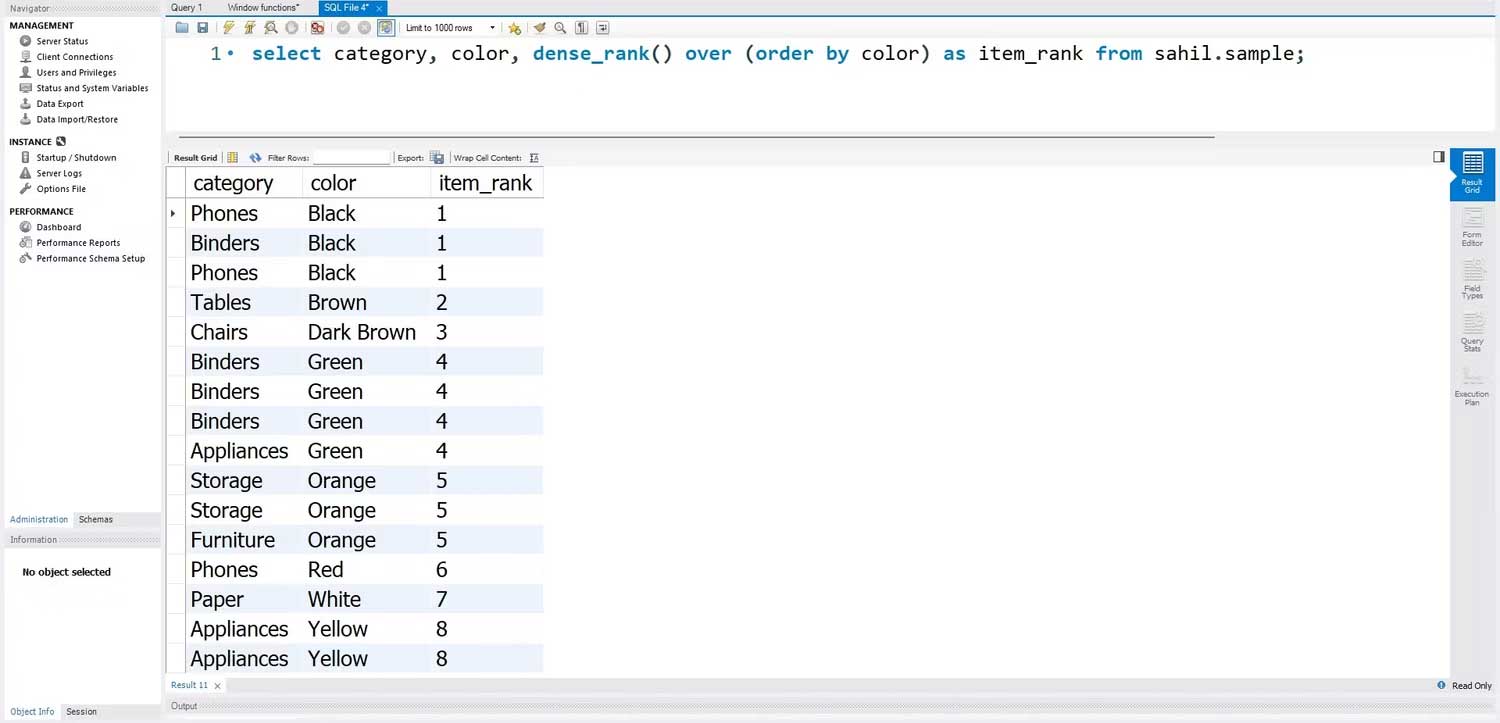
<p style="text-align: justify;">Hàm dense_rank không bỏ qua bất kỳ giá trị xếp hạn trong hàm order by. Ví dụ, 3 mục màu đầu tiên sẽ có xếp hạng 1. Tuy nhiên, màu (Brown) tiếp theo sẽ không có rank 4, mà là rank 2, là thứ tự thời gian tiếp theo trong danh mục đánh số. Hàm dense_rank là một window function thực tế hơn bởi nó gắn một giá trị có ý nghĩa cho tất cả danh sách các mục.</p>

<p style="text-align: justify;">Dưới đây là cách bạn có thể dùng hàm dense_rank trong SQL:</p>

<pre id="pre7" style="text-align: justify;">
SELECT category, color,
dense_rank()
OVER (order by color) AS item_rank
FROM sahil.sample;</pre>

<p style="text-align: justify;">Kết quả:</p>

<p style="text-align: justify;"><img alt="dense_rank() trong SQL" data-i="7" data-src="https://st.quantrimang.com/photos/image/2023/02/14/window-function-sql-8.jpg" data-was-processed="true" height="313" src="https://st.quantrimang.com/photos/image/2023/02/14/window-function-sql-8.jpg" width="650" /></p>

<p style="text-align: justify;">Trên đây là<strong>&nbsp;mọi điều bạn cần biết về Windows Function trong SQL</strong>. Hi vọng bài viết hữu ích với các bạn.</p>
		</div>
				<div id="author">
						<p>
				<strong>Nguồn tin:</strong>
				Quantrimang.com
			</p>
		</div>
	</div>
	<div id="footer" class="clearfix">
		<div id="url">
			<strong>URL của bản tin này: </strong><a href="https://www.nguoicodonvn2008.info/vi/news/savefile/kien-thuc-may-tinh/window-function-trong-sql-moi-dieu-ban-can-biet-6722.html" title="Window Function trong SQL&#x3A; Mọi điều bạn cần biết">https://www.nguoicodonvn2008.info/vi/news/savefile/kien-thuc-may-tinh/window-function-trong-sql-moi-dieu-ban-can-biet-6722.html</a>

		</div>
		<div class="clear"></div>
		<div class="copyright">
			&copy; .&#x3A; Nguoicodonvn2008.info - Cõi lòng người cô đơn &#x3A;.
		</div>
		<div id="contact">
			<a href="mailto:admin@nguoicodonvn2008.info">admin@nguoicodonvn2008.info</a>
		</div>
	</div>
</div>
        <div id="timeoutsess" class="chromeframe">
            Bạn đã không sử dụng Site, <a onclick="timeoutsesscancel();" href="https://www.nguoicodonvn2008.info/#">Bấm vào đây để duy trì trạng thái đăng nhập</a>. Thời gian chờ: <span id="secField"> 60 </span> giây
        </div>
        <div id="openidResult" class="nv-alert" style="display:none"></div>
        <div id="openidBt" data-result="" data-redirect=""></div>
		</script>
		<div class="car-top">
  <span><img src="https://www.nguoicodonvn2008.info/themes/default/images/car.png" alt=""></span>
</div>
<script src="https://www.nguoicodonvn2008.info/assets/js/jquery/jquery.min.js"></script>
<script>var nv_base_siteurl="/",nv_lang_data="vi",nv_lang_interface="vi",nv_name_variable="nv",nv_fc_variable="op",nv_lang_variable="language",nv_module_name="news",nv_func_name="savefile",nv_is_user=0, nv_my_ofs=-4,nv_my_abbr="EDT",nv_cookie_prefix="nv4c_e856T",nv_check_pass_mstime=1738000,nv_area_admin=0,nv_safemode=0,theme_responsive=0,nv_recaptcha_ver=2,nv_recaptcha_sitekey="",nv_recaptcha_type="image",XSSsanitize=1;</script>
<script src="https://www.nguoicodonvn2008.info/assets/js/language/vi.js"></script>
<script src="https://www.nguoicodonvn2008.info/assets/js/DOMPurify/purify3.js"></script>
<script src="https://www.nguoicodonvn2008.info/assets/js/global.js"></script>
<script src="https://www.nguoicodonvn2008.info/assets/js/site.js"></script>
<script src="https://www.nguoicodonvn2008.info/themes/default/js/news.js"></script>
<script src="https://www.nguoicodonvn2008.info/themes/default/js/main.js"></script>
<script src="https://www.nguoicodonvn2008.info/themes/default/js/custom.js"></script>
<script type="application/ld+json">
        {
            "@context": "https://schema.org",
            "@type": "Organization",
            "url": "https://www.nguoicodonvn2008.info",
            "logo": "https://www.nguoicodonvn2008.info/uploads/angel.gif"
        }
        </script>
<script src="https://www.nguoicodonvn2008.info/themes/default/js/bootstrap.min.js"></script>
<script type="text/javascript">
var $scrolltop = $('.car-top');
$scrolltop.on('click', function () {
    $('html,body').animate({
        scrollTop: 0
    }, 800);
    $(this).addClass("car-run");
    setTimeout(function(){ $scrolltop.removeClass('car-run');}, 1000);
    return false;
});
$(window).on('scroll', function ()
{ 
    if($(window).scrollTop() >= 200)
    {
        $scrolltop.addClass("show");
        $scrolltop.addClass("car-down");
    }
    else
    {
       $scrolltop.removeClass("show");
       setTimeout(function(){ $scrolltop.removeClass('car-down');}, 300);
    }
});
</script>
</body>
</html>