<!DOCTYPE html>
    <html lang="vi" xmlns="http://www.w3.org/1999/xhtml" prefix="og: http://ogp.me/ns#">
    <head>
<title>Vòng lặp for trong Python</title>
<meta name="description" content="Vòng lặp for trong Python - Savefile - Tin Tức - https&#x3A;&#x002F;&#x002F;www.nguoicodonvn2008.info&#x002F;vi&#x002F;news&#x002F;savefile&#x002F;kien-thuc-may-tinh&#x002F;vong-lap-for-trong-python-9063.html">
<meta name="author" content=".: Nguoicodonvn2008.info - Cõi lòng người cô đơn :.">
<meta name="copyright" content=".: Nguoicodonvn2008.info - Cõi lòng người cô đơn :. [admin@nguoicodonvn2008.info]">
<meta name="robots" content="index, archive, follow, noodp">
<meta name="googlebot" content="index,archive,follow,noodp">
<meta name="msnbot" content="all,index,follow">
<meta name="generator" content="NukeViet v4.5">
<meta http-equiv="Content-Type" content="text/html; charset=utf-8">
<meta property="og:title" content="Vòng lặp for trong Python">
<meta property="og:type" content="website">
<meta property="og:description" content="Savefile - Tin Tức - https&#x3A;&#x002F;&#x002F;www.nguoicodonvn2008.info&#x002F;vi&#x002F;news&#x002F;savefile&#x002F;kien-thuc-may-tinh&#x002F;vong-lap-for-trong-python-9063.html">
<meta property="og:site_name" content=".&#x3A; Nguoicodonvn2008.info - Cõi lòng người cô đơn &#x3A;.">
<meta property="og:url" content="https://www.nguoicodonvn2008.info/vi/news/savefile/kien-thuc-may-tinh/vong-lap-for-trong-python-9063.html">
<link rel="shortcut icon" href="https://www.nguoicodonvn2008.info/favicon.ico">
<link rel="canonical" href="https://www.nguoicodonvn2008.info/vi/news/savefile/kien-thuc-may-tinh/vong-lap-for-trong-python-9063.html">
<link rel="alternate" href="https://www.nguoicodonvn2008.info/vi/news/rss/" title="Tin Tức" type="application/rss+xml">
<link rel="alternate" href="https://www.nguoicodonvn2008.info/vi/news/rss/karaoke-dual/" title="Tin Tức - Karaoke Dual" type="application/rss+xml">
<link rel="alternate" href="https://www.nguoicodonvn2008.info/vi/news/rss/nhac-tre/" title="Tin Tức - Nhạc trẻ" type="application/rss+xml">
<link rel="alternate" href="https://www.nguoicodonvn2008.info/vi/news/rss/tru-tinh/" title="Tin Tức - Trữ tình" type="application/rss+xml">
<link rel="alternate" href="https://www.nguoicodonvn2008.info/vi/news/rss/nuoc-ngoai/" title="Tin Tức - Nước ngoài" type="application/rss+xml">
<link rel="alternate" href="https://www.nguoicodonvn2008.info/vi/news/rss/remix/" title="Tin Tức - Remix" type="application/rss+xml">
<link rel="alternate" href="https://www.nguoicodonvn2008.info/vi/news/rss/tam-su-tinh-yeu/" title="Tin Tức - Tâm sự tình yêu" type="application/rss+xml">
<link rel="alternate" href="https://www.nguoicodonvn2008.info/vi/news/rss/tho-suu-tam/" title="Tin Tức - Thơ sưu tầm" type="application/rss+xml">
<link rel="alternate" href="https://www.nguoicodonvn2008.info/vi/news/rss/cuoc-song/" title="Tin Tức - Cuộc sống" type="application/rss+xml">
<link rel="alternate" href="https://www.nguoicodonvn2008.info/vi/news/rss/phan-mem/" title="Tin Tức - Phần mềm" type="application/rss+xml">
<link rel="alternate" href="https://www.nguoicodonvn2008.info/vi/news/rss/kien-thuc-may-tinh/" title="Tin Tức - Kiến thức máy tính" type="application/rss+xml">
<link rel="alternate" href="https://www.nguoicodonvn2008.info/vi/news/rss/hoc-tap/" title="Tin Tức - Học tập" type="application/rss+xml">
<link rel="alternate" href="https://www.nguoicodonvn2008.info/vi/news/rss/tai-lieu/" title="Tin Tức - Tài liệu" type="application/rss+xml">
<link rel="alternate" href="https://www.nguoicodonvn2008.info/vi/news/rss/de-thi/" title="Tin Tức - Đề thi" type="application/rss+xml">
<link rel="preload" as="style" href="https://www.nguoicodonvn2008.info/assets/css/font-awesome.min.css" type="text/css">
<link rel="preload" as="style" href="https://www.nguoicodonvn2008.info/themes/default/css/bootstrap.non-responsive.css" type="text/css">
<link rel="preload" as="style" href="https://www.nguoicodonvn2008.info/themes/default/css/style.css" type="text/css">
<link rel="preload" as="style" href="https://www.nguoicodonvn2008.info/themes/default/css/style.non-responsive.css" type="text/css">
<link rel="preload" as="style" href="https://www.nguoicodonvn2008.info/themes/default/css/news.css" type="text/css">
<link rel="preload" as="style" href="https://www.nguoicodonvn2008.info/themes/default/css/custom.css" type="text/css">
<link rel="preload" as="script" href="https://www.nguoicodonvn2008.info/assets/js/jquery/jquery.min.js" type="text/javascript">
<link rel="preload" as="script" href="https://www.nguoicodonvn2008.info/assets/js/language/vi.js" type="text/javascript">
<link rel="preload" as="script" href="https://www.nguoicodonvn2008.info/assets/js/DOMPurify/purify3.js" type="text/javascript">
<link rel="preload" as="script" href="https://www.nguoicodonvn2008.info/assets/js/global.js" type="text/javascript">
<link rel="preload" as="script" href="https://www.nguoicodonvn2008.info/assets/js/site.js" type="text/javascript">
<link rel="preload" as="script" href="https://www.nguoicodonvn2008.info/themes/default/js/news.js" type="text/javascript">
<link rel="preload" as="script" href="https://www.nguoicodonvn2008.info/themes/default/js/main.js" type="text/javascript">
<link rel="preload" as="script" href="https://www.nguoicodonvn2008.info/themes/default/js/custom.js" type="text/javascript">
<link rel="preload" as="script" href="https://www.nguoicodonvn2008.info/themes/default/js/bootstrap.min.js" type="text/javascript">
<link rel="stylesheet" href="https://www.nguoicodonvn2008.info/assets/css/font-awesome.min.css">
<link rel="stylesheet" href="https://www.nguoicodonvn2008.info/themes/default/css/bootstrap.non-responsive.css">
<link rel="stylesheet" href="https://www.nguoicodonvn2008.info/themes/default/css/style.css">
<link rel="stylesheet" href="https://www.nguoicodonvn2008.info/themes/default/css/style.non-responsive.css">
<link rel="StyleSheet" href="https://www.nguoicodonvn2008.info/themes/default/css/news.css">
<link rel="stylesheet" href="https://www.nguoicodonvn2008.info/themes/default/css/custom.css">
<style type="text/css">
	body{background: #fff;}
</style>
    </head>
    <body>
<div id="print">
	<div id="hd_print">
		<h2 class="pull-left">.&#x3A; Nguoicodonvn2008.info - Cõi lòng người cô đơn &#x3A;.</h2>
		<p class="pull-right"><a title=".&#x3A; Nguoicodonvn2008.info - Cõi lòng người cô đơn &#x3A;." href="https://www.nguoicodonvn2008.info/">https://www.nguoicodonvn2008.info</a></p>
	</div>
	<div class="clear"></div>
	<hr />
	<div id="content">
		<h1>Vòng lặp for trong Python</h1>
		<ul class="list-inline">
			<li>Thứ năm - 26/09/2024 00:18</li>
			<li class="hidden-print txtrequired"><em class="fa fa-print">&nbsp;</em><a title="In ra" href="javascript:;" onclick="window.print()">In ra</a></li>
			<li class="hidden-print txtrequired"><em class="fa fa-power-off">&nbsp;</em><a title="Đóng cửa sổ này" href="javascript:;" onclick="window.close()">Đóng cửa sổ này</a></li>
		</ul>
		<div class="clear"></div>
		<div id="hometext">
		</div>
				<div class="imghome">
			<img alt="Vòng lặp for trong Python" src="https://st.quantrimang.com/photos/image/2022/09/06/for-python.png" width="460" class="img-thumbnail" />
		</div>
		<div class="clear"></div>
		<div id="bodytext" class="clearfix">
			<p style="text-align: justify;"><strong>Vòng lặp for trong Python</strong>&nbsp;quan trọng trong thiết kế web, ứng dụng. Dưới đây là những điều bạn cần biết về&nbsp;<code>for</code>&nbsp;trong Python.</p>

<p style="text-align: justify;">Lập trình hiện tại đang là một ngành cực kỳ được “săn đón” bởi nó là “cái nôi” tạo ra nhiều ứng dụng, phần mềm và trang web hữu ích. Thế giới lập trình vô cùng đa dạng và phong phú với nhiều ngôn ngữ khác nhau. Python chỉ là một phần trong số đó nhưng hiện rất được ưa chuộng bởi dễ dùng và linh hoạt.</p>

<p style="text-align: justify;">Python nổi tiếng là ngôn ngữ lập trình mạnh mẽ, được thiết kế dễ hiểu và dễ đưa vào ứng dụng thực tế. Python mã nguồn mở nên lập trình viên dễ chỉnh sửa như ý muốn. Học Python về cơ bản không khó. Bạn cần nắm được các hàm và thành phần cơ bản.</p>

<p style="text-align: justify;">Giống như mọi ngôn ngữ lập trình khác, Python cũng có vòng lặp. Nó rất quan trọng khi bạn phát triển ứng dụng nào đó. Ở bài viết này, hãy cùng nhau tìm hiểu về for loop trong Python nhé!</p>

<h2 style="text-align: justify;">Vòng lặp for trong Python là gì?</h2>

<p style="text-align: justify;">Python thường xuyên dùng loop để lặp các đối tượng như danh sách, bộ dữ liệu và chuỗi. Tuy nhiên, nó vẫn có điểm khác biệt so với các ngôn ngữ lập trình khác. Dưới đây là thông tin chi tiết.</p>

<h3 style="text-align: justify;">Vòng lặp for loop hoạt động nội bộ như thế nào?</h3>

<p style="text-align: justify;">Trước khi đi sâu vào chi tiết, hãy cùng tìm hiểu về các biến lặp trong Python. Đầu tiên, hãy xem xét một ví dụ đơn giản về for loop như sau:</p>

<pre id="pre0" style="text-align: justify;">
# Một ví dụ về for loop đơn giản

fruits = &#91;&quot;apple&quot;, &quot;orange&quot;, &quot;kiwi&quot;&#93;

for fruit in fruits:

	print(fruit)
</pre>

<p style="text-align: justify;">Kết quả:</p>

<pre id="pre1" style="text-align: justify;">
apple
orange
Kiwi</pre>

<p style="text-align: justify;">Bạn có thể thấy các biến lặp for loop trên đối tượng lặp là các loại trái cây được hiện dưới dạng danh sách. List, set, dictionary chỉ là một số đối tượng lặp, còn đối tượng số nguyên không phải đối tượng lặp. For loop có thể lặp trên bất kỳ đối tượng có thể lặp này.</p>

<div style="text-align: justify;">&nbsp;</div>

<p style="text-align: justify;">Với sự trợ giúp của ví dụ trên, hãy tiếp tục tìm hiểu sâu hơn để xem điều gì xảy ra bên trong ở đây.</p>

<ul>
	<li style="text-align: justify;">Tạo danh sách một đối tượng có thể lặp với sự trợ giúp của hàm iter().</li>
	<li style="text-align: justify;">Chạy một vòng lặp while vô tận và chỉ ngắt nếu tăng StopIteration.</li>
	<li style="text-align: justify;">Trong khối try, tìm nạp phần tử tiếp theo của trái cây bằng hàm next().</li>
</ul>

<p style="text-align: justify;">Sau khi tìm nạp thành phần đã thực hiện, hoạt động được tiến hành với phần tử này. (i.e print(fruit))</p>

<pre id="pre2" style="text-align: justify;">
fruits = &#91;&quot;apple&quot;, &quot;orange&quot;, &quot;kiwi&quot;&#93;

# Tạo đối tượng lặp
# từ biến có thể lặp i.e fruits
iter_obj = iter(fruits)

# while loop vô tận
while True:
	try:
		# Lấy biến tiếp theo
		fruit = next(iter_obj)
		print(fruit)
	except StopIteration:

		# nếu StopIteration tăng,
		# thoát vòng lặp
		break
</pre>

<p style="text-align: justify;">Kết quả</p>

<pre id="pre3" style="text-align: justify;">
apple
orange
kiwi</pre>

<p style="text-align: justify;"><strong>Ví dụ khác:</strong></p>

<p style="text-align: justify;">Liệt kê từng loại trái cây dưới dạng danh sách:</p>

<pre id="pre4" style="text-align: justify;">
fruits = &#91;&quot;apple&quot;, &quot;banana&quot;, &quot;cherry&quot;&#93;
for x in fruits:
  print(x)</pre>

<p style="text-align: justify;">Vòng lặp&nbsp;<code>for</code>&nbsp;không yêu cầu một biến chỉ mục được thiết lập trước.</p>

<h2 style="text-align: justify;">Cú pháp của for trong Python</h2>

<pre id="pre5" style="text-align: justify;">
for bien_lap in chuoi_lap:
    Khối lệnh của for</pre>

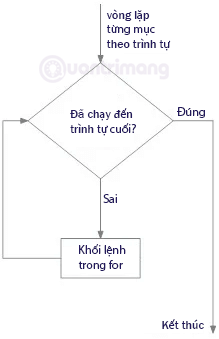
<p style="text-align: justify;">Trong cú pháp trên,&nbsp;<code>chuoi_lap</code>&nbsp;là chuỗi cần lặp,&nbsp;<code>bien_lap</code>&nbsp;là biến nhận giá trị của từng mục bên trong&nbsp;<code>chuoi_lap</code>&nbsp;trên mỗi lần lặp. Vòng lặp sẽ tiếp tục cho đến khi nó lặp tới mục cuối cùng trong chuỗi.</p>

<p style="text-align: justify;">Khối lệnh của&nbsp;<code>for</code>&nbsp;được thụt lề để phân biệt với phần còn lại của code.</p>

<h3 style="text-align: justify;">Sơ đồ vòng lặp for</h3>

<p style="text-align: justify;"><img alt="Sơ đồ vòng lặp for" data-i="0" data-src="https://st.quantrimang.com/photos/image/2022/09/06/for-python.png" data-was-processed="true" height="339" src="https://st.quantrimang.com/photos/image/2022/09/06/for-python.png" width="219" /></p>

<h2 style="text-align: justify;">Vòng lặp for qua một chuỗi</h2>

<p style="text-align: justify;">Một chuỗi là các đối tượng có thể dùng vòng lặp để đọc từng chữ cái một. Ví dụ:</p>

<pre id="pre6" style="text-align: justify;">
#Lặp chữ cái trong quantrimang
for chu in &#039;quantrimang&#039;:
    print(&#039;Chữ cái hiện tại:&#039;, chu)

#Lặp từ trong chuỗi
chuoi = &#91;&#039;bố&#039;,&#039;mẹ&#039;,&#039;em&#039;&#93;
for tu in chuoi:
    print(&#039;Anh yêu&#039;, tu)</pre>

<div style="text-align: justify;"><iframe allow="autoplay" allowtransparency="true" aria-label="Advertisement" data-google-container-id="a!3" data-google-query-id="CPDhlYfS34gDFQpfDwIdqb8NoQ" data-load-complete="true" frameborder="0" height="0" hspace="0" id="aswift_2" marginheight="0" marginwidth="0" name="aswift_2" sandbox="allow-scripts allow-same-origin allow-forms allow-presentation allow-popups" scrolling="no" tabindex="0" title="Advertisement" vspace="0" width="694"></iframe></div>

<p style="text-align: justify;">Ta có kết quả đầu ra như sau:</p>

<pre id="pre7" style="text-align: justify;">
Chữ cái hiện tại: q
Chữ cái hiện tại: u
Chữ cái hiện tại: a
Chữ cái hiện tại: n
Chữ cái hiện tại: t
Chữ cái hiện tại: r
Chữ cái hiện tại: i
Chữ cái hiện tại: m
Chữ cái hiện tại: a
Chữ cái hiện tại: n
Chữ cái hiện tại: g
Anh yêu bố
Anh yêu mẹ
Anh yêu em</pre>

<h2 style="text-align: justify;">Vòng lặp for trong một dãy số</h2>

<p style="text-align: justify;">Ngoài việc sử dụng vòng lặp&nbsp;<code>for</code>&nbsp;để lấy các chữ cái và ký tự trong chuỗi, ta còn sử dụng for để lấy các số trong 1 mảng dãy số.</p>

<pre id="pre8" style="text-align: justify;">
# Tính tổng tất cả các số trong danh sách A
# Danh sách A
A = &#91;1, 3, 5, 9, 11, 2, 6, 8, 10&#93;
# Biến để lưu trữ tổng các số là tong, gán giá trị ban đầu bằng 0
tong = 0
# Vòng lặp for, a là biến lặp
for a in A:
     tong = tong+a
# Đầu ra: Tổng các số là 55
print(&quot;Tổng các số là&quot;, tong)</pre>

<p style="text-align: justify;">Khi chạy đoạn code trên, bạn sẽ nhận được kết quả là:</p>

<pre id="pre9" style="text-align: justify;">
Tổng các số là 55</pre>

<h2 style="text-align: justify;">Lệnh break trong for</h2>

<p style="text-align: justify;">Với câu lệnh break, chúng ta có thể dừng vòng lặp trước khi nó lặp qua hết các mục trong chuỗi lặp. Ví dụ: dừng vòng lặp khi gặp dấu chấm (.) trong chuỗi quantrimang.com:</p>

<pre id="pre10" style="text-align: justify;">
#Lặp chữ cái có break:

a=&#91;&quot;quan&quot;,&quot;tri&quot;,&quot;mang&quot;,&quot;.&quot;,&quot;com&quot;&#93;
for chu in a:
    if chu == &quot;.&quot;:
        break
    print(chu)
print(&quot;Nội dung ngoài vòng lặp for&quot;)</pre>

<p style="text-align: justify;">Kết quả sau khi chạy đoạn code trên là:</p>

<pre id="pre11">
<code>quan
tri
mang
Nội dung ngoài vòng lặp for</code></pre>

<p style="text-align: justify;">Ở ví dụ trên, vòng lặp đã lặp qua các chữ cái:&nbsp;<strong>quan</strong>,&nbsp;<strong>tri</strong>,&nbsp;<strong>mang</strong>; tới khi gặp dấu chấm&nbsp;<code>&quot;.&quot;</code>, vòng lặp đã thoát hoàn toàn và không in nốt chữ cuối:&nbsp;<strong>com</strong>.</p>

<h2 style="text-align: justify;">Lệnh continue trong for</h2>

<p style="text-align: justify;">Không giống như&nbsp;<code>break</code>, lệnh&nbsp;<code>continue</code>&nbsp;sẽ chỉ dừng việc lặp của vòng lặp hiện tại và vẫn tiếp tục chu trình lặp tiếp theo. Ví dụ: lặp lại chuỗi quan, tri, mang, ., com ở trên nhưng bỏ qua không in ký tự chấm (.). Chuỗi lệnh sẽ như sau:</p>

<pre id="pre12" style="text-align: justify;">
#Lặp chữ cái có break:

a=&#91;&quot;quan&quot;,&quot;tri&quot;,&quot;mang&quot;,&quot;.&quot;,&quot;com&quot;&#93;
for chu in a:
    if chu == &quot;.&quot;:
        continue
    print(chu)
print(&quot;Nội dung ngoài vòng lặp for&quot;)</pre>

<p style="text-align: justify;">Kết quả sau khi chạy lệnh sẽ là:</p>

<pre id="pre13">
<code>quan
tri
mang
com
Nội dung ngoài vòng lặp for</code></pre>

<p style="text-align: justify;">Như bạn đã thấy trong kết quả trên, vòng lặp chỉ bỏ qua vòng lặp in ký tự&nbsp;<code>.</code>&nbsp;và vẫn tiếp tục in chữ&nbsp;<strong>com</strong>&nbsp;ở sau nó.</p>

<h2 style="text-align: justify;">Lệnh pass trong for</h2>

<p style="text-align: justify;">Các lệnh trong vòng lặp&nbsp;<code>for</code>&nbsp;thường không thể để trống, nhưng nếu vì một lý do nào đó bạn mới chỉ lên ý tưởng cho vòng lặp&nbsp;<code>for</code>&nbsp;mà chưa có nội dung bên trong, lúc này hãy sử dụng lệnh&nbsp;<code>pass</code>&nbsp;để &quot;đặt chỗ&quot; cho những khối code mà mình chưa nghĩ ra.</p>

<p style="text-align: justify;">Ví dụ:</p>

<pre id="pre14" style="text-align: justify;">
#Sử dụng pass để đặt chỗ cho những khối code trong tương lai:

for x in &#039;QuanTriMang&#039;:
  pass</pre>

<p style="text-align: justify;">Chạy khối lệnh trên bạn sẽ không thấy có kết quả gì trả về, do vòng lặp&nbsp;<code>for</code>&nbsp;đã dùng&nbsp;<code>pass</code>&nbsp;để bỏ qua các khối lệnh. Nếu không có lệnh&nbsp;<code>pass</code>&nbsp;bạn sẽ gặp lỗi báo như sau:</p>

<pre id="pre15">
<code>File &quot;&lt;string&gt;&quot;, line 2
    ^
SyntaxError: unexpected EOF while parsing</code></pre>

<div style="text-align: justify;">&nbsp;</div>

<h2 style="text-align: justify;">Hàm range()</h2>

<p style="text-align: justify;">Bạn có thể sử dụng hàm&nbsp;<code>range()</code>&nbsp;để tạo ra một dãy số. Ví dụ,&nbsp;<code>range(100)</code>&nbsp;sẽ tạo một dãy số từ 0 đến 99 (100 số).</p>

<p style="text-align: justify;">Hàm&nbsp;<code>range(so_bat_dau, so_ket_thuc, khoang_cach_2_so)</code>&nbsp;được sử dụng để tạo dãy số tùy chỉnh. Nếu không đặt khoảng cách giữa hai số thì Python sẽ hiểu mặc định nó bằng 1.</p>

<p style="text-align: justify;"><strong>Ví dụ</strong>: Viết 100 lần &quot;<em>Anh xin lỗi</em>&quot;, ta sẽ cho biến i lặp từ 0 đến 100 như dưới đây:</p>

<pre id="pre16" style="text-align: justify;">
for i in range(100):
    print (&quot;Anh xin lỗi&quot;)
print(&quot;Em ơi, anh chép xong ồi nè!&quot;)</pre>

<p style="text-align: justify;">Hàm&nbsp;<code>range()</code>&nbsp;không lưu tất cả các giá trị trong bộ nhớ mà nó lưu giá trị bắt đầu, giá trị kết thúc và khoảng cách giữa hai số từ đó tạo ra số tiếp theo trong dãy.</p>

<p style="text-align: justify;">Để&nbsp;<code>range()</code>&nbsp;xuất ra tất cả các giá trị, bạn cần sử dụng đến hàm&nbsp;<code>list()</code>&nbsp;giống như ví dụ dưới đây:</p>

<pre id="pre17" style="text-align: justify;">
#Lệnh 1
print(range(9))
#Lệnh 2
print(list(range(9)))
#Lệnh 3
print(list(range(2, 5)))
#Lệnh 4
print(list(range(0, 15, 5)))</pre>

<p style="text-align: justify;">Chúng ta sẽ có đầu ra như sau:</p>

<pre id="pre18" style="text-align: justify;">
range(0, 9)
&#91;0, 1, 2, 3, 4, 5, 6, 7, 8&#93;
&#91;2, 3, 4&#93;
&#91;0, 5, 10&#93;</pre>

<p style="text-align: justify;">Mỗi dòng tương ứng với Lệnh 1, 2, 3, 4 ở trên.</p>

<p style="text-align: justify;">Hàm&nbsp;<code>range()</code>&nbsp;có thể sử dụng kết hợp với&nbsp;<code>len()</code>&nbsp;để lặp qua một dãy sử dụng index, như ví dụ dưới đây:</p>

<pre id="pre19" style="text-align: justify;">
chuoi = &#91;&#039;bố&#039;,&#039;mẹ&#039;,&#039;em&#039;&#93;

for tu in range(len(chuoi)):
    print(&quot;Anh yêu&quot;,chuoi&#91;tu&#93;)</pre>

<p style="text-align: justify;">Ta có kết quả đầu ra giống như ví dụ 1 bên trên:</p>

<pre id="pre20" style="text-align: justify;">
Anh yêu bố
Anh yêu mẹ
Anh yêu em</pre>

<p style="text-align: justify;">&nbsp;</p>

<h2 style="text-align: justify;">Vòng lặp for lồng nhau</h2>

<p style="text-align: justify;">Vòng lặp lồng nhau là vòng lặp đặt bên trong 1 vòng lặp khác. Vòng lặp trong cùng sẽ được thực hiện cho mỗi lần lặp của vòng lặp ngoài.</p>

<p style="text-align: justify;"><strong>Ví dụ: Ghép tính từ cho từng loại quả</strong></p>

<pre id="pre21" style="text-align: justify;">
#Ví dụ về vòng lặp lồng nhau trên QuanTriMang

tinhtu = &#91;&quot;đỏ&quot;, &quot;to&quot;, &quot;ngon&quot;&#93;
qua = &#91;&quot;táo&quot;, &quot;chuối&quot;, &quot;cherry&quot;&#93;

for x in qua:
  for y in tinhtu:
    print(x, y)</pre>

<p style="text-align: justify;">Kết quả sau khi chạy lệnh trên sẽ như sau:</p>

<pre id="pre22">
<code>táo đỏ
táo to
táo ngon
chuối đỏ
chuối to
chuối ngon
cherry đỏ
cherry to
cherry ngon</code></pre>

<h2 style="text-align: justify;">Kết hợp for với else</h2>

<p style="text-align: justify;">Trong bài trước bạn đã thấy cấu trúc&nbsp;<code>if...else</code>&nbsp;và&nbsp;<code>if...elif...else</code>.&nbsp;<code>else</code>&nbsp;không chỉ kết hợp được với&nbsp;<code>if</code>&nbsp;mà trong vòng lặp&nbsp;<code>for</code>&nbsp;cũng có thể dùng được.</p>

<p style="text-align: justify;">Trong for, khối lệnh của else sẽ được thực thi khi các mục trong chuỗi đã được lặp hết.</p>

<p style="text-align: justify;"><strong>Ví dụ:</strong></p>

<pre id="pre23" style="text-align: justify;">
B = &#91;0, 2, 4, 5&#93;

for b in B:
    print(b)
else:
    print(&quot;Đã hết số.&quot;)</pre>

<p style="text-align: justify;">Ở đây, vòng lặp for sẽ in ra danh sách B cho đến khi hết các mục. Khi vòng lặp kết thúc nó thực thi khối lệnh của else và in. Ta có kết quả sau khi chạy code như sau:</p>

<pre id="pre24" style="text-align: justify;">
0
2
4
5
Đã hết số.</pre>

<p style="text-align: justify;">Lệnh&nbsp;<code>break</code>&nbsp;có thể được sử dụng để dừng vòng lặp&nbsp;<code>for</code>, lúc này phần&nbsp;<code>else</code>&nbsp;sẽ bị bỏ qua. Hay nói cách khác, phần&nbsp;<code>else</code>&nbsp;trong&nbsp;<code>for</code>&nbsp;sẽ chạy khi không có&nbsp;<code>break</code>&nbsp;nào được thực thi.</p>

<p style="text-align: justify;"><strong>Ví dụ:</strong></p>

<pre id="pre25" style="text-align: justify;">
#Lặp dãy từ 0 đến 10
for num in range(0,10):
#Lặp trên các thừa số của một số trong dãy
   for i in range(2,num): 
#Xác định thừa số đầu tiên (phép chia có số dư bằng 0)
      if num%i == 0: 
         j=num/i #Ước lượng thừa số thứ 2
         print (&#039;%d bằng %d * %d&#039; % (num,i,j))
         break #Dừng vòng for hiện tại, chuyển đến số tiếp theo trong vòng for đầu tiên
   else: # Phần else trong vòng lặp
      print (num, &#039;là số nguyên tố&#039;)</pre>

<div style="text-align: justify;"><iframe allow="autoplay" allowtransparency="true" aria-label="Advertisement" data-google-container-id="a!5" data-google-query-id="CKzt7Z7g34gDFeRZDwIdq-syyQ" data-load-complete="true" frameborder="0" height="0" hspace="0" id="aswift_4" marginheight="0" marginwidth="0" name="aswift_4" sandbox="allow-scripts allow-same-origin allow-forms allow-presentation allow-popups" scrolling="no" tabindex="0" title="Advertisement" vspace="0" width="694"></iframe></div>

<p style="text-align: justify;">Code trên lặp các số trong dãy từ 0 đến 10, với mỗi số sẽ chạy vòng lặp kiểm tra xem có phải là số nguyên tố không, nếu phải thì in thông báo và dừng vòng lặp kiểm tra, chuyển qua số tiếp theo trong vòng lặp đầu tiên, nếu không phải số nguyên tố thì sẽ thực hiện khối lệnh else. Chạy code trên ta có kết quả như sau:</p>

<pre id="pre26" style="text-align: justify;">
0 là số nguyên tố
1 là số nguyên tố
2 là số nguyên tố
3 là số nguyên tố
4 bằng 2 * 2
5 là số nguyên tố
6 bằng 2 * 3
7 là số nguyên tố
8 bằng 2 * 4
9 bằng 3 * 3</pre>

<p style="text-align: justify;">&nbsp;</p>

<p style="text-align: justify;">Trên đây là những kiến thức cơ bản nhất về vòng lặp for, trong bài tiếp theo các bạn sẽ được tìm hiểu về vòng lặp while, bạn còn nhớ đã gặp nó ở đâu trong loạt bài giới thiệu về Python của Quản Trị Mạng không?</p>

<div style="text-align: justify;">&nbsp;</div>
		</div>
				<div id="author">
						<p>
				<strong>Nguồn tin:</strong>
				Quantrimang.com:
			</p>
		</div>
	</div>
	<div id="footer" class="clearfix">
		<div id="url">
			<strong>URL của bản tin này: </strong><a href="https://www.nguoicodonvn2008.info/vi/news/savefile/kien-thuc-may-tinh/vong-lap-for-trong-python-9063.html" title="Vòng lặp for trong Python">https://www.nguoicodonvn2008.info/vi/news/savefile/kien-thuc-may-tinh/vong-lap-for-trong-python-9063.html</a>

		</div>
		<div class="clear"></div>
		<div class="copyright">
			&copy; .&#x3A; Nguoicodonvn2008.info - Cõi lòng người cô đơn &#x3A;.
		</div>
		<div id="contact">
			<a href="mailto:admin@nguoicodonvn2008.info">admin@nguoicodonvn2008.info</a>
		</div>
	</div>
</div>
        <div id="timeoutsess" class="chromeframe">
            Bạn đã không sử dụng Site, <a onclick="timeoutsesscancel();" href="https://www.nguoicodonvn2008.info/#">Bấm vào đây để duy trì trạng thái đăng nhập</a>. Thời gian chờ: <span id="secField"> 60 </span> giây
        </div>
        <div id="openidResult" class="nv-alert" style="display:none"></div>
        <div id="openidBt" data-result="" data-redirect=""></div>
		</script>
		<div class="car-top">
  <span><img src="https://www.nguoicodonvn2008.info/themes/default/images/car.png" alt=""></span>
</div>
<script src="https://www.nguoicodonvn2008.info/assets/js/jquery/jquery.min.js"></script>
<script>var nv_base_siteurl="/",nv_lang_data="vi",nv_lang_interface="vi",nv_name_variable="nv",nv_fc_variable="op",nv_lang_variable="language",nv_module_name="news",nv_func_name="savefile",nv_is_user=0, nv_my_ofs=-4,nv_my_abbr="EDT",nv_cookie_prefix="nv4c_e856T",nv_check_pass_mstime=1738000,nv_area_admin=0,nv_safemode=0,theme_responsive=0,nv_recaptcha_ver=2,nv_recaptcha_sitekey="",nv_recaptcha_type="image",XSSsanitize=1;</script>
<script src="https://www.nguoicodonvn2008.info/assets/js/language/vi.js"></script>
<script src="https://www.nguoicodonvn2008.info/assets/js/DOMPurify/purify3.js"></script>
<script src="https://www.nguoicodonvn2008.info/assets/js/global.js"></script>
<script src="https://www.nguoicodonvn2008.info/assets/js/site.js"></script>
<script src="https://www.nguoicodonvn2008.info/themes/default/js/news.js"></script>
<script src="https://www.nguoicodonvn2008.info/themes/default/js/main.js"></script>
<script src="https://www.nguoicodonvn2008.info/themes/default/js/custom.js"></script>
<script type="application/ld+json">
        {
            "@context": "https://schema.org",
            "@type": "Organization",
            "url": "https://www.nguoicodonvn2008.info",
            "logo": "https://www.nguoicodonvn2008.info/uploads/angel.gif"
        }
        </script>
<script src="https://www.nguoicodonvn2008.info/themes/default/js/bootstrap.min.js"></script>
<script type="text/javascript">
var $scrolltop = $('.car-top');
$scrolltop.on('click', function () {
    $('html,body').animate({
        scrollTop: 0
    }, 800);
    $(this).addClass("car-run");
    setTimeout(function(){ $scrolltop.removeClass('car-run');}, 1000);
    return false;
});
$(window).on('scroll', function ()
{ 
    if($(window).scrollTop() >= 200)
    {
        $scrolltop.addClass("show");
        $scrolltop.addClass("car-down");
    }
    else
    {
       $scrolltop.removeClass("show");
       setTimeout(function(){ $scrolltop.removeClass('car-down');}, 300);
    }
});
</script>
</body>
</html>