<!DOCTYPE html>
    <html lang="vi" xmlns="http://www.w3.org/1999/xhtml" prefix="og: http://ogp.me/ns#">
    <head>
<title>Tổng hợp cách khóa PC Windows 11</title>
<meta name="description" content="Tổng hợp cách khóa PC Windows 11 - Savefile - Tin Tức - https&#x3A;&#x002F;&#x002F;www.nguoicodonvn2008.info&#x002F;vi&#x002F;news&#x002F;savefile&#x002F;kien-thuc-may-tinh&#x002F;tong-hop-cach-khoa-pc-windows-11-4573.html">
<meta name="author" content=".: Nguoicodonvn2008.info - Cõi lòng người cô đơn :.">
<meta name="copyright" content=".: Nguoicodonvn2008.info - Cõi lòng người cô đơn :. [admin@nguoicodonvn2008.info]">
<meta name="robots" content="index, archive, follow, noodp">
<meta name="googlebot" content="index,archive,follow,noodp">
<meta name="msnbot" content="all,index,follow">
<meta name="generator" content="NukeViet v4.5">
<meta http-equiv="Content-Type" content="text/html; charset=utf-8">
<meta property="og:title" content="Tổng hợp cách khóa PC Windows 11">
<meta property="og:type" content="website">
<meta property="og:description" content="Savefile - Tin Tức - https&#x3A;&#x002F;&#x002F;www.nguoicodonvn2008.info&#x002F;vi&#x002F;news&#x002F;savefile&#x002F;kien-thuc-may-tinh&#x002F;tong-hop-cach-khoa-pc-windows-11-4573.html">
<meta property="og:site_name" content=".&#x3A; Nguoicodonvn2008.info - Cõi lòng người cô đơn &#x3A;.">
<meta property="og:url" content="https://www.nguoicodonvn2008.info/vi/news/savefile/kien-thuc-may-tinh/tong-hop-cach-khoa-pc-windows-11-4573.html">
<link rel="shortcut icon" href="https://www.nguoicodonvn2008.info/favicon.ico">
<link rel="canonical" href="https://www.nguoicodonvn2008.info/vi/news/savefile/kien-thuc-may-tinh/tong-hop-cach-khoa-pc-windows-11-4573.html">
<link rel="alternate" href="https://www.nguoicodonvn2008.info/vi/news/rss/" title="Tin Tức" type="application/rss+xml">
<link rel="alternate" href="https://www.nguoicodonvn2008.info/vi/news/rss/karaoke-dual/" title="Tin Tức - Karaoke Dual" type="application/rss+xml">
<link rel="alternate" href="https://www.nguoicodonvn2008.info/vi/news/rss/nhac-tre/" title="Tin Tức - Nhạc trẻ" type="application/rss+xml">
<link rel="alternate" href="https://www.nguoicodonvn2008.info/vi/news/rss/tru-tinh/" title="Tin Tức - Trữ tình" type="application/rss+xml">
<link rel="alternate" href="https://www.nguoicodonvn2008.info/vi/news/rss/nuoc-ngoai/" title="Tin Tức - Nước ngoài" type="application/rss+xml">
<link rel="alternate" href="https://www.nguoicodonvn2008.info/vi/news/rss/remix/" title="Tin Tức - Remix" type="application/rss+xml">
<link rel="alternate" href="https://www.nguoicodonvn2008.info/vi/news/rss/tam-su-tinh-yeu/" title="Tin Tức - Tâm sự tình yêu" type="application/rss+xml">
<link rel="alternate" href="https://www.nguoicodonvn2008.info/vi/news/rss/tho-suu-tam/" title="Tin Tức - Thơ sưu tầm" type="application/rss+xml">
<link rel="alternate" href="https://www.nguoicodonvn2008.info/vi/news/rss/cuoc-song/" title="Tin Tức - Cuộc sống" type="application/rss+xml">
<link rel="alternate" href="https://www.nguoicodonvn2008.info/vi/news/rss/phan-mem/" title="Tin Tức - Phần mềm" type="application/rss+xml">
<link rel="alternate" href="https://www.nguoicodonvn2008.info/vi/news/rss/kien-thuc-may-tinh/" title="Tin Tức - Kiến thức máy tính" type="application/rss+xml">
<link rel="alternate" href="https://www.nguoicodonvn2008.info/vi/news/rss/hoc-tap/" title="Tin Tức - Học tập" type="application/rss+xml">
<link rel="alternate" href="https://www.nguoicodonvn2008.info/vi/news/rss/tai-lieu/" title="Tin Tức - Tài liệu" type="application/rss+xml">
<link rel="alternate" href="https://www.nguoicodonvn2008.info/vi/news/rss/de-thi/" title="Tin Tức - Đề thi" type="application/rss+xml">
<link rel="preload" as="style" href="https://www.nguoicodonvn2008.info/assets/css/font-awesome.min.css" type="text/css">
<link rel="preload" as="style" href="https://www.nguoicodonvn2008.info/themes/default/css/bootstrap.non-responsive.css" type="text/css">
<link rel="preload" as="style" href="https://www.nguoicodonvn2008.info/themes/default/css/style.css" type="text/css">
<link rel="preload" as="style" href="https://www.nguoicodonvn2008.info/themes/default/css/style.non-responsive.css" type="text/css">
<link rel="preload" as="style" href="https://www.nguoicodonvn2008.info/themes/default/css/news.css" type="text/css">
<link rel="preload" as="style" href="https://www.nguoicodonvn2008.info/themes/default/css/custom.css" type="text/css">
<link rel="preload" as="script" href="https://www.nguoicodonvn2008.info/assets/js/jquery/jquery.min.js" type="text/javascript">
<link rel="preload" as="script" href="https://www.nguoicodonvn2008.info/assets/js/language/vi.js" type="text/javascript">
<link rel="preload" as="script" href="https://www.nguoicodonvn2008.info/assets/js/DOMPurify/purify3.js" type="text/javascript">
<link rel="preload" as="script" href="https://www.nguoicodonvn2008.info/assets/js/global.js" type="text/javascript">
<link rel="preload" as="script" href="https://www.nguoicodonvn2008.info/assets/js/site.js" type="text/javascript">
<link rel="preload" as="script" href="https://www.nguoicodonvn2008.info/themes/default/js/news.js" type="text/javascript">
<link rel="preload" as="script" href="https://www.nguoicodonvn2008.info/themes/default/js/main.js" type="text/javascript">
<link rel="preload" as="script" href="https://www.nguoicodonvn2008.info/themes/default/js/custom.js" type="text/javascript">
<link rel="preload" as="script" href="https://www.nguoicodonvn2008.info/themes/default/js/bootstrap.min.js" type="text/javascript">
<link rel="stylesheet" href="https://www.nguoicodonvn2008.info/assets/css/font-awesome.min.css">
<link rel="stylesheet" href="https://www.nguoicodonvn2008.info/themes/default/css/bootstrap.non-responsive.css">
<link rel="stylesheet" href="https://www.nguoicodonvn2008.info/themes/default/css/style.css">
<link rel="stylesheet" href="https://www.nguoicodonvn2008.info/themes/default/css/style.non-responsive.css">
<link rel="StyleSheet" href="https://www.nguoicodonvn2008.info/themes/default/css/news.css">
<link rel="stylesheet" href="https://www.nguoicodonvn2008.info/themes/default/css/custom.css">
<style type="text/css">
	body{background: #fff;}
</style>
    </head>
    <body>
<div id="print">
	<div id="hd_print">
		<h2 class="pull-left">.&#x3A; Nguoicodonvn2008.info - Cõi lòng người cô đơn &#x3A;.</h2>
		<p class="pull-right"><a title=".&#x3A; Nguoicodonvn2008.info - Cõi lòng người cô đơn &#x3A;." href="https://www.nguoicodonvn2008.info/">https://www.nguoicodonvn2008.info</a></p>
	</div>
	<div class="clear"></div>
	<hr />
	<div id="content">
		<h1>Tổng hợp cách khóa PC Windows 11</h1>
		<ul class="list-inline">
			<li>Thứ ba - 12/10/2021 07:20</li>
			<li class="hidden-print txtrequired"><em class="fa fa-print">&nbsp;</em><a title="In ra" href="javascript:;" onclick="window.print()">In ra</a></li>
			<li class="hidden-print txtrequired"><em class="fa fa-power-off">&nbsp;</em><a title="Đóng cửa sổ này" href="javascript:;" onclick="window.close()">Đóng cửa sổ này</a></li>
		</ul>
		<div class="clear"></div>
		<div id="hometext">
		</div>
				<div class="imghome">
			<img alt="Tổng hợp cách khóa PC Windows 11" src="https://st.quantrimang.com/photos/image/2021/10/02/khoa-pc-windows-111.jpg" width="460" class="img-thumbnail" />
		</div>
		<div class="clear"></div>
		<div id="bodytext" class="clearfix">
			<p>Do yêu cầu công việc, đôi khi bạn phải bật và sử dụng máy tính cả ngày. Vậy khi có việc phải rời mắt khỏi máy, bạn nên làm gì để vẫn bảo đảm an toàn, bảo mật mà không phải tắt hoàn toàn hệ thống? Rất đơn giản, hãy khóa máy lại!</p>

<p>Bài viết này sẽ hướng dẫn bạn các phương pháp khóa một hệ thống PC chạy Windows 11.</p>

<h2>Sự khác biệt giữa khóa, đăng xuất và tắt máy</h2>

<p>Trước tiên, điều đầu tiên bạn cần hiểu rằng &quot;khóa&quot; PC ở đây không phải là việc sử dụng ổ khóa vật lý để bảo vệ máy tính. Thay vào đó, chúng ta đang nói về việc sử dụng tính năng khóa phần mềm được tích hợp sẵn trong Windows.</p>

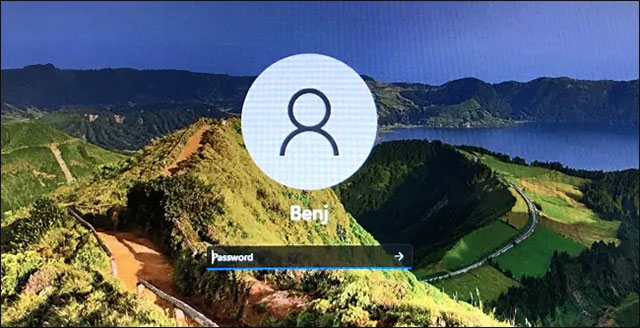
<p>Khi bạn khóa PC, Windows sẽ chỉ hiển thị ở trạng thái màn hình đăng nhập. Màn hình này sẽ vẫn được duy trì cho phiên Windows hoạt động ở chế độ nền của bạn. Bạn có thể tiếp tục công việc đang làm (trước khi khóa) bất kỳ lúc nào bằng cách đăng nhập vào tài khoản của Windows của mình, mã PIN hoặc các phương thức xác minh danh tích được hỗ trợ khác.</p>

<div class="adbox in-article"><iframe allowfullscreen="true" allowtransparency="true" data-google-container-id="a!2" data-google-query-id="CKbblcLgxPMCFU2Kwgod4IUIKg" data-load-complete="true" frameborder="0" height="174" hspace="0" id="aswift_1" marginheight="0" marginwidth="0" name="aswift_1" sandbox="allow-forms allow-popups allow-popups-to-escape-sandbox allow-same-origin allow-scripts allow-top-navigation-by-user-activation" scrolling="no" style="left: 0px; position: absolute; top: 0px; border: 0px none; width: 675px; height: 174px;" vspace="0" width="675"></iframe></div>

<p>&nbsp;</p>

<div class="adszone adstopimage adsviewed" data-bid="9811" data-zid="421">
<div class="adswrapper" style="width: 640px;"><a href="https://stats.adrealclick.com/url?q=aHR0cHM6Ly9tZXRhLnZuL2NheS1udW9jLW5vbmctbGFuaC1jNTY1P3V0bV9zb3VyY2U9aW4taW1hZ2UmdXRtX21lZGl1bT1RVE0mcmVmPWluLWltYWdlLVFUTQ%3D%3D&amp;bid=9811&amp;zid=421" rel="nofollow noopener sponsored" target="_blank"><img alt="🖼️" data-i="0" height="100" loading="lazy" src="https://as.gamevui.com/data/image/2020/08/13/cay-nuoc-nong-lanh-640x100.png" style="width: 640px; height: 100px;" width="640" /></a></div>
</div>
<img alt=" Màn hình đăng nhập" class="lazy lightbox loaded" data-i="1" data-inimage-loaded="true" data-src="https://st.quantrimang.com/photos/image/2021/10/02/khoa-pc-windows-111.jpg" data-was-processed="true" height="328" src="https://st.quantrimang.com/photos/image/2021/10/02/khoa-pc-windows-111.jpg" style="display: block; margin-left: auto; margin-right: auto; height: 328px; width: 640px;" width="640" />
<p>&nbsp;</p>

<p>Ngược lại, việc “đăng xuất” tuy cũng có thể ngăn người khác sử dụng PC của bạn, nhưng cũng sẽ khiến mọi tác vụ mà bạn đang làm việc trên Windows bị tắt bỏ và giải phóng tài nguyên hệ thống (chẳng hạn như RAM và thời gian CPU).</p>

<p>Tương tự việc tắt hệ thống (Shut Down) cũng sẽ đóng mọi tác vụ và tắt nguồn hoàn toàn PC của bạn.</p>

<p>Tóm lại, việc khóa máy sẽ là hợp lý trong trường hợp bạn có việc đột xuất và cần rời mắt khỏi máy tính, nhưng vẫn muốn đảm bảo không ai có thể truy cập và sử dụng nếu chưa được sự đồng ý của mình.</p>

<div class="adbox in-article"><iframe allowfullscreen="true" allowtransparency="true" data-google-container-id="a!3" data-google-query-id="CIqilsLgxPMCFdM0Kgod2EUP_Q" data-load-complete="true" frameborder="0" height="174" hspace="0" id="aswift_2" marginheight="0" marginwidth="0" name="aswift_2" sandbox="allow-forms allow-popups allow-popups-to-escape-sandbox allow-same-origin allow-scripts allow-top-navigation-by-user-activation" scrolling="no" style="left: 0px; position: absolute; top: 0px; border: 0px none; width: 675px; height: 174px;" vspace="0" width="675"></iframe></div>

<h2>Tổng hợp các cách khóa PC Windows 11</h2>

<h3>Khóa PC Windows 11 bằng phím tắt</h3>

<p><img alt="Khóa PC Windows 11 bằng phím tắt" class="lazy lightbox loaded" data-i="2" data-src="https://st.quantrimang.com/photos/image/2021/10/02/khoa-pc-windows-112.jpg" data-was-processed="true" height="267" src="https://st.quantrimang.com/photos/image/2021/10/02/khoa-pc-windows-112.jpg" style="display: block; margin-left: auto; margin-right: auto; height: 267px; width: 640px;" width="640" /></p>

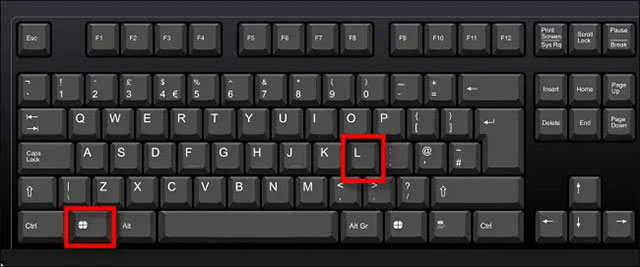
<p>Phương pháp nhanh chóng và đơn giản nhất để khóa PC Windows 11 là sử dụng phím tắt. Bạn chỉ cần nhấn tổ hợp phím Windows + L bất cứ lúc nào, Windows sẽ khóa và chuyển sang màn hình đăng nhập ngay lập tức.</p>

<h3>Khóa PC Windows 11 bằng Start menu</h3>

<p><img alt="Khóa PC Windows 11 bằng Start menu" class="lazy lightbox loaded" data-i="3" data-src="https://st.quantrimang.com/photos/image/2021/10/02/khoa-pc-windows-113.jpg" data-was-processed="true" height="368" src="https://st.quantrimang.com/photos/image/2021/10/02/khoa-pc-windows-113.jpg" style="display: block; margin-left: auto; margin-right: auto; height: 368px; width: 640px;" width="640" /></p>

<div class="adbox in-article"><iframe allowfullscreen="true" allowtransparency="true" data-google-container-id="a!4" data-google-query-id="CLGAiMjgxPMCFR5jYAodIOILQQ" data-load-complete="true" frameborder="0" height="174" hspace="0" id="aswift_3" marginheight="0" marginwidth="0" name="aswift_3" sandbox="allow-forms allow-popups allow-popups-to-escape-sandbox allow-same-origin allow-scripts allow-top-navigation-by-user-activation" scrolling="no" style="left: 0px; position: absolute; top: 0px; border: 0px none; width: 675px; height: 174px;" vspace="0" width="675"></iframe></div>

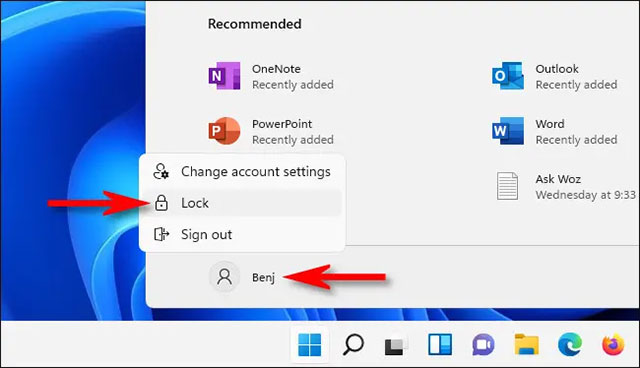
<p>Bạn cũng có thể khóa PC của mình một cách nhanh chóng với menu Start. Trước tiên, hãy nhấp vào nút Start trên thanh tác vụ, sau đó bấm chọn tên tài khoản của bạn ở góc dưới bên trái. Trong menu con hiện ra, bạn nhấn vào “Lock”. PC sẽ lập tức được khóa, và bạn cần đăng nhập lại để sử dụng.</p>

<h3>Khóa bằng màn hình Ctrl + Alt + Delete</h3>

<p><img alt="Khóa bằng màn hình Ctrl + Alt + Delete" class="lazy lightbox loaded" data-i="4" data-src="https://st.quantrimang.com/photos/image/2021/10/02/khoa-pc-windows-114.jpg" data-was-processed="true" height="394" src="https://st.quantrimang.com/photos/image/2021/10/02/khoa-pc-windows-114.jpg" style="display: block; margin-left: auto; margin-right: auto; height: 394px; width: 640px;" width="640" /></p>

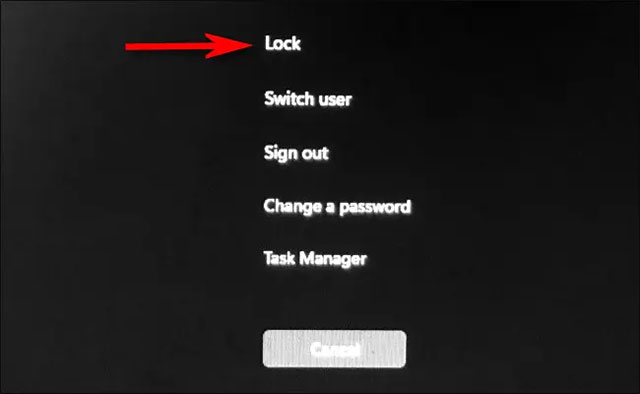
<p>Một phương pháp nhanh chóng khác để khóa PC Windows 11 là sử dụng màn hình Ctrl + Alt + Delete. Trước tiên, hãy nhấn tổ hợp phím Ctrl + Alt + Delete và bạn sẽ thấy một màn hình đen đặc biệt hiện ra với các tùy chọn ở giữa. Nhấp vào “Lock” và PC của bạn sẽ khóa ngay lập tức.</p>

<h3>Khóa tự động với tính năng Dynamic Lock</h3>

<p><img alt="Khóa tự động với tính năng Dynamic Lock" class="lazy lightbox loaded" data-i="5" data-src="https://st.quantrimang.com/photos/image/2021/10/02/khoa-pc-windows-115.jpg" data-was-processed="true" height="351" src="https://st.quantrimang.com/photos/image/2021/10/02/khoa-pc-windows-115.jpg" style="display: block; margin-left: auto; margin-right: auto; height: 351px; width: 650px;" width="650" /></p>

<div class="adbox in-article"><iframe allowfullscreen="true" allowtransparency="true" data-google-container-id="a!5" data-google-query-id="CKDTj8ngxPMCFZUGKgody0YIRQ" data-load-complete="true" frameborder="0" height="174" hspace="0" id="aswift_4" marginheight="0" marginwidth="0" name="aswift_4" sandbox="allow-forms allow-popups allow-popups-to-escape-sandbox allow-same-origin allow-scripts allow-top-navigation-by-user-activation" scrolling="no" style="left: 0px; position: absolute; top: 0px; border: 0px none; width: 675px; height: 174px;" vspace="0" width="675"></iframe></div>

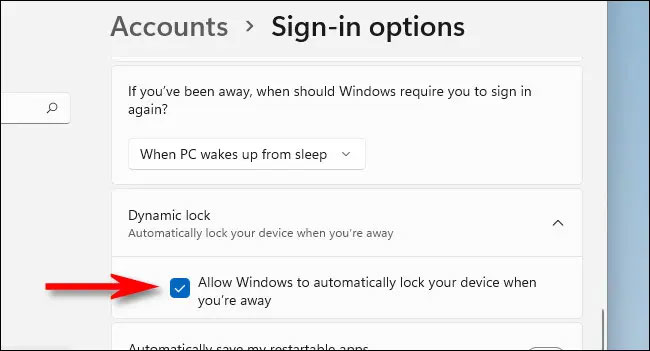
<p>Bạn cũng có thể tự động khóa khi rời khỏi PC bằng một tính năng gọi là Dynamic Lock. Trước tiên, bạn cần ghép nối điện thoại thông minh với PC làm thiết bị Bluetooth. Sau đó, mở Settings (nhấn Windows + i) và điều hướng đến Accounts &gt; Sign-in Options. Cuộn xuống phần “Dynamic Lock” và tích vào ô vuông bên cạnh tùy chọn “Allow Windows to automatically lock your device when you’re away”. Sau đó, đóng Settings.</p>

<p>Lần tới khi bạn rời khỏi PC, Windows sẽ phát hiện ra rằng bạn đã rời đi và tự động khóa.</p>

<h3>Tự động khóa khi không hoạt động</h3>

<p><img alt="Tự động khóa khi không hoạt động" class="lazy lightbox loaded" data-i="6" data-src="https://st.quantrimang.com/photos/image/2021/10/02/khoa-pc-windows-116.jpg" data-was-processed="true" height="489" src="https://st.quantrimang.com/photos/image/2021/10/02/khoa-pc-windows-116.jpg" style="display: block; margin-left: auto; margin-right: auto; height: 489px; width: 650px;" width="650" /></p>

<p>Nếu bạn thường xuyên phải rời mắt khỏi PC, có thể thiết lập để hệ thống tự động khóa sau một khoảng thời gian nhất định.</p>

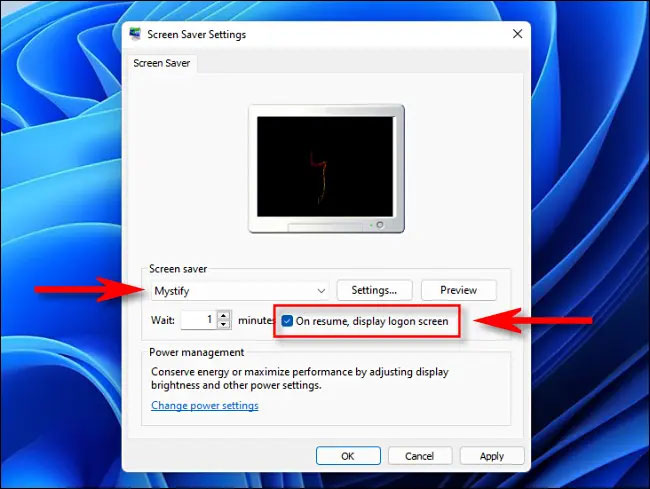
<p>Để làm như vậy, trước tiên hãy mở menu Start và tìm kiếm từ khóa “screen saver”. Bấm chọn “Turn Screen Saver On or Off” trong kết quả tìm kiếm tương ứng trả về.</p>

<p>Khi cửa sổ “Screen Saver Settings” mở ra, hãy chọn trình bảo vệ màn hình từ menu thả xuống, sau đó đặt thời gian trong mục “Wait”. Đây là mốc thời gian mà PC của bạn sẽ tự động khóa khi không tương tác. Cuối cùng, đặt dấu tích bên cạnh mục “On resume, display logon screen” và nhấp vào “OK”. Lần tiếp theo khi trình bảo vệ màn hình được kích hoạt, PC của bạn cũng sẽ tự động khóa.</p>
		</div>
				<div id="author">
						<p>
				<strong>Tác giả:</strong>
				<a href="https://www.nguoicodonvn2008.info/vi/news/author/admin/">admin</a>
			</p>
						<p>
				<strong>Nguồn tin:</strong>
				Quantrimang.com
			</p>
		</div>
	</div>
	<div id="footer" class="clearfix">
		<div id="url">
			<strong>URL của bản tin này: </strong><a href="https://www.nguoicodonvn2008.info/vi/news/savefile/kien-thuc-may-tinh/tong-hop-cach-khoa-pc-windows-11-4573.html" title="Tổng hợp cách khóa PC Windows 11">https://www.nguoicodonvn2008.info/vi/news/savefile/kien-thuc-may-tinh/tong-hop-cach-khoa-pc-windows-11-4573.html</a>

		</div>
		<div class="clear"></div>
		<div class="copyright">
			&copy; .&#x3A; Nguoicodonvn2008.info - Cõi lòng người cô đơn &#x3A;.
		</div>
		<div id="contact">
			<a href="mailto:admin@nguoicodonvn2008.info">admin@nguoicodonvn2008.info</a>
		</div>
	</div>
</div>
        <div id="timeoutsess" class="chromeframe">
            Bạn đã không sử dụng Site, <a onclick="timeoutsesscancel();" href="https://www.nguoicodonvn2008.info/#">Bấm vào đây để duy trì trạng thái đăng nhập</a>. Thời gian chờ: <span id="secField"> 60 </span> giây
        </div>
        <div id="openidResult" class="nv-alert" style="display:none"></div>
        <div id="openidBt" data-result="" data-redirect=""></div>
		</script>
		<div class="car-top">
  <span><img src="https://www.nguoicodonvn2008.info/themes/default/images/car.png" alt=""></span>
</div>
<script src="https://www.nguoicodonvn2008.info/assets/js/jquery/jquery.min.js"></script>
<script>var nv_base_siteurl="/",nv_lang_data="vi",nv_lang_interface="vi",nv_name_variable="nv",nv_fc_variable="op",nv_lang_variable="language",nv_module_name="news",nv_func_name="savefile",nv_is_user=0, nv_my_ofs=-4,nv_my_abbr="EDT",nv_cookie_prefix="nv4c_e856T",nv_check_pass_mstime=1738000,nv_area_admin=0,nv_safemode=0,theme_responsive=0,nv_recaptcha_ver=2,nv_recaptcha_sitekey="",nv_recaptcha_type="image",XSSsanitize=1;</script>
<script src="https://www.nguoicodonvn2008.info/assets/js/language/vi.js"></script>
<script src="https://www.nguoicodonvn2008.info/assets/js/DOMPurify/purify3.js"></script>
<script src="https://www.nguoicodonvn2008.info/assets/js/global.js"></script>
<script src="https://www.nguoicodonvn2008.info/assets/js/site.js"></script>
<script src="https://www.nguoicodonvn2008.info/themes/default/js/news.js"></script>
<script src="https://www.nguoicodonvn2008.info/themes/default/js/main.js"></script>
<script src="https://www.nguoicodonvn2008.info/themes/default/js/custom.js"></script>
<script type="application/ld+json">
        {
            "@context": "https://schema.org",
            "@type": "Organization",
            "url": "https://www.nguoicodonvn2008.info",
            "logo": "https://www.nguoicodonvn2008.info/uploads/angel.gif"
        }
        </script>
<script src="https://www.nguoicodonvn2008.info/themes/default/js/bootstrap.min.js"></script>
<script type="text/javascript">
var $scrolltop = $('.car-top');
$scrolltop.on('click', function () {
    $('html,body').animate({
        scrollTop: 0
    }, 800);
    $(this).addClass("car-run");
    setTimeout(function(){ $scrolltop.removeClass('car-run');}, 1000);
    return false;
});
$(window).on('scroll', function ()
{ 
    if($(window).scrollTop() >= 200)
    {
        $scrolltop.addClass("show");
        $scrolltop.addClass("car-down");
    }
    else
    {
       $scrolltop.removeClass("show");
       setTimeout(function(){ $scrolltop.removeClass('car-down');}, 300);
    }
});
</script>
</body>
</html>