<!DOCTYPE html>
    <html lang="vi" xmlns="http://www.w3.org/1999/xhtml" prefix="og: http://ogp.me/ns#">
    <head>
<title>Tìm hiểu về File Pilot&#x3A; Trình quản lý file siêu nhanh thay thế Windows File Explorer</title>
<meta name="description" content="Tìm hiểu về File Pilot&#x3A; Trình quản lý file siêu nhanh thay thế Windows File Explorer - Savefile - Tin Tức -...">
<meta name="author" content=".: Nguoicodonvn2008.info - Cõi lòng người cô đơn :.">
<meta name="copyright" content=".: Nguoicodonvn2008.info - Cõi lòng người cô đơn :. [admin@nguoicodonvn2008.info]">
<meta name="robots" content="index, archive, follow, noodp">
<meta name="googlebot" content="index,archive,follow,noodp">
<meta name="msnbot" content="all,index,follow">
<meta name="generator" content="NukeViet v4.5">
<meta http-equiv="Content-Type" content="text/html; charset=utf-8">
<meta property="og:title" content="Tìm hiểu về File Pilot&#x3A; Trình quản lý file siêu nhanh thay thế Windows File Explorer">
<meta property="og:type" content="website">
<meta property="og:description" content="Savefile - Tin Tức -...">
<meta property="og:site_name" content=".&#x3A; Nguoicodonvn2008.info - Cõi lòng người cô đơn &#x3A;.">
<meta property="og:url" content="https://www.nguoicodonvn2008.info/vi/news/savefile/kien-thuc-may-tinh/tim-hieu-ve-file-pilot-trinh-quan-ly-file-sieu-nhanh-thay-the-windows-file-explorer-9955.html">
<link rel="shortcut icon" href="https://www.nguoicodonvn2008.info/favicon.ico">
<link rel="canonical" href="https://www.nguoicodonvn2008.info/vi/news/savefile/kien-thuc-may-tinh/tim-hieu-ve-file-pilot-trinh-quan-ly-file-sieu-nhanh-thay-the-windows-file-explorer-9955.html">
<link rel="alternate" href="https://www.nguoicodonvn2008.info/vi/news/rss/" title="Tin Tức" type="application/rss+xml">
<link rel="alternate" href="https://www.nguoicodonvn2008.info/vi/news/rss/karaoke-dual/" title="Tin Tức - Karaoke Dual" type="application/rss+xml">
<link rel="alternate" href="https://www.nguoicodonvn2008.info/vi/news/rss/nhac-tre/" title="Tin Tức - Nhạc trẻ" type="application/rss+xml">
<link rel="alternate" href="https://www.nguoicodonvn2008.info/vi/news/rss/tru-tinh/" title="Tin Tức - Trữ tình" type="application/rss+xml">
<link rel="alternate" href="https://www.nguoicodonvn2008.info/vi/news/rss/nuoc-ngoai/" title="Tin Tức - Nước ngoài" type="application/rss+xml">
<link rel="alternate" href="https://www.nguoicodonvn2008.info/vi/news/rss/remix/" title="Tin Tức - Remix" type="application/rss+xml">
<link rel="alternate" href="https://www.nguoicodonvn2008.info/vi/news/rss/tam-su-tinh-yeu/" title="Tin Tức - Tâm sự tình yêu" type="application/rss+xml">
<link rel="alternate" href="https://www.nguoicodonvn2008.info/vi/news/rss/tho-suu-tam/" title="Tin Tức - Thơ sưu tầm" type="application/rss+xml">
<link rel="alternate" href="https://www.nguoicodonvn2008.info/vi/news/rss/cuoc-song/" title="Tin Tức - Cuộc sống" type="application/rss+xml">
<link rel="alternate" href="https://www.nguoicodonvn2008.info/vi/news/rss/phan-mem/" title="Tin Tức - Phần mềm" type="application/rss+xml">
<link rel="alternate" href="https://www.nguoicodonvn2008.info/vi/news/rss/kien-thuc-may-tinh/" title="Tin Tức - Kiến thức máy tính" type="application/rss+xml">
<link rel="alternate" href="https://www.nguoicodonvn2008.info/vi/news/rss/hoc-tap/" title="Tin Tức - Học tập" type="application/rss+xml">
<link rel="alternate" href="https://www.nguoicodonvn2008.info/vi/news/rss/tai-lieu/" title="Tin Tức - Tài liệu" type="application/rss+xml">
<link rel="alternate" href="https://www.nguoicodonvn2008.info/vi/news/rss/de-thi/" title="Tin Tức - Đề thi" type="application/rss+xml">
<link rel="preload" as="style" href="https://www.nguoicodonvn2008.info/assets/css/font-awesome.min.css" type="text/css">
<link rel="preload" as="style" href="https://www.nguoicodonvn2008.info/themes/default/css/bootstrap.non-responsive.css" type="text/css">
<link rel="preload" as="style" href="https://www.nguoicodonvn2008.info/themes/default/css/style.css" type="text/css">
<link rel="preload" as="style" href="https://www.nguoicodonvn2008.info/themes/default/css/style.non-responsive.css" type="text/css">
<link rel="preload" as="style" href="https://www.nguoicodonvn2008.info/themes/default/css/news.css" type="text/css">
<link rel="preload" as="style" href="https://www.nguoicodonvn2008.info/themes/default/css/custom.css" type="text/css">
<link rel="preload" as="script" href="https://www.nguoicodonvn2008.info/assets/js/jquery/jquery.min.js" type="text/javascript">
<link rel="preload" as="script" href="https://www.nguoicodonvn2008.info/assets/js/language/vi.js" type="text/javascript">
<link rel="preload" as="script" href="https://www.nguoicodonvn2008.info/assets/js/DOMPurify/purify3.js" type="text/javascript">
<link rel="preload" as="script" href="https://www.nguoicodonvn2008.info/assets/js/global.js" type="text/javascript">
<link rel="preload" as="script" href="https://www.nguoicodonvn2008.info/assets/js/site.js" type="text/javascript">
<link rel="preload" as="script" href="https://www.nguoicodonvn2008.info/themes/default/js/news.js" type="text/javascript">
<link rel="preload" as="script" href="https://www.nguoicodonvn2008.info/themes/default/js/main.js" type="text/javascript">
<link rel="preload" as="script" href="https://www.nguoicodonvn2008.info/themes/default/js/custom.js" type="text/javascript">
<link rel="preload" as="script" href="https://www.nguoicodonvn2008.info/themes/default/js/bootstrap.min.js" type="text/javascript">
<link rel="stylesheet" href="https://www.nguoicodonvn2008.info/assets/css/font-awesome.min.css">
<link rel="stylesheet" href="https://www.nguoicodonvn2008.info/themes/default/css/bootstrap.non-responsive.css">
<link rel="stylesheet" href="https://www.nguoicodonvn2008.info/themes/default/css/style.css">
<link rel="stylesheet" href="https://www.nguoicodonvn2008.info/themes/default/css/style.non-responsive.css">
<link rel="StyleSheet" href="https://www.nguoicodonvn2008.info/themes/default/css/news.css">
<link rel="stylesheet" href="https://www.nguoicodonvn2008.info/themes/default/css/custom.css">
<style type="text/css">
	body{background: #fff;}
</style>
    </head>
    <body>
<div id="print">
	<div id="hd_print">
		<h2 class="pull-left">.&#x3A; Nguoicodonvn2008.info - Cõi lòng người cô đơn &#x3A;.</h2>
		<p class="pull-right"><a title=".&#x3A; Nguoicodonvn2008.info - Cõi lòng người cô đơn &#x3A;." href="https://www.nguoicodonvn2008.info/">https://www.nguoicodonvn2008.info</a></p>
	</div>
	<div class="clear"></div>
	<hr />
	<div id="content">
		<h1>Tìm hiểu về File Pilot&#x3A; Trình quản lý file siêu nhanh thay thế Windows File Explorer</h1>
		<ul class="list-inline">
			<li>Thứ sáu - 07/03/2025 21:59</li>
			<li class="hidden-print txtrequired"><em class="fa fa-print">&nbsp;</em><a title="In ra" href="javascript:;" onclick="window.print()">In ra</a></li>
			<li class="hidden-print txtrequired"><em class="fa fa-power-off">&nbsp;</em><a title="Đóng cửa sổ này" href="javascript:;" onclick="window.close()">Đóng cửa sổ này</a></li>
		</ul>
		<div class="clear"></div>
		<div id="hometext">
		</div>
				<div class="imghome">
			<img alt="Tìm hiểu về File Pilot&#x3A; Trình quản lý file siêu nhanh thay thế Windows File Explorer" src="https://st.quantrimang.com/photos/image/2025/03/07/file-pilot-trinh-quan-ly-file-thay-the-windows-file-explorer-1.gif" width="460" class="img-thumbnail" />
		</div>
		<div class="clear"></div>
		<div id="bodytext" class="clearfix">
			<p style="text-align: justify;">Mặc dù có những cải tiến trong&nbsp;Windows 11, File Explorer vẫn chậm và ì ạch. Nhưng nếu có một giải pháp thay thế nhanh hơn, hiệu quả hơn thì sao? File Pilot là một trình quản lý file nhẹ, gọn gàng và giàu tính năng, vượt trội hơn công cụ mặc định của&nbsp;&nbsp;Windows&nbsp;theo mọi cách.</p>

<h2 style="text-align: justify;">File Pilot cực nhanh</h2>

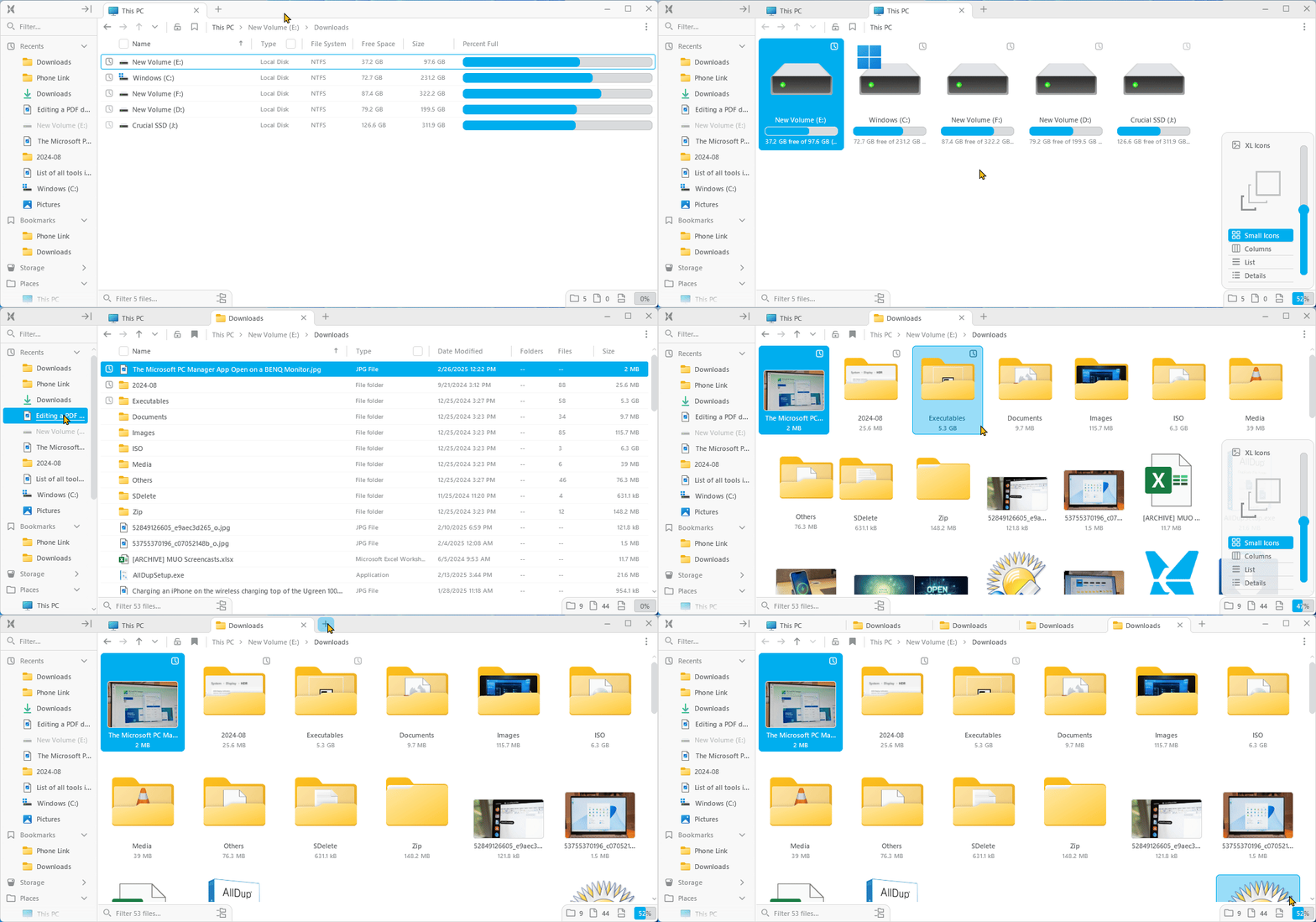
<p style="text-align: justify;">Điều đầu tiên bạn sẽ nhận thấy sau khi cài đặt File Pilot là tốc độ khởi chạy và load file, thư mục và mọi thứ khác. Việc khởi chạy menu ngữ cảnh không mất nhiều thời gian và việc mở các tab mới không giống như xem buffer YouTube trên mạng 2G.</p>

<figure>
<div style="text-align: justify;"><img alt="File Piot hoạt động trên Windows 11" data-i="0" data-src="https://st.quantrimang.com/photos/image/2025/03/07/file-pilot-trinh-quan-ly-file-thay-the-windows-file-explorer-1.gif" data-was-processed="true" src="https://st.quantrimang.com/photos/image/2025/03/07/file-pilot-trinh-quan-ly-file-thay-the-windows-file-explorer-1.gif" /></div>

<figcaption>
<div style="text-align: justify;">File Piot hoạt động trên Windows 11</div>
</figcaption>
</figure>

<p style="text-align: justify;">Nó cũng trông tuyệt vời. Giao diện sạch sẽ, hiện đại và quen thuộc - giống như File Explorer, nhưng tốt hơn. Các hình ảnh động mượt mà và việc chuyển đổi giữa những chế độ xem diễn ra liền mạch. Chỉ cần nhấp vào nút % ở góc dưới bên phải và sử dụng thanh trượt để điều chỉnh chế độ xem theo ý thích của bạn hoặc nhấn và giữ&nbsp;<strong>Ctrl</strong>&nbsp;rồi sử dụng bánh xe cuộn.</p>

<h2 style="text-align: justify;">Đưa menu ngữ cảnh cổ điển trở lại với một nét mới</h2>

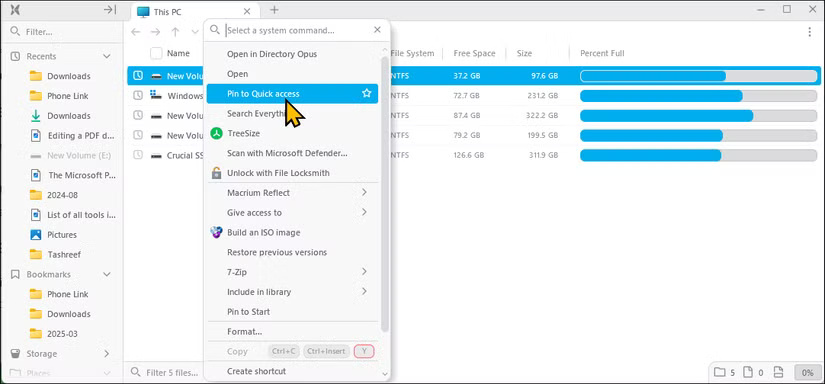
<p style="text-align: justify;">Microsoft đã làm cho menu chuột phải tệ hơn trong Windows 11, thường ẩn các tùy chọn quan trọng trong&nbsp;<strong><em>Show more options</em></strong>. Chắc chắn, bạn có thể đưa menu cổ điển trở lại bằng cách tinh chỉnh registry, nhưng File Pilot không cần nhấp thêm để tìm các hành động đó.</p>

<figure>
<div style="text-align: justify;"><img alt="Menu chuột phải trên File Explorer trong Windows 11" data-i="1" data-src="https://st.quantrimang.com/photos/image/2025/03/07/file-pilot-trinh-quan-ly-file-thay-the-windows-file-explorer-2.jpg" data-was-processed="true" height="384" src="https://st.quantrimang.com/photos/image/2025/03/07/file-pilot-trinh-quan-ly-file-thay-the-windows-file-explorer-2.jpg" width="825" /></div>

<figcaption>
<div style="text-align: justify;">Menu chuột phải trên File Explorer trong Windows 11</div>
</figcaption>
</figure>

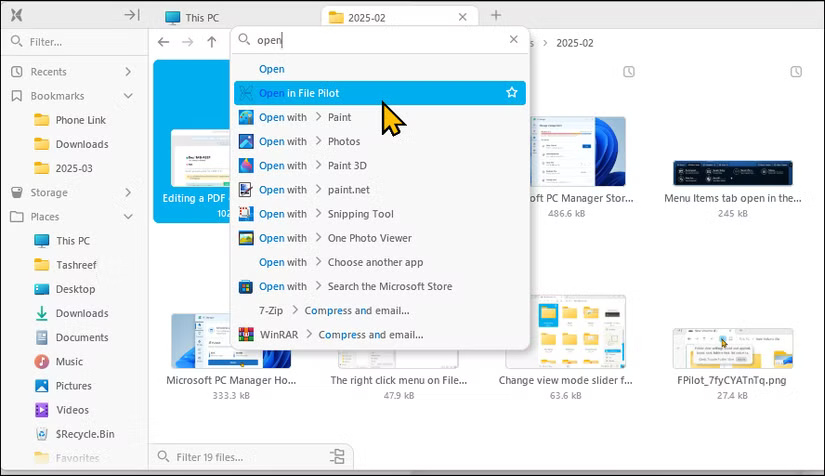
<p style="text-align: justify;">Chức năng tìm kiếm đi kèm là một bổ sung hữu ích khác cho menu ngữ cảnh. Nó cho phép bạn nhanh chóng tìm thấy lệnh hoặc hành động bạn muốn thực hiện. Ví dụ, nhấp chuột phải vào file, nhập xóa và nhấn&nbsp;<strong>Enter</strong>&nbsp;để hoàn tất hành động. Bạn cũng có thể ghim các lệnh thường dùng để chúng luôn xuất hiện ở trên cùng.</p>

<figure>
<div style="text-align: justify;"><img alt="Chức năng tìm kiếm cho menu ngữ cảnh trong File Pilot" data-adbro-processed="true" data-i="2" data-src="https://st.quantrimang.com/photos/image/2025/03/07/file-pilot-trinh-quan-ly-file-thay-the-windows-file-explorer-3.jpg" data-was-processed="true" height="476" src="https://st.quantrimang.com/photos/image/2025/03/07/file-pilot-trinh-quan-ly-file-thay-the-windows-file-explorer-3.jpg" width="825" /></div>

<figcaption>
<div style="text-align: justify;">Chức năng tìm kiếm cho menu ngữ cảnh trong File Pilot</div>
</figcaption>
</figure>

<h2 style="text-align: justify;">Đa nhiệm tuyệt vời với bảng điều khiển và tab</h2>

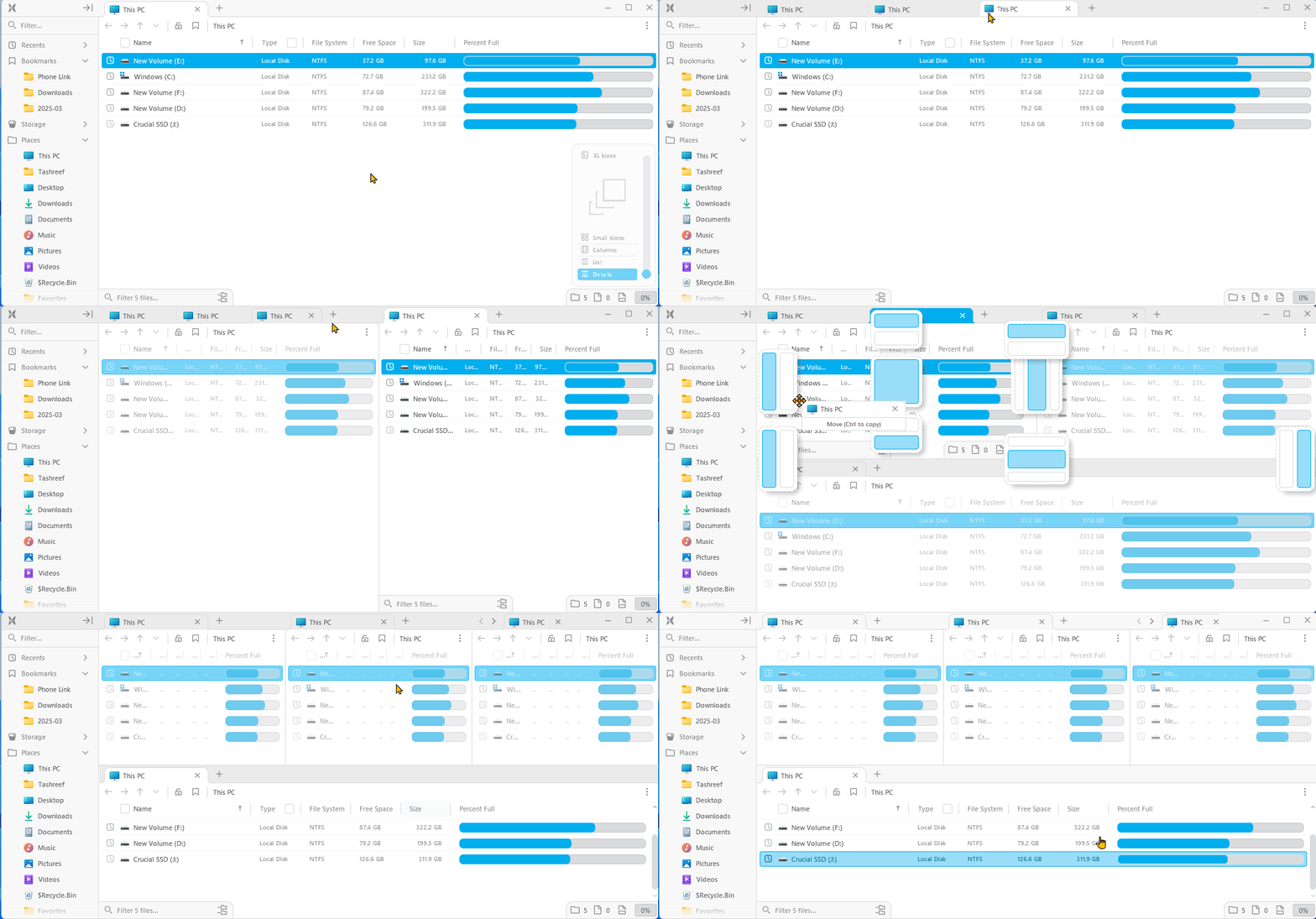
<p style="text-align: justify;">Giống như File Explorer và những trình quản lý file của bên thứ ba khác, File Pilot hỗ trợ các tab, cho phép bạn mở nhiều tab tùy thích trong cùng một cửa sổ. Bạn cũng sẽ nhận thấy rằng nó hỗ trợ tính năng duy trì tab, nghĩa là File Pilot sẽ tự động ghi nhớ và khôi phục các tab trước đó, giống như trình duyệt web. Nó cực kỳ tiện dụng nếu bạn thường xuyên làm việc với cùng một tập hợp thư mục mỗi ngày.</p>

<p style="text-align: justify;">Hơn nữa, File Pilot cũng hỗ trợ nhiều bảng điều khiển, cho phép bạn chia màn hình thành các bố cục khác nhau với nhiều tab tùy ý. Chỉ cần kéo và thả các tab để sắp xếp chúng và bố cục tùy chỉnh sẽ vẫn nguyên vẹn cho đến khi bạn đóng thủ công.</p>

<figure>
<div style="text-align: justify;"><img alt="Các tính năng của File Filot Panels trên Windows 11" data-i="3" data-src="https://st.quantrimang.com/photos/image/2025/03/07/file-pilot-trinh-quan-ly-file-thay-the-windows-file-explorer-4.gif" data-was-processed="true" height="503" src="https://st.quantrimang.com/photos/image/2025/03/07/file-pilot-trinh-quan-ly-file-thay-the-windows-file-explorer-4.gif" width="1080" /></div>

<figcaption>
<div style="text-align: justify;">Các tính năng của File Filot Panels trên Windows 11</div>
</figcaption>
</figure>

<p style="text-align: justify;"><strong>Inspector</strong>&nbsp;là một bổ sung tuyệt vời khác cho File Pilot. Nó hoạt động rất giống với chế độ xem&nbsp; preview pane của File Explorer, ngoại trừ việc nó tương tác hơn. Inspector cho phép bạn nhanh chóng xem trước và phóng to nội dung file, bao gồm văn bản, hình ảnh và thậm chí cả các thư mục khác trong chế độ xem chia đôi màn hình.</p>

<p style="text-align: justify;">Bạn có thể bật hoặc tắt chế độ Inspector bằng phím cách, khiến chế độ này đặc biệt hữu ích vì File Pilot không hỗ trợ các tiện ích mở rộng của bên thứ ba như tất cả mọi công cụ hữu ích mà bạn có thể sử dụng trong Microsoft PowerToys.</p>

<h2 style="text-align: justify;">Gói một bộ tiện ích hữu ích tuyệt vời</h2>

<p style="text-align: justify;">Ngoài quản lý file cơ bản và đa nhiệm, File Pilot còn bao gồm các công cụ mạnh mẽ khác giúp việc tìm kiếm và quản lý file dễ dàng hơn nhiều.</p>

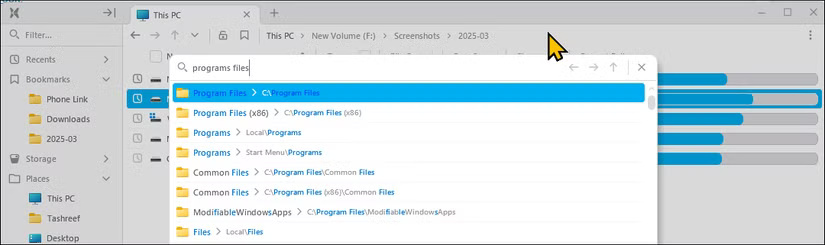
<p style="text-align: justify;">Ví dụ,&nbsp;<strong>GoTo</strong>&nbsp;cho phép bạn tìm kiếm bất kỳ thư mục nào trực tiếp từ thanh địa chỉ. Thay vì nhập thủ công toàn bộ đường dẫn thư mục, bạn có thể nhập tên thư mục - như &quot;Program Files&quot; - và chọn thư mục đó từ kết quả tìm kiếm.</p>

<figure>
<div style="text-align: justify;"><img alt="Tính năng GoTo đang hoạt động trên File Pilot chạy trên Windows 11" data-i="4" data-src="https://st.quantrimang.com/photos/image/2025/03/07/file-pilot-trinh-quan-ly-file-thay-the-windows-file-explorer-5.jpg" data-was-processed="true" height="245" src="https://st.quantrimang.com/photos/image/2025/03/07/file-pilot-trinh-quan-ly-file-thay-the-windows-file-explorer-5.jpg" width="825" /></div>

<figcaption>
<div style="text-align: justify;">Tính năng GoTo đang hoạt động trên File Pilot chạy trên&nbsp;<a data-google-interstitial="false" data-google-vignette="false" href="https://quantrimang.com/cong-nghe/file-pilot-trinh-quan-ly-file-thay-the-windows-file-explorer-207853#">&nbsp;Windows</a>&nbsp;11</div>
</figcaption>
</figure>

<p style="text-align: justify;">Thanh&nbsp;<strong>Search</strong>&nbsp;cũng tiện dụng không kém, cho phép bạn xem ngay các phân cấp thư mục đã làm phẳng hoặc thậm chí toàn bộ ổ. Bạn thậm chí có thể lọc file theo phần mở rộng của chúng để có kết quả nhanh và chính xác hơn.</p>

<p style="text-align: justify;">Ngoài ra còn có nhiều tính năng tiện dụng hơn như đổi tên hàng loạt, cho phép bạn đổi tên nhiều file cùng lúc và khả năng lưu cài đặt chế độ xem hiện tại bằng biểu tượng khóa trên thanh địa chỉ. Bạn cũng có thể sử dụng phím tắt đánh dấu nhanh để lưu các thư mục hoặc đường dẫn thường dùng vào Bookmarks để truy cập dễ dàng hơn.</p>

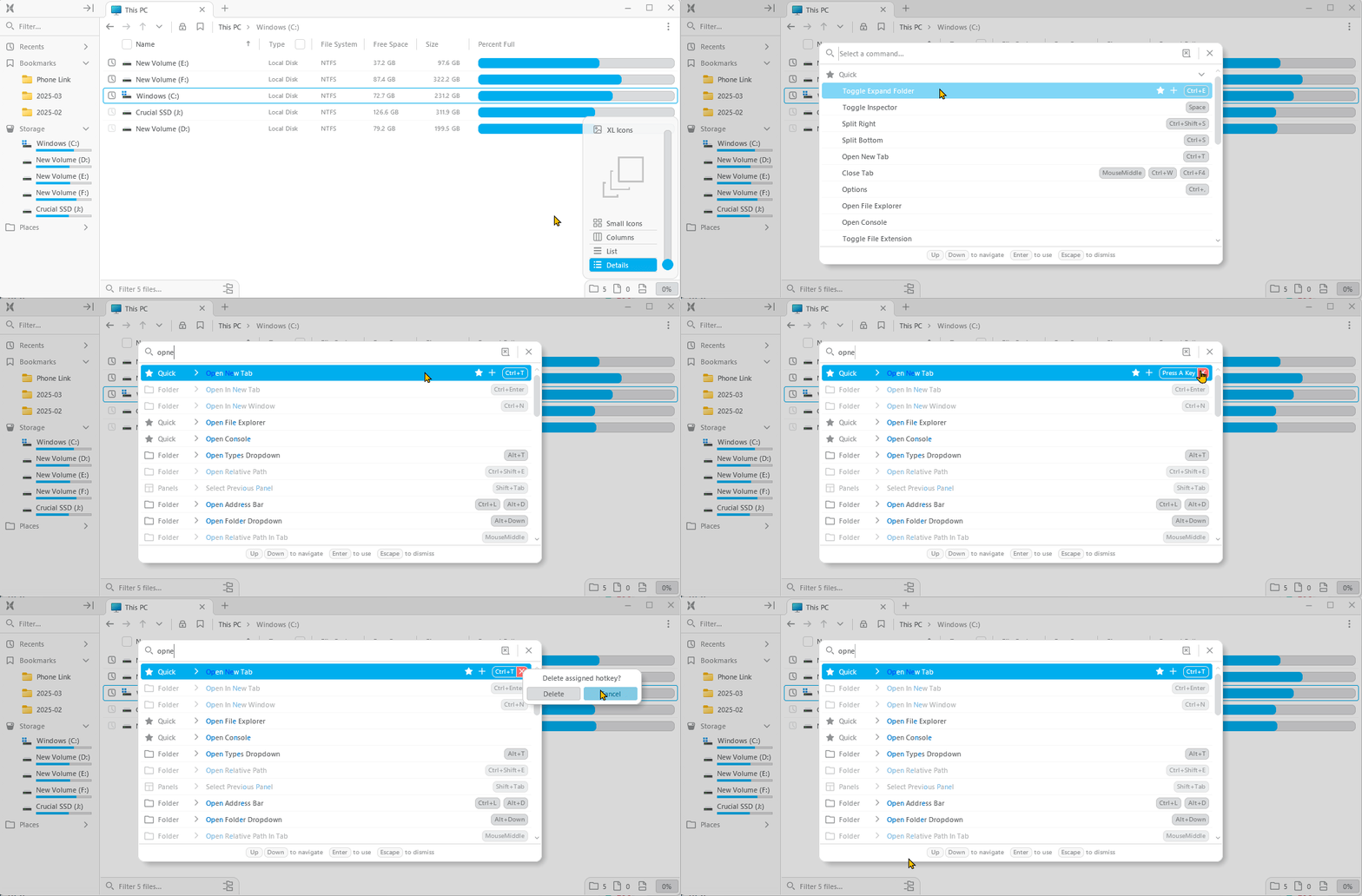
<p style="text-align: justify;"><strong>Command panel</strong>&nbsp;<strong>(Ctrl+Shift+P)</strong>&nbsp;của File Pilot cho phép bạn tìm kiếm tất cả các hành động khả dụng và chỉ định phím tắt. Thêm vào đó, việc thay đổi phím tắt cực kỳ trực quan. Chỉ cần nhấp vào phím tắt được chỉ định trong giao diện người dùng và thay đổi thành tổ hợp phím bạn muốn.</p>

<figure>
<div style="text-align: justify;"><img alt="" data-i="5" data-src="https://st.quantrimang.com/photos/image/2025/03/07/file-pilot-trinh-quan-ly-file-thay-the-windows-file-explorer-6.gif" data-was-processed="true" height="473" src="https://st.quantrimang.com/photos/image/2025/03/07/file-pilot-trinh-quan-ly-file-thay-the-windows-file-explorer-6.gif" width="1078" /></div>
</figure>

<p style="text-align: justify;">Trong&nbsp;<strong>Options panel</strong>&nbsp;<strong>(Ctrl+,)</strong>, bạn có thể điều chỉnh kích thước phông chữ, kiểu, khoảng cách, hoạt ảnh, phối màu, độ mờ của bảng điều khiển, v.v... Mặc dù File Pilot hỗ trợ chế độ sáng và tối, nhưng bạn sẽ cần bật thủ công trong phần cài đặt.</p>

<p style="text-align: justify;">Ưu điểm của File Pilot là khả năng sử dụng. Nó mở nhanh hơn và tìm kiếm file thậm chí còn tuyệt hơn. Nó trông tuyệt vời, mượt mà và sửa menu ngữ cảnh mà không làm phức tạp thêm. Nhìn chung, nó cung cấp các công cụ cần thiết để quản lý hoặc truy cập file hiệu quả nhanh chóng. Với dung lượng dưới 2MB, File Pilot là một công cụ ấn tượng đối với hầu hết người dùng ưu tiên tốc độ, hiệu quả và sự đơn giản.</p>

<p style="text-align: justify;">Nếu quản lý file là một phần quan trọng trong quy trình làm việc của bạn, hãy thử File Pilot và quyết định xem sự tiện lợi của nó có xứng đáng với mức giá hay không.</p>
		</div>
				<div id="author">
						<p>
				<strong>Nguồn tin:</strong>
				Quantrimang.com:
			</p>
		</div>
	</div>
	<div id="footer" class="clearfix">
		<div id="url">
			<strong>URL của bản tin này: </strong><a href="https://www.nguoicodonvn2008.info/vi/news/savefile/kien-thuc-may-tinh/tim-hieu-ve-file-pilot-trinh-quan-ly-file-sieu-nhanh-thay-the-windows-file-explorer-9955.html" title="Tìm hiểu về File Pilot&#x3A; Trình quản lý file siêu nhanh thay thế Windows File Explorer">https://www.nguoicodonvn2008.info/vi/news/savefile/kien-thuc-may-tinh/tim-hieu-ve-file-pilot-trinh-quan-ly-file-sieu-nhanh-thay-the-windows-file-explorer-9955.html</a>

		</div>
		<div class="clear"></div>
		<div class="copyright">
			&copy; .&#x3A; Nguoicodonvn2008.info - Cõi lòng người cô đơn &#x3A;.
		</div>
		<div id="contact">
			<a href="mailto:admin@nguoicodonvn2008.info">admin@nguoicodonvn2008.info</a>
		</div>
	</div>
</div>
        <div id="timeoutsess" class="chromeframe">
            Bạn đã không sử dụng Site, <a onclick="timeoutsesscancel();" href="https://www.nguoicodonvn2008.info/#">Bấm vào đây để duy trì trạng thái đăng nhập</a>. Thời gian chờ: <span id="secField"> 60 </span> giây
        </div>
        <div id="openidResult" class="nv-alert" style="display:none"></div>
        <div id="openidBt" data-result="" data-redirect=""></div>
		</script>
		<div class="car-top">
  <span><img src="https://www.nguoicodonvn2008.info/themes/default/images/car.png" alt=""></span>
</div>
<div id="run_cronjobs" style="visibility:hidden;display:none;"><img alt="cron" src="/index.php?second=cronjobs&amp;p=l3dGnyy7" width="1" height="1" /></div>
<script src="https://www.nguoicodonvn2008.info/assets/js/jquery/jquery.min.js"></script>
<script>var nv_base_siteurl="/",nv_lang_data="vi",nv_lang_interface="vi",nv_name_variable="nv",nv_fc_variable="op",nv_lang_variable="language",nv_module_name="news",nv_func_name="savefile",nv_is_user=0, nv_my_ofs=-4,nv_my_abbr="EDT",nv_cookie_prefix="nv4c_e856T",nv_check_pass_mstime=1738000,nv_area_admin=0,nv_safemode=0,theme_responsive=0,nv_recaptcha_ver=2,nv_recaptcha_sitekey="",nv_recaptcha_type="image",XSSsanitize=1;</script>
<script src="https://www.nguoicodonvn2008.info/assets/js/language/vi.js"></script>
<script src="https://www.nguoicodonvn2008.info/assets/js/DOMPurify/purify3.js"></script>
<script src="https://www.nguoicodonvn2008.info/assets/js/global.js"></script>
<script src="https://www.nguoicodonvn2008.info/assets/js/site.js"></script>
<script src="https://www.nguoicodonvn2008.info/themes/default/js/news.js"></script>
<script src="https://www.nguoicodonvn2008.info/themes/default/js/main.js"></script>
<script src="https://www.nguoicodonvn2008.info/themes/default/js/custom.js"></script>
<script type="application/ld+json">
        {
            "@context": "https://schema.org",
            "@type": "Organization",
            "url": "https://www.nguoicodonvn2008.info",
            "logo": "https://www.nguoicodonvn2008.info/uploads/angel.gif"
        }
        </script>
<script src="https://www.nguoicodonvn2008.info/themes/default/js/bootstrap.min.js"></script>
<script type="text/javascript">
var $scrolltop = $('.car-top');
$scrolltop.on('click', function () {
    $('html,body').animate({
        scrollTop: 0
    }, 800);
    $(this).addClass("car-run");
    setTimeout(function(){ $scrolltop.removeClass('car-run');}, 1000);
    return false;
});
$(window).on('scroll', function ()
{ 
    if($(window).scrollTop() >= 200)
    {
        $scrolltop.addClass("show");
        $scrolltop.addClass("car-down");
    }
    else
    {
       $scrolltop.removeClass("show");
       setTimeout(function(){ $scrolltop.removeClass('car-down');}, 300);
    }
});
</script>
</body>
</html>