<!DOCTYPE html>
    <html lang="vi" xmlns="http://www.w3.org/1999/xhtml" prefix="og: http://ogp.me/ns#">
    <head>
<title>Tìm hiểu về cheat.sh&#x3A; Công cụ Terminal đơn giản cung cấp cheatsheet cho bất kỳ lệnh Linux nào</title>
<meta name="description" content="Tìm hiểu về cheat.sh&#x3A; Công cụ Terminal đơn giản cung cấp cheatsheet cho bất kỳ lệnh Linux nào - Savefile - Tin Tức -...">
<meta name="author" content=".: Nguoicodonvn2008.info - Cõi lòng người cô đơn :.">
<meta name="copyright" content=".: Nguoicodonvn2008.info - Cõi lòng người cô đơn :. [admin@nguoicodonvn2008.info]">
<meta name="robots" content="index, archive, follow, noodp">
<meta name="googlebot" content="index,archive,follow,noodp">
<meta name="msnbot" content="all,index,follow">
<meta name="generator" content="NukeViet v4.5">
<meta http-equiv="Content-Type" content="text/html; charset=utf-8">
<meta property="og:title" content="Tìm hiểu về cheat.sh&#x3A; Công cụ Terminal đơn giản cung cấp cheatsheet cho bất kỳ lệnh Linux nào">
<meta property="og:type" content="website">
<meta property="og:description" content="Savefile - Tin Tức -...">
<meta property="og:site_name" content=".&#x3A; Nguoicodonvn2008.info - Cõi lòng người cô đơn &#x3A;.">
<meta property="og:url" content="https://www.nguoicodonvn2008.info/vi/news/savefile/kien-thuc-may-tinh/tim-hieu-ve-cheat-sh-cong-cu-terminal-don-gian-cung-cap-cheatsheet-cho-bat-ky-lenh-linux-nao-10149.html">
<link rel="shortcut icon" href="https://www.nguoicodonvn2008.info/favicon.ico">
<link rel="canonical" href="https://www.nguoicodonvn2008.info/vi/news/savefile/kien-thuc-may-tinh/tim-hieu-ve-cheat-sh-cong-cu-terminal-don-gian-cung-cap-cheatsheet-cho-bat-ky-lenh-linux-nao-10149.html">
<link rel="alternate" href="https://www.nguoicodonvn2008.info/vi/news/rss/" title="Tin Tức" type="application/rss+xml">
<link rel="alternate" href="https://www.nguoicodonvn2008.info/vi/news/rss/karaoke-dual/" title="Tin Tức - Karaoke Dual" type="application/rss+xml">
<link rel="alternate" href="https://www.nguoicodonvn2008.info/vi/news/rss/nhac-tre/" title="Tin Tức - Nhạc trẻ" type="application/rss+xml">
<link rel="alternate" href="https://www.nguoicodonvn2008.info/vi/news/rss/tru-tinh/" title="Tin Tức - Trữ tình" type="application/rss+xml">
<link rel="alternate" href="https://www.nguoicodonvn2008.info/vi/news/rss/nuoc-ngoai/" title="Tin Tức - Nước ngoài" type="application/rss+xml">
<link rel="alternate" href="https://www.nguoicodonvn2008.info/vi/news/rss/remix/" title="Tin Tức - Remix" type="application/rss+xml">
<link rel="alternate" href="https://www.nguoicodonvn2008.info/vi/news/rss/tam-su-tinh-yeu/" title="Tin Tức - Tâm sự tình yêu" type="application/rss+xml">
<link rel="alternate" href="https://www.nguoicodonvn2008.info/vi/news/rss/tho-suu-tam/" title="Tin Tức - Thơ sưu tầm" type="application/rss+xml">
<link rel="alternate" href="https://www.nguoicodonvn2008.info/vi/news/rss/cuoc-song/" title="Tin Tức - Cuộc sống" type="application/rss+xml">
<link rel="alternate" href="https://www.nguoicodonvn2008.info/vi/news/rss/phan-mem/" title="Tin Tức - Phần mềm" type="application/rss+xml">
<link rel="alternate" href="https://www.nguoicodonvn2008.info/vi/news/rss/kien-thuc-may-tinh/" title="Tin Tức - Kiến thức máy tính" type="application/rss+xml">
<link rel="alternate" href="https://www.nguoicodonvn2008.info/vi/news/rss/hoc-tap/" title="Tin Tức - Học tập" type="application/rss+xml">
<link rel="alternate" href="https://www.nguoicodonvn2008.info/vi/news/rss/tai-lieu/" title="Tin Tức - Tài liệu" type="application/rss+xml">
<link rel="alternate" href="https://www.nguoicodonvn2008.info/vi/news/rss/de-thi/" title="Tin Tức - Đề thi" type="application/rss+xml">
<link rel="preload" as="style" href="https://www.nguoicodonvn2008.info/assets/css/font-awesome.min.css" type="text/css">
<link rel="preload" as="style" href="https://www.nguoicodonvn2008.info/themes/default/css/bootstrap.non-responsive.css" type="text/css">
<link rel="preload" as="style" href="https://www.nguoicodonvn2008.info/themes/default/css/style.css" type="text/css">
<link rel="preload" as="style" href="https://www.nguoicodonvn2008.info/themes/default/css/style.non-responsive.css" type="text/css">
<link rel="preload" as="style" href="https://www.nguoicodonvn2008.info/themes/default/css/news.css" type="text/css">
<link rel="preload" as="style" href="https://www.nguoicodonvn2008.info/themes/default/css/custom.css" type="text/css">
<link rel="preload" as="script" href="https://www.nguoicodonvn2008.info/assets/js/jquery/jquery.min.js" type="text/javascript">
<link rel="preload" as="script" href="https://www.nguoicodonvn2008.info/assets/js/language/vi.js" type="text/javascript">
<link rel="preload" as="script" href="https://www.nguoicodonvn2008.info/assets/js/DOMPurify/purify3.js" type="text/javascript">
<link rel="preload" as="script" href="https://www.nguoicodonvn2008.info/assets/js/global.js" type="text/javascript">
<link rel="preload" as="script" href="https://www.nguoicodonvn2008.info/assets/js/site.js" type="text/javascript">
<link rel="preload" as="script" href="https://www.nguoicodonvn2008.info/themes/default/js/news.js" type="text/javascript">
<link rel="preload" as="script" href="https://www.nguoicodonvn2008.info/themes/default/js/main.js" type="text/javascript">
<link rel="preload" as="script" href="https://www.nguoicodonvn2008.info/themes/default/js/custom.js" type="text/javascript">
<link rel="preload" as="script" href="https://www.nguoicodonvn2008.info/themes/default/js/bootstrap.min.js" type="text/javascript">
<link rel="stylesheet" href="https://www.nguoicodonvn2008.info/assets/css/font-awesome.min.css">
<link rel="stylesheet" href="https://www.nguoicodonvn2008.info/themes/default/css/bootstrap.non-responsive.css">
<link rel="stylesheet" href="https://www.nguoicodonvn2008.info/themes/default/css/style.css">
<link rel="stylesheet" href="https://www.nguoicodonvn2008.info/themes/default/css/style.non-responsive.css">
<link rel="StyleSheet" href="https://www.nguoicodonvn2008.info/themes/default/css/news.css">
<link rel="stylesheet" href="https://www.nguoicodonvn2008.info/themes/default/css/custom.css">
<style type="text/css">
	body{background: #fff;}
</style>
    </head>
    <body>
<div id="print">
	<div id="hd_print">
		<h2 class="pull-left">.&#x3A; Nguoicodonvn2008.info - Cõi lòng người cô đơn &#x3A;.</h2>
		<p class="pull-right"><a title=".&#x3A; Nguoicodonvn2008.info - Cõi lòng người cô đơn &#x3A;." href="https://www.nguoicodonvn2008.info/">https://www.nguoicodonvn2008.info</a></p>
	</div>
	<div class="clear"></div>
	<hr />
	<div id="content">
		<h1>Tìm hiểu về cheat.sh&#x3A; Công cụ Terminal đơn giản cung cấp cheatsheet cho bất kỳ lệnh Linux nào</h1>
		<ul class="list-inline">
			<li>Thứ tư - 09/04/2025 22:51</li>
			<li class="hidden-print txtrequired"><em class="fa fa-print">&nbsp;</em><a title="In ra" href="javascript:;" onclick="window.print()">In ra</a></li>
			<li class="hidden-print txtrequired"><em class="fa fa-power-off">&nbsp;</em><a title="Đóng cửa sổ này" href="javascript:;" onclick="window.close()">Đóng cửa sổ này</a></li>
		</ul>
		<div class="clear"></div>
		<div id="hometext">
		</div>
				<div class="imghome">
			<img alt="Tìm hiểu về cheat.sh&#x3A; Công cụ Terminal đơn giản cung cấp cheatsheet cho bất kỳ lệnh Linux nào" src="https://st.quantrimang.com/photos/image/2025/04/09/cheat-sh-cung-cap-cheatsheet-cho-lenh-linux-bat-ky-4.jpg" width="460" class="img-thumbnail" />
		</div>
		<div class="clear"></div>
		<div id="bodytext" class="clearfix">
			<p style="text-align: justify;">Đôi khi, các lệnh Linux có thể gây khó khăn do có nhiều tùy chọn và tham số. Ngay cả những người dùng có kinh nghiệm đôi khi cũng cần tham khảo nhanh. Bạn có thể tìm hiểu qua các trang hướng dẫn hoặc tìm kiếm trên Internet, nhưng nếu có cách nhanh hơn thì sao? Hãy sử dụng cheat.sh, một công cụ tuyệt vời cung cấp quyền truy cập tức thời vào các cheatsheet cho bất kỳ lệnh Linux nào.</p>

<p style="text-align: justify;">cheat.sh&nbsp;là bộ sưu tập cheatsheet khổng lồ do cộng đồng đóng góp mà bạn có thể truy cập ngay lập tức. Nó lấy thông tin từ các nguồn như dự án Cheat, những trang TLDR, StackOverflow và nhiều nguồn khác, sau đó cung cấp cho bạn ở định dạng rõ ràng và dễ đọc.</p>

<p style="text-align: justify;">Phần tuyệt nhất là bạn không cần phải cài đặt bất cứ thứ gì! Bạn có thể sử dụng cheat.sh trực tiếp với công cụ curl. Nếu bạn đã từng tải xuống thứ gì đó qua terminal hoặc tương tác với API web, thì có thể bạn đã từng sử dụng curl trước đây. Nó chỉ cần lấy dữ liệu từ các&nbsp;URL. Và cheat.sh tận dụng chức năng này để cung cấp các cheatsheet trực tiếp đến màn hình của bạn.</p>

<h2 style="text-align: justify;">Bắt đầu với cheat.sh</h2>

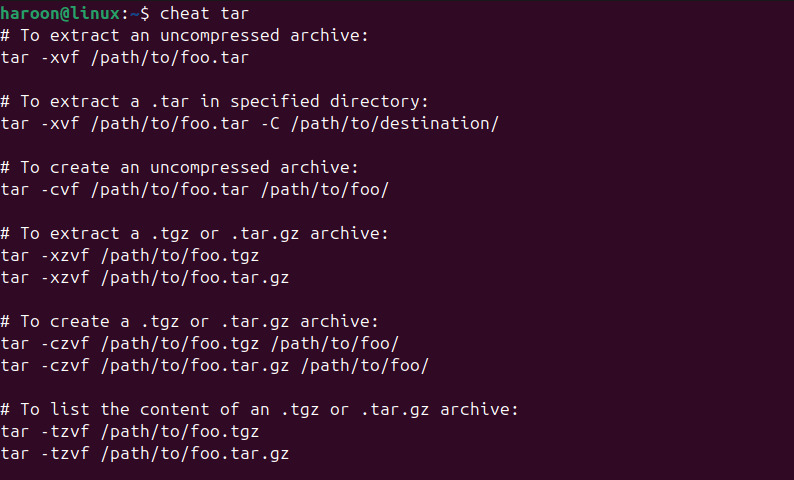
<p style="text-align: justify;">Cú pháp cơ bản để làm việc với cheat.sh rất đơn giản. Ví dụ, nếu muốn lấy cheatsheet cho một lệnh như tar, bạn chỉ cần mở terminal và nhập lệnh này:</p>

<pre id="pre0">
<code>curl cht.sh/tar</code></pre>

<figure>
<div style="text-align: justify;"><img alt="Hiển thị trang hướng dẫn của lệnh Tar" data-i="0" data-src="https://st.quantrimang.com/photos/image/2025/04/09/cheat-sh-cung-cap-cheatsheet-cho-lenh-linux-bat-ky-1.jpg" data-was-processed="true" height="380" src="https://st.quantrimang.com/photos/image/2025/04/09/cheat-sh-cung-cap-cheatsheet-cho-lenh-linux-bat-ky-1.jpg" width="800" /></div>

<figcaption>
<div style="text-align: justify;">Hiển thị trang hướng dẫn của lệnh Tar</div>
</figcaption>
</figure>

<p style="text-align: justify;">Trong vòng một phần giây, công cụ sẽ lấy ra cheatsheet được định dạng gọn gàng với các tùy chọn phổ biến, ví dụ sử dụng và mẹo hữu ích.</p>

<p style="text-align: justify;">Vậy là xong! Chỉ cần thay tar bằng bất kỳ lệnh nào khiến bạn gặp rắc rối.</p>

<p style="text-align: justify;">Ví dụ, để kiểm tra cú pháp của&nbsp;lệnh find, hãy sử dụng:</p>

<pre id="pre1">
<code>curl cht.sh/find</code></pre>

<p style="text-align: justify;">Lệnh này sẽ hiển thị thông tin chi tiết về cách tìm file theo tên, loại, ngày sửa đổi, kích thước và thậm chí là cách thực thi lệnh trên các file đã định vị.</p>

<h3 style="text-align: justify;">Tìm kiếm bằng từ khóa</h3>

<p style="text-align: justify;">Bạn cũng có thể lấy cheatsheet ngay cả khi không chắc chắn về lệnh chính xác bằng cách tìm kiếm bằng từ khóa. Chỉ cần mô tả những gì bạn muốn làm bằng cách sử dụng<strong>&nbsp;~</strong>. Ví dụ, nếu bạn muốn tìm và xóa file:</p>

<pre id="pre2">
<code>curl cht.sh/~find+delete+files</code></pre>

<p style="text-align: justify;">Điều này tìm kiếm qua các cheatsheet để tìm những chủ đề liên quan đến việc tìm và xóa, có thể chỉ cho bạn lệnh tìm, tùy chọn xóa hoặc cách sử dụng lệnh này với xargs.</p>

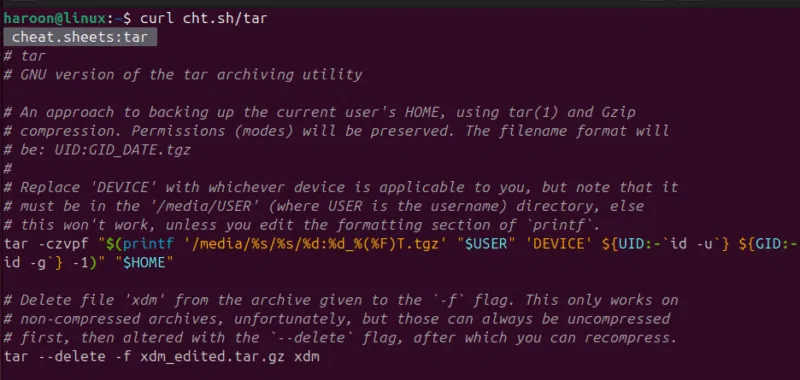
<p style="text-align: justify;">Không chỉ các lệnh Linux – nó cũng hoạt động với những ngôn ngữ lập trình. Cần một lời nhắc nhanh để hiểu danh sách Python, hãy chạy lệnh này:</p>

<pre id="pre3">
<code>curl cht.sh/python/list+comprehension</code></pre>

<figure>
<div style="text-align: justify;"><img alt="Hiển thị trang cheatsheet để hiểu danh sách Python" data-i="1" data-src="https://st.quantrimang.com/photos/image/2025/04/09/cheat-sh-cung-cap-cheatsheet-cho-lenh-linux-bat-ky-2.jpg" data-was-processed="true" height="505" src="https://st.quantrimang.com/photos/image/2025/04/09/cheat-sh-cung-cap-cheatsheet-cho-lenh-linux-bat-ky-2.jpg" width="800" /></div>

<figcaption>
<div style="text-align: justify;">Hiển thị trang cheatsheet để hiểu danh sách Python</div>
</figcaption>
</figure>

<p style="text-align: justify;">Bạn muốn hiểu các lệnh Git? Sử dụng:</p>

<pre id="pre4">
<code>curl cheat.sh/git/merge</code></pre>

<h2 style="text-align: justify;">Làm cho cheat.sh dễ truy cập hơn nữa</h2>

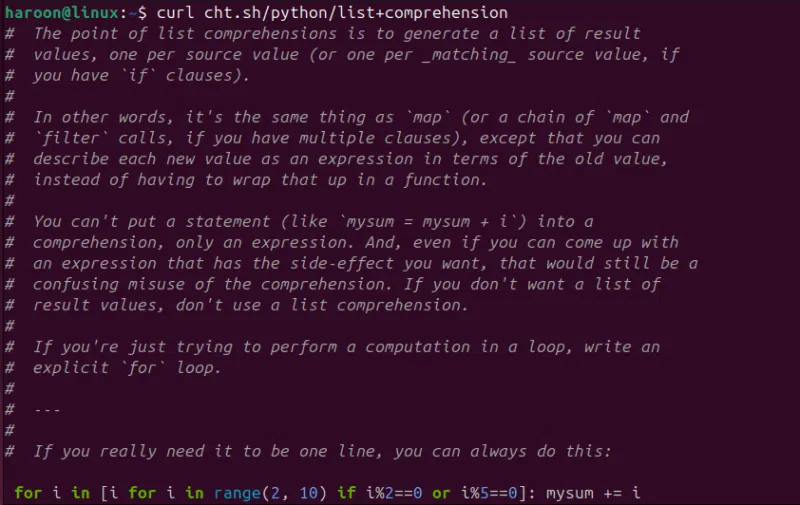
<p style="text-align: justify;">Mặc dù phương pháp curl hoạt động hoàn hảo, nhưng bạn có thể muốn có một cách thuận tiện hơn để truy cập cheat.sh, đặc biệt là nếu bạn sử dụng nó thường xuyên. Bạn có thể tạo một hàm shell đơn giản hoặc alias trong file .bashrc hoặc .zshrc của mình.</p>

<p style="text-align: justify;">Mở file cấu hình của bạn bằng bất kỳ trình soạn thảo văn bản nào như Nano (đối với Bash):</p>

<pre id="pre5">
<code>nano ~/.bashrc</code></pre>

<p style="text-align: justify;">Đối với Zsh, hãy chạy:</p>

<pre id="pre6">
<code>nano ~/.zshrc</code></pre>

<p style="text-align: justify;">Dán hàm:</p>

<pre id="pre7">
<code>cheat() {
curl cheat.sh/$1
}</code></pre>

<figure>
<div style="text-align: justify;"><img alt="Tạo alias trong Bash Terminal cho công cụ Cheat" data-i="2" data-src="https://st.quantrimang.com/photos/image/2025/04/09/cheat-sh-cung-cap-cheatsheet-cho-lenh-linux-bat-ky-3.jpg" data-was-processed="true" height="477" src="https://st.quantrimang.com/photos/image/2025/04/09/cheat-sh-cung-cap-cheatsheet-cho-lenh-linux-bat-ky-3.jpg" width="800" /></div>

<figcaption>
<div style="text-align: justify;">Tạo alias trong Bash Terminal cho công cụ Cheat</div>
</figcaption>
</figure>

<p style="text-align: justify;">Cuối cùng, hãy lưu và đóng file, sau đó load lại bằng:</p>

<pre id="pre8">
<code>source ~/.bashrc</code></pre>

<p style="text-align: justify;">Bây giờ, với hàm này được xác định, bạn chỉ cần nhập:</p>

<pre id="pre9">
<code>cheat tar</code></pre>

<p style="text-align: justify;">Viết tắt này giúp bạn tiết kiệm một vài lần nhấn phím và giúp công cụ có cảm giác tích hợp hơn vào quy trình làm việc của bạn.</p>

<h2 style="text-align: justify;">Hãy thử cheat (phiên bản Go có thể cài đặt) để biết thêm tùy chọn cấu hình!</h2>

<p style="text-align: justify;">Mặc dù cheat.sh rất tuyệt vời để tra cứu nhanh, nhưng một số người dùng có thể thích kiểm soát và tùy chỉnh nhiều hơn. Đó là lúc công cụ dòng lệnh cheat phát huy tác dụng. Thay vì tạo yêu cầu HTTP đến máy chủ từ xa, công cụ này duy trì một bộ sưu tập cheatsheet cục bộ mà bạn có thể tùy chỉnh bằng ghi chú cá nhân, theme màu và trình soạn thảo văn bản ưa thích.</p>

<p style="text-align: justify;"><strong>Lưu ý</strong>: Tên gọi có thể hơi khó hiểu – cheat.sh và cheat là hai công cụ khác nhau. Công cụ chúng ta đang thảo luận ở đây là một công cụ hiện đại, đẹp mắt được viết bằng Go mà bạn có thể tải xuống và cài đặt.</p>

<p style="text-align: justify;">Cách dễ nhất để cài đặt cheat là sử dụng trình quản lý gói snap hoặc nếu đã thiết lập Go, bạn có thể cài đặt trực tiếp bằng Go.</p>

<p style="text-align: justify;">Ví dụ, trên Debian/Ubuntu, hãy chạy:</p>

<pre id="pre10">
<code>sudo snap install cheat</code></pre>

<p style="text-align: justify;">Ngoài ra, hãy sử dụng Go:</p>

<pre id="pre11">
<code>go install github.com/cheat/cheat/cmd/cheat@latest</code></pre>

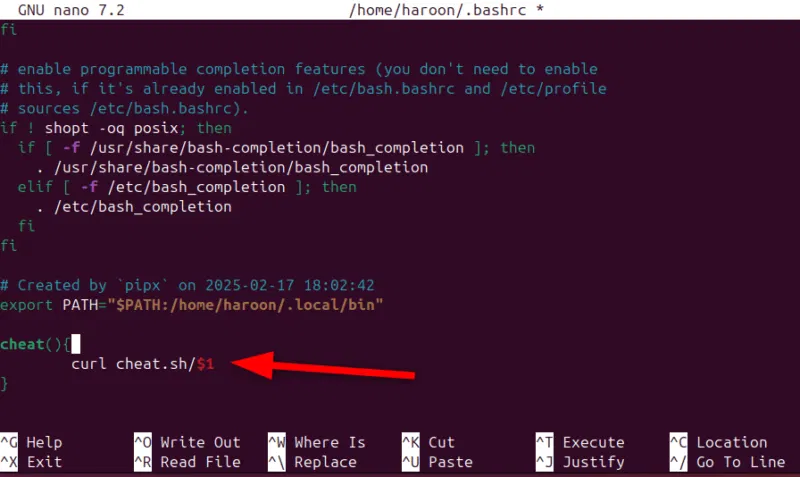
<p style="text-align: justify;">Sau khi cài đặt, việc sử dụng nó cũng giống như cheat.sh:</p>

<pre id="pre12">
<code>cheat &lt;command_name&gt;</code></pre>

<figure>
<div style="text-align: justify;"><img alt="Hiển thị Cheatsheet cho lệnh Tar " data-i="3" data-src="https://st.quantrimang.com/photos/image/2025/04/09/cheat-sh-cung-cap-cheatsheet-cho-lenh-linux-bat-ky-4.jpg" data-was-processed="true" height="480" src="https://st.quantrimang.com/photos/image/2025/04/09/cheat-sh-cung-cap-cheatsheet-cho-lenh-linux-bat-ky-4.jpg" width="794" /></div>

<figcaption>
<div style="text-align: justify;">Hiển thị Cheatsheet cho lệnh Tar</div>
</figcaption>
</figure>

<p style="text-align: justify;">Bạn cũng có thể xem các sheet mình có và liệt kê tất cả bằng lệnh này:</p>

<pre id="pre13">
<code>cheat -l</code></pre>

<p style="text-align: justify;">Một tính năng hữu ích khác của công cụ cheat này là khả năng tạo cheatsheet tùy chỉnh. Sau đây là cách bạn có thể tạo một cheatsheet:</p>

<pre id="pre14">
<code>cheat -e new_command</code></pre>

<p style="text-align: justify;">Điều này sẽ mở trình soạn thảo mặc định, nơi bạn có thể tạo một cheatsheet mới cho &quot;new_command&quot;. Định dạng rất đơn giản – thêm một mô tả ngắn gọn ở trên cùng, theo sau là các ví dụ và giải thích.</p>

<p style="text-align: justify;">Cheat và cheat.sh thực ra không phải là đối thủ. Cả hai đều hữu ích vì những lý do khác nhau. cheat.sh (có curl) cung cấp trợ giúp tức thời trên bất kỳ máy nào có Internet và để tra cứu nhanh và bao gồm hàng tấn lệnh và thậm chí cả ngôn ngữ lập trình.</p>

<p style="text-align: justify;">Nếu cả cheat.sh và công cụ cheat đều có vẻ quá mức, hãy cân nhắc sử dụng TLDR. Viết tắt của Too Long; Didn’t Read, TLDR cung cấp các trang trợ giúp được đơn giản hóa cho những lệnh phổ biến. Nó hoàn hảo cho người mới bắt đầu muốn có câu trả lời nhanh mà không cần phải tìm hiểu tài liệu phức tạp.</p>
		</div>
				<div id="author">
						<p>
				<strong>Nguồn tin:</strong>
				Quantrimang.com:
			</p>
		</div>
	</div>
	<div id="footer" class="clearfix">
		<div id="url">
			<strong>URL của bản tin này: </strong><a href="https://www.nguoicodonvn2008.info/vi/news/savefile/kien-thuc-may-tinh/tim-hieu-ve-cheat-sh-cong-cu-terminal-don-gian-cung-cap-cheatsheet-cho-bat-ky-lenh-linux-nao-10149.html" title="Tìm hiểu về cheat.sh&#x3A; Công cụ Terminal đơn giản cung cấp cheatsheet cho bất kỳ lệnh Linux nào">https://www.nguoicodonvn2008.info/vi/news/savefile/kien-thuc-may-tinh/tim-hieu-ve-cheat-sh-cong-cu-terminal-don-gian-cung-cap-cheatsheet-cho-bat-ky-lenh-linux-nao-10149.html</a>

		</div>
		<div class="clear"></div>
		<div class="copyright">
			&copy; .&#x3A; Nguoicodonvn2008.info - Cõi lòng người cô đơn &#x3A;.
		</div>
		<div id="contact">
			<a href="mailto:admin@nguoicodonvn2008.info">admin@nguoicodonvn2008.info</a>
		</div>
	</div>
</div>
        <div id="timeoutsess" class="chromeframe">
            Bạn đã không sử dụng Site, <a onclick="timeoutsesscancel();" href="https://www.nguoicodonvn2008.info/#">Bấm vào đây để duy trì trạng thái đăng nhập</a>. Thời gian chờ: <span id="secField"> 60 </span> giây
        </div>
        <div id="openidResult" class="nv-alert" style="display:none"></div>
        <div id="openidBt" data-result="" data-redirect=""></div>
		</script>
		<div class="car-top">
  <span><img src="https://www.nguoicodonvn2008.info/themes/default/images/car.png" alt=""></span>
</div>
<script src="https://www.nguoicodonvn2008.info/assets/js/jquery/jquery.min.js"></script>
<script>var nv_base_siteurl="/",nv_lang_data="vi",nv_lang_interface="vi",nv_name_variable="nv",nv_fc_variable="op",nv_lang_variable="language",nv_module_name="news",nv_func_name="savefile",nv_is_user=0, nv_my_ofs=-4,nv_my_abbr="EDT",nv_cookie_prefix="nv4c_e856T",nv_check_pass_mstime=1738000,nv_area_admin=0,nv_safemode=0,theme_responsive=0,nv_recaptcha_ver=2,nv_recaptcha_sitekey="",nv_recaptcha_type="image",XSSsanitize=1;</script>
<script src="https://www.nguoicodonvn2008.info/assets/js/language/vi.js"></script>
<script src="https://www.nguoicodonvn2008.info/assets/js/DOMPurify/purify3.js"></script>
<script src="https://www.nguoicodonvn2008.info/assets/js/global.js"></script>
<script src="https://www.nguoicodonvn2008.info/assets/js/site.js"></script>
<script src="https://www.nguoicodonvn2008.info/themes/default/js/news.js"></script>
<script src="https://www.nguoicodonvn2008.info/themes/default/js/main.js"></script>
<script src="https://www.nguoicodonvn2008.info/themes/default/js/custom.js"></script>
<script type="application/ld+json">
        {
            "@context": "https://schema.org",
            "@type": "Organization",
            "url": "https://www.nguoicodonvn2008.info",
            "logo": "https://www.nguoicodonvn2008.info/uploads/angel.gif"
        }
        </script>
<script src="https://www.nguoicodonvn2008.info/themes/default/js/bootstrap.min.js"></script>
<script type="text/javascript">
var $scrolltop = $('.car-top');
$scrolltop.on('click', function () {
    $('html,body').animate({
        scrollTop: 0
    }, 800);
    $(this).addClass("car-run");
    setTimeout(function(){ $scrolltop.removeClass('car-run');}, 1000);
    return false;
});
$(window).on('scroll', function ()
{ 
    if($(window).scrollTop() >= 200)
    {
        $scrolltop.addClass("show");
        $scrolltop.addClass("car-down");
    }
    else
    {
       $scrolltop.removeClass("show");
       setTimeout(function(){ $scrolltop.removeClass('car-down');}, 300);
    }
});
</script>
</body>
</html>