<!DOCTYPE html>
    <html lang="vi" xmlns="http://www.w3.org/1999/xhtml" prefix="og: http://ogp.me/ns#">
    <head>
<title>Tìm hiểu Pktmon&#x3A; Công cụ theo dõi mạng tích hợp của Windows 10</title>
<meta name="description" content="Tìm hiểu Pktmon&#x3A; Công cụ theo dõi mạng tích hợp của Windows 10 - Savefile - Tin Tức -...">
<meta name="author" content=".: Nguoicodonvn2008.info - Cõi lòng người cô đơn :.">
<meta name="copyright" content=".: Nguoicodonvn2008.info - Cõi lòng người cô đơn :. [admin@nguoicodonvn2008.info]">
<meta name="robots" content="index, archive, follow, noodp">
<meta name="googlebot" content="index,archive,follow,noodp">
<meta name="msnbot" content="all,index,follow">
<meta name="generator" content="NukeViet v4.5">
<meta http-equiv="Content-Type" content="text/html; charset=utf-8">
<meta property="og:title" content="Tìm hiểu Pktmon&#x3A; Công cụ theo dõi mạng tích hợp của Windows 10">
<meta property="og:type" content="website">
<meta property="og:description" content="Savefile - Tin Tức - https&#x3A;&#x002F;&#x002F;www.nguoicodonvn2008.info&#x002F;vi&#x002F;news&#x002F;savefile&#x002F;kien-thuc-may-tinh&#x002F;tim-hieu-pktmon-cong-cu-theo-doi-mang-tich-hop-cua-windows-10-3333.html">
<meta property="og:site_name" content=".&#x3A; Nguoicodonvn2008.info - Cõi lòng người cô đơn &#x3A;.">
<meta property="og:url" content="https://www.nguoicodonvn2008.info/vi/news/savefile/kien-thuc-may-tinh/tim-hieu-pktmon-cong-cu-theo-doi-mang-tich-hop-cua-windows-10-3333.html">
<link rel="shortcut icon" href="https://www.nguoicodonvn2008.info/favicon.ico">
<link rel="canonical" href="https://www.nguoicodonvn2008.info/vi/news/savefile/kien-thuc-may-tinh/tim-hieu-pktmon-cong-cu-theo-doi-mang-tich-hop-cua-windows-10-3333.html">
<link rel="alternate" href="https://www.nguoicodonvn2008.info/vi/news/rss/" title="Tin Tức" type="application/rss+xml">
<link rel="alternate" href="https://www.nguoicodonvn2008.info/vi/news/rss/karaoke-dual/" title="Tin Tức - Karaoke Dual" type="application/rss+xml">
<link rel="alternate" href="https://www.nguoicodonvn2008.info/vi/news/rss/nhac-tre/" title="Tin Tức - Nhạc trẻ" type="application/rss+xml">
<link rel="alternate" href="https://www.nguoicodonvn2008.info/vi/news/rss/tru-tinh/" title="Tin Tức - Trữ tình" type="application/rss+xml">
<link rel="alternate" href="https://www.nguoicodonvn2008.info/vi/news/rss/nuoc-ngoai/" title="Tin Tức - Nước ngoài" type="application/rss+xml">
<link rel="alternate" href="https://www.nguoicodonvn2008.info/vi/news/rss/remix/" title="Tin Tức - Remix" type="application/rss+xml">
<link rel="alternate" href="https://www.nguoicodonvn2008.info/vi/news/rss/tam-su-tinh-yeu/" title="Tin Tức - Tâm sự tình yêu" type="application/rss+xml">
<link rel="alternate" href="https://www.nguoicodonvn2008.info/vi/news/rss/tho-suu-tam/" title="Tin Tức - Thơ sưu tầm" type="application/rss+xml">
<link rel="alternate" href="https://www.nguoicodonvn2008.info/vi/news/rss/cuoc-song/" title="Tin Tức - Cuộc sống" type="application/rss+xml">
<link rel="alternate" href="https://www.nguoicodonvn2008.info/vi/news/rss/phan-mem/" title="Tin Tức - Phần mềm" type="application/rss+xml">
<link rel="alternate" href="https://www.nguoicodonvn2008.info/vi/news/rss/kien-thuc-may-tinh/" title="Tin Tức - Kiến thức máy tính" type="application/rss+xml">
<link rel="alternate" href="https://www.nguoicodonvn2008.info/vi/news/rss/hoc-tap/" title="Tin Tức - Học tập" type="application/rss+xml">
<link rel="alternate" href="https://www.nguoicodonvn2008.info/vi/news/rss/tai-lieu/" title="Tin Tức - Tài liệu" type="application/rss+xml">
<link rel="alternate" href="https://www.nguoicodonvn2008.info/vi/news/rss/de-thi/" title="Tin Tức - Đề thi" type="application/rss+xml">
<link rel="preload" as="style" href="https://www.nguoicodonvn2008.info/assets/css/font-awesome.min.css" type="text/css">
<link rel="preload" as="style" href="https://www.nguoicodonvn2008.info/themes/default/css/bootstrap.non-responsive.css" type="text/css">
<link rel="preload" as="style" href="https://www.nguoicodonvn2008.info/themes/default/css/style.css" type="text/css">
<link rel="preload" as="style" href="https://www.nguoicodonvn2008.info/themes/default/css/style.non-responsive.css" type="text/css">
<link rel="preload" as="style" href="https://www.nguoicodonvn2008.info/themes/default/css/news.css" type="text/css">
<link rel="preload" as="style" href="https://www.nguoicodonvn2008.info/themes/default/css/custom.css" type="text/css">
<link rel="preload" as="script" href="https://www.nguoicodonvn2008.info/assets/js/jquery/jquery.min.js" type="text/javascript">
<link rel="preload" as="script" href="https://www.nguoicodonvn2008.info/assets/js/language/vi.js" type="text/javascript">
<link rel="preload" as="script" href="https://www.nguoicodonvn2008.info/assets/js/DOMPurify/purify3.js" type="text/javascript">
<link rel="preload" as="script" href="https://www.nguoicodonvn2008.info/assets/js/global.js" type="text/javascript">
<link rel="preload" as="script" href="https://www.nguoicodonvn2008.info/assets/js/site.js" type="text/javascript">
<link rel="preload" as="script" href="https://www.nguoicodonvn2008.info/themes/default/js/news.js" type="text/javascript">
<link rel="preload" as="script" href="https://www.nguoicodonvn2008.info/themes/default/js/main.js" type="text/javascript">
<link rel="preload" as="script" href="https://www.nguoicodonvn2008.info/themes/default/js/custom.js" type="text/javascript">
<link rel="preload" as="script" href="https://www.nguoicodonvn2008.info/themes/default/js/bootstrap.min.js" type="text/javascript">
<link rel="stylesheet" href="https://www.nguoicodonvn2008.info/assets/css/font-awesome.min.css">
<link rel="stylesheet" href="https://www.nguoicodonvn2008.info/themes/default/css/bootstrap.non-responsive.css">
<link rel="stylesheet" href="https://www.nguoicodonvn2008.info/themes/default/css/style.css">
<link rel="stylesheet" href="https://www.nguoicodonvn2008.info/themes/default/css/style.non-responsive.css">
<link rel="StyleSheet" href="https://www.nguoicodonvn2008.info/themes/default/css/news.css">
<link rel="stylesheet" href="https://www.nguoicodonvn2008.info/themes/default/css/custom.css">
<style type="text/css">
	body{background: #fff;}
</style>
    </head>
    <body>
<div id="print">
	<div id="hd_print">
		<h2 class="pull-left">.&#x3A; Nguoicodonvn2008.info - Cõi lòng người cô đơn &#x3A;.</h2>
		<p class="pull-right"><a title=".&#x3A; Nguoicodonvn2008.info - Cõi lòng người cô đơn &#x3A;." href="https://www.nguoicodonvn2008.info/">https://www.nguoicodonvn2008.info</a></p>
	</div>
	<div class="clear"></div>
	<hr />
	<div id="content">
		<h1>Tìm hiểu Pktmon&#x3A; Công cụ theo dõi mạng tích hợp của Windows 10</h1>
		<ul class="list-inline">
			<li>Thứ hai - 28/12/2020 23:51</li>
			<li class="hidden-print txtrequired"><em class="fa fa-print">&nbsp;</em><a title="In ra" href="javascript:;" onclick="window.print()">In ra</a></li>
			<li class="hidden-print txtrequired"><em class="fa fa-power-off">&nbsp;</em><a title="Đóng cửa sổ này" href="javascript:;" onclick="window.close()">Đóng cửa sổ này</a></li>
		</ul>
		<div class="clear"></div>
		<div id="hometext">
		</div>
				<div class="imghome">
			<img alt="Tìm hiểu Pktmon&#x3A; Công cụ theo dõi mạng tích hợp của Windows 10" src="https://st.quantrimang.com/photos/image/2020/12/16/cong-cu-theo-doi-mang-pktmon-5.jpg" width="460" class="img-thumbnail" />
		</div>
		<div class="clear"></div>
		<div id="bodytext" class="clearfix">
			<p style="text-align: justify;">Khi phát hành bản cập nhật Windows 10 tháng 10 năm 2018, Microsoft đã âm thầm bổ sung một trình kiểm tra gói mạng (packet sniffer) dưới dạng dòng lệnh tích hợp có tên Pktmon vào&nbsp;Windows 10. Sau đó, Microsoft đã bổ sung thêm một số tính năng cho công cụ này để giúp người dùng dễ sử dụng hơn.</p>

<p style="text-align: justify;">Trình theo dõi gói, hay trình phân tích mạng, là chương trình cho phép bạn theo dõi lưu lượng mạng truyền qua các thiết bị mạng của máy tính đến cấp độ từng gói riêng lẻ.</p>

<h2 style="text-align: justify;">Pktmon: Công cụ theo dõi mạng tích hợp của Windows 10</h2>

<p style="text-align: justify;">Khi mới phát hành, Pktmon chỉ hỗ trợ định dạng Event Trace Log (ETL), một định dạng nhật ký độc quyền do Microsoft tạo ra. Sau này, Microsoft đã thêm hỗ trợ file nhật ký&nbsp;PCAPNG&nbsp;và tính năng giám sát thời gian thực, mà chúng ta sẽ tìm hiểu trong bài viết này.</p>

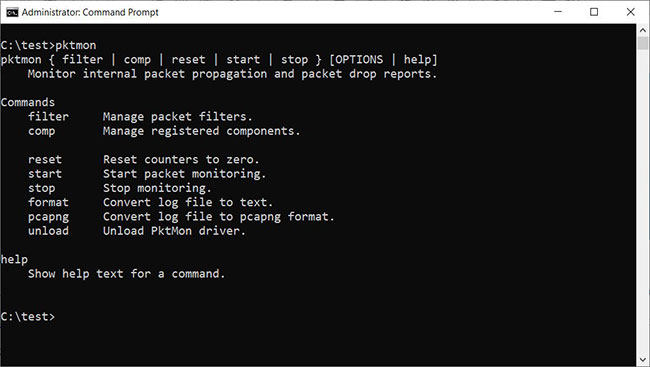
<p style="text-align: justify;">Để sử dụng Pktmon, bạn cần&nbsp;khởi chạy Command Prompt với quyền admin&nbsp;trên Windows 10, vì chương trình yêu cầu quyền admin. Để nhận được hướng dẫn về cách sử dụng chương trình, bạn nhập lệnh&nbsp;<strong>pktmon help</strong>&nbsp;trong&nbsp;Command Prompt.</p>

<figure>
<div style="text-align: justify;"><img alt="Tài liệu trợ giúp pktmon" data-i="0" data-src="https://st.quantrimang.com/photos/image/2020/12/16/cong-cu-theo-doi-mang-pktmon-1.jpg" data-was-processed="true" height="367" src="https://st.quantrimang.com/photos/image/2020/12/16/cong-cu-theo-doi-mang-pktmon-1.jpg" width="650" /></div>

<figcaption>
<div style="text-align: justify;">Tài liệu trợ giúp pktmon</div>
</figcaption>
</figure>

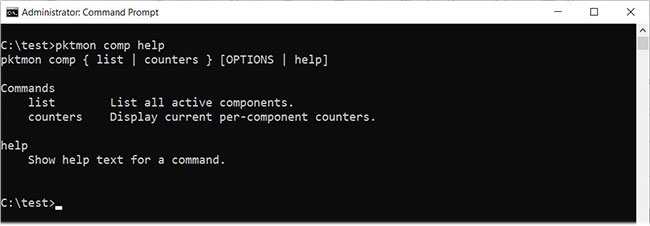
<p style="text-align: justify;">Để nhận thêm hướng dẫn trợ giúp về một lệnh cụ thể, hãy nhập lệnh&nbsp;<strong>pktmon &#91;tên lệnh&#93; help</strong>. Ví dụ, để xem tài liệu về lệnh&nbsp;<strong>&quot;comp&quot;</strong>, bạn sẽ nhập:</p>

<pre id="pre0">
<code>pktmon comp help</code></pre>

<figure>
<div style="text-align: justify;"><img alt="Sử dụng lệnh help" data-i="1" data-src="https://st.quantrimang.com/photos/image/2020/12/16/cong-cu-theo-doi-mang-pktmon-2.jpg" data-was-processed="true" height="226" src="https://st.quantrimang.com/photos/image/2020/12/16/cong-cu-theo-doi-mang-pktmon-2.jpg" width="650" /></div>

<figcaption>
<div style="text-align: justify;">Sử dụng lệnh help</div>
</figcaption>
</figure>

<p style="text-align: justify;">Bạn có thể sử dụng&nbsp;<strong>help</strong>&nbsp;để xem hướng dẫn của cả những lệnh phụ (subcommand), ví dụ:</p>

<pre id="pre1">
<code>pktmon comp list help</code></pre>

<p style="text-align: justify;">Để làm quen với Pktmon thì xem hướng dẫn là cách hữu ích nhất, vì thế bạn nên thử tìm hiểu trước khi thực sự sử dụng công cụ này.</p>

<div style="text-align: justify;">&nbsp;</div>

<h2 style="text-align: justify;">Cách sử dụng công cụ theo dõi mạng Pktmon</h2>

<p style="text-align: justify;">So với công cụ theo dõi mạng có giao diện người dùng đồ họa, bạn có thể mất nhiều thời gian hơn để làm quen với giao diện dòng lệnh của Pktmon.</p>

<p style="text-align: justify;">Trước khi có thể theo dõi các gói, trước tiên bạn cần tạo bộ lọc bằng cách sử dụng lệnh&nbsp;<em>pktmon filter add</em>, lệnh này chỉ định traffic (lưu lượng) bạn muốn theo dõi.</p>

<div style="text-align: justify;">&nbsp;</div>

<p style="text-align: justify;">Ví dụ, bạn có thể theo dõi tất cả traffic mạng trên mạng của mình bằng lệnh:</p>

<pre id="pre2">
<code>pktmon filter add -i 192.168.1.0/24</code></pre>

<p style="text-align: justify;">… hoặc giám sát traffic&nbsp;DNS&nbsp;bằng:</p>

<pre id="pre3">
<code>pktmon filter add -t UDP -p 53</code></pre>

<p style="text-align: justify;">Nếu chưa hình dung ra cách làm, bạn nên dùng lệnh&nbsp;<strong>pktmon filter add help</strong>&nbsp;để tìm hiểu cách tạo bộ lọc.</p>

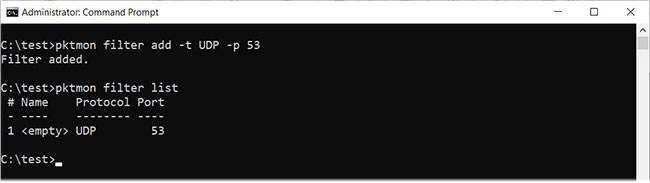
<p style="text-align: justify;">Trong bài viết này, tác giả đã tạo một bộ lọc để theo dõi lưu lượng DNS như được mô tả ở trên. Để xem các bộ lọc bạn đã tạo, hãy nhập lệnh:</p>

<pre id="pre4">
<code>pktmon filter list</code></pre>

<figure>
<div style="text-align: justify;"><img alt="Bộ lọc giám sát đã tạo được liệt kê" data-i="2" data-src="https://st.quantrimang.com/photos/image/2020/12/16/cong-cu-theo-doi-mang-pktmon-3.jpg" data-was-processed="true" height="183" src="https://st.quantrimang.com/photos/image/2020/12/16/cong-cu-theo-doi-mang-pktmon-3.jpg" width="650" /></div>

<figcaption>
<div style="text-align: justify;">Bộ lọc giám sát đã tạo được liệt kê</div>
</figcaption>
</figure>

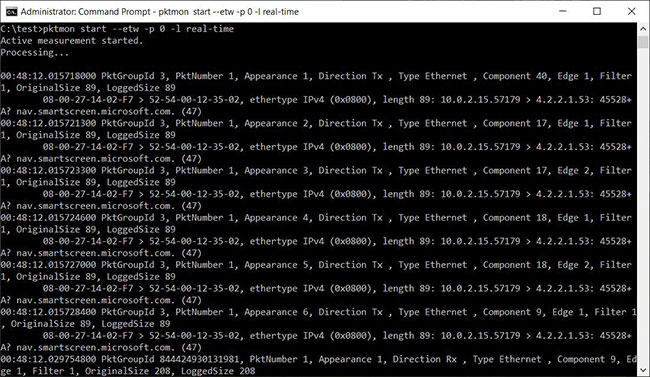
<p style="text-align: justify;">Để bắt đầu giám sát lưu lượng DNS trên tất cả các interface mạng và hiển thị hoạt động trong thời gian thực, bạn sẽ sử dụng lệnh sau:</p>

<pre id="pre5">
<code>pktmon start --etw -p 0 -l real-time</code></pre>

<p style="text-align: justify;">Ví dụ trên sử dụng đối số&nbsp;<strong>-p 0</strong>, vì vậy nó bắt toàn bộ gói tin. Bạn cũng có thể chỉ định interface mạng cụ thể để giám sát bằng cách sử dụng đối số&nbsp;<strong>-c</strong>&nbsp;theo sau là index ID của interface. Để có danh sách các interface mạng và index ID (ifIndex), bạn có thể sử dụng lệnh:</p>

<pre id="pre6">
<code>pktmon comp list</code></pre>

<p style="text-align: justify;">Khi bắt đầu theo dõi lưu lượng truy cập, bạn sẽ thấy các gói DNS đã bắt được hiển thị theo thời gian thực trong Command Prompt, như dưới đây.</p>

<figure>
<div style="text-align: justify;"><img alt="Giám sát lưu lượng DNS trong thời gian thực" data-i="3" data-src="https://st.quantrimang.com/photos/image/2020/12/16/cong-cu-theo-doi-mang-pktmon-4.jpg" data-was-processed="true" height="377" src="https://st.quantrimang.com/photos/image/2020/12/16/cong-cu-theo-doi-mang-pktmon-4.jpg" width="650" /></div>

<figcaption>
<div style="text-align: justify;">Giám sát lưu lượng DNS trong thời gian thực</div>
</figcaption>
</figure>

<p style="text-align: justify;">Để dừng theo dõi traffic, hãy nhấn&nbsp;<strong>Ctrl + C</strong>. Khi hoàn tất, sẽ có file nhật ký&nbsp;<strong>PktMon.etl</strong>&nbsp;được tạo trong thư mục bạn đã chạy Pktmon.</p>

<p style="text-align: justify;">Tuy nhiên, file ETL không phải là một lựa chọn tốt vì nhiều ứng dụng không hỗ trợ chúng. Bạn có thể chuyển file ETL thành file PCAPNG bằng lệnh&nbsp;<strong>pktmon pcapng</strong>. Ví dụ, để chuyển đổi PktMon.etl thành file PCAPNG có tên&nbsp;<strong>PktMon.pcapng</strong>, hãy nhập lệnh sau:</p>

<pre id="pre7">
<code>pktmon pcapng PktMon.etl -o PktMon.pcapng</code></pre>

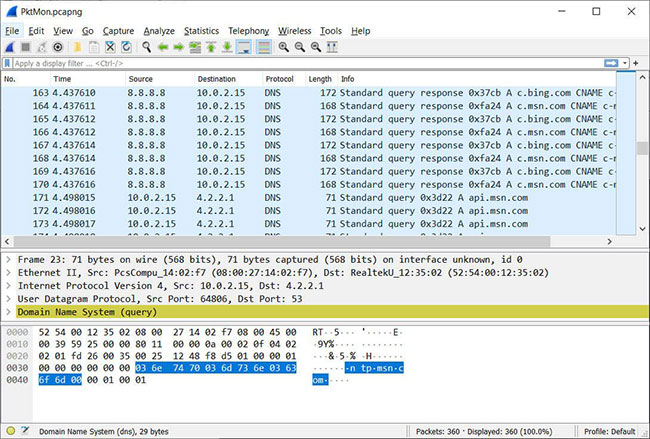
<p style="text-align: justify;">Sau khi file nhật ký được chuyển đổi sang định dạng PCANPNG, bạn có thể load file đó vào một chương trình như&nbsp;Wireshark&nbsp;để nhận thông tin chi tiết về từng yêu cầu DNS.</p>

<figure>
<div style="text-align: justify;"><img alt="Phân tích nhật ký Pktmon với Wireshark" data-i="4" data-src="https://st.quantrimang.com/photos/image/2020/12/16/cong-cu-theo-doi-mang-pktmon-5.jpg" data-was-processed="true" height="439" src="https://st.quantrimang.com/photos/image/2020/12/16/cong-cu-theo-doi-mang-pktmon-5.jpg" width="650" /></div>

<figcaption>
<div style="text-align: justify;">Phân tích nhật ký Pktmon với Wireshark</div>
</figcaption>
</figure>

<p style="text-align: justify;">Như bạn có thể thấy, Pktmon là một công cụ cực kỳ mạnh mẽ, cho phép bạn có được cái nhìn sâu sắc về loại lưu lượng chạy qua mạng của mình.</p>

<div style="text-align: justify;">&nbsp;</div>

<p style="text-align: justify;">Đồng thời, Pktmon có thể phức tạp khi sử dụng, vì vậy bạn nên làm quen với tài liệu trợ giúp trước khi chạy lệnh.</p>
		</div>
				<div id="author">
						<p>
				<strong>Nguồn tin:</strong>
				Quantrimang.com
			</p>
		</div>
	</div>
	<div id="footer" class="clearfix">
		<div id="url">
			<strong>URL của bản tin này: </strong><a href="https://www.nguoicodonvn2008.info/vi/news/savefile/kien-thuc-may-tinh/tim-hieu-pktmon-cong-cu-theo-doi-mang-tich-hop-cua-windows-10-3333.html" title="Tìm hiểu Pktmon&#x3A; Công cụ theo dõi mạng tích hợp của Windows 10">https://www.nguoicodonvn2008.info/vi/news/savefile/kien-thuc-may-tinh/tim-hieu-pktmon-cong-cu-theo-doi-mang-tich-hop-cua-windows-10-3333.html</a>

		</div>
		<div class="clear"></div>
		<div class="copyright">
			&copy; .&#x3A; Nguoicodonvn2008.info - Cõi lòng người cô đơn &#x3A;.
		</div>
		<div id="contact">
			<a href="mailto:admin@nguoicodonvn2008.info">admin@nguoicodonvn2008.info</a>
		</div>
	</div>
</div>
        <div id="timeoutsess" class="chromeframe">
            Bạn đã không sử dụng Site, <a onclick="timeoutsesscancel();" href="https://www.nguoicodonvn2008.info/#">Bấm vào đây để duy trì trạng thái đăng nhập</a>. Thời gian chờ: <span id="secField"> 60 </span> giây
        </div>
        <div id="openidResult" class="nv-alert" style="display:none"></div>
        <div id="openidBt" data-result="" data-redirect=""></div>
		</script>
		<div class="car-top">
  <span><img src="https://www.nguoicodonvn2008.info/themes/default/images/car.png" alt=""></span>
</div>
<script src="https://www.nguoicodonvn2008.info/assets/js/jquery/jquery.min.js"></script>
<script>var nv_base_siteurl="/",nv_lang_data="vi",nv_lang_interface="vi",nv_name_variable="nv",nv_fc_variable="op",nv_lang_variable="language",nv_module_name="news",nv_func_name="savefile",nv_is_user=0, nv_my_ofs=-4,nv_my_abbr="EDT",nv_cookie_prefix="nv4c_e856T",nv_check_pass_mstime=1738000,nv_area_admin=0,nv_safemode=0,theme_responsive=0,nv_recaptcha_ver=2,nv_recaptcha_sitekey="",nv_recaptcha_type="image",XSSsanitize=1;</script>
<script src="https://www.nguoicodonvn2008.info/assets/js/language/vi.js"></script>
<script src="https://www.nguoicodonvn2008.info/assets/js/DOMPurify/purify3.js"></script>
<script src="https://www.nguoicodonvn2008.info/assets/js/global.js"></script>
<script src="https://www.nguoicodonvn2008.info/assets/js/site.js"></script>
<script src="https://www.nguoicodonvn2008.info/themes/default/js/news.js"></script>
<script src="https://www.nguoicodonvn2008.info/themes/default/js/main.js"></script>
<script src="https://www.nguoicodonvn2008.info/themes/default/js/custom.js"></script>
<script type="application/ld+json">
        {
            "@context": "https://schema.org",
            "@type": "Organization",
            "url": "https://www.nguoicodonvn2008.info",
            "logo": "https://www.nguoicodonvn2008.info/uploads/angel.gif"
        }
        </script>
<script src="https://www.nguoicodonvn2008.info/themes/default/js/bootstrap.min.js"></script>
<script type="text/javascript">
var $scrolltop = $('.car-top');
$scrolltop.on('click', function () {
    $('html,body').animate({
        scrollTop: 0
    }, 800);
    $(this).addClass("car-run");
    setTimeout(function(){ $scrolltop.removeClass('car-run');}, 1000);
    return false;
});
$(window).on('scroll', function ()
{ 
    if($(window).scrollTop() >= 200)
    {
        $scrolltop.addClass("show");
        $scrolltop.addClass("car-down");
    }
    else
    {
       $scrolltop.removeClass("show");
       setTimeout(function(){ $scrolltop.removeClass('car-down');}, 300);
    }
});
</script>
</body>
</html>