<!DOCTYPE html>
    <html lang="vi" xmlns="http://www.w3.org/1999/xhtml" prefix="og: http://ogp.me/ns#">
    <head>
<title>Thuộc tính class trong HTML</title>
<meta name="description" content="Thuộc tính class trong HTML - Savefile - Tin Tức - https&#x3A;&#x002F;&#x002F;www.nguoicodonvn2008.info&#x002F;vi&#x002F;news&#x002F;savefile&#x002F;kien-thuc-may-tinh&#x002F;thuoc-tinh-class-trong-html-7326.html">
<meta name="author" content=".: Nguoicodonvn2008.info - Cõi lòng người cô đơn :.">
<meta name="copyright" content=".: Nguoicodonvn2008.info - Cõi lòng người cô đơn :. [admin@nguoicodonvn2008.info]">
<meta name="robots" content="index, archive, follow, noodp">
<meta name="googlebot" content="index,archive,follow,noodp">
<meta name="msnbot" content="all,index,follow">
<meta name="generator" content="NukeViet v4.5">
<meta http-equiv="Content-Type" content="text/html; charset=utf-8">
<meta property="og:title" content="Thuộc tính class trong HTML">
<meta property="og:type" content="website">
<meta property="og:description" content="Savefile - Tin Tức - https&#x3A;&#x002F;&#x002F;www.nguoicodonvn2008.info&#x002F;vi&#x002F;news&#x002F;savefile&#x002F;kien-thuc-may-tinh&#x002F;thuoc-tinh-class-trong-html-7326.html">
<meta property="og:site_name" content=".&#x3A; Nguoicodonvn2008.info - Cõi lòng người cô đơn &#x3A;.">
<meta property="og:url" content="https://www.nguoicodonvn2008.info/vi/news/savefile/kien-thuc-may-tinh/thuoc-tinh-class-trong-html-7326.html">
<link rel="shortcut icon" href="https://www.nguoicodonvn2008.info/favicon.ico">
<link rel="canonical" href="https://www.nguoicodonvn2008.info/vi/news/savefile/kien-thuc-may-tinh/thuoc-tinh-class-trong-html-7326.html">
<link rel="alternate" href="https://www.nguoicodonvn2008.info/vi/news/rss/" title="Tin Tức" type="application/rss+xml">
<link rel="alternate" href="https://www.nguoicodonvn2008.info/vi/news/rss/karaoke-dual/" title="Tin Tức - Karaoke Dual" type="application/rss+xml">
<link rel="alternate" href="https://www.nguoicodonvn2008.info/vi/news/rss/nhac-tre/" title="Tin Tức - Nhạc trẻ" type="application/rss+xml">
<link rel="alternate" href="https://www.nguoicodonvn2008.info/vi/news/rss/tru-tinh/" title="Tin Tức - Trữ tình" type="application/rss+xml">
<link rel="alternate" href="https://www.nguoicodonvn2008.info/vi/news/rss/nuoc-ngoai/" title="Tin Tức - Nước ngoài" type="application/rss+xml">
<link rel="alternate" href="https://www.nguoicodonvn2008.info/vi/news/rss/remix/" title="Tin Tức - Remix" type="application/rss+xml">
<link rel="alternate" href="https://www.nguoicodonvn2008.info/vi/news/rss/tam-su-tinh-yeu/" title="Tin Tức - Tâm sự tình yêu" type="application/rss+xml">
<link rel="alternate" href="https://www.nguoicodonvn2008.info/vi/news/rss/tho-suu-tam/" title="Tin Tức - Thơ sưu tầm" type="application/rss+xml">
<link rel="alternate" href="https://www.nguoicodonvn2008.info/vi/news/rss/cuoc-song/" title="Tin Tức - Cuộc sống" type="application/rss+xml">
<link rel="alternate" href="https://www.nguoicodonvn2008.info/vi/news/rss/phan-mem/" title="Tin Tức - Phần mềm" type="application/rss+xml">
<link rel="alternate" href="https://www.nguoicodonvn2008.info/vi/news/rss/kien-thuc-may-tinh/" title="Tin Tức - Kiến thức máy tính" type="application/rss+xml">
<link rel="alternate" href="https://www.nguoicodonvn2008.info/vi/news/rss/hoc-tap/" title="Tin Tức - Học tập" type="application/rss+xml">
<link rel="alternate" href="https://www.nguoicodonvn2008.info/vi/news/rss/tai-lieu/" title="Tin Tức - Tài liệu" type="application/rss+xml">
<link rel="alternate" href="https://www.nguoicodonvn2008.info/vi/news/rss/de-thi/" title="Tin Tức - Đề thi" type="application/rss+xml">
<link rel="preload" as="style" href="https://www.nguoicodonvn2008.info/assets/css/font-awesome.min.css" type="text/css">
<link rel="preload" as="style" href="https://www.nguoicodonvn2008.info/themes/default/css/bootstrap.non-responsive.css" type="text/css">
<link rel="preload" as="style" href="https://www.nguoicodonvn2008.info/themes/default/css/style.css" type="text/css">
<link rel="preload" as="style" href="https://www.nguoicodonvn2008.info/themes/default/css/style.non-responsive.css" type="text/css">
<link rel="preload" as="style" href="https://www.nguoicodonvn2008.info/themes/default/css/news.css" type="text/css">
<link rel="preload" as="style" href="https://www.nguoicodonvn2008.info/themes/default/css/custom.css" type="text/css">
<link rel="preload" as="script" href="https://www.nguoicodonvn2008.info/assets/js/jquery/jquery.min.js" type="text/javascript">
<link rel="preload" as="script" href="https://www.nguoicodonvn2008.info/assets/js/language/vi.js" type="text/javascript">
<link rel="preload" as="script" href="https://www.nguoicodonvn2008.info/assets/js/DOMPurify/purify3.js" type="text/javascript">
<link rel="preload" as="script" href="https://www.nguoicodonvn2008.info/assets/js/global.js" type="text/javascript">
<link rel="preload" as="script" href="https://www.nguoicodonvn2008.info/assets/js/site.js" type="text/javascript">
<link rel="preload" as="script" href="https://www.nguoicodonvn2008.info/themes/default/js/news.js" type="text/javascript">
<link rel="preload" as="script" href="https://www.nguoicodonvn2008.info/themes/default/js/main.js" type="text/javascript">
<link rel="preload" as="script" href="https://www.nguoicodonvn2008.info/themes/default/js/custom.js" type="text/javascript">
<link rel="preload" as="script" href="https://www.nguoicodonvn2008.info/themes/default/js/bootstrap.min.js" type="text/javascript">
<link rel="stylesheet" href="https://www.nguoicodonvn2008.info/assets/css/font-awesome.min.css">
<link rel="stylesheet" href="https://www.nguoicodonvn2008.info/themes/default/css/bootstrap.non-responsive.css">
<link rel="stylesheet" href="https://www.nguoicodonvn2008.info/themes/default/css/style.css">
<link rel="stylesheet" href="https://www.nguoicodonvn2008.info/themes/default/css/style.non-responsive.css">
<link rel="StyleSheet" href="https://www.nguoicodonvn2008.info/themes/default/css/news.css">
<link rel="stylesheet" href="https://www.nguoicodonvn2008.info/themes/default/css/custom.css">
<style type="text/css">
	body{background: #fff;}
</style>
    </head>
    <body>
<div id="print">
	<div id="hd_print">
		<h2 class="pull-left">.&#x3A; Nguoicodonvn2008.info - Cõi lòng người cô đơn &#x3A;.</h2>
		<p class="pull-right"><a title=".&#x3A; Nguoicodonvn2008.info - Cõi lòng người cô đơn &#x3A;." href="https://www.nguoicodonvn2008.info/">https://www.nguoicodonvn2008.info</a></p>
	</div>
	<div class="clear"></div>
	<hr />
	<div id="content">
		<h1>Thuộc tính class trong HTML</h1>
		<ul class="list-inline">
			<li>Thứ hai - 24/07/2023 10:25</li>
			<li class="hidden-print txtrequired"><em class="fa fa-print">&nbsp;</em><a title="In ra" href="javascript:;" onclick="window.print()">In ra</a></li>
			<li class="hidden-print txtrequired"><em class="fa fa-power-off">&nbsp;</em><a title="Đóng cửa sổ này" href="javascript:;" onclick="window.close()">Đóng cửa sổ này</a></li>
		</ul>
		<div class="clear"></div>
		<div id="hometext">
		</div>
				<div class="imghome">
			<img alt="Thuộc tính class trong HTML" src="https://st.quantrimang.com/photos/image/2018/05/30/html-class-vi-du.jpg" width="460" class="img-thumbnail" />
		</div>
		<div class="clear"></div>
		<div id="bodytext" class="clearfix">
			<p style="text-align: justify;"><strong>Class trong HTML</strong>&nbsp;là gì?&nbsp;<strong>Cách dùng thẻ class trong HTML</strong>&nbsp;như thế nào? Hãy cùng Quantrimang.com tìm hiểu nhé!</p>

<h2 style="text-align: justify;">Thuộc tính class trong HTML</h2>

<p style="text-align: justify;">Thuộc tính clas trong HTML được dùng để xác định một hoặc nhiều tên class cho thành phần HTML. Tên class có thể được dùng bởi CSS và JavaScript để thực hiện một số nhiệm vụ cho thành phần HTML. Bạn có thể dùng class này trong CSS với một class cụ thể, viết ký tự dấu chấm (.), theo sau là tên của class để chọn các phần tử.</p>

<ul>
	<li style="text-align: justify;">Một thuộc tính class có thể được xác định trong thẻ &lt;style&gt; hoặc trong một file riêng bằng ký tự (.).</li>
	<li style="text-align: justify;">Trong một tài liệu HTML, bạn có thể dùng chung tên thuộc tính class cho các nhân tố khác nhau.</li>
</ul>

<p style="text-align: justify;">Ví dụ dùng CSS để tạo kiểu cho tất cả các phần tử có tên lớp là “thành phố”</p>

<pre id="pre0" style="text-align: justify;">
&lt;style&gt;
.thành phố {
 background-color: tomato;
 color: white;
 padding: 10px;
}
&lt;/style&gt;

&lt;h2 class=&quot;thành phố&quot;&gt;Hà Nội&lt;/h2&gt;
&lt;p&gt;Hà Nội là thủ đô của Việt Nam.&lt;/p&gt;

&lt;h2 class=&quot;thành phố&quot;&gt;Paris&lt;/h2&gt;
&lt;p&gt;Paris là thủ đô của Pháp.&lt;/p&gt;

&lt;h2 class=&quot;thành phố&quot;&gt;Tokyo&lt;/h2&gt;
&lt;p&gt;Tokyo là thủ đô của Nhật Bản.&lt;/p&gt;</pre>

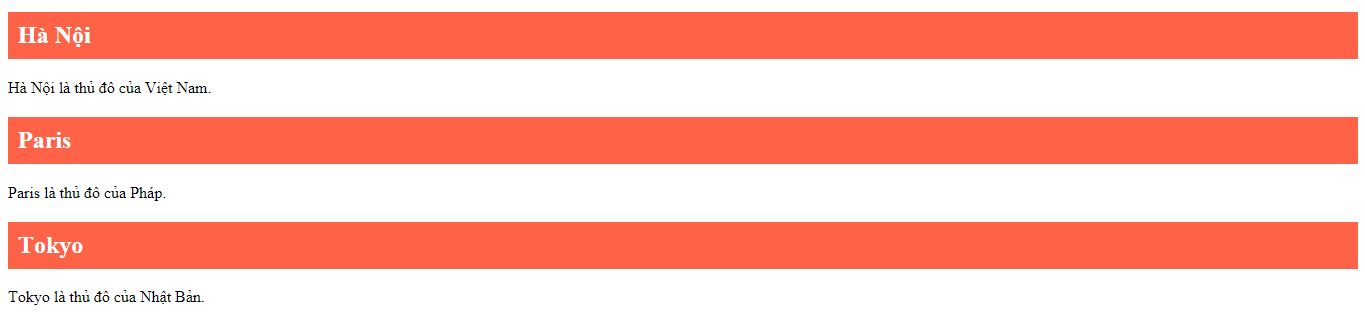
<p style="text-align: justify;">Kết quả hiển thị sẽ như dưới đây.</p>

<p style="text-align: justify;"><img alt="Thuộc tính class áp dụng cho nhiều phần tử" data-i="0" data-src="https://st.quantrimang.com/photos/image/2018/05/30/html-class-vi-du.jpg" data-was-processed="true" height="151" src="https://st.quantrimang.com/photos/image/2018/05/30/html-class-vi-du.jpg" width="640" /><br />
<em>Thuộc tính class áp dụng cho nhiều phần tử</em></p>

<p style="text-align: justify;"><strong>Lưu ý:</strong></p>

<ul>
	<li style="text-align: justify;">Thuộc tính&nbsp;<code>class</code>&nbsp;có thể dùng với bất kì phần tử HTML nào.</li>
	<li style="text-align: justify;">Tên lớp có phân biệt giữa chữ viết hoa và viết thường.</li>
</ul>

<p style="text-align: justify;"><strong>Dùng thuộc tính class trong JavaScript</strong></p>

<p style="text-align: justify;">JavaScript có thể truy cập các phần tử có tên lớp nhất định bằng&nbsp;<code>getElementsByClassName()</code></p>

<p style="text-align: justify;">Ví dụ khi người dùng click vào một nút, ẩn tất cả các phần tử có tên lớp là “thành phố”.</p>

<pre id="pre1" style="text-align: justify;">
&lt;script&gt;
function myFunction() {
 var x = document.getElementsByClassName(&quot;thành phố&quot;);
 for (var i = 0; i &lt; x.length; i++) {
  x&#91;i&#93;.style.display = &quot;none&quot;;
 }
}
&lt;/script&gt;</pre>

<p style="text-align: justify;"><strong>Sử dụng nhiều lớp trong HTML</strong></p>

<p style="text-align: justify;">Các phần tử HTML có thể dùng nhiều tên lớp, mỗi tên lớp cách nhau một khoảng trắng. Ví dụ có thể tạo kiểu cho phần tử bằng lớp “thành phố” và lớp “lớn”.</p>

<pre id="pre2" style="text-align: justify;">
&lt;h2 class=&quot;thành phố lớn&quot;&gt;London&lt;/h2&gt;
&lt;h2 class=&quot;thành phố&quot;&gt;Paris&lt;/h2&gt;
&lt;h2 class=&quot;thành phố&quot;&gt;Tokyo&lt;/h2&gt;</pre>

<p style="text-align: justify;"><strong>Cùng một lớp nhưng thẻ khác nhau</strong></p>

<p style="text-align: justify;">Các thẻ khác nhau như&nbsp;<code>&lt;h2&gt;</code>&nbsp;hay&nbsp;<code>&lt;p&gt;</code>&nbsp;có thể dùng cùng một tên lớp (và có kiểu cách giống nhau).</p>

<pre id="pre3" style="text-align: justify;">
&lt;h2 class=&quot;thành phố&quot;&gt;Hà Nội&lt;/h2&gt;
&lt;p class=&quot;thành phố&quot;&gt;Hà Nội là thủ đô của Việt Nam.&lt;/p&gt;</pre>

<p style="text-align: justify;"><strong>Tóm lại những điều cần ghi nhớ về class HTML:</strong></p>

<ul>
	<li style="text-align: justify;">Class là một thuộc tính chỉ định một hoặc nhiều tên class cho một thành phần HTML.</li>
	<li style="text-align: justify;">Thuộc tính class có thể được dùng trên thành phần HTML bất kỳ.</li>
	<li style="text-align: justify;">Tên class có thể được dùng bởi CSS và JavaScript để triển khai những tác vụ nhất định cho các thành phần bằng tên class cụ thể.</li>
</ul>
		</div>
				<div id="author">
						<p>
				<strong>Nguồn tin:</strong>
				Quantrimang.com
			</p>
		</div>
	</div>
	<div id="footer" class="clearfix">
		<div id="url">
			<strong>URL của bản tin này: </strong><a href="https://www.nguoicodonvn2008.info/vi/news/savefile/kien-thuc-may-tinh/thuoc-tinh-class-trong-html-7326.html" title="Thuộc tính class trong HTML">https://www.nguoicodonvn2008.info/vi/news/savefile/kien-thuc-may-tinh/thuoc-tinh-class-trong-html-7326.html</a>

		</div>
		<div class="clear"></div>
		<div class="copyright">
			&copy; .&#x3A; Nguoicodonvn2008.info - Cõi lòng người cô đơn &#x3A;.
		</div>
		<div id="contact">
			<a href="mailto:admin@nguoicodonvn2008.info">admin@nguoicodonvn2008.info</a>
		</div>
	</div>
</div>
        <div id="timeoutsess" class="chromeframe">
            Bạn đã không sử dụng Site, <a onclick="timeoutsesscancel();" href="https://www.nguoicodonvn2008.info/#">Bấm vào đây để duy trì trạng thái đăng nhập</a>. Thời gian chờ: <span id="secField"> 60 </span> giây
        </div>
        <div id="openidResult" class="nv-alert" style="display:none"></div>
        <div id="openidBt" data-result="" data-redirect=""></div>
		</script>
		<div class="car-top">
  <span><img src="https://www.nguoicodonvn2008.info/themes/default/images/car.png" alt=""></span>
</div>
<script src="https://www.nguoicodonvn2008.info/assets/js/jquery/jquery.min.js"></script>
<script>var nv_base_siteurl="/",nv_lang_data="vi",nv_lang_interface="vi",nv_name_variable="nv",nv_fc_variable="op",nv_lang_variable="language",nv_module_name="news",nv_func_name="savefile",nv_is_user=0, nv_my_ofs=-4,nv_my_abbr="EDT",nv_cookie_prefix="nv4c_e856T",nv_check_pass_mstime=1738000,nv_area_admin=0,nv_safemode=0,theme_responsive=0,nv_recaptcha_ver=2,nv_recaptcha_sitekey="",nv_recaptcha_type="image",XSSsanitize=1;</script>
<script src="https://www.nguoicodonvn2008.info/assets/js/language/vi.js"></script>
<script src="https://www.nguoicodonvn2008.info/assets/js/DOMPurify/purify3.js"></script>
<script src="https://www.nguoicodonvn2008.info/assets/js/global.js"></script>
<script src="https://www.nguoicodonvn2008.info/assets/js/site.js"></script>
<script src="https://www.nguoicodonvn2008.info/themes/default/js/news.js"></script>
<script src="https://www.nguoicodonvn2008.info/themes/default/js/main.js"></script>
<script src="https://www.nguoicodonvn2008.info/themes/default/js/custom.js"></script>
<script type="application/ld+json">
        {
            "@context": "https://schema.org",
            "@type": "Organization",
            "url": "https://www.nguoicodonvn2008.info",
            "logo": "https://www.nguoicodonvn2008.info/uploads/angel.gif"
        }
        </script>
<script src="https://www.nguoicodonvn2008.info/themes/default/js/bootstrap.min.js"></script>
<script type="text/javascript">
var $scrolltop = $('.car-top');
$scrolltop.on('click', function () {
    $('html,body').animate({
        scrollTop: 0
    }, 800);
    $(this).addClass("car-run");
    setTimeout(function(){ $scrolltop.removeClass('car-run');}, 1000);
    return false;
});
$(window).on('scroll', function ()
{ 
    if($(window).scrollTop() >= 200)
    {
        $scrolltop.addClass("show");
        $scrolltop.addClass("car-down");
    }
    else
    {
       $scrolltop.removeClass("show");
       setTimeout(function(){ $scrolltop.removeClass('car-down');}, 300);
    }
});
</script>
</body>
</html>