<!DOCTYPE html>
    <html lang="vi" xmlns="http://www.w3.org/1999/xhtml" prefix="og: http://ogp.me/ns#">
    <head>
<title>Thư mục $WINDOWS.&#x7E;BT là gì? Có thể xóa $WINDOWS.&#x7E;BT hay không?</title>
<meta name="description" content="Thư mục $WINDOWS.&#x7E;BT là gì? Có thể xóa $WINDOWS.&#x7E;BT hay không? - Savefile - Tin Tức -...">
<meta name="author" content=".: Nguoicodonvn2008.info - Cõi lòng người cô đơn :.">
<meta name="copyright" content=".: Nguoicodonvn2008.info - Cõi lòng người cô đơn :. [admin@nguoicodonvn2008.info]">
<meta name="robots" content="index, archive, follow, noodp">
<meta name="googlebot" content="index,archive,follow,noodp">
<meta name="msnbot" content="all,index,follow">
<meta name="generator" content="NukeViet v4.5">
<meta http-equiv="Content-Type" content="text/html; charset=utf-8">
<meta property="og:title" content="Thư mục $WINDOWS.&#x7E;BT là gì? Có thể xóa $WINDOWS.&#x7E;BT hay không?">
<meta property="og:type" content="website">
<meta property="og:description" content="Savefile - Tin Tức - https&#x3A;&#x002F;&#x002F;www.nguoicodonvn2008.info&#x002F;vi&#x002F;news&#x002F;savefile&#x002F;kien-thuc-may-tinh&#x002F;thu-muc-windows-bt-la-gi-co-the-xoa-windows-bt-hay-khong-9595.html">
<meta property="og:site_name" content=".&#x3A; Nguoicodonvn2008.info - Cõi lòng người cô đơn &#x3A;.">
<meta property="og:url" content="https://www.nguoicodonvn2008.info/vi/news/savefile/kien-thuc-may-tinh/thu-muc-windows-bt-la-gi-co-the-xoa-windows-bt-hay-khong-9595.html">
<link rel="shortcut icon" href="https://www.nguoicodonvn2008.info/favicon.ico">
<link rel="canonical" href="https://www.nguoicodonvn2008.info/vi/news/savefile/kien-thuc-may-tinh/thu-muc-windows-bt-la-gi-co-the-xoa-windows-bt-hay-khong-9595.html">
<link rel="alternate" href="https://www.nguoicodonvn2008.info/vi/news/rss/" title="Tin Tức" type="application/rss+xml">
<link rel="alternate" href="https://www.nguoicodonvn2008.info/vi/news/rss/karaoke-dual/" title="Tin Tức - Karaoke Dual" type="application/rss+xml">
<link rel="alternate" href="https://www.nguoicodonvn2008.info/vi/news/rss/nhac-tre/" title="Tin Tức - Nhạc trẻ" type="application/rss+xml">
<link rel="alternate" href="https://www.nguoicodonvn2008.info/vi/news/rss/tru-tinh/" title="Tin Tức - Trữ tình" type="application/rss+xml">
<link rel="alternate" href="https://www.nguoicodonvn2008.info/vi/news/rss/nuoc-ngoai/" title="Tin Tức - Nước ngoài" type="application/rss+xml">
<link rel="alternate" href="https://www.nguoicodonvn2008.info/vi/news/rss/remix/" title="Tin Tức - Remix" type="application/rss+xml">
<link rel="alternate" href="https://www.nguoicodonvn2008.info/vi/news/rss/tam-su-tinh-yeu/" title="Tin Tức - Tâm sự tình yêu" type="application/rss+xml">
<link rel="alternate" href="https://www.nguoicodonvn2008.info/vi/news/rss/tho-suu-tam/" title="Tin Tức - Thơ sưu tầm" type="application/rss+xml">
<link rel="alternate" href="https://www.nguoicodonvn2008.info/vi/news/rss/cuoc-song/" title="Tin Tức - Cuộc sống" type="application/rss+xml">
<link rel="alternate" href="https://www.nguoicodonvn2008.info/vi/news/rss/phan-mem/" title="Tin Tức - Phần mềm" type="application/rss+xml">
<link rel="alternate" href="https://www.nguoicodonvn2008.info/vi/news/rss/kien-thuc-may-tinh/" title="Tin Tức - Kiến thức máy tính" type="application/rss+xml">
<link rel="alternate" href="https://www.nguoicodonvn2008.info/vi/news/rss/hoc-tap/" title="Tin Tức - Học tập" type="application/rss+xml">
<link rel="alternate" href="https://www.nguoicodonvn2008.info/vi/news/rss/tai-lieu/" title="Tin Tức - Tài liệu" type="application/rss+xml">
<link rel="alternate" href="https://www.nguoicodonvn2008.info/vi/news/rss/de-thi/" title="Tin Tức - Đề thi" type="application/rss+xml">
<link rel="preload" as="style" href="https://www.nguoicodonvn2008.info/assets/css/font-awesome.min.css" type="text/css">
<link rel="preload" as="style" href="https://www.nguoicodonvn2008.info/themes/default/css/bootstrap.non-responsive.css" type="text/css">
<link rel="preload" as="style" href="https://www.nguoicodonvn2008.info/themes/default/css/style.css" type="text/css">
<link rel="preload" as="style" href="https://www.nguoicodonvn2008.info/themes/default/css/style.non-responsive.css" type="text/css">
<link rel="preload" as="style" href="https://www.nguoicodonvn2008.info/themes/default/css/news.css" type="text/css">
<link rel="preload" as="style" href="https://www.nguoicodonvn2008.info/themes/default/css/custom.css" type="text/css">
<link rel="preload" as="script" href="https://www.nguoicodonvn2008.info/assets/js/jquery/jquery.min.js" type="text/javascript">
<link rel="preload" as="script" href="https://www.nguoicodonvn2008.info/assets/js/language/vi.js" type="text/javascript">
<link rel="preload" as="script" href="https://www.nguoicodonvn2008.info/assets/js/DOMPurify/purify3.js" type="text/javascript">
<link rel="preload" as="script" href="https://www.nguoicodonvn2008.info/assets/js/global.js" type="text/javascript">
<link rel="preload" as="script" href="https://www.nguoicodonvn2008.info/assets/js/site.js" type="text/javascript">
<link rel="preload" as="script" href="https://www.nguoicodonvn2008.info/themes/default/js/news.js" type="text/javascript">
<link rel="preload" as="script" href="https://www.nguoicodonvn2008.info/themes/default/js/main.js" type="text/javascript">
<link rel="preload" as="script" href="https://www.nguoicodonvn2008.info/themes/default/js/custom.js" type="text/javascript">
<link rel="preload" as="script" href="https://www.nguoicodonvn2008.info/themes/default/js/bootstrap.min.js" type="text/javascript">
<link rel="stylesheet" href="https://www.nguoicodonvn2008.info/assets/css/font-awesome.min.css">
<link rel="stylesheet" href="https://www.nguoicodonvn2008.info/themes/default/css/bootstrap.non-responsive.css">
<link rel="stylesheet" href="https://www.nguoicodonvn2008.info/themes/default/css/style.css">
<link rel="stylesheet" href="https://www.nguoicodonvn2008.info/themes/default/css/style.non-responsive.css">
<link rel="StyleSheet" href="https://www.nguoicodonvn2008.info/themes/default/css/news.css">
<link rel="stylesheet" href="https://www.nguoicodonvn2008.info/themes/default/css/custom.css">
<style type="text/css">
	body{background: #fff;}
</style>
    </head>
    <body>
<div id="print">
	<div id="hd_print">
		<h2 class="pull-left">.&#x3A; Nguoicodonvn2008.info - Cõi lòng người cô đơn &#x3A;.</h2>
		<p class="pull-right"><a title=".&#x3A; Nguoicodonvn2008.info - Cõi lòng người cô đơn &#x3A;." href="https://www.nguoicodonvn2008.info/">https://www.nguoicodonvn2008.info</a></p>
	</div>
	<div class="clear"></div>
	<hr />
	<div id="content">
		<h1>Thư mục $WINDOWS.&#x7E;BT là gì? Có thể xóa $WINDOWS.&#x7E;BT hay không?</h1>
		<ul class="list-inline">
			<li>Thứ sáu - 27/12/2024 22:56</li>
			<li class="hidden-print txtrequired"><em class="fa fa-print">&nbsp;</em><a title="In ra" href="javascript:;" onclick="window.print()">In ra</a></li>
			<li class="hidden-print txtrequired"><em class="fa fa-power-off">&nbsp;</em><a title="Đóng cửa sổ này" href="javascript:;" onclick="window.close()">Đóng cửa sổ này</a></li>
		</ul>
		<div class="clear"></div>
		<div id="hometext">
		</div>
				<div class="imghome">
			<img alt="Thư mục $WINDOWS.&#x7E;BT là gì? Có thể xóa $WINDOWS.&#x7E;BT hay không?" src="https://st.quantrimang.com/photos/image/2023/12/28/thu-muc-windowsbt-la-gi-1.jpg" width="460" class="img-thumbnail" />
		</div>
		<div class="clear"></div>
		<div id="bodytext" class="clearfix">
			<p style="text-align: justify;">Xóa thư mục &quot;$Windows.~BT&quot; ẩn và khôi phục hàng gigabyte dung lượng trên ổ cứng của bạn là một điều hấp dẫn. Nhưng thư mục có tên khó hiểu này dùng để làm gì và nó quan trọng như thế nào đối với quá trình cài đặt Windows của bạn?</p>

<h2 style="text-align: justify;">Thư mục “$Windows.~BT” là gì? Có nên xóa nó không?</h2>

<p style="text-align: justify;">Windows tạo thư mục &quot;$Windows.~BT&quot; khi bạn nâng cấp hệ điều hành lên bản build mới hơn. Thư mục này chứa tất cả các file cần thiết cho quá trình nâng cấp, như file cài đặt tạm thời và nhật ký từ quá trình cài đặt Windows trước đó.</p>

<p style="text-align: justify;">Windows tự động xóa thư mục &quot;$Windows.~BT&quot; sau 10 ngày. Vì việc xóa thư mục này theo cách thủ công sẽ xóa các file cài đặt Windows cũ nên bạn sẽ không thể quay lại bản build Windows trước đó bằng cách sử dụng tùy chọn&nbsp;<strong>Go back</strong>&nbsp;trong menu&nbsp;<strong>Recovery</strong>&nbsp;trong thời gian đó (ví dụ, để&nbsp;hạ cấp từ Windows 11 xuống Windows 10). Do đó, bạn chỉ nên loại bỏ thư mục này nếu bạn hài lòng với bản build Windows hiện tại trên PC của mình. Bạn cũng có thể xóa thư mục lớn một cách an toàn nếu Windows không tự động thực hiện việc đó sau thời gian gia hạn.</p>

<p style="text-align: justify;">Nhưng bạn không nên xóa thư mục ẩn này như bất kỳ thư mục nào khác trên desktop. Thay vào đó, bạn nên chuyển sang công cụ Disk Cleanup hoặc Command Prompt.</p>

<h2 style="text-align: justify;">Cách tìm và xóa thư mục &quot;$Windows.~BT&quot;</h2>

<p style="text-align: justify;">Vì &quot;$Windows.~BT&quot; là một thư mục ẩn nên bạn cần cấu hình Windows để hiển thị các file và thư mục ẩn nhằm tìm thấy nó trong File Explorer. Sau khi thực hiện xong, thư mục C:\$Windows.~BT sẽ hiển thị.</p>

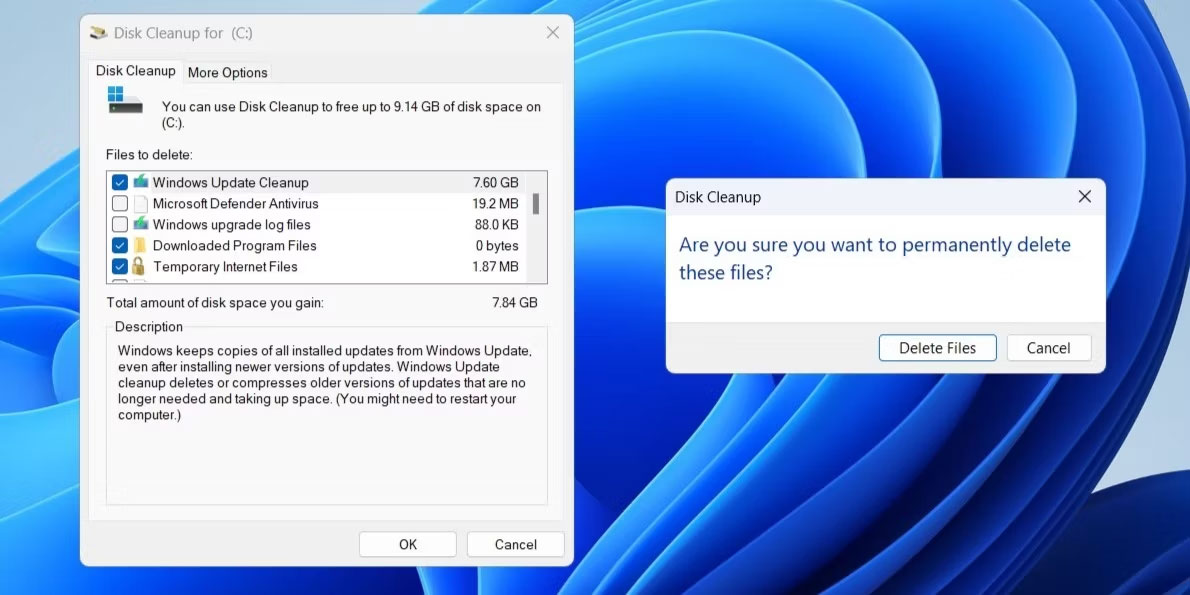
<p style="text-align: justify;">Tuy nhiên, bạn không thể xóa trực tiếp thư mục &quot;$Windows.~BT&quot;. Để làm như vậy, bạn cần chạy công cụ Disk Cleanup. Đây là cách thực hiện:</p>

<div style="text-align: justify;">&nbsp;</div>

<ol>
	<li style="text-align: justify;">Nhấn&nbsp;<strong>Win + R&nbsp;</strong>để&nbsp;mở hộp thoại Run.</li>
	<li style="text-align: justify;">Nhập&nbsp;<strong>cleanmgr</strong>&nbsp;vào hộp và nhấn&nbsp;<strong>Enter.</strong></li>
	<li style="text-align: justify;">Sử dụng menu drop-down để chọn ổ đĩa hệ thống (thường là&nbsp;<strong>C:</strong>) và nhấp vào&nbsp;<strong>OK.</strong></li>
	<li style="text-align: justify;">Nhấp vào nút&nbsp;<strong>Clean up system files</strong>.</li>
	<li style="text-align: justify;">Trong&nbsp;<strong>Files to delete</strong>, hãy sử dụng các hộp kiểm để chọn các tùy chọn sau:&nbsp;<strong>Previous Windows Installations, Windows Update Cleanup, Windows upgrade log files, Temporary Windows installation files</strong>&nbsp;và&nbsp;<strong>Temporary files</strong>.</li>
	<li style="text-align: justify;">Nhấp vào&nbsp;<strong>OK</strong>.</li>
	<li style="text-align: justify;">Chọn&nbsp;<strong>Delete Files</strong>&nbsp;để xác nhận.</li>
</ol>

<figure>
<div style="text-align: justify;"><img alt="Xóa thư mục $Windows.~BT bằng công cụ Disk Cleanup" data-adbro-processed="true" data-i="0" data-src="https://st.quantrimang.com/photos/image/2023/12/28/thu-muc-windowsbt-la-gi-1.jpg" data-was-processed="true" height="595" src="https://st.quantrimang.com/photos/image/2023/12/28/thu-muc-windowsbt-la-gi-1.jpg" width="1190" /></div>

<figcaption>
<div style="text-align: justify;">Xóa thư mục $Windows.~BT bằng công cụ Disk Cleanup</div>
</figcaption>
</figure>

<p style="text-align: justify;">Nếu thư mục &quot;$Windows.~BT&quot; hiển thị ngay cả sau khi bạn chạy công cụ Disk Cleanup, bạn sẽ cần thực thi một số lệnh trong Command Prompt. Để làm điều đó, hãy&nbsp;mở Command Prompt với quyền admin&nbsp;và sau đó chạy từng lệnh sau.</p>

<pre id="pre0">
<code>takeown /F C:\$Windows.~BT\* /R /A 
icacls C:\$Windows.~BT\*.* /T /grant administrators:F 
rmdir /S /Q C:\$Windows.~BT\</code></pre>

<p style="text-align: justify;">Khi bạn chạy các lệnh trên, thư mục &quot;$Windows.~BT&quot; sẽ bị xóa vĩnh viễn.</p>

<p style="text-align: justify;">Bây giờ, bạn đã hiểu mục đích của thư mục &quot;$Windows.~BT&quot;. Bạn có thể quyết định cách xử lý nó. Ngoài thư mục &quot;$Windows.~BT&quot;, bạn cũng có thể gặp các thư mục như &quot;Windows.old&quot;, &quot;$WinREAgent&quot;, &quot;$SysReset&quot; và những thư mục khác cũng có thể được xóa một cách an toàn bằng công cụ Disk Cleanup.</p>

<p style="text-align: justify;">Chúc các bạn thành công!</p>

<div style="text-align: justify;">&nbsp;</div>
		</div>
				<div id="author">
						<p>
				<strong>Nguồn tin:</strong>
				Quantrimang.com:
			</p>
		</div>
	</div>
	<div id="footer" class="clearfix">
		<div id="url">
			<strong>URL của bản tin này: </strong><a href="https://www.nguoicodonvn2008.info/vi/news/savefile/kien-thuc-may-tinh/thu-muc-windows-bt-la-gi-co-the-xoa-windows-bt-hay-khong-9595.html" title="Thư mục $WINDOWS.&#x7E;BT là gì? Có thể xóa $WINDOWS.&#x7E;BT hay không?">https://www.nguoicodonvn2008.info/vi/news/savefile/kien-thuc-may-tinh/thu-muc-windows-bt-la-gi-co-the-xoa-windows-bt-hay-khong-9595.html</a>

		</div>
		<div class="clear"></div>
		<div class="copyright">
			&copy; .&#x3A; Nguoicodonvn2008.info - Cõi lòng người cô đơn &#x3A;.
		</div>
		<div id="contact">
			<a href="mailto:admin@nguoicodonvn2008.info">admin@nguoicodonvn2008.info</a>
		</div>
	</div>
</div>
        <div id="timeoutsess" class="chromeframe">
            Bạn đã không sử dụng Site, <a onclick="timeoutsesscancel();" href="https://www.nguoicodonvn2008.info/#">Bấm vào đây để duy trì trạng thái đăng nhập</a>. Thời gian chờ: <span id="secField"> 60 </span> giây
        </div>
        <div id="openidResult" class="nv-alert" style="display:none"></div>
        <div id="openidBt" data-result="" data-redirect=""></div>
		</script>
		<div class="car-top">
  <span><img src="https://www.nguoicodonvn2008.info/themes/default/images/car.png" alt=""></span>
</div>
<script src="https://www.nguoicodonvn2008.info/assets/js/jquery/jquery.min.js"></script>
<script>var nv_base_siteurl="/",nv_lang_data="vi",nv_lang_interface="vi",nv_name_variable="nv",nv_fc_variable="op",nv_lang_variable="language",nv_module_name="news",nv_func_name="savefile",nv_is_user=0, nv_my_ofs=-4,nv_my_abbr="EDT",nv_cookie_prefix="nv4c_e856T",nv_check_pass_mstime=1738000,nv_area_admin=0,nv_safemode=0,theme_responsive=0,nv_recaptcha_ver=2,nv_recaptcha_sitekey="",nv_recaptcha_type="image",XSSsanitize=1;</script>
<script src="https://www.nguoicodonvn2008.info/assets/js/language/vi.js"></script>
<script src="https://www.nguoicodonvn2008.info/assets/js/DOMPurify/purify3.js"></script>
<script src="https://www.nguoicodonvn2008.info/assets/js/global.js"></script>
<script src="https://www.nguoicodonvn2008.info/assets/js/site.js"></script>
<script src="https://www.nguoicodonvn2008.info/themes/default/js/news.js"></script>
<script src="https://www.nguoicodonvn2008.info/themes/default/js/main.js"></script>
<script src="https://www.nguoicodonvn2008.info/themes/default/js/custom.js"></script>
<script type="application/ld+json">
        {
            "@context": "https://schema.org",
            "@type": "Organization",
            "url": "https://www.nguoicodonvn2008.info",
            "logo": "https://www.nguoicodonvn2008.info/uploads/angel.gif"
        }
        </script>
<script src="https://www.nguoicodonvn2008.info/themes/default/js/bootstrap.min.js"></script>
<script type="text/javascript">
var $scrolltop = $('.car-top');
$scrolltop.on('click', function () {
    $('html,body').animate({
        scrollTop: 0
    }, 800);
    $(this).addClass("car-run");
    setTimeout(function(){ $scrolltop.removeClass('car-run');}, 1000);
    return false;
});
$(window).on('scroll', function ()
{ 
    if($(window).scrollTop() >= 200)
    {
        $scrolltop.addClass("show");
        $scrolltop.addClass("car-down");
    }
    else
    {
       $scrolltop.removeClass("show");
       setTimeout(function(){ $scrolltop.removeClass('car-down');}, 300);
    }
});
</script>
</body>
</html>