<!DOCTYPE html>
    <html lang="vi" xmlns="http://www.w3.org/1999/xhtml" prefix="og: http://ogp.me/ns#">
    <head>
<title>Theme Giáng Sinh cho Windows 10 trên Microsoft Store</title>
<meta name="description" content="Theme Giáng Sinh cho Windows 10 trên Microsoft Store - Savefile - Tin Tức -...">
<meta name="author" content=".: Nguoicodonvn2008.info - Cõi lòng người cô đơn :.">
<meta name="copyright" content=".: Nguoicodonvn2008.info - Cõi lòng người cô đơn :. [admin@nguoicodonvn2008.info]">
<meta name="robots" content="index, archive, follow, noodp">
<meta name="googlebot" content="index,archive,follow,noodp">
<meta name="msnbot" content="all,index,follow">
<meta name="generator" content="NukeViet v4.5">
<meta http-equiv="Content-Type" content="text/html; charset=utf-8">
<meta property="og:title" content="Theme Giáng Sinh cho Windows 10 trên Microsoft Store">
<meta property="og:type" content="website">
<meta property="og:description" content="Savefile - Tin Tức - https&#x3A;&#x002F;&#x002F;www.nguoicodonvn2008.info&#x002F;vi&#x002F;news&#x002F;savefile&#x002F;kien-thuc-may-tinh&#x002F;theme-giang-sinh-cho-windows-10-tren-microsoft-store-3225.html">
<meta property="og:site_name" content=".&#x3A; Nguoicodonvn2008.info - Cõi lòng người cô đơn &#x3A;.">
<meta property="og:url" content="https://www.nguoicodonvn2008.info/vi/news/savefile/kien-thuc-may-tinh/theme-giang-sinh-cho-windows-10-tren-microsoft-store-3225.html">
<link rel="shortcut icon" href="https://www.nguoicodonvn2008.info/favicon.ico">
<link rel="canonical" href="https://www.nguoicodonvn2008.info/vi/news/savefile/kien-thuc-may-tinh/theme-giang-sinh-cho-windows-10-tren-microsoft-store-3225.html">
<link rel="alternate" href="https://www.nguoicodonvn2008.info/vi/news/rss/" title="Tin Tức" type="application/rss+xml">
<link rel="alternate" href="https://www.nguoicodonvn2008.info/vi/news/rss/karaoke-dual/" title="Tin Tức - Karaoke Dual" type="application/rss+xml">
<link rel="alternate" href="https://www.nguoicodonvn2008.info/vi/news/rss/nhac-tre/" title="Tin Tức - Nhạc trẻ" type="application/rss+xml">
<link rel="alternate" href="https://www.nguoicodonvn2008.info/vi/news/rss/tru-tinh/" title="Tin Tức - Trữ tình" type="application/rss+xml">
<link rel="alternate" href="https://www.nguoicodonvn2008.info/vi/news/rss/nuoc-ngoai/" title="Tin Tức - Nước ngoài" type="application/rss+xml">
<link rel="alternate" href="https://www.nguoicodonvn2008.info/vi/news/rss/remix/" title="Tin Tức - Remix" type="application/rss+xml">
<link rel="alternate" href="https://www.nguoicodonvn2008.info/vi/news/rss/tam-su-tinh-yeu/" title="Tin Tức - Tâm sự tình yêu" type="application/rss+xml">
<link rel="alternate" href="https://www.nguoicodonvn2008.info/vi/news/rss/tho-suu-tam/" title="Tin Tức - Thơ sưu tầm" type="application/rss+xml">
<link rel="alternate" href="https://www.nguoicodonvn2008.info/vi/news/rss/cuoc-song/" title="Tin Tức - Cuộc sống" type="application/rss+xml">
<link rel="alternate" href="https://www.nguoicodonvn2008.info/vi/news/rss/phan-mem/" title="Tin Tức - Phần mềm" type="application/rss+xml">
<link rel="alternate" href="https://www.nguoicodonvn2008.info/vi/news/rss/kien-thuc-may-tinh/" title="Tin Tức - Kiến thức máy tính" type="application/rss+xml">
<link rel="alternate" href="https://www.nguoicodonvn2008.info/vi/news/rss/hoc-tap/" title="Tin Tức - Học tập" type="application/rss+xml">
<link rel="alternate" href="https://www.nguoicodonvn2008.info/vi/news/rss/tai-lieu/" title="Tin Tức - Tài liệu" type="application/rss+xml">
<link rel="alternate" href="https://www.nguoicodonvn2008.info/vi/news/rss/de-thi/" title="Tin Tức - Đề thi" type="application/rss+xml">
<link rel="preload" as="style" href="https://www.nguoicodonvn2008.info/assets/css/font-awesome.min.css" type="text/css">
<link rel="preload" as="style" href="https://www.nguoicodonvn2008.info/themes/default/css/bootstrap.non-responsive.css" type="text/css">
<link rel="preload" as="style" href="https://www.nguoicodonvn2008.info/themes/default/css/style.css" type="text/css">
<link rel="preload" as="style" href="https://www.nguoicodonvn2008.info/themes/default/css/style.non-responsive.css" type="text/css">
<link rel="preload" as="style" href="https://www.nguoicodonvn2008.info/themes/default/css/news.css" type="text/css">
<link rel="preload" as="style" href="https://www.nguoicodonvn2008.info/themes/default/css/custom.css" type="text/css">
<link rel="preload" as="script" href="https://www.nguoicodonvn2008.info/assets/js/jquery/jquery.min.js" type="text/javascript">
<link rel="preload" as="script" href="https://www.nguoicodonvn2008.info/assets/js/language/vi.js" type="text/javascript">
<link rel="preload" as="script" href="https://www.nguoicodonvn2008.info/assets/js/DOMPurify/purify3.js" type="text/javascript">
<link rel="preload" as="script" href="https://www.nguoicodonvn2008.info/assets/js/global.js" type="text/javascript">
<link rel="preload" as="script" href="https://www.nguoicodonvn2008.info/assets/js/site.js" type="text/javascript">
<link rel="preload" as="script" href="https://www.nguoicodonvn2008.info/themes/default/js/news.js" type="text/javascript">
<link rel="preload" as="script" href="https://www.nguoicodonvn2008.info/themes/default/js/main.js" type="text/javascript">
<link rel="preload" as="script" href="https://www.nguoicodonvn2008.info/themes/default/js/custom.js" type="text/javascript">
<link rel="preload" as="script" href="https://www.nguoicodonvn2008.info/themes/default/js/bootstrap.min.js" type="text/javascript">
<link rel="stylesheet" href="https://www.nguoicodonvn2008.info/assets/css/font-awesome.min.css">
<link rel="stylesheet" href="https://www.nguoicodonvn2008.info/themes/default/css/bootstrap.non-responsive.css">
<link rel="stylesheet" href="https://www.nguoicodonvn2008.info/themes/default/css/style.css">
<link rel="stylesheet" href="https://www.nguoicodonvn2008.info/themes/default/css/style.non-responsive.css">
<link rel="StyleSheet" href="https://www.nguoicodonvn2008.info/themes/default/css/news.css">
<link rel="stylesheet" href="https://www.nguoicodonvn2008.info/themes/default/css/custom.css">
<style type="text/css">
	body{background: #fff;}
</style>
    </head>
    <body>
<div id="print">
	<div id="hd_print">
		<h2 class="pull-left">.&#x3A; Nguoicodonvn2008.info - Cõi lòng người cô đơn &#x3A;.</h2>
		<p class="pull-right"><a title=".&#x3A; Nguoicodonvn2008.info - Cõi lòng người cô đơn &#x3A;." href="https://www.nguoicodonvn2008.info/">https://www.nguoicodonvn2008.info</a></p>
	</div>
	<div class="clear"></div>
	<hr />
	<div id="content">
		<h1>Theme Giáng Sinh cho Windows 10 trên Microsoft Store</h1>
		<ul class="list-inline">
			<li>Thứ năm - 10/12/2020 23:46</li>
			<li class="hidden-print txtrequired"><em class="fa fa-print">&nbsp;</em><a title="In ra" href="javascript:;" onclick="window.print()">In ra</a></li>
			<li class="hidden-print txtrequired"><em class="fa fa-power-off">&nbsp;</em><a title="Đóng cửa sổ này" href="javascript:;" onclick="window.close()">Đóng cửa sổ này</a></li>
		</ul>
		<div class="clear"></div>
		<div id="hometext">
		</div>
				<div class="imghome">
			<img alt="Theme Giáng Sinh cho Windows 10 trên Microsoft Store" src="https://st.quantrimang.com/photos/image/2018/11/16/Windows-10-theme-giang-sinh-1.jpg" width="460" class="img-thumbnail" />
		</div>
		<div class="clear"></div>
		<div id="bodytext" class="clearfix">
			<p style="text-align: justify;">1 năm nữa lại chuẩn bị qua đi và cũng chào đón những ngày lễ cuối năm như Giáng Sinh. Để chào đón mùa Giáng Sinh sắp tới, Microsoft đã tung ra các bộ theme mùa đông và đặc biệt là các chủ đề về Giáng Sinh. Các&nbsp;<a href="https://quantrimang.com/cach-su-dung-theme-tren-windows-10-151276" title="Cách sử dụng Theme trên Windows 10">bộ theme cho Windows 10</a>&nbsp;sẽ tập hợp những hình ảnh với các họa tiết, cảnh sắc đặc trưng của mùa Đông như tuyết trắng, hay khung cảnh cây thông trong Giáng Sinh. Bài viết dưới đây sẽ tổng hợp các bộ theme Giáng Sinh cho máy tính Windows 10.</p>

<div style="text-align: justify;">&nbsp;</div>

<h2 style="text-align: justify;">Tổng hợp các chủ đề Giáng Sinh Windows 10</h2>

<h3 style="text-align: justify;">1. Snow Sculptures</h3>

<ul>
	<li style="text-align: justify;">Tải&nbsp;theme Snow Sculptures:</li>
</ul>

<div style="text-align: justify;"><span style="color:rgb(192, 57, 43);"><strong>https://www.microsoft.com/en-us/p/snow-sculptures/9ppj5wzd6v5t?activetab=pivot:overviewtab</strong></span></div>

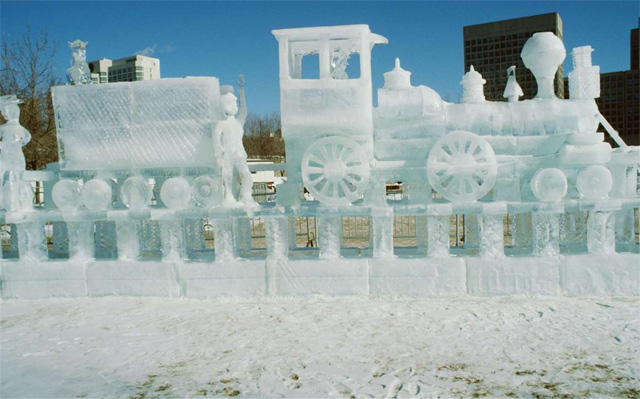
<p style="text-align: justify;">Bộ theme bao gồm 14 hình ảnh chất lượng và sắc nét về chủ đề Giáng Sinh đầy sắc màu. Khung cảnh những lâu đài tuyết, đoàn xe lửa tuyết với người tuyết sẽ mang tới không khí của mùa đông ngay trên máy tính của bạn.</p>

<p style="text-align: justify;"><img alt="Bộ theme Snow Sculptures" data-i="0" data-src="https://st.quantrimang.com/photos/image/2018/11/16/Windows-10-theme-giang-sinh-1.jpg" data-was-processed="true" height="399" src="https://st.quantrimang.com/photos/image/2018/11/16/Windows-10-theme-giang-sinh-1.jpg" width="640" /></p>

<h3 style="text-align: justify;">2. Festival of Lights</h3>

<ul>
	<li style="text-align: justify;">Tải&nbsp;theme Festival of Lights:</li>
</ul>

<div style="text-align: justify;"><span style="color:rgb(192, 57, 43);"><strong>https://www.microsoft.com/en-us/p/festival-of-lights/9p5ms5vk11dm?activetab=pivot:overviewtab</strong></span></div>

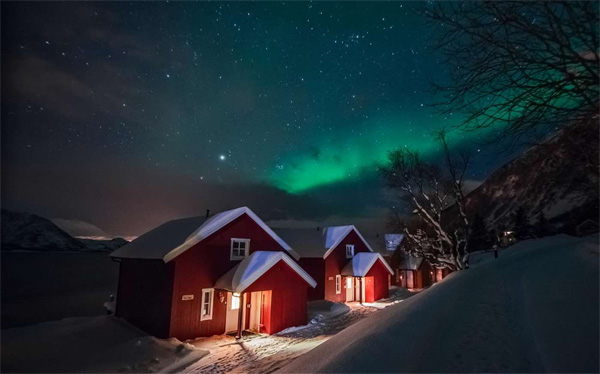
<p style="text-align: justify;">Ngay trong tên của bộ theme cũng đã nói lên chủ đề đó là các lễ hội và ánh sáng. Bộ theme có tất cả 17 hình ảnh với ánh đèn lung linh, không thể thiếu trong các lễ hội.</p>

<p style="text-align: justify;"><img alt="Theme Festival of Lights" data-i="1" data-src="https://st.quantrimang.com/photos/image/2018/11/16/Windows-10-theme-giang-sinh-2.jpg" data-was-processed="true" height="374" src="https://st.quantrimang.com/photos/image/2018/11/16/Windows-10-theme-giang-sinh-2.jpg" width="600" /></p>

<h3 style="text-align: justify;">3. Warm Winter Nights</h3>

<ul>
	<li style="text-align: justify;">Tải&nbsp;theme Warm Winter Nights:</li>
</ul>

<div style="text-align: justify;"><span style="color:rgb(192, 57, 43);"><strong>https://www.microsoft.com/en-us/p/warm-winter-nights/9p5tnm4tngfv?activetab=pivot:overviewtab</strong></span></div>

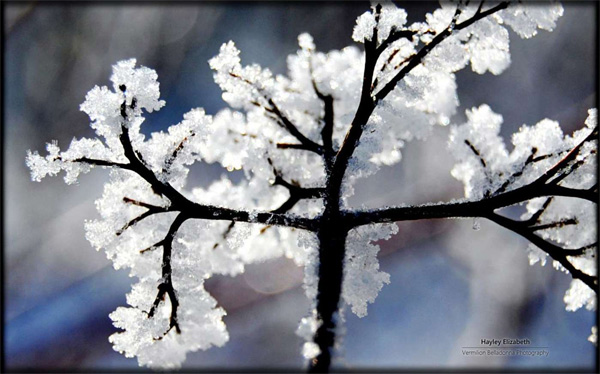
<p style="text-align: justify;">Chủ đề mà bộ theme này hướng tới là phong cảnh ban đêm của mùa đông. Bạn sẽ nhìn thấy những dãy núi được bao phủ bởi màu trắng xóa, hay quang cực màu sắc giữa đêm đông.</p>

<p style="text-align: justify;"><img alt="Bộ theme Warm Winter Nights" data-i="2" data-src="https://st.quantrimang.com/photos/image/2018/11/16/Windows-10-theme-giang-sinh-3.jpg" data-was-processed="true" height="374" src="https://st.quantrimang.com/photos/image/2018/11/16/Windows-10-theme-giang-sinh-3.jpg" width="600" /></p>

<h3 style="text-align: justify;">4. Winter Garden</h3>

<ul>
	<li style="text-align: justify;">Tải&nbsp;theme Winter Garden:</li>
</ul>

<div style="text-align: justify;"><strong><span style="color:rgb(192, 57, 43);">https://www.microsoft.com/en-us/p/winter-garden-by-hayley-elizabeth/9p61fmbpkwp2?activetab=pivot:overviewtab</span></strong></div>

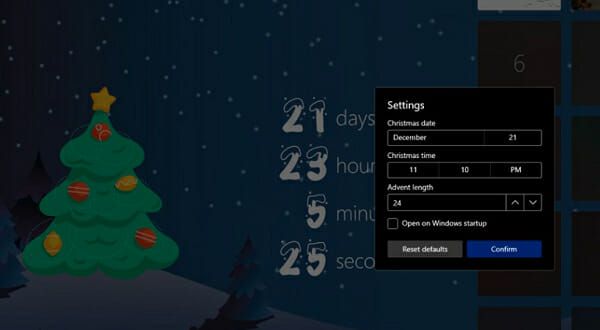
<p style="text-align: justify;">Nếu bạn yêu thích khung cảnh thiên nhiên vào mùa đông thì có thể tải theme Winter Garden. Bộ theme có 8 hình ảnh thiên nhiên được phủ một lớp tuyết trắng trên bề mặt.</p>

<p style="text-align: justify;"><img alt="Theme Winter Garden" data-i="3" data-src="https://st.quantrimang.com/photos/image/2018/11/19/Windows-10-theme-giang-sinh.jpg" data-was-processed="true" height="374" src="https://st.quantrimang.com/photos/image/2018/11/19/Windows-10-theme-giang-sinh.jpg" width="600" /></p>

<h3 style="text-align: justify;">5. Christmas Countdown</h3>

<ul>
	<li style="text-align: justify;">Tải&nbsp;theme Christmas Countdown:</li>
</ul>

<div style="text-align: justify;"><span style="color:rgb(192, 57, 43);"><strong>https://www.microsoft.com/en-us/p/the-christmas-countdown/9wzdncrfjvhd?ranMID=24542&amp;ranEAID=ZDHqslUESDQ&amp;ranSiteID=ZDHqslUESDQ-yNWXsNW3JjNMyyC4fzp5SQ&amp;epi=ZDHqslUESDQ-yNWXsNW3JjNMyyC4fzp5SQ&amp;irgwc=1&amp;OCID=AID2000142_aff_7593_1243925&amp;tduid=%28ir__3h0hoyhbm9kfqjj3kk0sohzz222xsvyw0tcbdalp00%29%287593%29%281243925%29%28ZDHqslUESDQ-yNWXsNW3JjNMyyC4fzp5SQ%29%28%29&amp;irclickid=_3h0hoyhbm9kfqjj3kk0sohzz222xsvyw0tcbdalp00&amp;activetab=pivot:overviewtab</strong></span></div>

<p style="text-align: justify;">Như bạn có thể đoán, Christmas Countdown sẽ hiển thị cho bạn đồng hồ đếm ngược đến Giáng sinh, để giúp bạn theo dõi tổng số ngày còn lại cho đến đúng hôm Noel mà bạn mong đợi.</p>

<figure>
<div style="text-align: justify;"><img alt="Christmas Countdown" data-i="4" data-src="https://st.quantrimang.com/photos/image/2020/12/11/theme-giang-sinh-1.jpg" data-was-processed="true" height="330" src="https://st.quantrimang.com/photos/image/2020/12/11/theme-giang-sinh-1.jpg" width="600" /></div>

<figcaption>
<div style="text-align: justify;">Christmas Countdown</div>
</figcaption>
</figure>

<p style="text-align: justify;">Ứng dụng này hoàn hảo cho cả người lớn và trẻ em. Để làm cho mọi thứ năng động hơn, hãy đảm bảo chuyển đổi giữa tất cả các theme nền Giáng sinh tuyệt vời đó.</p>

<p style="text-align: justify;">Phần tuyệt vời nhất là tất cả các cài đặt được tự động áp dụng trên mọi thiết bị của bạn. Hơn nữa, hãy sẵn sàng để thưởng thức một video hài hước, ấm áp mỗi ngày! Đó là một cách độc đáo để kỷ niệm những ngày lễ đặc biệt như thế này, phải không?</p>

<h3 style="text-align: justify;">6. Microsoft Desktop Themes</h3>

<ul>
	<li style="text-align: justify;">Tải&nbsp;gói theme Microsoft Desktop Themes:</li>
</ul>

<div style="text-align: justify;"><strong><span style="color:rgb(192, 57, 43);">https://support.microsoft.com/en-us/windows/desktop-themes-94880287-6046-1d35-6d2f-35dee759701e?ranMID=24542&amp;ranEAID=ZDHqslUESDQ&amp;ranSiteID=ZDHqslUESDQ-bBJ.8VMYNm0OX6ezr53vxQ&amp;epi=ZDHqslUESDQ-bBJ.8VMYNm0OX6ezr53vxQ&amp;irgwc=1&amp;OCID=AID2000142_aff_7593_1243925&amp;tduid=%28ir__3h0hoyhbm9kfqjj3kk0sohzz222xsvywahcbdalp00%29%287593%29%281243925%29%28ZDHqslUESDQ-bBJ.8VMYNm0OX6ezr53vxQ%29%28%29&amp;irclickid=_3h0hoyhbm9kfqjj3kk0sohzz222xsvywahcbdalp00</span></strong></div>

<p style="text-align: justify;">Nếu bạn muốn tùy chỉnh mọi khía cạnh trên máy tính Windows 10 của mình, thì gói Microsoft Desktop Themes rõ ràng là lựa chọn tốt nhất để làm điều đó.</p>

<figure>
<div style="text-align: justify;"><img alt="Microsoft Desktop Themes" data-i="5" data-src="https://st.quantrimang.com/photos/image/2020/12/11/theme-giang-sinh-2.jpg" data-was-processed="true" height="330" src="https://st.quantrimang.com/photos/image/2020/12/11/theme-giang-sinh-2.jpg" width="600" /></div>

<figcaption>
<div style="text-align: justify;">Microsoft Desktop Themes</div>
</figcaption>
</figure>

<p style="text-align: justify;">Để có được một trong những theme Giáng sinh tuyệt vời của Microsoft, hãy mở rộng danh mục thích hợp, nhấp vào liên kết cho theme và cuối cùng chọn nút&nbsp;<strong>Open.</strong></p>

<p style="text-align: justify;">Thậm chí còn có một số theme toàn cảnh cho màn hình kép đáng để bạn chú ý, cũng như các theme có thương hiệu hoặc một số tùy chọn có âm thanh tùy chỉnh, vì vậy hãy để trí tưởng tượng của bạn thỏa sức sáng tạo.</p>

<div style="text-align: justify;">&nbsp;</div>

<p style="text-align: justify;">Có rất nhiều theme Giáng Sinh tuyệt đẹp trên Microsoft Store có sẵn miễn phí để bạn lựa chọn. Hy vọng những gợi ý trong bài viết này sẽ giúp mang không khí Noel đến với máy tính của bạn!</p>

<p style="text-align: justify;">Chúc bạn tìm được cho mình lựa chọn phù hợp!</p>
		</div>
				<div id="author">
						<p>
				<strong>Nguồn tin:</strong>
				Quantrimang.com
			</p>
		</div>
	</div>
	<div id="footer" class="clearfix">
		<div id="url">
			<strong>URL của bản tin này: </strong><a href="https://www.nguoicodonvn2008.info/vi/news/savefile/kien-thuc-may-tinh/theme-giang-sinh-cho-windows-10-tren-microsoft-store-3225.html" title="Theme Giáng Sinh cho Windows 10 trên Microsoft Store">https://www.nguoicodonvn2008.info/vi/news/savefile/kien-thuc-may-tinh/theme-giang-sinh-cho-windows-10-tren-microsoft-store-3225.html</a>

		</div>
		<div class="clear"></div>
		<div class="copyright">
			&copy; .&#x3A; Nguoicodonvn2008.info - Cõi lòng người cô đơn &#x3A;.
		</div>
		<div id="contact">
			<a href="mailto:admin@nguoicodonvn2008.info">admin@nguoicodonvn2008.info</a>
		</div>
	</div>
</div>
        <div id="timeoutsess" class="chromeframe">
            Bạn đã không sử dụng Site, <a onclick="timeoutsesscancel();" href="https://www.nguoicodonvn2008.info/#">Bấm vào đây để duy trì trạng thái đăng nhập</a>. Thời gian chờ: <span id="secField"> 60 </span> giây
        </div>
        <div id="openidResult" class="nv-alert" style="display:none"></div>
        <div id="openidBt" data-result="" data-redirect=""></div>
		</script>
		<div class="car-top">
  <span><img src="https://www.nguoicodonvn2008.info/themes/default/images/car.png" alt=""></span>
</div>
<script src="https://www.nguoicodonvn2008.info/assets/js/jquery/jquery.min.js"></script>
<script>var nv_base_siteurl="/",nv_lang_data="vi",nv_lang_interface="vi",nv_name_variable="nv",nv_fc_variable="op",nv_lang_variable="language",nv_module_name="news",nv_func_name="savefile",nv_is_user=0, nv_my_ofs=-4,nv_my_abbr="EDT",nv_cookie_prefix="nv4c_e856T",nv_check_pass_mstime=1738000,nv_area_admin=0,nv_safemode=0,theme_responsive=0,nv_recaptcha_ver=2,nv_recaptcha_sitekey="",nv_recaptcha_type="image",XSSsanitize=1;</script>
<script src="https://www.nguoicodonvn2008.info/assets/js/language/vi.js"></script>
<script src="https://www.nguoicodonvn2008.info/assets/js/DOMPurify/purify3.js"></script>
<script src="https://www.nguoicodonvn2008.info/assets/js/global.js"></script>
<script src="https://www.nguoicodonvn2008.info/assets/js/site.js"></script>
<script src="https://www.nguoicodonvn2008.info/themes/default/js/news.js"></script>
<script src="https://www.nguoicodonvn2008.info/themes/default/js/main.js"></script>
<script src="https://www.nguoicodonvn2008.info/themes/default/js/custom.js"></script>
<script type="application/ld+json">
        {
            "@context": "https://schema.org",
            "@type": "Organization",
            "url": "https://www.nguoicodonvn2008.info",
            "logo": "https://www.nguoicodonvn2008.info/uploads/angel.gif"
        }
        </script>
<script src="https://www.nguoicodonvn2008.info/themes/default/js/bootstrap.min.js"></script>
<script type="text/javascript">
var $scrolltop = $('.car-top');
$scrolltop.on('click', function () {
    $('html,body').animate({
        scrollTop: 0
    }, 800);
    $(this).addClass("car-run");
    setTimeout(function(){ $scrolltop.removeClass('car-run');}, 1000);
    return false;
});
$(window).on('scroll', function ()
{ 
    if($(window).scrollTop() >= 200)
    {
        $scrolltop.addClass("show");
        $scrolltop.addClass("car-down");
    }
    else
    {
       $scrolltop.removeClass("show");
       setTimeout(function(){ $scrolltop.removeClass('car-down');}, 300);
    }
});
</script>
</body>
</html>