<!DOCTYPE html>
    <html lang="vi" xmlns="http://www.w3.org/1999/xhtml" prefix="og: http://ogp.me/ns#">
    <head>
<title>Tạo shortcut Safely Remove Hardware trên Windows 10</title>
<meta name="description" content="Tạo shortcut Safely Remove Hardware trên Windows 10 - Savefile - Tin Tức -...">
<meta name="author" content=".: Nguoicodonvn2008.info - Cõi lòng người cô đơn :.">
<meta name="copyright" content=".: Nguoicodonvn2008.info - Cõi lòng người cô đơn :. [admin@nguoicodonvn2008.info]">
<meta name="robots" content="index, archive, follow, noodp">
<meta name="googlebot" content="index,archive,follow,noodp">
<meta name="msnbot" content="all,index,follow">
<meta name="generator" content="NukeViet v4.5">
<meta http-equiv="Content-Type" content="text/html; charset=utf-8">
<meta property="og:title" content="Tạo shortcut Safely Remove Hardware trên Windows 10">
<meta property="og:type" content="website">
<meta property="og:description" content="Savefile - Tin Tức - https&#x3A;&#x002F;&#x002F;www.nguoicodonvn2008.info&#x002F;vi&#x002F;news&#x002F;savefile&#x002F;kien-thuc-may-tinh&#x002F;tao-shortcut-safely-remove-hardware-tren-windows-10-2987.html">
<meta property="og:site_name" content=".&#x3A; Nguoicodonvn2008.info - Cõi lòng người cô đơn &#x3A;.">
<meta property="og:url" content="https://www.nguoicodonvn2008.info/vi/news/savefile/kien-thuc-may-tinh/tao-shortcut-safely-remove-hardware-tren-windows-10-2987.html">
<link rel="shortcut icon" href="https://www.nguoicodonvn2008.info/favicon.ico">
<link rel="canonical" href="https://www.nguoicodonvn2008.info/vi/news/savefile/kien-thuc-may-tinh/tao-shortcut-safely-remove-hardware-tren-windows-10-2987.html">
<link rel="alternate" href="https://www.nguoicodonvn2008.info/vi/news/rss/" title="Tin Tức" type="application/rss+xml">
<link rel="alternate" href="https://www.nguoicodonvn2008.info/vi/news/rss/karaoke-dual/" title="Tin Tức - Karaoke Dual" type="application/rss+xml">
<link rel="alternate" href="https://www.nguoicodonvn2008.info/vi/news/rss/nhac-tre/" title="Tin Tức - Nhạc trẻ" type="application/rss+xml">
<link rel="alternate" href="https://www.nguoicodonvn2008.info/vi/news/rss/tru-tinh/" title="Tin Tức - Trữ tình" type="application/rss+xml">
<link rel="alternate" href="https://www.nguoicodonvn2008.info/vi/news/rss/nuoc-ngoai/" title="Tin Tức - Nước ngoài" type="application/rss+xml">
<link rel="alternate" href="https://www.nguoicodonvn2008.info/vi/news/rss/remix/" title="Tin Tức - Remix" type="application/rss+xml">
<link rel="alternate" href="https://www.nguoicodonvn2008.info/vi/news/rss/tam-su-tinh-yeu/" title="Tin Tức - Tâm sự tình yêu" type="application/rss+xml">
<link rel="alternate" href="https://www.nguoicodonvn2008.info/vi/news/rss/tho-suu-tam/" title="Tin Tức - Thơ sưu tầm" type="application/rss+xml">
<link rel="alternate" href="https://www.nguoicodonvn2008.info/vi/news/rss/cuoc-song/" title="Tin Tức - Cuộc sống" type="application/rss+xml">
<link rel="alternate" href="https://www.nguoicodonvn2008.info/vi/news/rss/phan-mem/" title="Tin Tức - Phần mềm" type="application/rss+xml">
<link rel="alternate" href="https://www.nguoicodonvn2008.info/vi/news/rss/kien-thuc-may-tinh/" title="Tin Tức - Kiến thức máy tính" type="application/rss+xml">
<link rel="alternate" href="https://www.nguoicodonvn2008.info/vi/news/rss/hoc-tap/" title="Tin Tức - Học tập" type="application/rss+xml">
<link rel="alternate" href="https://www.nguoicodonvn2008.info/vi/news/rss/tai-lieu/" title="Tin Tức - Tài liệu" type="application/rss+xml">
<link rel="alternate" href="https://www.nguoicodonvn2008.info/vi/news/rss/de-thi/" title="Tin Tức - Đề thi" type="application/rss+xml">
<link rel="preload" as="style" href="https://www.nguoicodonvn2008.info/assets/css/font-awesome.min.css" type="text/css">
<link rel="preload" as="style" href="https://www.nguoicodonvn2008.info/themes/default/css/bootstrap.non-responsive.css" type="text/css">
<link rel="preload" as="style" href="https://www.nguoicodonvn2008.info/themes/default/css/style.css" type="text/css">
<link rel="preload" as="style" href="https://www.nguoicodonvn2008.info/themes/default/css/style.non-responsive.css" type="text/css">
<link rel="preload" as="style" href="https://www.nguoicodonvn2008.info/themes/default/css/news.css" type="text/css">
<link rel="preload" as="style" href="https://www.nguoicodonvn2008.info/themes/default/css/custom.css" type="text/css">
<link rel="preload" as="script" href="https://www.nguoicodonvn2008.info/assets/js/jquery/jquery.min.js" type="text/javascript">
<link rel="preload" as="script" href="https://www.nguoicodonvn2008.info/assets/js/language/vi.js" type="text/javascript">
<link rel="preload" as="script" href="https://www.nguoicodonvn2008.info/assets/js/DOMPurify/purify3.js" type="text/javascript">
<link rel="preload" as="script" href="https://www.nguoicodonvn2008.info/assets/js/global.js" type="text/javascript">
<link rel="preload" as="script" href="https://www.nguoicodonvn2008.info/assets/js/site.js" type="text/javascript">
<link rel="preload" as="script" href="https://www.nguoicodonvn2008.info/themes/default/js/news.js" type="text/javascript">
<link rel="preload" as="script" href="https://www.nguoicodonvn2008.info/themes/default/js/main.js" type="text/javascript">
<link rel="preload" as="script" href="https://www.nguoicodonvn2008.info/themes/default/js/custom.js" type="text/javascript">
<link rel="preload" as="script" href="https://www.nguoicodonvn2008.info/themes/default/js/bootstrap.min.js" type="text/javascript">
<link rel="stylesheet" href="https://www.nguoicodonvn2008.info/assets/css/font-awesome.min.css">
<link rel="stylesheet" href="https://www.nguoicodonvn2008.info/themes/default/css/bootstrap.non-responsive.css">
<link rel="stylesheet" href="https://www.nguoicodonvn2008.info/themes/default/css/style.css">
<link rel="stylesheet" href="https://www.nguoicodonvn2008.info/themes/default/css/style.non-responsive.css">
<link rel="StyleSheet" href="https://www.nguoicodonvn2008.info/themes/default/css/news.css">
<link rel="stylesheet" href="https://www.nguoicodonvn2008.info/themes/default/css/custom.css">
<style type="text/css">
	body{background: #fff;}
</style>
    </head>
    <body>
<div id="print">
	<div id="hd_print">
		<h2 class="pull-left">.&#x3A; Nguoicodonvn2008.info - Cõi lòng người cô đơn &#x3A;.</h2>
		<p class="pull-right"><a title=".&#x3A; Nguoicodonvn2008.info - Cõi lòng người cô đơn &#x3A;." href="https://www.nguoicodonvn2008.info/">https://www.nguoicodonvn2008.info</a></p>
	</div>
	<div class="clear"></div>
	<hr />
	<div id="content">
		<h1>Tạo shortcut Safely Remove Hardware trên Windows 10</h1>
		<ul class="list-inline">
			<li>Thứ sáu - 30/10/2020 00:48</li>
			<li class="hidden-print txtrequired"><em class="fa fa-print">&nbsp;</em><a title="In ra" href="javascript:;" onclick="window.print()">In ra</a></li>
			<li class="hidden-print txtrequired"><em class="fa fa-power-off">&nbsp;</em><a title="Đóng cửa sổ này" href="javascript:;" onclick="window.close()">Đóng cửa sổ này</a></li>
		</ul>
		<div class="clear"></div>
		<div id="hometext">
		</div>
				<div class="imghome">
			<img alt="Tạo shortcut Safely Remove Hardware trên Windows 10" src="https://st.quantrimang.com/photos/image/2020/10/29/tao-shortcut-safely-remove-hardware-1.png" width="460" class="img-thumbnail" />
		</div>
		<div class="clear"></div>
		<div id="bodytext" class="clearfix">
			<p style="text-align: justify;">Safely Remove Hardware cho phép bạn tắt và tháo thiết bị lưu trữ &quot;di động&quot; một cách an toàn trước khi rút hoặc ngắt kết nối, để giúp ngăn ngừa tình trạng mất dữ liệu ngẫu nhiên, nếu dữ liệu vẫn đang được sao chép hoặc lưu vào hoặc từ thiết bị.</p>

<p style="text-align: justify;">Nếu bạn đặt policy cho thiết bị thành&nbsp;<strong>Quick removal</strong>, bạn có thể ngắt kết nối thiết bị một cách an toàn mà không cần sử dụng biểu tượng thông báo Safely Remove Hardware.</p>

<p style="text-align: justify;">Hướng dẫn này sẽ chỉ cho bạn cách tạo hoặc tải xuống shortcut Safely Remove Hardware trong Windows 10.</p>

<h2 style="text-align: justify;">Tải shortcut Safely Remove Hardware</h2>

<p style="text-align: justify;">1.&nbsp;Tải xuống file Safely_Remove_Hardware_shortcut.zip:&nbsp;<strong><span style="color:rgb(192, 57, 43);">http://quantrimang.com/photos/file/2020/10/29/Safely-Remove-Hardware-shortcut.zip</span></strong></p>

<p style="text-align: justify;">2. Lưu file .zip vào desktop.</p>

<p style="text-align: justify;">3. Bỏ chặn file .zip.</p>

<p style="text-align: justify;">4. Mở file .zip và giải nén (kéo và thả) shortcut vào desktop.</p>

<p style="text-align: justify;">5. Bạn có thể ghim vào thanh tác vụ, menu Start, thêm vào All apps, Quick Launch, gán phím tắt cho hoặc di chuyển shortcut này đến nơi bạn muốn để dễ sử dụng.</p>

<div style="text-align: justify;">&nbsp;</div>

<p style="text-align: justify;">6. Khi hoàn tất, bạn có thể xóa file .zip đã tải xuống nếu muốn.</p>

<div style="text-align: justify;">&nbsp;</div>

<h2 style="text-align: justify;">Tạo thủ công shortcut Safely Remove Hardware</h2>

<p style="text-align: justify;">1. Nhấp chuột phải hoặc nhấn và giữ vào một vùng trống trên desktop và nhấp vào&nbsp;<strong>New &gt; Shortcut</strong>.</p>

<p style="text-align: justify;">2. Sao chép và dán đường dẫn bên dưới vào khu vực vị trí và nhấp vào&nbsp;<strong>Next.</strong></p>

<pre id="pre0">
<code>%windir%\System32\rundll32.exe shell32.dll,Control_RunDLL hotplug.dll</code></pre>

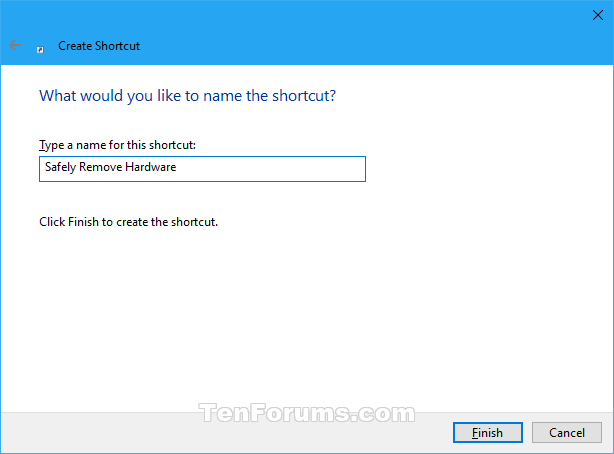
<p style="text-align: justify;">3. Nhập&nbsp;<strong>Safely Remove Hardware</strong>&nbsp;làm tên và nhấp vào nút&nbsp;<strong>Finish.</strong></p>

<figure>
<div style="text-align: justify;"><img alt="Nhập Safely Remove Hardware làm tên" data-i="0" data-src="https://st.quantrimang.com/photos/image/2020/10/29/tao-shortcut-safely-remove-hardware-1.png" data-was-processed="true" height="454" src="https://st.quantrimang.com/photos/image/2020/10/29/tao-shortcut-safely-remove-hardware-1.png" width="614" /></div>

<figcaption>
<div style="text-align: justify;">Nhập Safely Remove Hardware làm tên</div>
</figcaption>
</figure>

<p style="text-align: justify;"><strong>Lưu ý</strong>: Bạn có thể đặt tên cho shortcut này thành bất cứ thứ gì bạn muốn.</p>

<p style="text-align: justify;">4. Nhấp chuột phải hoặc nhấn và giữ trên shortcut Safely Remove Hardware mới và nhấn vào&nbsp;<strong>Properties.</strong></p>

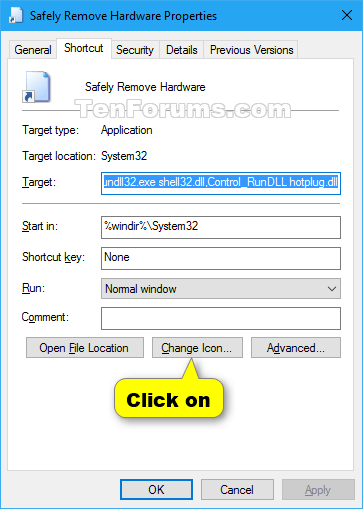
<p style="text-align: justify;">5. Nhấp vào tab&nbsp;<strong>Shortcut</strong>, sau đó nhấn vào nút<strong>&nbsp;Change Icon</strong>.</p>

<figure>
<div style="text-align: justify;"><img alt="Nhấn vào nút Change Icon" data-i="1" data-src="https://st.quantrimang.com/photos/image/2020/10/29/tao-shortcut-safely-remove-hardware-2.png" data-was-processed="true" height="509" src="https://st.quantrimang.com/photos/image/2020/10/29/tao-shortcut-safely-remove-hardware-2.png" width="363" /></div>

<figcaption>
<div style="text-align: justify;">Nhấn vào nút Change Icon</div>
</figcaption>
</figure>

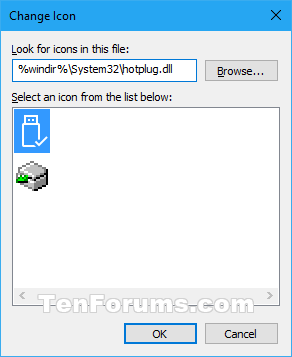
<p style="text-align: justify;">6. Trong dòng bên dưới&nbsp;<strong>&quot;Look for icons in this file&quot;</strong>, sao chép và dán vị trí bên dưới rồi nhấn&nbsp;<strong>Enter.</strong></p>

<pre id="pre1">
<code>%windir%\System32\hotplug.dll</code></pre>

<p style="text-align: justify;">7. Chọn biểu tượng được highlight màu xanh lam ở trên và nhấn&nbsp;<strong>OK.&nbsp;</strong>Tất nhiên, bạn có thể sử dụng bất kỳ biểu tượng nào mà bạn muốn.</p>

<figure>
<div style="text-align: justify;"><img alt="Chọn biểu tượng được highlight màu xanh lam" data-i="2" data-src="https://st.quantrimang.com/photos/image/2020/10/29/tao-shortcut-safely-remove-hardware-3.png" data-was-processed="true" height="357" src="https://st.quantrimang.com/photos/image/2020/10/29/tao-shortcut-safely-remove-hardware-3.png" width="292" /></div>

<figcaption>
<div style="text-align: justify;">Chọn biểu tượng được highlight màu xanh lam</div>
</figcaption>
</figure>

<p style="text-align: justify;">8. Nhấn&nbsp;<strong>OK.</strong></p>

<p style="text-align: justify;">9. Bạn có thể ghim vào thanh tác vụ, menu Start, thêm vào All apps, Quick Launch, gán phím tắt cho hoặc di chuyển shortcut này đến nơi bạn muốn để dễ sử dụng.</p>
		</div>
				<div id="author">
						<p>
				<strong>Nguồn tin:</strong>
				Quantrimang.com
			</p>
		</div>
	</div>
	<div id="footer" class="clearfix">
		<div id="url">
			<strong>URL của bản tin này: </strong><a href="https://www.nguoicodonvn2008.info/vi/news/savefile/kien-thuc-may-tinh/tao-shortcut-safely-remove-hardware-tren-windows-10-2987.html" title="Tạo shortcut Safely Remove Hardware trên Windows 10">https://www.nguoicodonvn2008.info/vi/news/savefile/kien-thuc-may-tinh/tao-shortcut-safely-remove-hardware-tren-windows-10-2987.html</a>

		</div>
		<div class="clear"></div>
		<div class="copyright">
			&copy; .&#x3A; Nguoicodonvn2008.info - Cõi lòng người cô đơn &#x3A;.
		</div>
		<div id="contact">
			<a href="mailto:admin@nguoicodonvn2008.info">admin@nguoicodonvn2008.info</a>
		</div>
	</div>
</div>
        <div id="timeoutsess" class="chromeframe">
            Bạn đã không sử dụng Site, <a onclick="timeoutsesscancel();" href="https://www.nguoicodonvn2008.info/#">Bấm vào đây để duy trì trạng thái đăng nhập</a>. Thời gian chờ: <span id="secField"> 60 </span> giây
        </div>
        <div id="openidResult" class="nv-alert" style="display:none"></div>
        <div id="openidBt" data-result="" data-redirect=""></div>
		</script>
		<div class="car-top">
  <span><img src="https://www.nguoicodonvn2008.info/themes/default/images/car.png" alt=""></span>
</div>
<script src="https://www.nguoicodonvn2008.info/assets/js/jquery/jquery.min.js"></script>
<script>var nv_base_siteurl="/",nv_lang_data="vi",nv_lang_interface="vi",nv_name_variable="nv",nv_fc_variable="op",nv_lang_variable="language",nv_module_name="news",nv_func_name="savefile",nv_is_user=0, nv_my_ofs=-4,nv_my_abbr="EDT",nv_cookie_prefix="nv4c_e856T",nv_check_pass_mstime=1738000,nv_area_admin=0,nv_safemode=0,theme_responsive=0,nv_recaptcha_ver=2,nv_recaptcha_sitekey="",nv_recaptcha_type="image",XSSsanitize=1;</script>
<script src="https://www.nguoicodonvn2008.info/assets/js/language/vi.js"></script>
<script src="https://www.nguoicodonvn2008.info/assets/js/DOMPurify/purify3.js"></script>
<script src="https://www.nguoicodonvn2008.info/assets/js/global.js"></script>
<script src="https://www.nguoicodonvn2008.info/assets/js/site.js"></script>
<script src="https://www.nguoicodonvn2008.info/themes/default/js/news.js"></script>
<script src="https://www.nguoicodonvn2008.info/themes/default/js/main.js"></script>
<script src="https://www.nguoicodonvn2008.info/themes/default/js/custom.js"></script>
<script type="application/ld+json">
        {
            "@context": "https://schema.org",
            "@type": "Organization",
            "url": "https://www.nguoicodonvn2008.info",
            "logo": "https://www.nguoicodonvn2008.info/uploads/angel.gif"
        }
        </script>
<script src="https://www.nguoicodonvn2008.info/themes/default/js/bootstrap.min.js"></script>
<script type="text/javascript">
var $scrolltop = $('.car-top');
$scrolltop.on('click', function () {
    $('html,body').animate({
        scrollTop: 0
    }, 800);
    $(this).addClass("car-run");
    setTimeout(function(){ $scrolltop.removeClass('car-run');}, 1000);
    return false;
});
$(window).on('scroll', function ()
{ 
    if($(window).scrollTop() >= 200)
    {
        $scrolltop.addClass("show");
        $scrolltop.addClass("car-down");
    }
    else
    {
       $scrolltop.removeClass("show");
       setTimeout(function(){ $scrolltop.removeClass('car-down');}, 300);
    }
});
</script>
</body>
</html>