<!DOCTYPE html>
    <html lang="vi" xmlns="http://www.w3.org/1999/xhtml" prefix="og: http://ogp.me/ns#">
    <head>
<title>Tải Wuthering Waves, Wuthering Waves APK</title>
<meta name="description" content="Tải Wuthering Waves, Wuthering Waves APK - Savefile - Tin Tức -...">
<meta name="author" content=".: Nguoicodonvn2008.info - Cõi lòng người cô đơn :.">
<meta name="copyright" content=".: Nguoicodonvn2008.info - Cõi lòng người cô đơn :. [admin@nguoicodonvn2008.info]">
<meta name="robots" content="index, archive, follow, noodp">
<meta name="googlebot" content="index,archive,follow,noodp">
<meta name="msnbot" content="all,index,follow">
<meta name="generator" content="NukeViet v4.5">
<meta http-equiv="Content-Type" content="text/html; charset=utf-8">
<meta property="og:title" content="Tải Wuthering Waves, Wuthering Waves APK">
<meta property="og:type" content="website">
<meta property="og:description" content="Savefile - Tin Tức - https&#x3A;&#x002F;&#x002F;www.nguoicodonvn2008.info&#x002F;vi&#x002F;news&#x002F;savefile&#x002F;kien-thuc-may-tinh&#x002F;tai-wuthering-waves-wuthering-waves-apk-8965.html">
<meta property="og:site_name" content=".&#x3A; Nguoicodonvn2008.info - Cõi lòng người cô đơn &#x3A;.">
<meta property="og:url" content="https://www.nguoicodonvn2008.info/vi/news/savefile/kien-thuc-may-tinh/tai-wuthering-waves-wuthering-waves-apk-8965.html">
<link rel="shortcut icon" href="https://www.nguoicodonvn2008.info/favicon.ico">
<link rel="canonical" href="https://www.nguoicodonvn2008.info/vi/news/savefile/kien-thuc-may-tinh/tai-wuthering-waves-wuthering-waves-apk-8965.html">
<link rel="alternate" href="https://www.nguoicodonvn2008.info/vi/news/rss/" title="Tin Tức" type="application/rss+xml">
<link rel="alternate" href="https://www.nguoicodonvn2008.info/vi/news/rss/karaoke-dual/" title="Tin Tức - Karaoke Dual" type="application/rss+xml">
<link rel="alternate" href="https://www.nguoicodonvn2008.info/vi/news/rss/nhac-tre/" title="Tin Tức - Nhạc trẻ" type="application/rss+xml">
<link rel="alternate" href="https://www.nguoicodonvn2008.info/vi/news/rss/tru-tinh/" title="Tin Tức - Trữ tình" type="application/rss+xml">
<link rel="alternate" href="https://www.nguoicodonvn2008.info/vi/news/rss/nuoc-ngoai/" title="Tin Tức - Nước ngoài" type="application/rss+xml">
<link rel="alternate" href="https://www.nguoicodonvn2008.info/vi/news/rss/remix/" title="Tin Tức - Remix" type="application/rss+xml">
<link rel="alternate" href="https://www.nguoicodonvn2008.info/vi/news/rss/tam-su-tinh-yeu/" title="Tin Tức - Tâm sự tình yêu" type="application/rss+xml">
<link rel="alternate" href="https://www.nguoicodonvn2008.info/vi/news/rss/tho-suu-tam/" title="Tin Tức - Thơ sưu tầm" type="application/rss+xml">
<link rel="alternate" href="https://www.nguoicodonvn2008.info/vi/news/rss/cuoc-song/" title="Tin Tức - Cuộc sống" type="application/rss+xml">
<link rel="alternate" href="https://www.nguoicodonvn2008.info/vi/news/rss/phan-mem/" title="Tin Tức - Phần mềm" type="application/rss+xml">
<link rel="alternate" href="https://www.nguoicodonvn2008.info/vi/news/rss/kien-thuc-may-tinh/" title="Tin Tức - Kiến thức máy tính" type="application/rss+xml">
<link rel="alternate" href="https://www.nguoicodonvn2008.info/vi/news/rss/hoc-tap/" title="Tin Tức - Học tập" type="application/rss+xml">
<link rel="alternate" href="https://www.nguoicodonvn2008.info/vi/news/rss/tai-lieu/" title="Tin Tức - Tài liệu" type="application/rss+xml">
<link rel="alternate" href="https://www.nguoicodonvn2008.info/vi/news/rss/de-thi/" title="Tin Tức - Đề thi" type="application/rss+xml">
<link rel="preload" as="style" href="https://www.nguoicodonvn2008.info/assets/css/font-awesome.min.css" type="text/css">
<link rel="preload" as="style" href="https://www.nguoicodonvn2008.info/themes/default/css/bootstrap.non-responsive.css" type="text/css">
<link rel="preload" as="style" href="https://www.nguoicodonvn2008.info/themes/default/css/style.css" type="text/css">
<link rel="preload" as="style" href="https://www.nguoicodonvn2008.info/themes/default/css/style.non-responsive.css" type="text/css">
<link rel="preload" as="style" href="https://www.nguoicodonvn2008.info/themes/default/css/news.css" type="text/css">
<link rel="preload" as="style" href="https://www.nguoicodonvn2008.info/themes/default/css/custom.css" type="text/css">
<link rel="preload" as="script" href="https://www.nguoicodonvn2008.info/assets/js/jquery/jquery.min.js" type="text/javascript">
<link rel="preload" as="script" href="https://www.nguoicodonvn2008.info/assets/js/language/vi.js" type="text/javascript">
<link rel="preload" as="script" href="https://www.nguoicodonvn2008.info/assets/js/DOMPurify/purify3.js" type="text/javascript">
<link rel="preload" as="script" href="https://www.nguoicodonvn2008.info/assets/js/global.js" type="text/javascript">
<link rel="preload" as="script" href="https://www.nguoicodonvn2008.info/assets/js/site.js" type="text/javascript">
<link rel="preload" as="script" href="https://www.nguoicodonvn2008.info/themes/default/js/news.js" type="text/javascript">
<link rel="preload" as="script" href="https://www.nguoicodonvn2008.info/themes/default/js/main.js" type="text/javascript">
<link rel="preload" as="script" href="https://www.nguoicodonvn2008.info/themes/default/js/custom.js" type="text/javascript">
<link rel="preload" as="script" href="https://www.nguoicodonvn2008.info/themes/default/js/bootstrap.min.js" type="text/javascript">
<link rel="stylesheet" href="https://www.nguoicodonvn2008.info/assets/css/font-awesome.min.css">
<link rel="stylesheet" href="https://www.nguoicodonvn2008.info/themes/default/css/bootstrap.non-responsive.css">
<link rel="stylesheet" href="https://www.nguoicodonvn2008.info/themes/default/css/style.css">
<link rel="stylesheet" href="https://www.nguoicodonvn2008.info/themes/default/css/style.non-responsive.css">
<link rel="StyleSheet" href="https://www.nguoicodonvn2008.info/themes/default/css/news.css">
<link rel="stylesheet" href="https://www.nguoicodonvn2008.info/themes/default/css/custom.css">
<style type="text/css">
	body{background: #fff;}
</style>
    </head>
    <body>
<div id="print">
	<div id="hd_print">
		<h2 class="pull-left">.&#x3A; Nguoicodonvn2008.info - Cõi lòng người cô đơn &#x3A;.</h2>
		<p class="pull-right"><a title=".&#x3A; Nguoicodonvn2008.info - Cõi lòng người cô đơn &#x3A;." href="https://www.nguoicodonvn2008.info/">https://www.nguoicodonvn2008.info</a></p>
	</div>
	<div class="clear"></div>
	<hr />
	<div id="content">
		<h1>Tải Wuthering Waves, Wuthering Waves APK</h1>
		<ul class="list-inline">
			<li>Thứ sáu - 06/09/2024 00:28</li>
			<li class="hidden-print txtrequired"><em class="fa fa-print">&nbsp;</em><a title="In ra" href="javascript:;" onclick="window.print()">In ra</a></li>
			<li class="hidden-print txtrequired"><em class="fa fa-power-off">&nbsp;</em><a title="Đóng cửa sổ này" href="javascript:;" onclick="window.close()">Đóng cửa sổ này</a></li>
		</ul>
		<div class="clear"></div>
		<div id="hometext">
		</div>
				<div class="imghome">
			<img alt="Tải Wuthering Waves, Wuthering Waves APK" src="https://st.quantrimang.com/photos/image/2024/05/23/Tai-Wuthering-Waves-5.jpg" width="460" class="img-thumbnail" />
		</div>
		<div class="clear"></div>
		<div id="bodytext" class="clearfix">
			<p style="text-align: justify;">Wuthering Waves đã chính thức ra mắt, tuy nhiên tại Việt Nam thì bạn vẫn chưa thể tải về tựa game này trên CHPlay hay App Store. Tuy nhiên Quantrimang.com sẽ giúp bạn tải về Wuthering Waves một cách đơn giản ở dưới đây.</p>

<h2 style="text-align: justify;">Cách tải Wuthering Waves chuẩn nhất, mới nhất</h2>

<p style="text-align: justify;"><strong>Bước 1:</strong>&nbsp;Tải file Wuthering Waves APK theo link dưới đây</p>

<pre id="pre0">
<code>https://vi.ldplayer.net/downloads/wuthering-waves-apk.html?n=13319362#utm_source=aff&amp;utm_medium=aff&amp;utm_campaign=aff13319362</code></pre>

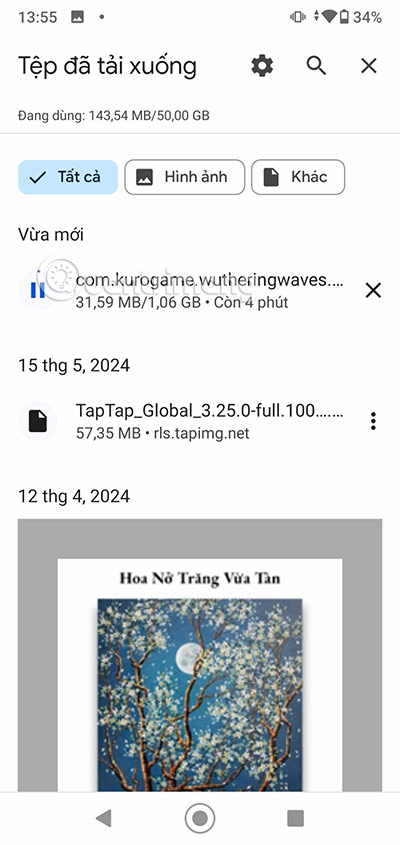
<p style="text-align: justify;"><strong>Bước 2:</strong>&nbsp;Kế đến, bạn hãy cài đặt file APK của game Wuthering Waves như những file APK khác trên Android. Bắt đầu bằng cách bấm vào file APK đó trong File Explorer của bạn. Hoặc bấm trực tiếp vào file APK Wuthering Waves trong danh sách file đã tải xuống.</p>

<figure>
<div style="text-align: justify;"><img alt="Wuthering Waves" data-i="0" data-src="https://st.quantrimang.com/photos/image/2024/05/23/Tai-Wuthering-Waves-0.jpg" data-was-processed="true" height="845" src="https://st.quantrimang.com/photos/image/2024/05/23/Tai-Wuthering-Waves-0.jpg" width="400" /></div>
</figure>

<div style="text-align: justify;"><iframe allow="autoplay" allowtransparency="true" aria-label="Advertisement" data-google-container-id="a!2" data-google-query-id="CK77y7O9rYgDFRNHwgUds14C_g" data-load-complete="true" frameborder="0" height="0" hspace="0" id="aswift_1" marginheight="0" marginwidth="0" name="aswift_1" sandbox="allow-scripts allow-same-origin allow-forms allow-presentation allow-popups" scrolling="no" tabindex="0" title="Advertisement" vspace="0" width="694"></iframe></div>

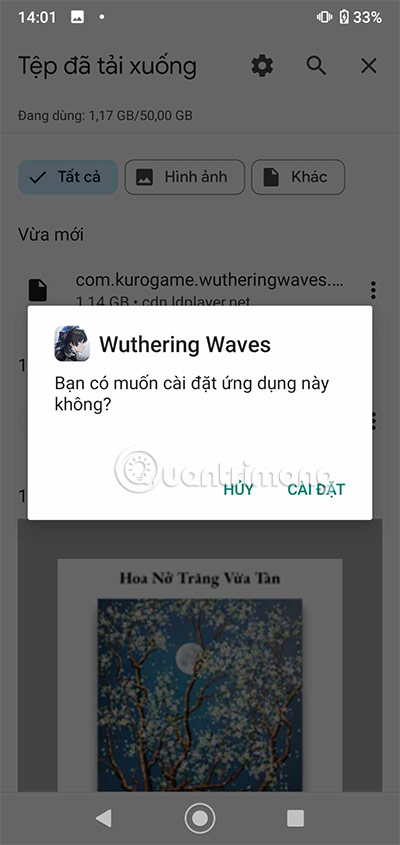
<p style="text-align: justify;"><strong>Bước 3:&nbsp;</strong>Chọn Cài Đặt.</p>

<figure>
<div style="text-align: justify;"><img alt="Wuthering Waves apk" data-i="1" data-src="https://st.quantrimang.com/photos/image/2024/05/23/Tai-Wuthering-Waves-1.jpg" data-was-processed="true" height="845" src="https://st.quantrimang.com/photos/image/2024/05/23/Tai-Wuthering-Waves-1.jpg" width="400" /></div>
</figure>

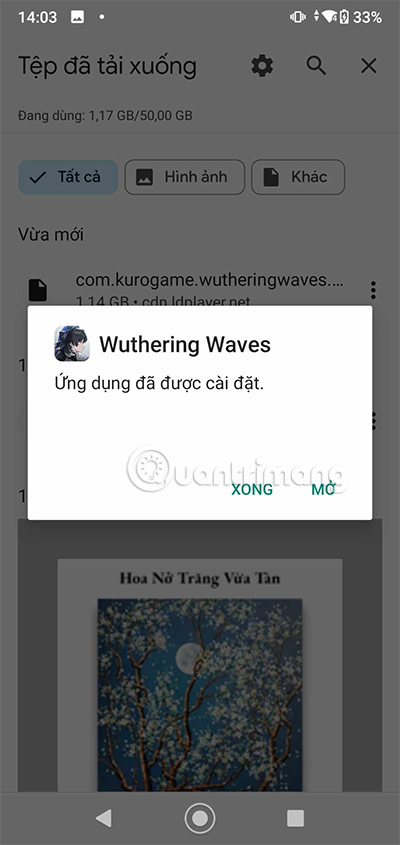
<p style="text-align: justify;"><strong>Bước 4:&nbsp;</strong>Khi cài đặt xong thì bạn chỉ cần chọn Mở.</p>

<figure>
<div style="text-align: justify;"><img alt="tải Wuthering Waves" data-i="2" data-src="https://st.quantrimang.com/photos/image/2024/05/23/Tai-Wuthering-Waves-2.jpg" data-was-processed="true" height="845" src="https://st.quantrimang.com/photos/image/2024/05/23/Tai-Wuthering-Waves-2.jpg" width="400" /></div>
</figure>

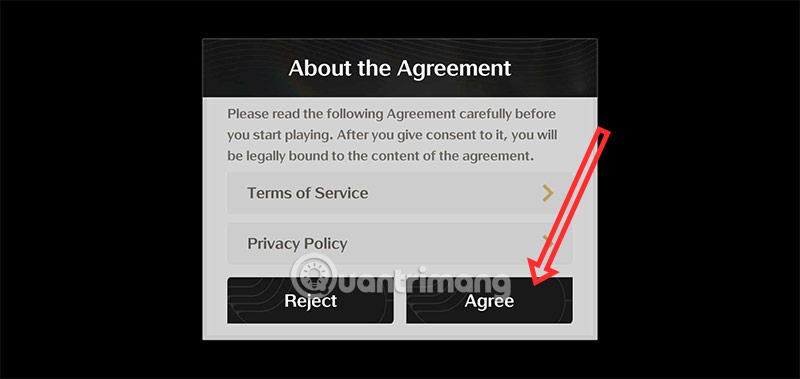
<p style="text-align: justify;"><strong>Bước 5:&nbsp;</strong>Khi mở game, bạn sẽ thấy ngay thông báo đi kèm Điều khoản &amp; Dịch vụ và Chính sách bảo mật. Chọn Agree để đồng ý với Điều khoản &amp; Dịch vụ và Chính sách bảo mật.</p>

<figure>
<div style="text-align: justify;"><img alt="tải Wuthering Waves ios" data-i="3" data-src="https://st.quantrimang.com/photos/image/2024/05/23/Tai-Wuthering-Waves-3.jpg" data-was-processed="true" height="379" src="https://st.quantrimang.com/photos/image/2024/05/23/Tai-Wuthering-Waves-3.jpg" width="800" /></div>
</figure>

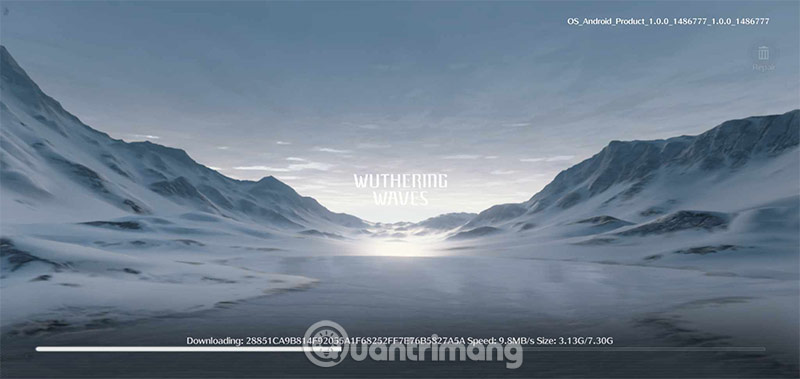
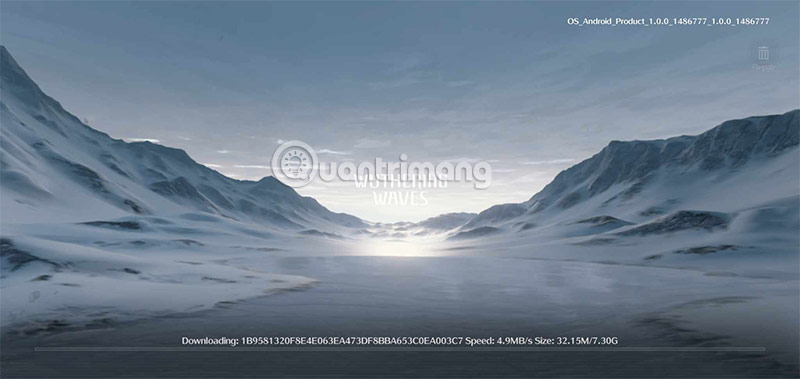
<p style="text-align: justify;"><strong>Bước 6:&nbsp;</strong>Wuthering Waves được đánh giá là có đồ họa đỉnh cao, và dĩ nhiên dung lượng game cũng khá lớn. Bạn sẽ phải tải về tổng cộng 11GB dung lượng game mới có thể truy cập vào trò chơi.</p>

<figure>
<div style="text-align: justify;"><img alt="Wuthering Waves iphone" data-adbro-processed="true" data-i="4" data-src="https://st.quantrimang.com/photos/image/2024/05/23/Tai-Wuthering-Waves-4.jpg" data-was-processed="true" height="379" src="https://st.quantrimang.com/photos/image/2024/05/23/Tai-Wuthering-Waves-4.jpg" width="800" /></div>
</figure>

<p style="text-align: justify;">Bạn sẽ phải chờ khoảng 15-30 phút để hoàn tất tải về dung lượng chính của game. Vì là một tựa game nặng nên Wuthering Waves cũng sẽ yêu cầu cấu hình đủ để đáp ứng dụng đồ họa thấp nhất.</p>

<figure>
<div style="text-align: justify;"><img alt="tai Wuthering Waves ios" data-i="5" data-src="https://st.quantrimang.com/photos/image/2024/05/23/Tai-Wuthering-Waves-5.jpg" data-was-processed="true" height="379" src="https://st.quantrimang.com/photos/image/2024/05/23/Tai-Wuthering-Waves-5.jpg" width="800" /></div>
</figure>

<p style="text-align: justify;"><strong>Bước 7:&nbsp;</strong>Bạn có thể xem yêu cầu cấu hình Wuthering Waves trong&nbsp;Cấu hình Wuthering Waves mới nhất. Như vậy thì bạn mới có thể biết được cấu hình smartphone của mình có đáp ứng tối thiểu mức đồ họa thấp nhất của game hay không.</p>

<figure>
<div style="text-align: justify;"><img alt="Wuthering Waves iphone" data-i="6" data-src="https://st.quantrimang.com/photos/image/2024/05/23/Tai-Wuthering-Waves-6.jpg" data-was-processed="true" height="845" src="https://st.quantrimang.com/photos/image/2024/05/23/Tai-Wuthering-Waves-6.jpg" width="400" /></div>
</figure>

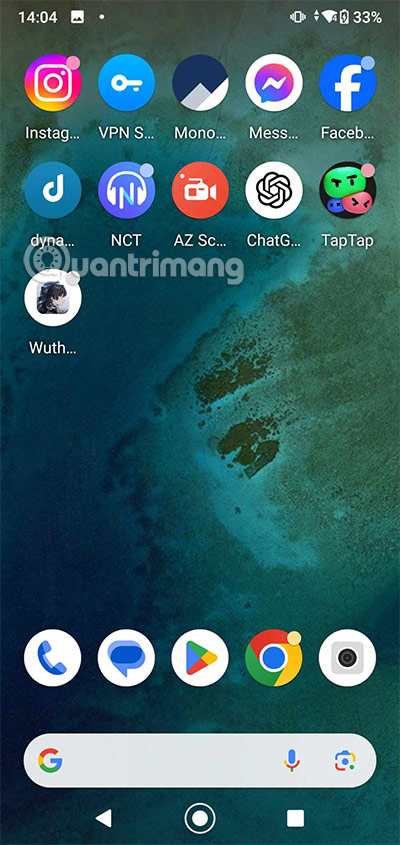
<p style="text-align: justify;">Giờ mỗi khi bạn muốn chơi game, chỉ cần ra ngoài màn hình chính, bạn sẽ thấy biểu tượng của game hiển thị ở đó. Chỉ cần thêm Wuthering Waves vào màn hình chính và chọn khi chơi là được.</p>

<div style="text-align: justify;">&nbsp;</div>
		</div>
				<div id="author">
						<p>
				<strong>Nguồn tin:</strong>
				Quantrimang.com:
			</p>
		</div>
	</div>
	<div id="footer" class="clearfix">
		<div id="url">
			<strong>URL của bản tin này: </strong><a href="https://www.nguoicodonvn2008.info/vi/news/savefile/kien-thuc-may-tinh/tai-wuthering-waves-wuthering-waves-apk-8965.html" title="Tải Wuthering Waves, Wuthering Waves APK">https://www.nguoicodonvn2008.info/vi/news/savefile/kien-thuc-may-tinh/tai-wuthering-waves-wuthering-waves-apk-8965.html</a>

		</div>
		<div class="clear"></div>
		<div class="copyright">
			&copy; .&#x3A; Nguoicodonvn2008.info - Cõi lòng người cô đơn &#x3A;.
		</div>
		<div id="contact">
			<a href="mailto:admin@nguoicodonvn2008.info">admin@nguoicodonvn2008.info</a>
		</div>
	</div>
</div>
        <div id="timeoutsess" class="chromeframe">
            Bạn đã không sử dụng Site, <a onclick="timeoutsesscancel();" href="https://www.nguoicodonvn2008.info/#">Bấm vào đây để duy trì trạng thái đăng nhập</a>. Thời gian chờ: <span id="secField"> 60 </span> giây
        </div>
        <div id="openidResult" class="nv-alert" style="display:none"></div>
        <div id="openidBt" data-result="" data-redirect=""></div>
		</script>
		<div class="car-top">
  <span><img src="https://www.nguoicodonvn2008.info/themes/default/images/car.png" alt=""></span>
</div>
<script src="https://www.nguoicodonvn2008.info/assets/js/jquery/jquery.min.js"></script>
<script>var nv_base_siteurl="/",nv_lang_data="vi",nv_lang_interface="vi",nv_name_variable="nv",nv_fc_variable="op",nv_lang_variable="language",nv_module_name="news",nv_func_name="savefile",nv_is_user=0, nv_my_ofs=-4,nv_my_abbr="EDT",nv_cookie_prefix="nv4c_e856T",nv_check_pass_mstime=1738000,nv_area_admin=0,nv_safemode=0,theme_responsive=0,nv_recaptcha_ver=2,nv_recaptcha_sitekey="",nv_recaptcha_type="image",XSSsanitize=1;</script>
<script src="https://www.nguoicodonvn2008.info/assets/js/language/vi.js"></script>
<script src="https://www.nguoicodonvn2008.info/assets/js/DOMPurify/purify3.js"></script>
<script src="https://www.nguoicodonvn2008.info/assets/js/global.js"></script>
<script src="https://www.nguoicodonvn2008.info/assets/js/site.js"></script>
<script src="https://www.nguoicodonvn2008.info/themes/default/js/news.js"></script>
<script src="https://www.nguoicodonvn2008.info/themes/default/js/main.js"></script>
<script src="https://www.nguoicodonvn2008.info/themes/default/js/custom.js"></script>
<script type="application/ld+json">
        {
            "@context": "https://schema.org",
            "@type": "Organization",
            "url": "https://www.nguoicodonvn2008.info",
            "logo": "https://www.nguoicodonvn2008.info/uploads/angel.gif"
        }
        </script>
<script src="https://www.nguoicodonvn2008.info/themes/default/js/bootstrap.min.js"></script>
<script type="text/javascript">
var $scrolltop = $('.car-top');
$scrolltop.on('click', function () {
    $('html,body').animate({
        scrollTop: 0
    }, 800);
    $(this).addClass("car-run");
    setTimeout(function(){ $scrolltop.removeClass('car-run');}, 1000);
    return false;
});
$(window).on('scroll', function ()
{ 
    if($(window).scrollTop() >= 200)
    {
        $scrolltop.addClass("show");
        $scrolltop.addClass("car-down");
    }
    else
    {
       $scrolltop.removeClass("show");
       setTimeout(function(){ $scrolltop.removeClass('car-down');}, 300);
    }
});
</script>
</body>
</html>