<!DOCTYPE html>
    <html lang="vi" xmlns="http://www.w3.org/1999/xhtml" prefix="og: http://ogp.me/ns#">
    <head>
<title>Tại sao Windows vẫn sử dụng ký tự cho ổ đĩa?</title>
<meta name="description" content="Tại sao Windows vẫn sử dụng ký tự cho ổ đĩa? - Savefile - Tin Tức -...">
<meta name="author" content=".: Nguoicodonvn2008.info - Cõi lòng người cô đơn :.">
<meta name="copyright" content=".: Nguoicodonvn2008.info - Cõi lòng người cô đơn :. [admin@nguoicodonvn2008.info]">
<meta name="robots" content="index, archive, follow, noodp">
<meta name="googlebot" content="index,archive,follow,noodp">
<meta name="msnbot" content="all,index,follow">
<meta name="generator" content="NukeViet v4.5">
<meta http-equiv="Content-Type" content="text/html; charset=utf-8">
<meta property="og:title" content="Tại sao Windows vẫn sử dụng ký tự cho ổ đĩa?">
<meta property="og:type" content="website">
<meta property="og:description" content="Savefile - Tin Tức - https&#x3A;&#x002F;&#x002F;www.nguoicodonvn2008.info&#x002F;vi&#x002F;news&#x002F;savefile&#x002F;kien-thuc-may-tinh&#x002F;tai-sao-windows-van-su-dung-ky-tu-cho-o-dia-441.html">
<meta property="og:site_name" content=".&#x3A; Nguoicodonvn2008.info - Cõi lòng người cô đơn &#x3A;.">
<meta property="og:url" content="https://www.nguoicodonvn2008.info/vi/news/savefile/kien-thuc-may-tinh/tai-sao-windows-van-su-dung-ky-tu-cho-o-dia-441.html">
<link rel="shortcut icon" href="https://www.nguoicodonvn2008.info/favicon.ico">
<link rel="canonical" href="https://www.nguoicodonvn2008.info/vi/news/savefile/kien-thuc-may-tinh/tai-sao-windows-van-su-dung-ky-tu-cho-o-dia-441.html">
<link rel="alternate" href="https://www.nguoicodonvn2008.info/vi/news/rss/" title="Tin Tức" type="application/rss+xml">
<link rel="alternate" href="https://www.nguoicodonvn2008.info/vi/news/rss/karaoke-dual/" title="Tin Tức - Karaoke Dual" type="application/rss+xml">
<link rel="alternate" href="https://www.nguoicodonvn2008.info/vi/news/rss/nhac-tre/" title="Tin Tức - Nhạc trẻ" type="application/rss+xml">
<link rel="alternate" href="https://www.nguoicodonvn2008.info/vi/news/rss/tru-tinh/" title="Tin Tức - Trữ tình" type="application/rss+xml">
<link rel="alternate" href="https://www.nguoicodonvn2008.info/vi/news/rss/nuoc-ngoai/" title="Tin Tức - Nước ngoài" type="application/rss+xml">
<link rel="alternate" href="https://www.nguoicodonvn2008.info/vi/news/rss/remix/" title="Tin Tức - Remix" type="application/rss+xml">
<link rel="alternate" href="https://www.nguoicodonvn2008.info/vi/news/rss/tam-su-tinh-yeu/" title="Tin Tức - Tâm sự tình yêu" type="application/rss+xml">
<link rel="alternate" href="https://www.nguoicodonvn2008.info/vi/news/rss/tho-suu-tam/" title="Tin Tức - Thơ sưu tầm" type="application/rss+xml">
<link rel="alternate" href="https://www.nguoicodonvn2008.info/vi/news/rss/cuoc-song/" title="Tin Tức - Cuộc sống" type="application/rss+xml">
<link rel="alternate" href="https://www.nguoicodonvn2008.info/vi/news/rss/phan-mem/" title="Tin Tức - Phần mềm" type="application/rss+xml">
<link rel="alternate" href="https://www.nguoicodonvn2008.info/vi/news/rss/kien-thuc-may-tinh/" title="Tin Tức - Kiến thức máy tính" type="application/rss+xml">
<link rel="alternate" href="https://www.nguoicodonvn2008.info/vi/news/rss/hoc-tap/" title="Tin Tức - Học tập" type="application/rss+xml">
<link rel="alternate" href="https://www.nguoicodonvn2008.info/vi/news/rss/tai-lieu/" title="Tin Tức - Tài liệu" type="application/rss+xml">
<link rel="alternate" href="https://www.nguoicodonvn2008.info/vi/news/rss/de-thi/" title="Tin Tức - Đề thi" type="application/rss+xml">
<link rel="preload" as="style" href="https://www.nguoicodonvn2008.info/assets/css/font-awesome.min.css" type="text/css">
<link rel="preload" as="style" href="https://www.nguoicodonvn2008.info/themes/default/css/bootstrap.non-responsive.css" type="text/css">
<link rel="preload" as="style" href="https://www.nguoicodonvn2008.info/themes/default/css/style.css" type="text/css">
<link rel="preload" as="style" href="https://www.nguoicodonvn2008.info/themes/default/css/style.non-responsive.css" type="text/css">
<link rel="preload" as="style" href="https://www.nguoicodonvn2008.info/themes/default/css/news.css" type="text/css">
<link rel="preload" as="style" href="https://www.nguoicodonvn2008.info/themes/default/css/custom.css" type="text/css">
<link rel="preload" as="script" href="https://www.nguoicodonvn2008.info/assets/js/jquery/jquery.min.js" type="text/javascript">
<link rel="preload" as="script" href="https://www.nguoicodonvn2008.info/assets/js/language/vi.js" type="text/javascript">
<link rel="preload" as="script" href="https://www.nguoicodonvn2008.info/assets/js/DOMPurify/purify3.js" type="text/javascript">
<link rel="preload" as="script" href="https://www.nguoicodonvn2008.info/assets/js/global.js" type="text/javascript">
<link rel="preload" as="script" href="https://www.nguoicodonvn2008.info/assets/js/site.js" type="text/javascript">
<link rel="preload" as="script" href="https://www.nguoicodonvn2008.info/themes/default/js/news.js" type="text/javascript">
<link rel="preload" as="script" href="https://www.nguoicodonvn2008.info/themes/default/js/main.js" type="text/javascript">
<link rel="preload" as="script" href="https://www.nguoicodonvn2008.info/themes/default/js/custom.js" type="text/javascript">
<link rel="preload" as="script" href="https://www.nguoicodonvn2008.info/themes/default/js/bootstrap.min.js" type="text/javascript">
<link rel="stylesheet" href="https://www.nguoicodonvn2008.info/assets/css/font-awesome.min.css">
<link rel="stylesheet" href="https://www.nguoicodonvn2008.info/themes/default/css/bootstrap.non-responsive.css">
<link rel="stylesheet" href="https://www.nguoicodonvn2008.info/themes/default/css/style.css">
<link rel="stylesheet" href="https://www.nguoicodonvn2008.info/themes/default/css/style.non-responsive.css">
<link rel="StyleSheet" href="https://www.nguoicodonvn2008.info/themes/default/css/news.css">
<link rel="stylesheet" href="https://www.nguoicodonvn2008.info/themes/default/css/custom.css">
<style type="text/css">
	body{background: #fff;}
</style>
    </head>
    <body>
<div id="print">
	<div id="hd_print">
		<h2 class="pull-left">.&#x3A; Nguoicodonvn2008.info - Cõi lòng người cô đơn &#x3A;.</h2>
		<p class="pull-right"><a title=".&#x3A; Nguoicodonvn2008.info - Cõi lòng người cô đơn &#x3A;." href="https://www.nguoicodonvn2008.info/">https://www.nguoicodonvn2008.info</a></p>
	</div>
	<div class="clear"></div>
	<hr />
	<div id="content">
		<h1>Tại sao Windows vẫn sử dụng ký tự cho ổ đĩa?</h1>
		<ul class="list-inline">
			<li>Thứ sáu - 12/07/2019 01:51</li>
			<li class="hidden-print txtrequired"><em class="fa fa-print">&nbsp;</em><a title="In ra" href="javascript:;" onclick="window.print()">In ra</a></li>
			<li class="hidden-print txtrequired"><em class="fa fa-power-off">&nbsp;</em><a title="Đóng cửa sổ này" href="javascript:;" onclick="window.close()">Đóng cửa sổ này</a></li>
		</ul>
		<div class="clear"></div>
		<div id="hometext">
		</div>
				<div class="imghome">
			<img alt="Tại sao Windows vẫn sử dụng ký tự cho ổ đĩa?" src="https://st.quantrimang.com/photos/image/2019/07/12/ly-do-windows-su-dung-ky-tu-o-dia-4.png" width="460" class="img-thumbnail" />
		</div>
		<div class="clear"></div>
		<div id="bodytext" class="clearfix">
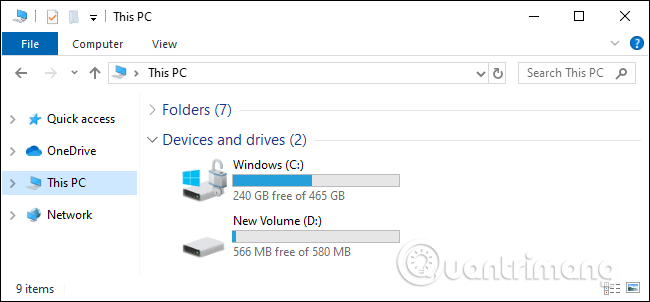
			<p style="text-align: justify;">Windows thường gán ổ đĩa hệ thống của bạn với ký tự C: và các chữ cái khác nhau cho các thiết bị lưu trữ khác. Hệ điều hành macOS và Linux không sử dụng chữ cái để đặt tên cho ổ đĩa. Windows có thể truy cập ổ đĩa mà không cần ký tự, vậy tại sao họ vẫn sử dụng chúng?</p>

<div style="text-align: justify;">&nbsp;</div>

<h2 style="text-align: justify;">Những ký tự ổ đĩa đến từ đâu?</h2>

<p style="text-align: justify;">Giống như nhiều thứ khác trong Windows, chẳng hạn như, cách nó&nbsp;sử dụng dấu gạch chéo ngược thay vì dấu gạch chéo lên, ký tự ổ đĩa có từ thời MS-DOS (thực tế nó còn được sử dụng sớm hơn). Đó là&nbsp;lý do ổ đĩa hệ thống Windows sử dụng chữ cái C:, A: và B: dành cho các ổ đĩa mềm.</p>

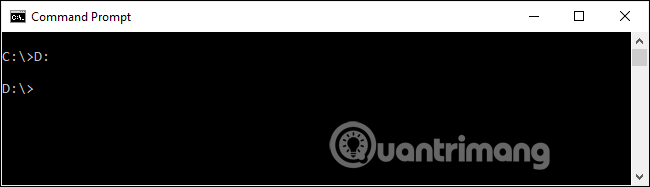
<p style="text-align: justify;">Ký tự ổ đĩa đã được chuyển đến MS-DOS từ CP/M (một hệ điều hành cũ hơn). Chúng cung cấp một cách để truy cập vào các thiết bị lưu trữ logic và vật lý chứa các file. Để truy cập một file tên README.TXT trên ổ đĩa mềm thứ hai, bạn chỉ cần gõ B:README.TXT.</p>

<p style="text-align: justify;"><img alt="Ký tự ổ đĩa " data-i="0" data-src="https://st.quantrimang.com/photos/image/2019/07/12/ly-do-windows-su-dung-ky-tu-o-dia-1.png" data-was-processed="true" height="184" src="https://st.quantrimang.com/photos/image/2019/07/12/ly-do-windows-su-dung-ky-tu-o-dia-1.png" width="640" /></p>

<p style="text-align: justify;">Dòng lệnh cần các ký tự ổ đĩa, nếu không có nó làm thế nào để bạn có thể nhanh chóng chỉ định đường dẫn đến file trên các thiết bị khác? Hệ thống MS-DOS đã được thừa hưởng nó và Microsoft mắc kẹt với nó kể từ đó.</p>

<p style="text-align: justify;">Mặc dù hiện nay ký tự ổ đĩa có vẻ ít quan trọng khi chúng ta đang sử dụng các máy tính để bàn đồ họa, chỉ cần click vào icon để mở file, nhưng nó vẫn đóng một vai trò quan trọng. Ngay cả khi bạn chỉ truy cập file bằng công cụ đồ họa, các chương trình bạn sử dụng phải tham chiếu đến các file đó với đường dẫn file trong nền và chúng sử dụng ký tự ổ đĩa để làm điều đó.</p>

<h2 style="text-align: justify;">Giải pháp thay thế Unix: Mount Point</h2>

<p style="text-align: justify;">Tuy nhiên, ký tự ổ đĩa không phải là giải pháp khả thi duy nhất. MacOS, Linux và các hệ điều hành tương tự Unix khác của Apple sử dụng một phương pháp khác để truy cập các phân vùng và thiết bị lưu trữ khác nhau.</p>

<p style="text-align: justify;">Thay vì sử dụng ký tự để truy cập, bạn có thể truy cập vào một thiết bị theo đường dẫn thư mục trong hệ thống file. Ví dụ, trên Linux, thiết bị lưu trữ ngoài được mount tại&nbsp;<strong>/mount</strong>, do đó thay vì truy cập ổ DVD tại D:, bạn có thể truy cập theo đường dẫn&nbsp;<strong>/mount/dvd</strong>.</p>

<p style="text-align: justify;">Thao tác này sẽ truy cập vào thư mục gốc của hệ thống tập tin. Linux và macOS không có ký tự ổ đĩa, vì vậy phần cơ sở của hệ thống file không phải là chữ cái. Những hệ điều hành này có thư mục gốc đó là<strong>&nbsp;/</strong>. Ổ đĩa hệ thống được mount tại&nbsp;<strong>/</strong>&nbsp;thay vì&nbsp;<strong>C:\</strong>. Các ổ đĩa khác có thể được mount tại các thư mục ngẫu nhiên. Nếu muốn thư mục home lưu trữ ổ đĩa khác, bạn có thể mount tại&nbsp;<strong>/home</strong>, sau đó truy cập nội dung của ổ đĩa tại đường dẫn đó.</p>

<div style="text-align: justify;">&nbsp;</div>

<h2 style="text-align: justify;">Bạn có thể truy cập ổ đĩa trên Windows mà không cần ký tự ổ đĩa</h2>

<p style="text-align: justify;"><img alt="Truy cập ổ đĩa Windows không cần ký tự " data-i="1" data-src="https://st.quantrimang.com/photos/image/2019/07/12/ly-do-windows-su-dung-ky-tu-o-dia-2.png" data-was-processed="true" height="354" src="https://st.quantrimang.com/photos/image/2019/07/12/ly-do-windows-su-dung-ky-tu-o-dia-2.png" width="640" /></p>

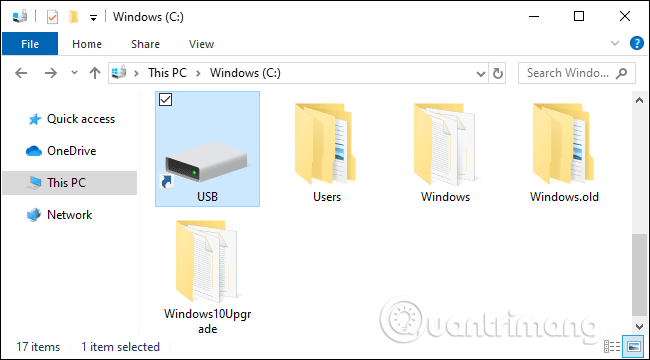
<p style="text-align: justify;">Chắc hẳn sẽ có người thắc mắc tại sao các ổ đĩa trên Windows không được mount theo cách đó để có thể truy cập theo đường dẫn thay vì ký tự. Tại sao chúng ta không thể truy cập&nbsp;<a href="https://quantrimang.com/nhung-mau-o-dia-flash-usb-tot-nhat-theo-tung-tieu-chi-101122" title="9 USB tốt nhất hiện nay theo từng tiêu chí">ổ USB</a>&nbsp;theo C:\USB\?</p>

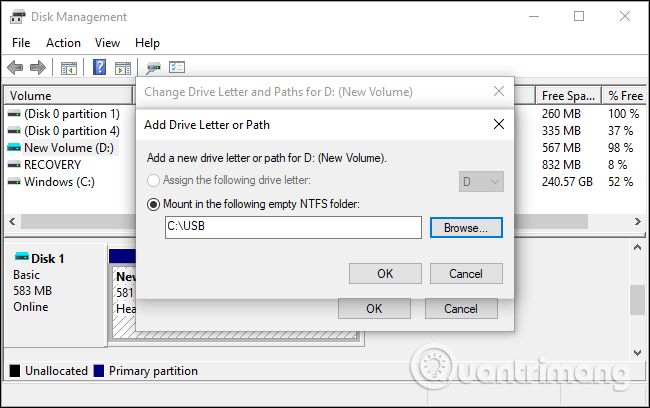
<p style="text-align: justify;">Câu trả lời là bạn có thể thực hiện điều đó trên Windows. Các phiên bản Windows hiện đại cho phép bạn mount các thiết bị lưu trữ theo đường dẫn thư mục. Tùy chọn này có trong công cụ&nbsp;<a href="https://quantrimang.com/truy-cap-disk-management-trong-windows-7-va-windows-8-93334" title="Truy cập Disk Management trong Windows 7 và Windows 8">Disk Management</a>. Bạn chỉ cần click chuột phải vào phân vùng của một ổ đĩa, chọn&nbsp;<strong>Change Drive Letters and Paths</strong>&nbsp;và sau đó click vào&nbsp;<strong>Add</strong>. Bạn có thể sử dụng tùy chọn&nbsp;<strong>Mount in the following empty NTFS folder</strong>&nbsp;để các thiết bị lưu trữ có đường dẫn thư mục như trên hệ điều hành giống Unix.</p>

<ul>
	<li style="text-align: justify;"><a href="https://quantrimang.com/xoa-bo-va-gan-ky-tu-o-dia-bat-ky-trong-windows-voi-diskpart-112687" title="Xoá bỏ và gán ký tự ổ đĩa bất kỳ trong Windows với Diskpart">Xoá bỏ và gán ký tự ổ đĩa bất kỳ trong Windows với Diskpart</a></li>
</ul>

<p style="text-align: justify;">Tuy nhiên, để thực hiện điều này, bạn phải mount ổ đĩa vào đường dẫn thư mục trên&nbsp;<a href="https://quantrimang.com/mot-so-kien-thuc-co-ban-ve-fat32-va-ntfs-20516" title="NTFS là gì? FAT32 là gì? So sánh NTFS và FAT32">hệ thống tập tin NTFS</a>và NTFS phải được mount vào ký tự ổ đĩa.</p>

<p style="text-align: justify;"><img alt="Thêm đường dẫn cho ổ đĩa " data-i="2" data-src="https://st.quantrimang.com/photos/image/2019/07/12/ly-do-windows-su-dung-ky-tu-o-dia-3.png" data-was-processed="true" height="402" src="https://st.quantrimang.com/photos/image/2019/07/12/ly-do-windows-su-dung-ky-tu-o-dia-3.png" width="640" /></p>

<p style="text-align: justify;">Do đó, ngay cả khi bạn đã sử dụng hết các ký tự ổ đĩa từ A đến Z, bạn vẫn có thể mount thêm các thiết bị lưu trữ và truy cập chúng trên Windows. Bạn không bị giới hạn ở 26 ổ đĩa trên phiên bản Windows hiện đại.</p>

<p style="text-align: justify;">Ngoài ra, bạn cũng có thể thay đổi ký tự cho ổ đĩa từ Disk Management, tuy nhiên không thể thay ổ đĩa C: thành ký tự khác. Ngay cả khi bạn thay ký tự D: thành E: cũng có thể xảy ra vấn đề.&nbsp;</p>

<div style="text-align: justify;">&nbsp;</div>

<h2 style="text-align: justify;">Tại sao Windows vẫn sử dụng ký tự cho ổ đĩa?</h2>

<p style="text-align: justify;"><img alt="Tại sao Windows vẫn sử dụng ký tự cho ổ đĩa" data-i="3" data-src="https://st.quantrimang.com/photos/image/2019/07/12/ly-do-windows-su-dung-ky-tu-o-dia-4.png" data-was-processed="true" height="297" src="https://st.quantrimang.com/photos/image/2019/07/12/ly-do-windows-su-dung-ky-tu-o-dia-4.png" width="640" /></p>

<p style="text-align: justify;">Nếu các hệ thống cũ sử dụng ký tự ổ đĩa (như C:) từ thời xa xưa và Windows có thể hoạt động mà không cần chúng, vậy tại sao họ vẫn sử dụng ký tự cho ổ đĩa?</p>

<p style="text-align: justify;">Lý do rất đơn giản và giải thích cho nhiều quyết định thiết kế của Windows, đó là tương thích ngược. Các phiên bản Windows đầu tiên phải tương thích với phần mềm MS-DOS và các phiên bản Windows hiện đại phải tương thích với phần mềm Windows cũ hơn. Đó là lý do họ vẫn sử dụng ký tự ổ đĩa.</p>

<p style="text-align: justify;">Về mặt kỹ thuật, bạn có thể cài đặt Windows để C: không phải là ổ đĩa hệ thống. Bạn có thể cài đặt nó thành ổ G:\ và có G:\Windows, G:\Users và G:\Program Files folders. C: không còn là ổ đĩa chính của bạn và điều này được Windows hỗ trợ chính thức. Tuy nhiên, nhiều ứng dụng Windows vẫn giả định bạn sử dụng ổ đĩa C: do đó bạn sẽ gặp vấn đề nếu không sử dụng ổ C: làm ổ chính khi sử dụng những ứng dụng này.</p>

<p style="text-align: justify;">Bạn có thể tự hỏi tại sao Windows vẫn hiển thị ký tự ổ đĩa. File Explorer có thể ẩn chúng và chỉ hiển thị các từ, System Drive hoặc USB Flash Drive nhưng File Explorer đã hiển thị mô tả đơn giản như thế và đôi khi bạn muốn biết ký tự ổ đĩa. Nhiều ứng dụng hiển thị các đường dẫn như D:\Folder\File.doc.</p>

<p style="text-align: justify;">Chắc chắn, Microsoft có thể đầu tư vào phần mềm tương thích chuyển hướng tất cả các yêu cầu cho C: sang một đường dẫn khác. Nhưng thay vì vứt bỏ các ký tự ổ đĩa và dành rất nhiều thời gian để sửa chữa những thứ sẽ bị hỏng do đó, Microsoft chọn cách gắn bó với các ký tự ổ đĩa.</p>
		</div>
				<div id="author">
						<p>
				<strong>Nguồn tin:</strong>
				Quantrimang.com
			</p>
		</div>
	</div>
	<div id="footer" class="clearfix">
		<div id="url">
			<strong>URL của bản tin này: </strong><a href="https://www.nguoicodonvn2008.info/vi/news/savefile/kien-thuc-may-tinh/tai-sao-windows-van-su-dung-ky-tu-cho-o-dia-441.html" title="Tại sao Windows vẫn sử dụng ký tự cho ổ đĩa?">https://www.nguoicodonvn2008.info/vi/news/savefile/kien-thuc-may-tinh/tai-sao-windows-van-su-dung-ky-tu-cho-o-dia-441.html</a>

		</div>
		<div class="clear"></div>
		<div class="copyright">
			&copy; .&#x3A; Nguoicodonvn2008.info - Cõi lòng người cô đơn &#x3A;.
		</div>
		<div id="contact">
			<a href="mailto:admin@nguoicodonvn2008.info">admin@nguoicodonvn2008.info</a>
		</div>
	</div>
</div>
        <div id="timeoutsess" class="chromeframe">
            Bạn đã không sử dụng Site, <a onclick="timeoutsesscancel();" href="https://www.nguoicodonvn2008.info/#">Bấm vào đây để duy trì trạng thái đăng nhập</a>. Thời gian chờ: <span id="secField"> 60 </span> giây
        </div>
        <div id="openidResult" class="nv-alert" style="display:none"></div>
        <div id="openidBt" data-result="" data-redirect=""></div>
		</script>
		<div class="car-top">
  <span><img src="https://www.nguoicodonvn2008.info/themes/default/images/car.png" alt=""></span>
</div>
<div id="run_cronjobs" style="visibility:hidden;display:none;"><img alt="cron" src="/index.php?second=cronjobs&amp;p=f85556fz" width="1" height="1" /></div>
<script src="https://www.nguoicodonvn2008.info/assets/js/jquery/jquery.min.js"></script>
<script>var nv_base_siteurl="/",nv_lang_data="vi",nv_lang_interface="vi",nv_name_variable="nv",nv_fc_variable="op",nv_lang_variable="language",nv_module_name="news",nv_func_name="savefile",nv_is_user=0, nv_my_ofs=-4,nv_my_abbr="EDT",nv_cookie_prefix="nv4c_e856T",nv_check_pass_mstime=1738000,nv_area_admin=0,nv_safemode=0,theme_responsive=0,nv_recaptcha_ver=2,nv_recaptcha_sitekey="",nv_recaptcha_type="image",XSSsanitize=1;</script>
<script src="https://www.nguoicodonvn2008.info/assets/js/language/vi.js"></script>
<script src="https://www.nguoicodonvn2008.info/assets/js/DOMPurify/purify3.js"></script>
<script src="https://www.nguoicodonvn2008.info/assets/js/global.js"></script>
<script src="https://www.nguoicodonvn2008.info/assets/js/site.js"></script>
<script src="https://www.nguoicodonvn2008.info/themes/default/js/news.js"></script>
<script src="https://www.nguoicodonvn2008.info/themes/default/js/main.js"></script>
<script src="https://www.nguoicodonvn2008.info/themes/default/js/custom.js"></script>
<script type="application/ld+json">
        {
            "@context": "https://schema.org",
            "@type": "Organization",
            "url": "https://www.nguoicodonvn2008.info",
            "logo": "https://www.nguoicodonvn2008.info/uploads/angel.gif"
        }
        </script>
<script src="https://www.nguoicodonvn2008.info/themes/default/js/bootstrap.min.js"></script>
<script type="text/javascript">
var $scrolltop = $('.car-top');
$scrolltop.on('click', function () {
    $('html,body').animate({
        scrollTop: 0
    }, 800);
    $(this).addClass("car-run");
    setTimeout(function(){ $scrolltop.removeClass('car-run');}, 1000);
    return false;
});
$(window).on('scroll', function ()
{ 
    if($(window).scrollTop() >= 200)
    {
        $scrolltop.addClass("show");
        $scrolltop.addClass("car-down");
    }
    else
    {
       $scrolltop.removeClass("show");
       setTimeout(function(){ $scrolltop.removeClass('car-down');}, 300);
    }
});
</script>
</body>
</html>