<!DOCTYPE html>
    <html lang="vi" xmlns="http://www.w3.org/1999/xhtml" prefix="og: http://ogp.me/ns#">
    <head>
<title>Tại sao nên sử dụng Windows Terminal thay vì Command Prompt?</title>
<meta name="description" content="Tại sao nên sử dụng Windows Terminal thay vì Command Prompt? - Savefile - Tin Tức -...">
<meta name="author" content=".: Nguoicodonvn2008.info - Cõi lòng người cô đơn :.">
<meta name="copyright" content=".: Nguoicodonvn2008.info - Cõi lòng người cô đơn :. [admin@nguoicodonvn2008.info]">
<meta name="robots" content="index, archive, follow, noodp">
<meta name="googlebot" content="index,archive,follow,noodp">
<meta name="msnbot" content="all,index,follow">
<meta name="generator" content="NukeViet v4.5">
<meta http-equiv="Content-Type" content="text/html; charset=utf-8">
<meta property="og:title" content="Tại sao nên sử dụng Windows Terminal thay vì Command Prompt?">
<meta property="og:type" content="website">
<meta property="og:description" content="Savefile - Tin Tức - https&#x3A;&#x002F;&#x002F;www.nguoicodonvn2008.info&#x002F;vi&#x002F;news&#x002F;savefile&#x002F;kien-thuc-may-tinh&#x002F;tai-sao-nen-su-dung-windows-terminal-thay-vi-command-prompt-11111.html">
<meta property="og:site_name" content=".&#x3A; Nguoicodonvn2008.info - Cõi lòng người cô đơn &#x3A;.">
<meta property="og:url" content="https://www.nguoicodonvn2008.info/vi/news/savefile/kien-thuc-may-tinh/tai-sao-nen-su-dung-windows-terminal-thay-vi-command-prompt-11111.html">
<link rel="shortcut icon" href="https://www.nguoicodonvn2008.info/favicon.ico">
<link rel="canonical" href="https://www.nguoicodonvn2008.info/vi/news/savefile/kien-thuc-may-tinh/tai-sao-nen-su-dung-windows-terminal-thay-vi-command-prompt-11111.html">
<link rel="alternate" href="https://www.nguoicodonvn2008.info/vi/news/rss/" title="Tin Tức" type="application/rss+xml">
<link rel="alternate" href="https://www.nguoicodonvn2008.info/vi/news/rss/karaoke-dual/" title="Tin Tức - Karaoke Dual" type="application/rss+xml">
<link rel="alternate" href="https://www.nguoicodonvn2008.info/vi/news/rss/nhac-tre/" title="Tin Tức - Nhạc trẻ" type="application/rss+xml">
<link rel="alternate" href="https://www.nguoicodonvn2008.info/vi/news/rss/tru-tinh/" title="Tin Tức - Trữ tình" type="application/rss+xml">
<link rel="alternate" href="https://www.nguoicodonvn2008.info/vi/news/rss/nuoc-ngoai/" title="Tin Tức - Nước ngoài" type="application/rss+xml">
<link rel="alternate" href="https://www.nguoicodonvn2008.info/vi/news/rss/remix/" title="Tin Tức - Remix" type="application/rss+xml">
<link rel="alternate" href="https://www.nguoicodonvn2008.info/vi/news/rss/tam-su-tinh-yeu/" title="Tin Tức - Tâm sự tình yêu" type="application/rss+xml">
<link rel="alternate" href="https://www.nguoicodonvn2008.info/vi/news/rss/tho-suu-tam/" title="Tin Tức - Thơ sưu tầm" type="application/rss+xml">
<link rel="alternate" href="https://www.nguoicodonvn2008.info/vi/news/rss/cuoc-song/" title="Tin Tức - Cuộc sống" type="application/rss+xml">
<link rel="alternate" href="https://www.nguoicodonvn2008.info/vi/news/rss/phan-mem/" title="Tin Tức - Phần mềm" type="application/rss+xml">
<link rel="alternate" href="https://www.nguoicodonvn2008.info/vi/news/rss/kien-thuc-may-tinh/" title="Tin Tức - Kiến thức máy tính" type="application/rss+xml">
<link rel="alternate" href="https://www.nguoicodonvn2008.info/vi/news/rss/hoc-tap/" title="Tin Tức - Học tập" type="application/rss+xml">
<link rel="alternate" href="https://www.nguoicodonvn2008.info/vi/news/rss/tai-lieu/" title="Tin Tức - Tài liệu" type="application/rss+xml">
<link rel="alternate" href="https://www.nguoicodonvn2008.info/vi/news/rss/de-thi/" title="Tin Tức - Đề thi" type="application/rss+xml">
<link rel="preload" as="style" href="https://www.nguoicodonvn2008.info/assets/css/font-awesome.min.css" type="text/css">
<link rel="preload" as="style" href="https://www.nguoicodonvn2008.info/themes/default/css/bootstrap.non-responsive.css" type="text/css">
<link rel="preload" as="style" href="https://www.nguoicodonvn2008.info/themes/default/css/style.css" type="text/css">
<link rel="preload" as="style" href="https://www.nguoicodonvn2008.info/themes/default/css/style.non-responsive.css" type="text/css">
<link rel="preload" as="style" href="https://www.nguoicodonvn2008.info/themes/default/css/news.css" type="text/css">
<link rel="preload" as="style" href="https://www.nguoicodonvn2008.info/themes/default/css/custom.css" type="text/css">
<link rel="preload" as="script" href="https://www.nguoicodonvn2008.info/assets/js/jquery/jquery.min.js" type="text/javascript">
<link rel="preload" as="script" href="https://www.nguoicodonvn2008.info/assets/js/language/vi.js" type="text/javascript">
<link rel="preload" as="script" href="https://www.nguoicodonvn2008.info/assets/js/DOMPurify/purify3.js" type="text/javascript">
<link rel="preload" as="script" href="https://www.nguoicodonvn2008.info/assets/js/global.js" type="text/javascript">
<link rel="preload" as="script" href="https://www.nguoicodonvn2008.info/assets/js/site.js" type="text/javascript">
<link rel="preload" as="script" href="https://www.nguoicodonvn2008.info/themes/default/js/news.js" type="text/javascript">
<link rel="preload" as="script" href="https://www.nguoicodonvn2008.info/themes/default/js/main.js" type="text/javascript">
<link rel="preload" as="script" href="https://www.nguoicodonvn2008.info/themes/default/js/custom.js" type="text/javascript">
<link rel="preload" as="script" href="https://www.nguoicodonvn2008.info/themes/default/js/bootstrap.min.js" type="text/javascript">
<link rel="stylesheet" href="https://www.nguoicodonvn2008.info/assets/css/font-awesome.min.css">
<link rel="stylesheet" href="https://www.nguoicodonvn2008.info/themes/default/css/bootstrap.non-responsive.css">
<link rel="stylesheet" href="https://www.nguoicodonvn2008.info/themes/default/css/style.css">
<link rel="stylesheet" href="https://www.nguoicodonvn2008.info/themes/default/css/style.non-responsive.css">
<link rel="StyleSheet" href="https://www.nguoicodonvn2008.info/themes/default/css/news.css">
<link rel="stylesheet" href="https://www.nguoicodonvn2008.info/themes/default/css/custom.css">
<style type="text/css">
	body{background: #fff;}
</style>
    </head>
    <body>
<div id="print">
	<div id="hd_print">
		<h2 class="pull-left">.&#x3A; Nguoicodonvn2008.info - Cõi lòng người cô đơn &#x3A;.</h2>
		<p class="pull-right"><a title=".&#x3A; Nguoicodonvn2008.info - Cõi lòng người cô đơn &#x3A;." href="https://www.nguoicodonvn2008.info/">https://www.nguoicodonvn2008.info</a></p>
	</div>
	<div class="clear"></div>
	<hr />
	<div id="content">
		<h1>Tại sao nên sử dụng Windows Terminal thay vì Command Prompt?</h1>
		<ul class="list-inline">
			<li>Thứ ba - 09/09/2025 23:16</li>
			<li class="hidden-print txtrequired"><em class="fa fa-print">&nbsp;</em><a title="In ra" href="javascript:;" onclick="window.print()">In ra</a></li>
			<li class="hidden-print txtrequired"><em class="fa fa-power-off">&nbsp;</em><a title="Đóng cửa sổ này" href="javascript:;" onclick="window.close()">Đóng cửa sổ này</a></li>
		</ul>
		<div class="clear"></div>
		<div id="hometext">
		</div>
				<div class="imghome">
			<img alt="Tại sao nên sử dụng Windows Terminal thay vì Command Prompt?" src="https://st.quantrimang.com/photos/image/2025/09/09/dung-windows-terminal-thay-command-prompt-8.jpg" width="460" class="img-thumbnail" />
		</div>
		<div class="clear"></div>
		<div id="bodytext" class="clearfix">
			<p style="text-align: justify;">Command Prompt&nbsp;là một shell dòng lệnh đơn giản. Bạn có thể sử dụng nó để sao chép file, logic lệnh và thậm chí là trình quản lý tải xuống. Tuy nhiên, nó chưa bao giờ ngang hàng với các phiên bản Unix. Nó không có tab và không có màn hình chia đôi; chỉ có một cửa sổ đen tại một thời điểm.</p>

<div style="text-align: justify;">&nbsp;</div>

<p style="text-align: justify;">Windows Terminal được phát hành vào năm 2019, nhưng nhiều người đã không chuyển sang ứng dụng mới cho đến khi Microsoft đặt nó làm tùy chọn mặc định trong&nbsp;Windows 11. Windows Terminal&nbsp;xử lý mọi thứ mà Command Prompt làm được, cộng với các tính năng quy trình làm việc mà người dùng Linux đã yêu thích trong nhiều thập kỷ.</p>

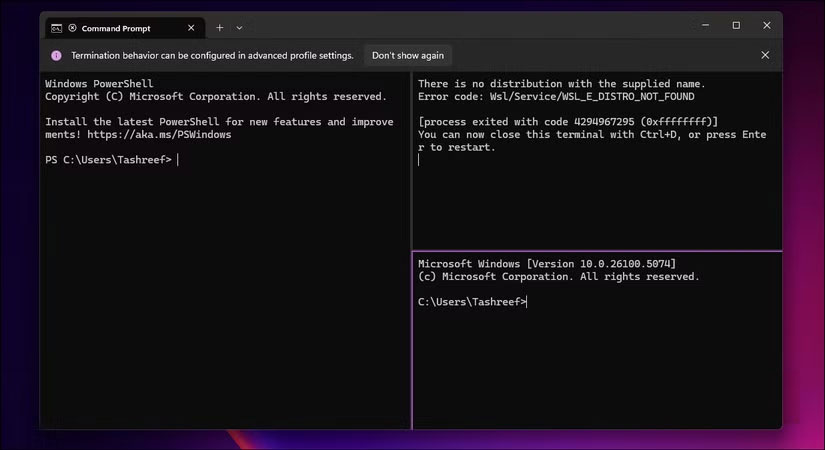
<h2 style="text-align: justify;">4. Nhiều tab và chia khung</h2>

<h3 style="text-align: justify;">Tuyệt vời cho đa nhiệm</h3>

<figure>
<div style="text-align: justify;"><img alt="Windows Terminal hiển thị lỗi PowerShell, Command Prompt và WSL trong các khung chia đôi" data-adbro-processed="true" data-i="0" data-src="https://st.quantrimang.com/photos/image/2025/09/09/dung-windows-terminal-thay-command-prompt-1.jpg" data-was-processed="true" height="450" src="https://st.quantrimang.com/photos/image/2025/09/09/dung-windows-terminal-thay-command-prompt-1.jpg" width="825" /></div>

<figcaption>
<div style="text-align: justify;">Windows Terminal hiển thị lỗi PowerShell, Command Prompt và WSL trong các khung chia đôi</div>
</figcaption>
</figure>

<p style="text-align: justify;">Windows Terminal bổ sung hỗ trợ nhiều tab, điều mà Command Prompt chưa bao giờ có. Khi mở terminal, hãy nhấn&nbsp;<strong>Ctrl + Shift + T&nbsp;</strong>để mở một tab mới và&nbsp;<strong>Ctrl + Tab</strong>&nbsp;để chuyển đổi giữa các tab. Mỗi tab duy trì phiên làm việc riêng, vì vậy bạn có thể chạy quy trình build trong một tab trong khi theo dõi nhật ký trong một tab khác mà không làm lộn xộn thanh tác vụ với những cửa sổ riêng biệt.</p>

<p style="text-align: justify;">Không chỉ vậy. Windows Terminal còn cung cấp tính năng chia khung, cho phép bạn chia một tab thành nhiều khung. Nhấn&nbsp;<strong>Shift + Alt + Dấu trừ (-)&nbsp;</strong>để chia theo chiều ngang hoặc&nbsp;<strong>Shift + Alt + Dấu bằng (=)</strong>&nbsp;để chia theo chiều dọc.</p>

<p style="text-align: justify;">Nếu nhấn&nbsp;<strong>Shift + Alt + phím Mũi tên</strong>, bạn có thể điều chỉnh kích thước khung.</p>

<h2 style="text-align: justify;">3. Một terminal, nhiều shell</h2>

<h3 style="text-align: justify;">Tất cả các công cụ dòng lệnh, bao gồm CMD và PowerShell</h3>

<figure>
<div style="text-align: justify;"><img alt="Giao diện Windows Terminal hiển thị nhiều tùy chọn shell bao gồm Command Prompt, PowerShell, Ubuntu và Azure Cloud Shell" data-i="1" data-src="https://st.quantrimang.com/photos/image/2025/09/09/dung-windows-terminal-thay-command-prompt-2.jpg" data-was-processed="true" height="407" src="https://st.quantrimang.com/photos/image/2025/09/09/dung-windows-terminal-thay-command-prompt-2.jpg" width="825" /></div>

<figcaption>
<div style="text-align: justify;">Giao diện Windows Terminal hiển thị nhiều tùy chọn shell bao gồm Command Prompt, PowerShell, Ubuntu và Azure Cloud Shell</div>
</figcaption>
</figure>

<p style="text-align: justify;">Một điểm hay của Windows Terminal là nếu bạn quen sử dụng cmd.exe hoặc&nbsp;PowerShell&nbsp;cổ điển, bạn có thể khởi chạy chúng từ ứng dụng terminal. Nó hợp nhất tất cả, vì vậy các shell dòng lệnh như Command Prompt, PowerShell, Git Bash, Azure Cloud Shell và bất kỳ bản phân phối WSL nào đều nằm trong cùng một ứng dụng.</p>

<p style="text-align: justify;">Mỗi công cụ có cấu hình riêng với các thiết lập tùy chỉnh. Cấu hình PowerShell của bạn có thể sử dụng bảng màu và phông chữ khác với cấu hình Command Prompt. Việc hiển thị phông chữ được cải thiện cũng đồng nghĩa với việc các mô-đun PowerShell như PSReadLine và Terminal-Icons hiển thị chính xác với tính năng highlight cú pháp và biểu tượng loại file.</p>

<h2 style="text-align: justify;">2. Các tùy chọn tùy chỉnh tốt hơn</h2>

<h3 style="text-align: justify;">Cá nhân hóa với màu sắc và theme tùy chỉnh</h3>

<div style="text-align: justify;">&nbsp;</div>

<p style="text-align: justify;">Windows Terminal cũng rất tuyệt vời cho việc tùy chỉnh. Bạn có thể thay đổi giao diện của dấu nhắc, chọn phông chữ tùy chỉnh, điều chỉnh kích thước văn bản và áp dụng toàn bộ theme. Trong khi Command Prompt cung cấp 16 màu và hai phông chữ, Windows Terminal hỗ trợ bất kỳ phông chữ đơn cách nào trên hệ thống và cho phép tùy chỉnh toàn bộ màu RGB.</p>

<p style="text-align: justify;">Bạn có thể truy cập Settings thông qua GUI hoặc bằng cách chỉnh sửa trực tiếp file&nbsp;<strong>settings.json</strong>. Điều này cho phép bạn thiết lập độ trong suốt bằng thanh trượt độ mờ, thêm ảnh nền vào profile, điều chỉnh khoảng cách để dễ đọc hơn và nhập theme cộng đồng chỉ bằng vài cú nhấp chuột. Mỗi profile duy trì các thiết lập giao diện độc lập.</p>

<h2 style="text-align: justify;">1. Tích hợp hỗ trợ Linux</h2>

<h3 style="text-align: justify;">Hoạt động tốt với Windows Subsystem for Linux</h3>

<figure>
<div style="text-align: justify;"><img alt="Cài đặt Windows Terminal Actions hiển thị các phím tắt cho những thao tác trên panel và tab phổ biến" data-i="7" data-src="https://st.quantrimang.com/photos/image/2025/09/09/dung-windows-terminal-thay-command-prompt-8.jpg" data-was-processed="true" height="488" src="https://st.quantrimang.com/photos/image/2025/09/09/dung-windows-terminal-thay-command-prompt-8.jpg" width="825" /></div>

<figcaption>
<div style="text-align: justify;">Cài đặt Windows Terminal Actions hiển thị các phím tắt cho những thao tác trên panel và tab phổ biến</div>
</figcaption>
</figure>

<p style="text-align: justify;">Windows 10 và 11 cho phép bạn chạy môi trường Linux trên máy tính Windows, nhờ Windows Subsystem for Linux (WSL). Windows Terminal cho phép bạn truy cập&nbsp;Ubuntu&nbsp;ở cùng một nơi với PowerShell, coi các bản phân phối Linux là một phần của hệ điều hành chứ không phải là một tiện ích bổ sung.</p>

<p style="text-align: justify;">Khi bạn cài đặt một bản phân phối WSL, Windows Terminal sẽ tự động tạo một cấu hình cho bản phân phối đó. Bạn có thể mở các tab Ubuntu, Debian và Alpine cùng với những shell Windows. Windows Terminal hỗ trợ các đường dẫn có thể nhấp và với tính năng dịch đường dẫn của WSL, bạn có thể dễ dàng di chuyển giữa các hệ thống file Linux và Windows.</p>

<p style="text-align: justify;">Trong Command Prompt, việc truy cập WSL đồng nghĩa với việc nhập wsl và mất hoàn toàn ngữ cảnh Windows. Bạn không thể dễ dàng sao chép đường dẫn giữa các môi trường hoặc duy trì tính nhất quán về mặt hình ảnh. Windows Terminal mang lại cảm giác WSL nguyên bản.</p>

<div style="text-align: justify;">&nbsp;</div>
		</div>
				<div id="author">
						<p>
				<strong>Nguồn tin:</strong>
				Quantrimang.com:
			</p>
		</div>
	</div>
	<div id="footer" class="clearfix">
		<div id="url">
			<strong>URL của bản tin này: </strong><a href="https://www.nguoicodonvn2008.info/vi/news/savefile/kien-thuc-may-tinh/tai-sao-nen-su-dung-windows-terminal-thay-vi-command-prompt-11111.html" title="Tại sao nên sử dụng Windows Terminal thay vì Command Prompt?">https://www.nguoicodonvn2008.info/vi/news/savefile/kien-thuc-may-tinh/tai-sao-nen-su-dung-windows-terminal-thay-vi-command-prompt-11111.html</a>

		</div>
		<div class="clear"></div>
		<div class="copyright">
			&copy; .&#x3A; Nguoicodonvn2008.info - Cõi lòng người cô đơn &#x3A;.
		</div>
		<div id="contact">
			<a href="mailto:admin@nguoicodonvn2008.info">admin@nguoicodonvn2008.info</a>
		</div>
	</div>
</div>
        <div id="timeoutsess" class="chromeframe">
            Bạn đã không sử dụng Site, <a onclick="timeoutsesscancel();" href="https://www.nguoicodonvn2008.info/#">Bấm vào đây để duy trì trạng thái đăng nhập</a>. Thời gian chờ: <span id="secField"> 60 </span> giây
        </div>
        <div id="openidResult" class="nv-alert" style="display:none"></div>
        <div id="openidBt" data-result="" data-redirect=""></div>
		</script>
		<div class="car-top">
  <span><img src="https://www.nguoicodonvn2008.info/themes/default/images/car.png" alt=""></span>
</div>
<script src="https://www.nguoicodonvn2008.info/assets/js/jquery/jquery.min.js"></script>
<script>var nv_base_siteurl="/",nv_lang_data="vi",nv_lang_interface="vi",nv_name_variable="nv",nv_fc_variable="op",nv_lang_variable="language",nv_module_name="news",nv_func_name="savefile",nv_is_user=0, nv_my_ofs=-4,nv_my_abbr="EDT",nv_cookie_prefix="nv4c_e856T",nv_check_pass_mstime=1738000,nv_area_admin=0,nv_safemode=0,theme_responsive=0,nv_recaptcha_ver=2,nv_recaptcha_sitekey="",nv_recaptcha_type="image",XSSsanitize=1;</script>
<script src="https://www.nguoicodonvn2008.info/assets/js/language/vi.js"></script>
<script src="https://www.nguoicodonvn2008.info/assets/js/DOMPurify/purify3.js"></script>
<script src="https://www.nguoicodonvn2008.info/assets/js/global.js"></script>
<script src="https://www.nguoicodonvn2008.info/assets/js/site.js"></script>
<script src="https://www.nguoicodonvn2008.info/themes/default/js/news.js"></script>
<script src="https://www.nguoicodonvn2008.info/themes/default/js/main.js"></script>
<script src="https://www.nguoicodonvn2008.info/themes/default/js/custom.js"></script>
<script type="application/ld+json">
        {
            "@context": "https://schema.org",
            "@type": "Organization",
            "url": "https://www.nguoicodonvn2008.info",
            "logo": "https://www.nguoicodonvn2008.info/uploads/angel.gif"
        }
        </script>
<script src="https://www.nguoicodonvn2008.info/themes/default/js/bootstrap.min.js"></script>
<script type="text/javascript">
var $scrolltop = $('.car-top');
$scrolltop.on('click', function () {
    $('html,body').animate({
        scrollTop: 0
    }, 800);
    $(this).addClass("car-run");
    setTimeout(function(){ $scrolltop.removeClass('car-run');}, 1000);
    return false;
});
$(window).on('scroll', function ()
{ 
    if($(window).scrollTop() >= 200)
    {
        $scrolltop.addClass("show");
        $scrolltop.addClass("car-down");
    }
    else
    {
       $scrolltop.removeClass("show");
       setTimeout(function(){ $scrolltop.removeClass('car-down');}, 300);
    }
});
</script>
</body>
</html>