<!DOCTYPE html>
    <html lang="vi" xmlns="http://www.w3.org/1999/xhtml" prefix="og: http://ogp.me/ns#">
    <head>
<title>Tại sao nên sử dụng quy tắc lọc domain người gửi trong email?</title>
<meta name="description" content="Tại sao nên sử dụng quy tắc lọc domain người gửi trong email? - Savefile - Tin Tức -...">
<meta name="author" content=".: Nguoicodonvn2008.info - Cõi lòng người cô đơn :.">
<meta name="copyright" content=".: Nguoicodonvn2008.info - Cõi lòng người cô đơn :. [admin@nguoicodonvn2008.info]">
<meta name="robots" content="index, archive, follow, noodp">
<meta name="googlebot" content="index,archive,follow,noodp">
<meta name="msnbot" content="all,index,follow">
<meta name="generator" content="NukeViet v4.5">
<meta http-equiv="Content-Type" content="text/html; charset=utf-8">
<meta property="og:title" content="Tại sao nên sử dụng quy tắc lọc domain người gửi trong email?">
<meta property="og:type" content="website">
<meta property="og:description" content="Savefile - Tin Tức - https&#x3A;&#x002F;&#x002F;www.nguoicodonvn2008.info&#x002F;vi&#x002F;news&#x002F;savefile&#x002F;kien-thuc-may-tinh&#x002F;tai-sao-nen-su-dung-quy-tac-loc-domain-nguoi-gui-trong-email-10574.html">
<meta property="og:site_name" content=".&#x3A; Nguoicodonvn2008.info - Cõi lòng người cô đơn &#x3A;.">
<meta property="og:url" content="https://www.nguoicodonvn2008.info/vi/news/savefile/kien-thuc-may-tinh/tai-sao-nen-su-dung-quy-tac-loc-domain-nguoi-gui-trong-email-10574.html">
<link rel="shortcut icon" href="https://www.nguoicodonvn2008.info/favicon.ico">
<link rel="canonical" href="https://www.nguoicodonvn2008.info/vi/news/savefile/kien-thuc-may-tinh/tai-sao-nen-su-dung-quy-tac-loc-domain-nguoi-gui-trong-email-10574.html">
<link rel="alternate" href="https://www.nguoicodonvn2008.info/vi/news/rss/" title="Tin Tức" type="application/rss+xml">
<link rel="alternate" href="https://www.nguoicodonvn2008.info/vi/news/rss/karaoke-dual/" title="Tin Tức - Karaoke Dual" type="application/rss+xml">
<link rel="alternate" href="https://www.nguoicodonvn2008.info/vi/news/rss/nhac-tre/" title="Tin Tức - Nhạc trẻ" type="application/rss+xml">
<link rel="alternate" href="https://www.nguoicodonvn2008.info/vi/news/rss/tru-tinh/" title="Tin Tức - Trữ tình" type="application/rss+xml">
<link rel="alternate" href="https://www.nguoicodonvn2008.info/vi/news/rss/nuoc-ngoai/" title="Tin Tức - Nước ngoài" type="application/rss+xml">
<link rel="alternate" href="https://www.nguoicodonvn2008.info/vi/news/rss/remix/" title="Tin Tức - Remix" type="application/rss+xml">
<link rel="alternate" href="https://www.nguoicodonvn2008.info/vi/news/rss/tam-su-tinh-yeu/" title="Tin Tức - Tâm sự tình yêu" type="application/rss+xml">
<link rel="alternate" href="https://www.nguoicodonvn2008.info/vi/news/rss/tho-suu-tam/" title="Tin Tức - Thơ sưu tầm" type="application/rss+xml">
<link rel="alternate" href="https://www.nguoicodonvn2008.info/vi/news/rss/cuoc-song/" title="Tin Tức - Cuộc sống" type="application/rss+xml">
<link rel="alternate" href="https://www.nguoicodonvn2008.info/vi/news/rss/phan-mem/" title="Tin Tức - Phần mềm" type="application/rss+xml">
<link rel="alternate" href="https://www.nguoicodonvn2008.info/vi/news/rss/kien-thuc-may-tinh/" title="Tin Tức - Kiến thức máy tính" type="application/rss+xml">
<link rel="alternate" href="https://www.nguoicodonvn2008.info/vi/news/rss/hoc-tap/" title="Tin Tức - Học tập" type="application/rss+xml">
<link rel="alternate" href="https://www.nguoicodonvn2008.info/vi/news/rss/tai-lieu/" title="Tin Tức - Tài liệu" type="application/rss+xml">
<link rel="alternate" href="https://www.nguoicodonvn2008.info/vi/news/rss/de-thi/" title="Tin Tức - Đề thi" type="application/rss+xml">
<link rel="preload" as="style" href="https://www.nguoicodonvn2008.info/assets/css/font-awesome.min.css" type="text/css">
<link rel="preload" as="style" href="https://www.nguoicodonvn2008.info/themes/default/css/bootstrap.non-responsive.css" type="text/css">
<link rel="preload" as="style" href="https://www.nguoicodonvn2008.info/themes/default/css/style.css" type="text/css">
<link rel="preload" as="style" href="https://www.nguoicodonvn2008.info/themes/default/css/style.non-responsive.css" type="text/css">
<link rel="preload" as="style" href="https://www.nguoicodonvn2008.info/themes/default/css/news.css" type="text/css">
<link rel="preload" as="style" href="https://www.nguoicodonvn2008.info/themes/default/css/custom.css" type="text/css">
<link rel="preload" as="script" href="https://www.nguoicodonvn2008.info/assets/js/jquery/jquery.min.js" type="text/javascript">
<link rel="preload" as="script" href="https://www.nguoicodonvn2008.info/assets/js/language/vi.js" type="text/javascript">
<link rel="preload" as="script" href="https://www.nguoicodonvn2008.info/assets/js/DOMPurify/purify3.js" type="text/javascript">
<link rel="preload" as="script" href="https://www.nguoicodonvn2008.info/assets/js/global.js" type="text/javascript">
<link rel="preload" as="script" href="https://www.nguoicodonvn2008.info/assets/js/site.js" type="text/javascript">
<link rel="preload" as="script" href="https://www.nguoicodonvn2008.info/themes/default/js/news.js" type="text/javascript">
<link rel="preload" as="script" href="https://www.nguoicodonvn2008.info/themes/default/js/main.js" type="text/javascript">
<link rel="preload" as="script" href="https://www.nguoicodonvn2008.info/themes/default/js/custom.js" type="text/javascript">
<link rel="preload" as="script" href="https://www.nguoicodonvn2008.info/themes/default/js/bootstrap.min.js" type="text/javascript">
<link rel="stylesheet" href="https://www.nguoicodonvn2008.info/assets/css/font-awesome.min.css">
<link rel="stylesheet" href="https://www.nguoicodonvn2008.info/themes/default/css/bootstrap.non-responsive.css">
<link rel="stylesheet" href="https://www.nguoicodonvn2008.info/themes/default/css/style.css">
<link rel="stylesheet" href="https://www.nguoicodonvn2008.info/themes/default/css/style.non-responsive.css">
<link rel="StyleSheet" href="https://www.nguoicodonvn2008.info/themes/default/css/news.css">
<link rel="stylesheet" href="https://www.nguoicodonvn2008.info/themes/default/css/custom.css">
<style type="text/css">
	body{background: #fff;}
</style>
    </head>
    <body>
<div id="print">
	<div id="hd_print">
		<h2 class="pull-left">.&#x3A; Nguoicodonvn2008.info - Cõi lòng người cô đơn &#x3A;.</h2>
		<p class="pull-right"><a title=".&#x3A; Nguoicodonvn2008.info - Cõi lòng người cô đơn &#x3A;." href="https://www.nguoicodonvn2008.info/">https://www.nguoicodonvn2008.info</a></p>
	</div>
	<div class="clear"></div>
	<hr />
	<div id="content">
		<h1>Tại sao nên sử dụng quy tắc lọc domain người gửi trong email?</h1>
		<ul class="list-inline">
			<li>Chủ nhật - 15/06/2025 03:22</li>
			<li class="hidden-print txtrequired"><em class="fa fa-print">&nbsp;</em><a title="In ra" href="javascript:;" onclick="window.print()">In ra</a></li>
			<li class="hidden-print txtrequired"><em class="fa fa-power-off">&nbsp;</em><a title="Đóng cửa sổ này" href="javascript:;" onclick="window.close()">Đóng cửa sổ này</a></li>
		</ul>
		<div class="clear"></div>
		<div id="hometext">
		</div>
				<div class="imghome">
			<img alt="Tại sao nên sử dụng quy tắc lọc domain người gửi trong email?" src="https://st.quantrimang.com/photos/image/2025/06/14/quy-tac-loc-domain-nguoi-gui-trong-email-7.jpg" width="460" class="img-thumbnail" />
		</div>
		<div class="clear"></div>
		<div id="bodytext" class="clearfix">
			<h1>&nbsp;</h1>

<p>Mỗi sáng, bạn thấy một số email quan trọng bị chôn vùi dưới đống quảng cáo lộn xộn. Trong khi hầu hết mọi người dựa vào các thư mục hoặc nhãn cơ bản, thì có một giải pháp mạnh mẽ hơn ẩn trong tầm nhìn rõ ràng: Quy tắc lọc domain, nhưng đáng ngạc nhiên là ít người biết về chúng.</p>

<h2>Quy tắc lọc domain người gửi là gì?</h2>

<p>Quy tắc lọc domain người gửi tự động sắp xếp email dựa trên domain mà chúng đến - đó là mọi thứ sau ký hiệu @ trong địa chỉ email. Thay vì tạo bộ lọc cho từng người gửi, bạn sắp xếp theo toàn bộ công ty hoặc dịch vụ.</p>

<p>Hãy cân nhắc điều này: khi Amazon gửi email cho bạn, email có thể đến từ các địa chỉ như&nbsp;<em>no-reply@amazon.com</em>&nbsp;hoặc&nbsp;<em>orders@amazon.com,</em>&nbsp;trong số hàng chục địa chỉ khác. Việc tạo bộ lọc riêng cho từng địa chỉ sẽ rất mệt mỏi, vì vậy bộ lọc domain sẽ tóm tất cả chúng bằng cách nhắm mục tiêu đến&nbsp;<em>@amazon.com.</em></p>

<p>Quy tắc này hữu ích để quản lý bản tin, email công việc và thông báo mua sắm. Bạn có thể tạo và sử dụng các quy tắc trong&nbsp;<a data-type="internal" href="https://quantrimang.com/cong-nghe/huong-dan-cach-su-dung-outlook-2013-cho-nguoi-moi-144897" title="Outlook là gì? Cách sử dụng Outlook cho người mới">Outlook</a>&nbsp;để quản lý việc sắp xếp hộp thư đến và hầu hết những nhà cung cấp email lớn đều cung cấp chức năng tương tự.</p>

<p>Hầu hết mọi người bỏ lỡ tính năng này vì họ tập trung vào việc lọc những người gửi cụ thể. Nhưng khi bạn nhận ra rằng các công ty sử dụng nhiều địa chỉ email cho những mục đích khác nhau, việc lọc domain đột nhiên trở nên hoàn toàn hợp lý.</p>

<h2>Cách thiết lập bộ lọc domain</h2>

<p>Thiết lập bộ lọc domain chỉ mất vài phút vì cả&nbsp;<a data-type="internal" href="https://quantrimang.com/download/gmail-184301" title="Gmail">Gmail</a>&nbsp;và Outlook đều cung cấp các công cụ tích hợp. Tuy nhiên, mỗi nền tảng đều có những điểm kỳ quặc riêng, nhưng điều quan trọng là nhắm mục tiêu vào domain chứ không phải từng địa chỉ.</p>

<h3>Thiết lập bộ lọc domain trong Gmail</h3>

<p>Gmail không có nút lọc theo domain chuyên dụng. Thay vào đó, bạn sử dụng các toán tử tìm kiếm mạnh mẽ của nó trong công cụ tạo bộ lọc. Đây là giải pháp thay thế đơn giản hoạt động hoàn hảo sau khi thiết lập. Sau đây là cách để thiết lập bộ lọc:</p>

<ol>
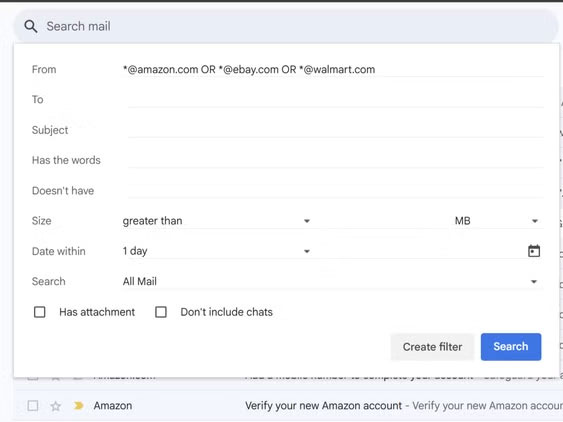
	<li>Nhấp vào biểu tượng bộ lọc ở bên phải thanh tìm kiếm ở trên cùng. Thao tác này sẽ mở menu tìm kiếm nâng cao.</li>
	<li>Trong trường&nbsp;<strong>From</strong>, nhập *@domain.com. Dấu hoa thị (*) đóng vai trò là ký tự đại diện cho bất kỳ người gửi nào tại domain đó.</li>
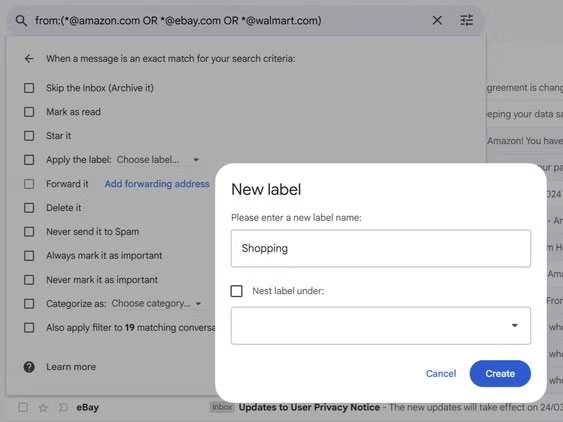
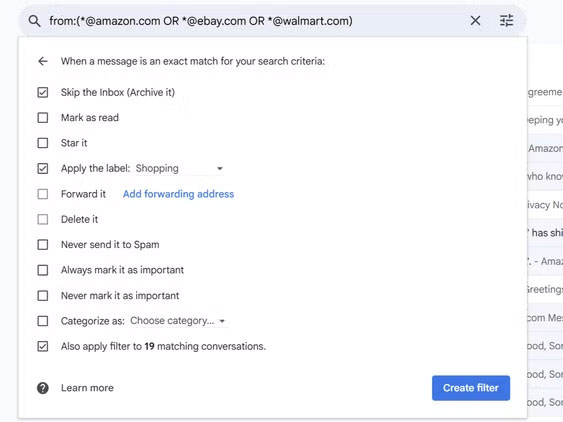
	<li>Nhấp vào&nbsp;<strong>Create filter</strong>&nbsp;và chọn những gì sẽ xảy ra với các email này. Xóa bộ lọc là cách thường làm để xử lý thư rác thực sự. Bạn cũng có thể áp dụng nhãn để phân loại chúng một cách gọn gàng.</li>
	<li>Chọn&nbsp;<strong>Also apply filter to matching conversations</strong>&nbsp;để dọn sạch các email hiện có, sau đó nhấp vào&nbsp;<strong>Create filter</strong>.</li>
</ol>

<figure><img alt="" data-i="0" data-src="https://st.quantrimang.com/photos/image/2025/06/14/quy-tac-loc-domain-nguoi-gui-trong-email-1.jpg" data-was-processed="true" height="422" src="https://st.quantrimang.com/photos/image/2025/06/14/quy-tac-loc-domain-nguoi-gui-trong-email-1.jpg" width="563" /></figure>

<figure><img alt="" data-i="1" data-src="https://st.quantrimang.com/photos/image/2025/06/14/quy-tac-loc-domain-nguoi-gui-trong-email-2.jpg" data-was-processed="true" height="422" src="https://st.quantrimang.com/photos/image/2025/06/14/quy-tac-loc-domain-nguoi-gui-trong-email-2.jpg" width="563" /></figure>

<figure><img alt="" data-i="2" data-src="https://st.quantrimang.com/photos/image/2025/06/14/quy-tac-loc-domain-nguoi-gui-trong-email-3.jpg" data-was-processed="true" height="422" src="https://st.quantrimang.com/photos/image/2025/06/14/quy-tac-loc-domain-nguoi-gui-trong-email-3.jpg" width="563" /></figure>

<p>Dấu hoa thị trước ký hiệu @ rất quan trọng vì nó yêu cầu Gmail bắt tất cả các email từ domain đó. Nếu không, các bộ lọc sẽ không hoạt động chính xác.</p>

<p><strong>Lưu ý</strong>: Trước tiên, hãy thử các bộ lọc mới với một domain, vì nó tránh vô tình ẩn các email quan trọng.</p>

<p>Theo thời gian, các quy tắc lỗi thời có thể cản trở các ứng dụng email hoặc gây ra lỗi. Sau đây là cách xóa chúng:</p>

<ol>
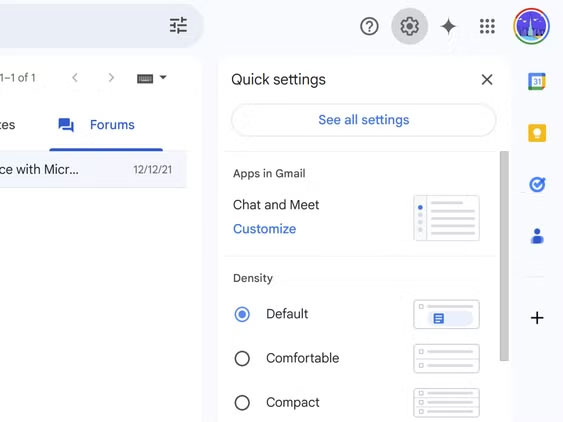
	<li>Truy cập&nbsp;<strong>Settings</strong>&nbsp;bằng cách nhấp vào biểu tượng bánh răng, sau đó chọn&nbsp;<strong>See all settings</strong>.</li>
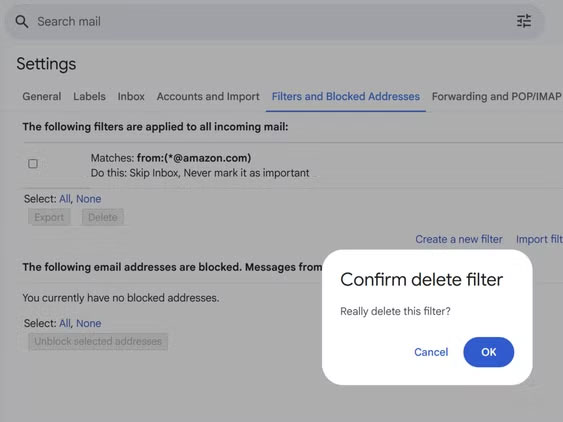
	<li>Nhấp vào&nbsp;<strong>Filters and blocked addresses</strong>, rồi tìm bộ lọc bạn muốn xóa khỏi danh sách.</li>
	<li>Nhấp vào nút&nbsp;<strong>Edit</strong>&nbsp;hoặc&nbsp;<strong>Delete</strong>&nbsp;bên cạnh bộ lọc.</li>
	<li>Để xóa nhãn, hãy di chuột qua tên nhãn ở thanh bên trái và nhấp vào&nbsp;<strong>Remove label</strong>.</li>
</ol>

<figure><img alt="" data-i="3" data-src="https://st.quantrimang.com/photos/image/2025/06/14/quy-tac-loc-domain-nguoi-gui-trong-email-4.jpg" data-was-processed="true" height="422" src="https://st.quantrimang.com/photos/image/2025/06/14/quy-tac-loc-domain-nguoi-gui-trong-email-4.jpg" width="563" /></figure>

<figure><img alt="" data-i="4" data-src="https://st.quantrimang.com/photos/image/2025/06/14/quy-tac-loc-domain-nguoi-gui-trong-email-5.jpg" data-was-processed="true" height="422" src="https://st.quantrimang.com/photos/image/2025/06/14/quy-tac-loc-domain-nguoi-gui-trong-email-5.jpg" width="563" /></figure>

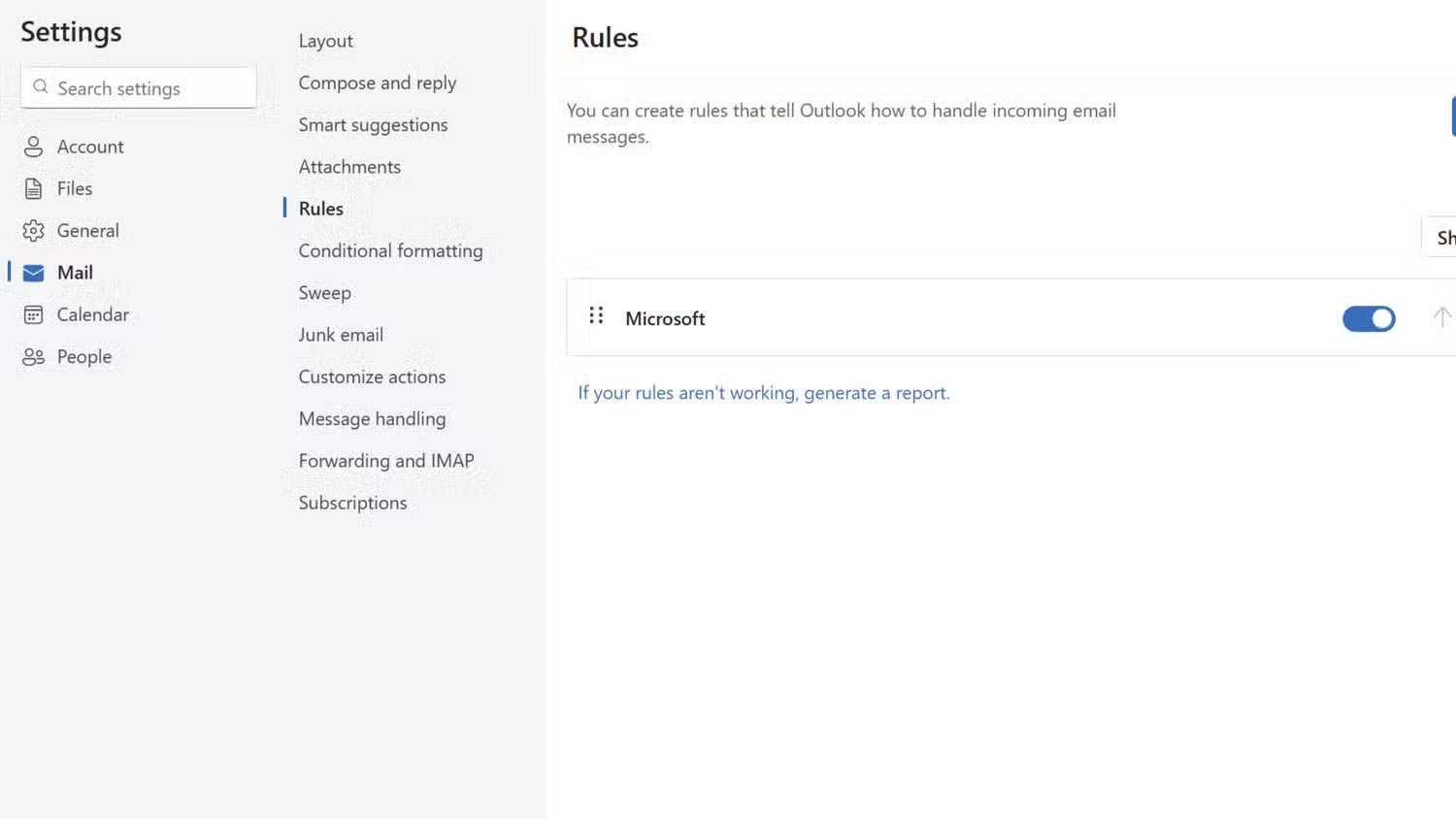
<p>Gmail cho phép bạn kết hợp nhiều domain trong một bộ lọc. Chỉ cần phân tách chúng bằng OR (viết hoa), như:&nbsp;<em>*@amazon.com OR *@ebay.com</em>. Tính năng này tỏ ra hữu ích khi quản lý tất cả các email mua sắm trong một lần quét.</p>

<h3>Thiết lập bộ lọc domain trong Outlook</h3>

<p>Phiên bản trình duyệt của Outlook chôn vùi các quy tắc sâu hơn ứng dụng desktop - có một sự thất vọng nhẹ. Nhưng khi bạn biết nơi để tìm, mọi thứ trở nên đơn giản. Thực hiện theo các bước sau để thiết lập bộ lọc domain:</p>

<ol>
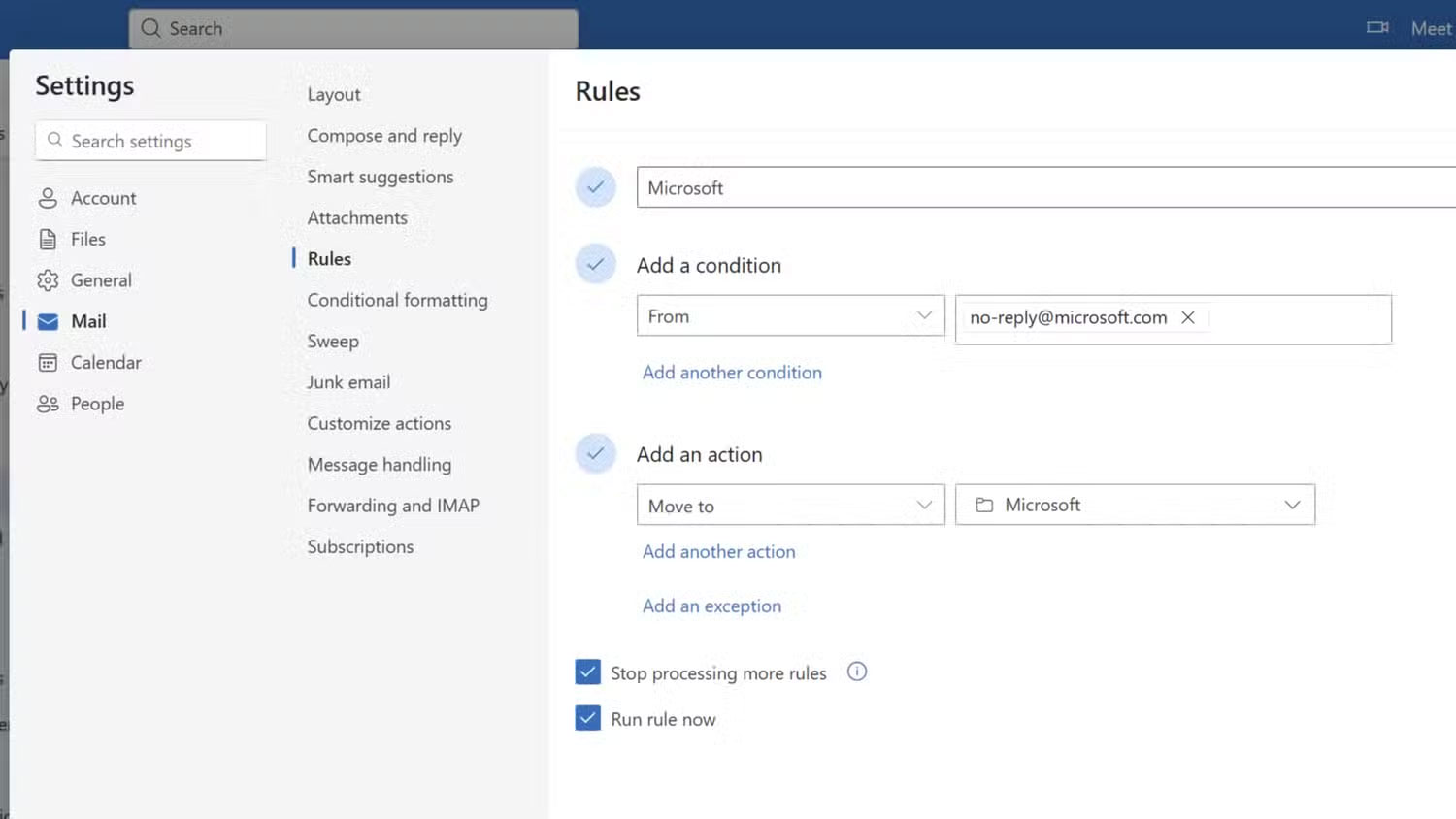
	<li>Nhấp vào biểu tượng&nbsp;<strong>Settings</strong>&nbsp;ở góc trên bên phải.</li>
	<li>Đi tới&nbsp;<strong>Mail</strong>&nbsp;rồi chọn&nbsp;<strong>Rules</strong>.</li>
	<li>Nhấp vào&nbsp;<strong>+ Add new rule</strong>&nbsp;và đặt tên cho quy tắc đó (ví dụ, Shopping).</li>
	<li>Trong mục&nbsp;<strong>Add a condition</strong>, chọn&nbsp;<strong>From</strong>&nbsp;rồi nhập&nbsp;<em>@domain.com.</em></li>
	<li>Trong mục&nbsp;<strong>Add an action</strong>, chọn&nbsp;<strong>Move to</strong>&nbsp;rồi chọn thư mục (trước tiên hãy tạo thư mục mới bằng cách nhấp chuột phải vào danh sách thư mục). Bạn cũng có thể thêm nhiều hành động.</li>
	<li>Chọn&nbsp;<strong>Run rule now&nbsp;</strong>và nhấp vào&nbsp;<strong>Save</strong>&nbsp;​​​​​​để tạo quy tắc.</li>
</ol>

<figure><img alt="" data-i="5" data-src="https://st.quantrimang.com/photos/image/2025/06/14/quy-tac-loc-domain-nguoi-gui-trong-email-6.jpg" data-was-processed="true" height="844" src="https://st.quantrimang.com/photos/image/2025/06/14/quy-tac-loc-domain-nguoi-gui-trong-email-6.jpg" width="1500" /></figure>

<figure><img alt="" data-i="6" data-src="https://st.quantrimang.com/photos/image/2025/06/14/quy-tac-loc-domain-nguoi-gui-trong-email-7.jpg" data-was-processed="true" height="844" src="https://st.quantrimang.com/photos/image/2025/06/14/quy-tac-loc-domain-nguoi-gui-trong-email-7.jpg" width="1500" /></figure>

<p>Ký tự đại diện (*) hoạt động tương tự như dấu hoa thị của Gmail. Sau khi tạo bộ lọc domain, bạn có thể áp dụng bộ lọc này để dọn dẹp hộp thư đến hiện tại của mình. Nhưng nếu không còn cần quy tắc nữa, bạn có thể xóa quy tắc không mong muốn đó bằng cách làm theo hai bước đầu tiên.</p>

<p>Cả hai nền tảng đều hỗ trợ các ngoại lệ, điều này rất cần thiết. Ví dụ, bạn có thể lọc tất cả email từ domain của công ty vào một thư mục công việc, ngoại trừ những email từ sếp của bạn, những email này sẽ nằm trong hộp thư đến chính.</p>
		</div>
				<div id="author">
						<p>
				<strong>Nguồn tin:</strong>
				Quantrimang.com:
			</p>
		</div>
	</div>
	<div id="footer" class="clearfix">
		<div id="url">
			<strong>URL của bản tin này: </strong><a href="https://www.nguoicodonvn2008.info/vi/news/savefile/kien-thuc-may-tinh/tai-sao-nen-su-dung-quy-tac-loc-domain-nguoi-gui-trong-email-10574.html" title="Tại sao nên sử dụng quy tắc lọc domain người gửi trong email?">https://www.nguoicodonvn2008.info/vi/news/savefile/kien-thuc-may-tinh/tai-sao-nen-su-dung-quy-tac-loc-domain-nguoi-gui-trong-email-10574.html</a>

		</div>
		<div class="clear"></div>
		<div class="copyright">
			&copy; .&#x3A; Nguoicodonvn2008.info - Cõi lòng người cô đơn &#x3A;.
		</div>
		<div id="contact">
			<a href="mailto:admin@nguoicodonvn2008.info">admin@nguoicodonvn2008.info</a>
		</div>
	</div>
</div>
        <div id="timeoutsess" class="chromeframe">
            Bạn đã không sử dụng Site, <a onclick="timeoutsesscancel();" href="https://www.nguoicodonvn2008.info/#">Bấm vào đây để duy trì trạng thái đăng nhập</a>. Thời gian chờ: <span id="secField"> 60 </span> giây
        </div>
        <div id="openidResult" class="nv-alert" style="display:none"></div>
        <div id="openidBt" data-result="" data-redirect=""></div>
		</script>
		<div class="car-top">
  <span><img src="https://www.nguoicodonvn2008.info/themes/default/images/car.png" alt=""></span>
</div>
<script src="https://www.nguoicodonvn2008.info/assets/js/jquery/jquery.min.js"></script>
<script>var nv_base_siteurl="/",nv_lang_data="vi",nv_lang_interface="vi",nv_name_variable="nv",nv_fc_variable="op",nv_lang_variable="language",nv_module_name="news",nv_func_name="savefile",nv_is_user=0, nv_my_ofs=-4,nv_my_abbr="EDT",nv_cookie_prefix="nv4c_e856T",nv_check_pass_mstime=1738000,nv_area_admin=0,nv_safemode=0,theme_responsive=0,nv_recaptcha_ver=2,nv_recaptcha_sitekey="",nv_recaptcha_type="image",XSSsanitize=1;</script>
<script src="https://www.nguoicodonvn2008.info/assets/js/language/vi.js"></script>
<script src="https://www.nguoicodonvn2008.info/assets/js/DOMPurify/purify3.js"></script>
<script src="https://www.nguoicodonvn2008.info/assets/js/global.js"></script>
<script src="https://www.nguoicodonvn2008.info/assets/js/site.js"></script>
<script src="https://www.nguoicodonvn2008.info/themes/default/js/news.js"></script>
<script src="https://www.nguoicodonvn2008.info/themes/default/js/main.js"></script>
<script src="https://www.nguoicodonvn2008.info/themes/default/js/custom.js"></script>
<script type="application/ld+json">
        {
            "@context": "https://schema.org",
            "@type": "Organization",
            "url": "https://www.nguoicodonvn2008.info",
            "logo": "https://www.nguoicodonvn2008.info/uploads/angel.gif"
        }
        </script>
<script src="https://www.nguoicodonvn2008.info/themes/default/js/bootstrap.min.js"></script>
<script type="text/javascript">
var $scrolltop = $('.car-top');
$scrolltop.on('click', function () {
    $('html,body').animate({
        scrollTop: 0
    }, 800);
    $(this).addClass("car-run");
    setTimeout(function(){ $scrolltop.removeClass('car-run');}, 1000);
    return false;
});
$(window).on('scroll', function ()
{ 
    if($(window).scrollTop() >= 200)
    {
        $scrolltop.addClass("show");
        $scrolltop.addClass("car-down");
    }
    else
    {
       $scrolltop.removeClass("show");
       setTimeout(function(){ $scrolltop.removeClass('car-down');}, 300);
    }
});
</script>
</body>
</html>