<!DOCTYPE html>
    <html lang="vi" xmlns="http://www.w3.org/1999/xhtml" prefix="og: http://ogp.me/ns#">
    <head>
<title>Tại sao không nên sử dụng tài khoản Windows cục bộ nữa?</title>
<meta name="description" content="Tại sao không nên sử dụng tài khoản Windows cục bộ nữa? - Savefile - Tin Tức -...">
<meta name="author" content=".: Nguoicodonvn2008.info - Cõi lòng người cô đơn :.">
<meta name="copyright" content=".: Nguoicodonvn2008.info - Cõi lòng người cô đơn :. [admin@nguoicodonvn2008.info]">
<meta name="robots" content="index, archive, follow, noodp">
<meta name="googlebot" content="index,archive,follow,noodp">
<meta name="msnbot" content="all,index,follow">
<meta name="generator" content="NukeViet v4.5">
<meta http-equiv="Content-Type" content="text/html; charset=utf-8">
<meta property="og:title" content="Tại sao không nên sử dụng tài khoản Windows cục bộ nữa?">
<meta property="og:type" content="website">
<meta property="og:description" content="Savefile - Tin Tức - https&#x3A;&#x002F;&#x002F;www.nguoicodonvn2008.info&#x002F;vi&#x002F;news&#x002F;savefile&#x002F;kien-thuc-may-tinh&#x002F;tai-sao-khong-nen-su-dung-tai-khoan-windows-cuc-bo-nua-10301.html">
<meta property="og:site_name" content=".&#x3A; Nguoicodonvn2008.info - Cõi lòng người cô đơn &#x3A;.">
<meta property="og:url" content="https://www.nguoicodonvn2008.info/vi/news/savefile/kien-thuc-may-tinh/tai-sao-khong-nen-su-dung-tai-khoan-windows-cuc-bo-nua-10301.html">
<link rel="shortcut icon" href="https://www.nguoicodonvn2008.info/favicon.ico">
<link rel="canonical" href="https://www.nguoicodonvn2008.info/vi/news/savefile/kien-thuc-may-tinh/tai-sao-khong-nen-su-dung-tai-khoan-windows-cuc-bo-nua-10301.html">
<link rel="alternate" href="https://www.nguoicodonvn2008.info/vi/news/rss/" title="Tin Tức" type="application/rss+xml">
<link rel="alternate" href="https://www.nguoicodonvn2008.info/vi/news/rss/karaoke-dual/" title="Tin Tức - Karaoke Dual" type="application/rss+xml">
<link rel="alternate" href="https://www.nguoicodonvn2008.info/vi/news/rss/nhac-tre/" title="Tin Tức - Nhạc trẻ" type="application/rss+xml">
<link rel="alternate" href="https://www.nguoicodonvn2008.info/vi/news/rss/tru-tinh/" title="Tin Tức - Trữ tình" type="application/rss+xml">
<link rel="alternate" href="https://www.nguoicodonvn2008.info/vi/news/rss/nuoc-ngoai/" title="Tin Tức - Nước ngoài" type="application/rss+xml">
<link rel="alternate" href="https://www.nguoicodonvn2008.info/vi/news/rss/remix/" title="Tin Tức - Remix" type="application/rss+xml">
<link rel="alternate" href="https://www.nguoicodonvn2008.info/vi/news/rss/tam-su-tinh-yeu/" title="Tin Tức - Tâm sự tình yêu" type="application/rss+xml">
<link rel="alternate" href="https://www.nguoicodonvn2008.info/vi/news/rss/tho-suu-tam/" title="Tin Tức - Thơ sưu tầm" type="application/rss+xml">
<link rel="alternate" href="https://www.nguoicodonvn2008.info/vi/news/rss/cuoc-song/" title="Tin Tức - Cuộc sống" type="application/rss+xml">
<link rel="alternate" href="https://www.nguoicodonvn2008.info/vi/news/rss/phan-mem/" title="Tin Tức - Phần mềm" type="application/rss+xml">
<link rel="alternate" href="https://www.nguoicodonvn2008.info/vi/news/rss/kien-thuc-may-tinh/" title="Tin Tức - Kiến thức máy tính" type="application/rss+xml">
<link rel="alternate" href="https://www.nguoicodonvn2008.info/vi/news/rss/hoc-tap/" title="Tin Tức - Học tập" type="application/rss+xml">
<link rel="alternate" href="https://www.nguoicodonvn2008.info/vi/news/rss/tai-lieu/" title="Tin Tức - Tài liệu" type="application/rss+xml">
<link rel="alternate" href="https://www.nguoicodonvn2008.info/vi/news/rss/de-thi/" title="Tin Tức - Đề thi" type="application/rss+xml">
<link rel="preload" as="style" href="https://www.nguoicodonvn2008.info/assets/css/font-awesome.min.css" type="text/css">
<link rel="preload" as="style" href="https://www.nguoicodonvn2008.info/themes/default/css/bootstrap.non-responsive.css" type="text/css">
<link rel="preload" as="style" href="https://www.nguoicodonvn2008.info/themes/default/css/style.css" type="text/css">
<link rel="preload" as="style" href="https://www.nguoicodonvn2008.info/themes/default/css/style.non-responsive.css" type="text/css">
<link rel="preload" as="style" href="https://www.nguoicodonvn2008.info/themes/default/css/news.css" type="text/css">
<link rel="preload" as="style" href="https://www.nguoicodonvn2008.info/themes/default/css/custom.css" type="text/css">
<link rel="preload" as="script" href="https://www.nguoicodonvn2008.info/assets/js/jquery/jquery.min.js" type="text/javascript">
<link rel="preload" as="script" href="https://www.nguoicodonvn2008.info/assets/js/language/vi.js" type="text/javascript">
<link rel="preload" as="script" href="https://www.nguoicodonvn2008.info/assets/js/DOMPurify/purify3.js" type="text/javascript">
<link rel="preload" as="script" href="https://www.nguoicodonvn2008.info/assets/js/global.js" type="text/javascript">
<link rel="preload" as="script" href="https://www.nguoicodonvn2008.info/assets/js/site.js" type="text/javascript">
<link rel="preload" as="script" href="https://www.nguoicodonvn2008.info/themes/default/js/news.js" type="text/javascript">
<link rel="preload" as="script" href="https://www.nguoicodonvn2008.info/themes/default/js/main.js" type="text/javascript">
<link rel="preload" as="script" href="https://www.nguoicodonvn2008.info/themes/default/js/custom.js" type="text/javascript">
<link rel="preload" as="script" href="https://www.nguoicodonvn2008.info/themes/default/js/bootstrap.min.js" type="text/javascript">
<link rel="stylesheet" href="https://www.nguoicodonvn2008.info/assets/css/font-awesome.min.css">
<link rel="stylesheet" href="https://www.nguoicodonvn2008.info/themes/default/css/bootstrap.non-responsive.css">
<link rel="stylesheet" href="https://www.nguoicodonvn2008.info/themes/default/css/style.css">
<link rel="stylesheet" href="https://www.nguoicodonvn2008.info/themes/default/css/style.non-responsive.css">
<link rel="StyleSheet" href="https://www.nguoicodonvn2008.info/themes/default/css/news.css">
<link rel="stylesheet" href="https://www.nguoicodonvn2008.info/themes/default/css/custom.css">
<style type="text/css">
	body{background: #fff;}
</style>
    </head>
    <body>
<div id="print">
	<div id="hd_print">
		<h2 class="pull-left">.&#x3A; Nguoicodonvn2008.info - Cõi lòng người cô đơn &#x3A;.</h2>
		<p class="pull-right"><a title=".&#x3A; Nguoicodonvn2008.info - Cõi lòng người cô đơn &#x3A;." href="https://www.nguoicodonvn2008.info/">https://www.nguoicodonvn2008.info</a></p>
	</div>
	<div class="clear"></div>
	<hr />
	<div id="content">
		<h1>Tại sao không nên sử dụng tài khoản Windows cục bộ nữa?</h1>
		<ul class="list-inline">
			<li>Thứ bảy - 03/05/2025 02:24</li>
			<li class="hidden-print txtrequired"><em class="fa fa-print">&nbsp;</em><a title="In ra" href="javascript:;" onclick="window.print()">In ra</a></li>
			<li class="hidden-print txtrequired"><em class="fa fa-power-off">&nbsp;</em><a title="Đóng cửa sổ này" href="javascript:;" onclick="window.close()">Đóng cửa sổ này</a></li>
		</ul>
		<div class="clear"></div>
		<div id="hometext">
		</div>
				<div class="imghome">
			<img alt="Tại sao không nên sử dụng tài khoản Windows cục bộ nữa?" src="https://st.quantrimang.com/photos/image/2025/05/02/khong-nen-dung-tai-khoan-windows-cuc-bo-5.jpg" width="460" class="img-thumbnail" />
		</div>
		<div class="clear"></div>
		<div id="bodytext" class="clearfix">
			<p style="text-align: justify;">Thoạt nhìn, sử dụng tài khoản&nbsp;&nbsp;Windows&nbsp;cục bộ không khác nhiều so với tài khoản Microsoft. Tuy nhiên, bạn sẽ bỏ lỡ các tính năng thiết yếu, bảo mật chặt chẽ hơn và tích hợp đám mây liền mạch mà chỉ có tài khoản Microsoft mới cung cấp.<br />
<br />
4. Không có tùy chọn đồng bộ cài đặt và dữ liệu trên nhiều thiết bị</p>

<div style="text-align: justify;">&nbsp;</div>

<figure>
<div style="text-align: justify;"><img alt="Cài đặt sao lưu Windows trong Windows 11" data-i="0" data-src="https://st.quantrimang.com/photos/image/2025/05/02/khong-nen-dung-tai-khoan-windows-cuc-bo-1.jpg" data-was-processed="true" height="421" src="https://st.quantrimang.com/photos/image/2025/05/02/khong-nen-dung-tai-khoan-windows-cuc-bo-1.jpg" width="825" /></div>

<figcaption>
<div style="text-align: justify;">Cài đặt sao lưu&nbsp;&nbsp;Windows&nbsp;trong Windows 11</div>
</figcaption>
</figure>

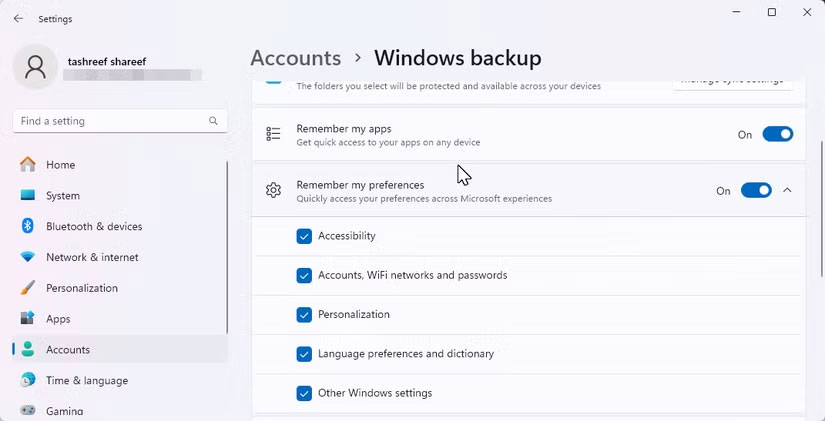
<p style="text-align: justify;">Đối với bất kỳ ai sử dụng nhiều máy tính Windows, một trong những nhược điểm lớn nhất khi sử dụng tài khoản Windows cục bộ là thiếu tính năng đồng bộ trên nhiều thiết bị.</p>

<div style="text-align: justify;">Linh kiện máy tính</div>

<p style="text-align: justify;">Khi bạn đăng nhập bằng tài khoản Microsoft, Windows cung cấp tính năng đồng bộ liền mạch các cài đặt của bạn, bao gồm theme, mật khẩu, dữ liệu trình duyệt, tùy chọn ngôn ngữ, v.v... Theo cách này, bạn có thể cá nhân hóa trải nghiệm của mình một lần và tận hưởng môi trường nhất quán trên tất cả các thiết bị của mình.</p>

<p style="text-align: justify;">Tuy nhiên, với tài khoản cục bộ, bạn sẽ mất tất cả sự tiện lợi này. Mỗi lần chuyển sang PC mới hoặc cài đặt lại Windows, bạn phải tự cấu hình lại cài đặt của mình từ đầu. Hãy tưởng tượng bạn phải thiết lập hình nền yêu thích hoặc thay đổi cài đặt Windows mỗi khi có thiết bị mới. Điều này không chỉ lãng phí thời gian mà còn tạo ra trải nghiệm người dùng rời rạc và không nhất quán.</p>

<figure>
<div style="text-align: justify;"><img alt="Tùy chọn khôi phục sao lưu Windows trong quá trình thiết lập Windows 11" data-i="1" data-src="https://st.quantrimang.com/photos/image/2025/05/02/khong-nen-dung-tai-khoan-windows-cuc-bo-2.jpg" data-was-processed="true" height="619" src="https://st.quantrimang.com/photos/image/2025/05/02/khong-nen-dung-tai-khoan-windows-cuc-bo-2.jpg" width="825" /></div>

<figcaption>
<div style="text-align: justify;">Tùy chọn khôi phục sao lưu Windows trong quá trình thiết lập Windows 11</div>
</figcaption>
</figure>

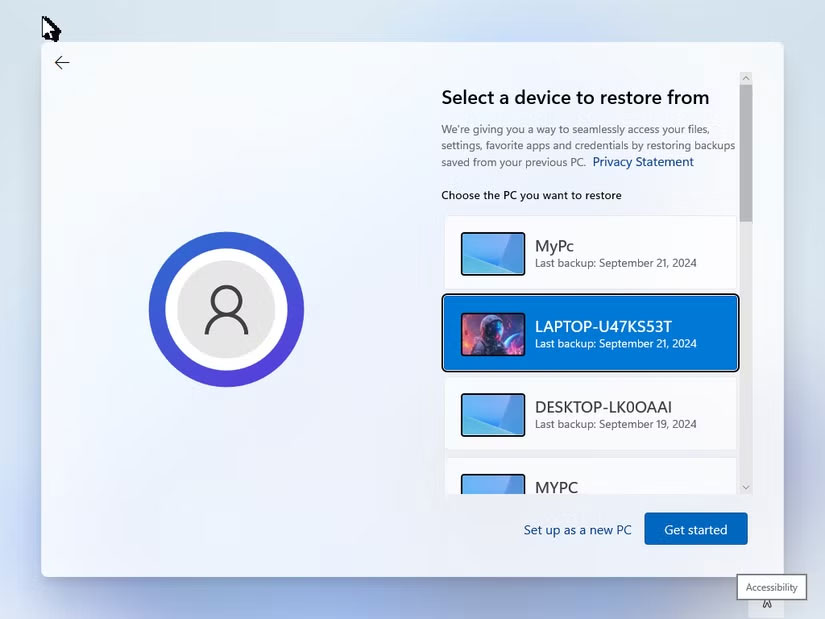
<p style="text-align: justify;">Ngoài khả năng đồng bộ giữa các thiết bị, sử dụng tài khoản Microsoft cũng cho phép bạn tận dụng tính năng Windows Backup, cho phép bạn dễ dàng lưu trữ dữ liệu trên&nbsp;OneDrive.</p>

<p style="text-align: justify;">Điều này đảm bảo dữ liệu của bạn được sao lưu an toàn trên đám mây. Nếu bạn cần reset hoặc thay thế PC, việc khôi phục ứng dụng, cài đặt và file của bạn sẽ trở nên nhanh chóng và dễ dàng. Đây là điều không thể thực hiện được với tài khoản cục bộ.</p>

<h2 style="text-align: justify;">3. Quyền truy cập hạn chế vào việc mua ứng dụng và game</h2>

<figure>
<div style="text-align: justify;"><img alt="Microsoft Store yêu cầu đăng nhập vào tài khoản Microsoft để hoàn tất giao dịch mua" data-i="2" data-src="https://st.quantrimang.com/photos/image/2025/05/02/khong-nen-dung-tai-khoan-windows-cuc-bo-3.jpg" data-was-processed="true" height="928" src="https://st.quantrimang.com/photos/image/2025/05/02/khong-nen-dung-tai-khoan-windows-cuc-bo-3.jpg" width="1650" /></div>

<figcaption>
<div style="text-align: justify;">Microsoft Store yêu cầu đăng nhập vào tài khoản Microsoft để hoàn tất giao dịch mua</div>
</figcaption>
</figure>

<div style="text-align: justify;">&nbsp;</div>

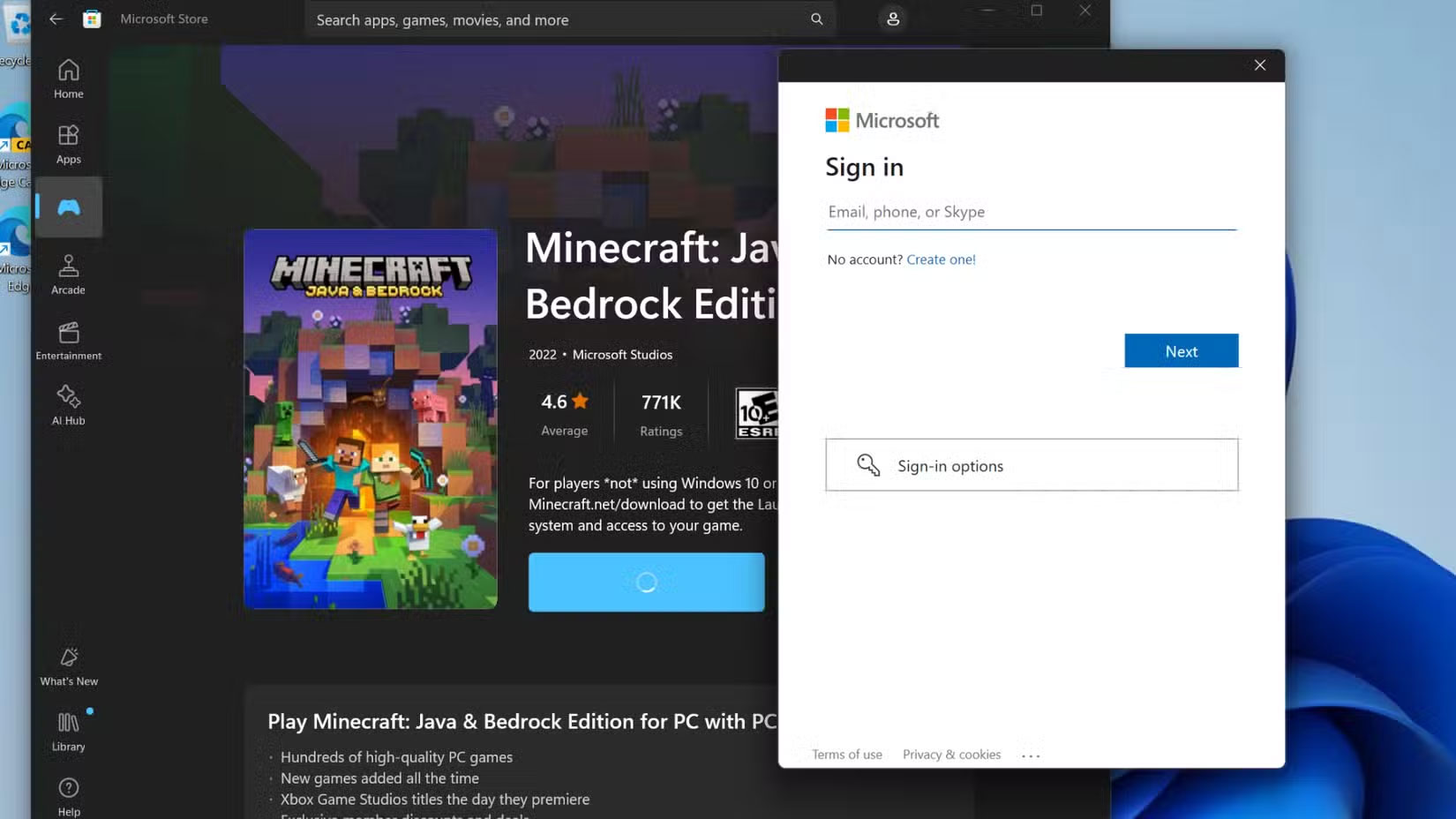
<p style="text-align: justify;">Một nhược điểm đáng kể khác khi sử dụng tài khoản Windows cục bộ là quyền truy cập hạn chế vào Microsoft Store. Mặc dù có thể tải xuống ứng dụng từ Microsoft Store khi sử dụng tài khoản cục bộ, nhưng quyền truy cập của bạn bị hạn chế nghiêm trọng.</p>

<p style="text-align: justify;">Ví dụ, các ứng dụng như&nbsp;Netflix, cung cấp nội dung dành cho người lớn, yêu cầu bạn phải đăng nhập bằng tài khoản Microsoft để xác minh giới hạn độ tuổi và đảm bảo nội dung phù hợp. Ngoài ra, nếu muốn mua ứng dụng hoặc game trả phí, tài khoản cục bộ sẽ không đủ; bạn sẽ cần đăng nhập bằng tài khoản Microsoft để thực hiện các giao dịch này.</p>

<p style="text-align: justify;">Không có gì ngạc nhiên khi bộ ứng dụng riêng của Microsoft, chẳng hạn như&nbsp;Phone Link, cũng yêu cầu phải có tài khoản Microsoft để hoạt động. Bằng cách chuyển sang tài khoản Microsoft, bạn có thể loại bỏ nhu cầu đăng nhập vào từng ứng dụng và tận hưởng trải nghiệm liền mạch hơn.</p>

<h2 style="text-align: justify;">2. Không có quyền truy cập vào Find My Device</h2>

<figure>
<div style="text-align: justify;"><img alt="Find My Device trên Windows 11" data-i="3" data-src="https://st.quantrimang.com/photos/image/2025/05/02/khong-nen-dung-tai-khoan-windows-cuc-bo-4.jpg" data-was-processed="true" height="451" src="https://st.quantrimang.com/photos/image/2025/05/02/khong-nen-dung-tai-khoan-windows-cuc-bo-4.jpg" width="825" /></div>

<figcaption>
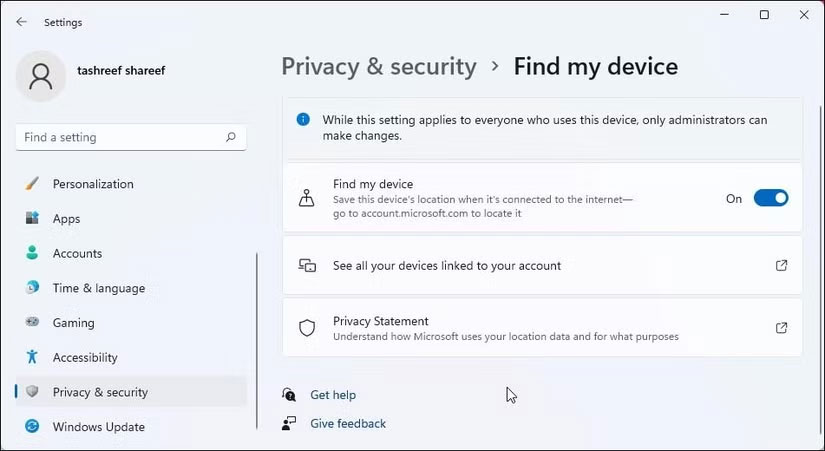
<div style="text-align: justify;">Find My Device trên&nbsp;&nbsp;Windows&nbsp;11</div>
</figcaption>
</figure>

<p style="text-align: justify;">Giống như Android và iPhone,&nbsp;&nbsp;Windows&nbsp;cũng cung cấp tính năng &quot;Find My Device&quot; có thể cực kỳ hữu ích nếu laptop của bạn bị mất hoặc bị đánh cắp. Tính năng này cho phép bạn theo dõi vị trí thiết bị, khóa thiết bị từ xa để ngăn chặn truy cập trái phép và thậm chí xóa dữ liệu nhạy cảm để bảo vệ quyền riêng tư.</p>

<p style="text-align: justify;">Tuy nhiên, tính năng này chỉ dành riêng cho tài khoản Microsoft. Ngược lại, tài khoản cục bộ không có tích hợp đám mây như tài khoản Microsoft cung cấp, nghĩa là bạn sẽ không thể theo dõi vị trí laptop bị đánh cắp hoặc bảo mật từ xa.</p>

<p style="text-align: justify;">Ngoài ra, các tính năng như Device Encryption - ngăn chặn hành vi trộm cắp dữ liệu ngay cả khi ổ cứng bị tháo ra - không được bật theo mặc định cho tài khoản cục bộ. Vì vậy, trừ khi bạn đã cấu hình thủ công các biện pháp mã hóa và sao lưu, những file cá nhân và thông tin nhạy cảm của bạn có thể gặp rủi ro nghiêm trọng nếu thiết bị rơi vào tay kẻ xấu.</p>

<p style="text-align: justify;">Hạn chế này đặc biệt đáng lo ngại đối với bất kỳ ai thường xuyên sử dụng laptop ở ngoài trời, chẳng hạn như trên phương tiện giao thông công cộng, trong quán cà phê hoặc trong các chuyến công tác. Trong những tình huống này, luôn có nguy cơ bị trộm cắp hoặc thất lạc, và nếu không có tính năng Find My Device, sẽ không có cách dễ dàng nào để đảm bảo thiết bị và thông tin nhạy cảm trong đó vẫn an toàn. Đây là một nhược điểm nhỏ nhưng nghiêm trọng có thể khiến bạn dễ bị tấn công.</p>

<div style="text-align: justify;">&nbsp;</div>

<h2 style="text-align: justify;">1. Tùy chọn khôi phục tài khoản bị giới hạn</h2>

<figure>
<div style="text-align: justify;"><img alt="Đăng nhập không thành công trên Windows 11" data-i="4" data-src="https://st.quantrimang.com/photos/image/2025/05/02/khong-nen-dung-tai-khoan-windows-cuc-bo-5.jpg" data-was-processed="true" height="1238" src="https://st.quantrimang.com/photos/image/2025/05/02/khong-nen-dung-tai-khoan-windows-cuc-bo-5.jpg" width="1650" /></div>

<figcaption>
<div style="text-align: justify;">Đăng nhập không thành công trên Windows 11</div>
</figcaption>
</figure>

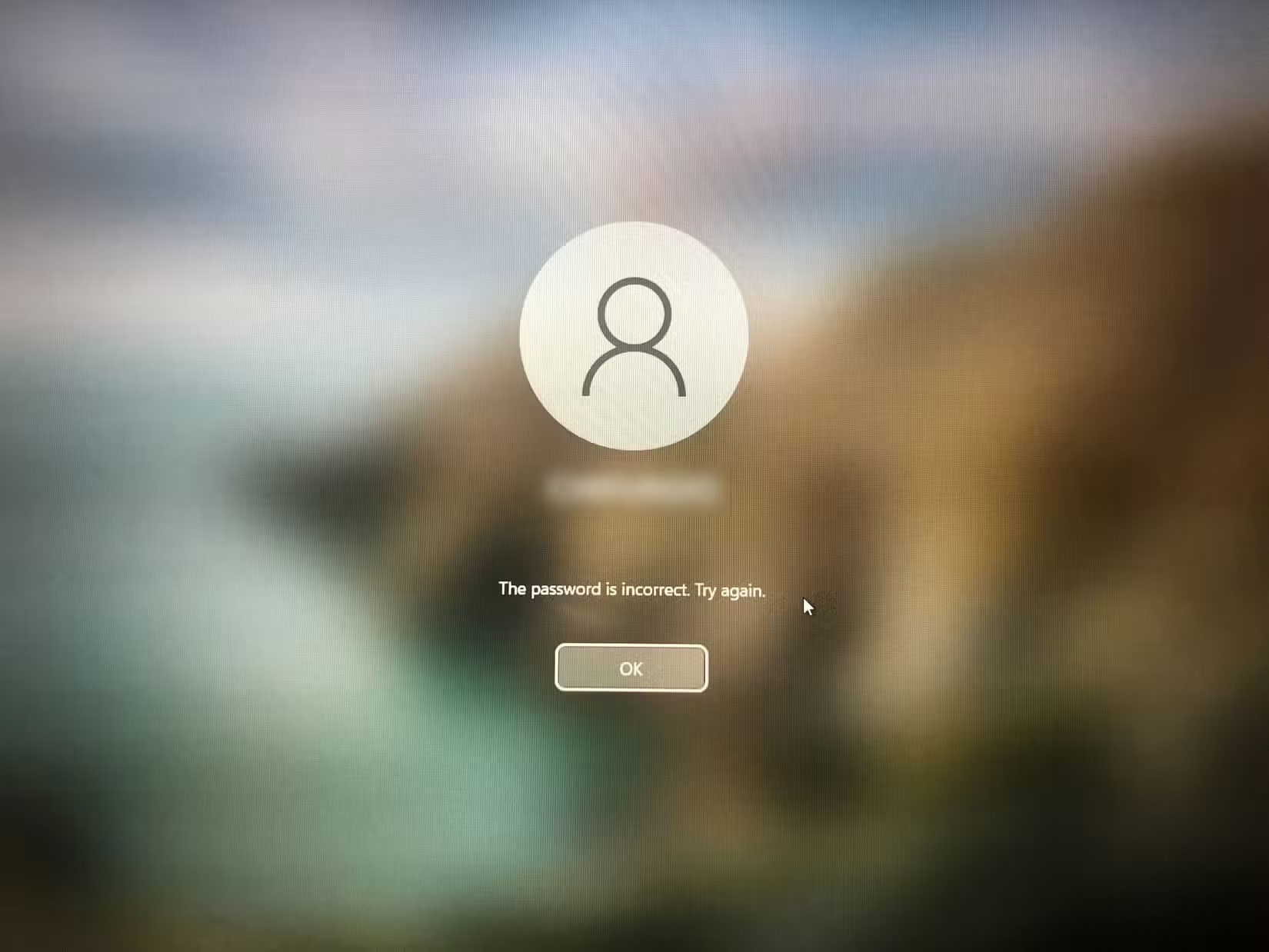
<p style="text-align: justify;">Dù bạn có cẩn thận đến đâu, vẫn luôn có khả năng bạn quên mã PIN hoặc mật khẩu đăng nhập. Với tài khoản Windows cục bộ, điều này có thể nhanh chóng trở thành trải nghiệm khó chịu. Nếu bạn quên mật khẩu, lựa chọn duy nhất của bạn là thử reset mật khẩu bằng các câu hỏi bảo mật mà bạn đã thiết lập khi tạo tài khoản.</p>

<p style="text-align: justify;">Nhưng đây là điều đáng lo ngại: Nếu bạn quên cả câu trả lời cho những câu hỏi bảo mật đó, về cơ bản bạn sẽ bị khóa khỏi laptop của chính mình. Tệ hơn nữa, trừ khi bạn dành thời gian tạo ổ đĩa reset mật khẩu trước, nếu không thì không có cách nào để lấy lại quyền truy cập.</p>

<p style="text-align: justify;">Ngược lại, khi bạn sử dụng tài khoản Microsoft, việc quên mã PIN không phải là vấn đề lớn. Bạn có thể dễ dàng reset mã PIN bằng mã xác minh được gửi đến email hoặc điện thoại của bạn. Và nếu quên mật khẩu tài khoản Microsoft, bạn có thể reset từ một thiết bị khác, chẳng hạn như điện thoại thông minh hoặc&nbsp;&nbsp;máy tính&nbsp;khác.</p>

<div style="text-align: justify;">Linh kiện máy tính</div>

<p style="text-align: justify;">Nhìn chung, mặc dù tài khoản&nbsp;&nbsp;Windows&nbsp;cục bộ có thể hấp dẫn những người dùng coi trọng quyền riêng tư, nhưng nó có thể khá hạn chế.&nbsp;Sự khác biệt giữa tài khoản Microsoft và tài khoản cục bộ&nbsp;khá đáng kể và những hạn chế khi sử dụng tài khoản cục bộ lớn hơn nhiều so với những lợi thế của nó.</p>

<p style="text-align: justify;">Vì vậy, nếu bạn vẫn đang sử dụng tài khoản Windows cục bộ, có lẽ đã đến lúc phải xem xét lại. Sự tiện lợi, bảo mật nâng cao và tích hợp liền mạch mà tài khoản Microsoft mang lại thực sự quá giá trị để bỏ qua.</p>
		</div>
				<div id="author">
						<p>
				<strong>Nguồn tin:</strong>
				Quantrimang.com:
			</p>
		</div>
	</div>
	<div id="footer" class="clearfix">
		<div id="url">
			<strong>URL của bản tin này: </strong><a href="https://www.nguoicodonvn2008.info/vi/news/savefile/kien-thuc-may-tinh/tai-sao-khong-nen-su-dung-tai-khoan-windows-cuc-bo-nua-10301.html" title="Tại sao không nên sử dụng tài khoản Windows cục bộ nữa?">https://www.nguoicodonvn2008.info/vi/news/savefile/kien-thuc-may-tinh/tai-sao-khong-nen-su-dung-tai-khoan-windows-cuc-bo-nua-10301.html</a>

		</div>
		<div class="clear"></div>
		<div class="copyright">
			&copy; .&#x3A; Nguoicodonvn2008.info - Cõi lòng người cô đơn &#x3A;.
		</div>
		<div id="contact">
			<a href="mailto:admin@nguoicodonvn2008.info">admin@nguoicodonvn2008.info</a>
		</div>
	</div>
</div>
        <div id="timeoutsess" class="chromeframe">
            Bạn đã không sử dụng Site, <a onclick="timeoutsesscancel();" href="https://www.nguoicodonvn2008.info/#">Bấm vào đây để duy trì trạng thái đăng nhập</a>. Thời gian chờ: <span id="secField"> 60 </span> giây
        </div>
        <div id="openidResult" class="nv-alert" style="display:none"></div>
        <div id="openidBt" data-result="" data-redirect=""></div>
		</script>
		<div class="car-top">
  <span><img src="https://www.nguoicodonvn2008.info/themes/default/images/car.png" alt=""></span>
</div>
<div id="run_cronjobs" style="visibility:hidden;display:none;"><img alt="cron" src="/index.php?second=cronjobs&amp;p=i0X9Q08K" width="1" height="1" /></div>
<script src="https://www.nguoicodonvn2008.info/assets/js/jquery/jquery.min.js"></script>
<script>var nv_base_siteurl="/",nv_lang_data="vi",nv_lang_interface="vi",nv_name_variable="nv",nv_fc_variable="op",nv_lang_variable="language",nv_module_name="news",nv_func_name="savefile",nv_is_user=0, nv_my_ofs=-4,nv_my_abbr="EDT",nv_cookie_prefix="nv4c_e856T",nv_check_pass_mstime=1738000,nv_area_admin=0,nv_safemode=0,theme_responsive=0,nv_recaptcha_ver=2,nv_recaptcha_sitekey="",nv_recaptcha_type="image",XSSsanitize=1;</script>
<script src="https://www.nguoicodonvn2008.info/assets/js/language/vi.js"></script>
<script src="https://www.nguoicodonvn2008.info/assets/js/DOMPurify/purify3.js"></script>
<script src="https://www.nguoicodonvn2008.info/assets/js/global.js"></script>
<script src="https://www.nguoicodonvn2008.info/assets/js/site.js"></script>
<script src="https://www.nguoicodonvn2008.info/themes/default/js/news.js"></script>
<script src="https://www.nguoicodonvn2008.info/themes/default/js/main.js"></script>
<script src="https://www.nguoicodonvn2008.info/themes/default/js/custom.js"></script>
<script type="application/ld+json">
        {
            "@context": "https://schema.org",
            "@type": "Organization",
            "url": "https://www.nguoicodonvn2008.info",
            "logo": "https://www.nguoicodonvn2008.info/uploads/angel.gif"
        }
        </script>
<script src="https://www.nguoicodonvn2008.info/themes/default/js/bootstrap.min.js"></script>
<script type="text/javascript">
var $scrolltop = $('.car-top');
$scrolltop.on('click', function () {
    $('html,body').animate({
        scrollTop: 0
    }, 800);
    $(this).addClass("car-run");
    setTimeout(function(){ $scrolltop.removeClass('car-run');}, 1000);
    return false;
});
$(window).on('scroll', function ()
{ 
    if($(window).scrollTop() >= 200)
    {
        $scrolltop.addClass("show");
        $scrolltop.addClass("car-down");
    }
    else
    {
       $scrolltop.removeClass("show");
       setTimeout(function(){ $scrolltop.removeClass('car-down');}, 300);
    }
});
</script>
</body>
</html>