<!DOCTYPE html>
    <html lang="vi" xmlns="http://www.w3.org/1999/xhtml" prefix="og: http://ogp.me/ns#">
    <head>
<title>Sửa lỗi “wget&#x3A; command not found” trong Linux</title>
<meta name="description" content="Sửa lỗi “wget&#x3A; command not found” trong Linux - Savefile - Tin Tức -...">
<meta name="author" content=".: Nguoicodonvn2008.info - Cõi lòng người cô đơn :.">
<meta name="copyright" content=".: Nguoicodonvn2008.info - Cõi lòng người cô đơn :. [admin@nguoicodonvn2008.info]">
<meta name="robots" content="index, archive, follow, noodp">
<meta name="googlebot" content="index,archive,follow,noodp">
<meta name="msnbot" content="all,index,follow">
<meta name="generator" content="NukeViet v4.5">
<meta http-equiv="Content-Type" content="text/html; charset=utf-8">
<meta property="og:title" content="Sửa lỗi “wget&#x3A; command not found” trong Linux">
<meta property="og:type" content="website">
<meta property="og:description" content="Savefile - Tin Tức - https&#x3A;&#x002F;&#x002F;www.nguoicodonvn2008.info&#x002F;vi&#x002F;news&#x002F;savefile&#x002F;kien-thuc-may-tinh&#x002F;sua-loi-wget-command-not-found-trong-linux-10008.html">
<meta property="og:site_name" content=".&#x3A; Nguoicodonvn2008.info - Cõi lòng người cô đơn &#x3A;.">
<meta property="og:url" content="https://www.nguoicodonvn2008.info/vi/news/savefile/kien-thuc-may-tinh/sua-loi-wget-command-not-found-trong-linux-10008.html">
<link rel="shortcut icon" href="https://www.nguoicodonvn2008.info/favicon.ico">
<link rel="canonical" href="https://www.nguoicodonvn2008.info/vi/news/savefile/kien-thuc-may-tinh/sua-loi-wget-command-not-found-trong-linux-10008.html">
<link rel="alternate" href="https://www.nguoicodonvn2008.info/vi/news/rss/" title="Tin Tức" type="application/rss+xml">
<link rel="alternate" href="https://www.nguoicodonvn2008.info/vi/news/rss/karaoke-dual/" title="Tin Tức - Karaoke Dual" type="application/rss+xml">
<link rel="alternate" href="https://www.nguoicodonvn2008.info/vi/news/rss/nhac-tre/" title="Tin Tức - Nhạc trẻ" type="application/rss+xml">
<link rel="alternate" href="https://www.nguoicodonvn2008.info/vi/news/rss/tru-tinh/" title="Tin Tức - Trữ tình" type="application/rss+xml">
<link rel="alternate" href="https://www.nguoicodonvn2008.info/vi/news/rss/nuoc-ngoai/" title="Tin Tức - Nước ngoài" type="application/rss+xml">
<link rel="alternate" href="https://www.nguoicodonvn2008.info/vi/news/rss/remix/" title="Tin Tức - Remix" type="application/rss+xml">
<link rel="alternate" href="https://www.nguoicodonvn2008.info/vi/news/rss/tam-su-tinh-yeu/" title="Tin Tức - Tâm sự tình yêu" type="application/rss+xml">
<link rel="alternate" href="https://www.nguoicodonvn2008.info/vi/news/rss/tho-suu-tam/" title="Tin Tức - Thơ sưu tầm" type="application/rss+xml">
<link rel="alternate" href="https://www.nguoicodonvn2008.info/vi/news/rss/cuoc-song/" title="Tin Tức - Cuộc sống" type="application/rss+xml">
<link rel="alternate" href="https://www.nguoicodonvn2008.info/vi/news/rss/phan-mem/" title="Tin Tức - Phần mềm" type="application/rss+xml">
<link rel="alternate" href="https://www.nguoicodonvn2008.info/vi/news/rss/kien-thuc-may-tinh/" title="Tin Tức - Kiến thức máy tính" type="application/rss+xml">
<link rel="alternate" href="https://www.nguoicodonvn2008.info/vi/news/rss/hoc-tap/" title="Tin Tức - Học tập" type="application/rss+xml">
<link rel="alternate" href="https://www.nguoicodonvn2008.info/vi/news/rss/tai-lieu/" title="Tin Tức - Tài liệu" type="application/rss+xml">
<link rel="alternate" href="https://www.nguoicodonvn2008.info/vi/news/rss/de-thi/" title="Tin Tức - Đề thi" type="application/rss+xml">
<link rel="preload" as="style" href="https://www.nguoicodonvn2008.info/assets/css/font-awesome.min.css" type="text/css">
<link rel="preload" as="style" href="https://www.nguoicodonvn2008.info/themes/default/css/bootstrap.non-responsive.css" type="text/css">
<link rel="preload" as="style" href="https://www.nguoicodonvn2008.info/themes/default/css/style.css" type="text/css">
<link rel="preload" as="style" href="https://www.nguoicodonvn2008.info/themes/default/css/style.non-responsive.css" type="text/css">
<link rel="preload" as="style" href="https://www.nguoicodonvn2008.info/themes/default/css/news.css" type="text/css">
<link rel="preload" as="style" href="https://www.nguoicodonvn2008.info/themes/default/css/custom.css" type="text/css">
<link rel="preload" as="script" href="https://www.nguoicodonvn2008.info/assets/js/jquery/jquery.min.js" type="text/javascript">
<link rel="preload" as="script" href="https://www.nguoicodonvn2008.info/assets/js/language/vi.js" type="text/javascript">
<link rel="preload" as="script" href="https://www.nguoicodonvn2008.info/assets/js/DOMPurify/purify3.js" type="text/javascript">
<link rel="preload" as="script" href="https://www.nguoicodonvn2008.info/assets/js/global.js" type="text/javascript">
<link rel="preload" as="script" href="https://www.nguoicodonvn2008.info/assets/js/site.js" type="text/javascript">
<link rel="preload" as="script" href="https://www.nguoicodonvn2008.info/themes/default/js/news.js" type="text/javascript">
<link rel="preload" as="script" href="https://www.nguoicodonvn2008.info/themes/default/js/main.js" type="text/javascript">
<link rel="preload" as="script" href="https://www.nguoicodonvn2008.info/themes/default/js/custom.js" type="text/javascript">
<link rel="preload" as="script" href="https://www.nguoicodonvn2008.info/themes/default/js/bootstrap.min.js" type="text/javascript">
<link rel="stylesheet" href="https://www.nguoicodonvn2008.info/assets/css/font-awesome.min.css">
<link rel="stylesheet" href="https://www.nguoicodonvn2008.info/themes/default/css/bootstrap.non-responsive.css">
<link rel="stylesheet" href="https://www.nguoicodonvn2008.info/themes/default/css/style.css">
<link rel="stylesheet" href="https://www.nguoicodonvn2008.info/themes/default/css/style.non-responsive.css">
<link rel="StyleSheet" href="https://www.nguoicodonvn2008.info/themes/default/css/news.css">
<link rel="stylesheet" href="https://www.nguoicodonvn2008.info/themes/default/css/custom.css">
<style type="text/css">
	body{background: #fff;}
</style>
    </head>
    <body>
<div id="print">
	<div id="hd_print">
		<h2 class="pull-left">.&#x3A; Nguoicodonvn2008.info - Cõi lòng người cô đơn &#x3A;.</h2>
		<p class="pull-right"><a title=".&#x3A; Nguoicodonvn2008.info - Cõi lòng người cô đơn &#x3A;." href="https://www.nguoicodonvn2008.info/">https://www.nguoicodonvn2008.info</a></p>
	</div>
	<div class="clear"></div>
	<hr />
	<div id="content">
		<h1>Sửa lỗi “wget&#x3A; command not found” trong Linux</h1>
		<ul class="list-inline">
			<li>Thứ ba - 18/03/2025 23:54</li>
			<li class="hidden-print txtrequired"><em class="fa fa-print">&nbsp;</em><a title="In ra" href="javascript:;" onclick="window.print()">In ra</a></li>
			<li class="hidden-print txtrequired"><em class="fa fa-power-off">&nbsp;</em><a title="Đóng cửa sổ này" href="javascript:;" onclick="window.close()">Đóng cửa sổ này</a></li>
		</ul>
		<div class="clear"></div>
		<div id="hometext">
		</div>
				<div class="imghome">
			<img alt="Sửa lỗi “wget&#x3A; command not found” trong Linux" src="https://st.quantrimang.com/photos/image/2025/03/18/sua-loi-wget-command-not-found-trong-linux-4.jpg" width="460" class="img-thumbnail" />
		</div>
		<div class="clear"></div>
		<div id="bodytext" class="clearfix">
			<p style="text-align: justify;">Gặp phải lỗi &quot;wget ​​command not found&quot; trong Linux có thể rất bực bội, đặc biệt là khi tải xuống file từ web. Nhưng đừng lo lắng! Thường thì lỗi này dễ sửa. Lỗi này thường có nghĩa là hệ thống của bạn chưa cài đặt wget hoặc wget không nằm trong PATH của hệ thống. Hướng dẫn này sẽ trình bày các bước đơn giản để khởi động và chạy wget để bạn có thể bắt đầu tải xuống file mà không gặp bất kỳ rắc rối nào.</p>

<h2 style="text-align: justify;">Tại sao lỗi &quot;wget ​​command not found&quot; xảy ra?</h2>

<p style="text-align: justify;">Lỗi wget: command not found trong Linux xảy ra khi wget không được cài đặt theo mặc định, không có trong PATH của hệ thống hoặc bị hỏng. Một số bản phân phối Linux tối thiểu không bao gồm wget để giữ cho hệ thống nhẹ. Trong trường hợp này, chúng ta cần cài đặt thủ công.</p>

<p style="text-align: justify;">Nếu hệ thống không nhận ra wget sau khi cài đặt, có thể nó nằm ngoài PATH. Bạn có thể sửa lỗi này bằng cách thêm thư mục của nó vào PATH. Ngoài ra, một gói wget bị hỏng hoặc đã xóa có thể gây ra sự cố này và việc cài đặt lại wget sẽ giải quyết được sự cố.</p>

<h2 style="text-align: justify;">Sửa lỗi “wget: command not found” trong Linux</h2>

<h3 style="text-align: justify;">Cách sửa lỗi 1: Cài đặt wget trên hệ thống Linux</h3>

<p style="text-align: justify;">Trên hầu hết các bản phân phối Linux, wget được cài đặt sẵn. Tuy nhiên, nếu vì lý do nào đó hệ thống của bạn không cài đặt wget, bạn có thể thấy lỗi &#039;command not found&#039;. Để tránh lỗi này, bạn nên kiểm tra cài đặt wget trên hệ thống trước khi sử dụng. Để thực hiện việc này, bạn có thể chạy lệnh sau:</p>

<pre id="pre0">
<code>sudo wget</code></pre>

<p style="text-align: justify;">Nếu hệ thống của bạn đã thiết lập wget đúng cách, lệnh này sẽ truy xuất thông báo “wget: missing URL usage:</p>

<figure>
<div style="text-align: justify;"><img alt="Kiểm tra tính khả dụng của Wget" data-i="0" data-src="https://st.quantrimang.com/photos/image/2025/03/18/sua-loi-wget-command-not-found-trong-linux-1.jpg" data-was-processed="true" height="148" src="https://st.quantrimang.com/photos/image/2025/03/18/sua-loi-wget-command-not-found-trong-linux-1.jpg" width="800" /></div>

<figcaption>
<div style="text-align: justify;">Kiểm tra tính khả dụng của Wget</div>
</figcaption>
</figure>

<p style="text-align: justify;">Tuy nhiên, nếu hệ thống Linux của bạn chưa cài đặt wget, bạn sẽ thấy lỗi “wget: command not found”:</p>

<figure>
<div style="text-align: justify;"><img alt="" data-i="1" data-src="https://st.quantrimang.com/photos/image/2025/03/18/sua-loi-wget-command-not-found-trong-linux-2.jpg" data-was-processed="true" height="87" src="https://st.quantrimang.com/photos/image/2025/03/18/sua-loi-wget-command-not-found-trong-linux-2.jpg" width="755" /></div>
</figure>

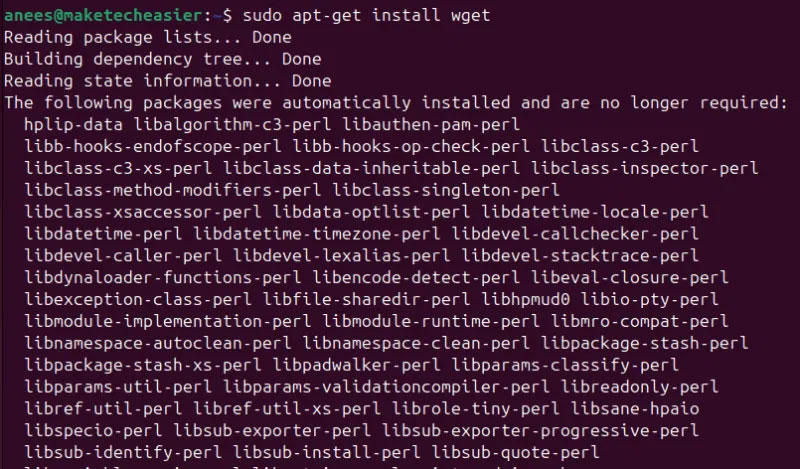
<p style="text-align: justify;">Để khắc phục lỗi này, hãy cài đặt wget bằng trình quản lý gói của bản phân phối. Ví dụ, trên Debian/<a data-type="internal" href="https://quantrimang.com/cong-nghe/meo-va-thu-thuat-sau-khi-cai-dat-ubuntu-84487" title="Mẹo và thủ thuật sau khi cài đặt Ubuntu">Ubuntu</a>, bạn có thể sử dụng trình quản lý gói apt:</p>

<pre id="pre1">
<code>sudo apt-get install wget</code></pre>

<figure>
<div style="text-align: justify;"><img alt="Cài đặt Wget" data-i="2" data-src="https://st.quantrimang.com/photos/image/2025/03/18/sua-loi-wget-command-not-found-trong-linux-3.jpg" data-was-processed="true" height="469" src="https://st.quantrimang.com/photos/image/2025/03/18/sua-loi-wget-command-not-found-trong-linux-3.jpg" width="800" /></div>

<figcaption>
<div style="text-align: justify;">Cài đặt Wget</div>
</figcaption>
</figure>

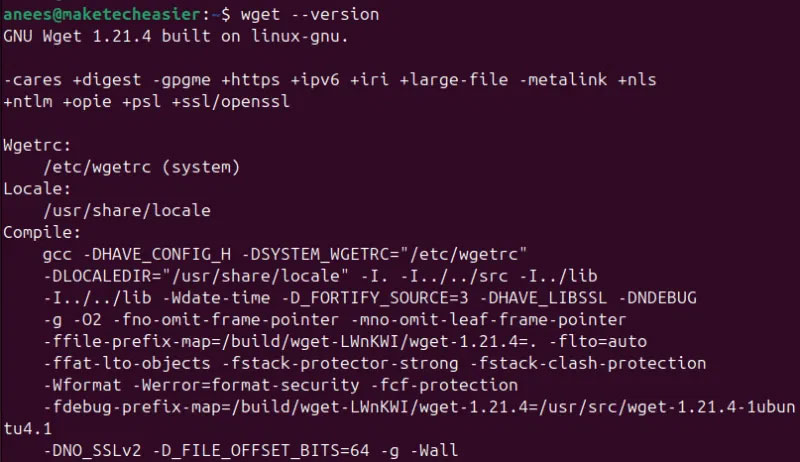
<p style="text-align: justify;">Bạn có thể xác nhận cài đặt bằng cách kiểm tra phiên bản wget:</p>

<pre id="pre2">
<code>wget --version</code></pre>

<figure>
<div style="text-align: justify;"><img alt="Xác minh cài đặt Wget" data-adbro-processed="true" data-i="3" data-src="https://st.quantrimang.com/photos/image/2025/03/18/sua-loi-wget-command-not-found-trong-linux-4.jpg" data-was-processed="true" height="462" src="https://st.quantrimang.com/photos/image/2025/03/18/sua-loi-wget-command-not-found-trong-linux-4.jpg" width="800" /></div>

<figcaption>
<div style="text-align: justify;">Xác minh cài đặt Wget</div>
</figcaption>
</figure>

<p style="text-align: justify;">Để cài đặt wget trên các bản phân phối Linux dựa trên RHEL, bạn có thể sử dụng trình quản lý gói dnf:</p>

<pre id="pre3">
<code>sudo dnf install wget</code></pre>

<p style="text-align: justify;">Tương tự, bạn có thể sử dụng trình quản lý gói của bản phân phối để cài đặt wget trên các biến thể Linux khác.</p>

<h3 style="text-align: justify;">Cách sửa lỗi 2: Cấu hình Wget PATH</h3>

<p style="text-align: justify;">Đôi khi, sự cố không phải do wget không đang được cài đặt. Trên thực tế, wget có thể có trên hệ thống của bạn, nhưng bạn vẫn gặp lỗi &#039;wget: command not found&#039;. Trong những trường hợp như vậy, bạn phải xác minh xem PATH của hệ thống có bao gồm wget không. Để thực hiện mục đích này, hãy sử dụng lệnh which:</p>

<pre id="pre4">
<code>which wget</code></pre>

<p style="text-align: justify;">Nếu lệnh này trả về đường dẫn như&nbsp;<strong>/usr/bin/wget</strong>, điều đó có nghĩa là wget đã được cài đặt và có sẵn trong PATH của hệ thống:</p>

<figure>
<div style="text-align: justify;"><img alt="Kiểm tra cấu hình Wget PATH" data-i="4" data-src="https://st.quantrimang.com/photos/image/2025/03/18/sua-loi-wget-command-not-found-trong-linux-5.jpg" data-was-processed="true" height="71" src="https://st.quantrimang.com/photos/image/2025/03/18/sua-loi-wget-command-not-found-trong-linux-5.jpg" width="778" /></div>

<figcaption>
<div style="text-align: justify;">Kiểm tra cấu hình Wget PATH</div>
</figcaption>
</figure>

<p style="text-align: justify;">Tuy nhiên, nếu lệnh không trả về kết quả nào, hệ thống của bạn không cài đặt wget hoặc có wget trong thư mục không được liệt kê trong biến môi trường PATH.</p>

<p style="text-align: justify;">Nếu wget đã được cài đặt nhưng không có trong PATH, bạn có thể thêm tạm thời bằng lệnh export:</p>

<pre id="pre5">
<code>export PATH=$PATH:/path/to/wget_directory</code></pre>

<p style="text-align: justify;">Thay thế /path/to/wget_directory bằng đường dẫn thực tế như /usr/bin:</p>

<figure>
<div style="text-align: justify;"><img alt="Cấu hình đường dẫn" data-i="5" data-src="https://st.quantrimang.com/photos/image/2025/03/18/sua-loi-wget-command-not-found-trong-linux-6.jpg" data-was-processed="true" height="67" src="https://st.quantrimang.com/photos/image/2025/03/18/sua-loi-wget-command-not-found-trong-linux-6.jpg" width="800" /></div>

<figcaption>
<div style="text-align: justify;">Cấu hình đường dẫn</div>
</figcaption>
</figure>

<p style="text-align: justify;">Bạn có thể thực hiện thay đổi này vĩnh viễn bằng cách thêm cùng một dòng vào ~/.bashrc hoặc ~/.bash_profile.</p>

<p style="text-align: justify;">Nếu bạn thường xuyên tải xuống các file bằng wget, hãy đảm bảo hệ thống của bạn đã cài đặt và thiết lập đúng. Nếu không, bạn có thể gặp phải lỗi như wget: command not found. Lỗi này thường xảy ra khi wget bị thiếu, cấu hình sai hoặc bị hỏng. Tuy nhiên, giải pháp rất đơn giản. Bạn có thể cài đặt wget, xác minh sự hiện diện của nó trong PATH hệ thống và thực hiện các điều chỉnh cần thiết. Nếu wget vẫn không hoạt động, bạn có thể sử dụng một giải pháp thay thế như lệnh curl để tải xuống các file từ web.</p>

<div style="text-align: justify;">&nbsp;</div>
		</div>
				<div id="author">
						<p>
				<strong>Nguồn tin:</strong>
				Quantrimang.com:
			</p>
		</div>
	</div>
	<div id="footer" class="clearfix">
		<div id="url">
			<strong>URL của bản tin này: </strong><a href="https://www.nguoicodonvn2008.info/vi/news/savefile/kien-thuc-may-tinh/sua-loi-wget-command-not-found-trong-linux-10008.html" title="Sửa lỗi “wget&#x3A; command not found” trong Linux">https://www.nguoicodonvn2008.info/vi/news/savefile/kien-thuc-may-tinh/sua-loi-wget-command-not-found-trong-linux-10008.html</a>

		</div>
		<div class="clear"></div>
		<div class="copyright">
			&copy; .&#x3A; Nguoicodonvn2008.info - Cõi lòng người cô đơn &#x3A;.
		</div>
		<div id="contact">
			<a href="mailto:admin@nguoicodonvn2008.info">admin@nguoicodonvn2008.info</a>
		</div>
	</div>
</div>
        <div id="timeoutsess" class="chromeframe">
            Bạn đã không sử dụng Site, <a onclick="timeoutsesscancel();" href="https://www.nguoicodonvn2008.info/#">Bấm vào đây để duy trì trạng thái đăng nhập</a>. Thời gian chờ: <span id="secField"> 60 </span> giây
        </div>
        <div id="openidResult" class="nv-alert" style="display:none"></div>
        <div id="openidBt" data-result="" data-redirect=""></div>
		</script>
		<div class="car-top">
  <span><img src="https://www.nguoicodonvn2008.info/themes/default/images/car.png" alt=""></span>
</div>
<script src="https://www.nguoicodonvn2008.info/assets/js/jquery/jquery.min.js"></script>
<script>var nv_base_siteurl="/",nv_lang_data="vi",nv_lang_interface="vi",nv_name_variable="nv",nv_fc_variable="op",nv_lang_variable="language",nv_module_name="news",nv_func_name="savefile",nv_is_user=0, nv_my_ofs=-4,nv_my_abbr="EDT",nv_cookie_prefix="nv4c_e856T",nv_check_pass_mstime=1738000,nv_area_admin=0,nv_safemode=0,theme_responsive=0,nv_recaptcha_ver=2,nv_recaptcha_sitekey="",nv_recaptcha_type="image",XSSsanitize=1;</script>
<script src="https://www.nguoicodonvn2008.info/assets/js/language/vi.js"></script>
<script src="https://www.nguoicodonvn2008.info/assets/js/DOMPurify/purify3.js"></script>
<script src="https://www.nguoicodonvn2008.info/assets/js/global.js"></script>
<script src="https://www.nguoicodonvn2008.info/assets/js/site.js"></script>
<script src="https://www.nguoicodonvn2008.info/themes/default/js/news.js"></script>
<script src="https://www.nguoicodonvn2008.info/themes/default/js/main.js"></script>
<script src="https://www.nguoicodonvn2008.info/themes/default/js/custom.js"></script>
<script type="application/ld+json">
        {
            "@context": "https://schema.org",
            "@type": "Organization",
            "url": "https://www.nguoicodonvn2008.info",
            "logo": "https://www.nguoicodonvn2008.info/uploads/angel.gif"
        }
        </script>
<script src="https://www.nguoicodonvn2008.info/themes/default/js/bootstrap.min.js"></script>
<script type="text/javascript">
var $scrolltop = $('.car-top');
$scrolltop.on('click', function () {
    $('html,body').animate({
        scrollTop: 0
    }, 800);
    $(this).addClass("car-run");
    setTimeout(function(){ $scrolltop.removeClass('car-run');}, 1000);
    return false;
});
$(window).on('scroll', function ()
{ 
    if($(window).scrollTop() >= 200)
    {
        $scrolltop.addClass("show");
        $scrolltop.addClass("car-down");
    }
    else
    {
       $scrolltop.removeClass("show");
       setTimeout(function(){ $scrolltop.removeClass('car-down');}, 300);
    }
});
</script>
</body>
</html>