<!DOCTYPE html>
    <html lang="vi" xmlns="http://www.w3.org/1999/xhtml" prefix="og: http://ogp.me/ns#">
    <head>
<title>PowerPoint 2019 &#40;Phần 9&#41;&#x3A; Sử dụng Find &amp; Replace</title>
<meta name="description" content="PowerPoint 2019 &#40;Phần 9&#41;&#x3A; Sử dụng Find &amp; Replace - Savefile - Tin Tức -...">
<meta name="author" content=".: Nguoicodonvn2008.info - Cõi lòng người cô đơn :.">
<meta name="copyright" content=".: Nguoicodonvn2008.info - Cõi lòng người cô đơn :. [admin@nguoicodonvn2008.info]">
<meta name="robots" content="index, archive, follow, noodp">
<meta name="googlebot" content="index,archive,follow,noodp">
<meta name="msnbot" content="all,index,follow">
<meta name="generator" content="NukeViet v4.5">
<meta http-equiv="Content-Type" content="text/html; charset=utf-8">
<meta property="og:title" content="PowerPoint 2019 &#40;Phần 9&#41;&#x3A; Sử dụng Find &amp; Replace">
<meta property="og:type" content="website">
<meta property="og:description" content="Savefile - Tin Tức - https&#x3A;&#x002F;&#x002F;www.nguoicodonvn2008.info&#x002F;vi&#x002F;news&#x002F;savefile&#x002F;kien-thuc-may-tinh&#x002F;powerpoint-2019-phan-9-su-dung-find-replace-5402.html">
<meta property="og:site_name" content=".&#x3A; Nguoicodonvn2008.info - Cõi lòng người cô đơn &#x3A;.">
<meta property="og:url" content="https://www.nguoicodonvn2008.info/vi/news/savefile/kien-thuc-may-tinh/powerpoint-2019-phan-9-su-dung-find-replace-5402.html">
<link rel="shortcut icon" href="https://www.nguoicodonvn2008.info/favicon.ico">
<link rel="canonical" href="https://www.nguoicodonvn2008.info/vi/news/savefile/kien-thuc-may-tinh/powerpoint-2019-phan-9-su-dung-find-replace-5402.html">
<link rel="alternate" href="https://www.nguoicodonvn2008.info/vi/news/rss/" title="Tin Tức" type="application/rss+xml">
<link rel="alternate" href="https://www.nguoicodonvn2008.info/vi/news/rss/karaoke-dual/" title="Tin Tức - Karaoke Dual" type="application/rss+xml">
<link rel="alternate" href="https://www.nguoicodonvn2008.info/vi/news/rss/nhac-tre/" title="Tin Tức - Nhạc trẻ" type="application/rss+xml">
<link rel="alternate" href="https://www.nguoicodonvn2008.info/vi/news/rss/tru-tinh/" title="Tin Tức - Trữ tình" type="application/rss+xml">
<link rel="alternate" href="https://www.nguoicodonvn2008.info/vi/news/rss/nuoc-ngoai/" title="Tin Tức - Nước ngoài" type="application/rss+xml">
<link rel="alternate" href="https://www.nguoicodonvn2008.info/vi/news/rss/remix/" title="Tin Tức - Remix" type="application/rss+xml">
<link rel="alternate" href="https://www.nguoicodonvn2008.info/vi/news/rss/tam-su-tinh-yeu/" title="Tin Tức - Tâm sự tình yêu" type="application/rss+xml">
<link rel="alternate" href="https://www.nguoicodonvn2008.info/vi/news/rss/tho-suu-tam/" title="Tin Tức - Thơ sưu tầm" type="application/rss+xml">
<link rel="alternate" href="https://www.nguoicodonvn2008.info/vi/news/rss/cuoc-song/" title="Tin Tức - Cuộc sống" type="application/rss+xml">
<link rel="alternate" href="https://www.nguoicodonvn2008.info/vi/news/rss/phan-mem/" title="Tin Tức - Phần mềm" type="application/rss+xml">
<link rel="alternate" href="https://www.nguoicodonvn2008.info/vi/news/rss/kien-thuc-may-tinh/" title="Tin Tức - Kiến thức máy tính" type="application/rss+xml">
<link rel="alternate" href="https://www.nguoicodonvn2008.info/vi/news/rss/hoc-tap/" title="Tin Tức - Học tập" type="application/rss+xml">
<link rel="alternate" href="https://www.nguoicodonvn2008.info/vi/news/rss/tai-lieu/" title="Tin Tức - Tài liệu" type="application/rss+xml">
<link rel="alternate" href="https://www.nguoicodonvn2008.info/vi/news/rss/de-thi/" title="Tin Tức - Đề thi" type="application/rss+xml">
<link rel="preload" as="style" href="https://www.nguoicodonvn2008.info/assets/css/font-awesome.min.css" type="text/css">
<link rel="preload" as="style" href="https://www.nguoicodonvn2008.info/themes/default/css/bootstrap.non-responsive.css" type="text/css">
<link rel="preload" as="style" href="https://www.nguoicodonvn2008.info/themes/default/css/style.css" type="text/css">
<link rel="preload" as="style" href="https://www.nguoicodonvn2008.info/themes/default/css/style.non-responsive.css" type="text/css">
<link rel="preload" as="style" href="https://www.nguoicodonvn2008.info/themes/default/css/news.css" type="text/css">
<link rel="preload" as="style" href="https://www.nguoicodonvn2008.info/themes/default/css/custom.css" type="text/css">
<link rel="preload" as="script" href="https://www.nguoicodonvn2008.info/assets/js/jquery/jquery.min.js" type="text/javascript">
<link rel="preload" as="script" href="https://www.nguoicodonvn2008.info/assets/js/language/vi.js" type="text/javascript">
<link rel="preload" as="script" href="https://www.nguoicodonvn2008.info/assets/js/DOMPurify/purify3.js" type="text/javascript">
<link rel="preload" as="script" href="https://www.nguoicodonvn2008.info/assets/js/global.js" type="text/javascript">
<link rel="preload" as="script" href="https://www.nguoicodonvn2008.info/assets/js/site.js" type="text/javascript">
<link rel="preload" as="script" href="https://www.nguoicodonvn2008.info/themes/default/js/news.js" type="text/javascript">
<link rel="preload" as="script" href="https://www.nguoicodonvn2008.info/themes/default/js/main.js" type="text/javascript">
<link rel="preload" as="script" href="https://www.nguoicodonvn2008.info/themes/default/js/custom.js" type="text/javascript">
<link rel="preload" as="script" href="https://www.nguoicodonvn2008.info/themes/default/js/bootstrap.min.js" type="text/javascript">
<link rel="stylesheet" href="https://www.nguoicodonvn2008.info/assets/css/font-awesome.min.css">
<link rel="stylesheet" href="https://www.nguoicodonvn2008.info/themes/default/css/bootstrap.non-responsive.css">
<link rel="stylesheet" href="https://www.nguoicodonvn2008.info/themes/default/css/style.css">
<link rel="stylesheet" href="https://www.nguoicodonvn2008.info/themes/default/css/style.non-responsive.css">
<link rel="StyleSheet" href="https://www.nguoicodonvn2008.info/themes/default/css/news.css">
<link rel="stylesheet" href="https://www.nguoicodonvn2008.info/themes/default/css/custom.css">
<style type="text/css">
	body{background: #fff;}
</style>
    </head>
    <body>
<div id="print">
	<div id="hd_print">
		<h2 class="pull-left">.&#x3A; Nguoicodonvn2008.info - Cõi lòng người cô đơn &#x3A;.</h2>
		<p class="pull-right"><a title=".&#x3A; Nguoicodonvn2008.info - Cõi lòng người cô đơn &#x3A;." href="https://www.nguoicodonvn2008.info/">https://www.nguoicodonvn2008.info</a></p>
	</div>
	<div class="clear"></div>
	<hr />
	<div id="content">
		<h1>PowerPoint 2019 &#40;Phần 9&#41;&#x3A; Sử dụng Find &amp; Replace</h1>
		<ul class="list-inline">
			<li>Thứ tư - 06/04/2022 00:44</li>
			<li class="hidden-print txtrequired"><em class="fa fa-print">&nbsp;</em><a title="In ra" href="javascript:;" onclick="window.print()">In ra</a></li>
			<li class="hidden-print txtrequired"><em class="fa fa-power-off">&nbsp;</em><a title="Đóng cửa sổ này" href="javascript:;" onclick="window.close()">Đóng cửa sổ này</a></li>
		</ul>
		<div class="clear"></div>
		<div id="hometext">
		</div>
				<div class="imghome">
			<img alt="PowerPoint 2019 &#40;Phần 9&#41;&#x3A; Sử dụng Find &amp; Replace" src="https://st.quantrimang.com/photos/image/2022/04/06/su-dung-find-replace-7.jpg" width="460" class="img-thumbnail" />
		</div>
		<div class="clear"></div>
		<div id="bodytext" class="clearfix">
			<p style="text-align: justify;">Khi bạn đang làm việc với các bài thuyết trình dài, có thể khó khăn và tốn thời gian để tìm một từ hoặc cụm từ cụ thể.&nbsp;PowerPoint&nbsp;có thể tự động tìm kiếm trong bài thuyết trình của bạn bằng tính năng&nbsp;<strong>Find</strong>&nbsp;và nó cho phép bạn nhanh chóng thay đổi các từ hoặc cụm từ bằng tính năng&nbsp;<strong>Replace.</strong></p>

<h2 style="text-align: justify;">Cách tìm văn bản trong PowerPoint</h2>

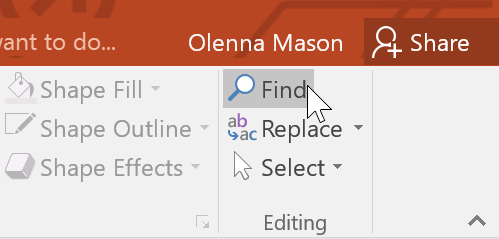
<p style="text-align: justify;">1. Từ tab&nbsp;<strong>Home</strong>, nhấp vào lệnh&nbsp;<strong>Find.</strong></p>

<p style="text-align: justify;"><img alt="" data-i="0" data-src="https://st.quantrimang.com/photos/image/2022/04/06/su-dung-find-replace-1.png" data-was-processed="true" height="239" src="https://st.quantrimang.com/photos/image/2022/04/06/su-dung-find-replace-1.png" width="499" /></p>

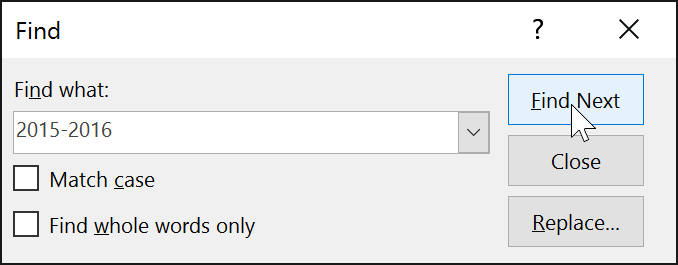
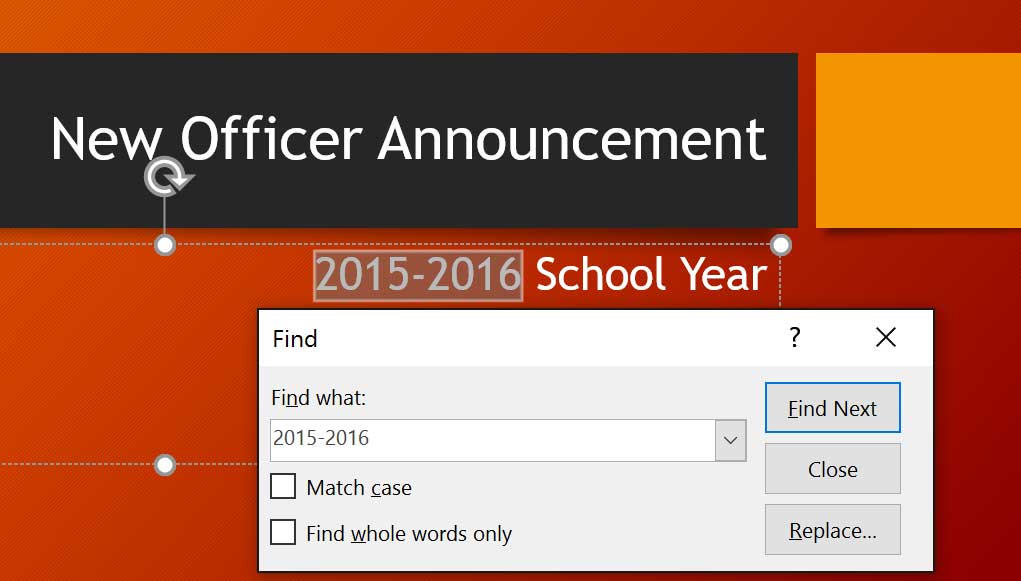
<p style="text-align: justify;">2. Một hộp thoại sẽ xuất hiện. Nhập văn bản bạn muốn tìm vào trường&nbsp;<strong>Find what:</strong>, sau đó bấm&nbsp;<strong>Find Next.</strong></p>

<p style="text-align: justify;"><strong><img alt="" data-i="1" data-src="https://st.quantrimang.com/photos/image/2022/04/06/su-dung-find-replace-2.png" data-was-processed="true" height="254" src="https://st.quantrimang.com/photos/image/2022/04/06/su-dung-find-replace-2.png" width="650" /></strong></p>

<p style="text-align: justify;">3. Nếu văn bản được tìm thấy, nó sẽ được chọn.</p>

<p style="text-align: justify;"><img alt="" data-i="2" data-src="https://st.quantrimang.com/photos/image/2022/04/06/su-dung-find-replace-3.jpg" data-was-processed="true" height="370" src="https://st.quantrimang.com/photos/image/2022/04/06/su-dung-find-replace-3.jpg" width="650" /></p>

<p style="text-align: justify;">Bạn cũng có thể truy cập lệnh&nbsp;<strong>Find</strong>&nbsp;bằng cách nhấn&nbsp;<strong>Ctrl + F</strong>&nbsp;trên bàn phím.</p>

<h2 style="text-align: justify;">Cách thay thế văn bản trong PowerPoint</h2>

<p style="text-align: justify;">Bạn có thể phát hiện ra rằng mình đã liên tục mắc lỗi trong suốt bài thuyết trình - chẳng hạn như viết sai chính tả tên của một người nào đó - hoặc bạn cần phải thay đổi một từ hoặc cụm từ cụ thể thành từ khác. Bạn có thể sử dụng tính năng&nbsp;<strong>Replace</strong>&nbsp;để thực hiện các bản sửa đổi nhanh chóng.</p>

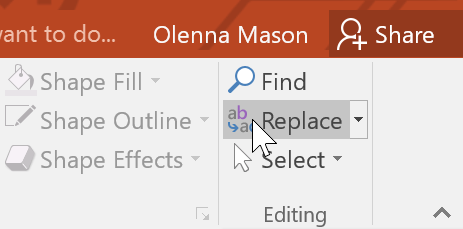
<p style="text-align: justify;">1. Từ tab&nbsp;<strong>Home</strong>, nhấp vào lệnh&nbsp;<strong>Replace.</strong></p>

<p style="text-align: justify;"><img alt="" data-i="3" data-src="https://st.quantrimang.com/photos/image/2022/04/06/su-dung-find-replace-4.png" data-was-processed="true" height="229" src="https://st.quantrimang.com/photos/image/2022/04/06/su-dung-find-replace-4.png" width="463" /></p>

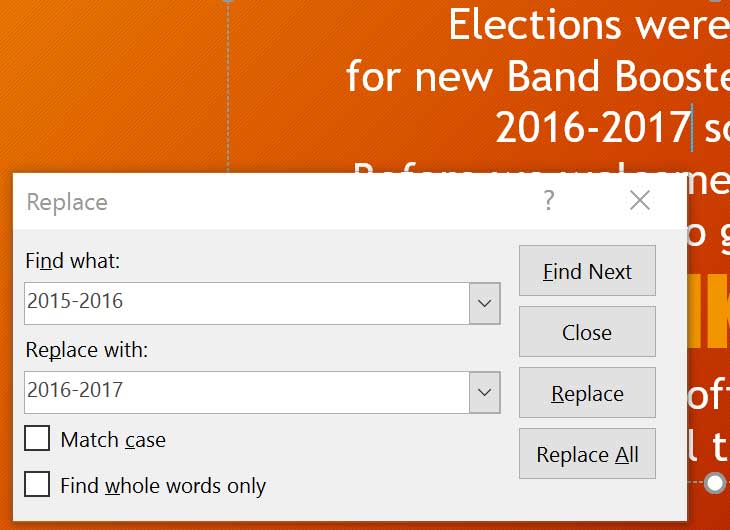
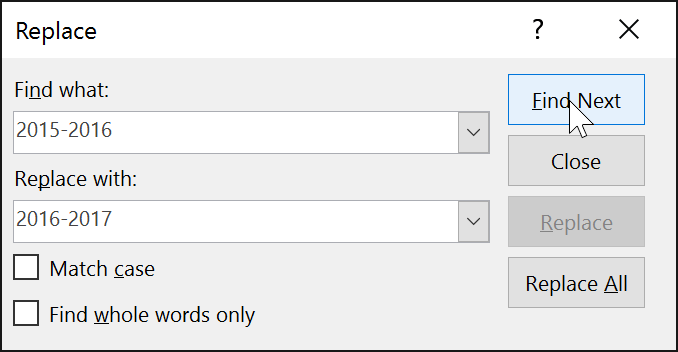
<p style="text-align: justify;">2. Một hộp thoại sẽ xuất hiện. Nhập văn bản bạn muốn tìm vào trường&nbsp;<strong>Find what:.</strong></p>

<p style="text-align: justify;">3. Nhập văn bản bạn muốn thay thế vào trường&nbsp;<strong>Replace with:</strong>, sau đó bấm&nbsp;<strong>Find Next.</strong></p>

<p style="text-align: justify;"><strong><img alt="" data-i="4" data-src="https://st.quantrimang.com/photos/image/2022/04/06/su-dung-find-replace-5.png" data-was-processed="true" height="337" src="https://st.quantrimang.com/photos/image/2022/04/06/su-dung-find-replace-5.png" width="650" /></strong></p>

<p style="text-align: justify;">4. Nếu văn bản được tìm thấy, nó sẽ được chọn. Xem lại văn bản để đảm bảo bạn muốn thay thế nó.</p>
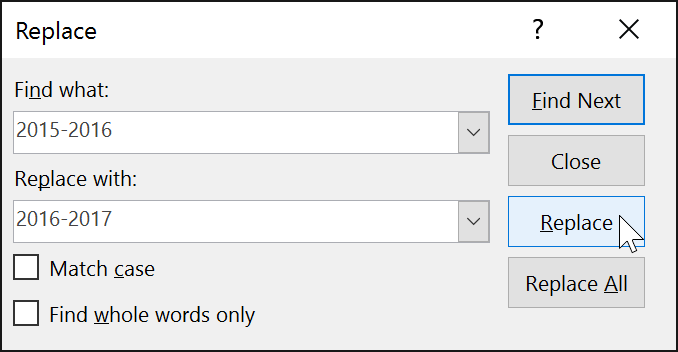
<p style="text-align: justify;">5. Nếu bạn muốn thay thế văn bản, hãy chọn một trong các tùy chọn thay thế. Tùy chọn&nbsp;<strong>Replace</strong>&nbsp;sẽ thay thế các trường hợp riêng lẻ và&nbsp;<strong>Replace All</strong>&nbsp;sẽ thay thế mọi trường hợp. Ví dụ sẽ sử dụng tùy chọn&nbsp;<strong>Replace.</strong></p>

<p style="text-align: justify;"><strong><img alt="" data-i="5" data-src="https://st.quantrimang.com/photos/image/2022/04/06/su-dung-find-replace-6.png" data-was-processed="true" height="337" src="https://st.quantrimang.com/photos/image/2022/04/06/su-dung-find-replace-6.png" width="650" /></strong></p>

<p style="text-align: justify;">6. Văn bản đã chọn sẽ được thay thế.</p>

<p style="text-align: justify;"><img alt="" data-i="6" data-src="https://st.quantrimang.com/photos/image/2022/04/06/su-dung-find-replace-7.jpg" data-was-processed="true" height="472" src="https://st.quantrimang.com/photos/image/2022/04/06/su-dung-find-replace-7.jpg" width="650" /></p>

<p style="text-align: justify;">7. PowerPoint sẽ chuyển sang trường hợp tiếp theo trong bài thuyết trình. Khi bạn hoàn tất việc thay thế văn bản, hãy nhấp vào&nbsp;<strong>Close</strong>&nbsp;để thoát khỏi hộp thoại.</p>

<p style="text-align: justify;">Khi sử dụng&nbsp;<strong>Replace All</strong>, điều quan trọng cần nhớ là nó có thể tìm thấy các kết quả phù hợp mà bạn không lường trước và có thể không thực sự muốn thay đổi. Chỉ sử dụng tùy chọn này nếu bạn hoàn toàn chắc chắn rằng nó sẽ không thay thế bất cứ thứ gì mà bạn không có ý định thay đổi.</p>
		</div>
				<div id="author">
						<p>
				<strong>Nguồn tin:</strong>
				Quantrimang.com
			</p>
		</div>
	</div>
	<div id="footer" class="clearfix">
		<div id="url">
			<strong>URL của bản tin này: </strong><a href="https://www.nguoicodonvn2008.info/vi/news/savefile/kien-thuc-may-tinh/powerpoint-2019-phan-9-su-dung-find-replace-5402.html" title="PowerPoint 2019 &#40;Phần 9&#41;&#x3A; Sử dụng Find &amp; Replace">https://www.nguoicodonvn2008.info/vi/news/savefile/kien-thuc-may-tinh/powerpoint-2019-phan-9-su-dung-find-replace-5402.html</a>

		</div>
		<div class="clear"></div>
		<div class="copyright">
			&copy; .&#x3A; Nguoicodonvn2008.info - Cõi lòng người cô đơn &#x3A;.
		</div>
		<div id="contact">
			<a href="mailto:admin@nguoicodonvn2008.info">admin@nguoicodonvn2008.info</a>
		</div>
	</div>
</div>
        <div id="timeoutsess" class="chromeframe">
            Bạn đã không sử dụng Site, <a onclick="timeoutsesscancel();" href="https://www.nguoicodonvn2008.info/#">Bấm vào đây để duy trì trạng thái đăng nhập</a>. Thời gian chờ: <span id="secField"> 60 </span> giây
        </div>
        <div id="openidResult" class="nv-alert" style="display:none"></div>
        <div id="openidBt" data-result="" data-redirect=""></div>
		</script>
		<div class="car-top">
  <span><img src="https://www.nguoicodonvn2008.info/themes/default/images/car.png" alt=""></span>
</div>
<script src="https://www.nguoicodonvn2008.info/assets/js/jquery/jquery.min.js"></script>
<script>var nv_base_siteurl="/",nv_lang_data="vi",nv_lang_interface="vi",nv_name_variable="nv",nv_fc_variable="op",nv_lang_variable="language",nv_module_name="news",nv_func_name="savefile",nv_is_user=0, nv_my_ofs=-4,nv_my_abbr="EDT",nv_cookie_prefix="nv4c_e856T",nv_check_pass_mstime=1738000,nv_area_admin=0,nv_safemode=0,theme_responsive=0,nv_recaptcha_ver=2,nv_recaptcha_sitekey="",nv_recaptcha_type="image",XSSsanitize=1;</script>
<script src="https://www.nguoicodonvn2008.info/assets/js/language/vi.js"></script>
<script src="https://www.nguoicodonvn2008.info/assets/js/DOMPurify/purify3.js"></script>
<script src="https://www.nguoicodonvn2008.info/assets/js/global.js"></script>
<script src="https://www.nguoicodonvn2008.info/assets/js/site.js"></script>
<script src="https://www.nguoicodonvn2008.info/themes/default/js/news.js"></script>
<script src="https://www.nguoicodonvn2008.info/themes/default/js/main.js"></script>
<script src="https://www.nguoicodonvn2008.info/themes/default/js/custom.js"></script>
<script type="application/ld+json">
        {
            "@context": "https://schema.org",
            "@type": "Organization",
            "url": "https://www.nguoicodonvn2008.info",
            "logo": "https://www.nguoicodonvn2008.info/uploads/angel.gif"
        }
        </script>
<script src="https://www.nguoicodonvn2008.info/themes/default/js/bootstrap.min.js"></script>
<script type="text/javascript">
var $scrolltop = $('.car-top');
$scrolltop.on('click', function () {
    $('html,body').animate({
        scrollTop: 0
    }, 800);
    $(this).addClass("car-run");
    setTimeout(function(){ $scrolltop.removeClass('car-run');}, 1000);
    return false;
});
$(window).on('scroll', function ()
{ 
    if($(window).scrollTop() >= 200)
    {
        $scrolltop.addClass("show");
        $scrolltop.addClass("car-down");
    }
    else
    {
       $scrolltop.removeClass("show");
       setTimeout(function(){ $scrolltop.removeClass('car-down');}, 300);
    }
});
</script>
</body>
</html>