<!DOCTYPE html>
    <html lang="vi" xmlns="http://www.w3.org/1999/xhtml" prefix="og: http://ogp.me/ns#">
    <head>
<title>Nhược điểm của việc sử dụng tài khoản Windows cục bộ</title>
<meta name="description" content="Nhược điểm của việc sử dụng tài khoản Windows cục bộ - Savefile - Tin Tức -...">
<meta name="author" content=".: Nguoicodonvn2008.info - Cõi lòng người cô đơn :.">
<meta name="copyright" content=".: Nguoicodonvn2008.info - Cõi lòng người cô đơn :. [admin@nguoicodonvn2008.info]">
<meta name="robots" content="index, archive, follow, noodp">
<meta name="googlebot" content="index,archive,follow,noodp">
<meta name="msnbot" content="all,index,follow">
<meta name="generator" content="NukeViet v4.5">
<meta http-equiv="Content-Type" content="text/html; charset=utf-8">
<meta property="og:title" content="Nhược điểm của việc sử dụng tài khoản Windows cục bộ">
<meta property="og:type" content="website">
<meta property="og:description" content="Savefile - Tin Tức - https&#x3A;&#x002F;&#x002F;www.nguoicodonvn2008.info&#x002F;vi&#x002F;news&#x002F;savefile&#x002F;kien-thuc-may-tinh&#x002F;nhuoc-diem-cua-viec-su-dung-tai-khoan-windows-cuc-bo-11270.html">
<meta property="og:site_name" content=".&#x3A; Nguoicodonvn2008.info - Cõi lòng người cô đơn &#x3A;.">
<meta property="og:url" content="https://www.nguoicodonvn2008.info/vi/news/savefile/kien-thuc-may-tinh/nhuoc-diem-cua-viec-su-dung-tai-khoan-windows-cuc-bo-11270.html">
<link rel="shortcut icon" href="https://www.nguoicodonvn2008.info/favicon.ico">
<link rel="canonical" href="https://www.nguoicodonvn2008.info/vi/news/savefile/kien-thuc-may-tinh/nhuoc-diem-cua-viec-su-dung-tai-khoan-windows-cuc-bo-11270.html">
<link rel="alternate" href="https://www.nguoicodonvn2008.info/vi/news/rss/" title="Tin Tức" type="application/rss+xml">
<link rel="alternate" href="https://www.nguoicodonvn2008.info/vi/news/rss/karaoke-dual/" title="Tin Tức - Karaoke Dual" type="application/rss+xml">
<link rel="alternate" href="https://www.nguoicodonvn2008.info/vi/news/rss/nhac-tre/" title="Tin Tức - Nhạc trẻ" type="application/rss+xml">
<link rel="alternate" href="https://www.nguoicodonvn2008.info/vi/news/rss/tru-tinh/" title="Tin Tức - Trữ tình" type="application/rss+xml">
<link rel="alternate" href="https://www.nguoicodonvn2008.info/vi/news/rss/nuoc-ngoai/" title="Tin Tức - Nước ngoài" type="application/rss+xml">
<link rel="alternate" href="https://www.nguoicodonvn2008.info/vi/news/rss/remix/" title="Tin Tức - Remix" type="application/rss+xml">
<link rel="alternate" href="https://www.nguoicodonvn2008.info/vi/news/rss/tam-su-tinh-yeu/" title="Tin Tức - Tâm sự tình yêu" type="application/rss+xml">
<link rel="alternate" href="https://www.nguoicodonvn2008.info/vi/news/rss/tho-suu-tam/" title="Tin Tức - Thơ sưu tầm" type="application/rss+xml">
<link rel="alternate" href="https://www.nguoicodonvn2008.info/vi/news/rss/cuoc-song/" title="Tin Tức - Cuộc sống" type="application/rss+xml">
<link rel="alternate" href="https://www.nguoicodonvn2008.info/vi/news/rss/phan-mem/" title="Tin Tức - Phần mềm" type="application/rss+xml">
<link rel="alternate" href="https://www.nguoicodonvn2008.info/vi/news/rss/kien-thuc-may-tinh/" title="Tin Tức - Kiến thức máy tính" type="application/rss+xml">
<link rel="alternate" href="https://www.nguoicodonvn2008.info/vi/news/rss/hoc-tap/" title="Tin Tức - Học tập" type="application/rss+xml">
<link rel="alternate" href="https://www.nguoicodonvn2008.info/vi/news/rss/tai-lieu/" title="Tin Tức - Tài liệu" type="application/rss+xml">
<link rel="alternate" href="https://www.nguoicodonvn2008.info/vi/news/rss/de-thi/" title="Tin Tức - Đề thi" type="application/rss+xml">
<link rel="preload" as="style" href="https://www.nguoicodonvn2008.info/assets/css/font-awesome.min.css" type="text/css">
<link rel="preload" as="style" href="https://www.nguoicodonvn2008.info/themes/default/css/bootstrap.non-responsive.css" type="text/css">
<link rel="preload" as="style" href="https://www.nguoicodonvn2008.info/themes/default/css/style.css" type="text/css">
<link rel="preload" as="style" href="https://www.nguoicodonvn2008.info/themes/default/css/style.non-responsive.css" type="text/css">
<link rel="preload" as="style" href="https://www.nguoicodonvn2008.info/themes/default/css/news.css" type="text/css">
<link rel="preload" as="style" href="https://www.nguoicodonvn2008.info/themes/default/css/custom.css" type="text/css">
<link rel="preload" as="script" href="https://www.nguoicodonvn2008.info/assets/js/jquery/jquery.min.js" type="text/javascript">
<link rel="preload" as="script" href="https://www.nguoicodonvn2008.info/assets/js/language/vi.js" type="text/javascript">
<link rel="preload" as="script" href="https://www.nguoicodonvn2008.info/assets/js/DOMPurify/purify3.js" type="text/javascript">
<link rel="preload" as="script" href="https://www.nguoicodonvn2008.info/assets/js/global.js" type="text/javascript">
<link rel="preload" as="script" href="https://www.nguoicodonvn2008.info/assets/js/site.js" type="text/javascript">
<link rel="preload" as="script" href="https://www.nguoicodonvn2008.info/themes/default/js/news.js" type="text/javascript">
<link rel="preload" as="script" href="https://www.nguoicodonvn2008.info/themes/default/js/main.js" type="text/javascript">
<link rel="preload" as="script" href="https://www.nguoicodonvn2008.info/themes/default/js/custom.js" type="text/javascript">
<link rel="preload" as="script" href="https://www.nguoicodonvn2008.info/themes/default/js/bootstrap.min.js" type="text/javascript">
<link rel="stylesheet" href="https://www.nguoicodonvn2008.info/assets/css/font-awesome.min.css">
<link rel="stylesheet" href="https://www.nguoicodonvn2008.info/themes/default/css/bootstrap.non-responsive.css">
<link rel="stylesheet" href="https://www.nguoicodonvn2008.info/themes/default/css/style.css">
<link rel="stylesheet" href="https://www.nguoicodonvn2008.info/themes/default/css/style.non-responsive.css">
<link rel="StyleSheet" href="https://www.nguoicodonvn2008.info/themes/default/css/news.css">
<link rel="stylesheet" href="https://www.nguoicodonvn2008.info/themes/default/css/custom.css">
<style type="text/css">
	body{background: #fff;}
</style>
    </head>
    <body>
<div id="print">
	<div id="hd_print">
		<h2 class="pull-left">.&#x3A; Nguoicodonvn2008.info - Cõi lòng người cô đơn &#x3A;.</h2>
		<p class="pull-right"><a title=".&#x3A; Nguoicodonvn2008.info - Cõi lòng người cô đơn &#x3A;." href="https://www.nguoicodonvn2008.info/">https://www.nguoicodonvn2008.info</a></p>
	</div>
	<div class="clear"></div>
	<hr />
	<div id="content">
		<h1>Nhược điểm của việc sử dụng tài khoản Windows cục bộ</h1>
		<ul class="list-inline">
			<li>Thứ ba - 30/09/2025 23:27</li>
			<li class="hidden-print txtrequired"><em class="fa fa-print">&nbsp;</em><a title="In ra" href="javascript:;" onclick="window.print()">In ra</a></li>
			<li class="hidden-print txtrequired"><em class="fa fa-power-off">&nbsp;</em><a title="Đóng cửa sổ này" href="javascript:;" onclick="window.close()">Đóng cửa sổ này</a></li>
		</ul>
		<div class="clear"></div>
		<div id="hometext">
		</div>
				<div class="imghome">
			<img alt="Nhược điểm của việc sử dụng tài khoản Windows cục bộ" src="https://st.quantrimang.com/photos/image/2025/09/30/nhuoc-diem-cua-tai-khoan-windows-cuc-bo-8.jpg" width="460" class="img-thumbnail" />
		</div>
		<div class="clear"></div>
		<div id="bodytext" class="clearfix">
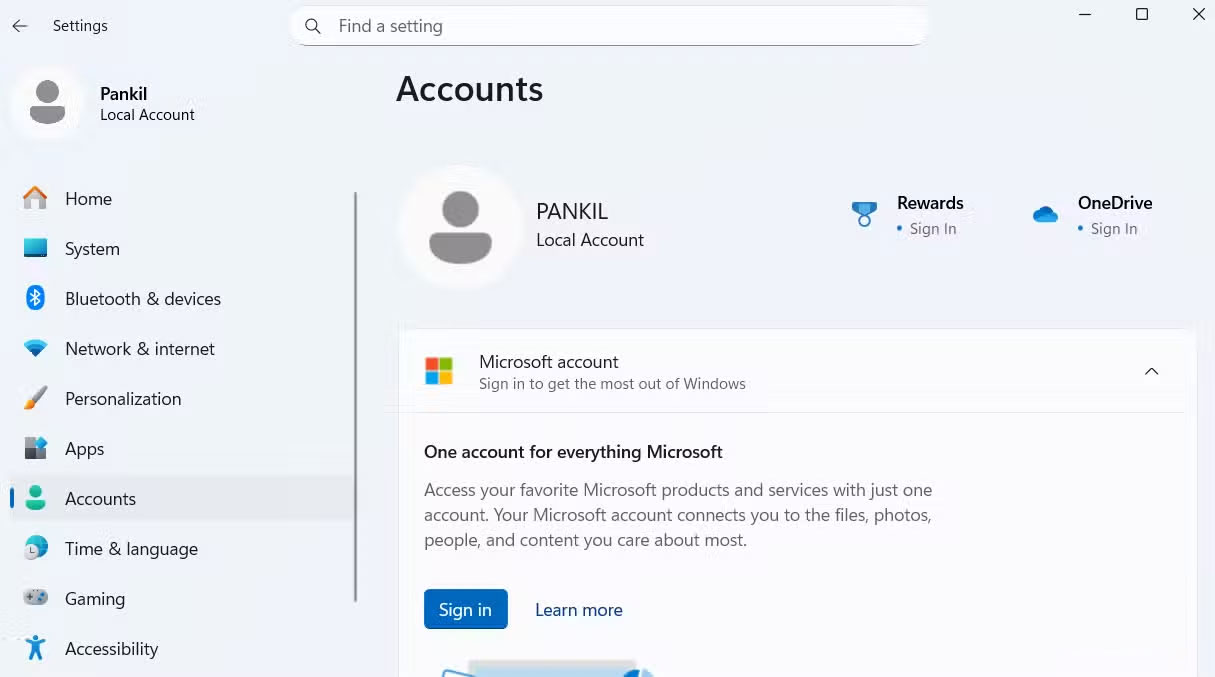
			<p style="text-align: justify;">Khi thiết lập&nbsp;&nbsp;máy tính&nbsp;Windows mới, nhiều người đã chọn tài khoản cục bộ để đảm bảo quyền riêng tư. Ý tưởng rất đơn giản: Không bị theo dõi tài khoản Microsoft và toàn quyền kiểm soát thiết bị. Nhưng khi bắt đầu sử dụng máy tính, các lỗ hổng bắt đầu xuất hiện, và họ nhận ra tài khoản cục bộ khác biệt thế nào so với tài khoản Microsoft.</p>

<p style="text-align: justify;">Các tính năng bạn cho là hiển nhiên, như&nbsp;Copilot, sao lưu đám mây và tự động đồng bộ cài đặt, đột nhiên biến mất. Ngay cả việc sử dụng các ứng dụng Microsoft yêu thích cũng trở nên phức tạp một cách không cần thiết. Cảm giác tự do ban đầu dần dần biến thành một loạt những khó chịu nhỏ và cuối cùng buộc bạn phải quay lại sử dụng tài khoản Microsoft.</p>

<h2 style="text-align: justify;">Truy cập hạn chế vào các ứng dụng Microsoft và những tính năng hỗ trợ AI</h2>

<h3 style="text-align: justify;">Các ứng dụng yêu thích sẽ không hoạt động trừ khi bạn đăng nhập</h3>

<figure>
<div style="text-align: justify;"><img alt="" data-adbro-processed="true" data-i="0" data-src="https://st.quantrimang.com/photos/image/2025/09/30/nhuoc-diem-cua-tai-khoan-windows-cuc-bo-1.jpg" data-was-processed="true" height="677" src="https://st.quantrimang.com/photos/image/2025/09/30/nhuoc-diem-cua-tai-khoan-windows-cuc-bo-1.jpg" width="1215" /></div>
</figure>

<figure>
<div style="text-align: justify;"><img alt="" data-i="1" data-src="https://st.quantrimang.com/photos/image/2025/09/30/nhuoc-diem-cua-tai-khoan-windows-cuc-bo-2.jpg" data-was-processed="true" height="637" src="https://st.quantrimang.com/photos/image/2025/09/30/nhuoc-diem-cua-tai-khoan-windows-cuc-bo-2.jpg" width="1050" /></div>
</figure>

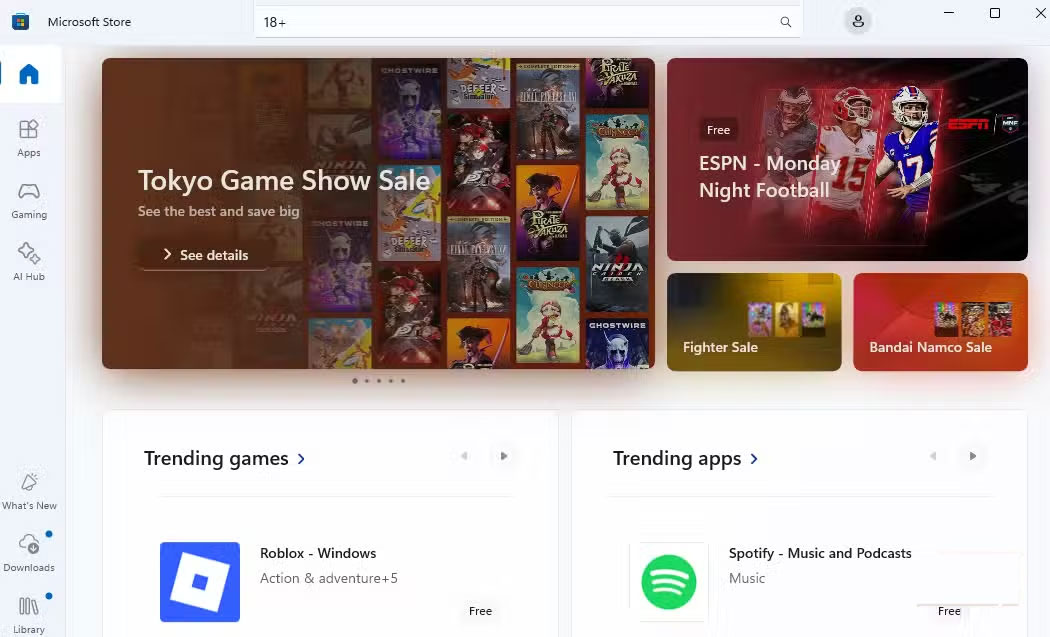
<p style="text-align: justify;">Một trong những điều đầu tiên bạn nhận thấy sau khi chuyển sang tài khoản cục bộ là Microsoft Store đột nhiên bị hạn chế như thế nào. Nếu không đăng nhập tài khoản Microsoft, bạn không thể chỉ cần nhấn nút tải xuống bất kỳ ứng dụng hoặc game nào và cài đặt một cách liền mạch.</p>

<p style="text-align: justify;">Các ứng dụng và game có nội dung người lớn hoặc giới hạn khu vực yêu cầu tài khoản Microsoft xác minh độ tuổi hoặc vị trí của bạn. Thêm vào đó, nếu muốn mua một ứng dụng hoặc game trả phí, bạn cần phải đăng nhập, điều này hợp lý vì lý do thanh toán và cấp phép.</p>

<p style="text-align: justify;">Tương tự, nếu sử dụng các ứng dụng tích hợp của Microsoft như&nbsp;Phone Link,&nbsp;Clipchamp&nbsp;hoặc bộ Office, bạn cần có tài khoản Microsoft.</p>

<h2 style="text-align: justify;">Không thể đồng bộ dữ liệu giữa các thiết bị hoặc sử dụng passkey</h2>

<h3 style="text-align: justify;">Nói lời tạm biệt với thiết lập liền mạch và đăng nhập dễ dàng</h3>

<figure>
<div style="text-align: justify;"><img alt="Cài đặt sao lưu Windows trên tài khoản cục bộ" data-i="5" data-src="https://st.quantrimang.com/photos/image/2025/09/30/nhuoc-diem-cua-tai-khoan-windows-cuc-bo-6.jpg" data-was-processed="true" height="472" src="https://st.quantrimang.com/photos/image/2025/09/30/nhuoc-diem-cua-tai-khoan-windows-cuc-bo-6.jpg" width="825" /></div>

<figcaption>
<div style="text-align: justify;">Cài đặt sao lưu Windows trên tài khoản cục bộ</div>
</figcaption>
</figure>

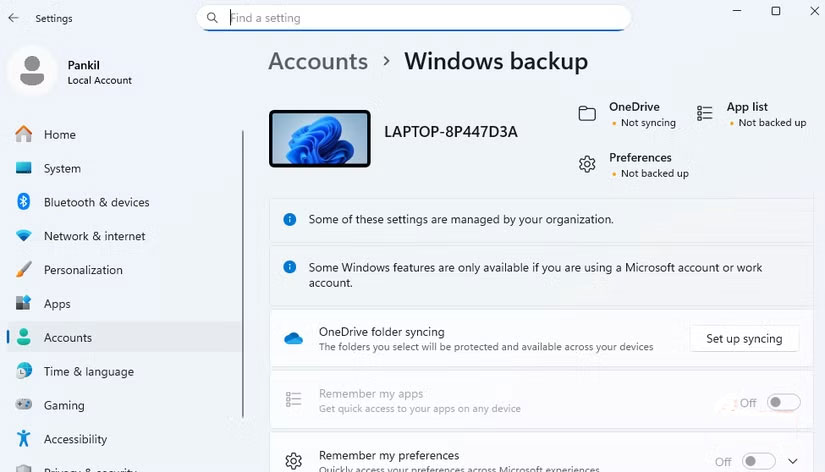
<p style="text-align: justify;">Một đánh đổi lớn khác khi sử dụng tài khoản cục bộ là mất đi tính năng đồng bộ liền mạch mà bạn thường cho là hiển nhiên. Khi bạn đăng nhập bằng tài khoản Microsoft, các cài đặt, theme, mật khẩu và thậm chí cả tùy chọn ngôn ngữ của bạn sẽ âm thầm di chuyển từ thiết bị Windows này sang thiết bị Windows khác. Điều này có nghĩa là bất cứ khi nào chuyển sang một&nbsp;&nbsp;máy tính&nbsp;khác, bạn chỉ cần đăng nhập và mọi thứ sẽ trở nên quen thuộc, như thể bạn chưa từng rời khỏi chiếc máy cũ của mình.</p>

<p style="text-align: justify;">Với tài khoản cục bộ, sự tiện lợi đó sẽ biến mất. Vì mọi thứ đều được lưu trữ cục bộ trên một thiết bị duy nhất, việc chuyển sang một PC khác hoặc thậm chí cài đặt lại Windows trở thành một quá trình thiết lập lại tẻ nhạt. Bạn phải sao chép thủ công các cài đặt, cài đặt lại ứng dụng và xây dựng lại quy trình làm việc từ đầu.</p>

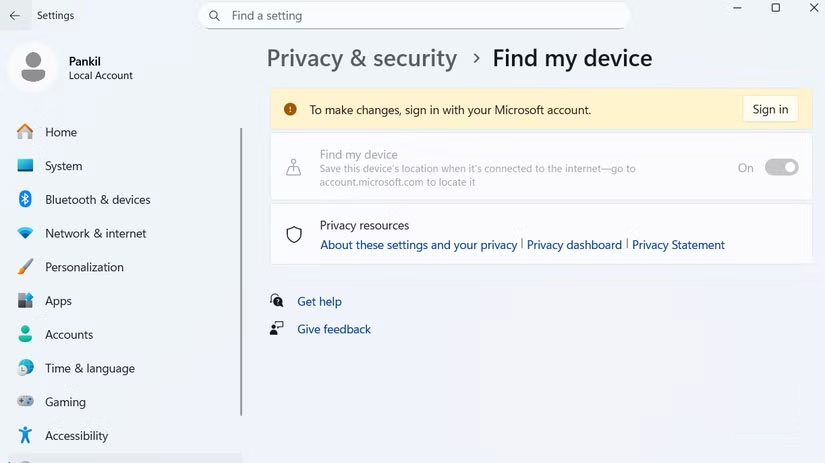
<h2 style="text-align: justify;">Find My Device và Windows Backup ngừng hoạt động</h2>

<h3 style="text-align: justify;">Khi mạng lưới an toàn biến mất, sự hoảng loạn bắt đầu</h3>

<figure>
<div style="text-align: justify;"><img alt="Find My Device trên tài khoản Windows cục bộ" data-i="6" data-src="https://st.quantrimang.com/photos/image/2025/09/30/nhuoc-diem-cua-tai-khoan-windows-cuc-bo-7.jpg" data-was-processed="true" height="463" src="https://st.quantrimang.com/photos/image/2025/09/30/nhuoc-diem-cua-tai-khoan-windows-cuc-bo-7.jpg" width="825" /></div>

<figcaption>
<div style="text-align: justify;">Find My Device trên tài khoản Windows cục bộ</div>
</figcaption>
</figure>

<p style="text-align: justify;">Chuyển sang tài khoản cục bộ cũng đồng nghĩa với việc mất quyền truy cập vào một số mạng lưới an toàn của Windows. Các tính năng như Find My Device và Windows Backup phụ thuộc vào tài khoản Microsoft của bạn để hoạt động, vì vậy khi bạn chuyển sang tài khoản cục bộ, chúng sẽ ngừng hoạt động.</p>

<p style="text-align: justify;">Một vấn đề đau đầu khác khi mất thiết bị là nguy cơ mất dữ liệu quý giá. Với Windows Backup, bạn có thể lưu mọi thứ, từ ứng dụng và cài đặt đến thông tin đăng nhập. Bằng cách đó, ngay cả khi máy tính xách tay bị mất, bạn vẫn có thể truy cập dữ liệu, nhưng chỉ khi bạn đã đăng nhập vào tài khoản Microsoft và đã thiết lập bản sao lưu trước.</p>

<h2 style="text-align: justify;">Ít tùy chọn khôi phục tài khoản hơn</h2>

<h3 style="text-align: justify;">Quên mật khẩu và hy vọng mọi chuyện sẽ ổn</h3>

<figure>
<div style="text-align: justify;"><img alt="Màn hình đăng nhập Windows 10 hiển thị các tùy chọn nguồn" data-i="7" data-src="https://st.quantrimang.com/photos/image/2025/09/30/nhuoc-diem-cua-tai-khoan-windows-cuc-bo-8.jpg" data-was-processed="true" height="550" src="https://st.quantrimang.com/photos/image/2025/09/30/nhuoc-diem-cua-tai-khoan-windows-cuc-bo-8.jpg" width="825" /></div>

<figcaption>
<div style="text-align: justify;">Màn hình đăng nhập Windows 10 hiển thị các tùy chọn nguồn</div>
</figcaption>
</figure>

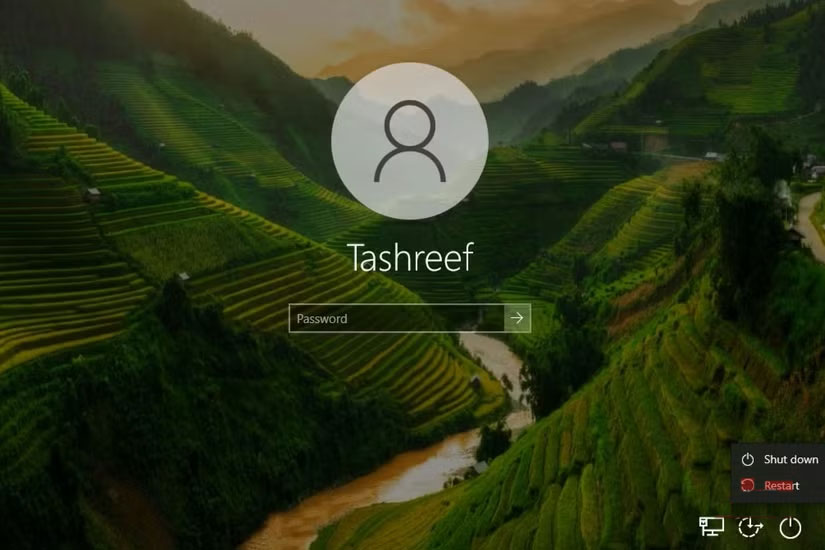
<p style="text-align: justify;">Với tài khoản Microsoft, việc quên mã PIN đăng nhập hoặc mật khẩu thường chỉ là một trục trặc nhỏ. Bạn có thể dễ dàng reset bằng cách đăng nhập vào tài khoản Microsoft hoặc nhận mã xác minh qua điện thoại hoặc email.</p>

<p style="text-align: justify;">Ngược lại, tài khoản cục bộ đặt toàn bộ trách nhiệm lên vai bạn. Quên mật khẩu, bạn sẽ phải sử dụng lại các câu hỏi bảo mật đã thiết lập khi tạo tài khoản lần đầu. Nếu không nhớ những câu hỏi này, việc lấy lại quyền truy cập gần như là bất khả thi.</p>

<p style="text-align: justify;">Tuy trường hợp này hiếm khi xảy ra, nhưng nếu máy tính của bạn lưu trữ các file và dữ liệu quan trọng mà không có bản sao lưu, rủi ro sẽ tăng cao hơn nhiều. Mất quyền truy cập có thể đồng nghĩa với việc mất tất cả mọi thứ, từ tài liệu cá nhân đến file công việc, mà không có cách nào thuận tiện để khôi phục.</p>
		</div>
				<div id="author">
						<p>
				<strong>Nguồn tin:</strong>
				Quantrimang.com:
			</p>
		</div>
	</div>
	<div id="footer" class="clearfix">
		<div id="url">
			<strong>URL của bản tin này: </strong><a href="https://www.nguoicodonvn2008.info/vi/news/savefile/kien-thuc-may-tinh/nhuoc-diem-cua-viec-su-dung-tai-khoan-windows-cuc-bo-11270.html" title="Nhược điểm của việc sử dụng tài khoản Windows cục bộ">https://www.nguoicodonvn2008.info/vi/news/savefile/kien-thuc-may-tinh/nhuoc-diem-cua-viec-su-dung-tai-khoan-windows-cuc-bo-11270.html</a>

		</div>
		<div class="clear"></div>
		<div class="copyright">
			&copy; .&#x3A; Nguoicodonvn2008.info - Cõi lòng người cô đơn &#x3A;.
		</div>
		<div id="contact">
			<a href="mailto:admin@nguoicodonvn2008.info">admin@nguoicodonvn2008.info</a>
		</div>
	</div>
</div>
        <div id="timeoutsess" class="chromeframe">
            Bạn đã không sử dụng Site, <a onclick="timeoutsesscancel();" href="https://www.nguoicodonvn2008.info/#">Bấm vào đây để duy trì trạng thái đăng nhập</a>. Thời gian chờ: <span id="secField"> 60 </span> giây
        </div>
        <div id="openidResult" class="nv-alert" style="display:none"></div>
        <div id="openidBt" data-result="" data-redirect=""></div>
		</script>
		<div class="car-top">
  <span><img src="https://www.nguoicodonvn2008.info/themes/default/images/car.png" alt=""></span>
</div>
<script src="https://www.nguoicodonvn2008.info/assets/js/jquery/jquery.min.js"></script>
<script>var nv_base_siteurl="/",nv_lang_data="vi",nv_lang_interface="vi",nv_name_variable="nv",nv_fc_variable="op",nv_lang_variable="language",nv_module_name="news",nv_func_name="savefile",nv_is_user=0, nv_my_ofs=-4,nv_my_abbr="EDT",nv_cookie_prefix="nv4c_e856T",nv_check_pass_mstime=1738000,nv_area_admin=0,nv_safemode=0,theme_responsive=0,nv_recaptcha_ver=2,nv_recaptcha_sitekey="",nv_recaptcha_type="image",XSSsanitize=1;</script>
<script src="https://www.nguoicodonvn2008.info/assets/js/language/vi.js"></script>
<script src="https://www.nguoicodonvn2008.info/assets/js/DOMPurify/purify3.js"></script>
<script src="https://www.nguoicodonvn2008.info/assets/js/global.js"></script>
<script src="https://www.nguoicodonvn2008.info/assets/js/site.js"></script>
<script src="https://www.nguoicodonvn2008.info/themes/default/js/news.js"></script>
<script src="https://www.nguoicodonvn2008.info/themes/default/js/main.js"></script>
<script src="https://www.nguoicodonvn2008.info/themes/default/js/custom.js"></script>
<script type="application/ld+json">
        {
            "@context": "https://schema.org",
            "@type": "Organization",
            "url": "https://www.nguoicodonvn2008.info",
            "logo": "https://www.nguoicodonvn2008.info/uploads/angel.gif"
        }
        </script>
<script src="https://www.nguoicodonvn2008.info/themes/default/js/bootstrap.min.js"></script>
<script type="text/javascript">
var $scrolltop = $('.car-top');
$scrolltop.on('click', function () {
    $('html,body').animate({
        scrollTop: 0
    }, 800);
    $(this).addClass("car-run");
    setTimeout(function(){ $scrolltop.removeClass('car-run');}, 1000);
    return false;
});
$(window).on('scroll', function ()
{ 
    if($(window).scrollTop() >= 200)
    {
        $scrolltop.addClass("show");
        $scrolltop.addClass("car-down");
    }
    else
    {
       $scrolltop.removeClass("show");
       setTimeout(function(){ $scrolltop.removeClass('car-down');}, 300);
    }
});
</script>
</body>
</html>