<!DOCTYPE html>
    <html lang="vi" xmlns="http://www.w3.org/1999/xhtml" prefix="og: http://ogp.me/ns#">
    <head>
<title>Modern Setup Host trên Windows 10 là gì? Có phải là virus không?</title>
<meta name="description" content="Modern Setup Host trên Windows 10 là gì? Có phải là virus không? - Savefile - Tin Tức -...">
<meta name="author" content=".: Nguoicodonvn2008.info - Cõi lòng người cô đơn :.">
<meta name="copyright" content=".: Nguoicodonvn2008.info - Cõi lòng người cô đơn :. [admin@nguoicodonvn2008.info]">
<meta name="robots" content="index, archive, follow, noodp">
<meta name="googlebot" content="index,archive,follow,noodp">
<meta name="msnbot" content="all,index,follow">
<meta name="generator" content="NukeViet v4.5">
<meta http-equiv="Content-Type" content="text/html; charset=utf-8">
<meta property="og:title" content="Modern Setup Host trên Windows 10 là gì? Có phải là virus không?">
<meta property="og:type" content="website">
<meta property="og:description" content="Savefile - Tin Tức - https&#x3A;&#x002F;&#x002F;www.nguoicodonvn2008.info&#x002F;vi&#x002F;news&#x002F;savefile&#x002F;kien-thuc-may-tinh&#x002F;modern-setup-host-tren-windows-10-la-gi-co-phai-la-virus-khong-3353.html">
<meta property="og:site_name" content=".&#x3A; Nguoicodonvn2008.info - Cõi lòng người cô đơn &#x3A;.">
<meta property="og:url" content="https://www.nguoicodonvn2008.info/vi/news/savefile/kien-thuc-may-tinh/modern-setup-host-tren-windows-10-la-gi-co-phai-la-virus-khong-3353.html">
<link rel="shortcut icon" href="https://www.nguoicodonvn2008.info/favicon.ico">
<link rel="canonical" href="https://www.nguoicodonvn2008.info/vi/news/savefile/kien-thuc-may-tinh/modern-setup-host-tren-windows-10-la-gi-co-phai-la-virus-khong-3353.html">
<link rel="alternate" href="https://www.nguoicodonvn2008.info/vi/news/rss/" title="Tin Tức" type="application/rss+xml">
<link rel="alternate" href="https://www.nguoicodonvn2008.info/vi/news/rss/karaoke-dual/" title="Tin Tức - Karaoke Dual" type="application/rss+xml">
<link rel="alternate" href="https://www.nguoicodonvn2008.info/vi/news/rss/nhac-tre/" title="Tin Tức - Nhạc trẻ" type="application/rss+xml">
<link rel="alternate" href="https://www.nguoicodonvn2008.info/vi/news/rss/tru-tinh/" title="Tin Tức - Trữ tình" type="application/rss+xml">
<link rel="alternate" href="https://www.nguoicodonvn2008.info/vi/news/rss/nuoc-ngoai/" title="Tin Tức - Nước ngoài" type="application/rss+xml">
<link rel="alternate" href="https://www.nguoicodonvn2008.info/vi/news/rss/remix/" title="Tin Tức - Remix" type="application/rss+xml">
<link rel="alternate" href="https://www.nguoicodonvn2008.info/vi/news/rss/tam-su-tinh-yeu/" title="Tin Tức - Tâm sự tình yêu" type="application/rss+xml">
<link rel="alternate" href="https://www.nguoicodonvn2008.info/vi/news/rss/tho-suu-tam/" title="Tin Tức - Thơ sưu tầm" type="application/rss+xml">
<link rel="alternate" href="https://www.nguoicodonvn2008.info/vi/news/rss/cuoc-song/" title="Tin Tức - Cuộc sống" type="application/rss+xml">
<link rel="alternate" href="https://www.nguoicodonvn2008.info/vi/news/rss/phan-mem/" title="Tin Tức - Phần mềm" type="application/rss+xml">
<link rel="alternate" href="https://www.nguoicodonvn2008.info/vi/news/rss/kien-thuc-may-tinh/" title="Tin Tức - Kiến thức máy tính" type="application/rss+xml">
<link rel="alternate" href="https://www.nguoicodonvn2008.info/vi/news/rss/hoc-tap/" title="Tin Tức - Học tập" type="application/rss+xml">
<link rel="alternate" href="https://www.nguoicodonvn2008.info/vi/news/rss/tai-lieu/" title="Tin Tức - Tài liệu" type="application/rss+xml">
<link rel="alternate" href="https://www.nguoicodonvn2008.info/vi/news/rss/de-thi/" title="Tin Tức - Đề thi" type="application/rss+xml">
<link rel="preload" as="style" href="https://www.nguoicodonvn2008.info/assets/css/font-awesome.min.css" type="text/css">
<link rel="preload" as="style" href="https://www.nguoicodonvn2008.info/themes/default/css/bootstrap.non-responsive.css" type="text/css">
<link rel="preload" as="style" href="https://www.nguoicodonvn2008.info/themes/default/css/style.css" type="text/css">
<link rel="preload" as="style" href="https://www.nguoicodonvn2008.info/themes/default/css/style.non-responsive.css" type="text/css">
<link rel="preload" as="style" href="https://www.nguoicodonvn2008.info/themes/default/css/news.css" type="text/css">
<link rel="preload" as="style" href="https://www.nguoicodonvn2008.info/themes/default/css/custom.css" type="text/css">
<link rel="preload" as="script" href="https://www.nguoicodonvn2008.info/assets/js/jquery/jquery.min.js" type="text/javascript">
<link rel="preload" as="script" href="https://www.nguoicodonvn2008.info/assets/js/language/vi.js" type="text/javascript">
<link rel="preload" as="script" href="https://www.nguoicodonvn2008.info/assets/js/DOMPurify/purify3.js" type="text/javascript">
<link rel="preload" as="script" href="https://www.nguoicodonvn2008.info/assets/js/global.js" type="text/javascript">
<link rel="preload" as="script" href="https://www.nguoicodonvn2008.info/assets/js/site.js" type="text/javascript">
<link rel="preload" as="script" href="https://www.nguoicodonvn2008.info/themes/default/js/news.js" type="text/javascript">
<link rel="preload" as="script" href="https://www.nguoicodonvn2008.info/themes/default/js/main.js" type="text/javascript">
<link rel="preload" as="script" href="https://www.nguoicodonvn2008.info/themes/default/js/custom.js" type="text/javascript">
<link rel="preload" as="script" href="https://www.nguoicodonvn2008.info/themes/default/js/bootstrap.min.js" type="text/javascript">
<link rel="stylesheet" href="https://www.nguoicodonvn2008.info/assets/css/font-awesome.min.css">
<link rel="stylesheet" href="https://www.nguoicodonvn2008.info/themes/default/css/bootstrap.non-responsive.css">
<link rel="stylesheet" href="https://www.nguoicodonvn2008.info/themes/default/css/style.css">
<link rel="stylesheet" href="https://www.nguoicodonvn2008.info/themes/default/css/style.non-responsive.css">
<link rel="StyleSheet" href="https://www.nguoicodonvn2008.info/themes/default/css/news.css">
<link rel="stylesheet" href="https://www.nguoicodonvn2008.info/themes/default/css/custom.css">
<style type="text/css">
	body{background: #fff;}
</style>
    </head>
    <body>
<div id="print">
	<div id="hd_print">
		<h2 class="pull-left">.&#x3A; Nguoicodonvn2008.info - Cõi lòng người cô đơn &#x3A;.</h2>
		<p class="pull-right"><a title=".&#x3A; Nguoicodonvn2008.info - Cõi lòng người cô đơn &#x3A;." href="https://www.nguoicodonvn2008.info/">https://www.nguoicodonvn2008.info</a></p>
	</div>
	<div class="clear"></div>
	<hr />
	<div id="content">
		<h1>Modern Setup Host trên Windows 10 là gì? Có phải là virus không?</h1>
		<ul class="list-inline">
			<li>Thứ tư - 30/12/2020 23:53</li>
			<li class="hidden-print txtrequired"><em class="fa fa-print">&nbsp;</em><a title="In ra" href="javascript:;" onclick="window.print()">In ra</a></li>
			<li class="hidden-print txtrequired"><em class="fa fa-power-off">&nbsp;</em><a title="Đóng cửa sổ này" href="javascript:;" onclick="window.close()">Đóng cửa sổ này</a></li>
		</ul>
		<div class="clear"></div>
		<div id="hometext">
		</div>
				<div class="imghome">
			<img alt="Modern Setup Host trên Windows 10 là gì? Có phải là virus không?" src="https://st.quantrimang.com/photos/image/2020/12/30/modern-setup-host-tren-windows-10-la-gi-co-phai-la-virus-khong.jpg" width="460" class="img-thumbnail" />
		</div>
		<div class="clear"></div>
		<div id="bodytext" class="clearfix">
			<p style="text-align: justify;">Khi nhận ra máy tính bị lag hoặc nóng quá mức nhiều người thường kiểm tra&nbsp;Windows Task Manager&nbsp;để xem quy trình nào đang chiếm dụng nhiều tài nguyên. Nếu phát hiện ra các quy trình lạ đang chạy, bạn sẽ có xu hướng tắt chúng đi.</p>

<p style="text-align: justify;">Một trong những quy trình lạ mà bạn có thể bắt gặp đó là Modern Setup Host (SetupHost.exe) trên&nbsp;Windows 10. Quy trình này chạy nền dưới hệ thống của bạn nhưng nó là gì và nó có phải là virus không, có nên tắt nó đi không? Mời các bạn cùng Quantrimang.com đi tìm câu trả lời.</p>

<h2 id="mcetoc_1eqopds180" style="text-align: justify;">Modern Setup Host trên Windows 10 là gì?</h2>

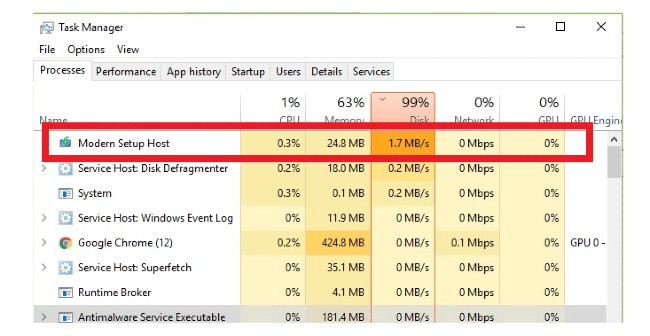
<p style="text-align: justify;">Modern Setup Host hoặc SetupHost.exe là tập tin được tích hợp trong Windows 10 và nó được khởi chạy trong nền khi bạn cài đặt&nbsp;Windows Update. Quy trình này có nhiệm vụ giúp máy tính của bạn sẵn sàng cho việc cập nhật và tạo điều kiện thuận lợi cho việc thiết lập hệ thống khi bạn nâng cấp lên phiên bản Windows 10 mới hơn. Đôi khi SetupHost.exe chiếm dụng nhiều tài nguyên CPU và RAM.</p>

<figure>
<div style="text-align: justify;"><img alt="Modern Setup Host trên Windows 10" data-i="0" data-src="https://st.quantrimang.com/photos/image/2020/12/30/modern-setup-host-tren-windows-10-la-gi-co-phai-la-virus-khong.jpg" data-was-processed="true" height="336" src="https://st.quantrimang.com/photos/image/2020/12/30/modern-setup-host-tren-windows-10-la-gi-co-phai-la-virus-khong.jpg" width="650" /></div>

<figcaption>
<div style="text-align: justify;">Modern Setup Host trên Windows 10</div>
</figcaption>
</figure>

<p style="text-align: justify;">Bạn có thể tìm thấy tập tin SetupHost.exe trong thư mục&nbsp;<strong>$Windows.~BT/Sources</strong>&nbsp;trên máy tính Windows 10 của bạn. Quy trình này không gây ảnh hưởng gì tới hiệu suất máy tính của bạn trừ khi bạn đang cài đặt bản cập nhật Windows 10. Chỉ khi đó Modern Setup Host mới xuất hiện trong Task Manager.</p>

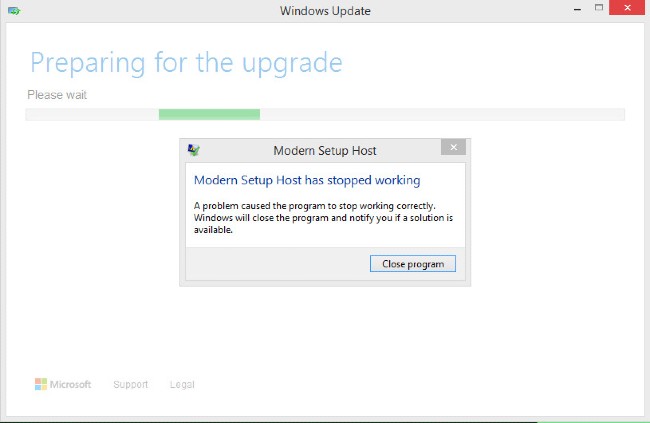
<p style="text-align: justify;">Nếu bị thiếu Modern Setup Host, bạn sẽ không thể cập nhật Windows 10. Quá trình cập nhật cũng sẽ bị ngừng nếu tập tin này gặp lỗi hoặc hỏng.</p>

<h2 id="mcetoc_1eqopds181" style="text-align: justify;">Modern Setup Host có phải là virus không?</h2>

<p style="text-align: justify;">Nhiều người tò mò tự hỏi Modern Setup Host là gì khi thấy nó xuất hiện trong Task Manager. Bản thân Modern Setup Host hay SetupHost.exe không phải là virus. Tuy nhiên, tội phạm mạng thường xuyên ngụy trang phần mềm độc hại dưới dạng tập tin hoặc quy trình hệ thống.</p>

<p style="text-align: justify;">Vì thế, Modern Setup Host mà bạn thấy trên máy của mình có thể là virus hoặc không. Rất may là có nhiều cách để bạn xác định Modern Setup Host trên máy của mình có phải là virus hay không.</p>

<figure>
<div style="text-align: justify;"><img alt="Quá trình cập nhật bị ngừng khi Modern Setup Host gặp lỗi" data-i="1" data-src="https://st.quantrimang.com/photos/image/2020/12/30/modern-setup-host-tren-windows-10-la-gi-co-phai-la-virus-khong-1.jpg" data-was-processed="true" height="423" src="https://st.quantrimang.com/photos/image/2020/12/30/modern-setup-host-tren-windows-10-la-gi-co-phai-la-virus-khong-1.jpg" width="650" /></div>

<figcaption>
<div style="text-align: justify;">Quá trình cập nhật bị ngừng khi Modern Setup Host gặp lỗi</div>
</figcaption>
</figure>

<h2 id="mcetoc_1eqopds182" style="text-align: justify;">Cách kiểm tra Modern Setup Host có phải là virus hay không?</h2>

<p style="text-align: justify;"><strong>1. Kiểm tra vị trí của tập tin</strong></p>

<p style="text-align: justify;">Tập tin SetupHost.exe chuẩn nằm trong thư mục&nbsp;<strong>$Windows.~BT/Sources</strong>&nbsp;trong máy tính Windows 10 của bạn. Vì thế, để tìm được nó bạn phải điều hướng tới&nbsp;<strong>Local Disk (C:) &gt; $WINDOWS.~BT &gt; Sources</strong>&nbsp;trong&nbsp;<strong>File Explorer</strong>. Lưu ý:&nbsp;<strong>$WINDOWS.~BT</strong>&nbsp;là thư mục ẩn, vì thế để truy cập bạn phải cho&nbsp;hiển thị các thư mục và tập tin ẩn trên Windows 10.</p>

<p style="text-align: justify;">Để xác định sự tồn tại cũng như vị trí của tập tin SetupHost.exe giả mạo bạn có thể tìm kiếm bằng cách nhấn nút&nbsp;<strong>Windows</strong>&nbsp;trên bàn phím sau đó nhập&nbsp;<strong>setuphost</strong>. Nhấp chuột phải vào&nbsp;<strong>SetupHost.exe</strong>&nbsp;từ kết quả tìm kiếm và chọn&nbsp;<strong>Open file location</strong>. Kiểm tra thư mục vừa mở và nếu nó không phải&nbsp;<strong>$Windows.~BT/Sources</strong>&nbsp;thì tập tin đó là&nbsp;<strong>SetupHost.exe</strong>&nbsp;giả mạo.</p>

<p style="text-align: justify;"><strong>2. Kiểm tra bản quyền và chữ ký số của tập tin</strong></p>

<p style="text-align: justify;">Modern Setup Host được phát triển và phân phối bởi Microsoft. Vì thế, để xác minh tập tin này bạn có thể kiểm tra xem nó có chữ ký số của Microsoft hay không.</p>

<p style="text-align: justify;">Nhấn nút&nbsp;<strong>Windows</strong>&nbsp;trên bàn phím sau đó nhập&nbsp;<strong>setuphost</strong>&nbsp;để tìm kiếm tập tin. Nhấp chuột phải vào&nbsp;<strong>SetupHost.exe</strong>&nbsp;từ kết quả tìm kiếm và chọn&nbsp;<strong>Open file location</strong>.</p>

<div style="text-align: justify;">&nbsp;</div>

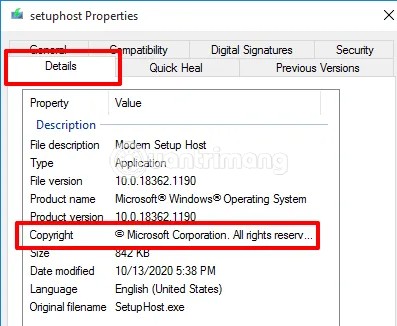
<p style="text-align: justify;">Tiếp theo, nhấp chuột phải vào&nbsp;<strong>SetupHost.exe</strong>&nbsp;và chọn&nbsp;<strong>Properties</strong>. Chuyển sang tab&nbsp;<strong>Details</strong>&nbsp;ở phía trên của cửa sổ&nbsp;<strong>SetupHost Properties</strong>&nbsp;và kéo xuống phần&nbsp;<strong>Copyright</strong>. Tại đây, tập tin chuẩn sẽ có ghi chi tiết về bản quyền của&nbsp;<strong>Microsoft Coporation</strong>. Nếu tại vị trí đó để hiển thị tên một công ty khác, bạn nên xóa ngay tập tin này đi.</p>

<figure>
<div style="text-align: justify;"><img alt="Thông tin bản quyền của Modern Setup Host" data-i="2" data-src="https://st.quantrimang.com/photos/image/2020/12/30/modern-setup-host-tren-windows-10-la-gi-co-phai-la-virus-khong-2.jpg" data-was-processed="true" height="326" src="https://st.quantrimang.com/photos/image/2020/12/30/modern-setup-host-tren-windows-10-la-gi-co-phai-la-virus-khong-2.jpg" width="397" /></div>

<figcaption>
<div style="text-align: justify;">Thông tin bản quyền của Modern Setup Host</div>
</figcaption>
</figure>

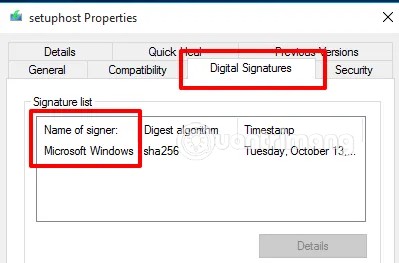
<p style="text-align: justify;">Sau khi xác nhận thông tin bản quyền, bạn hãy chuyển sang tab&nbsp;<strong>Digital Signatures</strong>&nbsp;(chữ ký số) ở phía trên. Để xác minh tập tin, cột tên của chủ sở hữu trong danh sách chữ ký số sẽ hiển thị&nbsp;<strong>Microsoft Windows</strong>.</p>

<figure>
<div style="text-align: justify;"><img alt="Chữ ký số của Modern Setup Host" data-i="3" data-src="https://st.quantrimang.com/photos/image/2020/12/30/modern-setup-host-tren-windows-10-la-gi-co-phai-la-virus-khong-3.jpg" data-was-processed="true" height="263" src="https://st.quantrimang.com/photos/image/2020/12/30/modern-setup-host-tren-windows-10-la-gi-co-phai-la-virus-khong-3.jpg" width="399" /></div>

<figcaption>
<div style="text-align: justify;">Chữ ký số của Modern Setup Host</div>
</figcaption>
</figure>

<p style="text-align: justify;"><strong>3. Kiểm tra khi SetupHost.exe chạy</strong></p>

<p style="text-align: justify;">Modern Setup Host hay SetupHost.exe chỉ chạy khi bạn cài đặt bản cập nhật Windows. Đây là một quy tắc để bạn kiểm tra xem Modern Setup Host trên máy của mình có phải là virus hay không.</p>

<p style="text-align: justify;">Đầu tiên, bạn cần đảm bảo rằng máy tính của mình đang không cài đặt bất cứ bản cập nhật nào. Tiếp theo, nhấn tổ hợp phím&nbsp;<strong>Ctrl + Shift + Esc</strong>&nbsp;để mở&nbsp;<strong>Task Manager</strong>. Nếu bạn phát hiện ra&nbsp;<strong>SetupHost.exe</strong>&nbsp;đang chạy dù không cài đặt bất cứ bản cập nhật Windows nào thì nó chính là virus và cần bị loại bỏ.</p>

<div style="text-align: justify;">&nbsp;</div>

<p style="text-align: justify;">Modern Setup Host hay SetupHost.exe là tập tin của Microsoft và được cài sẵn trên Windows 10. Vì thế, để đảm bảo an toàn bạn không nên tải về SetupHost.exe từ trang web của bên thứ 3. Tải phần mềm từ trang web của bên thứ 3 là một trong những hành vi gây nhiễm mã độc, virus chủ yếu trên Windows cũng như Android.</p>
		</div>
				<div id="author">
						<p>
				<strong>Nguồn tin:</strong>
				Quantrimang.com
			</p>
		</div>
	</div>
	<div id="footer" class="clearfix">
		<div id="url">
			<strong>URL của bản tin này: </strong><a href="https://www.nguoicodonvn2008.info/vi/news/savefile/kien-thuc-may-tinh/modern-setup-host-tren-windows-10-la-gi-co-phai-la-virus-khong-3353.html" title="Modern Setup Host trên Windows 10 là gì? Có phải là virus không?">https://www.nguoicodonvn2008.info/vi/news/savefile/kien-thuc-may-tinh/modern-setup-host-tren-windows-10-la-gi-co-phai-la-virus-khong-3353.html</a>

		</div>
		<div class="clear"></div>
		<div class="copyright">
			&copy; .&#x3A; Nguoicodonvn2008.info - Cõi lòng người cô đơn &#x3A;.
		</div>
		<div id="contact">
			<a href="mailto:admin@nguoicodonvn2008.info">admin@nguoicodonvn2008.info</a>
		</div>
	</div>
</div>
        <div id="timeoutsess" class="chromeframe">
            Bạn đã không sử dụng Site, <a onclick="timeoutsesscancel();" href="https://www.nguoicodonvn2008.info/#">Bấm vào đây để duy trì trạng thái đăng nhập</a>. Thời gian chờ: <span id="secField"> 60 </span> giây
        </div>
        <div id="openidResult" class="nv-alert" style="display:none"></div>
        <div id="openidBt" data-result="" data-redirect=""></div>
		</script>
		<div class="car-top">
  <span><img src="https://www.nguoicodonvn2008.info/themes/default/images/car.png" alt=""></span>
</div>
<div id="run_cronjobs" style="visibility:hidden;display:none;"><img alt="cron" src="/index.php?second=cronjobs&amp;p=e9Td5WM7" width="1" height="1" /></div>
<script src="https://www.nguoicodonvn2008.info/assets/js/jquery/jquery.min.js"></script>
<script>var nv_base_siteurl="/",nv_lang_data="vi",nv_lang_interface="vi",nv_name_variable="nv",nv_fc_variable="op",nv_lang_variable="language",nv_module_name="news",nv_func_name="savefile",nv_is_user=0, nv_my_ofs=-4,nv_my_abbr="EDT",nv_cookie_prefix="nv4c_e856T",nv_check_pass_mstime=1738000,nv_area_admin=0,nv_safemode=0,theme_responsive=0,nv_recaptcha_ver=2,nv_recaptcha_sitekey="",nv_recaptcha_type="image",XSSsanitize=1;</script>
<script src="https://www.nguoicodonvn2008.info/assets/js/language/vi.js"></script>
<script src="https://www.nguoicodonvn2008.info/assets/js/DOMPurify/purify3.js"></script>
<script src="https://www.nguoicodonvn2008.info/assets/js/global.js"></script>
<script src="https://www.nguoicodonvn2008.info/assets/js/site.js"></script>
<script src="https://www.nguoicodonvn2008.info/themes/default/js/news.js"></script>
<script src="https://www.nguoicodonvn2008.info/themes/default/js/main.js"></script>
<script src="https://www.nguoicodonvn2008.info/themes/default/js/custom.js"></script>
<script type="application/ld+json">
        {
            "@context": "https://schema.org",
            "@type": "Organization",
            "url": "https://www.nguoicodonvn2008.info",
            "logo": "https://www.nguoicodonvn2008.info/uploads/angel.gif"
        }
        </script>
<script src="https://www.nguoicodonvn2008.info/themes/default/js/bootstrap.min.js"></script>
<script type="text/javascript">
var $scrolltop = $('.car-top');
$scrolltop.on('click', function () {
    $('html,body').animate({
        scrollTop: 0
    }, 800);
    $(this).addClass("car-run");
    setTimeout(function(){ $scrolltop.removeClass('car-run');}, 1000);
    return false;
});
$(window).on('scroll', function ()
{ 
    if($(window).scrollTop() >= 200)
    {
        $scrolltop.addClass("show");
        $scrolltop.addClass("car-down");
    }
    else
    {
       $scrolltop.removeClass("show");
       setTimeout(function(){ $scrolltop.removeClass('car-down');}, 300);
    }
});
</script>
</body>
</html>