<!DOCTYPE html>
    <html lang="vi" xmlns="http://www.w3.org/1999/xhtml" prefix="og: http://ogp.me/ns#">
    <head>
<title>Microsoft Edge Drop là gì? Hoạt động như thế nào?</title>
<meta name="description" content="Microsoft Edge Drop là gì? Hoạt động như thế nào? - Savefile - Tin Tức -...">
<meta name="author" content=".: Nguoicodonvn2008.info - Cõi lòng người cô đơn :.">
<meta name="copyright" content=".: Nguoicodonvn2008.info - Cõi lòng người cô đơn :. [admin@nguoicodonvn2008.info]">
<meta name="robots" content="index, archive, follow, noodp">
<meta name="googlebot" content="index,archive,follow,noodp">
<meta name="msnbot" content="all,index,follow">
<meta name="generator" content="NukeViet v4.5">
<meta http-equiv="Content-Type" content="text/html; charset=utf-8">
<meta property="og:title" content="Microsoft Edge Drop là gì? Hoạt động như thế nào?">
<meta property="og:type" content="website">
<meta property="og:description" content="Savefile - Tin Tức - https&#x3A;&#x002F;&#x002F;www.nguoicodonvn2008.info&#x002F;vi&#x002F;news&#x002F;savefile&#x002F;kien-thuc-may-tinh&#x002F;microsoft-edge-drop-la-gi-hoat-dong-nhu-the-nao-7627.html">
<meta property="og:site_name" content=".&#x3A; Nguoicodonvn2008.info - Cõi lòng người cô đơn &#x3A;.">
<meta property="og:url" content="https://www.nguoicodonvn2008.info/vi/news/savefile/kien-thuc-may-tinh/microsoft-edge-drop-la-gi-hoat-dong-nhu-the-nao-7627.html">
<link rel="shortcut icon" href="https://www.nguoicodonvn2008.info/favicon.ico">
<link rel="canonical" href="https://www.nguoicodonvn2008.info/vi/news/savefile/kien-thuc-may-tinh/microsoft-edge-drop-la-gi-hoat-dong-nhu-the-nao-7627.html">
<link rel="alternate" href="https://www.nguoicodonvn2008.info/vi/news/rss/" title="Tin Tức" type="application/rss+xml">
<link rel="alternate" href="https://www.nguoicodonvn2008.info/vi/news/rss/karaoke-dual/" title="Tin Tức - Karaoke Dual" type="application/rss+xml">
<link rel="alternate" href="https://www.nguoicodonvn2008.info/vi/news/rss/nhac-tre/" title="Tin Tức - Nhạc trẻ" type="application/rss+xml">
<link rel="alternate" href="https://www.nguoicodonvn2008.info/vi/news/rss/tru-tinh/" title="Tin Tức - Trữ tình" type="application/rss+xml">
<link rel="alternate" href="https://www.nguoicodonvn2008.info/vi/news/rss/nuoc-ngoai/" title="Tin Tức - Nước ngoài" type="application/rss+xml">
<link rel="alternate" href="https://www.nguoicodonvn2008.info/vi/news/rss/remix/" title="Tin Tức - Remix" type="application/rss+xml">
<link rel="alternate" href="https://www.nguoicodonvn2008.info/vi/news/rss/tam-su-tinh-yeu/" title="Tin Tức - Tâm sự tình yêu" type="application/rss+xml">
<link rel="alternate" href="https://www.nguoicodonvn2008.info/vi/news/rss/tho-suu-tam/" title="Tin Tức - Thơ sưu tầm" type="application/rss+xml">
<link rel="alternate" href="https://www.nguoicodonvn2008.info/vi/news/rss/cuoc-song/" title="Tin Tức - Cuộc sống" type="application/rss+xml">
<link rel="alternate" href="https://www.nguoicodonvn2008.info/vi/news/rss/phan-mem/" title="Tin Tức - Phần mềm" type="application/rss+xml">
<link rel="alternate" href="https://www.nguoicodonvn2008.info/vi/news/rss/kien-thuc-may-tinh/" title="Tin Tức - Kiến thức máy tính" type="application/rss+xml">
<link rel="alternate" href="https://www.nguoicodonvn2008.info/vi/news/rss/hoc-tap/" title="Tin Tức - Học tập" type="application/rss+xml">
<link rel="alternate" href="https://www.nguoicodonvn2008.info/vi/news/rss/tai-lieu/" title="Tin Tức - Tài liệu" type="application/rss+xml">
<link rel="alternate" href="https://www.nguoicodonvn2008.info/vi/news/rss/de-thi/" title="Tin Tức - Đề thi" type="application/rss+xml">
<link rel="preload" as="style" href="https://www.nguoicodonvn2008.info/assets/css/font-awesome.min.css" type="text/css">
<link rel="preload" as="style" href="https://www.nguoicodonvn2008.info/themes/default/css/bootstrap.non-responsive.css" type="text/css">
<link rel="preload" as="style" href="https://www.nguoicodonvn2008.info/themes/default/css/style.css" type="text/css">
<link rel="preload" as="style" href="https://www.nguoicodonvn2008.info/themes/default/css/style.non-responsive.css" type="text/css">
<link rel="preload" as="style" href="https://www.nguoicodonvn2008.info/themes/default/css/news.css" type="text/css">
<link rel="preload" as="style" href="https://www.nguoicodonvn2008.info/themes/default/css/custom.css" type="text/css">
<link rel="preload" as="script" href="https://www.nguoicodonvn2008.info/assets/js/jquery/jquery.min.js" type="text/javascript">
<link rel="preload" as="script" href="https://www.nguoicodonvn2008.info/assets/js/language/vi.js" type="text/javascript">
<link rel="preload" as="script" href="https://www.nguoicodonvn2008.info/assets/js/DOMPurify/purify3.js" type="text/javascript">
<link rel="preload" as="script" href="https://www.nguoicodonvn2008.info/assets/js/global.js" type="text/javascript">
<link rel="preload" as="script" href="https://www.nguoicodonvn2008.info/assets/js/site.js" type="text/javascript">
<link rel="preload" as="script" href="https://www.nguoicodonvn2008.info/themes/default/js/news.js" type="text/javascript">
<link rel="preload" as="script" href="https://www.nguoicodonvn2008.info/themes/default/js/main.js" type="text/javascript">
<link rel="preload" as="script" href="https://www.nguoicodonvn2008.info/themes/default/js/custom.js" type="text/javascript">
<link rel="preload" as="script" href="https://www.nguoicodonvn2008.info/themes/default/js/bootstrap.min.js" type="text/javascript">
<link rel="stylesheet" href="https://www.nguoicodonvn2008.info/assets/css/font-awesome.min.css">
<link rel="stylesheet" href="https://www.nguoicodonvn2008.info/themes/default/css/bootstrap.non-responsive.css">
<link rel="stylesheet" href="https://www.nguoicodonvn2008.info/themes/default/css/style.css">
<link rel="stylesheet" href="https://www.nguoicodonvn2008.info/themes/default/css/style.non-responsive.css">
<link rel="StyleSheet" href="https://www.nguoicodonvn2008.info/themes/default/css/news.css">
<link rel="stylesheet" href="https://www.nguoicodonvn2008.info/themes/default/css/custom.css">
<style type="text/css">
	body{background: #fff;}
</style>
    </head>
    <body>
<div id="print">
	<div id="hd_print">
		<h2 class="pull-left">.&#x3A; Nguoicodonvn2008.info - Cõi lòng người cô đơn &#x3A;.</h2>
		<p class="pull-right"><a title=".&#x3A; Nguoicodonvn2008.info - Cõi lòng người cô đơn &#x3A;." href="https://www.nguoicodonvn2008.info/">https://www.nguoicodonvn2008.info</a></p>
	</div>
	<div class="clear"></div>
	<hr />
	<div id="content">
		<h1>Microsoft Edge Drop là gì? Hoạt động như thế nào?</h1>
		<ul class="list-inline">
			<li>Thứ ba - 10/10/2023 10:27</li>
			<li class="hidden-print txtrequired"><em class="fa fa-print">&nbsp;</em><a title="In ra" href="javascript:;" onclick="window.print()">In ra</a></li>
			<li class="hidden-print txtrequired"><em class="fa fa-power-off">&nbsp;</em><a title="Đóng cửa sổ này" href="javascript:;" onclick="window.close()">Đóng cửa sổ này</a></li>
		</ul>
		<div class="clear"></div>
		<div id="hometext">
		</div>
				<div class="imghome">
			<img alt="Microsoft Edge Drop là gì? Hoạt động như thế nào?" src="https://st.quantrimang.com/photos/image/2023/10/10/microsoft-edge-drop-5.jpg" width="460" class="img-thumbnail" />
		</div>
		<div class="clear"></div>
		<div id="bodytext" class="clearfix">
			<p style="text-align: justify;">Nếu bạn đang tìm kiếm một cách thuận tiện để chia sẻ file và tin nhắn giữa điện thoại và thiết bị máy tính, bạn có thể muốn xem qua Microsoft Edge Drop. Đây là tính năng cho phép bạn dễ dàng kéo và thả file để chia sẻ ngay lập tức hoặc gửi ghi chú cho chính mình trong khi duyệt trong&nbsp;Microsoft Edge.</p>

<p style="text-align: justify;">Đọc tiếp để tìm hiểu Microsoft Edge Drop là gì, cách hoạt động và sử dụng tính năng này ra sao.</p>

<h2 style="text-align: justify;">Microsoft Edge Drop là gì?</h2>

<figure>
<div style="text-align: justify;"><img alt="Trang chủ Edge Drop" data-i="0" data-src="https://st.quantrimang.com/photos/image/2023/10/10/microsoft-edge-drop-5.jpg" data-was-processed="true" height="610" src="https://st.quantrimang.com/photos/image/2023/10/10/microsoft-edge-drop-5.jpg" width="1500" /></div>

<figcaption>
<div style="text-align: justify;">Trang chủ Edge Drop</div>
</figcaption>
</figure>

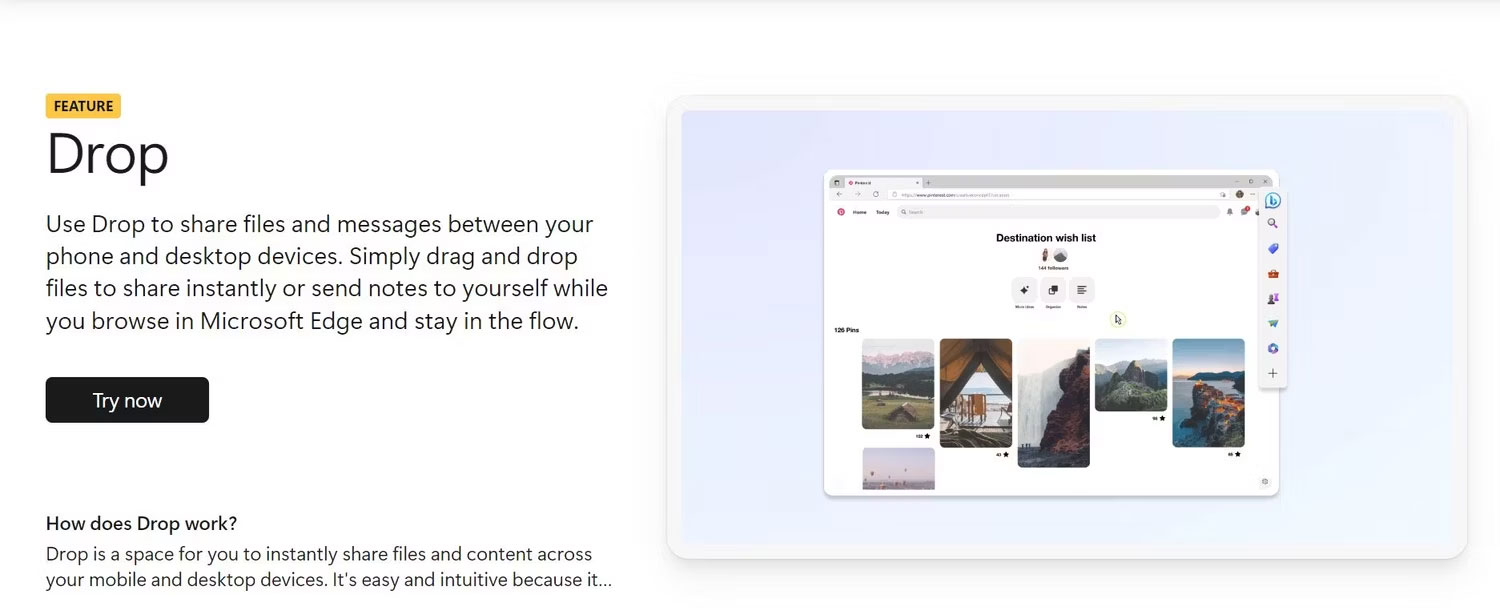
<p style="text-align: justify;">Drop là một tính năng của Microsoft Edge cho phép bạn chia sẻ file và nội dung giữa các thiết bị của mình. Bạn có thể sử dụng nó để nhanh chóng chuyển ảnh, video, tài liệu, liên kết hoặc bất kỳ file nào khác từ thiết bị này sang thiết bị khác mà không cần sử dụng email, bộ nhớ đám mây hoặc các ứng dụng khác.</p>

<p style="text-align: justify;">Nó giống như trò chuyện với chính mình, nơi bạn có thể gửi và nhận file. Bạn cũng có thể sử dụng nó để gửi ghi chú hoặc lời nhắc cho chính mình trong khi duyệt web trên máy tính và truy cập chúng sau này trên điện thoại.</p>

<h2 style="text-align: justify;">Microsoft Edge Drop hoạt động như thế nào?</h2>

<p style="text-align: justify;">Bạn có thể truy cập Drop từ thanh bên của Microsoft Edge trên desktop hoặc từ menu hamburger trên ứng dụng di động của bạn. Bạn có thể sử dụng Drop để:</p>

<ul>
	<li style="text-align: justify;">Gửi ảnh từ điện thoại tới máy tính</li>
	<li style="text-align: justify;">Chia sẻ tài liệu từ máy tính sang điện thoại của bạn</li>
	<li style="text-align: justify;">Viết lời nhắc nhở hoặc ghi chú cho chính bạn</li>
	<li style="text-align: justify;">Sao chép liên kết hoặc văn bản từ thiết bị này sang thiết bị khác</li>
</ul>

<p style="text-align: justify;">Bạn có thể xem và mở các file cũng như tin nhắn được chia sẻ của mình trên bất kỳ thiết bị nào bằng cách mở Drop in Microsoft Edge. Bạn cũng có thể tải chúng xuống thiết bị của mình.</p>

<h2 style="text-align: justify;">Cách chia sẻ tin nhắn và file bằng Microsoft Edge Drop</h2>

<p style="text-align: justify;">Để sử dụng Drop, bạn cần cài đặt Microsoft Edge trên tất cả các thiết bị mà bạn muốn chia sẻ file và nội dung. Bạn cũng cần đăng nhập bằng cùng một tài khoản Microsoft trên tất cả các thiết bị của mình.</p>

<p style="text-align: justify;">Sau khi thiết lập Drop, bạn có thể bắt đầu chia sẻ file và nội dung trên các thiết bị của mình từ nơi bạn truy cập thanh bên Bing AI. Dưới đây là một số ví dụ về cách bạn có thể sử dụng Drop:</p>

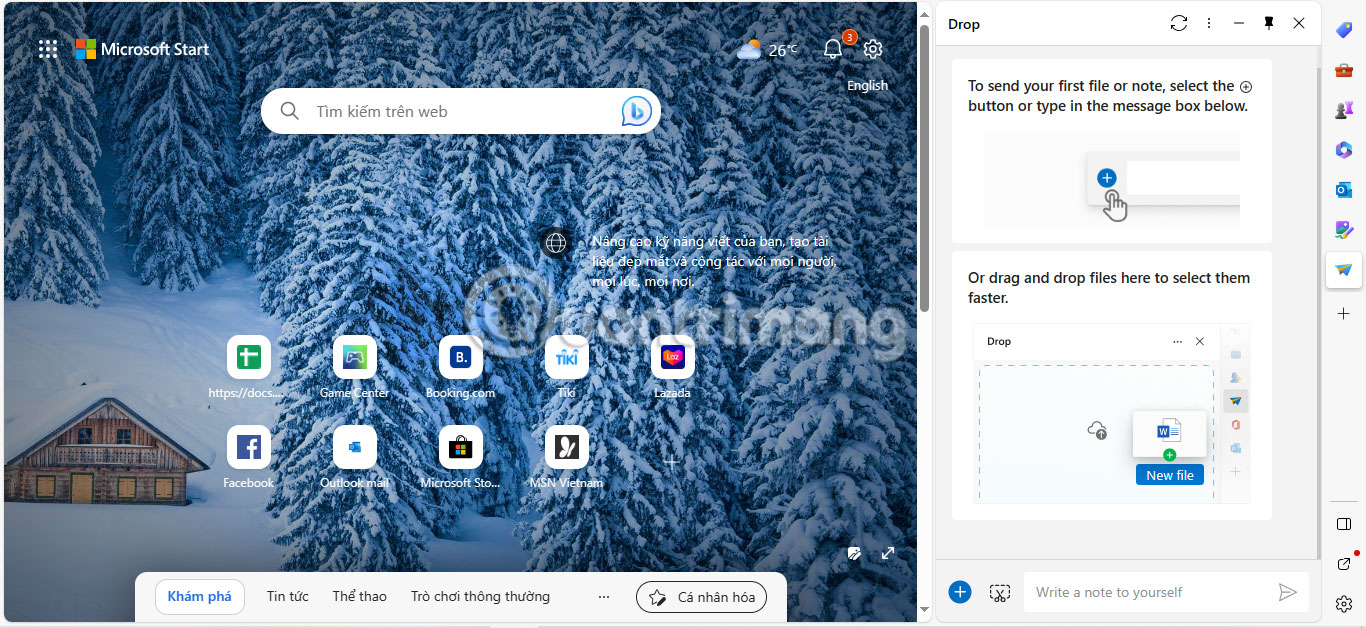
<h3 style="text-align: justify;">Trên desktop:</h3>

<ol>
	<li style="text-align: justify;">Để mở Drop, hãy nhấp vào biểu tượng máy bay giấy trên thanh bên của trình duyệt Edge.</li>
	<li style="text-align: justify;">Để gửi tin nhắn cho chính bạn, hãy nhập tin nhắn đó vào hộp văn bản ở cuối Drop và nhấn&nbsp;<strong>Enter.</strong></li>
	<li style="text-align: justify;">Để gửi file cho chính bạn, hãy kéo và thả file đó từ máy tính hoặc ứng dụng khác vào Drop.</li>
</ol>

<figure>
<div style="text-align: justify;"><img alt="Desktop Edge với menu Drop đang mở" data-i="1" data-src="https://st.quantrimang.com/photos/image/2023/10/10/microsoft-edge-drop-1.jpg" data-was-processed="true" height="628" src="https://st.quantrimang.com/photos/image/2023/10/10/microsoft-edge-drop-1.jpg" width="1366" /></div>

<figcaption>
<div style="text-align: justify;">Desktop Edge với menu Drop đang mở</div>
</figcaption>
</figure>

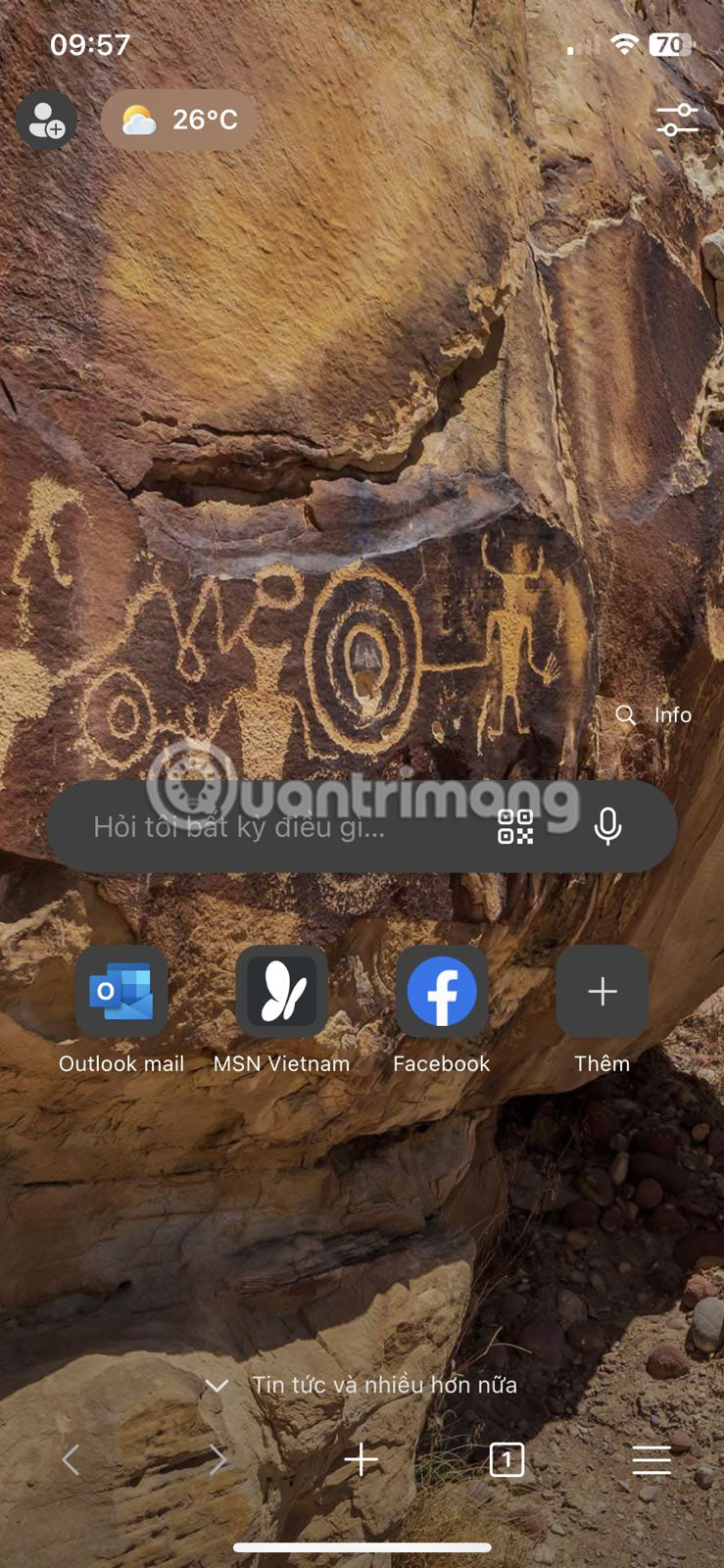
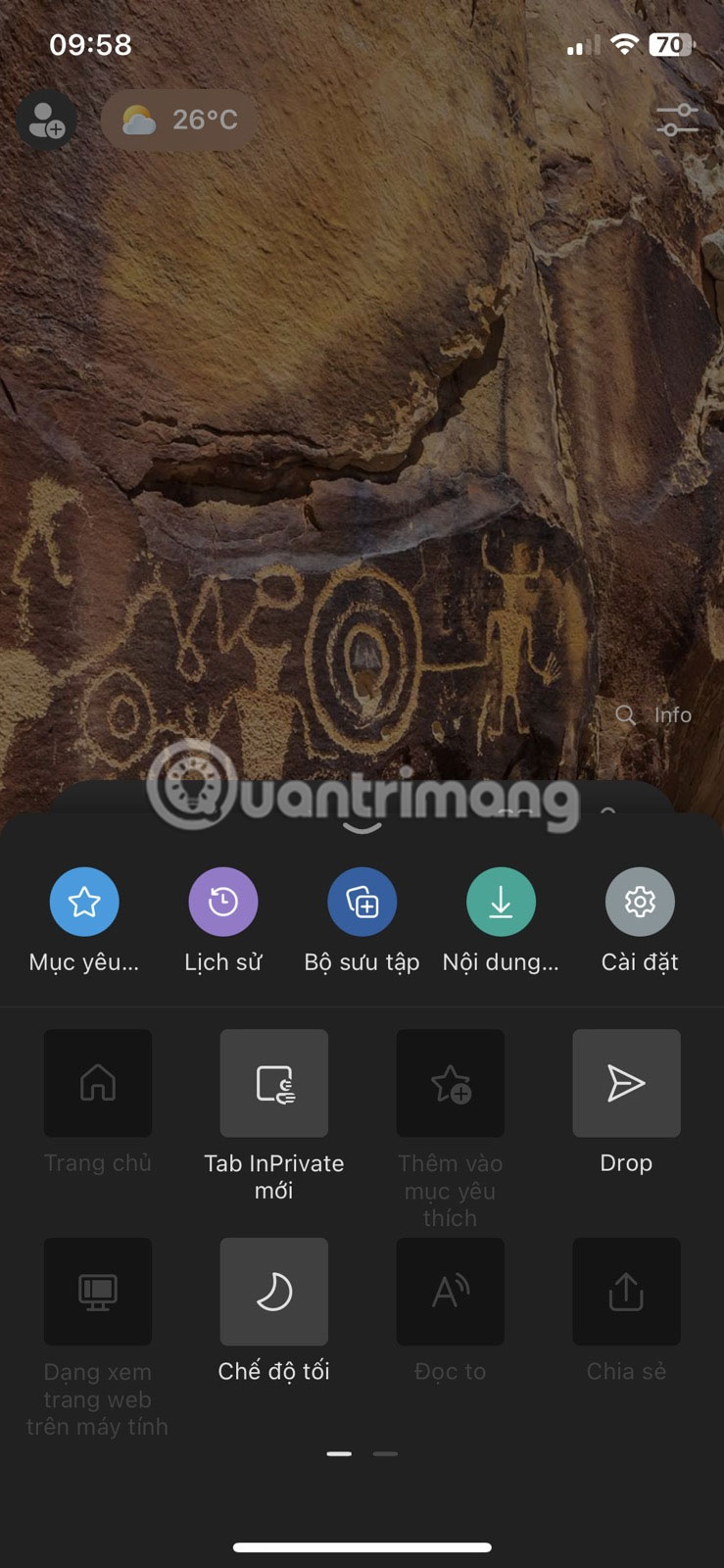
<h3 style="text-align: justify;">Trên thiết bị di động:</h3>

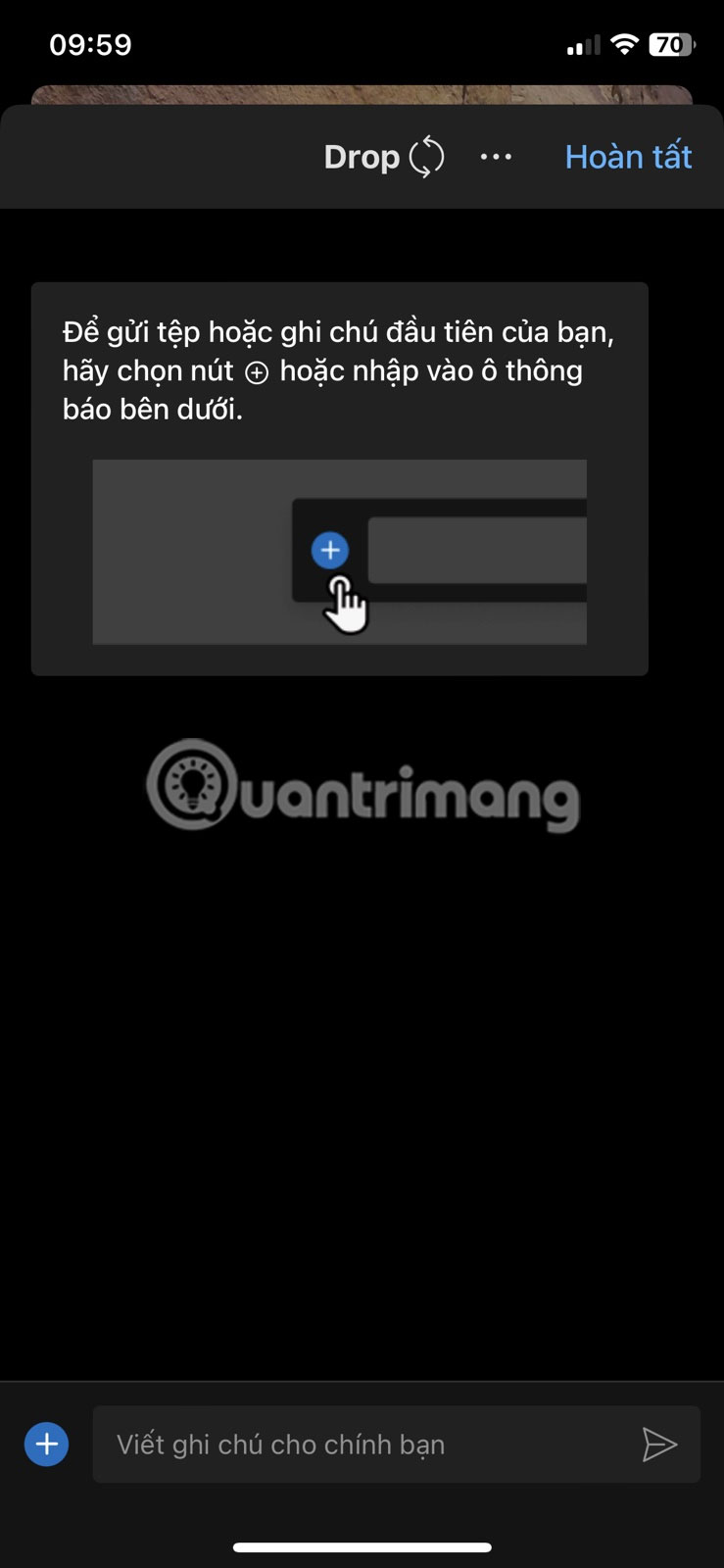
<ol>
	<li style="text-align: justify;">Để mở Drop, hãy nhấn vào biểu tượng bánh hamburger ở góc dưới bên phải của Microsoft Edge, sau đó nhấn vào&nbsp;<strong>Drop.</strong></li>
	<li style="text-align: justify;">Để gửi tin nhắn cho chính bạn, hãy nhập tin nhắn đó vào hộp văn bản ở cuối Drop và nhấn vào biểu tượng&nbsp;<strong>Send.</strong></li>
	<li style="text-align: justify;">Để gửi file cho chính bạn, hãy nhấn vào biểu tượng dấu cộng ở cuối Drop và chọn file bạn muốn gửi.</li>
</ol>

<figure>
<div style="text-align: justify;"><img alt="Trang chủ Microsoft Edge" data-i="2" data-src="https://st.quantrimang.com/photos/image/2023/10/10/microsoft-edge-drop-2.jpg" data-was-processed="true" height="1600" src="https://st.quantrimang.com/photos/image/2023/10/10/microsoft-edge-drop-2.jpg" width="739" /></div>
</figure>

<figure>
<div style="text-align: justify;"><img alt="Trang menu Microsoft Edge" data-i="3" data-src="https://st.quantrimang.com/photos/image/2023/10/10/microsoft-edge-drop-3.jpg" data-was-processed="true" height="1600" src="https://st.quantrimang.com/photos/image/2023/10/10/microsoft-edge-drop-3.jpg" width="739" /></div>
</figure>

<figure>
<div style="text-align: justify;"><img alt="Giao diện Drop của Microsoft" data-i="4" data-src="https://st.quantrimang.com/photos/image/2023/10/10/microsoft-edge-drop-4.jpg" data-was-processed="true" height="1600" src="https://st.quantrimang.com/photos/image/2023/10/10/microsoft-edge-drop-4.jpg" width="739" /></div>
</figure>

<p style="text-align: justify;">Drop là một tính năng tiện lợi của Microsoft Edge có thể giúp bạn luôn ngăn nắp. Nó rất dễ sử dụng và trực quan, do đó bạn không phải làm gián đoạn quy trình làm việc của mình hoặc chuyển đổi giữa các ứng dụng. Bạn có thể sử dụng Drop để chia sẻ file và nội dung giữa các thiết bị của mình mà không cần rời khỏi Microsoft Edge.</p>

<p style="text-align: justify;">Microsoft Edge Drop là một tính năng tiện dụng giúp bạn chia sẻ file và nội dung trên các thiết bị của mình mà không làm gián đoạn trải nghiệm duyệt web của bạn. Cho dù bạn muốn gửi cho mình lời nhắc, liên kết, tài liệu hay ảnh, Drop có thể giúp bạn theo kịp tiến độ và hoàn thành công việc. Nếu bạn chưa thử, hãy dành chút thời gian trải nghiệm và xem liệu nó có cải thiện năng suất và quy trình làm việc của bạn hay không.</p>
		</div>
				<div id="author">
						<p>
				<strong>Nguồn tin:</strong>
				Quantrimang.com
			</p>
		</div>
	</div>
	<div id="footer" class="clearfix">
		<div id="url">
			<strong>URL của bản tin này: </strong><a href="https://www.nguoicodonvn2008.info/vi/news/savefile/kien-thuc-may-tinh/microsoft-edge-drop-la-gi-hoat-dong-nhu-the-nao-7627.html" title="Microsoft Edge Drop là gì? Hoạt động như thế nào?">https://www.nguoicodonvn2008.info/vi/news/savefile/kien-thuc-may-tinh/microsoft-edge-drop-la-gi-hoat-dong-nhu-the-nao-7627.html</a>

		</div>
		<div class="clear"></div>
		<div class="copyright">
			&copy; .&#x3A; Nguoicodonvn2008.info - Cõi lòng người cô đơn &#x3A;.
		</div>
		<div id="contact">
			<a href="mailto:admin@nguoicodonvn2008.info">admin@nguoicodonvn2008.info</a>
		</div>
	</div>
</div>
        <div id="timeoutsess" class="chromeframe">
            Bạn đã không sử dụng Site, <a onclick="timeoutsesscancel();" href="https://www.nguoicodonvn2008.info/#">Bấm vào đây để duy trì trạng thái đăng nhập</a>. Thời gian chờ: <span id="secField"> 60 </span> giây
        </div>
        <div id="openidResult" class="nv-alert" style="display:none"></div>
        <div id="openidBt" data-result="" data-redirect=""></div>
		</script>
		<div class="car-top">
  <span><img src="https://www.nguoicodonvn2008.info/themes/default/images/car.png" alt=""></span>
</div>
<script src="https://www.nguoicodonvn2008.info/assets/js/jquery/jquery.min.js"></script>
<script>var nv_base_siteurl="/",nv_lang_data="vi",nv_lang_interface="vi",nv_name_variable="nv",nv_fc_variable="op",nv_lang_variable="language",nv_module_name="news",nv_func_name="savefile",nv_is_user=0, nv_my_ofs=-4,nv_my_abbr="EDT",nv_cookie_prefix="nv4c_e856T",nv_check_pass_mstime=1738000,nv_area_admin=0,nv_safemode=0,theme_responsive=0,nv_recaptcha_ver=2,nv_recaptcha_sitekey="",nv_recaptcha_type="image",XSSsanitize=1;</script>
<script src="https://www.nguoicodonvn2008.info/assets/js/language/vi.js"></script>
<script src="https://www.nguoicodonvn2008.info/assets/js/DOMPurify/purify3.js"></script>
<script src="https://www.nguoicodonvn2008.info/assets/js/global.js"></script>
<script src="https://www.nguoicodonvn2008.info/assets/js/site.js"></script>
<script src="https://www.nguoicodonvn2008.info/themes/default/js/news.js"></script>
<script src="https://www.nguoicodonvn2008.info/themes/default/js/main.js"></script>
<script src="https://www.nguoicodonvn2008.info/themes/default/js/custom.js"></script>
<script type="application/ld+json">
        {
            "@context": "https://schema.org",
            "@type": "Organization",
            "url": "https://www.nguoicodonvn2008.info",
            "logo": "https://www.nguoicodonvn2008.info/uploads/angel.gif"
        }
        </script>
<script src="https://www.nguoicodonvn2008.info/themes/default/js/bootstrap.min.js"></script>
<script type="text/javascript">
var $scrolltop = $('.car-top');
$scrolltop.on('click', function () {
    $('html,body').animate({
        scrollTop: 0
    }, 800);
    $(this).addClass("car-run");
    setTimeout(function(){ $scrolltop.removeClass('car-run');}, 1000);
    return false;
});
$(window).on('scroll', function ()
{ 
    if($(window).scrollTop() >= 200)
    {
        $scrolltop.addClass("show");
        $scrolltop.addClass("car-down");
    }
    else
    {
       $scrolltop.removeClass("show");
       setTimeout(function(){ $scrolltop.removeClass('car-down');}, 300);
    }
});
</script>
</body>
</html>