<!DOCTYPE html>
    <html lang="vi" xmlns="http://www.w3.org/1999/xhtml" prefix="og: http://ogp.me/ns#">
    <head>
<title>Microsoft âm thầm bổ sung hai phím tắt mới khá hữu ích trên Windows 11</title>
<meta name="description" content="Microsoft âm thầm bổ sung hai phím tắt mới khá hữu ích trên Windows 11 - Savefile - Tin Tức -...">
<meta name="author" content=".: Nguoicodonvn2008.info - Cõi lòng người cô đơn :.">
<meta name="copyright" content=".: Nguoicodonvn2008.info - Cõi lòng người cô đơn :. [admin@nguoicodonvn2008.info]">
<meta name="robots" content="index, archive, follow, noodp">
<meta name="googlebot" content="index,archive,follow,noodp">
<meta name="msnbot" content="all,index,follow">
<meta name="generator" content="NukeViet v4.5">
<meta http-equiv="Content-Type" content="text/html; charset=utf-8">
<meta property="og:title" content="Microsoft âm thầm bổ sung hai phím tắt mới khá hữu ích trên Windows 11">
<meta property="og:type" content="website">
<meta property="og:description" content="Savefile - Tin Tức -...">
<meta property="og:site_name" content=".&#x3A; Nguoicodonvn2008.info - Cõi lòng người cô đơn &#x3A;.">
<meta property="og:url" content="https://www.nguoicodonvn2008.info/vi/news/savefile/kien-thuc-may-tinh/microsoft-am-tham-bo-sung-hai-phim-tat-moi-kha-huu-ich-tren-windows-11-8230.html">
<link rel="shortcut icon" href="https://www.nguoicodonvn2008.info/favicon.ico">
<link rel="canonical" href="https://www.nguoicodonvn2008.info/vi/news/savefile/kien-thuc-may-tinh/microsoft-am-tham-bo-sung-hai-phim-tat-moi-kha-huu-ich-tren-windows-11-8230.html">
<link rel="alternate" href="https://www.nguoicodonvn2008.info/vi/news/rss/" title="Tin Tức" type="application/rss+xml">
<link rel="alternate" href="https://www.nguoicodonvn2008.info/vi/news/rss/karaoke-dual/" title="Tin Tức - Karaoke Dual" type="application/rss+xml">
<link rel="alternate" href="https://www.nguoicodonvn2008.info/vi/news/rss/nhac-tre/" title="Tin Tức - Nhạc trẻ" type="application/rss+xml">
<link rel="alternate" href="https://www.nguoicodonvn2008.info/vi/news/rss/tru-tinh/" title="Tin Tức - Trữ tình" type="application/rss+xml">
<link rel="alternate" href="https://www.nguoicodonvn2008.info/vi/news/rss/nuoc-ngoai/" title="Tin Tức - Nước ngoài" type="application/rss+xml">
<link rel="alternate" href="https://www.nguoicodonvn2008.info/vi/news/rss/remix/" title="Tin Tức - Remix" type="application/rss+xml">
<link rel="alternate" href="https://www.nguoicodonvn2008.info/vi/news/rss/tam-su-tinh-yeu/" title="Tin Tức - Tâm sự tình yêu" type="application/rss+xml">
<link rel="alternate" href="https://www.nguoicodonvn2008.info/vi/news/rss/tho-suu-tam/" title="Tin Tức - Thơ sưu tầm" type="application/rss+xml">
<link rel="alternate" href="https://www.nguoicodonvn2008.info/vi/news/rss/cuoc-song/" title="Tin Tức - Cuộc sống" type="application/rss+xml">
<link rel="alternate" href="https://www.nguoicodonvn2008.info/vi/news/rss/phan-mem/" title="Tin Tức - Phần mềm" type="application/rss+xml">
<link rel="alternate" href="https://www.nguoicodonvn2008.info/vi/news/rss/kien-thuc-may-tinh/" title="Tin Tức - Kiến thức máy tính" type="application/rss+xml">
<link rel="alternate" href="https://www.nguoicodonvn2008.info/vi/news/rss/hoc-tap/" title="Tin Tức - Học tập" type="application/rss+xml">
<link rel="alternate" href="https://www.nguoicodonvn2008.info/vi/news/rss/tai-lieu/" title="Tin Tức - Tài liệu" type="application/rss+xml">
<link rel="alternate" href="https://www.nguoicodonvn2008.info/vi/news/rss/de-thi/" title="Tin Tức - Đề thi" type="application/rss+xml">
<link rel="preload" as="style" href="https://www.nguoicodonvn2008.info/assets/css/font-awesome.min.css" type="text/css">
<link rel="preload" as="style" href="https://www.nguoicodonvn2008.info/themes/default/css/bootstrap.non-responsive.css" type="text/css">
<link rel="preload" as="style" href="https://www.nguoicodonvn2008.info/themes/default/css/style.css" type="text/css">
<link rel="preload" as="style" href="https://www.nguoicodonvn2008.info/themes/default/css/style.non-responsive.css" type="text/css">
<link rel="preload" as="style" href="https://www.nguoicodonvn2008.info/themes/default/css/news.css" type="text/css">
<link rel="preload" as="style" href="https://www.nguoicodonvn2008.info/themes/default/css/custom.css" type="text/css">
<link rel="preload" as="script" href="https://www.nguoicodonvn2008.info/assets/js/jquery/jquery.min.js" type="text/javascript">
<link rel="preload" as="script" href="https://www.nguoicodonvn2008.info/assets/js/language/vi.js" type="text/javascript">
<link rel="preload" as="script" href="https://www.nguoicodonvn2008.info/assets/js/DOMPurify/purify3.js" type="text/javascript">
<link rel="preload" as="script" href="https://www.nguoicodonvn2008.info/assets/js/global.js" type="text/javascript">
<link rel="preload" as="script" href="https://www.nguoicodonvn2008.info/assets/js/site.js" type="text/javascript">
<link rel="preload" as="script" href="https://www.nguoicodonvn2008.info/themes/default/js/news.js" type="text/javascript">
<link rel="preload" as="script" href="https://www.nguoicodonvn2008.info/themes/default/js/main.js" type="text/javascript">
<link rel="preload" as="script" href="https://www.nguoicodonvn2008.info/themes/default/js/custom.js" type="text/javascript">
<link rel="preload" as="script" href="https://www.nguoicodonvn2008.info/themes/default/js/bootstrap.min.js" type="text/javascript">
<link rel="stylesheet" href="https://www.nguoicodonvn2008.info/assets/css/font-awesome.min.css">
<link rel="stylesheet" href="https://www.nguoicodonvn2008.info/themes/default/css/bootstrap.non-responsive.css">
<link rel="stylesheet" href="https://www.nguoicodonvn2008.info/themes/default/css/style.css">
<link rel="stylesheet" href="https://www.nguoicodonvn2008.info/themes/default/css/style.non-responsive.css">
<link rel="StyleSheet" href="https://www.nguoicodonvn2008.info/themes/default/css/news.css">
<link rel="stylesheet" href="https://www.nguoicodonvn2008.info/themes/default/css/custom.css">
<style type="text/css">
	body{background: #fff;}
</style>
    </head>
    <body>
<div id="print">
	<div id="hd_print">
		<h2 class="pull-left">.&#x3A; Nguoicodonvn2008.info - Cõi lòng người cô đơn &#x3A;.</h2>
		<p class="pull-right"><a title=".&#x3A; Nguoicodonvn2008.info - Cõi lòng người cô đơn &#x3A;." href="https://www.nguoicodonvn2008.info/">https://www.nguoicodonvn2008.info</a></p>
	</div>
	<div class="clear"></div>
	<hr />
	<div id="content">
		<h1>Microsoft âm thầm bổ sung hai phím tắt mới khá hữu ích trên Windows 11</h1>
		<ul class="list-inline">
			<li>Thứ hai - 25/03/2024 23:18</li>
			<li class="hidden-print txtrequired"><em class="fa fa-print">&nbsp;</em><a title="In ra" href="javascript:;" onclick="window.print()">In ra</a></li>
			<li class="hidden-print txtrequired"><em class="fa fa-power-off">&nbsp;</em><a title="Đóng cửa sổ này" href="javascript:;" onclick="window.close()">Đóng cửa sổ này</a></li>
		</ul>
		<div class="clear"></div>
		<div id="hometext">
		</div>
				<div class="imghome">
			<img alt="Microsoft âm thầm bổ sung hai phím tắt mới khá hữu ích trên Windows 11" src="https://support.microsoft.com/en-gb/topic/how-to-change-column-settings-in-windows-explorer-7a6e06e5-85fe-62d5-c9a3-eed515e52aee" width="460" class="img-thumbnail" />
		</div>
		<div class="clear"></div>
		<div id="bodytext" class="clearfix">
			<p style="text-align: justify;">Windows là hệ điều hành máy tính được sử dụng phổ biến nhất thế giới nhờ sự đơn giản trong giao diện và cách thức sử dụng. Bạn gần như có thể tương tác với Windows hoàn toàn chỉ bằng chuột và bàn phím ảo. Tuy nhiên, có lẽ không nhiều người biết được rằng hệ điều hành của Microsoft còn ẩn chứa một kho phím tắt cực kỳ đa dạng mà nếu biết cách tận dụng, quá trình tương tác với hệ thống của bạn sẽ trở nên dễ dàng, tiện lợi và “Professional” hơn rất nhiều.</p>

<p style="text-align: justify;">Hiện tại, hệ thống phím tắt của Windows đã khá hoàn thiện, nhưng Microsoft vẫn thỉnh thoảng bổ sung thêm một số phím tắt mới khá thú vị. Mặc dù không phải tất cả những phím tắt này đều hữu ích cho người dùng phổ thông, nhưng đôi khi lại là những sự bổ sung đã được chờ đợi từ lâu đối với một vài nhóm người dùng nhất định. Chẳng hạn vào tháng 9 năm ngoái, Microsoft đã thêm một phím tắt để khởi chạy LinkedIn trên trình duyệt web mặc định mà người dùng đã đặt, đó là &quot;Ctrl+Shift+Alt+Win+L&quot;.</p>

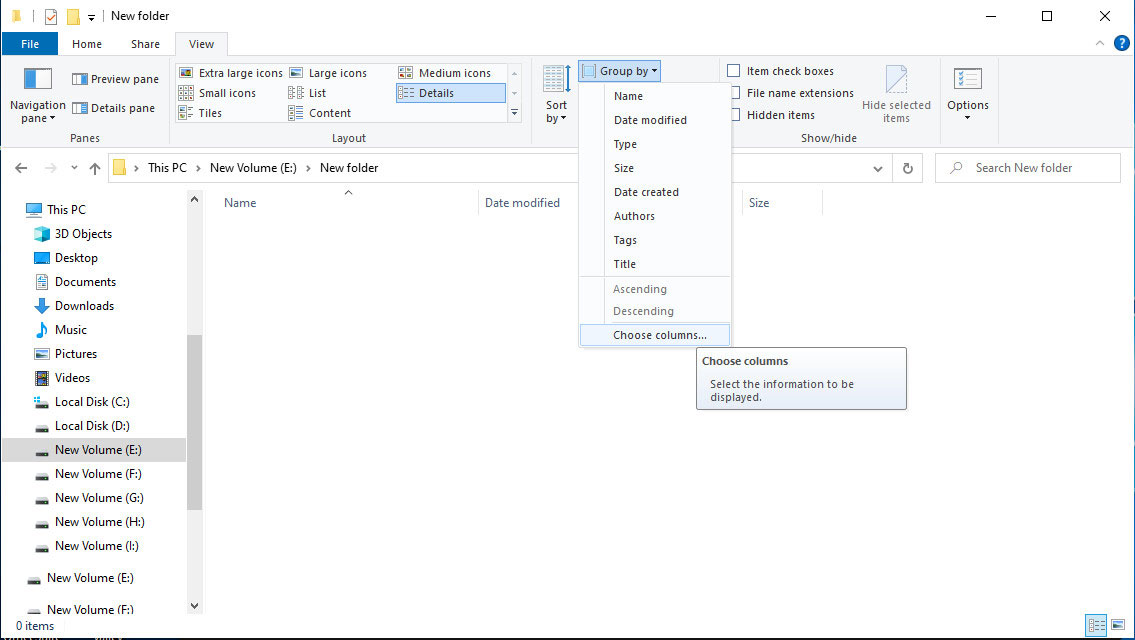
<p style="text-align: justify;">Gần đây, một danh sách phím tắt mới cũng đã được Microsoft âm thầm thêm vào Windows 11 có thể giúp thay đổi kích thước độ rộng cột bên trong File Explorer trên Windows 11. Chúng đã được thêm vào danh sách các phím tắt mà Microsoft duy trì trên trang web chính thức của mình vào khoảng cuối tháng 2 hoặc đầu tháng 3. Cụ thể như sau:</p>

<ul>
	<li style="text-align: justify;">Ctrl + Shift + Mũi tên trái: Giảm độ rộng cột.</li>
	<li style="text-align: justify;">Ctrl + Shift + Mũi tên phải: Tăng độ rộng cột.</li>
</ul>

<figure>
<div style="text-align: justify;"><img alt="microsoft bo sung hai phim tat moi tren windows 111*323387" data-i="0" data-src="https://st.quantrimang.com/photos/image/2024/03/25/microsoft-bo-sung-hai-phim-tat-moi-tren-windows-111.jpg" data-was-processed="true" height="640" src="https://st.quantrimang.com/photos/image/2024/03/25/microsoft-bo-sung-hai-phim-tat-moi-tren-windows-111.jpg" width="1135" /></div>
</figure>

<figure>
<div style="text-align: justify;"><img alt="microsoft bo sung hai phim tat moi tren windows 112*323389" data-i="1" data-src="https://st.quantrimang.com/photos/image/2024/03/25/microsoft-bo-sung-hai-phim-tat-moi-tren-windows-112.jpg" data-was-processed="true" height="639" src="https://st.quantrimang.com/photos/image/2024/03/25/microsoft-bo-sung-hai-phim-tat-moi-tren-windows-112.jpg" width="1131" /></div>
</figure>

<div style="text-align: justify;">&nbsp;</div>

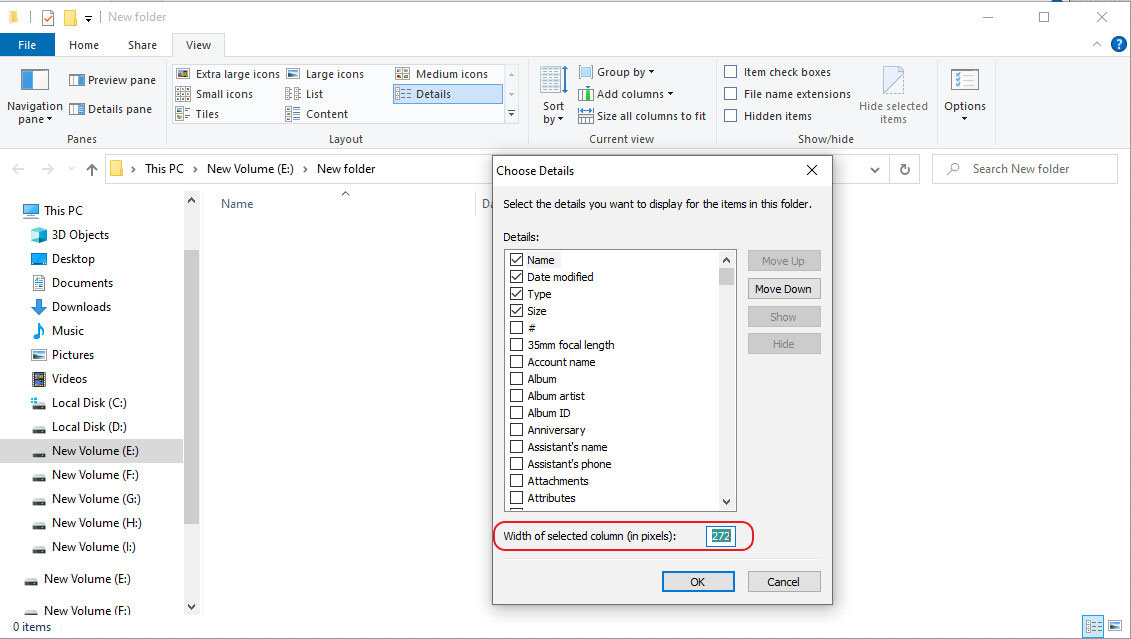
<p style="text-align: justify;">Việc định cỡ độ rộng cột bên trong File Explorer từ trước đến nay luôn có thể dễ dàng được thực hiện bằng cách sử dụng con trỏ chuột. Tuy nhiên, các phím tắt mới được bổ sung nêu trên sẽ giúp thao tác này thậm chí còn đơn giản hơn. Ngoài ra, còn có một cách khác ít phổ biến hơn là nhập các giá trị pixel (px) chính xác vào bên trong hộp &quot;Width of selected column (in pixels)&quot; nếu bạn muốn kích thước cột chính xác đến từng pixel.</p>

<p style="text-align: justify;">Microsoft cũng đã có có hướng dẫn vi tiết về điều này trên website mà bạn có thể tham khảo tại&nbsp;ĐÂY.</p>

<div style="text-align: justify;"><span style="color:rgb(192, 57, 43);"><strong>https://support.microsoft.com/en-gb/topic/how-to-change-column-settings-in-windows-explorer-7a6e06e5-85fe-62d5-c9a3-eed515e52aee</strong></span></div>
		</div>
				<div id="author">
						<p>
				<strong>Nguồn tin:</strong>
				Quantrimang.com
			</p>
		</div>
	</div>
	<div id="footer" class="clearfix">
		<div id="url">
			<strong>URL của bản tin này: </strong><a href="https://www.nguoicodonvn2008.info/vi/news/savefile/kien-thuc-may-tinh/microsoft-am-tham-bo-sung-hai-phim-tat-moi-kha-huu-ich-tren-windows-11-8230.html" title="Microsoft âm thầm bổ sung hai phím tắt mới khá hữu ích trên Windows 11">https://www.nguoicodonvn2008.info/vi/news/savefile/kien-thuc-may-tinh/microsoft-am-tham-bo-sung-hai-phim-tat-moi-kha-huu-ich-tren-windows-11-8230.html</a>

		</div>
		<div class="clear"></div>
		<div class="copyright">
			&copy; .&#x3A; Nguoicodonvn2008.info - Cõi lòng người cô đơn &#x3A;.
		</div>
		<div id="contact">
			<a href="mailto:admin@nguoicodonvn2008.info">admin@nguoicodonvn2008.info</a>
		</div>
	</div>
</div>
        <div id="timeoutsess" class="chromeframe">
            Bạn đã không sử dụng Site, <a onclick="timeoutsesscancel();" href="https://www.nguoicodonvn2008.info/#">Bấm vào đây để duy trì trạng thái đăng nhập</a>. Thời gian chờ: <span id="secField"> 60 </span> giây
        </div>
        <div id="openidResult" class="nv-alert" style="display:none"></div>
        <div id="openidBt" data-result="" data-redirect=""></div>
		</script>
		<div class="car-top">
  <span><img src="https://www.nguoicodonvn2008.info/themes/default/images/car.png" alt=""></span>
</div>
<script src="https://www.nguoicodonvn2008.info/assets/js/jquery/jquery.min.js"></script>
<script>var nv_base_siteurl="/",nv_lang_data="vi",nv_lang_interface="vi",nv_name_variable="nv",nv_fc_variable="op",nv_lang_variable="language",nv_module_name="news",nv_func_name="savefile",nv_is_user=0, nv_my_ofs=-4,nv_my_abbr="EDT",nv_cookie_prefix="nv4c_e856T",nv_check_pass_mstime=1738000,nv_area_admin=0,nv_safemode=0,theme_responsive=0,nv_recaptcha_ver=2,nv_recaptcha_sitekey="",nv_recaptcha_type="image",XSSsanitize=1;</script>
<script src="https://www.nguoicodonvn2008.info/assets/js/language/vi.js"></script>
<script src="https://www.nguoicodonvn2008.info/assets/js/DOMPurify/purify3.js"></script>
<script src="https://www.nguoicodonvn2008.info/assets/js/global.js"></script>
<script src="https://www.nguoicodonvn2008.info/assets/js/site.js"></script>
<script src="https://www.nguoicodonvn2008.info/themes/default/js/news.js"></script>
<script src="https://www.nguoicodonvn2008.info/themes/default/js/main.js"></script>
<script src="https://www.nguoicodonvn2008.info/themes/default/js/custom.js"></script>
<script type="application/ld+json">
        {
            "@context": "https://schema.org",
            "@type": "Organization",
            "url": "https://www.nguoicodonvn2008.info",
            "logo": "https://www.nguoicodonvn2008.info/uploads/angel.gif"
        }
        </script>
<script src="https://www.nguoicodonvn2008.info/themes/default/js/bootstrap.min.js"></script>
<script type="text/javascript">
var $scrolltop = $('.car-top');
$scrolltop.on('click', function () {
    $('html,body').animate({
        scrollTop: 0
    }, 800);
    $(this).addClass("car-run");
    setTimeout(function(){ $scrolltop.removeClass('car-run');}, 1000);
    return false;
});
$(window).on('scroll', function ()
{ 
    if($(window).scrollTop() >= 200)
    {
        $scrolltop.addClass("show");
        $scrolltop.addClass("car-down");
    }
    else
    {
       $scrolltop.removeClass("show");
       setTimeout(function(){ $scrolltop.removeClass('car-down');}, 300);
    }
});
</script>
</body>
</html>