<!DOCTYPE html>
    <html lang="vi" xmlns="http://www.w3.org/1999/xhtml" prefix="og: http://ogp.me/ns#">
    <head>
<title>Lỗi mở Outlook trình duyệt thay cho ứng dụng Windows</title>
<meta name="description" content="Lỗi mở Outlook trình duyệt thay cho ứng dụng Windows - Savefile - Tin Tức -...">
<meta name="author" content=".: Nguoicodonvn2008.info - Cõi lòng người cô đơn :.">
<meta name="copyright" content=".: Nguoicodonvn2008.info - Cõi lòng người cô đơn :. [admin@nguoicodonvn2008.info]">
<meta name="robots" content="index, archive, follow, noodp">
<meta name="googlebot" content="index,archive,follow,noodp">
<meta name="msnbot" content="all,index,follow">
<meta name="generator" content="NukeViet v4.5">
<meta http-equiv="Content-Type" content="text/html; charset=utf-8">
<meta property="og:title" content="Lỗi mở Outlook trình duyệt thay cho ứng dụng Windows">
<meta property="og:type" content="website">
<meta property="og:description" content="Savefile - Tin Tức - https&#x3A;&#x002F;&#x002F;www.nguoicodonvn2008.info&#x002F;vi&#x002F;news&#x002F;savefile&#x002F;kien-thuc-may-tinh&#x002F;loi-mo-outlook-trinh-duyet-thay-cho-ung-dung-windows-11771.html">
<meta property="og:site_name" content=".&#x3A; Nguoicodonvn2008.info - Cõi lòng người cô đơn &#x3A;.">
<meta property="og:url" content="https://www.nguoicodonvn2008.info/vi/news/savefile/kien-thuc-may-tinh/loi-mo-outlook-trinh-duyet-thay-cho-ung-dung-windows-11771.html">
<link rel="shortcut icon" href="https://www.nguoicodonvn2008.info/favicon.ico">
<link rel="canonical" href="https://www.nguoicodonvn2008.info/vi/news/savefile/kien-thuc-may-tinh/loi-mo-outlook-trinh-duyet-thay-cho-ung-dung-windows-11771.html">
<link rel="alternate" href="https://www.nguoicodonvn2008.info/vi/news/rss/" title="Tin Tức" type="application/rss+xml">
<link rel="alternate" href="https://www.nguoicodonvn2008.info/vi/news/rss/karaoke-dual/" title="Tin Tức - Karaoke Dual" type="application/rss+xml">
<link rel="alternate" href="https://www.nguoicodonvn2008.info/vi/news/rss/nhac-tre/" title="Tin Tức - Nhạc trẻ" type="application/rss+xml">
<link rel="alternate" href="https://www.nguoicodonvn2008.info/vi/news/rss/tru-tinh/" title="Tin Tức - Trữ tình" type="application/rss+xml">
<link rel="alternate" href="https://www.nguoicodonvn2008.info/vi/news/rss/nuoc-ngoai/" title="Tin Tức - Nước ngoài" type="application/rss+xml">
<link rel="alternate" href="https://www.nguoicodonvn2008.info/vi/news/rss/remix/" title="Tin Tức - Remix" type="application/rss+xml">
<link rel="alternate" href="https://www.nguoicodonvn2008.info/vi/news/rss/tam-su-tinh-yeu/" title="Tin Tức - Tâm sự tình yêu" type="application/rss+xml">
<link rel="alternate" href="https://www.nguoicodonvn2008.info/vi/news/rss/tho-suu-tam/" title="Tin Tức - Thơ sưu tầm" type="application/rss+xml">
<link rel="alternate" href="https://www.nguoicodonvn2008.info/vi/news/rss/cuoc-song/" title="Tin Tức - Cuộc sống" type="application/rss+xml">
<link rel="alternate" href="https://www.nguoicodonvn2008.info/vi/news/rss/phan-mem/" title="Tin Tức - Phần mềm" type="application/rss+xml">
<link rel="alternate" href="https://www.nguoicodonvn2008.info/vi/news/rss/kien-thuc-may-tinh/" title="Tin Tức - Kiến thức máy tính" type="application/rss+xml">
<link rel="alternate" href="https://www.nguoicodonvn2008.info/vi/news/rss/hoc-tap/" title="Tin Tức - Học tập" type="application/rss+xml">
<link rel="alternate" href="https://www.nguoicodonvn2008.info/vi/news/rss/tai-lieu/" title="Tin Tức - Tài liệu" type="application/rss+xml">
<link rel="alternate" href="https://www.nguoicodonvn2008.info/vi/news/rss/de-thi/" title="Tin Tức - Đề thi" type="application/rss+xml">
<link rel="preload" as="style" href="https://www.nguoicodonvn2008.info/assets/css/font-awesome.min.css" type="text/css">
<link rel="preload" as="style" href="https://www.nguoicodonvn2008.info/themes/default/css/bootstrap.non-responsive.css" type="text/css">
<link rel="preload" as="style" href="https://www.nguoicodonvn2008.info/themes/default/css/style.css" type="text/css">
<link rel="preload" as="style" href="https://www.nguoicodonvn2008.info/themes/default/css/style.non-responsive.css" type="text/css">
<link rel="preload" as="style" href="https://www.nguoicodonvn2008.info/themes/default/css/news.css" type="text/css">
<link rel="preload" as="style" href="https://www.nguoicodonvn2008.info/themes/default/css/custom.css" type="text/css">
<link rel="preload" as="script" href="https://www.nguoicodonvn2008.info/assets/js/jquery/jquery.min.js" type="text/javascript">
<link rel="preload" as="script" href="https://www.nguoicodonvn2008.info/assets/js/language/vi.js" type="text/javascript">
<link rel="preload" as="script" href="https://www.nguoicodonvn2008.info/assets/js/DOMPurify/purify3.js" type="text/javascript">
<link rel="preload" as="script" href="https://www.nguoicodonvn2008.info/assets/js/global.js" type="text/javascript">
<link rel="preload" as="script" href="https://www.nguoicodonvn2008.info/assets/js/site.js" type="text/javascript">
<link rel="preload" as="script" href="https://www.nguoicodonvn2008.info/themes/default/js/news.js" type="text/javascript">
<link rel="preload" as="script" href="https://www.nguoicodonvn2008.info/themes/default/js/main.js" type="text/javascript">
<link rel="preload" as="script" href="https://www.nguoicodonvn2008.info/themes/default/js/custom.js" type="text/javascript">
<link rel="preload" as="script" href="https://www.nguoicodonvn2008.info/themes/default/js/bootstrap.min.js" type="text/javascript">
<link rel="stylesheet" href="https://www.nguoicodonvn2008.info/assets/css/font-awesome.min.css">
<link rel="stylesheet" href="https://www.nguoicodonvn2008.info/themes/default/css/bootstrap.non-responsive.css">
<link rel="stylesheet" href="https://www.nguoicodonvn2008.info/themes/default/css/style.css">
<link rel="stylesheet" href="https://www.nguoicodonvn2008.info/themes/default/css/style.non-responsive.css">
<link rel="StyleSheet" href="https://www.nguoicodonvn2008.info/themes/default/css/news.css">
<link rel="stylesheet" href="https://www.nguoicodonvn2008.info/themes/default/css/custom.css">
<style type="text/css">
	body{background: #fff;}
</style>
    </head>
    <body>
<div id="print">
	<div id="hd_print">
		<h2 class="pull-left">.&#x3A; Nguoicodonvn2008.info - Cõi lòng người cô đơn &#x3A;.</h2>
		<p class="pull-right"><a title=".&#x3A; Nguoicodonvn2008.info - Cõi lòng người cô đơn &#x3A;." href="https://www.nguoicodonvn2008.info/">https://www.nguoicodonvn2008.info</a></p>
	</div>
	<div class="clear"></div>
	<hr />
	<div id="content">
		<h1>Lỗi mở Outlook trình duyệt thay cho ứng dụng Windows</h1>
		<ul class="list-inline">
			<li>Thứ tư - 03/12/2025 00:55</li>
			<li class="hidden-print txtrequired"><em class="fa fa-print">&nbsp;</em><a title="In ra" href="javascript:;" onclick="window.print()">In ra</a></li>
			<li class="hidden-print txtrequired"><em class="fa fa-power-off">&nbsp;</em><a title="Đóng cửa sổ này" href="javascript:;" onclick="window.close()">Đóng cửa sổ này</a></li>
		</ul>
		<div class="clear"></div>
		<div id="hometext">
		</div>
				<div class="imghome">
			<img alt="Lỗi mở Outlook trình duyệt thay cho ứng dụng Windows" src="https://st.quantrimang.com/photos/image/2025/12/01/loi-mo-outlook-trinh-duyet-thay-ung-dung-8.jpg" width="460" class="img-thumbnail" />
		</div>
		<div class="clear"></div>
		<div id="bodytext" class="clearfix">
			<p style="text-align: justify;">Để mở ứng dụng Outlook trên máy tính thì chúng ta chỉ cần nhấn vào biểu tượng ứng dụng là được. Nhưng đôi khi bạn lại gặp lỗi mở Outlook trình duyệt thay cho ứng dụng, làm ảnh hưởng tới quá trình làm việc của bạn. Nếu bạn đang gặp rắc rối với vấn đề mở Outlook trên máy tính thì tham khảo sửa lỗi trong bài viết này.</p>

<div style="text-align: justify;">&nbsp;</div>

<h2 style="text-align: justify;">Nguyên nhân mở Outlook trình duyệt thay cho ứng dụng</h2>

<p style="text-align: justify;">Có một vài lý do khiến Outlook của bạn mở bằng trình duyệt thay vì ứng dụng. Một số lý do chính bao gồm:</p>

<ul>
	<li style="text-align: justify;">Sử dụng phím tắt có đường dẫn khác</li>
	<li style="text-align: justify;">Bản cập nhật Windows đang thiết lập lại các cài đặt mặc định của Outlook</li>
	<li style="text-align: justify;">Bộ nhớ cache có vấn đề</li>
</ul>

<h2 style="text-align: justify;">Hướng dẫn sửa lỗi mở Outlook trình duyệt thay cho ứng dụng</h2>

<h3 style="text-align: justify;">Kiểm tra và thay đổi các phím tắt</h3>

<p style="text-align: justify;">Nếu bạn ghim lối tắt Outlook trên Taskbar thì có thể mở phiên bản Outlook trực tuyến thay vì ứng dụng trên máy tính.</p>

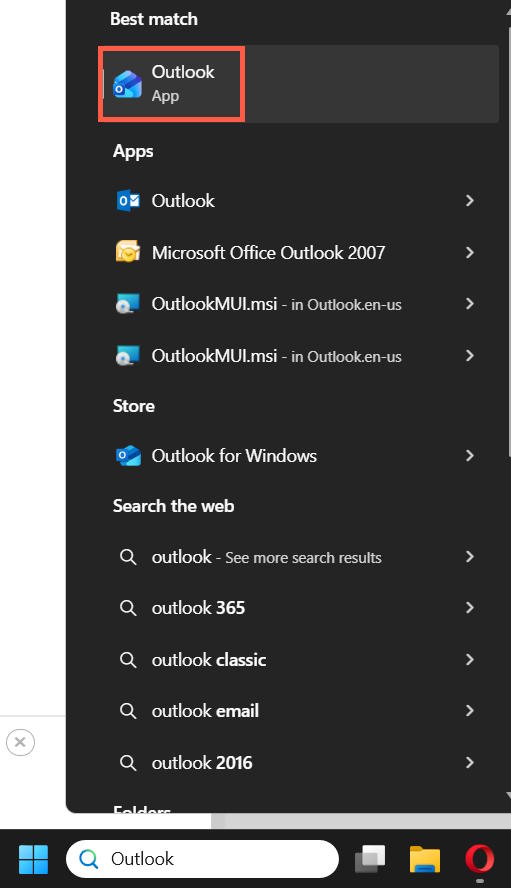
<p style="text-align: justify;">Đầu tiên bạn cần&nbsp;<strong>gỡ Outlook hiện trên thanh Taskbar hoặc desktop</strong>. Tiếp đến,&nbsp;<strong>nhập Outlook vào thanh tìm kiếm</strong>&nbsp;và tìm ứng dụng như hình dưới đây.</p>

<p style="text-align: justify;"><img alt="Tìm Outlook" data-i="0" data-src="https://st.quantrimang.com/photos/image/2025/12/01/loi-mo-outlook-trinh-duyet-thay-ung-dung-1.jpg" data-was-processed="true" height="608" src="https://st.quantrimang.com/photos/image/2025/12/01/loi-mo-outlook-trinh-duyet-thay-ung-dung-1.jpg" width="350" /></p>

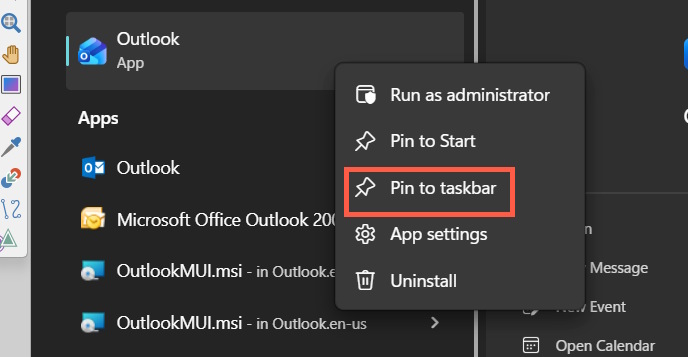
<p style="text-align: justify;">Sau đó bạn<strong>&nbsp;nhấn chuột phải chọn Pin to taskbar</strong>&nbsp;để thực hiện ghim ứng dụng Outlook.</p>

<p style="text-align: justify;">&nbsp;</p>

<div style="text-align: justify;"><img alt="Ghim Outlook thanh Taskbar" data-adbro-processed="true" data-i="1" data-src="https://st.quantrimang.com/photos/image/2025/12/01/loi-mo-outlook-trinh-duyet-thay-ung-dung-2.jpg" data-was-processed="true" height="311" src="https://st.quantrimang.com/photos/image/2025/12/01/loi-mo-outlook-trinh-duyet-thay-ung-dung-2.jpg" width="600" /></div>

<h3 style="text-align: justify;">Đổi ứng dụng mặc định trên Windows</h3>

<p style="text-align: justify;">Có thể Windows không còn thiết lập Outlook làm ứng dụng mặc định nữa nên bạn cần kiểm tra lại.</p>

<p style="text-align: justify;"><strong>Bước 1:</strong></p>

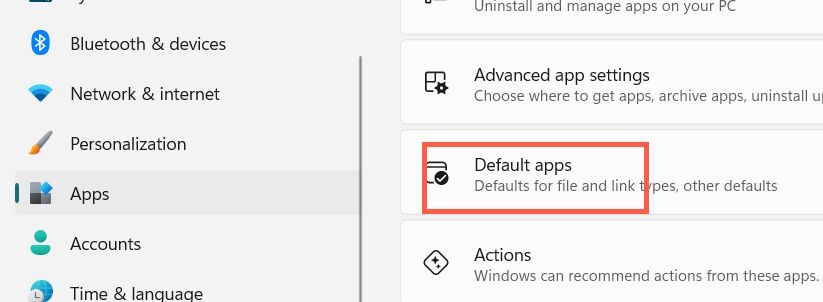
<p style="text-align: justify;">Chúng ta&nbsp;<strong>mở Settings</strong>&nbsp;trên máy tính, sau đó&nbsp;<strong>nhấn vào mục Apps&nbsp;</strong>ở cạnh trái, rồi nhìn sang cạnh phải&nbsp;<strong>chọn Default Apps</strong>.</p>

<p style="text-align: justify;"><img alt="Chọn Default Apps" data-i="2" data-src="https://st.quantrimang.com/photos/image/2025/12/01/loi-mo-outlook-trinh-duyet-thay-ung-dung-3.jpg" data-was-processed="true" height="235" src="https://st.quantrimang.com/photos/image/2025/12/01/loi-mo-outlook-trinh-duyet-thay-ung-dung-3.jpg" width="640" /></p>

<p style="text-align: justify;"><strong>Bước 2:</strong></p>

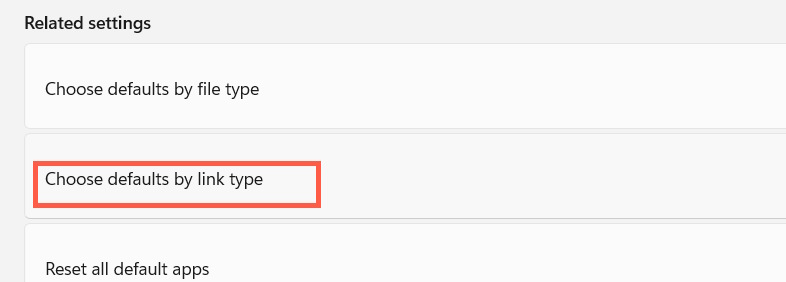
<p style="text-align: justify;">Lúc này chúng ta nhấn chọn vào mục&nbsp;<strong>Choose defaults by link type</strong>&nbsp;như hình dưới đây.</p>

<p style="text-align: justify;"><strong><img alt="Thiết lập app mặc định" data-i="3" data-src="https://st.quantrimang.com/photos/image/2025/12/01/loi-mo-outlook-trinh-duyet-thay-ung-dung-4.jpg" data-was-processed="true" height="230" src="https://st.quantrimang.com/photos/image/2025/12/01/loi-mo-outlook-trinh-duyet-thay-ung-dung-4.jpg" width="640" /></strong></p>

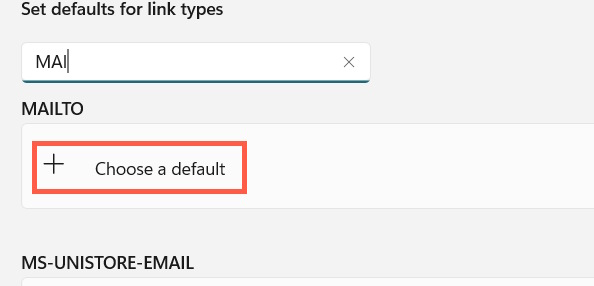
<p style="text-align: justify;">Chúng ta tìm tới&nbsp;<strong>mục MAILTO&nbsp;</strong>sau đó nhấn Choose app để lựa chọn ứng dụng mặc định.</p>

<p style="text-align: justify;"><strong><img alt="Thiết lập app mail mặc định" data-i="4" data-src="https://st.quantrimang.com/photos/image/2025/12/01/loi-mo-outlook-trinh-duyet-thay-ung-dung-5.jpg" data-was-processed="true" height="286" src="https://st.quantrimang.com/photos/image/2025/12/01/loi-mo-outlook-trinh-duyet-thay-ung-dung-5.jpg" width="594" /></strong></p>

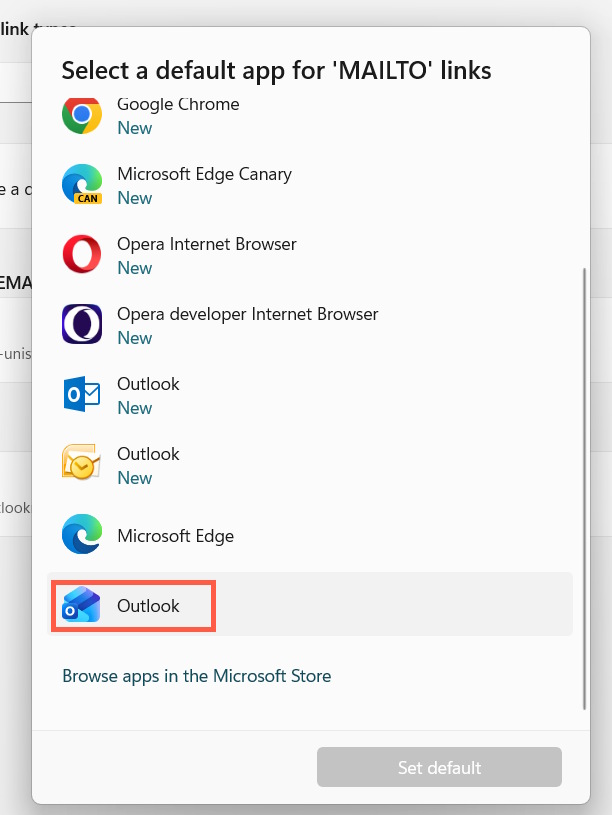
<p style="text-align: justify;">Tại đây bạn&nbsp;<strong>chọn vào ứng dụng Outlook</strong>&nbsp;rồi&nbsp;<strong>nhấn Set default</strong>&nbsp;để đặt làm ứng dụng mail mặc định trên máy tính.</p>

<p style="text-align: justify;"><strong><img alt="Cài Outlook làm app mail mặc định" data-i="5" data-src="https://st.quantrimang.com/photos/image/2025/12/01/loi-mo-outlook-trinh-duyet-thay-ung-dung-6.jpg" data-was-processed="true" height="533" src="https://st.quantrimang.com/photos/image/2025/12/01/loi-mo-outlook-trinh-duyet-thay-ung-dung-6.jpg" width="400" /></strong></p>

<h3 style="text-align: justify;">Xóa bộ nhớ đệm Outlook</h3>

<p style="text-align: justify;">Một cách khắc phục hiệu quả lỗi mở Outlook trình duyệt thay ứng dụng là xóa bộ nhớ đệm Outlook và xóa mọi cài đặt web tiềm ẩn.</p>

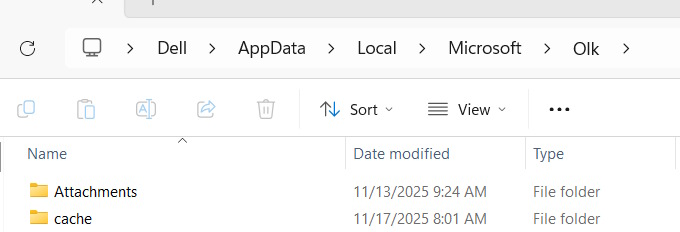
<p style="text-align: justify;">Bạn&nbsp;<strong>mở Explorer</strong>&nbsp;sau đó&nbsp;<strong>nhập đường dẫn %localappdata%\Microsoft\Olk</strong></p>

<p style="text-align: justify;"><strong><img alt="Truy cập thư mục Outlook" data-i="6" data-src="https://st.quantrimang.com/photos/image/2025/12/01/loi-mo-outlook-trinh-duyet-thay-ung-dung-7.jpg" data-was-processed="true" height="205" src="https://st.quantrimang.com/photos/image/2025/12/01/loi-mo-outlook-trinh-duyet-thay-ung-dung-7.jpg" width="600" /></strong></p>

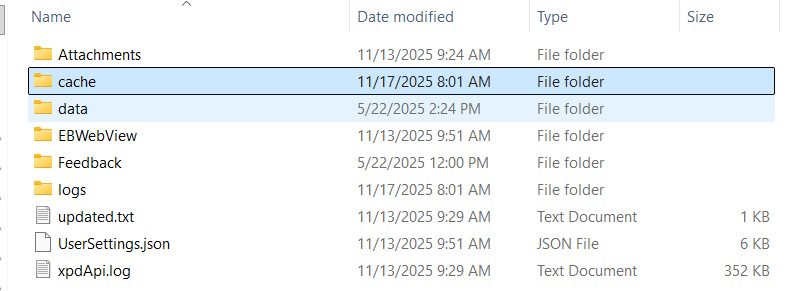
<p style="text-align: justify;">Tiếp đến&nbsp;<strong>trong thư mục OLK</strong>, chúng ta<strong>&nbsp;nhấn vào thư mục cache</strong>&nbsp;rồi<strong>&nbsp;nhấn Shift + Del để xóa</strong>&nbsp;toàn bộ bộ nhớ đệm. Sau đó khởi động lại máy tính.</p>

<p style="text-align: justify;">Nếu cách này không giải quyết được vấn đề, bạn cũng có thể thử xóa cả thư mục logs và thư mục EBWebView theo cách thực hiện bên trên.</p>

<h3 style="text-align: justify;"><strong><img alt="Xóa bộ nhớ đệm Outlook" data-i="7" data-src="https://st.quantrimang.com/photos/image/2025/12/01/loi-mo-outlook-trinh-duyet-thay-ung-dung-8.jpg" data-was-processed="true" height="237" src="https://st.quantrimang.com/photos/image/2025/12/01/loi-mo-outlook-trinh-duyet-thay-ung-dung-8.jpg" width="640" /></strong><br />
Đăng xuất ứng dụng Outlook hoàn toàn</h3>

<p style="text-align: justify;">Một cách khác để kiểm soát Outlook chuyển hướng đến trình duyệt là buộc ứng dụng phải đăng xuất và đảm bảo rằng quy trình đăng nhập thông qua ứng dụng.</p>

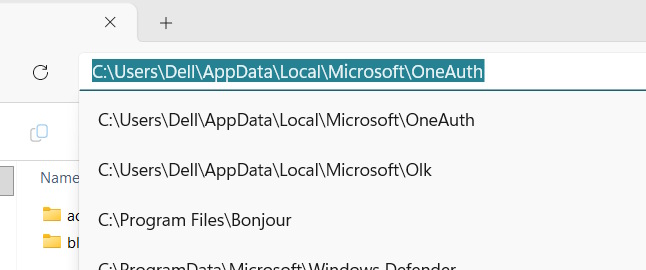
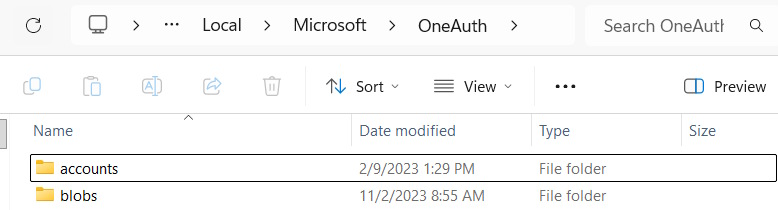
<p style="text-align: justify;">Trong&nbsp;<strong>giao diện Explorer</strong>&nbsp;bạn&nbsp;<strong>nhập %localappdata%\Microsoft\OneAuth</strong>&nbsp;và nhấn Enter.</p>

<h3 style="text-align: justify;"><strong><img alt="Tài khoản Outlook" data-i="8" data-src="https://st.quantrimang.com/photos/image/2025/12/01/loi-mo-outlook-trinh-duyet-thay-ung-dung-9.jpg" data-was-processed="true" height="251" src="https://st.quantrimang.com/photos/image/2025/12/01/loi-mo-outlook-trinh-duyet-thay-ung-dung-9.jpg" width="600" /></strong></h3>

<p style="text-align: justify;">Tại đây chúng ta xóa thư mục OneAuth hoàn toàn và tài khoản Outlook đã đăng xuất khỏi máy tính.</p>

<h3 style="text-align: justify;"><strong><img alt="Đăng xuất Outlook" data-i="9" data-src="https://st.quantrimang.com/photos/image/2025/12/01/loi-mo-outlook-trinh-duyet-thay-ung-dung-10.jpg" data-was-processed="true" height="170" src="https://st.quantrimang.com/photos/image/2025/12/01/loi-mo-outlook-trinh-duyet-thay-ung-dung-10.jpg" width="630" /></strong></h3>

<div style="text-align: justify;">&nbsp;</div>
		</div>
				<div id="author">
						<p>
				<strong>Nguồn tin:</strong>
				Quantrimang.com:
			</p>
		</div>
	</div>
	<div id="footer" class="clearfix">
		<div id="url">
			<strong>URL của bản tin này: </strong><a href="https://www.nguoicodonvn2008.info/vi/news/savefile/kien-thuc-may-tinh/loi-mo-outlook-trinh-duyet-thay-cho-ung-dung-windows-11771.html" title="Lỗi mở Outlook trình duyệt thay cho ứng dụng Windows">https://www.nguoicodonvn2008.info/vi/news/savefile/kien-thuc-may-tinh/loi-mo-outlook-trinh-duyet-thay-cho-ung-dung-windows-11771.html</a>

		</div>
		<div class="clear"></div>
		<div class="copyright">
			&copy; .&#x3A; Nguoicodonvn2008.info - Cõi lòng người cô đơn &#x3A;.
		</div>
		<div id="contact">
			<a href="mailto:admin@nguoicodonvn2008.info">admin@nguoicodonvn2008.info</a>
		</div>
	</div>
</div>
        <div id="timeoutsess" class="chromeframe">
            Bạn đã không sử dụng Site, <a onclick="timeoutsesscancel();" href="https://www.nguoicodonvn2008.info/#">Bấm vào đây để duy trì trạng thái đăng nhập</a>. Thời gian chờ: <span id="secField"> 60 </span> giây
        </div>
        <div id="openidResult" class="nv-alert" style="display:none"></div>
        <div id="openidBt" data-result="" data-redirect=""></div>
		</script>
		<div class="car-top">
  <span><img src="https://www.nguoicodonvn2008.info/themes/default/images/car.png" alt=""></span>
</div>
<script src="https://www.nguoicodonvn2008.info/assets/js/jquery/jquery.min.js"></script>
<script>var nv_base_siteurl="/",nv_lang_data="vi",nv_lang_interface="vi",nv_name_variable="nv",nv_fc_variable="op",nv_lang_variable="language",nv_module_name="news",nv_func_name="savefile",nv_is_user=0, nv_my_ofs=-4,nv_my_abbr="EDT",nv_cookie_prefix="nv4c_e856T",nv_check_pass_mstime=1738000,nv_area_admin=0,nv_safemode=0,theme_responsive=0,nv_recaptcha_ver=2,nv_recaptcha_sitekey="",nv_recaptcha_type="image",XSSsanitize=1;</script>
<script src="https://www.nguoicodonvn2008.info/assets/js/language/vi.js"></script>
<script src="https://www.nguoicodonvn2008.info/assets/js/DOMPurify/purify3.js"></script>
<script src="https://www.nguoicodonvn2008.info/assets/js/global.js"></script>
<script src="https://www.nguoicodonvn2008.info/assets/js/site.js"></script>
<script src="https://www.nguoicodonvn2008.info/themes/default/js/news.js"></script>
<script src="https://www.nguoicodonvn2008.info/themes/default/js/main.js"></script>
<script src="https://www.nguoicodonvn2008.info/themes/default/js/custom.js"></script>
<script type="application/ld+json">
        {
            "@context": "https://schema.org",
            "@type": "Organization",
            "url": "https://www.nguoicodonvn2008.info",
            "logo": "https://www.nguoicodonvn2008.info/uploads/angel.gif"
        }
        </script>
<script src="https://www.nguoicodonvn2008.info/themes/default/js/bootstrap.min.js"></script>
<script type="text/javascript">
var $scrolltop = $('.car-top');
$scrolltop.on('click', function () {
    $('html,body').animate({
        scrollTop: 0
    }, 800);
    $(this).addClass("car-run");
    setTimeout(function(){ $scrolltop.removeClass('car-run');}, 1000);
    return false;
});
$(window).on('scroll', function ()
{ 
    if($(window).scrollTop() >= 200)
    {
        $scrolltop.addClass("show");
        $scrolltop.addClass("car-down");
    }
    else
    {
       $scrolltop.removeClass("show");
       setTimeout(function(){ $scrolltop.removeClass('car-down');}, 300);
    }
});
</script>
</body>
</html>