<!DOCTYPE html>
    <html lang="vi" xmlns="http://www.w3.org/1999/xhtml" prefix="og: http://ogp.me/ns#">
    <head>
<title>Linux có thể chạy các file Windows EXE không?</title>
<meta name="description" content="Linux có thể chạy các file Windows EXE không? - Savefile - Tin Tức -...">
<meta name="author" content=".: Nguoicodonvn2008.info - Cõi lòng người cô đơn :.">
<meta name="copyright" content=".: Nguoicodonvn2008.info - Cõi lòng người cô đơn :. [admin@nguoicodonvn2008.info]">
<meta name="robots" content="index, archive, follow, noodp">
<meta name="googlebot" content="index,archive,follow,noodp">
<meta name="msnbot" content="all,index,follow">
<meta name="generator" content="NukeViet v4.5">
<meta http-equiv="Content-Type" content="text/html; charset=utf-8">
<meta property="og:title" content="Linux có thể chạy các file Windows EXE không?">
<meta property="og:type" content="website">
<meta property="og:description" content="Savefile - Tin Tức - https&#x3A;&#x002F;&#x002F;www.nguoicodonvn2008.info&#x002F;vi&#x002F;news&#x002F;savefile&#x002F;kien-thuc-may-tinh&#x002F;linux-co-the-chay-cac-file-windows-exe-khong-5302.html">
<meta property="og:site_name" content=".&#x3A; Nguoicodonvn2008.info - Cõi lòng người cô đơn &#x3A;.">
<meta property="og:url" content="https://www.nguoicodonvn2008.info/vi/news/savefile/kien-thuc-may-tinh/linux-co-the-chay-cac-file-windows-exe-khong-5302.html">
<link rel="shortcut icon" href="https://www.nguoicodonvn2008.info/favicon.ico">
<link rel="canonical" href="https://www.nguoicodonvn2008.info/vi/news/savefile/kien-thuc-may-tinh/linux-co-the-chay-cac-file-windows-exe-khong-5302.html">
<link rel="alternate" href="https://www.nguoicodonvn2008.info/vi/news/rss/" title="Tin Tức" type="application/rss+xml">
<link rel="alternate" href="https://www.nguoicodonvn2008.info/vi/news/rss/karaoke-dual/" title="Tin Tức - Karaoke Dual" type="application/rss+xml">
<link rel="alternate" href="https://www.nguoicodonvn2008.info/vi/news/rss/nhac-tre/" title="Tin Tức - Nhạc trẻ" type="application/rss+xml">
<link rel="alternate" href="https://www.nguoicodonvn2008.info/vi/news/rss/tru-tinh/" title="Tin Tức - Trữ tình" type="application/rss+xml">
<link rel="alternate" href="https://www.nguoicodonvn2008.info/vi/news/rss/nuoc-ngoai/" title="Tin Tức - Nước ngoài" type="application/rss+xml">
<link rel="alternate" href="https://www.nguoicodonvn2008.info/vi/news/rss/remix/" title="Tin Tức - Remix" type="application/rss+xml">
<link rel="alternate" href="https://www.nguoicodonvn2008.info/vi/news/rss/tam-su-tinh-yeu/" title="Tin Tức - Tâm sự tình yêu" type="application/rss+xml">
<link rel="alternate" href="https://www.nguoicodonvn2008.info/vi/news/rss/tho-suu-tam/" title="Tin Tức - Thơ sưu tầm" type="application/rss+xml">
<link rel="alternate" href="https://www.nguoicodonvn2008.info/vi/news/rss/cuoc-song/" title="Tin Tức - Cuộc sống" type="application/rss+xml">
<link rel="alternate" href="https://www.nguoicodonvn2008.info/vi/news/rss/phan-mem/" title="Tin Tức - Phần mềm" type="application/rss+xml">
<link rel="alternate" href="https://www.nguoicodonvn2008.info/vi/news/rss/kien-thuc-may-tinh/" title="Tin Tức - Kiến thức máy tính" type="application/rss+xml">
<link rel="alternate" href="https://www.nguoicodonvn2008.info/vi/news/rss/hoc-tap/" title="Tin Tức - Học tập" type="application/rss+xml">
<link rel="alternate" href="https://www.nguoicodonvn2008.info/vi/news/rss/tai-lieu/" title="Tin Tức - Tài liệu" type="application/rss+xml">
<link rel="alternate" href="https://www.nguoicodonvn2008.info/vi/news/rss/de-thi/" title="Tin Tức - Đề thi" type="application/rss+xml">
<link rel="preload" as="style" href="https://www.nguoicodonvn2008.info/assets/css/font-awesome.min.css" type="text/css">
<link rel="preload" as="style" href="https://www.nguoicodonvn2008.info/themes/default/css/bootstrap.non-responsive.css" type="text/css">
<link rel="preload" as="style" href="https://www.nguoicodonvn2008.info/themes/default/css/style.css" type="text/css">
<link rel="preload" as="style" href="https://www.nguoicodonvn2008.info/themes/default/css/style.non-responsive.css" type="text/css">
<link rel="preload" as="style" href="https://www.nguoicodonvn2008.info/themes/default/css/news.css" type="text/css">
<link rel="preload" as="style" href="https://www.nguoicodonvn2008.info/themes/default/css/custom.css" type="text/css">
<link rel="preload" as="script" href="https://www.nguoicodonvn2008.info/assets/js/jquery/jquery.min.js" type="text/javascript">
<link rel="preload" as="script" href="https://www.nguoicodonvn2008.info/assets/js/language/vi.js" type="text/javascript">
<link rel="preload" as="script" href="https://www.nguoicodonvn2008.info/assets/js/DOMPurify/purify3.js" type="text/javascript">
<link rel="preload" as="script" href="https://www.nguoicodonvn2008.info/assets/js/global.js" type="text/javascript">
<link rel="preload" as="script" href="https://www.nguoicodonvn2008.info/assets/js/site.js" type="text/javascript">
<link rel="preload" as="script" href="https://www.nguoicodonvn2008.info/themes/default/js/news.js" type="text/javascript">
<link rel="preload" as="script" href="https://www.nguoicodonvn2008.info/themes/default/js/main.js" type="text/javascript">
<link rel="preload" as="script" href="https://www.nguoicodonvn2008.info/themes/default/js/custom.js" type="text/javascript">
<link rel="preload" as="script" href="https://www.nguoicodonvn2008.info/themes/default/js/bootstrap.min.js" type="text/javascript">
<link rel="stylesheet" href="https://www.nguoicodonvn2008.info/assets/css/font-awesome.min.css">
<link rel="stylesheet" href="https://www.nguoicodonvn2008.info/themes/default/css/bootstrap.non-responsive.css">
<link rel="stylesheet" href="https://www.nguoicodonvn2008.info/themes/default/css/style.css">
<link rel="stylesheet" href="https://www.nguoicodonvn2008.info/themes/default/css/style.non-responsive.css">
<link rel="StyleSheet" href="https://www.nguoicodonvn2008.info/themes/default/css/news.css">
<link rel="stylesheet" href="https://www.nguoicodonvn2008.info/themes/default/css/custom.css">
<style type="text/css">
	body{background: #fff;}
</style>
    </head>
    <body>
<div id="print">
	<div id="hd_print">
		<h2 class="pull-left">.&#x3A; Nguoicodonvn2008.info - Cõi lòng người cô đơn &#x3A;.</h2>
		<p class="pull-right"><a title=".&#x3A; Nguoicodonvn2008.info - Cõi lòng người cô đơn &#x3A;." href="https://www.nguoicodonvn2008.info/">https://www.nguoicodonvn2008.info</a></p>
	</div>
	<div class="clear"></div>
	<hr />
	<div id="content">
		<h1>Linux có thể chạy các file Windows EXE không?</h1>
		<ul class="list-inline">
			<li>Thứ sáu - 18/03/2022 00:46</li>
			<li class="hidden-print txtrequired"><em class="fa fa-print">&nbsp;</em><a title="In ra" href="javascript:;" onclick="window.print()">In ra</a></li>
			<li class="hidden-print txtrequired"><em class="fa fa-power-off">&nbsp;</em><a title="Đóng cửa sổ này" href="javascript:;" onclick="window.close()">Đóng cửa sổ này</a></li>
		</ul>
		<div class="clear"></div>
		<div id="hometext">
		</div>
				<div class="imghome">
			<img alt="Linux có thể chạy các file Windows EXE không?" src="https://st.quantrimang.com/photos/image/2022/03/17/linux-co-the-chay-cac-file-windows-exe-khong-2.jpg" width="460" class="img-thumbnail" />
		</div>
		<div class="clear"></div>
		<div id="bodytext" class="clearfix">
			<p style="text-align: justify;">Người dùng gần đây đã&nbsp;chuyển từ Windows sang Linux&nbsp;thường tự hỏi liệu họ có thể chạy các ứng dụng và chương trình Windows trên hệ thống mới hay không. Câu trả lời cho điều này ảnh hưởng đến quan điểm của người dùng về Linux nói chung, vì hệ điều hành phải dễ sử dụng và đồng thời hoan nghênh ý tưởng chạy các định dạng file khác nhau.</p>

<p style="text-align: justify;">Một câu trả lời đơn giản cho câu hỏi này là có. Bạn có thể chạy các file EXE và những chương trình Windows khác trên Linux. Thật may mắn, việc này không quá phức tạp.</p>

<p style="text-align: justify;">Hãy cùng tìm hiểu sơ qua về các file thực thi, cùng một số cách khác nhau để chạy những chương trình nói trên trên Linux.</p>

<h2 style="text-align: justify;">Các file thực thi trong Windows và Linux</h2>

<p style="text-align: justify;">Trước khi làm cho các file EXE chạy trên Linux, điều quan trọng là bạn phải biết file thực thi là gì. Nói chung, file thực thi là một file chứa các lệnh để máy tính thực hiện một số hướng dẫn cụ thể (như được viết trong code).</p>

<p style="text-align: justify;">Không giống như các loại file khác (file văn bản hoặc&nbsp;PDF), file thực thi không được máy tính đọc. Thay vào đó, hệ thống biên dịch các file như vậy và sau đó thực hiện theo những hướng dẫn tương ứng.</p>

<p style="text-align: justify;">Một số định dạng file thực thi phổ biến bao gồm:</p>

<ul>
	<li style="text-align: justify;">EXE, BIN và COM trên Microsoft Windows</li>
	<li style="text-align: justify;">DMG&nbsp;và APP trên macOS</li>
	<li style="text-align: justify;">OUT và&nbsp;AppImage trên Linux</li>
</ul>

<p style="text-align: justify;">Sự khác biệt bên trong hệ điều hành (chủ yếu là lệnh system call và quyền truy cập file) là lý do tại sao một hệ điều hành không hỗ trợ tất cả mọi định dạng file thực thi có sẵn. Nhưng người dùng Linux có thể dễ dàng giải quyết vấn đề này bằng cách sử dụng phần mềm như Wine hay&nbsp;VirtualBox.</p>

<h2 style="text-align: justify;">Các cách chạy chương trình Windows trong Linux</h2>

<p style="text-align: justify;">Chạy một ứng dụng Windows trên Linux không phải là bất khả thi. Dưới đây là các cách khác nhau để chạy file EXE trên Linux:</p>

<h3 style="text-align: justify;">Sử dụng lớp tương thích</h3>

<p style="text-align: justify;"><img alt="Wine" data-i="0" data-src="https://st.quantrimang.com/photos/image/2022/03/17/linux-co-the-chay-cac-file-windows-exe-khong-1.jpg" data-was-processed="true" height="256" src="https://st.quantrimang.com/photos/image/2022/03/17/linux-co-the-chay-cac-file-windows-exe-khong-1.jpg" width="650" /></p>

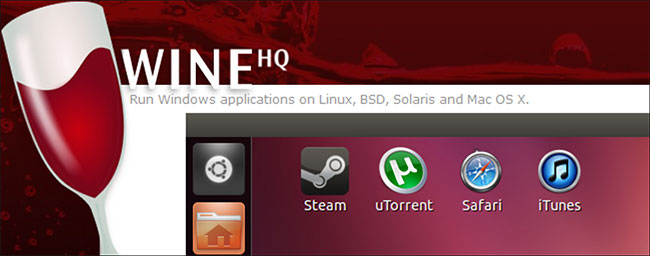
<p style="text-align: justify;">Các lớp tương thích của Windows có thể giúp người dùng Linux chạy những file EXE trên hệ thống của mình. Wine, viết tắt của Wine Is Not an Emulator, là một lớp tương thích Windows phổ biến, đúng với tên gọi của nó.</p>

<p style="text-align: justify;">Không giống như trình giả lập và máy ảo, Wine không chạy chương trình trong môi trường giống Windows được tạo trên hệ thống Linux. Thay vào đó, nó chỉ đơn giản là chuyển đổi các lệnh system call Windows thành những lệnh POSIX tương đương của chúng.</p>

<p style="text-align: justify;">Nhìn chung, các lớp tương thích như Wine chịu trách nhiệm chuyển đổi những lệnh system call, cải cách cấu trúc thư mục và cung cấp các thư viện hệ thống dành riêng cho hệ điều hành đối với một chương trình.&nbsp;Cài đặt và sử dụng Wine để chạy các chương trình Windows trên Linux&nbsp;rất đơn giản.</p>

<p style="text-align: justify;">Người dùng Linux muốn chơi các game chỉ dành cho Windows có thể chọn&nbsp;PlayOnLinux, một wrapper frontend cho Wine. PlayOnLinux cũng cung cấp danh sách chi tiết các ứng dụng và game Windows mà bạn có thể cài đặt trên hệ thống của mình.</p>

<h3 style="text-align: justify;">Chạy Windows bên trong máy ảo</h3>

<p style="text-align: justify;"><img alt="Virtualbox" data-i="1" data-src="https://st.quantrimang.com/photos/image/2022/03/17/linux-co-the-chay-cac-file-windows-exe-khong-2.jpg" data-was-processed="true" height="435" src="https://st.quantrimang.com/photos/image/2022/03/17/linux-co-the-chay-cac-file-windows-exe-khong-2.jpg" width="580" /></p>

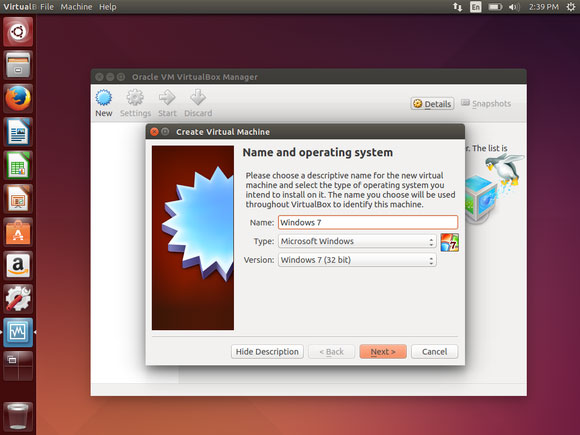
<p style="text-align: justify;">Một giải pháp khác là chạy các file Windows EXE bằng máy ảo. Một VM hypervisor như VirtualBox, cho phép người dùng cài đặt hệ điều hành phụ chạy trong hệ điều hành chính của mình.</p>

<p style="text-align: justify;">Tất cả những gì bạn phải làm là&nbsp;cài đặt VirtualBox&nbsp;hoặc VMWare, tạo một máy ảo mới và thiết lập Windows trên đó. Sau đó, bạn chỉ cần khởi động máy ảo và chạy Windows bên trong hệ điều hành dựa trên Linux của mình. Bằng cách này, bạn có thể chạy các file EXE và những chương trình khác như bạn thường làm trên máy tính Windows.</p>

<p style="text-align: justify;">Hiện tại, một lượng lớn phần mềm có sẵn chỉ tập trung vào một hệ điều hành duy nhất. Hầu hết các ứng dụng bạn có thể tìm thấy đều có sẵn dành riêng cho Windows, macOS, Linux hoặc chỉ Windows và macOS. Hiếm khi bạn có cơ hội cài đặt một phần mềm chạy trên tất cả các hệ điều hành chính thống.</p>

<p style="text-align: justify;">Nhưng tất cả điều này đang thay đổi với sự phát triển đa nền tảng. Các nhà phát triển phần mềm hiện đang xây dựng các ứng dụng có thể chạy trên nhiều nền tảng.&nbsp;Spotify,&nbsp;VLC Media Player,&nbsp;Sublime Text&nbsp;và&nbsp;Visual Studio Code&nbsp;là một số ví dụ về phần mềm đa nền tảng có sẵn cho tất cả các hệ điều hành chính.</p>
		</div>
				<div id="author">
						<p>
				<strong>Nguồn tin:</strong>
				Quantrimang.com
			</p>
		</div>
	</div>
	<div id="footer" class="clearfix">
		<div id="url">
			<strong>URL của bản tin này: </strong><a href="https://www.nguoicodonvn2008.info/vi/news/savefile/kien-thuc-may-tinh/linux-co-the-chay-cac-file-windows-exe-khong-5302.html" title="Linux có thể chạy các file Windows EXE không?">https://www.nguoicodonvn2008.info/vi/news/savefile/kien-thuc-may-tinh/linux-co-the-chay-cac-file-windows-exe-khong-5302.html</a>

		</div>
		<div class="clear"></div>
		<div class="copyright">
			&copy; .&#x3A; Nguoicodonvn2008.info - Cõi lòng người cô đơn &#x3A;.
		</div>
		<div id="contact">
			<a href="mailto:admin@nguoicodonvn2008.info">admin@nguoicodonvn2008.info</a>
		</div>
	</div>
</div>
        <div id="timeoutsess" class="chromeframe">
            Bạn đã không sử dụng Site, <a onclick="timeoutsesscancel();" href="https://www.nguoicodonvn2008.info/#">Bấm vào đây để duy trì trạng thái đăng nhập</a>. Thời gian chờ: <span id="secField"> 60 </span> giây
        </div>
        <div id="openidResult" class="nv-alert" style="display:none"></div>
        <div id="openidBt" data-result="" data-redirect=""></div>
		</script>
		<div class="car-top">
  <span><img src="https://www.nguoicodonvn2008.info/themes/default/images/car.png" alt=""></span>
</div>
<div id="run_cronjobs" style="visibility:hidden;display:none;"><img alt="cron" src="/index.php?second=cronjobs&amp;p=l2Qj7HbP" width="1" height="1" /></div>
<script src="https://www.nguoicodonvn2008.info/assets/js/jquery/jquery.min.js"></script>
<script>var nv_base_siteurl="/",nv_lang_data="vi",nv_lang_interface="vi",nv_name_variable="nv",nv_fc_variable="op",nv_lang_variable="language",nv_module_name="news",nv_func_name="savefile",nv_is_user=0, nv_my_ofs=-4,nv_my_abbr="EDT",nv_cookie_prefix="nv4c_e856T",nv_check_pass_mstime=1738000,nv_area_admin=0,nv_safemode=0,theme_responsive=0,nv_recaptcha_ver=2,nv_recaptcha_sitekey="",nv_recaptcha_type="image",XSSsanitize=1;</script>
<script src="https://www.nguoicodonvn2008.info/assets/js/language/vi.js"></script>
<script src="https://www.nguoicodonvn2008.info/assets/js/DOMPurify/purify3.js"></script>
<script src="https://www.nguoicodonvn2008.info/assets/js/global.js"></script>
<script src="https://www.nguoicodonvn2008.info/assets/js/site.js"></script>
<script src="https://www.nguoicodonvn2008.info/themes/default/js/news.js"></script>
<script src="https://www.nguoicodonvn2008.info/themes/default/js/main.js"></script>
<script src="https://www.nguoicodonvn2008.info/themes/default/js/custom.js"></script>
<script type="application/ld+json">
        {
            "@context": "https://schema.org",
            "@type": "Organization",
            "url": "https://www.nguoicodonvn2008.info",
            "logo": "https://www.nguoicodonvn2008.info/uploads/angel.gif"
        }
        </script>
<script src="https://www.nguoicodonvn2008.info/themes/default/js/bootstrap.min.js"></script>
<script type="text/javascript">
var $scrolltop = $('.car-top');
$scrolltop.on('click', function () {
    $('html,body').animate({
        scrollTop: 0
    }, 800);
    $(this).addClass("car-run");
    setTimeout(function(){ $scrolltop.removeClass('car-run');}, 1000);
    return false;
});
$(window).on('scroll', function ()
{ 
    if($(window).scrollTop() >= 200)
    {
        $scrolltop.addClass("show");
        $scrolltop.addClass("car-down");
    }
    else
    {
       $scrolltop.removeClass("show");
       setTimeout(function(){ $scrolltop.removeClass('car-down');}, 300);
    }
});
</script>
</body>
</html>