<!DOCTYPE html>
    <html lang="vi" xmlns="http://www.w3.org/1999/xhtml" prefix="og: http://ogp.me/ns#">
    <head>
<title>Liệt kê tên thiết bị, thông tin ổ đĩa và phân vùng trong Linux với lsblk</title>
<meta name="description" content="Liệt kê tên thiết bị, thông tin ổ đĩa và phân vùng trong Linux với lsblk - Savefile - Tin Tức -...">
<meta name="author" content=".: Nguoicodonvn2008.info - Cõi lòng người cô đơn :.">
<meta name="copyright" content=".: Nguoicodonvn2008.info - Cõi lòng người cô đơn :. [admin@nguoicodonvn2008.info]">
<meta name="robots" content="index, archive, follow, noodp">
<meta name="googlebot" content="index,archive,follow,noodp">
<meta name="msnbot" content="all,index,follow">
<meta name="generator" content="NukeViet v4.5">
<meta http-equiv="Content-Type" content="text/html; charset=utf-8">
<meta property="og:title" content="Liệt kê tên thiết bị, thông tin ổ đĩa và phân vùng trong Linux với lsblk">
<meta property="og:type" content="website">
<meta property="og:description" content="Savefile - Tin Tức -...">
<meta property="og:site_name" content=".&#x3A; Nguoicodonvn2008.info - Cõi lòng người cô đơn &#x3A;.">
<meta property="og:url" content="https://www.nguoicodonvn2008.info/vi/news/savefile/kien-thuc-may-tinh/liet-ke-ten-thiet-bi-thong-tin-o-dia-va-phan-vung-trong-linux-voi-lsblk-1034.html">
<link rel="shortcut icon" href="https://www.nguoicodonvn2008.info/favicon.ico">
<link rel="canonical" href="https://www.nguoicodonvn2008.info/vi/news/savefile/kien-thuc-may-tinh/liet-ke-ten-thiet-bi-thong-tin-o-dia-va-phan-vung-trong-linux-voi-lsblk-1034.html">
<link rel="alternate" href="https://www.nguoicodonvn2008.info/vi/news/rss/" title="Tin Tức" type="application/rss+xml">
<link rel="alternate" href="https://www.nguoicodonvn2008.info/vi/news/rss/karaoke-dual/" title="Tin Tức - Karaoke Dual" type="application/rss+xml">
<link rel="alternate" href="https://www.nguoicodonvn2008.info/vi/news/rss/nhac-tre/" title="Tin Tức - Nhạc trẻ" type="application/rss+xml">
<link rel="alternate" href="https://www.nguoicodonvn2008.info/vi/news/rss/tru-tinh/" title="Tin Tức - Trữ tình" type="application/rss+xml">
<link rel="alternate" href="https://www.nguoicodonvn2008.info/vi/news/rss/nuoc-ngoai/" title="Tin Tức - Nước ngoài" type="application/rss+xml">
<link rel="alternate" href="https://www.nguoicodonvn2008.info/vi/news/rss/remix/" title="Tin Tức - Remix" type="application/rss+xml">
<link rel="alternate" href="https://www.nguoicodonvn2008.info/vi/news/rss/tam-su-tinh-yeu/" title="Tin Tức - Tâm sự tình yêu" type="application/rss+xml">
<link rel="alternate" href="https://www.nguoicodonvn2008.info/vi/news/rss/tho-suu-tam/" title="Tin Tức - Thơ sưu tầm" type="application/rss+xml">
<link rel="alternate" href="https://www.nguoicodonvn2008.info/vi/news/rss/cuoc-song/" title="Tin Tức - Cuộc sống" type="application/rss+xml">
<link rel="alternate" href="https://www.nguoicodonvn2008.info/vi/news/rss/phan-mem/" title="Tin Tức - Phần mềm" type="application/rss+xml">
<link rel="alternate" href="https://www.nguoicodonvn2008.info/vi/news/rss/kien-thuc-may-tinh/" title="Tin Tức - Kiến thức máy tính" type="application/rss+xml">
<link rel="alternate" href="https://www.nguoicodonvn2008.info/vi/news/rss/hoc-tap/" title="Tin Tức - Học tập" type="application/rss+xml">
<link rel="alternate" href="https://www.nguoicodonvn2008.info/vi/news/rss/tai-lieu/" title="Tin Tức - Tài liệu" type="application/rss+xml">
<link rel="alternate" href="https://www.nguoicodonvn2008.info/vi/news/rss/de-thi/" title="Tin Tức - Đề thi" type="application/rss+xml">
<link rel="preload" as="style" href="https://www.nguoicodonvn2008.info/assets/css/font-awesome.min.css" type="text/css">
<link rel="preload" as="style" href="https://www.nguoicodonvn2008.info/themes/default/css/bootstrap.non-responsive.css" type="text/css">
<link rel="preload" as="style" href="https://www.nguoicodonvn2008.info/themes/default/css/style.css" type="text/css">
<link rel="preload" as="style" href="https://www.nguoicodonvn2008.info/themes/default/css/style.non-responsive.css" type="text/css">
<link rel="preload" as="style" href="https://www.nguoicodonvn2008.info/themes/default/css/news.css" type="text/css">
<link rel="preload" as="style" href="https://www.nguoicodonvn2008.info/themes/default/css/custom.css" type="text/css">
<link rel="preload" as="script" href="https://www.nguoicodonvn2008.info/assets/js/jquery/jquery.min.js" type="text/javascript">
<link rel="preload" as="script" href="https://www.nguoicodonvn2008.info/assets/js/language/vi.js" type="text/javascript">
<link rel="preload" as="script" href="https://www.nguoicodonvn2008.info/assets/js/DOMPurify/purify3.js" type="text/javascript">
<link rel="preload" as="script" href="https://www.nguoicodonvn2008.info/assets/js/global.js" type="text/javascript">
<link rel="preload" as="script" href="https://www.nguoicodonvn2008.info/assets/js/site.js" type="text/javascript">
<link rel="preload" as="script" href="https://www.nguoicodonvn2008.info/themes/default/js/news.js" type="text/javascript">
<link rel="preload" as="script" href="https://www.nguoicodonvn2008.info/themes/default/js/main.js" type="text/javascript">
<link rel="preload" as="script" href="https://www.nguoicodonvn2008.info/themes/default/js/custom.js" type="text/javascript">
<link rel="preload" as="script" href="https://www.nguoicodonvn2008.info/themes/default/js/bootstrap.min.js" type="text/javascript">
<link rel="stylesheet" href="https://www.nguoicodonvn2008.info/assets/css/font-awesome.min.css">
<link rel="stylesheet" href="https://www.nguoicodonvn2008.info/themes/default/css/bootstrap.non-responsive.css">
<link rel="stylesheet" href="https://www.nguoicodonvn2008.info/themes/default/css/style.css">
<link rel="stylesheet" href="https://www.nguoicodonvn2008.info/themes/default/css/style.non-responsive.css">
<link rel="StyleSheet" href="https://www.nguoicodonvn2008.info/themes/default/css/news.css">
<link rel="stylesheet" href="https://www.nguoicodonvn2008.info/themes/default/css/custom.css">
<style type="text/css">
	body{background: #fff;}
</style>
    </head>
    <body>
<div id="print">
	<div id="hd_print">
		<h2 class="pull-left">.&#x3A; Nguoicodonvn2008.info - Cõi lòng người cô đơn &#x3A;.</h2>
		<p class="pull-right"><a title=".&#x3A; Nguoicodonvn2008.info - Cõi lòng người cô đơn &#x3A;." href="https://www.nguoicodonvn2008.info/">https://www.nguoicodonvn2008.info</a></p>
	</div>
	<div class="clear"></div>
	<hr />
	<div id="content">
		<h1>Liệt kê tên thiết bị, thông tin ổ đĩa và phân vùng trong Linux với lsblk</h1>
		<ul class="list-inline">
			<li>Thứ tư - 25/09/2019 10:12</li>
			<li class="hidden-print txtrequired"><em class="fa fa-print">&nbsp;</em><a title="In ra" href="javascript:;" onclick="window.print()">In ra</a></li>
			<li class="hidden-print txtrequired"><em class="fa fa-power-off">&nbsp;</em><a title="Đóng cửa sổ này" href="javascript:;" onclick="window.close()">Đóng cửa sổ này</a></li>
		</ul>
		<div class="clear"></div>
		<div id="hometext">
		</div>
				<div class="imghome">
			<img alt="Liệt kê tên thiết bị, thông tin ổ đĩa và phân vùng trong Linux với lsblk" src="https://st.quantrimang.com/photos/image/2019/09/24/liet-ke-ten-thiet-bi-voi-lsblk-1.jpg" width="460" class="img-thumbnail" />
		</div>
		<div class="clear"></div>
		<div id="bodytext" class="clearfix">
			<p style="text-align: justify;">Trên&nbsp;Linux, đôi khi bạn cần phải làm việc với các ổ đĩa và/hoặc phân vùng trực tiếp từ dòng lệnh. Thông thường, bạn thực sự muốn thực hiện hành động trên các hệ thống file, nhưng rốt cuộc lại làm điều đó bằng cách chỉ định các phân vùng nơi chúng được lưu trữ. Trên dòng lệnh, bạn thực hiện những điều này bằng cách sử dụng tên thiết bị của chúng (ví dụ: “<strong>/dev/sda3</strong>”).</p>

<p style="text-align: justify;">Trên các hệ thống có nhiều ổ đĩa, phân vùng, ổ quang và ổ USB, có thể khó xác định tên thiết bị được gán cho mỗi ổ đó.</p>

<h2 style="text-align: justify;">&nbsp;</h2>

<h2 id="mcetoc_1dlh5rfkh0" style="text-align: justify;">Lệnh lsblk thực hiện nhiệm vụ gì?</h2>

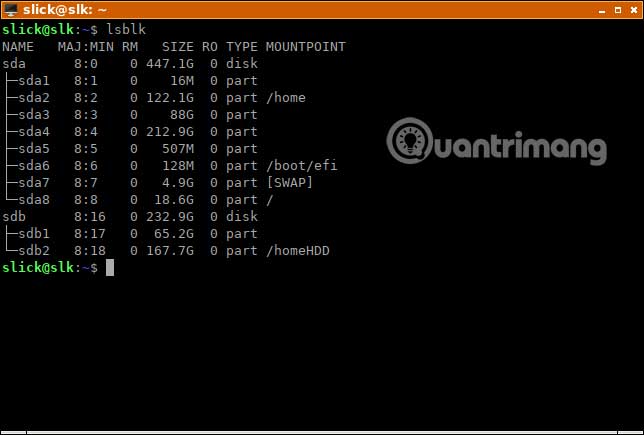
<p style="text-align: justify;">lsblk hiển thị thông tin về các thiết bị lưu trữ. Tiện ích này thường được sử dụng để xác định tên thiết bị chính xác được truyền cho lệnh tiếp theo.</p>

<pre id="pre0">
<code>lsblk</code></pre>

<p style="text-align: justify;"><img alt="Lệnh lsblk thực hiện nhiệm vụ gì?" data-i="0" data-src="https://st.quantrimang.com/photos/image/2019/09/24/liet-ke-ten-thiet-bi-voi-lsblk-1.jpg" data-was-processed="true" height="435" src="https://st.quantrimang.com/photos/image/2019/09/24/liet-ke-ten-thiet-bi-voi-lsblk-1.jpg" width="644" /></p>

<p style="text-align: justify;">Trong hầu hết mọi trường hợp, chỉ lsblk, không cần bất kỳ tham số bổ sung nào, cũng đủ để giúp xác định ổ đĩa hoặc phân vùng bạn muốn làm việc. Chẳng hạn, từ bức ảnh trên, bạn có thể nói rằng, sda4 là một phân vùng của Windows, vì bạn biết dung lượng của nó là khoảng 200GB. Tuy nhiên, nếu bạn có hai hoặc nhiều phân vùng có cùng kích thước, mọi thứ có thể trở nên khó hiểu hơn. Trong những trường hợp khác, bạn chỉ đơn giản là không biết hoặc không nhớ dung lượng của một ổ đĩa hoặc phân vùng cụ thể trên hệ thống của mình.</p>

<p style="text-align: justify;">Trên Linux, rất nguy hiểm khi nhầm lẫn tên thiết bị, vì bạn có thể phá hủy hoặc làm hỏng dữ liệu hữu ích bằng một lệnh sai.</p>

<h2 id="mcetoc_1dlh5rfki1" style="text-align: justify;">Tham số lsblk hữu ích</h2>

<p style="text-align: justify;">Theo mặc định, lsblk chỉ hiển thị một vài thuộc tính, như bạn đã thấy trong hình trên. Nhưng, nếu thêm tham số vào lệnh, bạn có thể khiến cho nó xuất ra các thuộc tính thiết bị bổ sung. Điều này giúp việc xác định ổ đĩa hoặc phân vùng bạn đang tìm kiếm dễ dàng hơn nhiều.</p>

<h3 id="mcetoc_1dlh5rfki2" style="text-align: justify;">Tìm hiểu xem đó là ổ SSD hay ổ cứng (HDD)</h3>

<p style="text-align: justify;">Để xem những cột nào lsblk có thể hiển thị, hãy nhập như sau:</p>

<pre id="pre1">
<code>lsblk --help</code></pre>

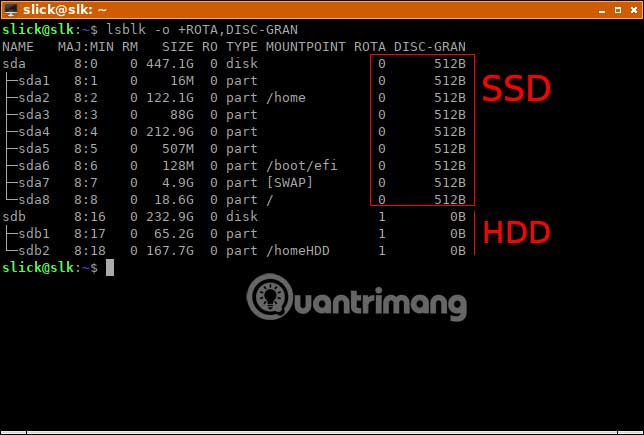
<p style="text-align: justify;">Trong tình huống này, bạn sẽ sử dụng&nbsp;<strong>ROTA</strong>&nbsp;và&nbsp;<strong>DISC-GRAN.</strong></p>

<ul>
	<li style="text-align: justify;"><strong>ROTA</strong>&nbsp;cho bạn biết liệu một block device (file đại diện cho một loại thiết bị nào đó, với dữ liệu có thể đọc hoặc ghi theo dạng block (khối), thường có khả năng tìm kiếm tiến/lùi, và/hoặc ánh xạ dữ liệu) có thuộc về thiết bị lưu trữ dạng quay không. Các đĩa cứng có thể quay, do đó, cột này xuất ra giá trị&nbsp;<strong>“1”</strong>&nbsp;bên cạnh chúng (giá trị logic nhị phân có nghĩa là&nbsp;<strong>“true”</strong>).</li>
	<li style="text-align: justify;"><strong>DISC-GRAN</strong>&nbsp;cho bạn thấy mức độ chi tiết của việc loại bỏ (discard granularity). SSD hỗ trợ việc loại bỏ để giải phóng các khối dữ liệu không sử dụng. Đĩa cứng không hỗ trợ tính năng này, vì chúng không cần nó, do đó cột này sẽ hiển thị giá trị&nbsp;<strong>0</strong>.</li>
</ul>

<pre id="pre2">
<code>lsblk -o +ROTA,DISC-GRAN</code></pre>

<p style="text-align: justify;"><img alt="Tìm hiểu xem đó là ổ SSD hay ổ cứng (HDD)" data-i="1" data-src="https://st.quantrimang.com/photos/image/2019/09/24/liet-ke-ten-thiet-bi-voi-lsblk-2.jpg" data-was-processed="true" height="435" src="https://st.quantrimang.com/photos/image/2019/09/24/liet-ke-ten-thiet-bi-voi-lsblk-2.jpg" width="644" /></p>

<h3 id="mcetoc_1dlh5rfki3" style="text-align: justify;">Hiển thị hệ thống file được lưu trữ trên ổ đĩa hoặc phân vùng</h3>

<p style="text-align: justify;">Khi thấy một danh sách các phân vùng, bạn có thể biết những gì chúng lưu trữ, dựa trên dung lượng của chúng. Nếu điều này không đủ, bạn cũng có thể tạo các hệ thống file đầu ra lsblk. Sẽ dễ dàng hơn nhiều nếu xác định phân vùng theo cách này bởi vì:</p>

<ul>
	<li style="text-align: justify;">Windows sử dụng hệ thống file&nbsp;NTFS</li>
	<li style="text-align: justify;">Linux thường sử dụng ext4</li>
	<li style="text-align: justify;">Thiết bị USB sử dụng FAT, FAT32 (vfat) hoặc NTFS</li>
	<li style="text-align: justify;">Phân vùng boot EFI thường rất nhỏ và hiển thị một hệ thống file vfat trên đó</li>
</ul>

<p style="text-align: justify;">Ngoài ra, thêm cột đầu ra&nbsp;<strong>LABEL,</strong>&nbsp;có thể giúp ích, nếu các phân vùng đã được gắn nhãn khi tạo hoặc format.</p>

<pre id="pre3">
<code>lsblk -o +FSTYPE,LABEL</code></pre>

<div style="text-align: justify;">&nbsp;</div>

<h3 id="mcetoc_1dlh5rfki4" style="text-align: justify;">Hiển thị thiết bị di động hoặc thẻ nhớ USB</h3>

<pre id="pre4">
<code>lsblk -o +RM</code></pre>

<p style="text-align: justify;">Lệnh này sẽ hiển thị thêm một cột cho bạn biết liệu thiết bị có thể tháo rời không. Giá trị&nbsp;<strong>“1”,</strong>&nbsp;đồng nghĩa với&nbsp;<strong>“true”,</strong>&nbsp;ám chỉ một USB hoặc các loại phương tiện di động khác.</p>

<h3 id="mcetoc_1dlh5rfki5" style="text-align: justify;">Hiển thị model HDD/SSD</h3>

<p style="text-align: justify;">Điều này hữu ích khi bạn muốn tra cứu code chính xác của model thiết bị lưu trữ để nâng cấp&nbsp;firmware&nbsp;hoặc tải xuống driver.</p>

<pre id="pre5">
<code>lsblk -d -o +MODEL</code></pre>

<h3 id="mcetoc_1dlh5rfki6" style="text-align: justify;">Hiển thị UUID (Universally Unique Identifier) hệ thống file</h3>

<p style="text-align: justify;">Các bản phân phối Linux cũ đã mount hệ thống file bằng cách chỉ định tên thiết bị của chúng trong&nbsp;<strong>“/etc/fstab”.</strong>&nbsp;Tuy nhiên, điều đó đã chứng minh là không đáng tin cậy bởi vì&nbsp;<strong>“/dev/sda2”</strong>&nbsp;có thể trở thành&nbsp;<strong>“/dev/sdb2”,</strong>&nbsp;khi bạn thêm một thiết bị lưu trữ khác vào hệ thống. Hiện nay, UUID được sử dụng thay thế, vẫn không đổi cho dù bạn thêm vào hoặc loại bỏ bất cứ gì khỏi máy tính. Vì bất kỳ lý do gì bạn cần UUID, bạn đều có thể làm cho lsblk hiển thị chúng với:</p>

<pre id="pre6">
<code>lsblk -o +UUID</code></pre>

<h2 id="mcetoc_1dlh5rfki7" style="text-align: justify;">Hiển thị các cột lsblk khác bạn cần</h2>

<p style="text-align: justify;">Ở phần đầu bài viết, bạn đã sử dụng:</p>

<pre id="pre7">
<code>lsblk --help</code></pre>

<p style="text-align: justify;">Lệnh này nhằm để xem các cột bổ sung mà lsblk có thể hiển thị. Nếu các ví dụ ở đây không đủ cho nhu cầu của bạn, hãy tham khảo thông tin trợ giúp đó một lần nữa và kết hợp những tham số khi cần. Để làm như vậy, chỉ cần nhập&nbsp;<code>lsblk -o +</code>, theo sau là tên cột mà bạn muốn xuất. Phân tách tên cột bằng dấu phẩy. Ví dụ:</p>

<pre id="pre8">
<code>lsblk -o +SCHED,RM,FSTYPE</code></pre>

<p style="text-align: justify;">Sau khi xác định tên thiết bị muốn làm việc, hãy nhớ thay thế nó bằng đường dẫn thiết bị đầy đủ trong lệnh tiếp theo bạn định sử dụng. Ví dụ, nếu nhận được kết quả là&nbsp;<strong>“sda4”</strong>trong lsblk, bạn sẽ phải thay thế nó bằng&nbsp;<strong>“/dev/sda4”</strong>&nbsp;trong lệnh tiếp theo. Vì vậy, thay vì&nbsp;<strong>“sda4”,</strong>&nbsp;bạn hãy nhập&nbsp;<strong>“/dev/sda4”</strong>&nbsp;vào một lệnh chẳng hạn như:&nbsp;</p>

<pre id="pre9">
<code>mkfs -t ext4 /dev/sda4</code></pre>

<p style="text-align: justify;">Chúc bạn thực hiện thành công!</p>
		</div>
				<div id="author">
						<p>
				<strong>Nguồn tin:</strong>
				Quantrimang.com
			</p>
		</div>
	</div>
	<div id="footer" class="clearfix">
		<div id="url">
			<strong>URL của bản tin này: </strong><a href="https://www.nguoicodonvn2008.info/vi/news/savefile/kien-thuc-may-tinh/liet-ke-ten-thiet-bi-thong-tin-o-dia-va-phan-vung-trong-linux-voi-lsblk-1034.html" title="Liệt kê tên thiết bị, thông tin ổ đĩa và phân vùng trong Linux với lsblk">https://www.nguoicodonvn2008.info/vi/news/savefile/kien-thuc-may-tinh/liet-ke-ten-thiet-bi-thong-tin-o-dia-va-phan-vung-trong-linux-voi-lsblk-1034.html</a>

		</div>
		<div class="clear"></div>
		<div class="copyright">
			&copy; .&#x3A; Nguoicodonvn2008.info - Cõi lòng người cô đơn &#x3A;.
		</div>
		<div id="contact">
			<a href="mailto:admin@nguoicodonvn2008.info">admin@nguoicodonvn2008.info</a>
		</div>
	</div>
</div>
        <div id="timeoutsess" class="chromeframe">
            Bạn đã không sử dụng Site, <a onclick="timeoutsesscancel();" href="https://www.nguoicodonvn2008.info/#">Bấm vào đây để duy trì trạng thái đăng nhập</a>. Thời gian chờ: <span id="secField"> 60 </span> giây
        </div>
        <div id="openidResult" class="nv-alert" style="display:none"></div>
        <div id="openidBt" data-result="" data-redirect=""></div>
		</script>
		<div class="car-top">
  <span><img src="https://www.nguoicodonvn2008.info/themes/default/images/car.png" alt=""></span>
</div>
<script src="https://www.nguoicodonvn2008.info/assets/js/jquery/jquery.min.js"></script>
<script>var nv_base_siteurl="/",nv_lang_data="vi",nv_lang_interface="vi",nv_name_variable="nv",nv_fc_variable="op",nv_lang_variable="language",nv_module_name="news",nv_func_name="savefile",nv_is_user=0, nv_my_ofs=-4,nv_my_abbr="EDT",nv_cookie_prefix="nv4c_e856T",nv_check_pass_mstime=1738000,nv_area_admin=0,nv_safemode=0,theme_responsive=0,nv_recaptcha_ver=2,nv_recaptcha_sitekey="",nv_recaptcha_type="image",XSSsanitize=1;</script>
<script src="https://www.nguoicodonvn2008.info/assets/js/language/vi.js"></script>
<script src="https://www.nguoicodonvn2008.info/assets/js/DOMPurify/purify3.js"></script>
<script src="https://www.nguoicodonvn2008.info/assets/js/global.js"></script>
<script src="https://www.nguoicodonvn2008.info/assets/js/site.js"></script>
<script src="https://www.nguoicodonvn2008.info/themes/default/js/news.js"></script>
<script src="https://www.nguoicodonvn2008.info/themes/default/js/main.js"></script>
<script src="https://www.nguoicodonvn2008.info/themes/default/js/custom.js"></script>
<script type="application/ld+json">
        {
            "@context": "https://schema.org",
            "@type": "Organization",
            "url": "https://www.nguoicodonvn2008.info",
            "logo": "https://www.nguoicodonvn2008.info/uploads/angel.gif"
        }
        </script>
<script src="https://www.nguoicodonvn2008.info/themes/default/js/bootstrap.min.js"></script>
<script type="text/javascript">
var $scrolltop = $('.car-top');
$scrolltop.on('click', function () {
    $('html,body').animate({
        scrollTop: 0
    }, 800);
    $(this).addClass("car-run");
    setTimeout(function(){ $scrolltop.removeClass('car-run');}, 1000);
    return false;
});
$(window).on('scroll', function ()
{ 
    if($(window).scrollTop() >= 200)
    {
        $scrolltop.addClass("show");
        $scrolltop.addClass("car-down");
    }
    else
    {
       $scrolltop.removeClass("show");
       setTimeout(function(){ $scrolltop.removeClass('car-down');}, 300);
    }
});
</script>
</body>
</html>