<!DOCTYPE html>
    <html lang="vi" xmlns="http://www.w3.org/1999/xhtml" prefix="og: http://ogp.me/ns#">
    <head>
<title>Lệnh break và continue trong Python</title>
<meta name="description" content="Lệnh break và continue trong Python - Savefile - Tin Tức -...">
<meta name="author" content=".: Nguoicodonvn2008.info - Cõi lòng người cô đơn :.">
<meta name="copyright" content=".: Nguoicodonvn2008.info - Cõi lòng người cô đơn :. [admin@nguoicodonvn2008.info]">
<meta name="robots" content="index, archive, follow, noodp">
<meta name="googlebot" content="index,archive,follow,noodp">
<meta name="msnbot" content="all,index,follow">
<meta name="generator" content="NukeViet v4.5">
<meta http-equiv="Content-Type" content="text/html; charset=utf-8">
<meta property="og:title" content="Lệnh break và continue trong Python">
<meta property="og:type" content="website">
<meta property="og:description" content="Savefile - Tin Tức - https&#x3A;&#x002F;&#x002F;www.nguoicodonvn2008.info&#x002F;vi&#x002F;news&#x002F;savefile&#x002F;kien-thuc-may-tinh&#x002F;lenh-break-va-continue-trong-python-9740.html">
<meta property="og:site_name" content=".&#x3A; Nguoicodonvn2008.info - Cõi lòng người cô đơn &#x3A;.">
<meta property="og:url" content="https://www.nguoicodonvn2008.info/vi/news/savefile/kien-thuc-may-tinh/lenh-break-va-continue-trong-python-9740.html">
<link rel="shortcut icon" href="https://www.nguoicodonvn2008.info/favicon.ico">
<link rel="canonical" href="https://www.nguoicodonvn2008.info/vi/news/savefile/kien-thuc-may-tinh/lenh-break-va-continue-trong-python-9740.html">
<link rel="alternate" href="https://www.nguoicodonvn2008.info/vi/news/rss/" title="Tin Tức" type="application/rss+xml">
<link rel="alternate" href="https://www.nguoicodonvn2008.info/vi/news/rss/karaoke-dual/" title="Tin Tức - Karaoke Dual" type="application/rss+xml">
<link rel="alternate" href="https://www.nguoicodonvn2008.info/vi/news/rss/nhac-tre/" title="Tin Tức - Nhạc trẻ" type="application/rss+xml">
<link rel="alternate" href="https://www.nguoicodonvn2008.info/vi/news/rss/tru-tinh/" title="Tin Tức - Trữ tình" type="application/rss+xml">
<link rel="alternate" href="https://www.nguoicodonvn2008.info/vi/news/rss/nuoc-ngoai/" title="Tin Tức - Nước ngoài" type="application/rss+xml">
<link rel="alternate" href="https://www.nguoicodonvn2008.info/vi/news/rss/remix/" title="Tin Tức - Remix" type="application/rss+xml">
<link rel="alternate" href="https://www.nguoicodonvn2008.info/vi/news/rss/tam-su-tinh-yeu/" title="Tin Tức - Tâm sự tình yêu" type="application/rss+xml">
<link rel="alternate" href="https://www.nguoicodonvn2008.info/vi/news/rss/tho-suu-tam/" title="Tin Tức - Thơ sưu tầm" type="application/rss+xml">
<link rel="alternate" href="https://www.nguoicodonvn2008.info/vi/news/rss/cuoc-song/" title="Tin Tức - Cuộc sống" type="application/rss+xml">
<link rel="alternate" href="https://www.nguoicodonvn2008.info/vi/news/rss/phan-mem/" title="Tin Tức - Phần mềm" type="application/rss+xml">
<link rel="alternate" href="https://www.nguoicodonvn2008.info/vi/news/rss/kien-thuc-may-tinh/" title="Tin Tức - Kiến thức máy tính" type="application/rss+xml">
<link rel="alternate" href="https://www.nguoicodonvn2008.info/vi/news/rss/hoc-tap/" title="Tin Tức - Học tập" type="application/rss+xml">
<link rel="alternate" href="https://www.nguoicodonvn2008.info/vi/news/rss/tai-lieu/" title="Tin Tức - Tài liệu" type="application/rss+xml">
<link rel="alternate" href="https://www.nguoicodonvn2008.info/vi/news/rss/de-thi/" title="Tin Tức - Đề thi" type="application/rss+xml">
<link rel="preload" as="style" href="https://www.nguoicodonvn2008.info/assets/css/font-awesome.min.css" type="text/css">
<link rel="preload" as="style" href="https://www.nguoicodonvn2008.info/themes/default/css/bootstrap.non-responsive.css" type="text/css">
<link rel="preload" as="style" href="https://www.nguoicodonvn2008.info/themes/default/css/style.css" type="text/css">
<link rel="preload" as="style" href="https://www.nguoicodonvn2008.info/themes/default/css/style.non-responsive.css" type="text/css">
<link rel="preload" as="style" href="https://www.nguoicodonvn2008.info/themes/default/css/news.css" type="text/css">
<link rel="preload" as="style" href="https://www.nguoicodonvn2008.info/themes/default/css/custom.css" type="text/css">
<link rel="preload" as="script" href="https://www.nguoicodonvn2008.info/assets/js/jquery/jquery.min.js" type="text/javascript">
<link rel="preload" as="script" href="https://www.nguoicodonvn2008.info/assets/js/language/vi.js" type="text/javascript">
<link rel="preload" as="script" href="https://www.nguoicodonvn2008.info/assets/js/DOMPurify/purify3.js" type="text/javascript">
<link rel="preload" as="script" href="https://www.nguoicodonvn2008.info/assets/js/global.js" type="text/javascript">
<link rel="preload" as="script" href="https://www.nguoicodonvn2008.info/assets/js/site.js" type="text/javascript">
<link rel="preload" as="script" href="https://www.nguoicodonvn2008.info/themes/default/js/news.js" type="text/javascript">
<link rel="preload" as="script" href="https://www.nguoicodonvn2008.info/themes/default/js/main.js" type="text/javascript">
<link rel="preload" as="script" href="https://www.nguoicodonvn2008.info/themes/default/js/custom.js" type="text/javascript">
<link rel="preload" as="script" href="https://www.nguoicodonvn2008.info/themes/default/js/bootstrap.min.js" type="text/javascript">
<link rel="stylesheet" href="https://www.nguoicodonvn2008.info/assets/css/font-awesome.min.css">
<link rel="stylesheet" href="https://www.nguoicodonvn2008.info/themes/default/css/bootstrap.non-responsive.css">
<link rel="stylesheet" href="https://www.nguoicodonvn2008.info/themes/default/css/style.css">
<link rel="stylesheet" href="https://www.nguoicodonvn2008.info/themes/default/css/style.non-responsive.css">
<link rel="StyleSheet" href="https://www.nguoicodonvn2008.info/themes/default/css/news.css">
<link rel="stylesheet" href="https://www.nguoicodonvn2008.info/themes/default/css/custom.css">
<style type="text/css">
	body{background: #fff;}
</style>
    </head>
    <body>
<div id="print">
	<div id="hd_print">
		<h2 class="pull-left">.&#x3A; Nguoicodonvn2008.info - Cõi lòng người cô đơn &#x3A;.</h2>
		<p class="pull-right"><a title=".&#x3A; Nguoicodonvn2008.info - Cõi lòng người cô đơn &#x3A;." href="https://www.nguoicodonvn2008.info/">https://www.nguoicodonvn2008.info</a></p>
	</div>
	<div class="clear"></div>
	<hr />
	<div id="content">
		<h1>Lệnh break và continue trong Python</h1>
		<ul class="list-inline">
			<li>Chủ nhật - 26/01/2025 10:49</li>
			<li class="hidden-print txtrequired"><em class="fa fa-print">&nbsp;</em><a title="In ra" href="javascript:;" onclick="window.print()">In ra</a></li>
			<li class="hidden-print txtrequired"><em class="fa fa-power-off">&nbsp;</em><a title="Đóng cửa sổ này" href="javascript:;" onclick="window.close()">Đóng cửa sổ này</a></li>
		</ul>
		<div class="clear"></div>
		<div id="hometext">
		</div>
				<div class="imghome">
			<img alt="Lệnh break và continue trong Python" src="https://st.quantrimang.com/photos/image/2022/09/23/break.png" width="460" class="img-thumbnail" />
		</div>
		<div class="clear"></div>
		<div id="bodytext" class="clearfix">
			<h1>&nbsp;</h1>
&nbsp;

<p><strong>Continue trong Python là gì? Lệnh continue trong Python cùng break được dùng như thế nào?</strong>&nbsp;Hãy cùng nhau tìm hiểu nhé!</p>

<p>Tính linh hoạt của Python khiến nó trở thành giải pháp tốt nhất để tự động hóa và thực hiện các tác vụ lặp đi lặp lại một cách hiệu quả. Trong Python (và các ngôn ngữ lập trình khác), vòng lặp giúp lặp lại danh sách, bộ, chuỗi, từ điển và tập hợp.</p>

<p>Liên quan tới loop, bạn sẽ cần biết cả continue và break. Hãy cùng nhau tìm hiểu nhé!</p>

<p>Trong&nbsp;<strong>Python</strong>, lệnh&nbsp;<code>break</code>&nbsp;và&nbsp;<code>continue</code>&nbsp;cho phép bạn kiểm soát luồng hoạt động của một vòng lặp thông thường.</p>

<p>Những vòng lặp thông thường sẽ lặp lại một khối code cho đến khi điều kiện kiểm tra&nbsp;<strong>False</strong>. Tuy vậy, sẽ có lúc bạn muốn chấm dứt vòng lặp hiện tại hoặc thậm chí toàn bộ vòng lặp mà không kiểm tra biểu thức điều kiện nữa. Đó là lúc chúng ta cần đến sự trợ giúp của lệnh&nbsp;<code>break</code>&nbsp;và&nbsp;<code>continue</code>.</p>

<h2 id="mcetoc_1bul743c90">Lệnh break trong Python</h2>

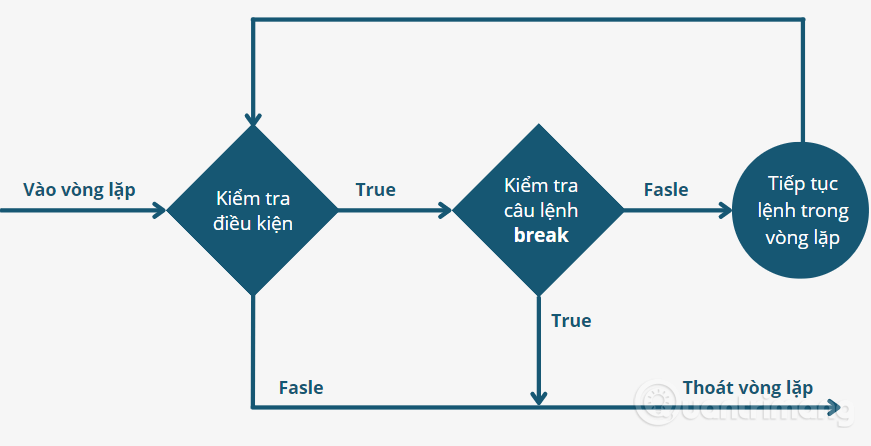
<p>Lệnh&nbsp;<code>break</code>&nbsp;trong Python dùng để kết thúc vòng lặp và truyền điều khiển đến câu lệnh tiếp theo sau của vòng lặp. Nếu lệnh&nbsp;<code>break</code>&nbsp;ở trong một vòng lặp lồng nhau (vòng lặp bên trong một vòng lặp khác),&nbsp;<code>break</code>&nbsp;sẽ chấm dứt vòng lặp trong cùng.</p>

<p>Bạn có thể sử dụng lệnh&nbsp;<code>break</code>&nbsp;để thoát khỏi vòng lặp khi một điều kiện cụ thể được đáp ứng (True), do đó lệnh&nbsp;<code>break</code>&nbsp;thường đi kèm với câu lệnh&nbsp;<code>if</code>.</p>

<h3>Cú pháp của lệnh break:</h3>

<pre id="pre0">
break</pre>

<h3><strong>Sơ đồ lệnh break:</strong></h3>

<p><img alt="Sơ đồ lệnh break trong Python" data-i="0" data-src="https://st.quantrimang.com/photos/image/2022/09/23/break.png" data-was-processed="true" src="https://st.quantrimang.com/photos/image/2022/09/23/break.png" /></p>

<p><strong>Nếu sử dụng break trong&nbsp;vòng lặp for Python&nbsp;thì sẽ như sau:</strong></p>

<pre id="pre1">
for var in sequence:
    #khối code bên trong vòng lặp for:
    if dieu_kien:
         break 

    #code khác bên trong vòng lặp for

#code bên ngoài vòng lặp for</pre>

<p>Khi&nbsp;<code>break</code>&nbsp;được thực thi thì &quot;<em>#code khác bên trong vòng lặp for</em>&quot; sẽ bị bỏ qua và chuyển đến &quot;<em>#code bên ngoài vòng lặp for</em>&quot;.</p>

<p><strong>Nếu sử dụng break trong&nbsp;vòng lặp while Python&nbsp;sẽ như sau:</strong></p>

<pre id="pre2">
while dieu_kien_kiem_tra:
    #code bên trong vòng lặp while:
    if dieu_kien:
       break

    #code khác bên trong vòng lặp while

#code bên ngoài vòng lặp while</pre>

<p>Khi&nbsp;<code>break</code>&nbsp;được thực thi thì &quot;<em>#code khác bên trong vòng lặp while</em>&quot; sẽ bị bỏ qua và chuyển đến &quot;<em>#code bên ngoài vòng lặp while</em>&quot;.</p>

<h3>Ví dụ về lệnh break Python</h3>

<p><strong>Ví dụ 1:</strong></p>

<pre id="pre3">
#Sử dụng break trong for

for val in &quot;quantrimang&quot;:
    if val == &quot;m&quot;:
        break
    print(val)

print(&quot;Kết thúc!&quot;)</pre>

<p>Trong đoạn code trên, chúng ta lặp các kí tự trong chuỗi&nbsp;<em>quantrimang</em>&nbsp;và kiểm tra điều kiện, nếu chữ cái là&nbsp;<strong>m</strong>&nbsp;thì sẽ thực thi lệnh&nbsp;<code>break</code>, nếu chữ cái khác&nbsp;<strong>m</strong>&nbsp;thì in ra màn hình. Chạy code trên ta được kết quả là các chữ cái trước&nbsp;<strong>m</strong>&nbsp;đã được in ra. Sau đó vòng lặp kết thúc, như kết quả dưới đây:</p>

<pre id="pre4">
<code>q
u
a
n
t
r
i
Kết thúc!</code></pre>

<p><strong>Ví dụ 2:</strong></p>

<pre id="pre5">
#Ví dụ sử dụng break trong while trên QuanTriMang:

bien = 10                    
while bien &gt; 0:              
   print (&#039;Giá trị biến hiện tại là: &#039;, bien)
   bien = bien -1
   if bien == 5:
      break

print (&quot;OK!&quot;)</pre>

<p>Code trên kiểm tra và in biến theo giá trị giảm dần từ 10, cho đến khi biến bằng 5 thì kết thúc vòng lặp.</p>

<pre id="pre6">
<code>Giá trị biến hiện tại là:  10
Giá trị biến hiện tại là:  9
Giá trị biến hiện tại là:  8
Giá trị biến hiện tại là:  7
Giá trị biến hiện tại là:  6
OK!</code></pre>

<h2>Lệnh continue trong Python</h2>

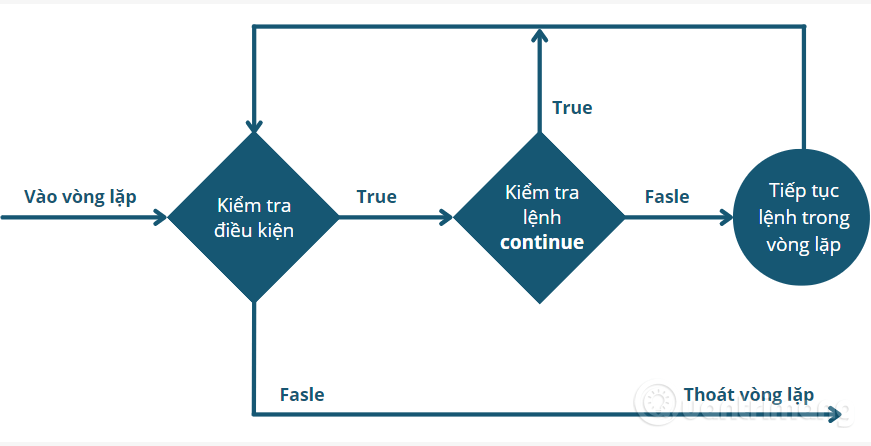
<p>Lệnh&nbsp;<code>continue</code>&nbsp;được sử dụng để bỏ qua phần còn lại của code bên trong vòng lặp, áp dụng cho lần lặp hiện tại. Không giống như câu lệnh&nbsp;<code>break</code>, câu lệnh&nbsp;<code>continue</code>&nbsp;sẽ không hoàn toàn dừng vòng lặp mà nó chỉ đơn giản nhảy sang vòng lặp kế tiếp.</p>

<p>Câu lệnh&nbsp;<code>continue</code>&nbsp;được sử dụng trong trường hợp bạn muốn bỏ qua vòng lặp của mình ở 1 giá trị điều kiện xác định, sau đó lại tiếp tục lặp tiếp.</p>

<h3><strong>Cú pháp lệnh continue:</strong></h3>

<pre id="pre7">
continue</pre>

<h3><strong>Sơ đồ lệnh continue trong Python:</strong></h3>

<p><img alt="Sơ đồ lệnh continue trong Python" data-adbro-processed="true" data-i="1" data-src="https://st.quantrimang.com/photos/image/2022/09/23/continue.png" data-was-processed="true" src="https://st.quantrimang.com/photos/image/2022/09/23/continue.png" /></p>

<p><strong>Lệnh continue trong vòng lặp for sẽ như sau:</strong></p>

<pre id="pre8">
for var in sequence:
    #khối code bên trong vòng lặp for
    if dieu_kien:
       continue 

    #code khác bên trong vòng lặp for

#code bên ngoài vòng lặp for</pre>

<p>Khi&nbsp;<code>continue</code>&nbsp;được thực thi thì &quot;<em>#code khác bên trong vòng lặp for</em>&quot; bị bỏ qua và quay trở lại &quot;#<em>khối code bên trong vòng lặp for</em>&quot;</p>

<p><strong>Lệnh continue trong vòng lặp while sẽ như sau:</strong></p>

<pre id="pre9">
while dieu_kien_kiem_tra:
    #khối code bên trong vòng lặp while
    if dieu_kien:
         continue

    #code khác bên trong vòng lặp while

#code bên ngoài vòng lặp while</pre>

<p>Khi&nbsp;<code>continue</code>&nbsp;được thực thi &quot;<em>#code khác bên trong vòng lặp while</em>&quot; sẽ bị bỏ qua và quay trở lại &quot;<em>#khối code bên trong vòng lặp while</em>&quot;</p>

<p><strong>Sự khác biệt giữa Continue và Pass trong Python:</strong></p>

<ul>
	<li>Pass: Câu lệnh pass trong Python được sử dụng khi một câu lệnh hoặc điều kiện bắt buộc phải có trong chương trình, nhưng chúng ta không muốn bất kỳ lệnh hoặc mã nào được thực thi. Câu lệnh này thường được sử dụng như một trình giữ chỗ cho mã trong tương lai.</li>
	<li>Continue: Câu lệnh continue trong Python được sử dụng để bỏ qua phần mã còn lại bên trong vòng lặp chỉ cho lần lặp hiện tại</li>
	<li>Break: Câu lệnh break trong Python thay đổi luồng của vòng lặp bằng cách kết thúc vòng lặp khi một điều kiện đã chỉ định được đáp ứng.</li>
</ul>

<h3>Ví dụ lệnh continnue trong Python</h3>

<p><strong>Ví dụ 3:</strong></p>

<pre id="pre10">
# Sử dụng continue trong for

for val in &quot;quantrimang&quot;:
    if val == &quot;m&quot;:
       continue
    print(val)

print(&quot;Kết thúc!&quot;)</pre>

<p>Code này giống hệt bên trên, chỉ thay lệnh&nbsp;<code>break</code>&nbsp;bằng&nbsp;<code>continue</code>. Tại đây, khi lặp chuỗi &quot;<em>quantrimang</em>&quot; đến chữ cái&nbsp;<strong>m</strong>&nbsp;thì sẽ bỏ qua lệnh in biến&nbsp;<code>print(val)</code>&nbsp;và quay trở lại vòng lặp&nbsp;<code>while</code>, ta có kết quả:</p>

<pre id="pre11">
<code>q
u
a
n
t
r
i
a
n
g
Kết thúc!</code></pre>

<p><strong>Ví dụ 4:</strong></p>

<pre id="pre12">
# Ví dụ sử dụng continue trong while trên QuanTriMang:

bien = 10 
while bien &gt; 0:     
    bien = bien -1 
    if bien == 5: 
       continue
    print (&#039;Giá trị biến hiện tại là: &#039;, bien) 
print (&quot;OK!&quot;)</pre>

<p>Nếu bien = 5 thì bỏ qua và thực hiện lần lặp tiếp theo, kết quả là:</p>

<pre id="pre13">
<code>Giá trị biến hiện tại là:  9
Giá trị biến hiện tại là:  8
Giá trị biến hiện tại là:  7
Giá trị biến hiện tại là:  6
Giá trị biến hiện tại là:  4
Giá trị biến hiện tại là:  3
Giá trị biến hiện tại là:  2
Giá trị biến hiện tại là:  1
Giá trị biến hiện tại là:  0
OK!</code></pre>

<p>Nhìn chung, lệnh break và continue trong Python được dùng để bỏ qua các phần của loop và break hiện tại ra khỏi vòng lặp hoàn toàn.</p>

<ul>
	<li>Lệnh&nbsp;<code>break</code>&nbsp;có thể được dùng nếu bạn cần thoát ra khỏi vòng lặp for hoặc while và chuyển tới phần code tiếp theo.</li>
	<li>Lệnh&nbsp;<code>continue</code>&nbsp;có thể được dùng nếu bạn cần bỏ qua biến lặp hiện tại của for hoặc while và di chuyển vào vòng lặp tiếp theo.</li>
</ul>

<h2>Sự khác biệt giữa break và continue trong Python</h2>

<p>Điểm khác biệt chính giữa break và continue trong Python là chấm dứt vòng lặp. Bảng sau sẽ cho bạn thấy rõ sự khác biệt giữa break và continue trong Python.</p>

<table cellpadding="2" cellspacing="2">
	<tbody>
		<tr>
			<td width="213">
			<p><strong>Tiêu chí so sánh</strong></p>
			</td>
			<td width="213">
			<p><strong>break</strong></p>
			</td>
			<td width="213">
			<p><strong>continue</strong></p>
			</td>
		</tr>
		<tr>
			<td width="213">
			<p><strong>Nhiệm vụ</strong></p>
			</td>
			<td width="213">
			<p>Loại bỏ việc thực hiện vòng lặp còn lại.</p>
			</td>
			<td width="213">
			<p>Chỉ kết thúc vòng lặp hiện tại.</p>
			</td>
		</tr>
		<tr>
			<td width="213">
			<p><strong>Hoạt động sau break/continue</strong></p>
			</td>
			<td width="213">
			<p>&#039;break&#039; sẽ tiếp tục kiểm soát chương trình đến cuối vòng lặp bao quanh &#039;break&#039; đó.</p>
			</td>
			<td width="213">
			<p>‘Continue’ sẽ tiếp tục kiểm soát chương trình cho lần lặp tiếp theo của vòng lặp đó kèm theo ‘continue&#039;</p>
			</td>
		</tr>
		<tr>
			<td width="213">
			<p><strong>Tác động</strong></p>
			</td>
			<td width="213">
			<p>Chấm dứt sớm vòng lặp.</p>
			</td>
			<td width="213">
			<p>Thực hiện sớm vòng lặp tiếp theo.</p>
			</td>
		</tr>
		<tr>
			<td width="213">
			<p><strong>Tính liên tục</strong></p>
			</td>
			<td width="213">
			<p>‘break ‘dừng việc tiếp tục vòng lặp</p>
			</td>
			<td width="213">
			<p>‘continue’ không dừng việc tiếp tục vòng lặp và nó dừng vòng lặp hiện tại.</p>
			</td>
		</tr>
		<tr>
			<td width="213">
			<p><strong>Nhân tố khác</strong></p>
			</td>
			<td width="213">
			<p>Được sử dụng cùng với ‘switch’, ‘label’</p>
			</td>
			<td width="213">
			<p>Không thể được thực thi cùng switch và label.</p>
			</td>
		</tr>
	</tbody>
</table>

<p>Nhìn chung, continue và break for Python có nhiều điểm khác biệt nhưng cả hai đều hữu ích trong lập trình. Vì thế, nhất định bạn nên nắm vững hai hàm này khi lập trình ứng dụng, phần mềm hoặc cho dự án bất kỳ.</p>

<p>Vậy là trong nội dung trên, tôi đã giới thiệu cho bạn cách sử dụng câu lệnh&nbsp;<code>break</code>&nbsp;và&nbsp;<code>continue</code>&nbsp;kèm với ví dụ cụ thể. Trong phần sau chúng ta sẽ tìm hiểu về lệnh pass và các kỹ thuật lặp trong Python, các bạn theo dõi nhé!</p>
		</div>
				<div id="author">
						<p>
				<strong>Nguồn tin:</strong>
				Quantrimang.com:
			</p>
		</div>
	</div>
	<div id="footer" class="clearfix">
		<div id="url">
			<strong>URL của bản tin này: </strong><a href="https://www.nguoicodonvn2008.info/vi/news/savefile/kien-thuc-may-tinh/lenh-break-va-continue-trong-python-9740.html" title="Lệnh break và continue trong Python">https://www.nguoicodonvn2008.info/vi/news/savefile/kien-thuc-may-tinh/lenh-break-va-continue-trong-python-9740.html</a>

		</div>
		<div class="clear"></div>
		<div class="copyright">
			&copy; .&#x3A; Nguoicodonvn2008.info - Cõi lòng người cô đơn &#x3A;.
		</div>
		<div id="contact">
			<a href="mailto:admin@nguoicodonvn2008.info">admin@nguoicodonvn2008.info</a>
		</div>
	</div>
</div>
        <div id="timeoutsess" class="chromeframe">
            Bạn đã không sử dụng Site, <a onclick="timeoutsesscancel();" href="https://www.nguoicodonvn2008.info/#">Bấm vào đây để duy trì trạng thái đăng nhập</a>. Thời gian chờ: <span id="secField"> 60 </span> giây
        </div>
        <div id="openidResult" class="nv-alert" style="display:none"></div>
        <div id="openidBt" data-result="" data-redirect=""></div>
		</script>
		<div class="car-top">
  <span><img src="https://www.nguoicodonvn2008.info/themes/default/images/car.png" alt=""></span>
</div>
<script src="https://www.nguoicodonvn2008.info/assets/js/jquery/jquery.min.js"></script>
<script>var nv_base_siteurl="/",nv_lang_data="vi",nv_lang_interface="vi",nv_name_variable="nv",nv_fc_variable="op",nv_lang_variable="language",nv_module_name="news",nv_func_name="savefile",nv_is_user=0, nv_my_ofs=-4,nv_my_abbr="EDT",nv_cookie_prefix="nv4c_e856T",nv_check_pass_mstime=1738000,nv_area_admin=0,nv_safemode=0,theme_responsive=0,nv_recaptcha_ver=2,nv_recaptcha_sitekey="",nv_recaptcha_type="image",XSSsanitize=1;</script>
<script src="https://www.nguoicodonvn2008.info/assets/js/language/vi.js"></script>
<script src="https://www.nguoicodonvn2008.info/assets/js/DOMPurify/purify3.js"></script>
<script src="https://www.nguoicodonvn2008.info/assets/js/global.js"></script>
<script src="https://www.nguoicodonvn2008.info/assets/js/site.js"></script>
<script src="https://www.nguoicodonvn2008.info/themes/default/js/news.js"></script>
<script src="https://www.nguoicodonvn2008.info/themes/default/js/main.js"></script>
<script src="https://www.nguoicodonvn2008.info/themes/default/js/custom.js"></script>
<script type="application/ld+json">
        {
            "@context": "https://schema.org",
            "@type": "Organization",
            "url": "https://www.nguoicodonvn2008.info",
            "logo": "https://www.nguoicodonvn2008.info/uploads/angel.gif"
        }
        </script>
<script src="https://www.nguoicodonvn2008.info/themes/default/js/bootstrap.min.js"></script>
<script type="text/javascript">
var $scrolltop = $('.car-top');
$scrolltop.on('click', function () {
    $('html,body').animate({
        scrollTop: 0
    }, 800);
    $(this).addClass("car-run");
    setTimeout(function(){ $scrolltop.removeClass('car-run');}, 1000);
    return false;
});
$(window).on('scroll', function ()
{ 
    if($(window).scrollTop() >= 200)
    {
        $scrolltop.addClass("show");
        $scrolltop.addClass("car-down");
    }
    else
    {
       $scrolltop.removeClass("show");
       setTimeout(function(){ $scrolltop.removeClass('car-down');}, 300);
    }
});
</script>
</body>
</html>