<!DOCTYPE html>
    <html lang="vi" xmlns="http://www.w3.org/1999/xhtml" prefix="og: http://ogp.me/ns#">
    <head>
<title>Làm thế nào để xem chi tiết chứng chỉ SSL trên trình duyệt Chrome?</title>
<meta name="description" content="Làm thế nào để xem chi tiết chứng chỉ SSL trên trình duyệt Chrome? - Savefile - Tin Tức -...">
<meta name="author" content=".: Nguoicodonvn2008.info - Cõi lòng người cô đơn :.">
<meta name="copyright" content=".: Nguoicodonvn2008.info - Cõi lòng người cô đơn :. [admin@nguoicodonvn2008.info]">
<meta name="robots" content="index, archive, follow, noodp">
<meta name="googlebot" content="index,archive,follow,noodp">
<meta name="msnbot" content="all,index,follow">
<meta name="generator" content="NukeViet v4.5">
<meta http-equiv="Content-Type" content="text/html; charset=utf-8">
<meta property="og:title" content="Làm thế nào để xem chi tiết chứng chỉ SSL trên trình duyệt Chrome?">
<meta property="og:type" content="website">
<meta property="og:description" content="Savefile - Tin Tức - https&#x3A;&#x002F;&#x002F;www.nguoicodonvn2008.info&#x002F;vi&#x002F;news&#x002F;savefile&#x002F;kien-thuc-may-tinh&#x002F;lam-the-nao-de-xem-chi-tiet-chung-chi-ssl-tren-trinh-duyet-chrome-5312.html">
<meta property="og:site_name" content=".&#x3A; Nguoicodonvn2008.info - Cõi lòng người cô đơn &#x3A;.">
<meta property="og:url" content="https://www.nguoicodonvn2008.info/vi/news/savefile/kien-thuc-may-tinh/lam-the-nao-de-xem-chi-tiet-chung-chi-ssl-tren-trinh-duyet-chrome-5312.html">
<link rel="shortcut icon" href="https://www.nguoicodonvn2008.info/favicon.ico">
<link rel="canonical" href="https://www.nguoicodonvn2008.info/vi/news/savefile/kien-thuc-may-tinh/lam-the-nao-de-xem-chi-tiet-chung-chi-ssl-tren-trinh-duyet-chrome-5312.html">
<link rel="alternate" href="https://www.nguoicodonvn2008.info/vi/news/rss/" title="Tin Tức" type="application/rss+xml">
<link rel="alternate" href="https://www.nguoicodonvn2008.info/vi/news/rss/karaoke-dual/" title="Tin Tức - Karaoke Dual" type="application/rss+xml">
<link rel="alternate" href="https://www.nguoicodonvn2008.info/vi/news/rss/nhac-tre/" title="Tin Tức - Nhạc trẻ" type="application/rss+xml">
<link rel="alternate" href="https://www.nguoicodonvn2008.info/vi/news/rss/tru-tinh/" title="Tin Tức - Trữ tình" type="application/rss+xml">
<link rel="alternate" href="https://www.nguoicodonvn2008.info/vi/news/rss/nuoc-ngoai/" title="Tin Tức - Nước ngoài" type="application/rss+xml">
<link rel="alternate" href="https://www.nguoicodonvn2008.info/vi/news/rss/remix/" title="Tin Tức - Remix" type="application/rss+xml">
<link rel="alternate" href="https://www.nguoicodonvn2008.info/vi/news/rss/tam-su-tinh-yeu/" title="Tin Tức - Tâm sự tình yêu" type="application/rss+xml">
<link rel="alternate" href="https://www.nguoicodonvn2008.info/vi/news/rss/tho-suu-tam/" title="Tin Tức - Thơ sưu tầm" type="application/rss+xml">
<link rel="alternate" href="https://www.nguoicodonvn2008.info/vi/news/rss/cuoc-song/" title="Tin Tức - Cuộc sống" type="application/rss+xml">
<link rel="alternate" href="https://www.nguoicodonvn2008.info/vi/news/rss/phan-mem/" title="Tin Tức - Phần mềm" type="application/rss+xml">
<link rel="alternate" href="https://www.nguoicodonvn2008.info/vi/news/rss/kien-thuc-may-tinh/" title="Tin Tức - Kiến thức máy tính" type="application/rss+xml">
<link rel="alternate" href="https://www.nguoicodonvn2008.info/vi/news/rss/hoc-tap/" title="Tin Tức - Học tập" type="application/rss+xml">
<link rel="alternate" href="https://www.nguoicodonvn2008.info/vi/news/rss/tai-lieu/" title="Tin Tức - Tài liệu" type="application/rss+xml">
<link rel="alternate" href="https://www.nguoicodonvn2008.info/vi/news/rss/de-thi/" title="Tin Tức - Đề thi" type="application/rss+xml">
<link rel="preload" as="style" href="https://www.nguoicodonvn2008.info/assets/css/font-awesome.min.css" type="text/css">
<link rel="preload" as="style" href="https://www.nguoicodonvn2008.info/themes/default/css/bootstrap.non-responsive.css" type="text/css">
<link rel="preload" as="style" href="https://www.nguoicodonvn2008.info/themes/default/css/style.css" type="text/css">
<link rel="preload" as="style" href="https://www.nguoicodonvn2008.info/themes/default/css/style.non-responsive.css" type="text/css">
<link rel="preload" as="style" href="https://www.nguoicodonvn2008.info/themes/default/css/news.css" type="text/css">
<link rel="preload" as="style" href="https://www.nguoicodonvn2008.info/themes/default/css/custom.css" type="text/css">
<link rel="preload" as="script" href="https://www.nguoicodonvn2008.info/assets/js/jquery/jquery.min.js" type="text/javascript">
<link rel="preload" as="script" href="https://www.nguoicodonvn2008.info/assets/js/language/vi.js" type="text/javascript">
<link rel="preload" as="script" href="https://www.nguoicodonvn2008.info/assets/js/DOMPurify/purify3.js" type="text/javascript">
<link rel="preload" as="script" href="https://www.nguoicodonvn2008.info/assets/js/global.js" type="text/javascript">
<link rel="preload" as="script" href="https://www.nguoicodonvn2008.info/assets/js/site.js" type="text/javascript">
<link rel="preload" as="script" href="https://www.nguoicodonvn2008.info/themes/default/js/news.js" type="text/javascript">
<link rel="preload" as="script" href="https://www.nguoicodonvn2008.info/themes/default/js/main.js" type="text/javascript">
<link rel="preload" as="script" href="https://www.nguoicodonvn2008.info/themes/default/js/custom.js" type="text/javascript">
<link rel="preload" as="script" href="https://www.nguoicodonvn2008.info/themes/default/js/bootstrap.min.js" type="text/javascript">
<link rel="stylesheet" href="https://www.nguoicodonvn2008.info/assets/css/font-awesome.min.css">
<link rel="stylesheet" href="https://www.nguoicodonvn2008.info/themes/default/css/bootstrap.non-responsive.css">
<link rel="stylesheet" href="https://www.nguoicodonvn2008.info/themes/default/css/style.css">
<link rel="stylesheet" href="https://www.nguoicodonvn2008.info/themes/default/css/style.non-responsive.css">
<link rel="StyleSheet" href="https://www.nguoicodonvn2008.info/themes/default/css/news.css">
<link rel="stylesheet" href="https://www.nguoicodonvn2008.info/themes/default/css/custom.css">
<style type="text/css">
	body{background: #fff;}
</style>
    </head>
    <body>
<div id="print">
	<div id="hd_print">
		<h2 class="pull-left">.&#x3A; Nguoicodonvn2008.info - Cõi lòng người cô đơn &#x3A;.</h2>
		<p class="pull-right"><a title=".&#x3A; Nguoicodonvn2008.info - Cõi lòng người cô đơn &#x3A;." href="https://www.nguoicodonvn2008.info/">https://www.nguoicodonvn2008.info</a></p>
	</div>
	<div class="clear"></div>
	<hr />
	<div id="content">
		<h1>Làm thế nào để xem chi tiết chứng chỉ SSL trên trình duyệt Chrome?</h1>
		<ul class="list-inline">
			<li>Thứ hai - 21/03/2022 02:34</li>
			<li class="hidden-print txtrequired"><em class="fa fa-print">&nbsp;</em><a title="In ra" href="javascript:;" onclick="window.print()">In ra</a></li>
			<li class="hidden-print txtrequired"><em class="fa fa-power-off">&nbsp;</em><a title="Đóng cửa sổ này" href="javascript:;" onclick="window.close()">Đóng cửa sổ này</a></li>
		</ul>
		<div class="clear"></div>
		<div id="hometext">
		</div>
				<div class="imghome">
			<img alt="Làm thế nào để xem chi tiết chứng chỉ SSL trên trình duyệt Chrome?" src="https://st.quantrimang.com/photos/image/2022/03/21/xem-chi-tiet-chung-chi-ssl-tren-trinh-duyet-chrome1.jpg" width="460" class="img-thumbnail" />
		</div>
		<div class="clear"></div>
		<div id="bodytext" class="clearfix">
			<p style="text-align: justify;">SSL là viết tắt của Secure Sockets Layer, một công nghệ tiêu chuẩn cho phép thiết lập kết nối được mã hóa an toàn giữa máy chủ web (host) và trình duyệt web (client). Kết nối này đảm bảo rằng dữ liệu được truyền giữa host và client được duy trì một cách riêng tư, đáng tin cậy.</p>

<p style="text-align: justify;">Hiểu theo cách đơn giản, chứng chỉ SSL là yếu tố cần thiết để giao thức HTTPS và các quy trình mã hóa hiện đại hoạt động chính xác. Nếu bạn đã từng truy cập một trang web sử dụng https:// trên thanh địa chỉ, nghĩa là bạn đã tạo một kết nối an toàn qua SSL.</p>

<p style="text-align: justify;">Trên Google Chrome, bạn có thể xem thông tin chứng chỉ SSL của trang web mà mình đang truy cập một cách dễ dàng. Cùng tìm hiểu ngay sau đây.</p>

<h2 style="text-align: justify;">Xem chứng chỉ SSL trong Google Chrome</h2>

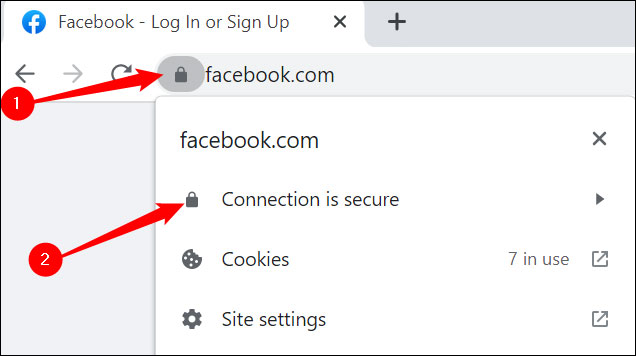
<p style="text-align: justify;">Ban đầu, Google Chrome cho phép người dùng xem chứng chỉ SSL bằng cách nhấp chuột vào biểu tượng ổ khóa gần thanh địa chỉ. Tính năng này sau đó đã bị lược bỏ bắt đầu từ phiên bản Chrome 55, nhưng đã được Google âm thầm đem trở lại trong các phiên bản Chrome gần đây. Tính năng này đã được thử nghiệm và hoạt động tốt trên phiên bản Chrome 99 mới nhất.</p>

<p style="text-align: justify;">Cụ thể, bạn chỉ cần nhấp vào biểu tượng ổ khóa nhỏ ở phía bên trái của thanh địa chỉ, sau đó nhấp vào thông báo cho biết “<strong>Connection is secure</strong>” (<strong>Kết nối an toàn</strong>).</p>

<p style="text-align: justify;"><img alt="Nhấp vào thông báo cho biết “Connection is secure”" data-i="0" data-src="https://st.quantrimang.com/photos/image/2022/03/21/xem-chi-tiet-chung-chi-ssl-tren-trinh-duyet-chrome1.jpg" data-was-processed="true" height="356" src="https://st.quantrimang.com/photos/image/2022/03/21/xem-chi-tiet-chung-chi-ssl-tren-trinh-duyet-chrome1.jpg" width="636" /></p>

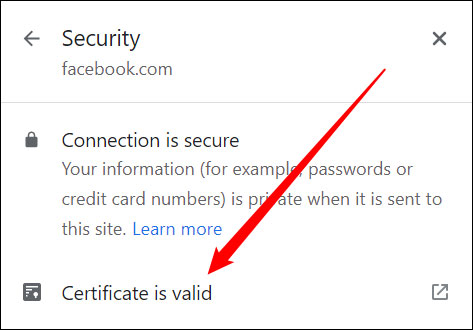
<p style="text-align: justify;">Nhấp vào “<strong>Certificate is Valid</strong>” (<strong>Chứng chỉ hợp lệ</strong>) để xem thêm thông tin.</p>

<p style="text-align: justify;"><img alt="Nhấp vào “Certificate is Valid” để xem thêm thông tin." data-i="1" data-src="https://st.quantrimang.com/photos/image/2022/03/21/xem-chi-tiet-chung-chi-ssl-tren-trinh-duyet-chrome2.jpg" data-was-processed="true" height="330" src="https://st.quantrimang.com/photos/image/2022/03/21/xem-chi-tiet-chung-chi-ssl-tren-trinh-duyet-chrome2.jpg" width="473" /></p>

<p style="text-align: justify;">Thông tin chi tiết về chứng chỉ SSL cho trang web - trong trường hợp này là Facebook - sẽ xuất hiện đầy đủ trong một cửa sổ pop-up mới.</p>

<p style="text-align: justify;">Tuy không thực sự hoàn hảo, nhưng chứng chỉ SSL và HTTPS là một cải tiến lớn so với HTTP thông thường ở khía cạnh bảo mật và quyền riêng tư cho người dùng internet. Tuy vậy, trường hợp một trang web gian lận được cấp chứng chỉ SSL vẫn có thể xảy ra, mặc dù những tình huống kiểu này là không thực sự phổ biến.</p>
		</div>
				<div id="author">
						<p>
				<strong>Nguồn tin:</strong>
				Quantrimang.com
			</p>
		</div>
	</div>
	<div id="footer" class="clearfix">
		<div id="url">
			<strong>URL của bản tin này: </strong><a href="https://www.nguoicodonvn2008.info/vi/news/savefile/kien-thuc-may-tinh/lam-the-nao-de-xem-chi-tiet-chung-chi-ssl-tren-trinh-duyet-chrome-5312.html" title="Làm thế nào để xem chi tiết chứng chỉ SSL trên trình duyệt Chrome?">https://www.nguoicodonvn2008.info/vi/news/savefile/kien-thuc-may-tinh/lam-the-nao-de-xem-chi-tiet-chung-chi-ssl-tren-trinh-duyet-chrome-5312.html</a>

		</div>
		<div class="clear"></div>
		<div class="copyright">
			&copy; .&#x3A; Nguoicodonvn2008.info - Cõi lòng người cô đơn &#x3A;.
		</div>
		<div id="contact">
			<a href="mailto:admin@nguoicodonvn2008.info">admin@nguoicodonvn2008.info</a>
		</div>
	</div>
</div>
        <div id="timeoutsess" class="chromeframe">
            Bạn đã không sử dụng Site, <a onclick="timeoutsesscancel();" href="https://www.nguoicodonvn2008.info/#">Bấm vào đây để duy trì trạng thái đăng nhập</a>. Thời gian chờ: <span id="secField"> 60 </span> giây
        </div>
        <div id="openidResult" class="nv-alert" style="display:none"></div>
        <div id="openidBt" data-result="" data-redirect=""></div>
		</script>
		<div class="car-top">
  <span><img src="https://www.nguoicodonvn2008.info/themes/default/images/car.png" alt=""></span>
</div>
<script src="https://www.nguoicodonvn2008.info/assets/js/jquery/jquery.min.js"></script>
<script>var nv_base_siteurl="/",nv_lang_data="vi",nv_lang_interface="vi",nv_name_variable="nv",nv_fc_variable="op",nv_lang_variable="language",nv_module_name="news",nv_func_name="savefile",nv_is_user=0, nv_my_ofs=-4,nv_my_abbr="EDT",nv_cookie_prefix="nv4c_e856T",nv_check_pass_mstime=1738000,nv_area_admin=0,nv_safemode=0,theme_responsive=0,nv_recaptcha_ver=2,nv_recaptcha_sitekey="",nv_recaptcha_type="image",XSSsanitize=1;</script>
<script src="https://www.nguoicodonvn2008.info/assets/js/language/vi.js"></script>
<script src="https://www.nguoicodonvn2008.info/assets/js/DOMPurify/purify3.js"></script>
<script src="https://www.nguoicodonvn2008.info/assets/js/global.js"></script>
<script src="https://www.nguoicodonvn2008.info/assets/js/site.js"></script>
<script src="https://www.nguoicodonvn2008.info/themes/default/js/news.js"></script>
<script src="https://www.nguoicodonvn2008.info/themes/default/js/main.js"></script>
<script src="https://www.nguoicodonvn2008.info/themes/default/js/custom.js"></script>
<script type="application/ld+json">
        {
            "@context": "https://schema.org",
            "@type": "Organization",
            "url": "https://www.nguoicodonvn2008.info",
            "logo": "https://www.nguoicodonvn2008.info/uploads/angel.gif"
        }
        </script>
<script src="https://www.nguoicodonvn2008.info/themes/default/js/bootstrap.min.js"></script>
<script type="text/javascript">
var $scrolltop = $('.car-top');
$scrolltop.on('click', function () {
    $('html,body').animate({
        scrollTop: 0
    }, 800);
    $(this).addClass("car-run");
    setTimeout(function(){ $scrolltop.removeClass('car-run');}, 1000);
    return false;
});
$(window).on('scroll', function ()
{ 
    if($(window).scrollTop() >= 200)
    {
        $scrolltop.addClass("show");
        $scrolltop.addClass("car-down");
    }
    else
    {
       $scrolltop.removeClass("show");
       setTimeout(function(){ $scrolltop.removeClass('car-down');}, 300);
    }
});
</script>
</body>
</html>