<!DOCTYPE html>
    <html lang="vi" xmlns="http://www.w3.org/1999/xhtml" prefix="og: http://ogp.me/ns#">
    <head>
<title>Làm sao đóng tất cả ứng dụng đang mở cùng lúc trên Windows 11?</title>
<meta name="description" content="Làm sao đóng tất cả ứng dụng đang mở cùng lúc trên Windows 11? - Savefile - Tin Tức -...">
<meta name="author" content=".: Nguoicodonvn2008.info - Cõi lòng người cô đơn :.">
<meta name="copyright" content=".: Nguoicodonvn2008.info - Cõi lòng người cô đơn :. [admin@nguoicodonvn2008.info]">
<meta name="robots" content="index, archive, follow, noodp">
<meta name="googlebot" content="index,archive,follow,noodp">
<meta name="msnbot" content="all,index,follow">
<meta name="generator" content="NukeViet v4.5">
<meta http-equiv="Content-Type" content="text/html; charset=utf-8">
<meta property="og:title" content="Làm sao đóng tất cả ứng dụng đang mở cùng lúc trên Windows 11?">
<meta property="og:type" content="website">
<meta property="og:description" content="Savefile - Tin Tức - https&#x3A;&#x002F;&#x002F;www.nguoicodonvn2008.info&#x002F;vi&#x002F;news&#x002F;savefile&#x002F;kien-thuc-may-tinh&#x002F;lam-sao-dong-tat-ca-ung-dung-dang-mo-cung-luc-tren-windows-11-10907.html">
<meta property="og:site_name" content=".&#x3A; Nguoicodonvn2008.info - Cõi lòng người cô đơn &#x3A;.">
<meta property="og:url" content="https://www.nguoicodonvn2008.info/vi/news/savefile/kien-thuc-may-tinh/lam-sao-dong-tat-ca-ung-dung-dang-mo-cung-luc-tren-windows-11-10907.html">
<link rel="shortcut icon" href="https://www.nguoicodonvn2008.info/favicon.ico">
<link rel="canonical" href="https://www.nguoicodonvn2008.info/vi/news/savefile/kien-thuc-may-tinh/lam-sao-dong-tat-ca-ung-dung-dang-mo-cung-luc-tren-windows-11-10907.html">
<link rel="alternate" href="https://www.nguoicodonvn2008.info/vi/news/rss/" title="Tin Tức" type="application/rss+xml">
<link rel="alternate" href="https://www.nguoicodonvn2008.info/vi/news/rss/karaoke-dual/" title="Tin Tức - Karaoke Dual" type="application/rss+xml">
<link rel="alternate" href="https://www.nguoicodonvn2008.info/vi/news/rss/nhac-tre/" title="Tin Tức - Nhạc trẻ" type="application/rss+xml">
<link rel="alternate" href="https://www.nguoicodonvn2008.info/vi/news/rss/tru-tinh/" title="Tin Tức - Trữ tình" type="application/rss+xml">
<link rel="alternate" href="https://www.nguoicodonvn2008.info/vi/news/rss/nuoc-ngoai/" title="Tin Tức - Nước ngoài" type="application/rss+xml">
<link rel="alternate" href="https://www.nguoicodonvn2008.info/vi/news/rss/remix/" title="Tin Tức - Remix" type="application/rss+xml">
<link rel="alternate" href="https://www.nguoicodonvn2008.info/vi/news/rss/tam-su-tinh-yeu/" title="Tin Tức - Tâm sự tình yêu" type="application/rss+xml">
<link rel="alternate" href="https://www.nguoicodonvn2008.info/vi/news/rss/tho-suu-tam/" title="Tin Tức - Thơ sưu tầm" type="application/rss+xml">
<link rel="alternate" href="https://www.nguoicodonvn2008.info/vi/news/rss/cuoc-song/" title="Tin Tức - Cuộc sống" type="application/rss+xml">
<link rel="alternate" href="https://www.nguoicodonvn2008.info/vi/news/rss/phan-mem/" title="Tin Tức - Phần mềm" type="application/rss+xml">
<link rel="alternate" href="https://www.nguoicodonvn2008.info/vi/news/rss/kien-thuc-may-tinh/" title="Tin Tức - Kiến thức máy tính" type="application/rss+xml">
<link rel="alternate" href="https://www.nguoicodonvn2008.info/vi/news/rss/hoc-tap/" title="Tin Tức - Học tập" type="application/rss+xml">
<link rel="alternate" href="https://www.nguoicodonvn2008.info/vi/news/rss/tai-lieu/" title="Tin Tức - Tài liệu" type="application/rss+xml">
<link rel="alternate" href="https://www.nguoicodonvn2008.info/vi/news/rss/de-thi/" title="Tin Tức - Đề thi" type="application/rss+xml">
<link rel="preload" as="style" href="https://www.nguoicodonvn2008.info/assets/css/font-awesome.min.css" type="text/css">
<link rel="preload" as="style" href="https://www.nguoicodonvn2008.info/themes/default/css/bootstrap.non-responsive.css" type="text/css">
<link rel="preload" as="style" href="https://www.nguoicodonvn2008.info/themes/default/css/style.css" type="text/css">
<link rel="preload" as="style" href="https://www.nguoicodonvn2008.info/themes/default/css/style.non-responsive.css" type="text/css">
<link rel="preload" as="style" href="https://www.nguoicodonvn2008.info/themes/default/css/news.css" type="text/css">
<link rel="preload" as="style" href="https://www.nguoicodonvn2008.info/themes/default/css/custom.css" type="text/css">
<link rel="preload" as="script" href="https://www.nguoicodonvn2008.info/assets/js/jquery/jquery.min.js" type="text/javascript">
<link rel="preload" as="script" href="https://www.nguoicodonvn2008.info/assets/js/language/vi.js" type="text/javascript">
<link rel="preload" as="script" href="https://www.nguoicodonvn2008.info/assets/js/DOMPurify/purify3.js" type="text/javascript">
<link rel="preload" as="script" href="https://www.nguoicodonvn2008.info/assets/js/global.js" type="text/javascript">
<link rel="preload" as="script" href="https://www.nguoicodonvn2008.info/assets/js/site.js" type="text/javascript">
<link rel="preload" as="script" href="https://www.nguoicodonvn2008.info/themes/default/js/news.js" type="text/javascript">
<link rel="preload" as="script" href="https://www.nguoicodonvn2008.info/themes/default/js/main.js" type="text/javascript">
<link rel="preload" as="script" href="https://www.nguoicodonvn2008.info/themes/default/js/custom.js" type="text/javascript">
<link rel="preload" as="script" href="https://www.nguoicodonvn2008.info/themes/default/js/bootstrap.min.js" type="text/javascript">
<link rel="stylesheet" href="https://www.nguoicodonvn2008.info/assets/css/font-awesome.min.css">
<link rel="stylesheet" href="https://www.nguoicodonvn2008.info/themes/default/css/bootstrap.non-responsive.css">
<link rel="stylesheet" href="https://www.nguoicodonvn2008.info/themes/default/css/style.css">
<link rel="stylesheet" href="https://www.nguoicodonvn2008.info/themes/default/css/style.non-responsive.css">
<link rel="StyleSheet" href="https://www.nguoicodonvn2008.info/themes/default/css/news.css">
<link rel="stylesheet" href="https://www.nguoicodonvn2008.info/themes/default/css/custom.css">
<style type="text/css">
	body{background: #fff;}
</style>
    </head>
    <body>
<div id="print">
	<div id="hd_print">
		<h2 class="pull-left">.&#x3A; Nguoicodonvn2008.info - Cõi lòng người cô đơn &#x3A;.</h2>
		<p class="pull-right"><a title=".&#x3A; Nguoicodonvn2008.info - Cõi lòng người cô đơn &#x3A;." href="https://www.nguoicodonvn2008.info/">https://www.nguoicodonvn2008.info</a></p>
	</div>
	<div class="clear"></div>
	<hr />
	<div id="content">
		<h1>Làm sao đóng tất cả ứng dụng đang mở cùng lúc trên Windows 11?</h1>
		<ul class="list-inline">
			<li>Thứ bảy - 02/08/2025 04:29</li>
			<li class="hidden-print txtrequired"><em class="fa fa-print">&nbsp;</em><a title="In ra" href="javascript:;" onclick="window.print()">In ra</a></li>
			<li class="hidden-print txtrequired"><em class="fa fa-power-off">&nbsp;</em><a title="Đóng cửa sổ này" href="javascript:;" onclick="window.close()">Đóng cửa sổ này</a></li>
		</ul>
		<div class="clear"></div>
		<div id="hometext">
		</div>
				<div class="imghome">
			<img alt="Làm sao đóng tất cả ứng dụng đang mở cùng lúc trên Windows 11?" src="https://st.quantrimang.com/photos/image/2025/07/31/dong-cac-cua-so-cung-luc-Windows-4.jpg" width="460" class="img-thumbnail" />
		</div>
		<div class="clear"></div>
		<div id="bodytext" class="clearfix">
			<p style="text-align: justify;">Nếu bạn có thói quen làm việc với nhiều cửa sổ ứng dụng, việc đóng từng cửa sổ một sẽ cần nhiều thời gian thực hiện.&nbsp;&nbsp;Windows&nbsp;11 không có nút đóng tất cả ứng dụng cụ thể để tránh người dùng vô tình làm mất dữ liệu công việc trên các tài liệu chưa lưu. Tuy nhiên, có một số phương pháp và giải pháp thay thế để đóng tất cả các ứng dụng đang mở cùng lúc trên Windows 11, theo bài hướng dẫn dưới đây.</p>

<h2 style="text-align: justify;">Sử dụng Windows PowerShell đóng tất cả ứng dụng</h2>

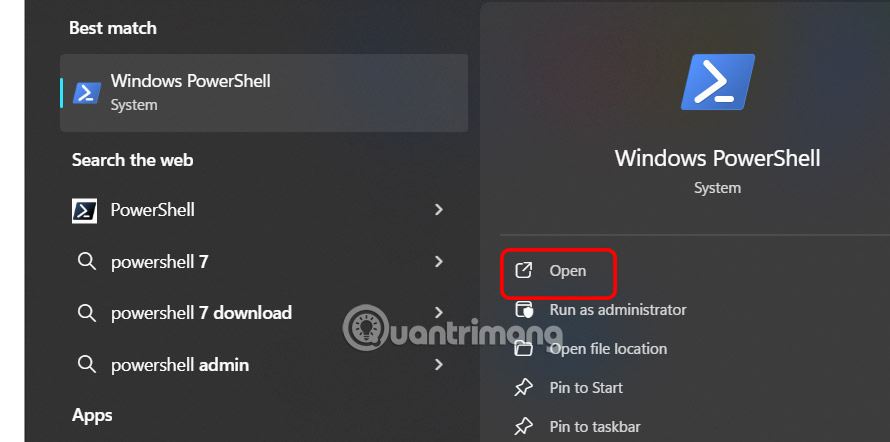
<p style="text-align: justify;"><strong>Bước 1:</strong></p>

<p style="text-align: justify;">Bạn&nbsp;<strong>nhập Windows PowerShell vào thanh tìm kiếm</strong>&nbsp;sau đó nhấn chọn để mở như bình thường.</p>

<p style="text-align: justify;"><img alt="Mở Powershell" data-i="0" data-src="https://st.quantrimang.com/photos/image/2025/07/31/dong-cac-cua-so-cung-luc-Windows-1.jpg" data-was-processed="true" height="318" src="https://st.quantrimang.com/photos/image/2025/07/31/dong-cac-cua-so-cung-luc-Windows-1.jpg" width="640" /></p>

<p style="text-align: justify;"><strong>Bước 2:</strong></p>

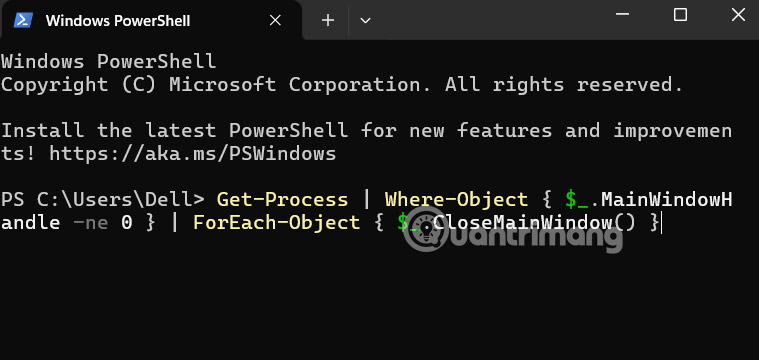
<p style="text-align: justify;">Sau đó người dùng nhập lệnh dưới đây rồi nhấn Enter để thực hiện.</p>

<pre id="pre0">
<code>Get-Process | Where-Object { $_.MainWindowHandle -ne 0 } | ForEach-Object { $_.CloseMainWindow() }</code></pre>

<p style="text-align: justify;">Thao tác này sẽ đóng tất cả các ứng dụng bao gồm cả cửa sổ PowerShell.</p>

<p style="text-align: justify;"><img alt="Sử dụng Windows PowerShell đóng tất cả ứng dụng" data-i="1" data-src="https://st.quantrimang.com/photos/image/2025/07/31/dong-cac-cua-so-cung-luc-Windows-2.jpg" data-was-processed="true" height="285" src="https://st.quantrimang.com/photos/image/2025/07/31/dong-cac-cua-so-cung-luc-Windows-2.jpg" width="600" /></p>

<h2 style="text-align: justify;">Đóng tất cả cửa sổ đang mở bằng phím tắt</h2>

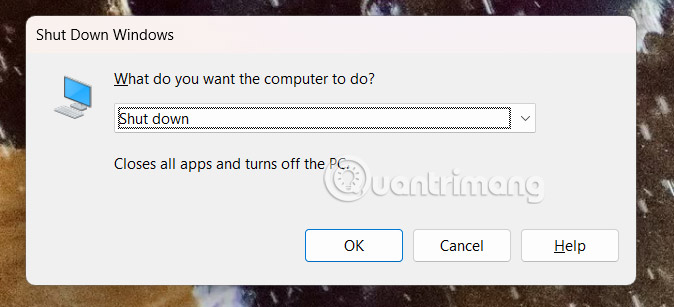
<p style="text-align: justify;"><strong>Phím tắt Alt + F4</strong>&nbsp;thường được dùng để đóng một ứng dụng cụ thể hoặc tắt/ khởi động lại hệ thống . Bạn có thể sử dụng các phím tắt tương tự để đóng tất cả các ứng dụng đang mở cùng lúc, sau đó kích hoạt hành động tắt máy hoặc khởi động lại.</p>

<p style="text-align: justify;">Nhấn đồng thời phím Alt và F4 để mở hộp thoại Shut Down Windows. Nhấn OK để thực hiện. Windows sẽ tự động đóng tất cả các ứng dụng đang mở.</p>

<p style="text-align: justify;"><img alt="Đóng tất cả cửa sổ đang mở bằng phím tắt" data-i="2" data-src="https://st.quantrimang.com/photos/image/2025/07/31/dong-cac-cua-so-cung-luc-Windows-3.jpg" data-was-processed="true" height="292" src="https://st.quantrimang.com/photos/image/2025/07/31/dong-cac-cua-so-cung-luc-Windows-3.jpg" width="640" /></p>

<h2 style="text-align: justify;">Đóng ứng dụng chỉ định trên Windows</h2>

<p style="text-align: justify;">Nếu bạn chỉ muốn đóng một số ứng dụng cụ thể, việc tạo tệp hàng loạt có thể tự động hóa quy trình đóng chúng cùng lúc.</p>

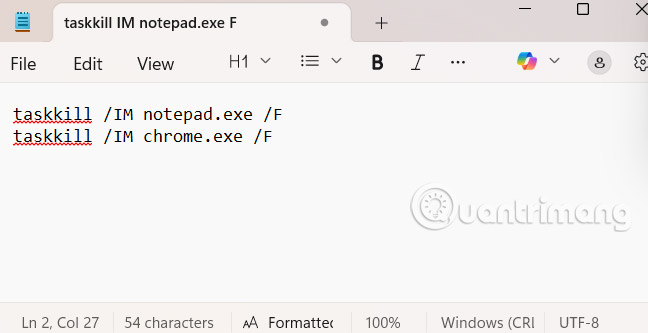
<p style="text-align: justify;">Mở&nbsp;<strong>ứng dụng Notepad</strong>&nbsp;và nhập lệnh sau cho mỗi ứng dụng bạn muốn đóng.</p>

<pre id="pre1">
<code>taskkill /IM appname.exe /F</code></pre>

<p style="text-align: justify;"><strong>Thay appname.exe bằng tên ứng dụng muốn đóng</strong>, chẳng hạn notepad.exe, chrome.exe, winword.exe, v.v.</p>

<p style="text-align: justify;">Sau đó bạn cần lưu file này với phần mở rộng .bat. Cuối cùng click đúp vào tệp này để thực hiện. Tất cả ứng dụng được chỉ định sẽ bị đóng ngay lập tức.</p>

<p style="text-align: justify;">&nbsp;</p>

<div style="text-align: justify;"><img alt="Đóng ứng dụng chỉ định trên Windows" data-adbro-processed="true" data-i="3" data-src="https://st.quantrimang.com/photos/image/2025/07/31/dong-cac-cua-so-cung-luc-Windows-4.jpg" data-was-processed="true" height="329" src="https://st.quantrimang.com/photos/image/2025/07/31/dong-cac-cua-so-cung-luc-Windows-4.jpg" width="640" /></div>

<h2 style="text-align: justify;">Đóng nhiều cửa sổ của một ứng dụng</h2>

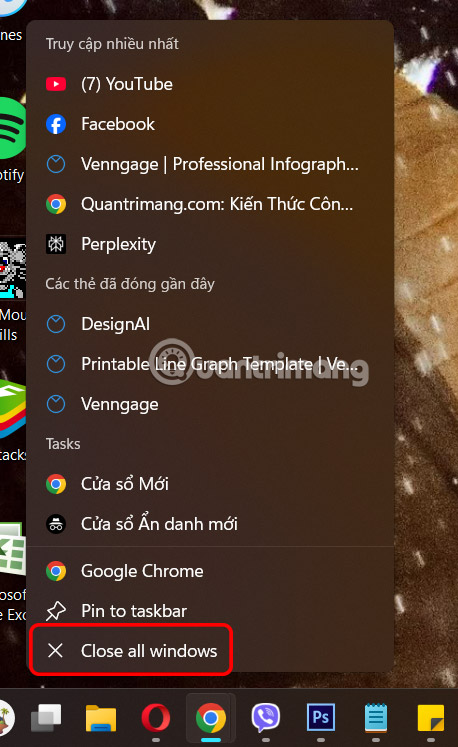
<p style="text-align: justify;">Nhấp chuột phải vào biểu tượng ứng dụng trên thanh tác vụ rồi chọn&nbsp;<strong>Close all windows</strong>&nbsp;là được.</p>

<p style="text-align: justify;"><img alt="Đóng nhiều cửa sổ của một ứng dụng" data-i="4" data-src="https://st.quantrimang.com/photos/image/2025/07/31/dong-cac-cua-so-cung-luc-Windows-5.jpg" data-was-processed="true" height="620" src="https://st.quantrimang.com/photos/image/2025/07/31/dong-cac-cua-so-cung-luc-Windows-5.jpg" width="380" /></p>

<h2 style="text-align: justify;">Sử dụng Alt + Tab</h2>

<p style="text-align: justify;">Alt + Tab giúp bạn quan sát tất cả cửa sổ ứng dụng đang mở, nhưng chúng ta vẫn tắt theo cách thủ công, đó là nhấn vào biểu tượng x.</p>
		</div>
				<div id="author">
						<p>
				<strong>Nguồn tin:</strong>
				Quantrimang.com:
			</p>
		</div>
	</div>
	<div id="footer" class="clearfix">
		<div id="url">
			<strong>URL của bản tin này: </strong><a href="https://www.nguoicodonvn2008.info/vi/news/savefile/kien-thuc-may-tinh/lam-sao-dong-tat-ca-ung-dung-dang-mo-cung-luc-tren-windows-11-10907.html" title="Làm sao đóng tất cả ứng dụng đang mở cùng lúc trên Windows 11?">https://www.nguoicodonvn2008.info/vi/news/savefile/kien-thuc-may-tinh/lam-sao-dong-tat-ca-ung-dung-dang-mo-cung-luc-tren-windows-11-10907.html</a>

		</div>
		<div class="clear"></div>
		<div class="copyright">
			&copy; .&#x3A; Nguoicodonvn2008.info - Cõi lòng người cô đơn &#x3A;.
		</div>
		<div id="contact">
			<a href="mailto:admin@nguoicodonvn2008.info">admin@nguoicodonvn2008.info</a>
		</div>
	</div>
</div>
        <div id="timeoutsess" class="chromeframe">
            Bạn đã không sử dụng Site, <a onclick="timeoutsesscancel();" href="https://www.nguoicodonvn2008.info/#">Bấm vào đây để duy trì trạng thái đăng nhập</a>. Thời gian chờ: <span id="secField"> 60 </span> giây
        </div>
        <div id="openidResult" class="nv-alert" style="display:none"></div>
        <div id="openidBt" data-result="" data-redirect=""></div>
		</script>
		<div class="car-top">
  <span><img src="https://www.nguoicodonvn2008.info/themes/default/images/car.png" alt=""></span>
</div>
<script src="https://www.nguoicodonvn2008.info/assets/js/jquery/jquery.min.js"></script>
<script>var nv_base_siteurl="/",nv_lang_data="vi",nv_lang_interface="vi",nv_name_variable="nv",nv_fc_variable="op",nv_lang_variable="language",nv_module_name="news",nv_func_name="savefile",nv_is_user=0, nv_my_ofs=-4,nv_my_abbr="EDT",nv_cookie_prefix="nv4c_e856T",nv_check_pass_mstime=1738000,nv_area_admin=0,nv_safemode=0,theme_responsive=0,nv_recaptcha_ver=2,nv_recaptcha_sitekey="",nv_recaptcha_type="image",XSSsanitize=1;</script>
<script src="https://www.nguoicodonvn2008.info/assets/js/language/vi.js"></script>
<script src="https://www.nguoicodonvn2008.info/assets/js/DOMPurify/purify3.js"></script>
<script src="https://www.nguoicodonvn2008.info/assets/js/global.js"></script>
<script src="https://www.nguoicodonvn2008.info/assets/js/site.js"></script>
<script src="https://www.nguoicodonvn2008.info/themes/default/js/news.js"></script>
<script src="https://www.nguoicodonvn2008.info/themes/default/js/main.js"></script>
<script src="https://www.nguoicodonvn2008.info/themes/default/js/custom.js"></script>
<script type="application/ld+json">
        {
            "@context": "https://schema.org",
            "@type": "Organization",
            "url": "https://www.nguoicodonvn2008.info",
            "logo": "https://www.nguoicodonvn2008.info/uploads/angel.gif"
        }
        </script>
<script src="https://www.nguoicodonvn2008.info/themes/default/js/bootstrap.min.js"></script>
<script type="text/javascript">
var $scrolltop = $('.car-top');
$scrolltop.on('click', function () {
    $('html,body').animate({
        scrollTop: 0
    }, 800);
    $(this).addClass("car-run");
    setTimeout(function(){ $scrolltop.removeClass('car-run');}, 1000);
    return false;
});
$(window).on('scroll', function ()
{ 
    if($(window).scrollTop() >= 200)
    {
        $scrolltop.addClass("show");
        $scrolltop.addClass("car-down");
    }
    else
    {
       $scrolltop.removeClass("show");
       setTimeout(function(){ $scrolltop.removeClass('car-down');}, 300);
    }
});
</script>
</body>
</html>