<!DOCTYPE html>
    <html lang="vi" xmlns="http://www.w3.org/1999/xhtml" prefix="og: http://ogp.me/ns#">
    <head>
<title>Làm sao để fix lỗi phóng to thu nhỏ trong Word?</title>
<meta name="description" content="Làm sao để fix lỗi phóng to thu nhỏ trong Word? - Savefile - Tin Tức -...">
<meta name="author" content=".: Nguoicodonvn2008.info - Cõi lòng người cô đơn :.">
<meta name="copyright" content=".: Nguoicodonvn2008.info - Cõi lòng người cô đơn :. [admin@nguoicodonvn2008.info]">
<meta name="robots" content="index, archive, follow, noodp">
<meta name="googlebot" content="index,archive,follow,noodp">
<meta name="msnbot" content="all,index,follow">
<meta name="generator" content="NukeViet v4.5">
<meta http-equiv="Content-Type" content="text/html; charset=utf-8">
<meta property="og:title" content="Làm sao để fix lỗi phóng to thu nhỏ trong Word?">
<meta property="og:type" content="website">
<meta property="og:description" content="Savefile - Tin Tức - https&#x3A;&#x002F;&#x002F;www.nguoicodonvn2008.info&#x002F;vi&#x002F;news&#x002F;savefile&#x002F;kien-thuc-may-tinh&#x002F;lam-sao-de-fix-loi-phong-to-thu-nho-trong-word-10427.html">
<meta property="og:site_name" content=".&#x3A; Nguoicodonvn2008.info - Cõi lòng người cô đơn &#x3A;.">
<meta property="og:url" content="https://www.nguoicodonvn2008.info/vi/news/savefile/kien-thuc-may-tinh/lam-sao-de-fix-loi-phong-to-thu-nho-trong-word-10427.html">
<link rel="shortcut icon" href="https://www.nguoicodonvn2008.info/favicon.ico">
<link rel="canonical" href="https://www.nguoicodonvn2008.info/vi/news/savefile/kien-thuc-may-tinh/lam-sao-de-fix-loi-phong-to-thu-nho-trong-word-10427.html">
<link rel="alternate" href="https://www.nguoicodonvn2008.info/vi/news/rss/" title="Tin Tức" type="application/rss+xml">
<link rel="alternate" href="https://www.nguoicodonvn2008.info/vi/news/rss/karaoke-dual/" title="Tin Tức - Karaoke Dual" type="application/rss+xml">
<link rel="alternate" href="https://www.nguoicodonvn2008.info/vi/news/rss/nhac-tre/" title="Tin Tức - Nhạc trẻ" type="application/rss+xml">
<link rel="alternate" href="https://www.nguoicodonvn2008.info/vi/news/rss/tru-tinh/" title="Tin Tức - Trữ tình" type="application/rss+xml">
<link rel="alternate" href="https://www.nguoicodonvn2008.info/vi/news/rss/nuoc-ngoai/" title="Tin Tức - Nước ngoài" type="application/rss+xml">
<link rel="alternate" href="https://www.nguoicodonvn2008.info/vi/news/rss/remix/" title="Tin Tức - Remix" type="application/rss+xml">
<link rel="alternate" href="https://www.nguoicodonvn2008.info/vi/news/rss/tam-su-tinh-yeu/" title="Tin Tức - Tâm sự tình yêu" type="application/rss+xml">
<link rel="alternate" href="https://www.nguoicodonvn2008.info/vi/news/rss/tho-suu-tam/" title="Tin Tức - Thơ sưu tầm" type="application/rss+xml">
<link rel="alternate" href="https://www.nguoicodonvn2008.info/vi/news/rss/cuoc-song/" title="Tin Tức - Cuộc sống" type="application/rss+xml">
<link rel="alternate" href="https://www.nguoicodonvn2008.info/vi/news/rss/phan-mem/" title="Tin Tức - Phần mềm" type="application/rss+xml">
<link rel="alternate" href="https://www.nguoicodonvn2008.info/vi/news/rss/kien-thuc-may-tinh/" title="Tin Tức - Kiến thức máy tính" type="application/rss+xml">
<link rel="alternate" href="https://www.nguoicodonvn2008.info/vi/news/rss/hoc-tap/" title="Tin Tức - Học tập" type="application/rss+xml">
<link rel="alternate" href="https://www.nguoicodonvn2008.info/vi/news/rss/tai-lieu/" title="Tin Tức - Tài liệu" type="application/rss+xml">
<link rel="alternate" href="https://www.nguoicodonvn2008.info/vi/news/rss/de-thi/" title="Tin Tức - Đề thi" type="application/rss+xml">
<link rel="preload" as="style" href="https://www.nguoicodonvn2008.info/assets/css/font-awesome.min.css" type="text/css">
<link rel="preload" as="style" href="https://www.nguoicodonvn2008.info/themes/default/css/bootstrap.non-responsive.css" type="text/css">
<link rel="preload" as="style" href="https://www.nguoicodonvn2008.info/themes/default/css/style.css" type="text/css">
<link rel="preload" as="style" href="https://www.nguoicodonvn2008.info/themes/default/css/style.non-responsive.css" type="text/css">
<link rel="preload" as="style" href="https://www.nguoicodonvn2008.info/themes/default/css/news.css" type="text/css">
<link rel="preload" as="style" href="https://www.nguoicodonvn2008.info/themes/default/css/custom.css" type="text/css">
<link rel="preload" as="script" href="https://www.nguoicodonvn2008.info/assets/js/jquery/jquery.min.js" type="text/javascript">
<link rel="preload" as="script" href="https://www.nguoicodonvn2008.info/assets/js/language/vi.js" type="text/javascript">
<link rel="preload" as="script" href="https://www.nguoicodonvn2008.info/assets/js/DOMPurify/purify3.js" type="text/javascript">
<link rel="preload" as="script" href="https://www.nguoicodonvn2008.info/assets/js/global.js" type="text/javascript">
<link rel="preload" as="script" href="https://www.nguoicodonvn2008.info/assets/js/site.js" type="text/javascript">
<link rel="preload" as="script" href="https://www.nguoicodonvn2008.info/themes/default/js/news.js" type="text/javascript">
<link rel="preload" as="script" href="https://www.nguoicodonvn2008.info/themes/default/js/main.js" type="text/javascript">
<link rel="preload" as="script" href="https://www.nguoicodonvn2008.info/themes/default/js/custom.js" type="text/javascript">
<link rel="preload" as="script" href="https://www.nguoicodonvn2008.info/themes/default/js/bootstrap.min.js" type="text/javascript">
<link rel="stylesheet" href="https://www.nguoicodonvn2008.info/assets/css/font-awesome.min.css">
<link rel="stylesheet" href="https://www.nguoicodonvn2008.info/themes/default/css/bootstrap.non-responsive.css">
<link rel="stylesheet" href="https://www.nguoicodonvn2008.info/themes/default/css/style.css">
<link rel="stylesheet" href="https://www.nguoicodonvn2008.info/themes/default/css/style.non-responsive.css">
<link rel="StyleSheet" href="https://www.nguoicodonvn2008.info/themes/default/css/news.css">
<link rel="stylesheet" href="https://www.nguoicodonvn2008.info/themes/default/css/custom.css">
<style type="text/css">
	body{background: #fff;}
</style>
    </head>
    <body>
<div id="print">
	<div id="hd_print">
		<h2 class="pull-left">.&#x3A; Nguoicodonvn2008.info - Cõi lòng người cô đơn &#x3A;.</h2>
		<p class="pull-right"><a title=".&#x3A; Nguoicodonvn2008.info - Cõi lòng người cô đơn &#x3A;." href="https://www.nguoicodonvn2008.info/">https://www.nguoicodonvn2008.info</a></p>
	</div>
	<div class="clear"></div>
	<hr />
	<div id="content">
		<h1>Làm sao để fix lỗi phóng to thu nhỏ trong Word?</h1>
		<ul class="list-inline">
			<li>Thứ tư - 21/05/2025 23:16</li>
			<li class="hidden-print txtrequired"><em class="fa fa-print">&nbsp;</em><a title="In ra" href="javascript:;" onclick="window.print()">In ra</a></li>
			<li class="hidden-print txtrequired"><em class="fa fa-power-off">&nbsp;</em><a title="Đóng cửa sổ này" href="javascript:;" onclick="window.close()">Đóng cửa sổ này</a></li>
		</ul>
		<div class="clear"></div>
		<div id="hometext">
		</div>
				<div class="imghome">
			<img alt="Làm sao để fix lỗi phóng to thu nhỏ trong Word?" src="https://st.quantrimang.com/photos/image/2025/05/20/fix-loi-phong-to-thu-nho-trong-Word-1.jpg" width="460" class="img-thumbnail" />
		</div>
		<div class="clear"></div>
		<div id="bodytext" class="clearfix">
			<h1 style="text-align: justify;">Làm sao để fix lỗi phóng to thu nhỏ trong Word?</h1>

<div style="text-align: justify;"><a><img alt="👨" src="https://st.quantrimang.com/photos/avatars/default-size-48x48-znd.png" /></a></div>

<h4 style="text-align: justify;"><a data-uid="55788">Trần Vân Anh</a></h4>

<p style="text-align: justify;">Chức năng phóng to và thu nhỏ trong Microsoft Word cho phép người dùng điều chỉnh kích thước chế độ xem tài liệu để dễ đọc hoặc chỉnh sửa hơn. Tuy nhiên, đôi khi bạn thấy tính năng thu phóng bị mờ hoặc không sử dụng được. Dưới đây là một số lý do tại sao tính năng thu phóng trong Word bị vô hiệu và cách sửa lỗi.</p>

<h2 style="text-align: justify;">1. Xem tài liệu chế độ nhiều trang</h2>

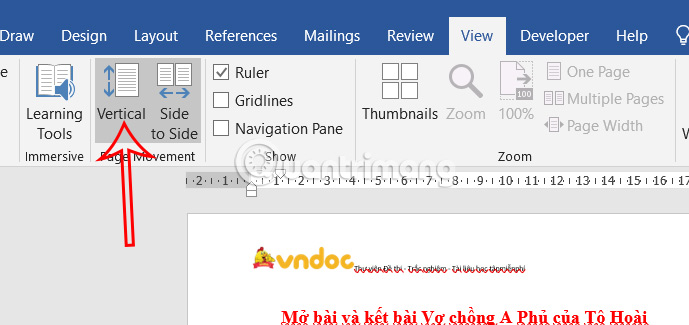
<p style="text-align: justify;">Tính năng thu phóng trong Word chỉ khả dụng khi bạn xem trang theo chiều dọc và Word sẽ tự động tắt tất cả các tính năng liên quan đến thu phóng trong chế độ xem chiều ngang.</p>

<p style="text-align: justify;">Để thay đổi lại chế độ xem, bạn nhấn vào&nbsp;<strong>tab View</strong>&nbsp;rồi nhấn vào&nbsp;<strong>chế độ Vertical&nbsp;</strong>để xem tài liệu, tắt chế độ xem Side to Side. Khi đó bạn sẽ nhìn thấy thanh phóng to thu nhỏ tài liệu.</p>

<p style="text-align: justify;"><img alt="Chuyển chế độ xem trong Word" data-i="0" data-src="https://st.quantrimang.com/photos/image/2025/05/20/fix-loi-phong-to-thu-nho-trong-Word-1.jpg" data-was-processed="true" height="302" src="https://st.quantrimang.com/photos/image/2025/05/20/fix-loi-phong-to-thu-nho-trong-Word-1.jpg" width="640" /></p>

<h2 style="text-align: justify;">2. Tài liệu bảo vệ bằng Chế độ đọc</h2>

<p style="text-align: justify;">Khi tài liệu Word được mở ở chế độ đọc với mục đích bảo vệ nội dung thì tùy chọn phóng to thu nhỏ sẽ bị hạn chế.</p>

<p style="text-align: justify;">Để sử dụng lại thanh thu phóng trong Word thì bạn buộc phải gỡ bỏ chế độ bảo mật này. Bạn nhấn vào Review &gt; Protect Restrict Editing và nhấn tiếp vào Stop Protection.</p>

<div style="text-align: justify;">&nbsp;</div>

<h2 style="text-align: justify;">3. Tài liệu Word chế độ chia sẻ</h2>

<p style="text-align: justify;">Khi cộng tác theo thời gian thực bằng OneDrive hoặc SharePoint, một số cài đặt chế độ xem bao gồm thuphong có thể bị giới hạn.</p>

<p style="text-align: justify;">Khi đó bạn cần lưu bản sao cục bộ của tài liệu và mở tài liệu ở chế độ khác để sử dụng lại thanh thu phóng nếu cần.</p>

<h2 style="text-align: justify;">4. Kiểm tra add-In trong Word</h2>

<p style="text-align: justify;">Tiện ích bổ sung trong Word sẽ cải thiện năng suất làm việc, nhưng đôi khi cũng ảnh hưởng tới tài liệu nếu lỗi, chẳng hạn vô hiệu hóa tính năng thu phóng.</p>

<p style="text-align: justify;">Trước hết bạn khởi động Word ở chế độ Safe Mode bằng cách giữ phím Control trong khi khởi động Word để xem chế độ zoom có ​​được bật lại không.</p>

<p style="text-align: justify;">Nếu có, nguyên nhân có thể là do một tiện ích bổ sung. Bạn có thể cần phải xóa tất cả các tiện ích bổ sung và bật từng tiện ích bổ sung một để tìm lỗi từ đâu.</p>

<p style="text-align: justify;">Chúng ta truy cập File &gt; Options &gt; Add-ins và click vào nút Go bên cạnh Manage &gt; COM Add-ins. Sau đó hãy bỏ tích tại từng tiện ích để vô hiệu hóa.</p>

<p style="text-align: justify;">Lưu ý vào File &gt; Info và nhấp vào nút Manage COM Add-ins để tìm tiện ích ảnh hưởng tới tính năng của Word.</p>

<h2 style="text-align: justify;">5. Lỗi từ Word</h2>

<p style="text-align: justify;">Đôi khi, chức năng thu phóng có thể bị vô hiệu hóa là do xuất phát từ Word. Chúng ta khởi động lại Microsoft Word hoặc khởi động lại&nbsp;&nbsp;máy tính&nbsp;để sửa lỗi.</p>
		</div>
				<div id="author">
						<p>
				<strong>Nguồn tin:</strong>
				Quantrimang.com:
			</p>
		</div>
	</div>
	<div id="footer" class="clearfix">
		<div id="url">
			<strong>URL của bản tin này: </strong><a href="https://www.nguoicodonvn2008.info/vi/news/savefile/kien-thuc-may-tinh/lam-sao-de-fix-loi-phong-to-thu-nho-trong-word-10427.html" title="Làm sao để fix lỗi phóng to thu nhỏ trong Word?">https://www.nguoicodonvn2008.info/vi/news/savefile/kien-thuc-may-tinh/lam-sao-de-fix-loi-phong-to-thu-nho-trong-word-10427.html</a>

		</div>
		<div class="clear"></div>
		<div class="copyright">
			&copy; .&#x3A; Nguoicodonvn2008.info - Cõi lòng người cô đơn &#x3A;.
		</div>
		<div id="contact">
			<a href="mailto:admin@nguoicodonvn2008.info">admin@nguoicodonvn2008.info</a>
		</div>
	</div>
</div>
        <div id="timeoutsess" class="chromeframe">
            Bạn đã không sử dụng Site, <a onclick="timeoutsesscancel();" href="https://www.nguoicodonvn2008.info/#">Bấm vào đây để duy trì trạng thái đăng nhập</a>. Thời gian chờ: <span id="secField"> 60 </span> giây
        </div>
        <div id="openidResult" class="nv-alert" style="display:none"></div>
        <div id="openidBt" data-result="" data-redirect=""></div>
		</script>
		<div class="car-top">
  <span><img src="https://www.nguoicodonvn2008.info/themes/default/images/car.png" alt=""></span>
</div>
<div id="run_cronjobs" style="visibility:hidden;display:none;"><img alt="cron" src="/index.php?second=cronjobs&amp;p=y631Gts5" width="1" height="1" /></div>
<script src="https://www.nguoicodonvn2008.info/assets/js/jquery/jquery.min.js"></script>
<script>var nv_base_siteurl="/",nv_lang_data="vi",nv_lang_interface="vi",nv_name_variable="nv",nv_fc_variable="op",nv_lang_variable="language",nv_module_name="news",nv_func_name="savefile",nv_is_user=0, nv_my_ofs=-4,nv_my_abbr="EDT",nv_cookie_prefix="nv4c_e856T",nv_check_pass_mstime=1738000,nv_area_admin=0,nv_safemode=0,theme_responsive=0,nv_recaptcha_ver=2,nv_recaptcha_sitekey="",nv_recaptcha_type="image",XSSsanitize=1;</script>
<script src="https://www.nguoicodonvn2008.info/assets/js/language/vi.js"></script>
<script src="https://www.nguoicodonvn2008.info/assets/js/DOMPurify/purify3.js"></script>
<script src="https://www.nguoicodonvn2008.info/assets/js/global.js"></script>
<script src="https://www.nguoicodonvn2008.info/assets/js/site.js"></script>
<script src="https://www.nguoicodonvn2008.info/themes/default/js/news.js"></script>
<script src="https://www.nguoicodonvn2008.info/themes/default/js/main.js"></script>
<script src="https://www.nguoicodonvn2008.info/themes/default/js/custom.js"></script>
<script type="application/ld+json">
        {
            "@context": "https://schema.org",
            "@type": "Organization",
            "url": "https://www.nguoicodonvn2008.info",
            "logo": "https://www.nguoicodonvn2008.info/uploads/angel.gif"
        }
        </script>
<script src="https://www.nguoicodonvn2008.info/themes/default/js/bootstrap.min.js"></script>
<script type="text/javascript">
var $scrolltop = $('.car-top');
$scrolltop.on('click', function () {
    $('html,body').animate({
        scrollTop: 0
    }, 800);
    $(this).addClass("car-run");
    setTimeout(function(){ $scrolltop.removeClass('car-run');}, 1000);
    return false;
});
$(window).on('scroll', function ()
{ 
    if($(window).scrollTop() >= 200)
    {
        $scrolltop.addClass("show");
        $scrolltop.addClass("car-down");
    }
    else
    {
       $scrolltop.removeClass("show");
       setTimeout(function(){ $scrolltop.removeClass('car-down');}, 300);
    }
});
</script>
</body>
</html>