<!DOCTYPE html>
    <html lang="vi" xmlns="http://www.w3.org/1999/xhtml" prefix="og: http://ogp.me/ns#">
    <head>
<title>Làm gì nếu Explorer sập khi mở thư mục lớn?</title>
<meta name="description" content="Làm gì nếu Explorer sập khi mở thư mục lớn? - Savefile - Tin Tức -...">
<meta name="author" content=".: Nguoicodonvn2008.info - Cõi lòng người cô đơn :.">
<meta name="copyright" content=".: Nguoicodonvn2008.info - Cõi lòng người cô đơn :. [admin@nguoicodonvn2008.info]">
<meta name="robots" content="index, archive, follow, noodp">
<meta name="googlebot" content="index,archive,follow,noodp">
<meta name="msnbot" content="all,index,follow">
<meta name="generator" content="NukeViet v4.5">
<meta http-equiv="Content-Type" content="text/html; charset=utf-8">
<meta property="og:title" content="Làm gì nếu Explorer sập khi mở thư mục lớn?">
<meta property="og:type" content="website">
<meta property="og:description" content="Savefile - Tin Tức - https&#x3A;&#x002F;&#x002F;www.nguoicodonvn2008.info&#x002F;vi&#x002F;news&#x002F;savefile&#x002F;kien-thuc-may-tinh&#x002F;lam-gi-neu-explorer-sap-khi-mo-thu-muc-lon-11710.html">
<meta property="og:site_name" content=".&#x3A; Nguoicodonvn2008.info - Cõi lòng người cô đơn &#x3A;.">
<meta property="og:url" content="https://www.nguoicodonvn2008.info/vi/news/savefile/kien-thuc-may-tinh/lam-gi-neu-explorer-sap-khi-mo-thu-muc-lon-11710.html">
<link rel="shortcut icon" href="https://www.nguoicodonvn2008.info/favicon.ico">
<link rel="canonical" href="https://www.nguoicodonvn2008.info/vi/news/savefile/kien-thuc-may-tinh/lam-gi-neu-explorer-sap-khi-mo-thu-muc-lon-11710.html">
<link rel="alternate" href="https://www.nguoicodonvn2008.info/vi/news/rss/" title="Tin Tức" type="application/rss+xml">
<link rel="alternate" href="https://www.nguoicodonvn2008.info/vi/news/rss/karaoke-dual/" title="Tin Tức - Karaoke Dual" type="application/rss+xml">
<link rel="alternate" href="https://www.nguoicodonvn2008.info/vi/news/rss/nhac-tre/" title="Tin Tức - Nhạc trẻ" type="application/rss+xml">
<link rel="alternate" href="https://www.nguoicodonvn2008.info/vi/news/rss/tru-tinh/" title="Tin Tức - Trữ tình" type="application/rss+xml">
<link rel="alternate" href="https://www.nguoicodonvn2008.info/vi/news/rss/nuoc-ngoai/" title="Tin Tức - Nước ngoài" type="application/rss+xml">
<link rel="alternate" href="https://www.nguoicodonvn2008.info/vi/news/rss/remix/" title="Tin Tức - Remix" type="application/rss+xml">
<link rel="alternate" href="https://www.nguoicodonvn2008.info/vi/news/rss/tam-su-tinh-yeu/" title="Tin Tức - Tâm sự tình yêu" type="application/rss+xml">
<link rel="alternate" href="https://www.nguoicodonvn2008.info/vi/news/rss/tho-suu-tam/" title="Tin Tức - Thơ sưu tầm" type="application/rss+xml">
<link rel="alternate" href="https://www.nguoicodonvn2008.info/vi/news/rss/cuoc-song/" title="Tin Tức - Cuộc sống" type="application/rss+xml">
<link rel="alternate" href="https://www.nguoicodonvn2008.info/vi/news/rss/phan-mem/" title="Tin Tức - Phần mềm" type="application/rss+xml">
<link rel="alternate" href="https://www.nguoicodonvn2008.info/vi/news/rss/kien-thuc-may-tinh/" title="Tin Tức - Kiến thức máy tính" type="application/rss+xml">
<link rel="alternate" href="https://www.nguoicodonvn2008.info/vi/news/rss/hoc-tap/" title="Tin Tức - Học tập" type="application/rss+xml">
<link rel="alternate" href="https://www.nguoicodonvn2008.info/vi/news/rss/tai-lieu/" title="Tin Tức - Tài liệu" type="application/rss+xml">
<link rel="alternate" href="https://www.nguoicodonvn2008.info/vi/news/rss/de-thi/" title="Tin Tức - Đề thi" type="application/rss+xml">
<link rel="preload" as="style" href="https://www.nguoicodonvn2008.info/assets/css/font-awesome.min.css" type="text/css">
<link rel="preload" as="style" href="https://www.nguoicodonvn2008.info/themes/default/css/bootstrap.non-responsive.css" type="text/css">
<link rel="preload" as="style" href="https://www.nguoicodonvn2008.info/themes/default/css/style.css" type="text/css">
<link rel="preload" as="style" href="https://www.nguoicodonvn2008.info/themes/default/css/style.non-responsive.css" type="text/css">
<link rel="preload" as="style" href="https://www.nguoicodonvn2008.info/themes/default/css/news.css" type="text/css">
<link rel="preload" as="style" href="https://www.nguoicodonvn2008.info/themes/default/css/custom.css" type="text/css">
<link rel="preload" as="script" href="https://www.nguoicodonvn2008.info/assets/js/jquery/jquery.min.js" type="text/javascript">
<link rel="preload" as="script" href="https://www.nguoicodonvn2008.info/assets/js/language/vi.js" type="text/javascript">
<link rel="preload" as="script" href="https://www.nguoicodonvn2008.info/assets/js/DOMPurify/purify3.js" type="text/javascript">
<link rel="preload" as="script" href="https://www.nguoicodonvn2008.info/assets/js/global.js" type="text/javascript">
<link rel="preload" as="script" href="https://www.nguoicodonvn2008.info/assets/js/site.js" type="text/javascript">
<link rel="preload" as="script" href="https://www.nguoicodonvn2008.info/themes/default/js/news.js" type="text/javascript">
<link rel="preload" as="script" href="https://www.nguoicodonvn2008.info/themes/default/js/main.js" type="text/javascript">
<link rel="preload" as="script" href="https://www.nguoicodonvn2008.info/themes/default/js/custom.js" type="text/javascript">
<link rel="preload" as="script" href="https://www.nguoicodonvn2008.info/themes/default/js/bootstrap.min.js" type="text/javascript">
<link rel="stylesheet" href="https://www.nguoicodonvn2008.info/assets/css/font-awesome.min.css">
<link rel="stylesheet" href="https://www.nguoicodonvn2008.info/themes/default/css/bootstrap.non-responsive.css">
<link rel="stylesheet" href="https://www.nguoicodonvn2008.info/themes/default/css/style.css">
<link rel="stylesheet" href="https://www.nguoicodonvn2008.info/themes/default/css/style.non-responsive.css">
<link rel="StyleSheet" href="https://www.nguoicodonvn2008.info/themes/default/css/news.css">
<link rel="stylesheet" href="https://www.nguoicodonvn2008.info/themes/default/css/custom.css">
<style type="text/css">
	body{background: #fff;}
</style>
    </head>
    <body>
<div id="print">
	<div id="hd_print">
		<h2 class="pull-left">.&#x3A; Nguoicodonvn2008.info - Cõi lòng người cô đơn &#x3A;.</h2>
		<p class="pull-right"><a title=".&#x3A; Nguoicodonvn2008.info - Cõi lòng người cô đơn &#x3A;." href="https://www.nguoicodonvn2008.info/">https://www.nguoicodonvn2008.info</a></p>
	</div>
	<div class="clear"></div>
	<hr />
	<div id="content">
		<h1>Làm gì nếu Explorer sập khi mở thư mục lớn?</h1>
		<ul class="list-inline">
			<li>Thứ hai - 24/11/2025 23:03</li>
			<li class="hidden-print txtrequired"><em class="fa fa-print">&nbsp;</em><a title="In ra" href="javascript:;" onclick="window.print()">In ra</a></li>
			<li class="hidden-print txtrequired"><em class="fa fa-power-off">&nbsp;</em><a title="Đóng cửa sổ này" href="javascript:;" onclick="window.close()">Đóng cửa sổ này</a></li>
		</ul>
		<div class="clear"></div>
		<div id="hometext">
		</div>
				<div class="imghome">
			<img alt="Làm gì nếu Explorer sập khi mở thư mục lớn?" src="https://st.quantrimang.com/photos/image/2025/11/21/loi-Explorer-mo-thu-muc-lon-1.jpg" width="460" class="img-thumbnail" />
		</div>
		<div class="clear"></div>
		<div id="bodytext" class="clearfix">
			<h1>&nbsp;</h1>

<p>Windows File Explorer&nbsp;có thể bị sập khi mở các thư mục lớn, chủ yếu là do quá tải khi dung lượng thư mục tương đối lớn. Nếu tình trạng này tiếp tục xảy ra, bạn có thể tắt một số cài đặt của Explorer để giải quyết tình trạng. Hoặc bạn có thể tắt một số phần mềm đang mở để khởi động lại Explorer. Dưới đây là một số cách fix lỗi Explorer sập khi mở thư mục lớn.</p>
&nbsp;

<h2>Cách khắc phục sự cố Explorer mở thư mục lớn</h2>

<h3>Khởi động lại Windows Explorer</h3>

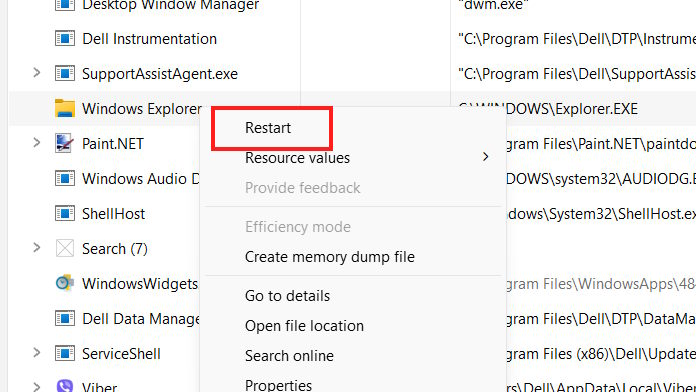
<p>Điều đầu tiên bạn nên khởi động lại Explorer để khắc phục lỗi mở thư mục lớn hay bất kỳ lỗi nào.</p>

<p>Chúng ta nhấn&nbsp;<strong>tổ hợp phím Ctrl + Shift + Esc</strong>&nbsp;để mở Task Manager. Sau đó trong giao diện bạn nhấn vào tab Processes, rồi&nbsp;<strong>click chuột phải vào Windows Explorer chọn Restart</strong>&nbsp;để tiến hành khởi động lại Windows Explorer.</p>

<p><img alt="Khởi động lại Explorer" data-adbro-processed="true" data-i="0" data-src="https://st.quantrimang.com/photos/image/2025/11/21/loi-Explorer-mo-thu-muc-lon-1.jpg" data-was-processed="true" height="338" src="https://st.quantrimang.com/photos/image/2025/11/21/loi-Explorer-mo-thu-muc-lon-1.jpg" width="600" /></p>

<h3>Điều chỉnh lại cài đặt File Explorer</h3>

<p>Nguyên nhân khiến File Explorer lỗi khi mở các thư mục lớn là do quá tải khi hiển thị các tạo ảnh thu nhỏ và thông tin dữ liệu, đặc biệt ở những máy tính có cấu hình thấp. Hãy thử điều chỉnh lại một số thiết lập để khắc phục tình trạng này.</p>

<p><strong>Bước 1:</strong></p>

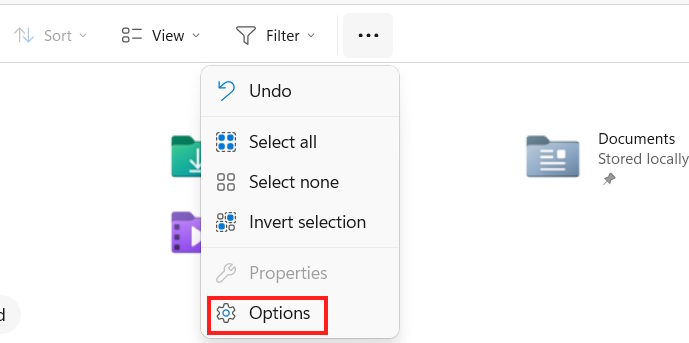
<p>Tại giao diện cửa sổ Explorer bạn nhấn vào<strong>&nbsp;biểu tượng 3 chấm rồi chọn Options</strong>.</p>

<p><img alt="Explorer Options" data-i="1" data-src="https://st.quantrimang.com/photos/image/2025/11/21/loi-Explorer-mo-thu-muc-lon-2.jpg" data-was-processed="true" height="299" src="https://st.quantrimang.com/photos/image/2025/11/21/loi-Explorer-mo-thu-muc-lon-2.jpg" width="600" /></p>

<p><strong>Bước 2:</strong></p>

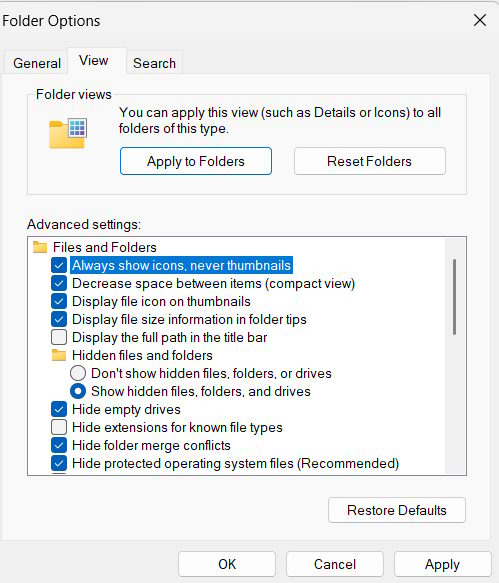
<p>Hiển thị giao diện mới bạn&nbsp;<strong>nhấn vào tab View</strong>&nbsp;sau đó nhìn xuống bên dưới, bạn&nbsp;<strong>tích chọn Always show icons, never thumbnails</strong>&nbsp;để hiện dạng icon không hiện ảnh thu nhỏ.</p>

<p>Ngoài ra, hãy thử ẩn các thư mục ẩn bằng cách nhấp vào Don’t show hidden files, folders, or drives.</p>

<p><img alt="Không hiện ảnh thu nhỏ" data-i="2" data-src="https://st.quantrimang.com/photos/image/2025/11/21/loi-Explorer-mo-thu-muc-lon-3.jpg" data-was-processed="true" height="467" src="https://st.quantrimang.com/photos/image/2025/11/21/loi-Explorer-mo-thu-muc-lon-3.jpg" width="400" /></p>

<p>Cuối cùng&nbsp;<strong>nhấn Apply và OK</strong>&nbsp;để lưu lại thay đổi.</p>

<h3>Vô hiệu hóa QuickTime và lịch sử Explorer</h3>

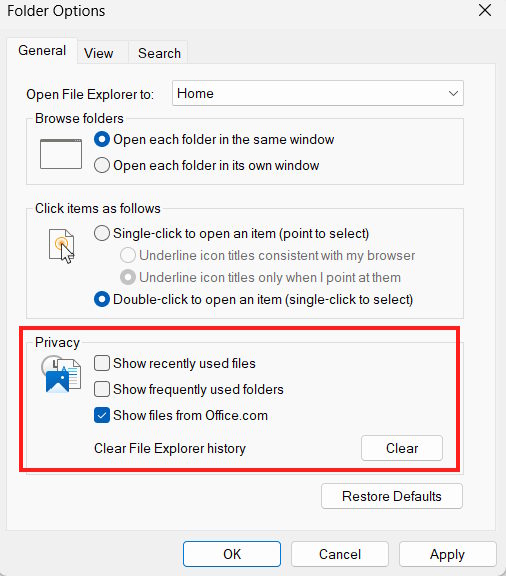
<p>QuickTime là một cách tiện lợi để truy cập các tệp và thư mục đã sử dụng gần đây, nhưng nó cũng có thể làm quá tải Explorer.</p>

<p>Chúng ta cũng mở Options trong Explorer. Tiếp đến trong<strong>&nbsp;tab General&nbsp;</strong>bạn kéo xuống&nbsp;<strong>mục Privacy</strong>&nbsp;rồi&nbsp;<strong>bỏ chọn tất cả các nội dung</strong>&nbsp;ở trong mục này. Tiếp tục&nbsp;<strong>nhấn vào nút Clear&nbsp;</strong>để xóa toàn bộ lịch sử Explorer.</p>

<p><img alt="Vô hiệu hóa QuickTime và lịch sử Explorer" data-i="3" data-src="https://st.quantrimang.com/photos/image/2025/11/21/loi-Explorer-mo-thu-muc-lon-4.jpg" data-was-processed="true" height="512" src="https://st.quantrimang.com/photos/image/2025/11/21/loi-Explorer-mo-thu-muc-lon-4.jpg" width="450" /></p>
&nbsp;
		</div>
				<div id="author">
						<p>
				<strong>Nguồn tin:</strong>
				Quantrimang.com:
			</p>
		</div>
	</div>
	<div id="footer" class="clearfix">
		<div id="url">
			<strong>URL của bản tin này: </strong><a href="https://www.nguoicodonvn2008.info/vi/news/savefile/kien-thuc-may-tinh/lam-gi-neu-explorer-sap-khi-mo-thu-muc-lon-11710.html" title="Làm gì nếu Explorer sập khi mở thư mục lớn?">https://www.nguoicodonvn2008.info/vi/news/savefile/kien-thuc-may-tinh/lam-gi-neu-explorer-sap-khi-mo-thu-muc-lon-11710.html</a>

		</div>
		<div class="clear"></div>
		<div class="copyright">
			&copy; .&#x3A; Nguoicodonvn2008.info - Cõi lòng người cô đơn &#x3A;.
		</div>
		<div id="contact">
			<a href="mailto:admin@nguoicodonvn2008.info">admin@nguoicodonvn2008.info</a>
		</div>
	</div>
</div>
        <div id="timeoutsess" class="chromeframe">
            Bạn đã không sử dụng Site, <a onclick="timeoutsesscancel();" href="https://www.nguoicodonvn2008.info/#">Bấm vào đây để duy trì trạng thái đăng nhập</a>. Thời gian chờ: <span id="secField"> 60 </span> giây
        </div>
        <div id="openidResult" class="nv-alert" style="display:none"></div>
        <div id="openidBt" data-result="" data-redirect=""></div>
		</script>
		<div class="car-top">
  <span><img src="https://www.nguoicodonvn2008.info/themes/default/images/car.png" alt=""></span>
</div>
<script src="https://www.nguoicodonvn2008.info/assets/js/jquery/jquery.min.js"></script>
<script>var nv_base_siteurl="/",nv_lang_data="vi",nv_lang_interface="vi",nv_name_variable="nv",nv_fc_variable="op",nv_lang_variable="language",nv_module_name="news",nv_func_name="savefile",nv_is_user=0, nv_my_ofs=-4,nv_my_abbr="EDT",nv_cookie_prefix="nv4c_e856T",nv_check_pass_mstime=1738000,nv_area_admin=0,nv_safemode=0,theme_responsive=0,nv_recaptcha_ver=2,nv_recaptcha_sitekey="",nv_recaptcha_type="image",XSSsanitize=1;</script>
<script src="https://www.nguoicodonvn2008.info/assets/js/language/vi.js"></script>
<script src="https://www.nguoicodonvn2008.info/assets/js/DOMPurify/purify3.js"></script>
<script src="https://www.nguoicodonvn2008.info/assets/js/global.js"></script>
<script src="https://www.nguoicodonvn2008.info/assets/js/site.js"></script>
<script src="https://www.nguoicodonvn2008.info/themes/default/js/news.js"></script>
<script src="https://www.nguoicodonvn2008.info/themes/default/js/main.js"></script>
<script src="https://www.nguoicodonvn2008.info/themes/default/js/custom.js"></script>
<script type="application/ld+json">
        {
            "@context": "https://schema.org",
            "@type": "Organization",
            "url": "https://www.nguoicodonvn2008.info",
            "logo": "https://www.nguoicodonvn2008.info/uploads/angel.gif"
        }
        </script>
<script src="https://www.nguoicodonvn2008.info/themes/default/js/bootstrap.min.js"></script>
<script type="text/javascript">
var $scrolltop = $('.car-top');
$scrolltop.on('click', function () {
    $('html,body').animate({
        scrollTop: 0
    }, 800);
    $(this).addClass("car-run");
    setTimeout(function(){ $scrolltop.removeClass('car-run');}, 1000);
    return false;
});
$(window).on('scroll', function ()
{ 
    if($(window).scrollTop() >= 200)
    {
        $scrolltop.addClass("show");
        $scrolltop.addClass("car-down");
    }
    else
    {
       $scrolltop.removeClass("show");
       setTimeout(function(){ $scrolltop.removeClass('car-down');}, 300);
    }
});
</script>
</body>
</html>