<!DOCTYPE html>
    <html lang="vi" xmlns="http://www.w3.org/1999/xhtml" prefix="og: http://ogp.me/ns#">
    <head>
<title>Khôi phục vị trí mặc định thư mục Game DVR Captures trong Windows 10</title>
<meta name="description" content="Khôi phục vị trí mặc định thư mục Game DVR Captures trong Windows 10 - Savefile - Tin Tức -...">
<meta name="author" content=".: Nguoicodonvn2008.info - Cõi lòng người cô đơn :.">
<meta name="copyright" content=".: Nguoicodonvn2008.info - Cõi lòng người cô đơn :. [admin@nguoicodonvn2008.info]">
<meta name="robots" content="index, archive, follow, noodp">
<meta name="googlebot" content="index,archive,follow,noodp">
<meta name="msnbot" content="all,index,follow">
<meta name="generator" content="NukeViet v4.5">
<meta http-equiv="Content-Type" content="text/html; charset=utf-8">
<meta property="og:title" content="Khôi phục vị trí mặc định thư mục Game DVR Captures trong Windows 10">
<meta property="og:type" content="website">
<meta property="og:description" content="Savefile - Tin Tức - https&#x3A;&#x002F;&#x002F;www.nguoicodonvn2008.info&#x002F;vi&#x002F;news&#x002F;savefile&#x002F;kien-thuc-may-tinh&#x002F;khoi-phuc-vi-tri-mac-dinh-thu-muc-game-dvr-captures-trong-windows-10-2675.html">
<meta property="og:site_name" content=".&#x3A; Nguoicodonvn2008.info - Cõi lòng người cô đơn &#x3A;.">
<meta property="og:url" content="https://www.nguoicodonvn2008.info/vi/news/savefile/kien-thuc-may-tinh/khoi-phuc-vi-tri-mac-dinh-thu-muc-game-dvr-captures-trong-windows-10-2675.html">
<link rel="shortcut icon" href="https://www.nguoicodonvn2008.info/favicon.ico">
<link rel="canonical" href="https://www.nguoicodonvn2008.info/vi/news/savefile/kien-thuc-may-tinh/khoi-phuc-vi-tri-mac-dinh-thu-muc-game-dvr-captures-trong-windows-10-2675.html">
<link rel="alternate" href="https://www.nguoicodonvn2008.info/vi/news/rss/" title="Tin Tức" type="application/rss+xml">
<link rel="alternate" href="https://www.nguoicodonvn2008.info/vi/news/rss/karaoke-dual/" title="Tin Tức - Karaoke Dual" type="application/rss+xml">
<link rel="alternate" href="https://www.nguoicodonvn2008.info/vi/news/rss/nhac-tre/" title="Tin Tức - Nhạc trẻ" type="application/rss+xml">
<link rel="alternate" href="https://www.nguoicodonvn2008.info/vi/news/rss/tru-tinh/" title="Tin Tức - Trữ tình" type="application/rss+xml">
<link rel="alternate" href="https://www.nguoicodonvn2008.info/vi/news/rss/nuoc-ngoai/" title="Tin Tức - Nước ngoài" type="application/rss+xml">
<link rel="alternate" href="https://www.nguoicodonvn2008.info/vi/news/rss/remix/" title="Tin Tức - Remix" type="application/rss+xml">
<link rel="alternate" href="https://www.nguoicodonvn2008.info/vi/news/rss/tam-su-tinh-yeu/" title="Tin Tức - Tâm sự tình yêu" type="application/rss+xml">
<link rel="alternate" href="https://www.nguoicodonvn2008.info/vi/news/rss/tho-suu-tam/" title="Tin Tức - Thơ sưu tầm" type="application/rss+xml">
<link rel="alternate" href="https://www.nguoicodonvn2008.info/vi/news/rss/cuoc-song/" title="Tin Tức - Cuộc sống" type="application/rss+xml">
<link rel="alternate" href="https://www.nguoicodonvn2008.info/vi/news/rss/phan-mem/" title="Tin Tức - Phần mềm" type="application/rss+xml">
<link rel="alternate" href="https://www.nguoicodonvn2008.info/vi/news/rss/kien-thuc-may-tinh/" title="Tin Tức - Kiến thức máy tính" type="application/rss+xml">
<link rel="alternate" href="https://www.nguoicodonvn2008.info/vi/news/rss/hoc-tap/" title="Tin Tức - Học tập" type="application/rss+xml">
<link rel="alternate" href="https://www.nguoicodonvn2008.info/vi/news/rss/tai-lieu/" title="Tin Tức - Tài liệu" type="application/rss+xml">
<link rel="alternate" href="https://www.nguoicodonvn2008.info/vi/news/rss/de-thi/" title="Tin Tức - Đề thi" type="application/rss+xml">
<link rel="preload" as="style" href="https://www.nguoicodonvn2008.info/assets/css/font-awesome.min.css" type="text/css">
<link rel="preload" as="style" href="https://www.nguoicodonvn2008.info/themes/default/css/bootstrap.non-responsive.css" type="text/css">
<link rel="preload" as="style" href="https://www.nguoicodonvn2008.info/themes/default/css/style.css" type="text/css">
<link rel="preload" as="style" href="https://www.nguoicodonvn2008.info/themes/default/css/style.non-responsive.css" type="text/css">
<link rel="preload" as="style" href="https://www.nguoicodonvn2008.info/themes/default/css/news.css" type="text/css">
<link rel="preload" as="style" href="https://www.nguoicodonvn2008.info/themes/default/css/custom.css" type="text/css">
<link rel="preload" as="script" href="https://www.nguoicodonvn2008.info/assets/js/jquery/jquery.min.js" type="text/javascript">
<link rel="preload" as="script" href="https://www.nguoicodonvn2008.info/assets/js/language/vi.js" type="text/javascript">
<link rel="preload" as="script" href="https://www.nguoicodonvn2008.info/assets/js/DOMPurify/purify3.js" type="text/javascript">
<link rel="preload" as="script" href="https://www.nguoicodonvn2008.info/assets/js/global.js" type="text/javascript">
<link rel="preload" as="script" href="https://www.nguoicodonvn2008.info/assets/js/site.js" type="text/javascript">
<link rel="preload" as="script" href="https://www.nguoicodonvn2008.info/themes/default/js/news.js" type="text/javascript">
<link rel="preload" as="script" href="https://www.nguoicodonvn2008.info/themes/default/js/main.js" type="text/javascript">
<link rel="preload" as="script" href="https://www.nguoicodonvn2008.info/themes/default/js/custom.js" type="text/javascript">
<link rel="preload" as="script" href="https://www.nguoicodonvn2008.info/themes/default/js/bootstrap.min.js" type="text/javascript">
<link rel="stylesheet" href="https://www.nguoicodonvn2008.info/assets/css/font-awesome.min.css">
<link rel="stylesheet" href="https://www.nguoicodonvn2008.info/themes/default/css/bootstrap.non-responsive.css">
<link rel="stylesheet" href="https://www.nguoicodonvn2008.info/themes/default/css/style.css">
<link rel="stylesheet" href="https://www.nguoicodonvn2008.info/themes/default/css/style.non-responsive.css">
<link rel="StyleSheet" href="https://www.nguoicodonvn2008.info/themes/default/css/news.css">
<link rel="stylesheet" href="https://www.nguoicodonvn2008.info/themes/default/css/custom.css">
<style type="text/css">
	body{background: #fff;}
</style>
    </head>
    <body>
<div id="print">
	<div id="hd_print">
		<h2 class="pull-left">.&#x3A; Nguoicodonvn2008.info - Cõi lòng người cô đơn &#x3A;.</h2>
		<p class="pull-right"><a title=".&#x3A; Nguoicodonvn2008.info - Cõi lòng người cô đơn &#x3A;." href="https://www.nguoicodonvn2008.info/">https://www.nguoicodonvn2008.info</a></p>
	</div>
	<div class="clear"></div>
	<hr />
	<div id="content">
		<h1>Khôi phục vị trí mặc định thư mục Game DVR Captures trong Windows 10</h1>
		<ul class="list-inline">
			<li>Thứ tư - 09/09/2020 00:57</li>
			<li class="hidden-print txtrequired"><em class="fa fa-print">&nbsp;</em><a title="In ra" href="javascript:;" onclick="window.print()">In ra</a></li>
			<li class="hidden-print txtrequired"><em class="fa fa-power-off">&nbsp;</em><a title="Đóng cửa sổ này" href="javascript:;" onclick="window.close()">Đóng cửa sổ này</a></li>
		</ul>
		<div class="clear"></div>
		<div id="hometext">
		</div>
				<div class="imghome">
			<img alt="Khôi phục vị trí mặc định thư mục Game DVR Captures trong Windows 10" src="https://st.quantrimang.com/photos/image/2020/09/07/khoi-phuc-vi-tri-mac-dinh-thu-muc-captures-6.png" width="460" class="img-thumbnail" />
		</div>
		<div class="clear"></div>
		<div id="bodytext" class="clearfix">
			<p style="text-align: justify;">Game Bar&nbsp;là một tính năng Game DVR của ứng dụng Xbox, cho phép bạn ghi và chia sẻ các clip và ảnh chụp màn hình game trong Windows 10. Tuy nhiên, bạn cũng có thể sử dụng Game Bar để ghi lại, chụp ảnh màn hình và phát bất kỳ ứng dụng hay nào trong Windows 10.</p>

<p style="text-align: justify;">&nbsp;</p>

<p style="text-align: justify;">Các video đã quay được lưu dưới dạng&nbsp;file .mp4&nbsp;và ảnh chụp màn hình được lưu dưới dạng file .png. Mỗi video và ảnh chụp màn hình được xác định bằng tiêu đề của game và siêu dữ liệu hiển thị khi hình ảnh được chụp.</p>

<p style="text-align: justify;">Theo mặc định, các video đã quay được lưu vào thư mục&nbsp;<strong>C:\Users\&lt;username&gt;\Videos</strong>, trong một folder có tên là&nbsp;<strong>Captures.</strong>&nbsp;Nếu muốn, bạn có thể di chuyển thư mục&nbsp;<strong>Captures</strong>&nbsp;đến một vị trí khác, nếu bạn không muốn chúng được lưu vào ổ C:.</p>

<div style="text-align: justify;">&nbsp;</div>

<p style="text-align: justify;">Hướng dẫn này sẽ chỉ cho bạn cách khôi phục vị trí mặc định của thư mục Xbox Game DVR Captures trong Windows 10.</p>

<h2 style="text-align: justify;">Cách khôi phục vị trí mặc định thư mục Game DVR Captures trong Windows 10</h2>

<p style="text-align: justify;">Đây là cách thực hiện:</p>

<p style="text-align: justify;">1.&nbsp;Mở Settings&nbsp;và nhấn vào biểu tượng&nbsp;<strong>Gaming.</strong></p>

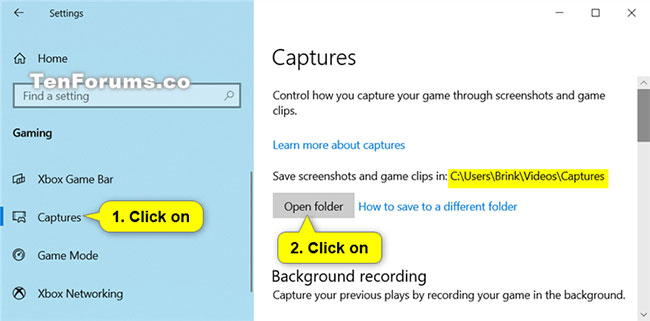
<p style="text-align: justify;">2. Nhấp vào&nbsp;<strong>Captures</strong>&nbsp;ở phía bên trái và nhấn vào nút&nbsp;<strong>Open folder</strong>&nbsp;ở phía bên phải để mở thư mục&nbsp;<strong>Captures</strong>&nbsp;ở vị trí hiện tại của nó.</p>

<figure data-inimage-loaded="true">
<div style="text-align: justify;"><a href="https://stats.adrealclick.com/url?q=aHR0cHM6Ly9tZXRhLnZuL2todXllbm1haS82Ny9zYW4tcGhhbS1iYW8tdmUtc3VjLWtob2UuaHRtbD91dG1fc291cmNlPWluLWltYWdlJnV0bV9tZWRpdW09UVRNJnJlZj1pbi1pbWFnZS1RVE0%3D&amp;bid=9781&amp;zid=421" rel="nofollow" target="_blank"><img alt="" data-i="0" height="100" loading="lazy" src="https://as.gamevui.com/data/image/2020/07/30/khau-trang-640x100.png" width="640" /></a><br />
<img alt="Nhấp vào Captures ở phía bên trái và nhấn vào nút Open folder" data-i="1" data-src="https://st.quantrimang.com/photos/image/2020/09/07/khoi-phuc-vi-tri-mac-dinh-thu-muc-captures-1.jpg" data-was-processed="true" height="321" src="https://st.quantrimang.com/photos/image/2020/09/07/khoi-phuc-vi-tri-mac-dinh-thu-muc-captures-1.jpg" width="650" /></div>

<figcaption>
<div style="text-align: justify;">Nhấp vào Captures ở phía bên trái và nhấn vào nút Open folder</div>
</figcaption>
</figure>

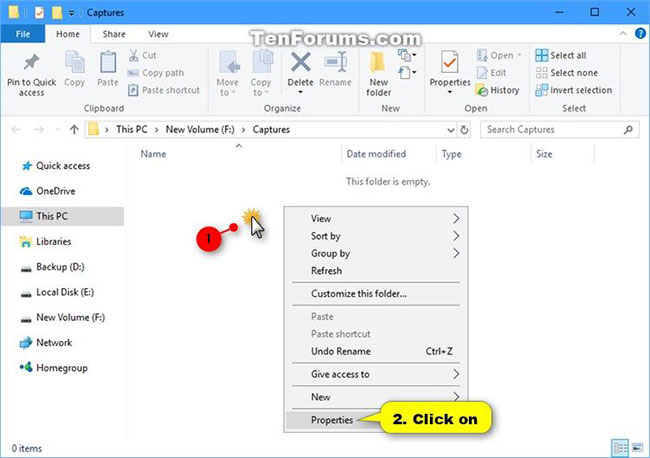
<p style="text-align: justify;">3. Nhấp chuột phải hoặc nhấn và giữ vào một khoảng trống trong thư mục Captures và nhấn vào&nbsp;<strong>Properties.</strong></p>

<figure>
<div style="text-align: justify;"><img alt="Nhấp chuột phải vào thư mục Captures và chọn Properties" data-i="2" data-src="https://st.quantrimang.com/photos/image/2020/09/07/khoi-phuc-vi-tri-mac-dinh-thu-muc-captures-2.jpg" data-was-processed="true" height="458" src="https://st.quantrimang.com/photos/image/2020/09/07/khoi-phuc-vi-tri-mac-dinh-thu-muc-captures-2.jpg" width="650" /></div>

<figcaption>
<div style="text-align: justify;">Nhấp chuột phải vào thư mục Captures và chọn Properties</div>
</figcaption>
</figure>

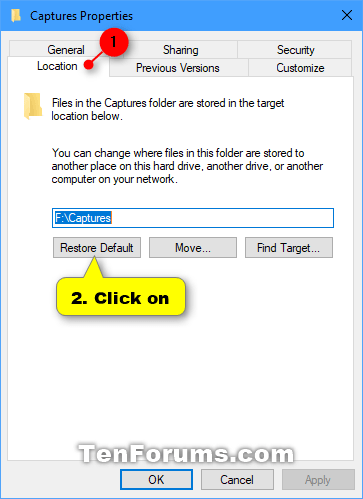
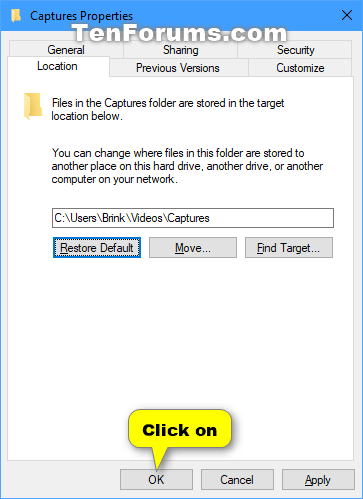
<p style="text-align: justify;">4. Nhấp vào tab&nbsp;<strong>Location</strong>&nbsp;và nhấn vào nút&nbsp;<strong>Restore Default.</strong></p>

<figure>
<div style="text-align: justify;"><img alt="Nhấn vào nút Restore Default" data-i="3" data-src="https://st.quantrimang.com/photos/image/2020/09/07/khoi-phuc-vi-tri-mac-dinh-thu-muc-captures-3.png" data-was-processed="true" height="499" src="https://st.quantrimang.com/photos/image/2020/09/07/khoi-phuc-vi-tri-mac-dinh-thu-muc-captures-3.png" width="363" /></div>

<figcaption>
<div style="text-align: justify;">Nhấn vào nút Restore Default</div>
</figcaption>
</figure>

<p style="text-align: justify;">5. Nhấn&nbsp;<strong>OK.</strong></p>

<figure>
<div style="text-align: justify;"><img alt="Nhấn OK" data-i="4" data-src="https://st.quantrimang.com/photos/image/2020/09/07/khoi-phuc-vi-tri-mac-dinh-thu-muc-captures-4.png" data-was-processed="true" height="499" src="https://st.quantrimang.com/photos/image/2020/09/07/khoi-phuc-vi-tri-mac-dinh-thu-muc-captures-4.png" width="363" /></div>

<figcaption>
<div style="text-align: justify;">Nhấn OK</div>
</figcaption>
</figure>

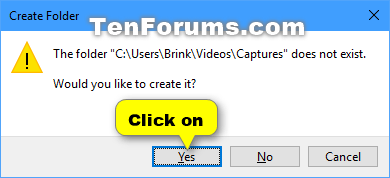
<p style="text-align: justify;">6. Nếu thư mục&nbsp;<strong>&quot;Captures&quot;</strong>&nbsp;không tồn tại, hãy nhấp vào&nbsp;<strong>Yes</strong>&nbsp;để tạo nó.</p>

<figure>
<div style="text-align: justify;"><img alt="Nhấp vào Yes để tạo thư mục Captures" data-i="5" data-src="https://st.quantrimang.com/photos/image/2020/09/07/khoi-phuc-vi-tri-mac-dinh-thu-muc-captures-5.png" data-was-processed="true" height="178" src="https://st.quantrimang.com/photos/image/2020/09/07/khoi-phuc-vi-tri-mac-dinh-thu-muc-captures-5.png" width="390" /></div>

<figcaption>
<div style="text-align: justify;">Nhấp vào Yes để tạo thư mục Captures</div>
</figcaption>
</figure>

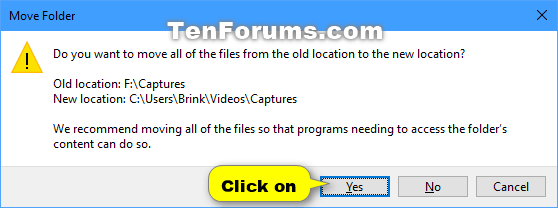
<p style="text-align: justify;">7. Nhấp vào&nbsp;<strong>Yes</strong>&nbsp;để di chuyển tất cả các file từ vị trí cũ sang vị trí mới.</p>

<figure>
<div style="text-align: justify;"><img alt="Nhấp vào Yes để di chuyển tất cả các file từ vị trí cũ sang vị trí mới" data-i="6" data-src="https://st.quantrimang.com/photos/image/2020/09/07/khoi-phuc-vi-tri-mac-dinh-thu-muc-captures-6.png" data-was-processed="true" height="208" src="https://st.quantrimang.com/photos/image/2020/09/07/khoi-phuc-vi-tri-mac-dinh-thu-muc-captures-6.png" width="558" /></div>

<figcaption>
<div style="text-align: justify;">Nhấp vào Yes để di chuyển tất cả các file từ vị trí cũ sang vị trí mới</div>
</figcaption>
</figure>

<p style="text-align: justify;">8. Sau một lúc, thư mục Captures của bạn sẽ được khôi phục về vị trí mặc định (ví dụ: &quot;<strong>C:\Users\Brink\Videos\Captures</strong>&quot;).</p>
		</div>
				<div id="author">
						<p>
				<strong>Nguồn tin:</strong>
				Quantrimang.com
			</p>
		</div>
	</div>
	<div id="footer" class="clearfix">
		<div id="url">
			<strong>URL của bản tin này: </strong><a href="https://www.nguoicodonvn2008.info/vi/news/savefile/kien-thuc-may-tinh/khoi-phuc-vi-tri-mac-dinh-thu-muc-game-dvr-captures-trong-windows-10-2675.html" title="Khôi phục vị trí mặc định thư mục Game DVR Captures trong Windows 10">https://www.nguoicodonvn2008.info/vi/news/savefile/kien-thuc-may-tinh/khoi-phuc-vi-tri-mac-dinh-thu-muc-game-dvr-captures-trong-windows-10-2675.html</a>

		</div>
		<div class="clear"></div>
		<div class="copyright">
			&copy; .&#x3A; Nguoicodonvn2008.info - Cõi lòng người cô đơn &#x3A;.
		</div>
		<div id="contact">
			<a href="mailto:admin@nguoicodonvn2008.info">admin@nguoicodonvn2008.info</a>
		</div>
	</div>
</div>
        <div id="timeoutsess" class="chromeframe">
            Bạn đã không sử dụng Site, <a onclick="timeoutsesscancel();" href="https://www.nguoicodonvn2008.info/#">Bấm vào đây để duy trì trạng thái đăng nhập</a>. Thời gian chờ: <span id="secField"> 60 </span> giây
        </div>
        <div id="openidResult" class="nv-alert" style="display:none"></div>
        <div id="openidBt" data-result="" data-redirect=""></div>
		</script>
		<div class="car-top">
  <span><img src="https://www.nguoicodonvn2008.info/themes/default/images/car.png" alt=""></span>
</div>
<script src="https://www.nguoicodonvn2008.info/assets/js/jquery/jquery.min.js"></script>
<script>var nv_base_siteurl="/",nv_lang_data="vi",nv_lang_interface="vi",nv_name_variable="nv",nv_fc_variable="op",nv_lang_variable="language",nv_module_name="news",nv_func_name="savefile",nv_is_user=0, nv_my_ofs=-4,nv_my_abbr="EDT",nv_cookie_prefix="nv4c_e856T",nv_check_pass_mstime=1738000,nv_area_admin=0,nv_safemode=0,theme_responsive=0,nv_recaptcha_ver=2,nv_recaptcha_sitekey="",nv_recaptcha_type="image",XSSsanitize=1;</script>
<script src="https://www.nguoicodonvn2008.info/assets/js/language/vi.js"></script>
<script src="https://www.nguoicodonvn2008.info/assets/js/DOMPurify/purify3.js"></script>
<script src="https://www.nguoicodonvn2008.info/assets/js/global.js"></script>
<script src="https://www.nguoicodonvn2008.info/assets/js/site.js"></script>
<script src="https://www.nguoicodonvn2008.info/themes/default/js/news.js"></script>
<script src="https://www.nguoicodonvn2008.info/themes/default/js/main.js"></script>
<script src="https://www.nguoicodonvn2008.info/themes/default/js/custom.js"></script>
<script type="application/ld+json">
        {
            "@context": "https://schema.org",
            "@type": "Organization",
            "url": "https://www.nguoicodonvn2008.info",
            "logo": "https://www.nguoicodonvn2008.info/uploads/angel.gif"
        }
        </script>
<script src="https://www.nguoicodonvn2008.info/themes/default/js/bootstrap.min.js"></script>
<script type="text/javascript">
var $scrolltop = $('.car-top');
$scrolltop.on('click', function () {
    $('html,body').animate({
        scrollTop: 0
    }, 800);
    $(this).addClass("car-run");
    setTimeout(function(){ $scrolltop.removeClass('car-run');}, 1000);
    return false;
});
$(window).on('scroll', function ()
{ 
    if($(window).scrollTop() >= 200)
    {
        $scrolltop.addClass("show");
        $scrolltop.addClass("car-down");
    }
    else
    {
       $scrolltop.removeClass("show");
       setTimeout(function(){ $scrolltop.removeClass('car-down');}, 300);
    }
});
</script>
</body>
</html>