<!DOCTYPE html>
    <html lang="vi" xmlns="http://www.w3.org/1999/xhtml" prefix="og: http://ogp.me/ns#">
    <head>
<title>Khắc phục tình trạng Service Host SysMain sử dụng nhiều CPU và bộ nhớ trong Windows 10</title>
<meta name="description" content="Khắc phục tình trạng Service Host SysMain sử dụng nhiều CPU và bộ nhớ trong Windows 10 - Savefile - Tin Tức -...">
<meta name="author" content=".: Nguoicodonvn2008.info - Cõi lòng người cô đơn :.">
<meta name="copyright" content=".: Nguoicodonvn2008.info - Cõi lòng người cô đơn :. [admin@nguoicodonvn2008.info]">
<meta name="robots" content="index, archive, follow, noodp">
<meta name="googlebot" content="index,archive,follow,noodp">
<meta name="msnbot" content="all,index,follow">
<meta name="generator" content="NukeViet v4.5">
<meta http-equiv="Content-Type" content="text/html; charset=utf-8">
<meta property="og:title" content="Khắc phục tình trạng Service Host SysMain sử dụng nhiều CPU và bộ nhớ trong Windows 10">
<meta property="og:type" content="website">
<meta property="og:description" content="Savefile - Tin Tức -...">
<meta property="og:site_name" content=".&#x3A; Nguoicodonvn2008.info - Cõi lòng người cô đơn &#x3A;.">
<meta property="og:url" content="https://www.nguoicodonvn2008.info/vi/news/savefile/kien-thuc-may-tinh/khac-phuc-tinh-trang-service-host-sysmain-su-dung-nhieu-cpu-va-bo-nho-trong-windows-10-2970.html">
<link rel="shortcut icon" href="https://www.nguoicodonvn2008.info/favicon.ico">
<link rel="canonical" href="https://www.nguoicodonvn2008.info/vi/news/savefile/kien-thuc-may-tinh/khac-phuc-tinh-trang-service-host-sysmain-su-dung-nhieu-cpu-va-bo-nho-trong-windows-10-2970.html">
<link rel="alternate" href="https://www.nguoicodonvn2008.info/vi/news/rss/" title="Tin Tức" type="application/rss+xml">
<link rel="alternate" href="https://www.nguoicodonvn2008.info/vi/news/rss/karaoke-dual/" title="Tin Tức - Karaoke Dual" type="application/rss+xml">
<link rel="alternate" href="https://www.nguoicodonvn2008.info/vi/news/rss/nhac-tre/" title="Tin Tức - Nhạc trẻ" type="application/rss+xml">
<link rel="alternate" href="https://www.nguoicodonvn2008.info/vi/news/rss/tru-tinh/" title="Tin Tức - Trữ tình" type="application/rss+xml">
<link rel="alternate" href="https://www.nguoicodonvn2008.info/vi/news/rss/nuoc-ngoai/" title="Tin Tức - Nước ngoài" type="application/rss+xml">
<link rel="alternate" href="https://www.nguoicodonvn2008.info/vi/news/rss/remix/" title="Tin Tức - Remix" type="application/rss+xml">
<link rel="alternate" href="https://www.nguoicodonvn2008.info/vi/news/rss/tam-su-tinh-yeu/" title="Tin Tức - Tâm sự tình yêu" type="application/rss+xml">
<link rel="alternate" href="https://www.nguoicodonvn2008.info/vi/news/rss/tho-suu-tam/" title="Tin Tức - Thơ sưu tầm" type="application/rss+xml">
<link rel="alternate" href="https://www.nguoicodonvn2008.info/vi/news/rss/cuoc-song/" title="Tin Tức - Cuộc sống" type="application/rss+xml">
<link rel="alternate" href="https://www.nguoicodonvn2008.info/vi/news/rss/phan-mem/" title="Tin Tức - Phần mềm" type="application/rss+xml">
<link rel="alternate" href="https://www.nguoicodonvn2008.info/vi/news/rss/kien-thuc-may-tinh/" title="Tin Tức - Kiến thức máy tính" type="application/rss+xml">
<link rel="alternate" href="https://www.nguoicodonvn2008.info/vi/news/rss/hoc-tap/" title="Tin Tức - Học tập" type="application/rss+xml">
<link rel="alternate" href="https://www.nguoicodonvn2008.info/vi/news/rss/tai-lieu/" title="Tin Tức - Tài liệu" type="application/rss+xml">
<link rel="alternate" href="https://www.nguoicodonvn2008.info/vi/news/rss/de-thi/" title="Tin Tức - Đề thi" type="application/rss+xml">
<link rel="preload" as="style" href="https://www.nguoicodonvn2008.info/assets/css/font-awesome.min.css" type="text/css">
<link rel="preload" as="style" href="https://www.nguoicodonvn2008.info/themes/default/css/bootstrap.non-responsive.css" type="text/css">
<link rel="preload" as="style" href="https://www.nguoicodonvn2008.info/themes/default/css/style.css" type="text/css">
<link rel="preload" as="style" href="https://www.nguoicodonvn2008.info/themes/default/css/style.non-responsive.css" type="text/css">
<link rel="preload" as="style" href="https://www.nguoicodonvn2008.info/themes/default/css/news.css" type="text/css">
<link rel="preload" as="style" href="https://www.nguoicodonvn2008.info/themes/default/css/custom.css" type="text/css">
<link rel="preload" as="script" href="https://www.nguoicodonvn2008.info/assets/js/jquery/jquery.min.js" type="text/javascript">
<link rel="preload" as="script" href="https://www.nguoicodonvn2008.info/assets/js/language/vi.js" type="text/javascript">
<link rel="preload" as="script" href="https://www.nguoicodonvn2008.info/assets/js/DOMPurify/purify3.js" type="text/javascript">
<link rel="preload" as="script" href="https://www.nguoicodonvn2008.info/assets/js/global.js" type="text/javascript">
<link rel="preload" as="script" href="https://www.nguoicodonvn2008.info/assets/js/site.js" type="text/javascript">
<link rel="preload" as="script" href="https://www.nguoicodonvn2008.info/themes/default/js/news.js" type="text/javascript">
<link rel="preload" as="script" href="https://www.nguoicodonvn2008.info/themes/default/js/main.js" type="text/javascript">
<link rel="preload" as="script" href="https://www.nguoicodonvn2008.info/themes/default/js/custom.js" type="text/javascript">
<link rel="preload" as="script" href="https://www.nguoicodonvn2008.info/themes/default/js/bootstrap.min.js" type="text/javascript">
<link rel="stylesheet" href="https://www.nguoicodonvn2008.info/assets/css/font-awesome.min.css">
<link rel="stylesheet" href="https://www.nguoicodonvn2008.info/themes/default/css/bootstrap.non-responsive.css">
<link rel="stylesheet" href="https://www.nguoicodonvn2008.info/themes/default/css/style.css">
<link rel="stylesheet" href="https://www.nguoicodonvn2008.info/themes/default/css/style.non-responsive.css">
<link rel="StyleSheet" href="https://www.nguoicodonvn2008.info/themes/default/css/news.css">
<link rel="stylesheet" href="https://www.nguoicodonvn2008.info/themes/default/css/custom.css">
<style type="text/css">
	body{background: #fff;}
</style>
    </head>
    <body>
<div id="print">
	<div id="hd_print">
		<h2 class="pull-left">.&#x3A; Nguoicodonvn2008.info - Cõi lòng người cô đơn &#x3A;.</h2>
		<p class="pull-right"><a title=".&#x3A; Nguoicodonvn2008.info - Cõi lòng người cô đơn &#x3A;." href="https://www.nguoicodonvn2008.info/">https://www.nguoicodonvn2008.info</a></p>
	</div>
	<div class="clear"></div>
	<hr />
	<div id="content">
		<h1>Khắc phục tình trạng Service Host SysMain sử dụng nhiều CPU và bộ nhớ trong Windows 10</h1>
		<ul class="list-inline">
			<li>Thứ tư - 28/10/2020 00:24</li>
			<li class="hidden-print txtrequired"><em class="fa fa-print">&nbsp;</em><a title="In ra" href="javascript:;" onclick="window.print()">In ra</a></li>
			<li class="hidden-print txtrequired"><em class="fa fa-power-off">&nbsp;</em><a title="Đóng cửa sổ này" href="javascript:;" onclick="window.close()">Đóng cửa sổ này</a></li>
		</ul>
		<div class="clear"></div>
		<div id="hometext">
		</div>
				<div class="imghome">
			<img alt="Khắc phục tình trạng Service Host SysMain sử dụng nhiều CPU và bộ nhớ trong Windows 10" src="https://st.quantrimang.com/photos/image/2020/10/28/service-host-sysmain-su-dung-nhieu-cpu-va-bo-nho-3.jpg" width="460" class="img-thumbnail" />
		</div>
		<div class="clear"></div>
		<div id="bodytext" class="clearfix">
			<p style="text-align: justify;">Rất nhiều người dùng đã báo cáo rằng tiến trình SysMain (trước đó được gọi là Superfetch) gây ra việc sử dụng CPU ở mức cao. Mặc dù service SysMain hữu ích trong việc hiểu cách bạn sử dụng ổ cứng, nhưng nó không thực sự cần thiết cho máy tính của bạn.</p>

<h2 style="text-align: justify;">Service Host SysMain gây ra việc sử dụng CPU và bộ nhớ cao</h2>

<p style="text-align: justify;">SysMain là service có liên quan đến Superfetch. Công việc của nó là duy trì và cải thiện hiệu suất hệ thống theo thời gian. Nó được tìm thấy trong&nbsp;thư mục System32. Về cơ bản, tiến trình SysMain chịu trách nhiệm thu thập dữ liệu của mọi hình thức sử dụng trên hệ thống. Sau đó, dữ liệu đó được tổ chức lại dưới dạng block (khối) cho ổ cứng và được ưu tiên cho phù hợp.</p>

<p style="text-align: justify;">Nếu tiến trình Service Host SysMan gây ra việc sử dụng tài nguyên cao, thì trước khi bạn quyết định vô hiệu hóa nó, hãy thử làm như sau:</p>

<ul>
	<li style="text-align: justify;">Chạy System File Checker</li>
	<li style="text-align: justify;">Sửa chữa system image</li>
	<li style="text-align: justify;">Chạy công cụ Disk Cleanup</li>
	<li style="text-align: justify;">Khắc phục sự cố ở trạng thái Clean Boot</li>
</ul>

<p style="text-align: justify;">Nếu bạn sử dụng ổ HDD trên hệ thống của mình thì rất có thể SysMain sẽ gây ra hiện tượng sử dụng CPU cao, vì thực tế đơn giản là ổ HDD tự tổ chức lại rất chậm. Nếu bạn gặp phải sự cố sử dụng CPU cao do SysMain, giải pháp đơn giản là vô hiệu hóa service này.</p>

<div style="text-align: justify;">&nbsp;</div>

<h2 style="text-align: justify;">Vô hiệu hóa service SysMain</h2>

<p style="text-align: justify;">Hãy thử các phương pháp sau để vô hiệu hóa service SysMain:</p>

<h3 style="text-align: justify;">1. Vô hiệu hóa service SysMain từ Service Manager</h3>

<figure>
<div style="text-align: justify;"><img alt="Vô hiệu hóa service SysMain từ Service Manager" data-i="0" data-src="https://st.quantrimang.com/photos/image/2020/10/28/service-host-sysmain-su-dung-nhieu-cpu-va-bo-nho-1.jpg" data-was-processed="true" height="490" src="https://st.quantrimang.com/photos/image/2020/10/28/service-host-sysmain-su-dung-nhieu-cpu-va-bo-nho-1.jpg" width="650" /></div>

<figcaption>
<div style="text-align: justify;">Vô hiệu hóa service SysMain từ Service Manager</div>
</figcaption>
</figure>

<p style="text-align: justify;">Phương pháp dễ nhất để loại bỏ tiến trình liên quan đến SysMain là vô hiệu hóa service SysMain từ Service Manager (trình quản lý service).</p>
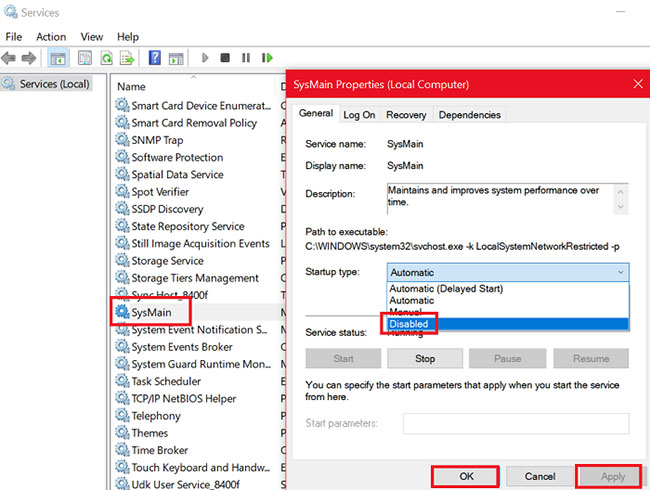
<p style="text-align: justify;"><strong>B1:</strong>&nbsp;Nhấn&nbsp;<strong>Win + R</strong>&nbsp;để mở cửa sổ&nbsp;<strong>Run</strong>&nbsp;và nhập lệnh&nbsp;<strong>services.msc.</strong></p>

<p style="text-align: justify;"><strong>B2:</strong>&nbsp;Nhấn&nbsp;<strong>Enter</strong>&nbsp;để mở cửa sổ&nbsp;<strong>Service Manager.</strong></p>

<p style="text-align: justify;"><strong>B3:</strong>&nbsp;Cuộn xuống vị trí service&nbsp;<strong>SysMain.</strong></p>

<p style="text-align: justify;"><strong>B4:</strong>&nbsp;Nhấp chuột phải vào service&nbsp;<strong>SysMain</strong>&nbsp;và chọn&nbsp;<strong>Properties.</strong></p>

<p style="text-align: justify;"><strong>B5:</strong>&nbsp;Thay đổi&nbsp;<strong>Startup Type</strong>&nbsp;thành<strong>&nbsp;Disabled</strong>.</p>

<p style="text-align: justify;"><strong>B6:</strong>&nbsp;Nhấn&nbsp;<strong>Apply</strong>&nbsp;và sau đó chọn&nbsp;<strong>OK.</strong></p>

<div style="text-align: justify;">&nbsp;</div>

<h3 style="text-align: justify;">2. Vô hiệu hóa SysMain bằng Command Prompt với quyền admin</h3>

<figure>
<div style="text-align: justify;"><img alt="Vô hiệu hóa SysMain bằng Command Prompt với quyền admin" data-i="1" data-src="https://st.quantrimang.com/photos/image/2020/10/28/service-host-sysmain-su-dung-nhieu-cpu-va-bo-nho-2.jpg" data-was-processed="true" height="150" src="https://st.quantrimang.com/photos/image/2020/10/28/service-host-sysmain-su-dung-nhieu-cpu-va-bo-nho-2.jpg" width="650" /></div>

<figcaption>
<div style="text-align: justify;">Vô hiệu hóa SysMain bằng Command Prompt với quyền admin</div>
</figcaption>
</figure>

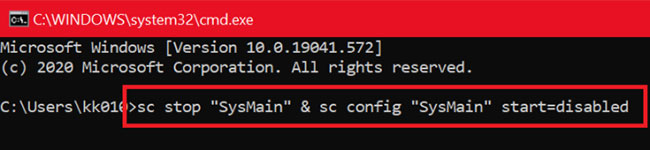
<p style="text-align: justify;">Phương pháp liên quan đến&nbsp;Command Prompt&nbsp;dễ dàng hơn vì tất cả những gì bạn cần làm là sao chép và dán một lệnh.</p>

<p style="text-align: justify;">Tìm “<strong>command prompt</strong>” trong thanh tìm kiếm Windows.</p>

<p style="text-align: justify;">Nhấp chuột phải vào kết quả&nbsp;<strong>Command Prompt</strong>&nbsp;và chọn&nbsp;<strong>Run as administrator</strong>&nbsp;để&nbsp;mở Command Prompt với quyền admin.</p>

<p style="text-align: justify;">Sau đó, trong cửa sổ&nbsp;<strong>Command Prompt</strong>, hãy nhập lệnh sau và nhấn&nbsp;<strong>Enter</strong>:</p>

<pre id="pre0">
<code>sc stop &quot;SysMain&quot; &amp; sc config &quot;SysMain&quot; start=disabled</code></pre>

<p style="text-align: justify;">Khi bạn nhận được thông báo&nbsp;<strong>SUCCESS</strong>, công việc coi như đã hoàn thành.</p>

<p style="text-align: justify;">Hãy&nbsp;khởi động lại máy tính!</p>

<h3 style="text-align: justify;">3. Vô hiệu hóa SysMain bằng Registry Editor</h3>

<figure>
<div style="text-align: justify;"><img alt="Vô hiệu hóa SysMain bằng Registry Editor" data-i="2" data-src="https://st.quantrimang.com/photos/image/2020/10/28/service-host-sysmain-su-dung-nhieu-cpu-va-bo-nho-3.jpg" data-was-processed="true" height="541" src="https://st.quantrimang.com/photos/image/2020/10/28/service-host-sysmain-su-dung-nhieu-cpu-va-bo-nho-3.jpg" width="650" /></div>

<figcaption>
<div style="text-align: justify;">Vô hiệu hóa SysMain bằng Registry Editor</div>
</figcaption>
</figure>

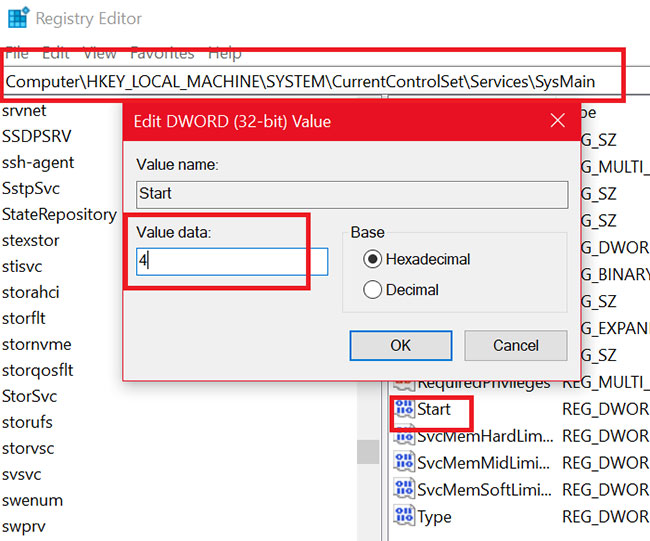
<p style="text-align: justify;">Registry Editor là một công cụ tuyệt vời để thực hiện các thay đổi lâu dài đối với hệ thống. Quy trình vô hiệu hóa service SysMain thông qua Registry Editor như sau:</p>

<p style="text-align: justify;">Nhấn&nbsp;<strong>Win + R</strong>&nbsp;để mở cửa sổ&nbsp;<strong>Run</strong>&nbsp;và gõ lệnh&nbsp;<strong>regedit.</strong>&nbsp;Nhấn&nbsp;<strong>Enter</strong>&nbsp;để&nbsp;mở cửa sổ Registry Editor.</p>

<p style="text-align: justify;">Đi tới đường dẫn sau trong Registry Editor:</p>

<pre id="pre1">
<code>HKEY_LOCAL_MACHINE\SYSTEM\CurrentControlSet\Services\SysMain</code></pre>

<p style="text-align: justify;">Ở bên phải, nhấp đúp vào giá trị&nbsp;<strong>Start.</strong></p>

<p style="text-align: justify;">Thay đổi giá trị của&nbsp;<strong>Value Data</strong>&nbsp;thành&nbsp;<strong>4</strong>&nbsp;và nhấp vào&nbsp;<strong>OK</strong>&nbsp;để lưu cài đặt.</p>
		</div>
				<div id="author">
						<p>
				<strong>Nguồn tin:</strong>
				Quantrimang.com
			</p>
		</div>
	</div>
	<div id="footer" class="clearfix">
		<div id="url">
			<strong>URL của bản tin này: </strong><a href="https://www.nguoicodonvn2008.info/vi/news/savefile/kien-thuc-may-tinh/khac-phuc-tinh-trang-service-host-sysmain-su-dung-nhieu-cpu-va-bo-nho-trong-windows-10-2970.html" title="Khắc phục tình trạng Service Host SysMain sử dụng nhiều CPU và bộ nhớ trong Windows 10">https://www.nguoicodonvn2008.info/vi/news/savefile/kien-thuc-may-tinh/khac-phuc-tinh-trang-service-host-sysmain-su-dung-nhieu-cpu-va-bo-nho-trong-windows-10-2970.html</a>

		</div>
		<div class="clear"></div>
		<div class="copyright">
			&copy; .&#x3A; Nguoicodonvn2008.info - Cõi lòng người cô đơn &#x3A;.
		</div>
		<div id="contact">
			<a href="mailto:admin@nguoicodonvn2008.info">admin@nguoicodonvn2008.info</a>
		</div>
	</div>
</div>
        <div id="timeoutsess" class="chromeframe">
            Bạn đã không sử dụng Site, <a onclick="timeoutsesscancel();" href="https://www.nguoicodonvn2008.info/#">Bấm vào đây để duy trì trạng thái đăng nhập</a>. Thời gian chờ: <span id="secField"> 60 </span> giây
        </div>
        <div id="openidResult" class="nv-alert" style="display:none"></div>
        <div id="openidBt" data-result="" data-redirect=""></div>
		</script>
		<div class="car-top">
  <span><img src="https://www.nguoicodonvn2008.info/themes/default/images/car.png" alt=""></span>
</div>
<script src="https://www.nguoicodonvn2008.info/assets/js/jquery/jquery.min.js"></script>
<script>var nv_base_siteurl="/",nv_lang_data="vi",nv_lang_interface="vi",nv_name_variable="nv",nv_fc_variable="op",nv_lang_variable="language",nv_module_name="news",nv_func_name="savefile",nv_is_user=0, nv_my_ofs=-4,nv_my_abbr="EDT",nv_cookie_prefix="nv4c_e856T",nv_check_pass_mstime=1738000,nv_area_admin=0,nv_safemode=0,theme_responsive=0,nv_recaptcha_ver=2,nv_recaptcha_sitekey="",nv_recaptcha_type="image",XSSsanitize=1;</script>
<script src="https://www.nguoicodonvn2008.info/assets/js/language/vi.js"></script>
<script src="https://www.nguoicodonvn2008.info/assets/js/DOMPurify/purify3.js"></script>
<script src="https://www.nguoicodonvn2008.info/assets/js/global.js"></script>
<script src="https://www.nguoicodonvn2008.info/assets/js/site.js"></script>
<script src="https://www.nguoicodonvn2008.info/themes/default/js/news.js"></script>
<script src="https://www.nguoicodonvn2008.info/themes/default/js/main.js"></script>
<script src="https://www.nguoicodonvn2008.info/themes/default/js/custom.js"></script>
<script type="application/ld+json">
        {
            "@context": "https://schema.org",
            "@type": "Organization",
            "url": "https://www.nguoicodonvn2008.info",
            "logo": "https://www.nguoicodonvn2008.info/uploads/angel.gif"
        }
        </script>
<script src="https://www.nguoicodonvn2008.info/themes/default/js/bootstrap.min.js"></script>
<script type="text/javascript">
var $scrolltop = $('.car-top');
$scrolltop.on('click', function () {
    $('html,body').animate({
        scrollTop: 0
    }, 800);
    $(this).addClass("car-run");
    setTimeout(function(){ $scrolltop.removeClass('car-run');}, 1000);
    return false;
});
$(window).on('scroll', function ()
{ 
    if($(window).scrollTop() >= 200)
    {
        $scrolltop.addClass("show");
        $scrolltop.addClass("car-down");
    }
    else
    {
       $scrolltop.removeClass("show");
       setTimeout(function(){ $scrolltop.removeClass('car-down');}, 300);
    }
});
</script>
</body>
</html>