<!DOCTYPE html>
    <html lang="vi" xmlns="http://www.w3.org/1999/xhtml" prefix="og: http://ogp.me/ns#">
    <head>
<title>Khắc phục lỗi &quot;The Driver Being Installed Is Not Validated&quot; trên Windows</title>
<meta name="description" content="Khắc phục lỗi &quot;The Driver Being Installed Is Not Validated&quot; trên Windows - Savefile - Tin Tức -...">
<meta name="author" content=".: Nguoicodonvn2008.info - Cõi lòng người cô đơn :.">
<meta name="copyright" content=".: Nguoicodonvn2008.info - Cõi lòng người cô đơn :. [admin@nguoicodonvn2008.info]">
<meta name="robots" content="index, archive, follow, noodp">
<meta name="googlebot" content="index,archive,follow,noodp">
<meta name="msnbot" content="all,index,follow">
<meta name="generator" content="NukeViet v4.5">
<meta http-equiv="Content-Type" content="text/html; charset=utf-8">
<meta property="og:title" content="Khắc phục lỗi &quot;The Driver Being Installed Is Not Validated&quot; trên Windows">
<meta property="og:type" content="website">
<meta property="og:description" content="Savefile - Tin Tức -...">
<meta property="og:site_name" content=".&#x3A; Nguoicodonvn2008.info - Cõi lòng người cô đơn &#x3A;.">
<meta property="og:url" content="https://www.nguoicodonvn2008.info/vi/news/savefile/kien-thuc-may-tinh/khac-phuc-loi-the-driver-being-installed-is-not-validated-tren-windows-2506.html">
<link rel="shortcut icon" href="https://www.nguoicodonvn2008.info/favicon.ico">
<link rel="canonical" href="https://www.nguoicodonvn2008.info/vi/news/savefile/kien-thuc-may-tinh/khac-phuc-loi-the-driver-being-installed-is-not-validated-tren-windows-2506.html">
<link rel="alternate" href="https://www.nguoicodonvn2008.info/vi/news/rss/" title="Tin Tức" type="application/rss+xml">
<link rel="alternate" href="https://www.nguoicodonvn2008.info/vi/news/rss/karaoke-dual/" title="Tin Tức - Karaoke Dual" type="application/rss+xml">
<link rel="alternate" href="https://www.nguoicodonvn2008.info/vi/news/rss/nhac-tre/" title="Tin Tức - Nhạc trẻ" type="application/rss+xml">
<link rel="alternate" href="https://www.nguoicodonvn2008.info/vi/news/rss/tru-tinh/" title="Tin Tức - Trữ tình" type="application/rss+xml">
<link rel="alternate" href="https://www.nguoicodonvn2008.info/vi/news/rss/nuoc-ngoai/" title="Tin Tức - Nước ngoài" type="application/rss+xml">
<link rel="alternate" href="https://www.nguoicodonvn2008.info/vi/news/rss/remix/" title="Tin Tức - Remix" type="application/rss+xml">
<link rel="alternate" href="https://www.nguoicodonvn2008.info/vi/news/rss/tam-su-tinh-yeu/" title="Tin Tức - Tâm sự tình yêu" type="application/rss+xml">
<link rel="alternate" href="https://www.nguoicodonvn2008.info/vi/news/rss/tho-suu-tam/" title="Tin Tức - Thơ sưu tầm" type="application/rss+xml">
<link rel="alternate" href="https://www.nguoicodonvn2008.info/vi/news/rss/cuoc-song/" title="Tin Tức - Cuộc sống" type="application/rss+xml">
<link rel="alternate" href="https://www.nguoicodonvn2008.info/vi/news/rss/phan-mem/" title="Tin Tức - Phần mềm" type="application/rss+xml">
<link rel="alternate" href="https://www.nguoicodonvn2008.info/vi/news/rss/kien-thuc-may-tinh/" title="Tin Tức - Kiến thức máy tính" type="application/rss+xml">
<link rel="alternate" href="https://www.nguoicodonvn2008.info/vi/news/rss/hoc-tap/" title="Tin Tức - Học tập" type="application/rss+xml">
<link rel="alternate" href="https://www.nguoicodonvn2008.info/vi/news/rss/tai-lieu/" title="Tin Tức - Tài liệu" type="application/rss+xml">
<link rel="alternate" href="https://www.nguoicodonvn2008.info/vi/news/rss/de-thi/" title="Tin Tức - Đề thi" type="application/rss+xml">
<link rel="preload" as="style" href="https://www.nguoicodonvn2008.info/assets/css/font-awesome.min.css" type="text/css">
<link rel="preload" as="style" href="https://www.nguoicodonvn2008.info/themes/default/css/bootstrap.non-responsive.css" type="text/css">
<link rel="preload" as="style" href="https://www.nguoicodonvn2008.info/themes/default/css/style.css" type="text/css">
<link rel="preload" as="style" href="https://www.nguoicodonvn2008.info/themes/default/css/style.non-responsive.css" type="text/css">
<link rel="preload" as="style" href="https://www.nguoicodonvn2008.info/themes/default/css/news.css" type="text/css">
<link rel="preload" as="style" href="https://www.nguoicodonvn2008.info/themes/default/css/custom.css" type="text/css">
<link rel="preload" as="script" href="https://www.nguoicodonvn2008.info/assets/js/jquery/jquery.min.js" type="text/javascript">
<link rel="preload" as="script" href="https://www.nguoicodonvn2008.info/assets/js/language/vi.js" type="text/javascript">
<link rel="preload" as="script" href="https://www.nguoicodonvn2008.info/assets/js/DOMPurify/purify3.js" type="text/javascript">
<link rel="preload" as="script" href="https://www.nguoicodonvn2008.info/assets/js/global.js" type="text/javascript">
<link rel="preload" as="script" href="https://www.nguoicodonvn2008.info/assets/js/site.js" type="text/javascript">
<link rel="preload" as="script" href="https://www.nguoicodonvn2008.info/themes/default/js/news.js" type="text/javascript">
<link rel="preload" as="script" href="https://www.nguoicodonvn2008.info/themes/default/js/main.js" type="text/javascript">
<link rel="preload" as="script" href="https://www.nguoicodonvn2008.info/themes/default/js/custom.js" type="text/javascript">
<link rel="preload" as="script" href="https://www.nguoicodonvn2008.info/themes/default/js/bootstrap.min.js" type="text/javascript">
<link rel="stylesheet" href="https://www.nguoicodonvn2008.info/assets/css/font-awesome.min.css">
<link rel="stylesheet" href="https://www.nguoicodonvn2008.info/themes/default/css/bootstrap.non-responsive.css">
<link rel="stylesheet" href="https://www.nguoicodonvn2008.info/themes/default/css/style.css">
<link rel="stylesheet" href="https://www.nguoicodonvn2008.info/themes/default/css/style.non-responsive.css">
<link rel="StyleSheet" href="https://www.nguoicodonvn2008.info/themes/default/css/news.css">
<link rel="stylesheet" href="https://www.nguoicodonvn2008.info/themes/default/css/custom.css">
<style type="text/css">
	body{background: #fff;}
</style>
    </head>
    <body>
<div id="print">
	<div id="hd_print">
		<h2 class="pull-left">.&#x3A; Nguoicodonvn2008.info - Cõi lòng người cô đơn &#x3A;.</h2>
		<p class="pull-right"><a title=".&#x3A; Nguoicodonvn2008.info - Cõi lòng người cô đơn &#x3A;." href="https://www.nguoicodonvn2008.info/">https://www.nguoicodonvn2008.info</a></p>
	</div>
	<div class="clear"></div>
	<hr />
	<div id="content">
		<h1>Khắc phục lỗi &quot;The Driver Being Installed Is Not Validated&quot; trên Windows</h1>
		<ul class="list-inline">
			<li>Thứ tư - 12/08/2020 00:52</li>
			<li class="hidden-print txtrequired"><em class="fa fa-print">&nbsp;</em><a title="In ra" href="javascript:;" onclick="window.print()">In ra</a></li>
			<li class="hidden-print txtrequired"><em class="fa fa-power-off">&nbsp;</em><a title="Đóng cửa sổ này" href="javascript:;" onclick="window.close()">Đóng cửa sổ này</a></li>
		</ul>
		<div class="clear"></div>
		<div id="hometext">
		</div>
				<div class="imghome">
			<img alt="Khắc phục lỗi &quot;The Driver Being Installed Is Not Validated&quot; trên Windows" src="https://st.quantrimang.com/photos/image/2020/08/12/loi-the-driver-being-installed-is-not-validated-4.jpg" width="460" class="img-thumbnail" />
		</div>
		<div class="clear"></div>
		<div id="bodytext" class="clearfix">
			<p style="text-align: justify;">Nếu cố gắng cài đặt driver của Intel trên một máy tính được build sẵn, rất có thể bạn sẽ thấy thông báo lỗi có nội dung: “The driver being installed is not validated for this computer” và không có tùy chọn để cài đặt driver. Tuy nhiên, đừng bỏ cuộc - có một cách bạn có thể cài đặt driver và khắc phục lỗi này.</p>

<h2 style="text-align: justify;">Nguyên nhân gây ra lỗi &quot;The Driver Being Installed Is Not Validated&quot;</h2>

<p style="text-align: justify;">Lỗi này xuất hiện do bạn đang cố gắng cài đặt các driver mà nhà sản xuất không cung cấp trực tiếp. Khi nhà sản xuất chế tạo PC hoặc laptop, họ thường có một thiết lập đặc biệt giữa phần cứng và driver.</p>

<p style="text-align: justify;">Do đó, nếu bạn cố gắng cài đặt driver mà nhà sản xuất chưa chính thức xác nhận, máy tính sẽ cho bạn biết rằng driver đó chưa được xác minh. Rất tiếc, không có nút&nbsp;<strong>“Install anyway”</strong>trên lỗi xuất hiện. Tuy nhiên, bạn có thể cài đặt driver theo cách khác - chỉ cần biết rằng nhà sản xuất chặn tải xuống driver chưa được xác minh là có lý do!</p>

<div style="text-align: justify;">&nbsp;</div>

<h2 style="text-align: justify;">Cách khắc phục lỗi &quot;The Driver Being Installed Is Not Validated&quot;</h2>

<p style="text-align: justify;">Nếu bạn gặp phải lỗi này và vẫn muốn cài đặt driver, không thể sử dụng phương pháp cài đặt dễ dàng để thực hiện việc này. Khi bạn tải xuống và chạy file EXE, máy tính sẽ dừng nó.</p>

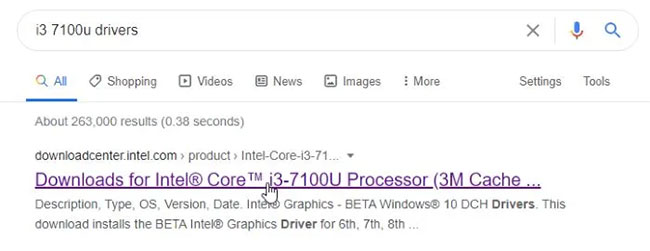
<p style="text-align: justify;">Để khắc phục điều này, trước tiên hãy tìm driver bạn muốn cài đặt trên trang web của Intel. Đối với bài viết này, tác giả bài viết sẽ cập nhật i3 7100u, vì vậy tác giả đã tìm kiếm&nbsp;<strong>“driver i3 7100u”</strong>&nbsp;và nhấp vào liên kết Intel xuất hiện.</p>

<figure>
<div style="text-align: justify;"><img alt="Tìm kiếm “driver i3 7100u”" data-i="0" data-src="https://st.quantrimang.com/photos/image/2020/08/12/loi-the-driver-being-installed-is-not-validated-1.jpg" data-was-processed="true" height="251" src="https://st.quantrimang.com/photos/image/2020/08/12/loi-the-driver-being-installed-is-not-validated-1.jpg" width="650" /></div>

<figcaption>
<div style="text-align: justify;">Tìm kiếm “driver i3 7100u”</div>
</figcaption>
</figure>

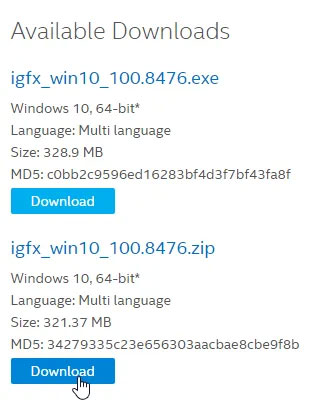
<p style="text-align: justify;">Chọn driver bạn muốn cài đặt từ danh sách. Sau đó, bước quan trọng nhất, khi bạn có thể chọn tải xuống EXE hoặc ZIP, hãy chọn file ZIP.</p>

<figure>
<div style="text-align: justify;"><img alt="Chọn file ZIP" data-i="1" data-src="https://st.quantrimang.com/photos/image/2020/08/12/loi-the-driver-being-installed-is-not-validated-2.jpg" data-was-processed="true" height="411" src="https://st.quantrimang.com/photos/image/2020/08/12/loi-the-driver-being-installed-is-not-validated-2.jpg" width="321" /></div>

<figcaption>
<div style="text-align: justify;">Chọn file ZIP</div>
</figcaption>
</figure>

<p style="text-align: justify;">Trong khi tải xuống, hãy nhấn nút&nbsp;<strong>Start</strong>, nhập&nbsp;<strong>Device Manager</strong>&nbsp;và nhấn&nbsp;<code>Enter</code>.</p>

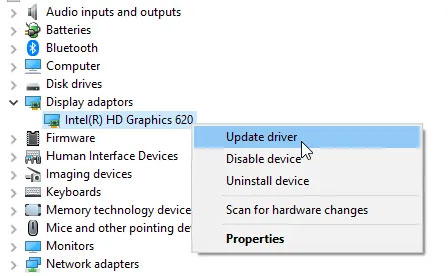
<p style="text-align: justify;">Mở rộng danh mục&nbsp;<strong>Display adaptors</strong>, nhấp chuột phải vào driver đồ họa và chọn&nbsp;<strong>Update driver.</strong></p>

<figure>
<div style="text-align: justify;"><img alt="Nhấp chuột phải vào driver đồ họa và chọn Update driver" data-i="2" data-src="https://st.quantrimang.com/photos/image/2020/08/12/loi-the-driver-being-installed-is-not-validated-3.jpg" data-was-processed="true" height="276" src="https://st.quantrimang.com/photos/image/2020/08/12/loi-the-driver-being-installed-is-not-validated-3.jpg" width="448" /></div>

<figcaption>
<div style="text-align: justify;">Nhấp chuột phải vào driver đồ họa và chọn Update driver</div>
</figcaption>
</figure>

<p style="text-align: justify;">Chọn&nbsp;<strong>Browse my computer for driver software</strong>.</p>

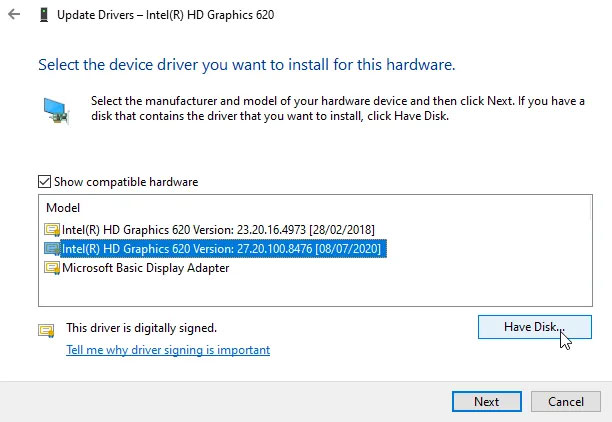
<p style="text-align: justify;">Trên menu tiếp theo, đừng duyệt tìm bất kỳ file nào. Thay vào đó, hãy chọn&nbsp;<strong>Let me pick from a list of available drivers for my computer</strong>.</p>

<p style="text-align: justify;">Chọn adapter đồ họa, sau đó nhấp vào&nbsp;<strong>Have Disk.</strong></p>

<figure>
<div style="text-align: justify;"><img alt="Nhấp vào Have Disk" data-i="3" data-src="https://st.quantrimang.com/photos/image/2020/08/12/loi-the-driver-being-installed-is-not-validated-4.jpg" data-was-processed="true" height="422" src="https://st.quantrimang.com/photos/image/2020/08/12/loi-the-driver-being-installed-is-not-validated-4.jpg" width="612" /></div>

<figcaption>
<div style="text-align: justify;">Nhấp vào Have Disk</div>
</figcaption>
</figure>

<p style="text-align: justify;">Trên menu tiếp theo, hãy đảm bảo rằng file ZIP được tải xuống và giải nén trước khi bạn tiếp tục. Duyệt đến thư mục bạn đã giải nén và đi vào thư mục&nbsp;<strong>Graphics.</strong></p>

<p style="text-align: justify;">Tại đây, bạn sẽ thấy một số file DDL để lựa chọn. Bạn cần phải chọn một file tùy thuộc vào thiết bị bạn có.</p>

<p style="text-align: justify;">Rất tiếc, dường như không có câu trả lời chung cho tất cả các driver. Ví dụ, một số người nói rằng hãy tìm một file có tên là&nbsp;<strong>“igdlh64.inf”</strong>&nbsp;hoặc&nbsp;<strong>“igdlh32.inf”.</strong>&nbsp;Một vài người khác nói rằng hãy tìm một file kết thúc bằng 64 hoặc 32 và chọn file phù hợp với hệ thống&nbsp;32 hoặc 64-bitcủa bạn.</p>

<p style="text-align: justify;">Thật không may cho 7100u trong ví dụ, cả hai tùy chọn đều không xuất hiện. Sau một hồi tìm kiếm, tác giả phát hiện ra mình cần file&nbsp;<strong>“iigd_dch.inf”</strong>, vì vậy ví dụ đã sử dụng file đó. Khi bạn chọn đúng file, nó sẽ cài đặt driver mà không có thông báo lỗi.</p>

<h2 style="text-align: justify;">Vượt qua các giới hạn về driver của Intel</h2>

<p style="text-align: justify;">Như bạn có thể thấy, thật dễ dàng để giải quyết lỗi “The driver being installed is not validated” trong Windows. Chỉ cần nhớ rằng các nhà sản xuất ngăn bạn cài đặt driver vì họ chưa xác minh nó. Nếu bạn vẫn kiên quyết về việc cài đặt driver, bạn có thể khắc phục lỗi này bằng cách tự cài đặt driver.</p>

<p style="text-align: justify;">Nếu bạn đang gặp sự cố về driver, bạn có thể xem driver Windows được cập nhật gần đây hoặc kiểm tra driver bị lỗi bằng&nbsp;Driver Verifier.</p>
		</div>
				<div id="author">
						<p>
				<strong>Nguồn tin:</strong>
				Quantrimang.com
			</p>
		</div>
	</div>
	<div id="footer" class="clearfix">
		<div id="url">
			<strong>URL của bản tin này: </strong><a href="https://www.nguoicodonvn2008.info/vi/news/savefile/kien-thuc-may-tinh/khac-phuc-loi-the-driver-being-installed-is-not-validated-tren-windows-2506.html" title="Khắc phục lỗi &quot;The Driver Being Installed Is Not Validated&quot; trên Windows">https://www.nguoicodonvn2008.info/vi/news/savefile/kien-thuc-may-tinh/khac-phuc-loi-the-driver-being-installed-is-not-validated-tren-windows-2506.html</a>

		</div>
		<div class="clear"></div>
		<div class="copyright">
			&copy; .&#x3A; Nguoicodonvn2008.info - Cõi lòng người cô đơn &#x3A;.
		</div>
		<div id="contact">
			<a href="mailto:admin@nguoicodonvn2008.info">admin@nguoicodonvn2008.info</a>
		</div>
	</div>
</div>
        <div id="timeoutsess" class="chromeframe">
            Bạn đã không sử dụng Site, <a onclick="timeoutsesscancel();" href="https://www.nguoicodonvn2008.info/#">Bấm vào đây để duy trì trạng thái đăng nhập</a>. Thời gian chờ: <span id="secField"> 60 </span> giây
        </div>
        <div id="openidResult" class="nv-alert" style="display:none"></div>
        <div id="openidBt" data-result="" data-redirect=""></div>
		</script>
		<div class="car-top">
  <span><img src="https://www.nguoicodonvn2008.info/themes/default/images/car.png" alt=""></span>
</div>
<script src="https://www.nguoicodonvn2008.info/assets/js/jquery/jquery.min.js"></script>
<script>var nv_base_siteurl="/",nv_lang_data="vi",nv_lang_interface="vi",nv_name_variable="nv",nv_fc_variable="op",nv_lang_variable="language",nv_module_name="news",nv_func_name="savefile",nv_is_user=0, nv_my_ofs=-4,nv_my_abbr="EDT",nv_cookie_prefix="nv4c_e856T",nv_check_pass_mstime=1738000,nv_area_admin=0,nv_safemode=0,theme_responsive=0,nv_recaptcha_ver=2,nv_recaptcha_sitekey="",nv_recaptcha_type="image",XSSsanitize=1;</script>
<script src="https://www.nguoicodonvn2008.info/assets/js/language/vi.js"></script>
<script src="https://www.nguoicodonvn2008.info/assets/js/DOMPurify/purify3.js"></script>
<script src="https://www.nguoicodonvn2008.info/assets/js/global.js"></script>
<script src="https://www.nguoicodonvn2008.info/assets/js/site.js"></script>
<script src="https://www.nguoicodonvn2008.info/themes/default/js/news.js"></script>
<script src="https://www.nguoicodonvn2008.info/themes/default/js/main.js"></script>
<script src="https://www.nguoicodonvn2008.info/themes/default/js/custom.js"></script>
<script type="application/ld+json">
        {
            "@context": "https://schema.org",
            "@type": "Organization",
            "url": "https://www.nguoicodonvn2008.info",
            "logo": "https://www.nguoicodonvn2008.info/uploads/angel.gif"
        }
        </script>
<script src="https://www.nguoicodonvn2008.info/themes/default/js/bootstrap.min.js"></script>
<script type="text/javascript">
var $scrolltop = $('.car-top');
$scrolltop.on('click', function () {
    $('html,body').animate({
        scrollTop: 0
    }, 800);
    $(this).addClass("car-run");
    setTimeout(function(){ $scrolltop.removeClass('car-run');}, 1000);
    return false;
});
$(window).on('scroll', function ()
{ 
    if($(window).scrollTop() >= 200)
    {
        $scrolltop.addClass("show");
        $scrolltop.addClass("car-down");
    }
    else
    {
       $scrolltop.removeClass("show");
       setTimeout(function(){ $scrolltop.removeClass('car-down');}, 300);
    }
});
</script>
</body>
</html>