<!DOCTYPE html>
    <html lang="vi" xmlns="http://www.w3.org/1999/xhtml" prefix="og: http://ogp.me/ns#">
    <head>
<title>Khắc phục lỗi cài đặt trùng lặp driver cũ trên Windows Update</title>
<meta name="description" content="Khắc phục lỗi cài đặt trùng lặp driver cũ trên Windows Update - Savefile - Tin Tức -...">
<meta name="author" content=".: Nguoicodonvn2008.info - Cõi lòng người cô đơn :.">
<meta name="copyright" content=".: Nguoicodonvn2008.info - Cõi lòng người cô đơn :. [admin@nguoicodonvn2008.info]">
<meta name="robots" content="index, archive, follow, noodp">
<meta name="googlebot" content="index,archive,follow,noodp">
<meta name="msnbot" content="all,index,follow">
<meta name="generator" content="NukeViet v4.5">
<meta http-equiv="Content-Type" content="text/html; charset=utf-8">
<meta property="og:title" content="Khắc phục lỗi cài đặt trùng lặp driver cũ trên Windows Update">
<meta property="og:type" content="website">
<meta property="og:description" content="Savefile - Tin Tức - https&#x3A;&#x002F;&#x002F;www.nguoicodonvn2008.info&#x002F;vi&#x002F;news&#x002F;savefile&#x002F;kien-thuc-may-tinh&#x002F;khac-phuc-loi-cai-dat-trung-lap-driver-cu-tren-windows-update-2217.html">
<meta property="og:site_name" content=".&#x3A; Nguoicodonvn2008.info - Cõi lòng người cô đơn &#x3A;.">
<meta property="og:url" content="https://www.nguoicodonvn2008.info/vi/news/savefile/kien-thuc-may-tinh/khac-phuc-loi-cai-dat-trung-lap-driver-cu-tren-windows-update-2217.html">
<link rel="shortcut icon" href="https://www.nguoicodonvn2008.info/favicon.ico">
<link rel="canonical" href="https://www.nguoicodonvn2008.info/vi/news/savefile/kien-thuc-may-tinh/khac-phuc-loi-cai-dat-trung-lap-driver-cu-tren-windows-update-2217.html">
<link rel="alternate" href="https://www.nguoicodonvn2008.info/vi/news/rss/" title="Tin Tức" type="application/rss+xml">
<link rel="alternate" href="https://www.nguoicodonvn2008.info/vi/news/rss/karaoke-dual/" title="Tin Tức - Karaoke Dual" type="application/rss+xml">
<link rel="alternate" href="https://www.nguoicodonvn2008.info/vi/news/rss/nhac-tre/" title="Tin Tức - Nhạc trẻ" type="application/rss+xml">
<link rel="alternate" href="https://www.nguoicodonvn2008.info/vi/news/rss/tru-tinh/" title="Tin Tức - Trữ tình" type="application/rss+xml">
<link rel="alternate" href="https://www.nguoicodonvn2008.info/vi/news/rss/nuoc-ngoai/" title="Tin Tức - Nước ngoài" type="application/rss+xml">
<link rel="alternate" href="https://www.nguoicodonvn2008.info/vi/news/rss/remix/" title="Tin Tức - Remix" type="application/rss+xml">
<link rel="alternate" href="https://www.nguoicodonvn2008.info/vi/news/rss/tam-su-tinh-yeu/" title="Tin Tức - Tâm sự tình yêu" type="application/rss+xml">
<link rel="alternate" href="https://www.nguoicodonvn2008.info/vi/news/rss/tho-suu-tam/" title="Tin Tức - Thơ sưu tầm" type="application/rss+xml">
<link rel="alternate" href="https://www.nguoicodonvn2008.info/vi/news/rss/cuoc-song/" title="Tin Tức - Cuộc sống" type="application/rss+xml">
<link rel="alternate" href="https://www.nguoicodonvn2008.info/vi/news/rss/phan-mem/" title="Tin Tức - Phần mềm" type="application/rss+xml">
<link rel="alternate" href="https://www.nguoicodonvn2008.info/vi/news/rss/kien-thuc-may-tinh/" title="Tin Tức - Kiến thức máy tính" type="application/rss+xml">
<link rel="alternate" href="https://www.nguoicodonvn2008.info/vi/news/rss/hoc-tap/" title="Tin Tức - Học tập" type="application/rss+xml">
<link rel="alternate" href="https://www.nguoicodonvn2008.info/vi/news/rss/tai-lieu/" title="Tin Tức - Tài liệu" type="application/rss+xml">
<link rel="alternate" href="https://www.nguoicodonvn2008.info/vi/news/rss/de-thi/" title="Tin Tức - Đề thi" type="application/rss+xml">
<link rel="preload" as="style" href="https://www.nguoicodonvn2008.info/assets/css/font-awesome.min.css" type="text/css">
<link rel="preload" as="style" href="https://www.nguoicodonvn2008.info/themes/default/css/bootstrap.non-responsive.css" type="text/css">
<link rel="preload" as="style" href="https://www.nguoicodonvn2008.info/themes/default/css/style.css" type="text/css">
<link rel="preload" as="style" href="https://www.nguoicodonvn2008.info/themes/default/css/style.non-responsive.css" type="text/css">
<link rel="preload" as="style" href="https://www.nguoicodonvn2008.info/themes/default/css/news.css" type="text/css">
<link rel="preload" as="style" href="https://www.nguoicodonvn2008.info/themes/default/css/custom.css" type="text/css">
<link rel="preload" as="script" href="https://www.nguoicodonvn2008.info/assets/js/jquery/jquery.min.js" type="text/javascript">
<link rel="preload" as="script" href="https://www.nguoicodonvn2008.info/assets/js/language/vi.js" type="text/javascript">
<link rel="preload" as="script" href="https://www.nguoicodonvn2008.info/assets/js/DOMPurify/purify3.js" type="text/javascript">
<link rel="preload" as="script" href="https://www.nguoicodonvn2008.info/assets/js/global.js" type="text/javascript">
<link rel="preload" as="script" href="https://www.nguoicodonvn2008.info/assets/js/site.js" type="text/javascript">
<link rel="preload" as="script" href="https://www.nguoicodonvn2008.info/themes/default/js/news.js" type="text/javascript">
<link rel="preload" as="script" href="https://www.nguoicodonvn2008.info/themes/default/js/main.js" type="text/javascript">
<link rel="preload" as="script" href="https://www.nguoicodonvn2008.info/themes/default/js/custom.js" type="text/javascript">
<link rel="preload" as="script" href="https://www.nguoicodonvn2008.info/themes/default/js/bootstrap.min.js" type="text/javascript">
<link rel="stylesheet" href="https://www.nguoicodonvn2008.info/assets/css/font-awesome.min.css">
<link rel="stylesheet" href="https://www.nguoicodonvn2008.info/themes/default/css/bootstrap.non-responsive.css">
<link rel="stylesheet" href="https://www.nguoicodonvn2008.info/themes/default/css/style.css">
<link rel="stylesheet" href="https://www.nguoicodonvn2008.info/themes/default/css/style.non-responsive.css">
<link rel="StyleSheet" href="https://www.nguoicodonvn2008.info/themes/default/css/news.css">
<link rel="stylesheet" href="https://www.nguoicodonvn2008.info/themes/default/css/custom.css">
<style type="text/css">
	body{background: #fff;}
</style>
    </head>
    <body>
<div id="print">
	<div id="hd_print">
		<h2 class="pull-left">.&#x3A; Nguoicodonvn2008.info - Cõi lòng người cô đơn &#x3A;.</h2>
		<p class="pull-right"><a title=".&#x3A; Nguoicodonvn2008.info - Cõi lòng người cô đơn &#x3A;." href="https://www.nguoicodonvn2008.info/">https://www.nguoicodonvn2008.info</a></p>
	</div>
	<div class="clear"></div>
	<hr />
	<div id="content">
		<h1>Khắc phục lỗi cài đặt trùng lặp driver cũ trên Windows Update</h1>
		<ul class="list-inline">
			<li>Thứ hai - 15/06/2020 01:00</li>
			<li class="hidden-print txtrequired"><em class="fa fa-print">&nbsp;</em><a title="In ra" href="javascript:;" onclick="window.print()">In ra</a></li>
			<li class="hidden-print txtrequired"><em class="fa fa-power-off">&nbsp;</em><a title="Đóng cửa sổ này" href="javascript:;" onclick="window.close()">Đóng cửa sổ này</a></li>
		</ul>
		<div class="clear"></div>
		<div id="hometext">
		</div>
				<div class="imghome">
			<img alt="Khắc phục lỗi cài đặt trùng lặp driver cũ trên Windows Update" src="https://st.quantrimang.com/photos/image/2020/06/14/khac-phuc-loi-cai-dat-trung-lap-driver-cu-tren-windows-update1.jpg" width="460" class="img-thumbnail" />
		</div>
		<div class="clear"></div>
		<div id="bodytext" class="clearfix">
			<p style="text-align: justify;">Cơ chế cập nhật tích hợp sẵn của Windows 10 được thiết kế để hỗ trợ cài đặt trình driver mới cho các thành phần hệ thống như màn hình, mạng, Bluetooth, v.v. Khi một thành phần cụ thể trong số này, chẳng hạn như Bluetooth không tương thích với phiên bản hệ điều hành mới, Windows Update sẽ cố gắng tìm kiếm và cài đặt gói driver phù hợp từ cửa hàng driver của Microsoft.</p>

<p style="text-align: justify;">Có thể nói sử dụng Windows Update là cách nhanh nhất và dễ nhất để&nbsp;cập nhật driver&nbsp;với các tùy chỉnh của&nbsp;OEM. Tuy nhiên công cụ hỗ trợ cập nhật này không phải lúc nào cũng hoạt động trơn tru, đặt biệt là sau khi các bản cập nhật Windows 10 lớn được triển khai. Gần đây, một số người dùng đang báo cáo rằng Windows Update liên tục cố gắng cài đặt các phiên bản driver Intel Corporation Display cũ trên hệ thống của họ.</p>

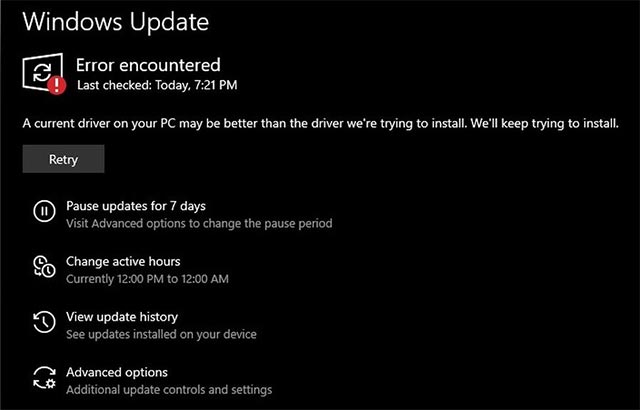
<p style="text-align: justify;">Cụ thể, theo hàng loạt các báo cáo từ người dùng Reddit và Feedback Hub trong nhiều ngày qua, Windows Update dường như đang gặp vấn đề khi liên tục cố gắng cài đặt trùng lặp các driver đồ họa cũ trên hệ thống, tạo ra một vòng lặp cài đặt khá khó hiểu.</p>

<p style="text-align: justify;"><em>“Windows Update của tôi liên tục cố gắng cài đặt phiên bản driver Intel UHD Graphics cũ, mặc dù trên thực tế, tôi đang sử dụng phiên bản driver Intel UHD Graphics mới nhất. Sự cố này dương như xuất hiện sau khi tôi cài đặt bản cập nhật Windows 10 May 2020 Update (v2004)”</em>, một người dùng báo cáo trong Feedback Hub.</p>

<figure>
<div style="text-align: justify;"><img alt="Windows Update báo lỗi" data-i="0" data-src="https://st.quantrimang.com/photos/image/2020/06/14/khac-phuc-loi-cai-dat-trung-lap-driver-cu-tren-windows-update1.jpg" data-was-processed="true" height="410" src="https://st.quantrimang.com/photos/image/2020/06/14/khac-phuc-loi-cai-dat-trung-lap-driver-cu-tren-windows-update1.jpg" width="640" /></div>

<figcaption>
<div style="text-align: justify;">Windows Update báo lỗi</div>
</figcaption>
</figure>

<p style="text-align: justify;"><em>“Windows Update của tôi đang cố gắng cài đặt Intel Corporation - Display - 26.20.100.7325 sau khi driver này đã được cài đặt thành công trước đó. Cuối cùng, nó đưa ra một lỗi cập nhật cho biết phiên bản driver tốt hơn đã được cài đặt. Nhưng trên thực tế, Windows Update dường như đang cài đặt lặp lại cùng một phiên bản driver”</em>, một người dùng khác cho biết.</p>

<p style="text-align: justify;">Trên Twitter, đội ngũ Windows Dev lưu ý rằng sự cố này nhiều khả năng bắt nguồn từ một lỗ hổng tồn tại trong bộ đệm cập nhật (update cache), và người dùng có thể khắc phục bằng cách thực hiện theo các bước sau:</p>

<ol>
	<li style="text-align: justify;">Điều hướng tới<em><strong>&nbsp;Settings &gt; Update &amp; Security &gt; Troubleshoot</strong></em>. Trong trang Troubleshoot, chọn&nbsp;<strong>Windows Update.</strong></li>
	<li style="text-align: justify;">Chọn “<strong>Run the troubleshooter</strong>”.</li>
</ol>

<p style="text-align: justify;">Ngoài ra, Microsoft cũng khuyến nghị người dùng xóa bộ đệm Windows Update bằng cách thực hiện theo các bước sau:</p>

<ul>
	<li style="text-align: justify;">Mở ứng dụng “<strong>Services</strong>” (services.msc).</li>
	<li style="text-align: justify;">Nhấp đúp chuột vào mục Windows Update và dừng tiến trình.</li>
	<li style="text-align: justify;">Mở File Explorer và điều hướng đến<strong>&nbsp;<em>C:\Windows\SoftwareDistribution\Download</em></strong></li>
	<li style="text-align: justify;">Chọn và xóa tất cả các tập tin hoặc thư mục.</li>
	<li style="text-align: justify;">Mở lại ứng dụng “<strong>Services</strong>” và khởi động lại tiến trình Windows Update.</li>
	<li style="text-align: justify;">Kiểm tra các bản cập nhật và bạn sẽ thấy driver đã biến mất.</li>
</ul>

<p style="text-align: justify;">Nếu sự cố vẫn còn, bạn cũng có thể gỡ cài đặt driver GPU Intel trong Device Manager và khởi động lại hệ thống.</p>

<p style="text-align: justify;">Sau khi khởi động lại, PC của bạn sẽ chỉ sử dụng driver cơ bản, và Windows Update sẽ có thể cài đặt trình phiên bản driver mới nhất, vốn trước đây đã bị chặn do xung đột với driver hiện có.</p>
		</div>
				<div id="author">
						<p>
				<strong>Nguồn tin:</strong>
				Quantrimang.com
			</p>
		</div>
	</div>
	<div id="footer" class="clearfix">
		<div id="url">
			<strong>URL của bản tin này: </strong><a href="https://www.nguoicodonvn2008.info/vi/news/savefile/kien-thuc-may-tinh/khac-phuc-loi-cai-dat-trung-lap-driver-cu-tren-windows-update-2217.html" title="Khắc phục lỗi cài đặt trùng lặp driver cũ trên Windows Update">https://www.nguoicodonvn2008.info/vi/news/savefile/kien-thuc-may-tinh/khac-phuc-loi-cai-dat-trung-lap-driver-cu-tren-windows-update-2217.html</a>

		</div>
		<div class="clear"></div>
		<div class="copyright">
			&copy; .&#x3A; Nguoicodonvn2008.info - Cõi lòng người cô đơn &#x3A;.
		</div>
		<div id="contact">
			<a href="mailto:admin@nguoicodonvn2008.info">admin@nguoicodonvn2008.info</a>
		</div>
	</div>
</div>
        <div id="timeoutsess" class="chromeframe">
            Bạn đã không sử dụng Site, <a onclick="timeoutsesscancel();" href="https://www.nguoicodonvn2008.info/#">Bấm vào đây để duy trì trạng thái đăng nhập</a>. Thời gian chờ: <span id="secField"> 60 </span> giây
        </div>
        <div id="openidResult" class="nv-alert" style="display:none"></div>
        <div id="openidBt" data-result="" data-redirect=""></div>
		</script>
		<div class="car-top">
  <span><img src="https://www.nguoicodonvn2008.info/themes/default/images/car.png" alt=""></span>
</div>
<div id="run_cronjobs" style="visibility:hidden;display:none;"><img alt="cron" src="/index.php?second=cronjobs&amp;p=v1HdO6j6" width="1" height="1" /></div>
<script src="https://www.nguoicodonvn2008.info/assets/js/jquery/jquery.min.js"></script>
<script>var nv_base_siteurl="/",nv_lang_data="vi",nv_lang_interface="vi",nv_name_variable="nv",nv_fc_variable="op",nv_lang_variable="language",nv_module_name="news",nv_func_name="savefile",nv_is_user=0, nv_my_ofs=-4,nv_my_abbr="EDT",nv_cookie_prefix="nv4c_e856T",nv_check_pass_mstime=1738000,nv_area_admin=0,nv_safemode=0,theme_responsive=0,nv_recaptcha_ver=2,nv_recaptcha_sitekey="",nv_recaptcha_type="image",XSSsanitize=1;</script>
<script src="https://www.nguoicodonvn2008.info/assets/js/language/vi.js"></script>
<script src="https://www.nguoicodonvn2008.info/assets/js/DOMPurify/purify3.js"></script>
<script src="https://www.nguoicodonvn2008.info/assets/js/global.js"></script>
<script src="https://www.nguoicodonvn2008.info/assets/js/site.js"></script>
<script src="https://www.nguoicodonvn2008.info/themes/default/js/news.js"></script>
<script src="https://www.nguoicodonvn2008.info/themes/default/js/main.js"></script>
<script src="https://www.nguoicodonvn2008.info/themes/default/js/custom.js"></script>
<script type="application/ld+json">
        {
            "@context": "https://schema.org",
            "@type": "Organization",
            "url": "https://www.nguoicodonvn2008.info",
            "logo": "https://www.nguoicodonvn2008.info/uploads/angel.gif"
        }
        </script>
<script src="https://www.nguoicodonvn2008.info/themes/default/js/bootstrap.min.js"></script>
<script type="text/javascript">
var $scrolltop = $('.car-top');
$scrolltop.on('click', function () {
    $('html,body').animate({
        scrollTop: 0
    }, 800);
    $(this).addClass("car-run");
    setTimeout(function(){ $scrolltop.removeClass('car-run');}, 1000);
    return false;
});
$(window).on('scroll', function ()
{ 
    if($(window).scrollTop() >= 200)
    {
        $scrolltop.addClass("show");
        $scrolltop.addClass("car-down");
    }
    else
    {
       $scrolltop.removeClass("show");
       setTimeout(function(){ $scrolltop.removeClass('car-down');}, 300);
    }
});
</script>
</body>
</html>