<!DOCTYPE html>
    <html lang="vi" xmlns="http://www.w3.org/1999/xhtml" prefix="og: http://ogp.me/ns#">
    <head>
<title>Hướng dẫn xóa đường viền bảng trong Word</title>
<meta name="description" content="Hướng dẫn xóa đường viền bảng trong Word - Savefile - Tin Tức -...">
<meta name="author" content=".: Nguoicodonvn2008.info - Cõi lòng người cô đơn :.">
<meta name="copyright" content=".: Nguoicodonvn2008.info - Cõi lòng người cô đơn :. [admin@nguoicodonvn2008.info]">
<meta name="robots" content="index, archive, follow, noodp">
<meta name="googlebot" content="index,archive,follow,noodp">
<meta name="msnbot" content="all,index,follow">
<meta name="generator" content="NukeViet v4.5">
<meta http-equiv="Content-Type" content="text/html; charset=utf-8">
<meta property="og:title" content="Hướng dẫn xóa đường viền bảng trong Word">
<meta property="og:type" content="website">
<meta property="og:description" content="Savefile - Tin Tức - https&#x3A;&#x002F;&#x002F;www.nguoicodonvn2008.info&#x002F;vi&#x002F;news&#x002F;savefile&#x002F;kien-thuc-may-tinh&#x002F;huong-dan-xoa-duong-vien-bang-trong-word-8442.html">
<meta property="og:site_name" content=".&#x3A; Nguoicodonvn2008.info - Cõi lòng người cô đơn &#x3A;.">
<meta property="og:url" content="https://www.nguoicodonvn2008.info/vi/news/savefile/kien-thuc-may-tinh/huong-dan-xoa-duong-vien-bang-trong-word-8442.html">
<link rel="shortcut icon" href="https://www.nguoicodonvn2008.info/favicon.ico">
<link rel="canonical" href="https://www.nguoicodonvn2008.info/vi/news/savefile/kien-thuc-may-tinh/huong-dan-xoa-duong-vien-bang-trong-word-8442.html">
<link rel="alternate" href="https://www.nguoicodonvn2008.info/vi/news/rss/" title="Tin Tức" type="application/rss+xml">
<link rel="alternate" href="https://www.nguoicodonvn2008.info/vi/news/rss/karaoke-dual/" title="Tin Tức - Karaoke Dual" type="application/rss+xml">
<link rel="alternate" href="https://www.nguoicodonvn2008.info/vi/news/rss/nhac-tre/" title="Tin Tức - Nhạc trẻ" type="application/rss+xml">
<link rel="alternate" href="https://www.nguoicodonvn2008.info/vi/news/rss/tru-tinh/" title="Tin Tức - Trữ tình" type="application/rss+xml">
<link rel="alternate" href="https://www.nguoicodonvn2008.info/vi/news/rss/nuoc-ngoai/" title="Tin Tức - Nước ngoài" type="application/rss+xml">
<link rel="alternate" href="https://www.nguoicodonvn2008.info/vi/news/rss/remix/" title="Tin Tức - Remix" type="application/rss+xml">
<link rel="alternate" href="https://www.nguoicodonvn2008.info/vi/news/rss/tam-su-tinh-yeu/" title="Tin Tức - Tâm sự tình yêu" type="application/rss+xml">
<link rel="alternate" href="https://www.nguoicodonvn2008.info/vi/news/rss/tho-suu-tam/" title="Tin Tức - Thơ sưu tầm" type="application/rss+xml">
<link rel="alternate" href="https://www.nguoicodonvn2008.info/vi/news/rss/cuoc-song/" title="Tin Tức - Cuộc sống" type="application/rss+xml">
<link rel="alternate" href="https://www.nguoicodonvn2008.info/vi/news/rss/phan-mem/" title="Tin Tức - Phần mềm" type="application/rss+xml">
<link rel="alternate" href="https://www.nguoicodonvn2008.info/vi/news/rss/kien-thuc-may-tinh/" title="Tin Tức - Kiến thức máy tính" type="application/rss+xml">
<link rel="alternate" href="https://www.nguoicodonvn2008.info/vi/news/rss/hoc-tap/" title="Tin Tức - Học tập" type="application/rss+xml">
<link rel="alternate" href="https://www.nguoicodonvn2008.info/vi/news/rss/tai-lieu/" title="Tin Tức - Tài liệu" type="application/rss+xml">
<link rel="alternate" href="https://www.nguoicodonvn2008.info/vi/news/rss/de-thi/" title="Tin Tức - Đề thi" type="application/rss+xml">
<link rel="preload" as="style" href="https://www.nguoicodonvn2008.info/assets/css/font-awesome.min.css" type="text/css">
<link rel="preload" as="style" href="https://www.nguoicodonvn2008.info/themes/default/css/bootstrap.non-responsive.css" type="text/css">
<link rel="preload" as="style" href="https://www.nguoicodonvn2008.info/themes/default/css/style.css" type="text/css">
<link rel="preload" as="style" href="https://www.nguoicodonvn2008.info/themes/default/css/style.non-responsive.css" type="text/css">
<link rel="preload" as="style" href="https://www.nguoicodonvn2008.info/themes/default/css/news.css" type="text/css">
<link rel="preload" as="style" href="https://www.nguoicodonvn2008.info/themes/default/css/custom.css" type="text/css">
<link rel="preload" as="script" href="https://www.nguoicodonvn2008.info/assets/js/jquery/jquery.min.js" type="text/javascript">
<link rel="preload" as="script" href="https://www.nguoicodonvn2008.info/assets/js/language/vi.js" type="text/javascript">
<link rel="preload" as="script" href="https://www.nguoicodonvn2008.info/assets/js/DOMPurify/purify3.js" type="text/javascript">
<link rel="preload" as="script" href="https://www.nguoicodonvn2008.info/assets/js/global.js" type="text/javascript">
<link rel="preload" as="script" href="https://www.nguoicodonvn2008.info/assets/js/site.js" type="text/javascript">
<link rel="preload" as="script" href="https://www.nguoicodonvn2008.info/themes/default/js/news.js" type="text/javascript">
<link rel="preload" as="script" href="https://www.nguoicodonvn2008.info/themes/default/js/main.js" type="text/javascript">
<link rel="preload" as="script" href="https://www.nguoicodonvn2008.info/themes/default/js/custom.js" type="text/javascript">
<link rel="preload" as="script" href="https://www.nguoicodonvn2008.info/themes/default/js/bootstrap.min.js" type="text/javascript">
<link rel="stylesheet" href="https://www.nguoicodonvn2008.info/assets/css/font-awesome.min.css">
<link rel="stylesheet" href="https://www.nguoicodonvn2008.info/themes/default/css/bootstrap.non-responsive.css">
<link rel="stylesheet" href="https://www.nguoicodonvn2008.info/themes/default/css/style.css">
<link rel="stylesheet" href="https://www.nguoicodonvn2008.info/themes/default/css/style.non-responsive.css">
<link rel="StyleSheet" href="https://www.nguoicodonvn2008.info/themes/default/css/news.css">
<link rel="stylesheet" href="https://www.nguoicodonvn2008.info/themes/default/css/custom.css">
<style type="text/css">
	body{background: #fff;}
</style>
    </head>
    <body>
<div id="print">
	<div id="hd_print">
		<h2 class="pull-left">.&#x3A; Nguoicodonvn2008.info - Cõi lòng người cô đơn &#x3A;.</h2>
		<p class="pull-right"><a title=".&#x3A; Nguoicodonvn2008.info - Cõi lòng người cô đơn &#x3A;." href="https://www.nguoicodonvn2008.info/">https://www.nguoicodonvn2008.info</a></p>
	</div>
	<div class="clear"></div>
	<hr />
	<div id="content">
		<h1>Hướng dẫn xóa đường viền bảng trong Word</h1>
		<ul class="list-inline">
			<li>Thứ sáu - 07/06/2024 23:38</li>
			<li class="hidden-print txtrequired"><em class="fa fa-print">&nbsp;</em><a title="In ra" href="javascript:;" onclick="window.print()">In ra</a></li>
			<li class="hidden-print txtrequired"><em class="fa fa-power-off">&nbsp;</em><a title="Đóng cửa sổ này" href="javascript:;" onclick="window.close()">Đóng cửa sổ này</a></li>
		</ul>
		<div class="clear"></div>
		<div id="hometext">
		</div>
				<div class="imghome">
			<img alt="Hướng dẫn xóa đường viền bảng trong Word" src="https://st.quantrimang.com/photos/image/2017/04/13/Word-xoa-dong-ke-boi-den.jpg" width="460" class="img-thumbnail" />
		</div>
		<div class="clear"></div>
		<div id="bodytext" class="clearfix">
			<p style="text-align: justify;">Xóa viền bảng trong Word có rất nhiều cách thực hiện khác nhau để người dùng có thể lựa chọn xóa viền bảng Word theo kiểu nào. Bạn có thể xóa viền bảng Word theo cạnh mà mình muốn để&nbsp;<a href="https://quantrimang.com/cong-nghe/cach-chia-o-trong-word-gop-o-trong-word-180450" title="Cách chia ô trong Word, gộp ô trong Word">gộp ô trong Word</a>, hoặc xóa toàn bộ viền bảng trong Word nhưng vẫn giữ lại nội dung trong bảng mà không bị ảnh hưởng. Tùy theo yêu cầu xử lý viền bảng như nào mà chúng ta lựa chọn xóa viền bảng trong Word cho phù hợp. Dưới đây là các cách xóa viền bảng trong Word.</p>

<h2 style="text-align: justify;">&nbsp;</h2>

<h2 id="mcetoc_1hvqocoh19l" style="text-align: justify;">1. Xóa viền bảng Word trong hoặc ngoài</h2>

<p style="text-align: justify;"><strong>Bước 1:</strong></p>

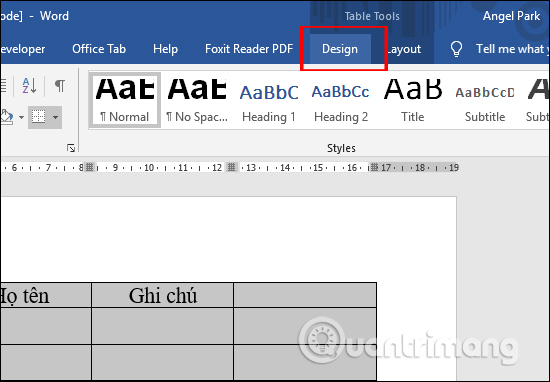
<p style="text-align: justify;">Tại bảng biểu muốn xóa đường viền, chúng ta bôi đen toàn bảng rồi nhấn vào&nbsp;<strong>tab Design</strong>&nbsp;ở phía trên cùng.</p>

<p style="text-align: justify;"><img alt="Nhấn Design" data-i="0" data-src="https://st.quantrimang.com/photos/image/2020/02/04/Word-xoa-duong-vien-bang-1.jpg" data-was-processed="true" height="382" src="https://st.quantrimang.com/photos/image/2020/02/04/Word-xoa-duong-vien-bang-1.jpg" width="550" /></p>

<p style="text-align: justify;"><strong>Bước 2:</strong></p>

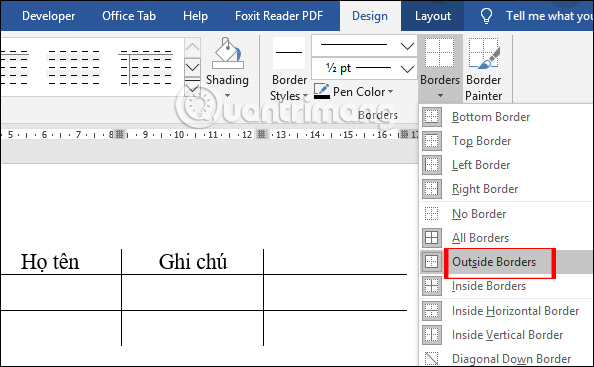
<p style="text-align: justify;">Sau đó người dùng nhấn vào&nbsp;<strong>phần Border</strong>&nbsp;rồi chọn&nbsp;<strong>Outside Borders</strong>&nbsp;để&nbsp;<strong>xóa đường viền ngoài của bảng</strong>.</p>

<p style="text-align: justify;"><img alt="Xóa đường viền ngoài " data-adbro-processed="true" data-i="1" data-src="https://st.quantrimang.com/photos/image/2020/02/04/Word-xoa-duong-vien-bang-2.jpg" data-was-processed="true" height="367" src="https://st.quantrimang.com/photos/image/2020/02/04/Word-xoa-duong-vien-bang-2.jpg" width="594" /></p>

<div style="text-align: justify;"><iframe allow="autoplay" allowtransparency="true" aria-label="Advertisement" data-google-container-id="a!2" data-google-query-id="CJ3o7K-Ky4YDFQVXDwIdS1IBBw" data-load-complete="true" frameborder="0" height="100" hspace="0" id="aswift_1" marginheight="0" marginwidth="0" name="aswift_1" sandbox="allow-scripts allow-same-origin allow-forms allow-presentation" scrolling="no" tabindex="0" title="Advertisement" vspace="0" width="694"></iframe></div>

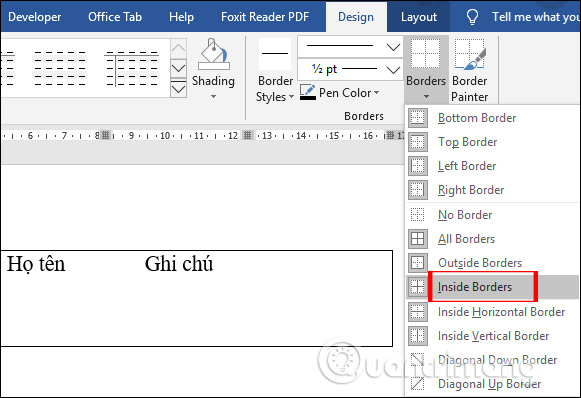
<p style="text-align: justify;">Trong trường hợp người dùng muốn&nbsp;<strong>xóa đường viền trong bảng</strong>&nbsp;thì nhấn vào&nbsp;<strong>Inside Borders</strong>.</p>

<p style="text-align: justify;"><img alt="Xóa đường viền trong " data-i="2" data-src="https://st.quantrimang.com/photos/image/2020/02/04/Word-xoa-duong-vien-bang-3.jpg" data-was-processed="true" height="398" src="https://st.quantrimang.com/photos/image/2020/02/04/Word-xoa-duong-vien-bang-3.jpg" width="581" /></p>

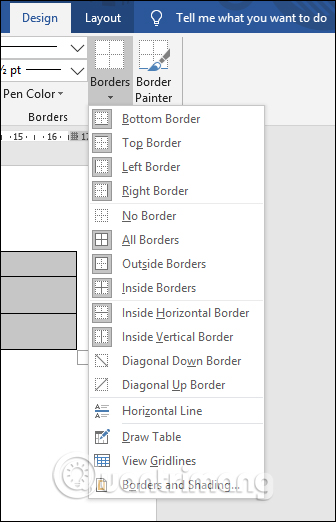
<p style="text-align: justify;">Ngoài ra tại danh sách khi nhấn vào Borders bạn sẽ thấy có nhiều tùy chọn để xóa đường viền khác nhau.</p>

<ul>
	<li style="text-align: justify;">Bottom Border: Xóa đường viền trong bảng ở dưới cùng.</li>
	<li style="text-align: justify;">Top Border: Xóa đường viền trong bảng ở trên cùng.</li>
	<li style="text-align: justify;">Left Border: Xóa đường viền của bảng ở bên trái.</li>
	<li style="text-align: justify;">Right Border: Xóa đường viền của bảng bên tay phải.</li>
	<li style="text-align: justify;">No Border: Xóa toàn bộ đường viền của bảng nhưng vẫn giữ lại văn bản phía trong.</li>
	<li style="text-align: justify;">All Borders: Xóa tất cả đường kẻ của bảng ở mọi vị trí tương tự như tùy chọn No Border.</li>
	<li style="text-align: justify;">Inside Horizontal Border: Xóa toàn bộ đường kẻ của bảng theo chiều dọc ở từng cột.</li>
	<li style="text-align: justify;">Inside Vertical Borde : Xóa toàn bộ đường kẻ của bảng theo chiều ngang ở từng hàng.</li>
	<li style="text-align: justify;">Diagonal Down Border: Kẻ một đường từ góc trên bên trái sang góc dưới bên phải của từng ô</li>
	<li style="text-align: justify;">Diagonal Up Border: Kẻ một đường từ góc dưới cùng bên trái sang góc trên cùng bên phải của từng ô.</li>
</ul>

<p style="text-align: justify;"><img alt="Tùy chọn xóa viền bảng " data-i="3" data-src="https://st.quantrimang.com/photos/image/2020/02/04/Word-xoa-duong-vien-bang-4.jpg" data-was-processed="true" height="522" src="https://st.quantrimang.com/photos/image/2020/02/04/Word-xoa-duong-vien-bang-4.jpg" width="336" /></p>

<div style="text-align: justify;">&nbsp;</div>

<h2 id="mcetoc_1hvqocoh19m" style="text-align: justify;">2. Xóa đường kẻ bảng Word</h2>

<p style="text-align: justify;"><strong>Bước 1:</strong></p>

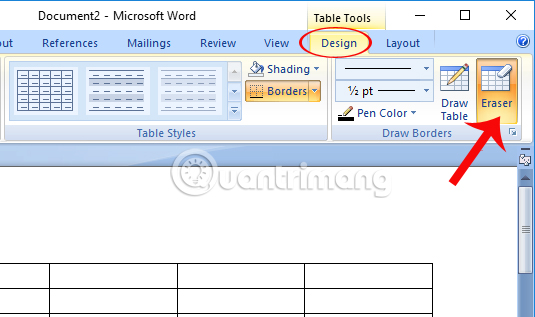
<p style="text-align: justify;">Tại nội dung bảng biểu trên Word, chúng ta để trỏ chuột tại đầu bảng biểu và click vào&nbsp;<strong>Table Tools &gt; Design &gt; Eraser</strong>.</p>

<p style="text-align: justify;"><img alt="Nhấn chọn Eraser" data-i="4" data-src="https://st.quantrimang.com/photos/image/2017/04/13/Word-xoa-dong-ke-Eraser.jpg" data-was-processed="true" height="296" src="https://st.quantrimang.com/photos/image/2017/04/13/Word-xoa-dong-ke-Eraser.jpg" title="Nhấn chọn Eraser" width="500" /></p>

<p style="text-align: justify;"><strong>Bước 2:</strong></p>

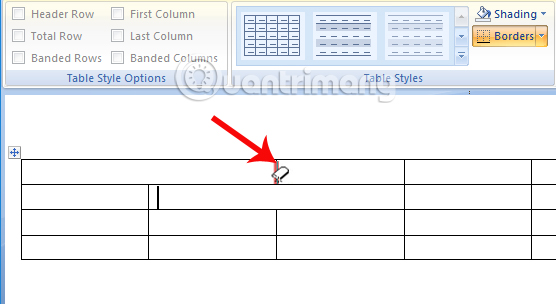
<p style="text-align: justify;">Xuất hiện biểu tượng tẩy. Chúng ta chỉ cần&nbsp;<strong>di biểu tượng tẩy đó vào bất cứ dòng kẻ nào để xóa</strong>&nbsp;rồi&nbsp;<strong>click chuột trái</strong>&nbsp;để xóa. Người dùng thực hiện thao tác tương tự với các dòng kẻ khác muốn xóa.</p>

<p style="text-align: justify;"><img alt="Xóa đường kẻ trong ô" data-i="5" data-src="https://st.quantrimang.com/photos/image/2017/04/13/Word-xoa-dong-ke-xoa.jpg" data-was-processed="true" height="273" src="https://st.quantrimang.com/photos/image/2017/04/13/Word-xoa-dong-ke-xoa.jpg" title="Xóa đường kẻ trong ô" width="500" /></p>

<h2 id="mcetoc_1hvqocoh19n" style="text-align: justify;">3. Xóa đường kẻ trong 1 ô Word</h2>

<p style="text-align: justify;">Trong trường hợp bạn muốn xóa đường kẻ trong 1 ô bảng biểu thì có chuyển boder thanh đường kẻ không màu.</p>

<p style="text-align: justify;"><strong>Bước 1:</strong></p>

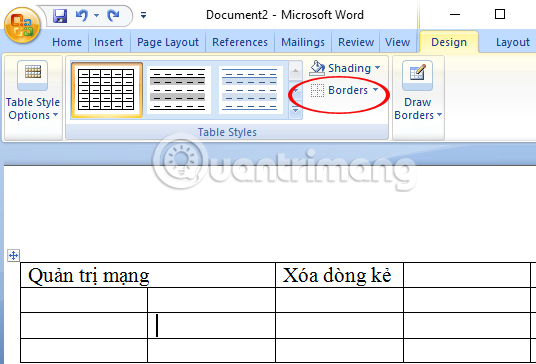
<p style="text-align: justify;">Tại nội dung bảng trên Word, chúng ta đặt trỏ chuột tại ô muốn xóa đường kẻ và thực hiện theo đường dẫn&nbsp;<strong>Table Tools &gt; Design &gt; Borders</strong>.</p>

<p style="text-align: justify;"><img alt="Nhấn chọn vào Borders" data-i="6" data-src="https://st.quantrimang.com/photos/image/2017/04/13/Word-xoa-dong-ke-Borders.jpg" data-was-processed="true" height="340" src="https://st.quantrimang.com/photos/image/2017/04/13/Word-xoa-dong-ke-Borders.jpg" title="Nhấn chọn vào Borders" width="500" /></p>

<p style="text-align: justify;"><strong>Bước 2:</strong></p>

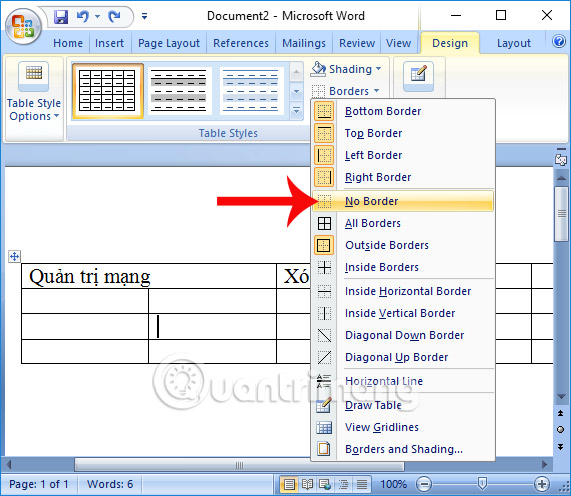
<p style="text-align: justify;">Tiếp theo, bạn nhấn chọn vào&nbsp;<strong>No Border</strong>&nbsp;để xóa tất cả các đường kẻ của bảng</p>

<p style="text-align: justify;"><img alt="Nhấn chọn No Border" data-i="7" data-src="https://st.quantrimang.com/photos/image/2017/04/13/Word-xoa-dong-ke-No-Borders.jpg" data-was-processed="true" height="434" src="https://st.quantrimang.com/photos/image/2017/04/13/Word-xoa-dong-ke-No-Borders.jpg" title="Nhấn chọn No Border" width="500" /></p>

<div style="text-align: justify;">&nbsp;</div>

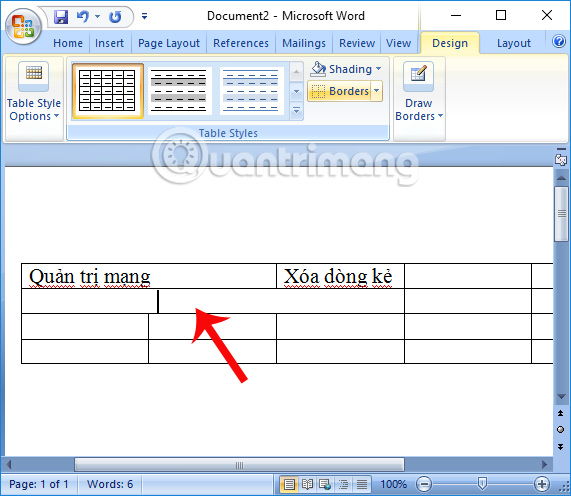
<p style="text-align: justify;">Kết quả cuối cùng các đường kẻ trong một ô đã được xóa.</p>

<p style="text-align: justify;"><img alt="Xóa đường kẻ trong 1 ô" data-i="8" data-src="https://st.quantrimang.com/photos/image/2017/04/13/Word-xoa-dong-ke-noi-dung.jpg" data-was-processed="true" height="434" src="https://st.quantrimang.com/photos/image/2017/04/13/Word-xoa-dong-ke-noi-dung.jpg" title="Xóa đường kẻ trong 1 ô" width="500" /></p>

<h2 id="mcetoc_1hvqocoh19o" style="text-align: justify;">4. Xóa bảng không làm mất chữ</h2>

<p style="text-align: justify;">Ngoài nhu cầu xóa các đường kẻ trong từng ô, chúng ta cũng có thể lựa chọn cách xóa toàn bảng nhưng vẫn giữ lại toàn bộ nội dung và bố cục trong bảng biểu.</p>

<p style="text-align: justify;"><strong>Bước 1:</strong></p>

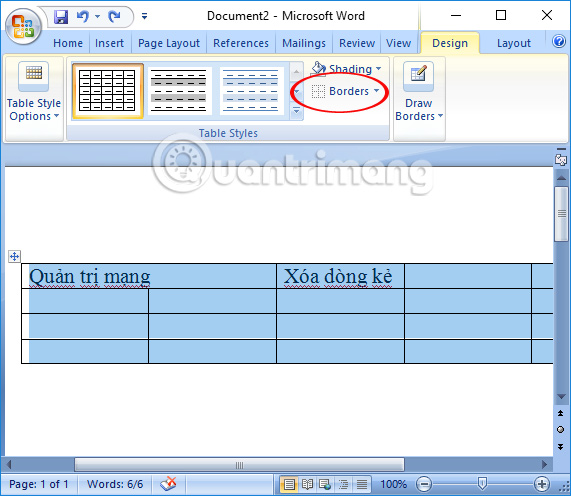
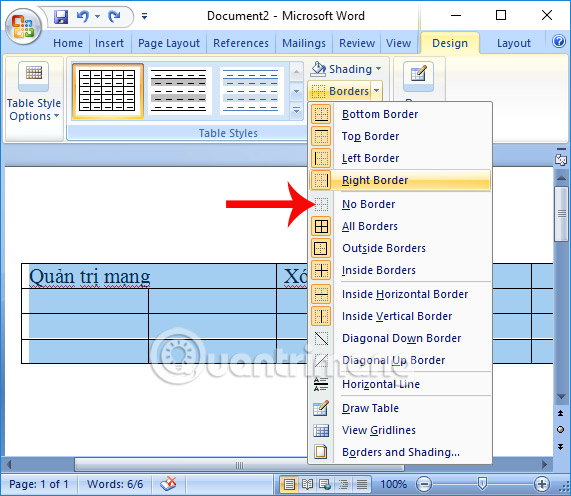
<p style="text-align: justify;">Tại bảng muốn xóa, bạn bôi đen toàn bộ bảng và nhấn chọn vào&nbsp;<strong>Table Tools &gt; Design &gt; Borders</strong>.</p>

<p style="text-align: justify;"><img alt="Bôi đen toàn bảng biểu" data-i="9" data-src="https://st.quantrimang.com/photos/image/2017/04/13/Word-xoa-dong-ke-boi-den.jpg" data-was-processed="true" height="434" src="https://st.quantrimang.com/photos/image/2017/04/13/Word-xoa-dong-ke-boi-den.jpg" title="Bôi đen toàn bảng biểu" width="500" /></p>

<p style="text-align: justify;"><strong>Bước 2:</strong></p>

<p style="text-align: justify;">Sau đó, bạn nhấn chọn vào&nbsp;<strong>No Border</strong>.</p>

<p style="text-align: justify;"><img alt="Nhấn chọn vào No Border" data-i="10" data-src="https://st.quantrimang.com/photos/image/2017/04/13/Word-xoa-dong-ke-duong-ke.jpg" data-was-processed="true" height="434" src="https://st.quantrimang.com/photos/image/2017/04/13/Word-xoa-dong-ke-duong-ke.jpg" title="Nhấn chọn vào No Border" width="500" /></p>

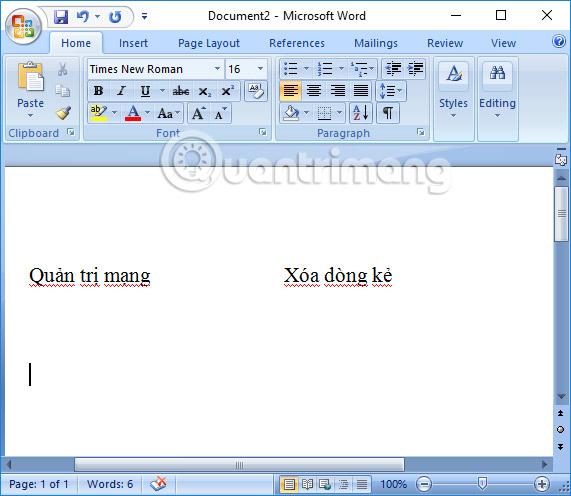
<p style="text-align: justify;">Như vậy bảng sẽ biến mất nhưng vẫn giữ lại nội dung chữ và bố cục trong bảng.</p>

<p style="text-align: justify;"><img alt="Xóa bảng giữ nguyên bố cục, nội dung" data-i="11" data-src="https://st.quantrimang.com/photos/image/2017/04/13/Word-xoa-dong-ke-bo-cuc.jpg" data-was-processed="true" height="434" src="https://st.quantrimang.com/photos/image/2017/04/13/Word-xoa-dong-ke-bo-cuc.jpg" title="Xóa bảng giữ nguyên bố cục, nội dung" width="500" /></p>

<p style="text-align: justify;">Trên đây là một số thủ thuật khi chúng ta làm việc với bảng biểu trên Word, trong đó có cách xóa dòng kẻ trong bảng hoặc xóa bảng nhưng vẫn giữ lại nội dung lẫn bố cục. Tùy theo nhu cầu tùy chỉnh bảng biểu mà chúng ta lựa chọn 1 trong 3 thủ thuật chỉnh sửa trên.</p>

<div style="text-align: justify;">&nbsp;</div>

<h2 id="mcetoc_1hvqocoh19p" style="text-align: justify;">Video hướng dẫn xóa viền bảng trong Word</h2>

<p style="text-align: center;">
<video controls="controls" height="480" preload="metadata" src="https://e.xem.video/data/media/2020/02/05/Huong-dan-xoa-duong-vien-bang-trong-Word-480p.mp4" width="640">&nbsp;</video>
</p>
		</div>
				<div id="author">
						<p>
				<strong>Nguồn tin:</strong>
				Quantrimang.com:
			</p>
		</div>
	</div>
	<div id="footer" class="clearfix">
		<div id="url">
			<strong>URL của bản tin này: </strong><a href="https://www.nguoicodonvn2008.info/vi/news/savefile/kien-thuc-may-tinh/huong-dan-xoa-duong-vien-bang-trong-word-8442.html" title="Hướng dẫn xóa đường viền bảng trong Word">https://www.nguoicodonvn2008.info/vi/news/savefile/kien-thuc-may-tinh/huong-dan-xoa-duong-vien-bang-trong-word-8442.html</a>

		</div>
		<div class="clear"></div>
		<div class="copyright">
			&copy; .&#x3A; Nguoicodonvn2008.info - Cõi lòng người cô đơn &#x3A;.
		</div>
		<div id="contact">
			<a href="mailto:admin@nguoicodonvn2008.info">admin@nguoicodonvn2008.info</a>
		</div>
	</div>
</div>
        <div id="timeoutsess" class="chromeframe">
            Bạn đã không sử dụng Site, <a onclick="timeoutsesscancel();" href="https://www.nguoicodonvn2008.info/#">Bấm vào đây để duy trì trạng thái đăng nhập</a>. Thời gian chờ: <span id="secField"> 60 </span> giây
        </div>
        <div id="openidResult" class="nv-alert" style="display:none"></div>
        <div id="openidBt" data-result="" data-redirect=""></div>
		</script>
		<div class="car-top">
  <span><img src="https://www.nguoicodonvn2008.info/themes/default/images/car.png" alt=""></span>
</div>
<script src="https://www.nguoicodonvn2008.info/assets/js/jquery/jquery.min.js"></script>
<script>var nv_base_siteurl="/",nv_lang_data="vi",nv_lang_interface="vi",nv_name_variable="nv",nv_fc_variable="op",nv_lang_variable="language",nv_module_name="news",nv_func_name="savefile",nv_is_user=0, nv_my_ofs=-4,nv_my_abbr="EDT",nv_cookie_prefix="nv4c_e856T",nv_check_pass_mstime=1738000,nv_area_admin=0,nv_safemode=0,theme_responsive=0,nv_recaptcha_ver=2,nv_recaptcha_sitekey="",nv_recaptcha_type="image",XSSsanitize=1;</script>
<script src="https://www.nguoicodonvn2008.info/assets/js/language/vi.js"></script>
<script src="https://www.nguoicodonvn2008.info/assets/js/DOMPurify/purify3.js"></script>
<script src="https://www.nguoicodonvn2008.info/assets/js/global.js"></script>
<script src="https://www.nguoicodonvn2008.info/assets/js/site.js"></script>
<script src="https://www.nguoicodonvn2008.info/themes/default/js/news.js"></script>
<script src="https://www.nguoicodonvn2008.info/themes/default/js/main.js"></script>
<script src="https://www.nguoicodonvn2008.info/themes/default/js/custom.js"></script>
<script type="application/ld+json">
        {
            "@context": "https://schema.org",
            "@type": "Organization",
            "url": "https://www.nguoicodonvn2008.info",
            "logo": "https://www.nguoicodonvn2008.info/uploads/angel.gif"
        }
        </script>
<script src="https://www.nguoicodonvn2008.info/themes/default/js/bootstrap.min.js"></script>
<script type="text/javascript">
var $scrolltop = $('.car-top');
$scrolltop.on('click', function () {
    $('html,body').animate({
        scrollTop: 0
    }, 800);
    $(this).addClass("car-run");
    setTimeout(function(){ $scrolltop.removeClass('car-run');}, 1000);
    return false;
});
$(window).on('scroll', function ()
{ 
    if($(window).scrollTop() >= 200)
    {
        $scrolltop.addClass("show");
        $scrolltop.addClass("car-down");
    }
    else
    {
       $scrolltop.removeClass("show");
       setTimeout(function(){ $scrolltop.removeClass('car-down');}, 300);
    }
});
</script>
</body>
</html>