<!DOCTYPE html>
    <html lang="vi" xmlns="http://www.w3.org/1999/xhtml" prefix="og: http://ogp.me/ns#">
    <head>
<title>Hướng dẫn xem lại nhà cũ trên Google Maps</title>
<meta name="description" content="Hướng dẫn xem lại nhà cũ trên Google Maps - Savefile - Tin Tức -...">
<meta name="author" content=".: Nguoicodonvn2008.info - Cõi lòng người cô đơn :.">
<meta name="copyright" content=".: Nguoicodonvn2008.info - Cõi lòng người cô đơn :. [admin@nguoicodonvn2008.info]">
<meta name="robots" content="index, archive, follow, noodp">
<meta name="googlebot" content="index,archive,follow,noodp">
<meta name="msnbot" content="all,index,follow">
<meta name="generator" content="NukeViet v4.5">
<meta http-equiv="Content-Type" content="text/html; charset=utf-8">
<meta property="og:title" content="Hướng dẫn xem lại nhà cũ trên Google Maps">
<meta property="og:type" content="website">
<meta property="og:description" content="Savefile - Tin Tức - https&#x3A;&#x002F;&#x002F;www.nguoicodonvn2008.info&#x002F;vi&#x002F;news&#x002F;savefile&#x002F;kien-thuc-may-tinh&#x002F;huong-dan-xem-lai-nha-cu-tren-google-maps-10697.html">
<meta property="og:site_name" content=".&#x3A; Nguoicodonvn2008.info - Cõi lòng người cô đơn &#x3A;.">
<meta property="og:url" content="https://www.nguoicodonvn2008.info/vi/news/savefile/kien-thuc-may-tinh/huong-dan-xem-lai-nha-cu-tren-google-maps-10697.html">
<link rel="shortcut icon" href="https://www.nguoicodonvn2008.info/favicon.ico">
<link rel="canonical" href="https://www.nguoicodonvn2008.info/vi/news/savefile/kien-thuc-may-tinh/huong-dan-xem-lai-nha-cu-tren-google-maps-10697.html">
<link rel="alternate" href="https://www.nguoicodonvn2008.info/vi/news/rss/" title="Tin Tức" type="application/rss+xml">
<link rel="alternate" href="https://www.nguoicodonvn2008.info/vi/news/rss/karaoke-dual/" title="Tin Tức - Karaoke Dual" type="application/rss+xml">
<link rel="alternate" href="https://www.nguoicodonvn2008.info/vi/news/rss/nhac-tre/" title="Tin Tức - Nhạc trẻ" type="application/rss+xml">
<link rel="alternate" href="https://www.nguoicodonvn2008.info/vi/news/rss/tru-tinh/" title="Tin Tức - Trữ tình" type="application/rss+xml">
<link rel="alternate" href="https://www.nguoicodonvn2008.info/vi/news/rss/nuoc-ngoai/" title="Tin Tức - Nước ngoài" type="application/rss+xml">
<link rel="alternate" href="https://www.nguoicodonvn2008.info/vi/news/rss/remix/" title="Tin Tức - Remix" type="application/rss+xml">
<link rel="alternate" href="https://www.nguoicodonvn2008.info/vi/news/rss/tam-su-tinh-yeu/" title="Tin Tức - Tâm sự tình yêu" type="application/rss+xml">
<link rel="alternate" href="https://www.nguoicodonvn2008.info/vi/news/rss/tho-suu-tam/" title="Tin Tức - Thơ sưu tầm" type="application/rss+xml">
<link rel="alternate" href="https://www.nguoicodonvn2008.info/vi/news/rss/cuoc-song/" title="Tin Tức - Cuộc sống" type="application/rss+xml">
<link rel="alternate" href="https://www.nguoicodonvn2008.info/vi/news/rss/phan-mem/" title="Tin Tức - Phần mềm" type="application/rss+xml">
<link rel="alternate" href="https://www.nguoicodonvn2008.info/vi/news/rss/kien-thuc-may-tinh/" title="Tin Tức - Kiến thức máy tính" type="application/rss+xml">
<link rel="alternate" href="https://www.nguoicodonvn2008.info/vi/news/rss/hoc-tap/" title="Tin Tức - Học tập" type="application/rss+xml">
<link rel="alternate" href="https://www.nguoicodonvn2008.info/vi/news/rss/tai-lieu/" title="Tin Tức - Tài liệu" type="application/rss+xml">
<link rel="alternate" href="https://www.nguoicodonvn2008.info/vi/news/rss/de-thi/" title="Tin Tức - Đề thi" type="application/rss+xml">
<link rel="preload" as="style" href="https://www.nguoicodonvn2008.info/assets/css/font-awesome.min.css" type="text/css">
<link rel="preload" as="style" href="https://www.nguoicodonvn2008.info/themes/default/css/bootstrap.non-responsive.css" type="text/css">
<link rel="preload" as="style" href="https://www.nguoicodonvn2008.info/themes/default/css/style.css" type="text/css">
<link rel="preload" as="style" href="https://www.nguoicodonvn2008.info/themes/default/css/style.non-responsive.css" type="text/css">
<link rel="preload" as="style" href="https://www.nguoicodonvn2008.info/themes/default/css/news.css" type="text/css">
<link rel="preload" as="style" href="https://www.nguoicodonvn2008.info/themes/default/css/custom.css" type="text/css">
<link rel="preload" as="script" href="https://www.nguoicodonvn2008.info/assets/js/jquery/jquery.min.js" type="text/javascript">
<link rel="preload" as="script" href="https://www.nguoicodonvn2008.info/assets/js/language/vi.js" type="text/javascript">
<link rel="preload" as="script" href="https://www.nguoicodonvn2008.info/assets/js/DOMPurify/purify3.js" type="text/javascript">
<link rel="preload" as="script" href="https://www.nguoicodonvn2008.info/assets/js/global.js" type="text/javascript">
<link rel="preload" as="script" href="https://www.nguoicodonvn2008.info/assets/js/site.js" type="text/javascript">
<link rel="preload" as="script" href="https://www.nguoicodonvn2008.info/themes/default/js/news.js" type="text/javascript">
<link rel="preload" as="script" href="https://www.nguoicodonvn2008.info/themes/default/js/main.js" type="text/javascript">
<link rel="preload" as="script" href="https://www.nguoicodonvn2008.info/themes/default/js/custom.js" type="text/javascript">
<link rel="preload" as="script" href="https://www.nguoicodonvn2008.info/themes/default/js/bootstrap.min.js" type="text/javascript">
<link rel="stylesheet" href="https://www.nguoicodonvn2008.info/assets/css/font-awesome.min.css">
<link rel="stylesheet" href="https://www.nguoicodonvn2008.info/themes/default/css/bootstrap.non-responsive.css">
<link rel="stylesheet" href="https://www.nguoicodonvn2008.info/themes/default/css/style.css">
<link rel="stylesheet" href="https://www.nguoicodonvn2008.info/themes/default/css/style.non-responsive.css">
<link rel="StyleSheet" href="https://www.nguoicodonvn2008.info/themes/default/css/news.css">
<link rel="stylesheet" href="https://www.nguoicodonvn2008.info/themes/default/css/custom.css">
<style type="text/css">
	body{background: #fff;}
</style>
    </head>
    <body>
<div id="print">
	<div id="hd_print">
		<h2 class="pull-left">.&#x3A; Nguoicodonvn2008.info - Cõi lòng người cô đơn &#x3A;.</h2>
		<p class="pull-right"><a title=".&#x3A; Nguoicodonvn2008.info - Cõi lòng người cô đơn &#x3A;." href="https://www.nguoicodonvn2008.info/">https://www.nguoicodonvn2008.info</a></p>
	</div>
	<div class="clear"></div>
	<hr />
	<div id="content">
		<h1>Hướng dẫn xem lại nhà cũ trên Google Maps</h1>
		<ul class="list-inline">
			<li>Thứ năm - 03/07/2025 05:41</li>
			<li class="hidden-print txtrequired"><em class="fa fa-print">&nbsp;</em><a title="In ra" href="javascript:;" onclick="window.print()">In ra</a></li>
			<li class="hidden-print txtrequired"><em class="fa fa-power-off">&nbsp;</em><a title="Đóng cửa sổ này" href="javascript:;" onclick="window.close()">Đóng cửa sổ này</a></li>
		</ul>
		<div class="clear"></div>
		<div id="hometext">
		</div>
				<div class="imghome">
			<img alt="Hướng dẫn xem lại nhà cũ trên Google Maps" src="https://st.quantrimang.com/photos/image/2025/07/02/Google-Maps-xem-pho-nam-truoc-1.jpg" width="460" class="img-thumbnail" />
		</div>
		<div class="clear"></div>
		<div id="bodytext" class="clearfix">
			<p style="text-align: justify;">Chế độ xem phố Street View trên Google Maps có thêm lựa chọn thời gian để chúng ta có thể xem lại nhà cũ hoặc bất kỳ địa điểm nào mà bạn muốn tìm lại ký ức xưa kia. Bạn chỉ cần nhập địa điểm mà mình muốn xem vào thanh tìm kiếm Google Maps và xem ở chế độ xem phố và kết quả sẽ thấy hình ảnh địa điểm hiện tại, kèm tùy chọn quay trở lại những năm trước đó. Dưới đây là hướng dẫn xem lại nhà cũ trên Google Maps.</p>

<div style="text-align: justify;">&nbsp;</div>

<h2 style="text-align: justify;">Cách xem lại nhà cũ trên Google Maps điện thoại</h2>

<p style="text-align: justify;"><strong>Bước 1:</strong></p>

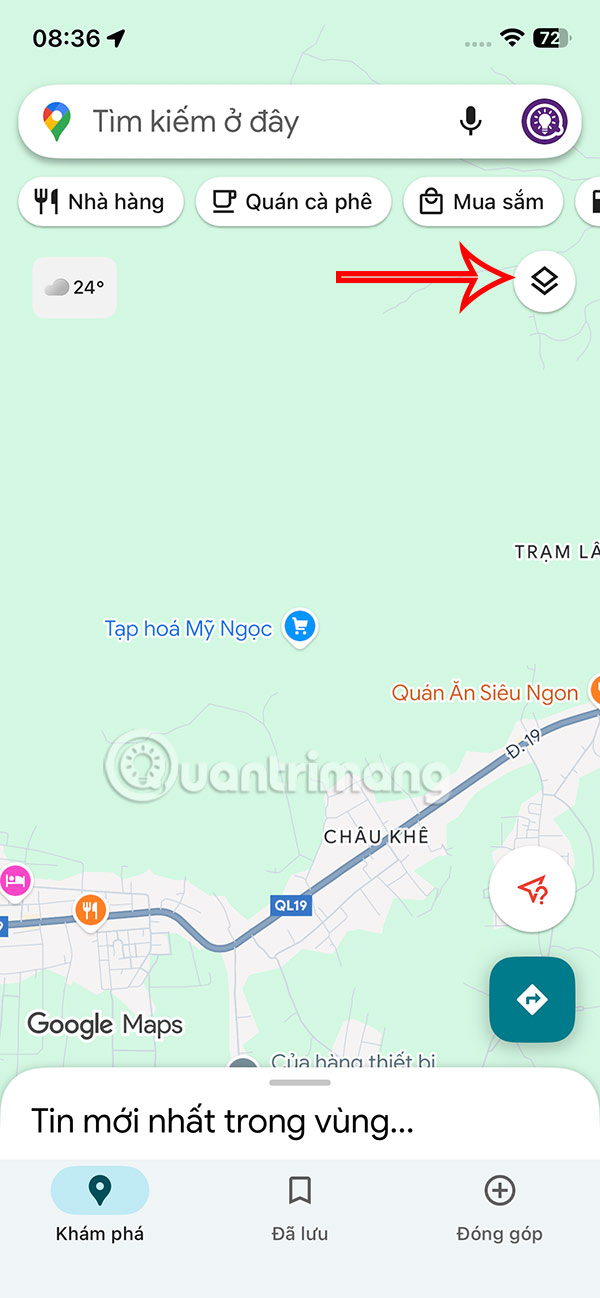
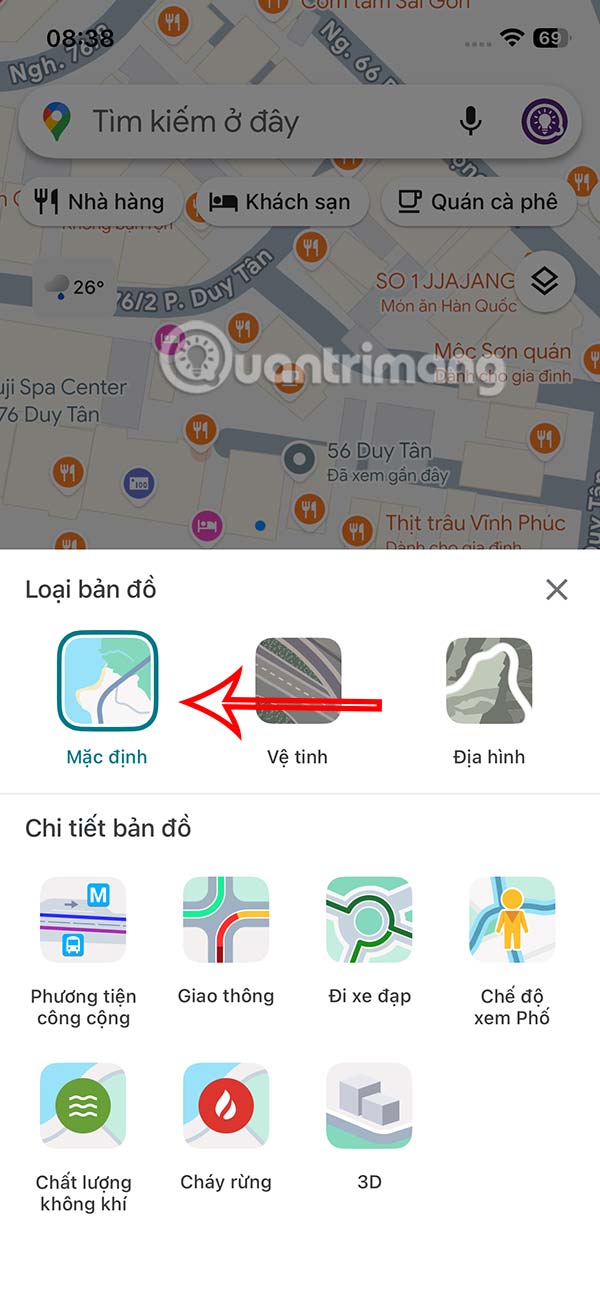
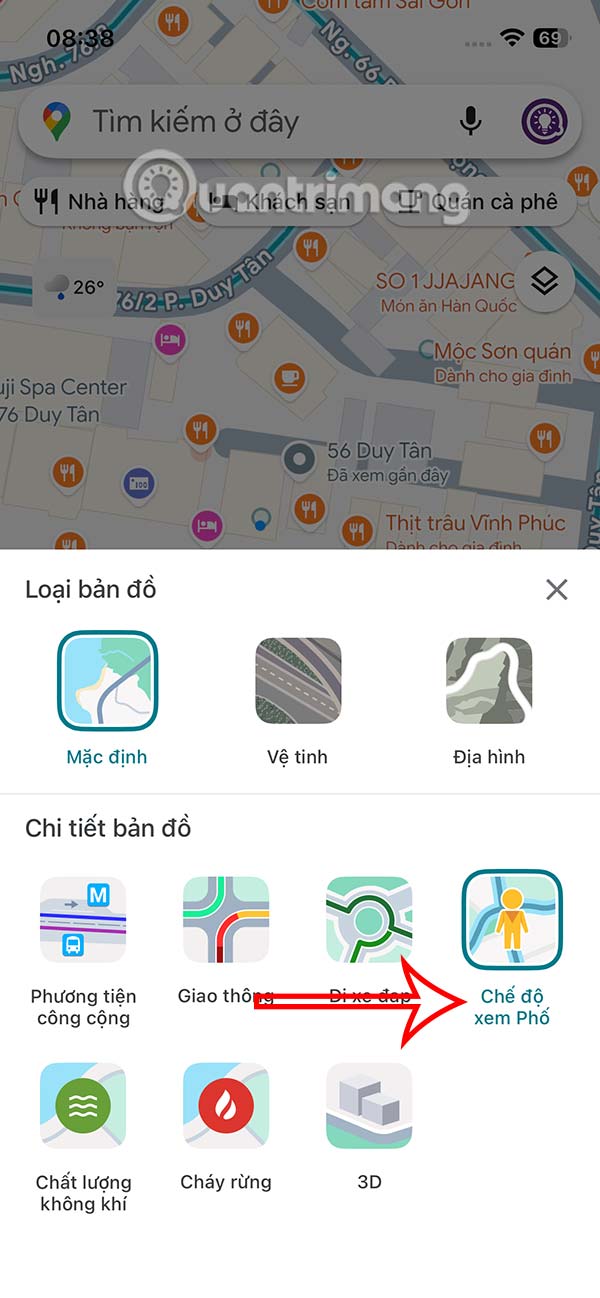
<p style="text-align: justify;">Tại giao diện trên ứng dụng Google Maps bạn nhấn vào&nbsp;<strong>biểu tượng hình thoi</strong>&nbsp;ở góc phải giao diện, rồi để Mặc định hoặc chọn&nbsp;<strong>mục Vệ tinh&nbsp;</strong>để chuyển sang chế độ hiển thị bản đồ chi tiết rồi nhấn tiếp&nbsp;<strong>Chế độ xem Phố</strong>.</p>

<figure>
<div style="text-align: justify;"><img alt="Tùy chỉnh bản đồ Google Maps" data-i="0" data-src="https://st.quantrimang.com/photos/image/2025/07/02/Google-Maps-xem-pho-nam-truoc-1.jpg" data-was-processed="true" height="1298" src="https://st.quantrimang.com/photos/image/2025/07/02/Google-Maps-xem-pho-nam-truoc-1.jpg" width="600" /></div>
</figure>

<figure>
<div style="text-align: justify;"><img alt="Chế độ vệ tinh Google Maps" data-i="1" data-src="https://st.quantrimang.com/photos/image/2025/07/02/Google-Maps-xem-pho-nam-truoc-2.jpg" data-was-processed="true" height="1298" src="https://st.quantrimang.com/photos/image/2025/07/02/Google-Maps-xem-pho-nam-truoc-2.jpg" width="600" /></div>
</figure>

<figure>
<div style="text-align: justify;"><img alt="Chế độ xem Phố Google Maps" data-i="2" data-src="https://st.quantrimang.com/photos/image/2025/07/02/Google-Maps-xem-pho-nam-truoc-3.jpg" data-was-processed="true" height="1298" src="https://st.quantrimang.com/photos/image/2025/07/02/Google-Maps-xem-pho-nam-truoc-3.jpg" width="600" /></div>
</figure>

<div style="text-align: justify;">&nbsp;</div>

<p style="text-align: justify;"><strong>Bước 2:</strong></p>

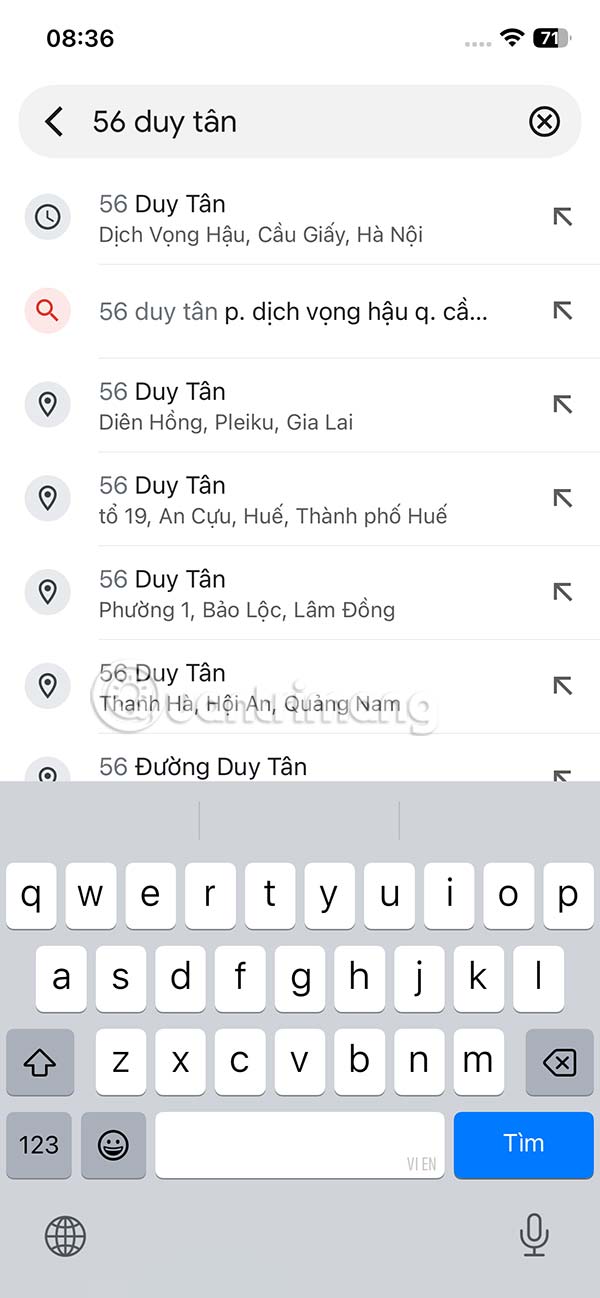
<p style="text-align: justify;">Lúc này bạn&nbsp;<strong>nhập địa điểm muốn xem</strong>&nbsp;lại từ những năm trước trên Google Maps trên thanh tìm kiếm rồi nhấn vào kết quả tìm được.</p>

<p style="text-align: justify;"><img alt="Tìm địa điểm muốn xem Google Maps" data-i="3" data-src="https://st.quantrimang.com/photos/image/2025/07/02/Google-Maps-xem-pho-nam-truoc-4.jpg" height="649" src="https://st.quantrimang.com/photos/image/holder.png" width="300" /></p>

<p style="text-align: justify;"><strong>Bước 3:</strong></p>

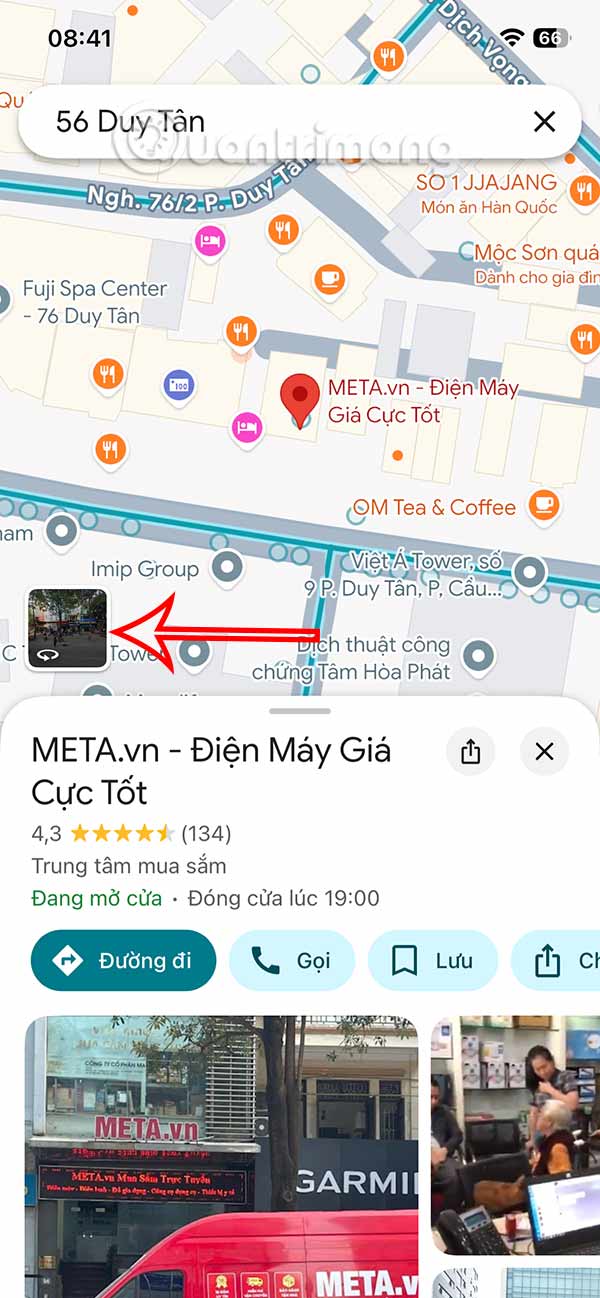
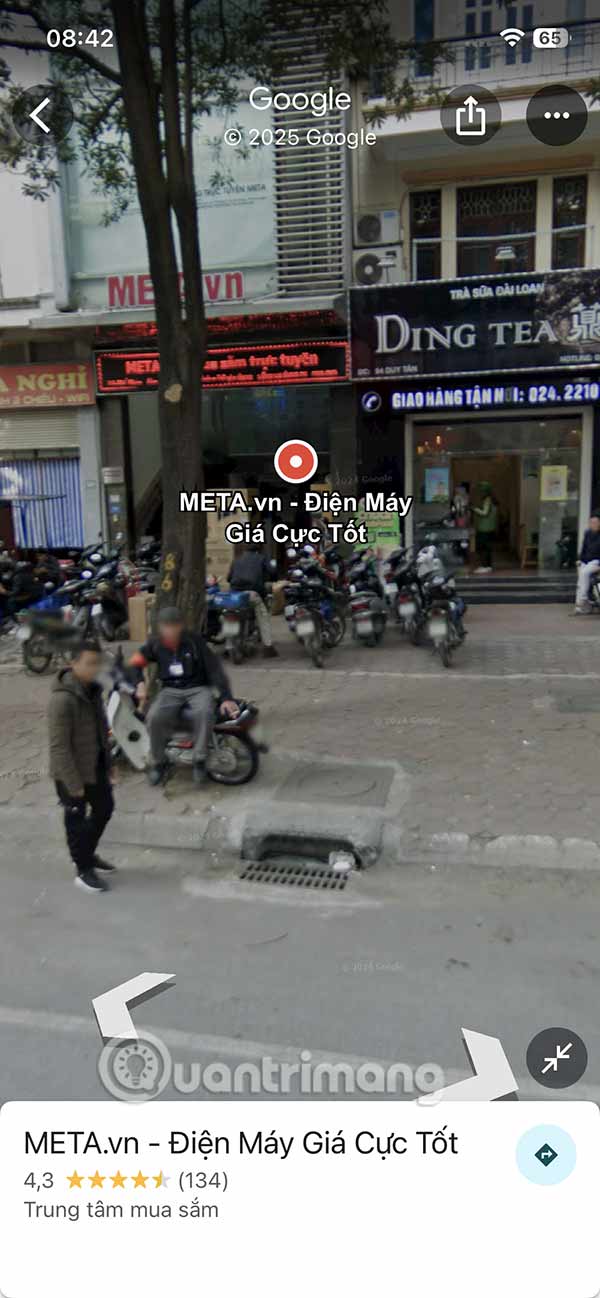
<p style="text-align: justify;">Hiển thị địa điểm trên bản đồ Google Maps, bạn&nbsp;<strong>nhấn chọn vào phần hình ảnh</strong>&nbsp;trong khung vuông. Hình ảnh địa điểm lúc này hiện ra dưới&nbsp;<strong>dạng 360 độ&nbsp;</strong>để chúng ta có thể xoay nhiều góc độ xem địa điểm ở chế độ Phố khác nhau trên Google Maps.</p>

<figure>
<div style="text-align: justify;"><img alt="Chế độ xem phố Google Maps" data-i="4" data-src="https://st.quantrimang.com/photos/image/2025/07/02/Google-Maps-xem-pho-nam-truoc-5.jpg" height="1298" src="https://st.quantrimang.com/photos/image/holder.png" width="600" /></div>
</figure>

<figure>
<div style="text-align: justify;"><img alt="Xem phố trên Google Maps" data-i="5" data-src="https://st.quantrimang.com/photos/image/2025/07/02/Google-Maps-xem-pho-nam-truoc-6.jpg" height="1298" src="https://st.quantrimang.com/photos/image/holder.png" width="600" /></div>
</figure>

<div style="text-align: justify;">&nbsp;</div>

<p style="text-align: justify;"><strong>Bước 4:</strong></p>

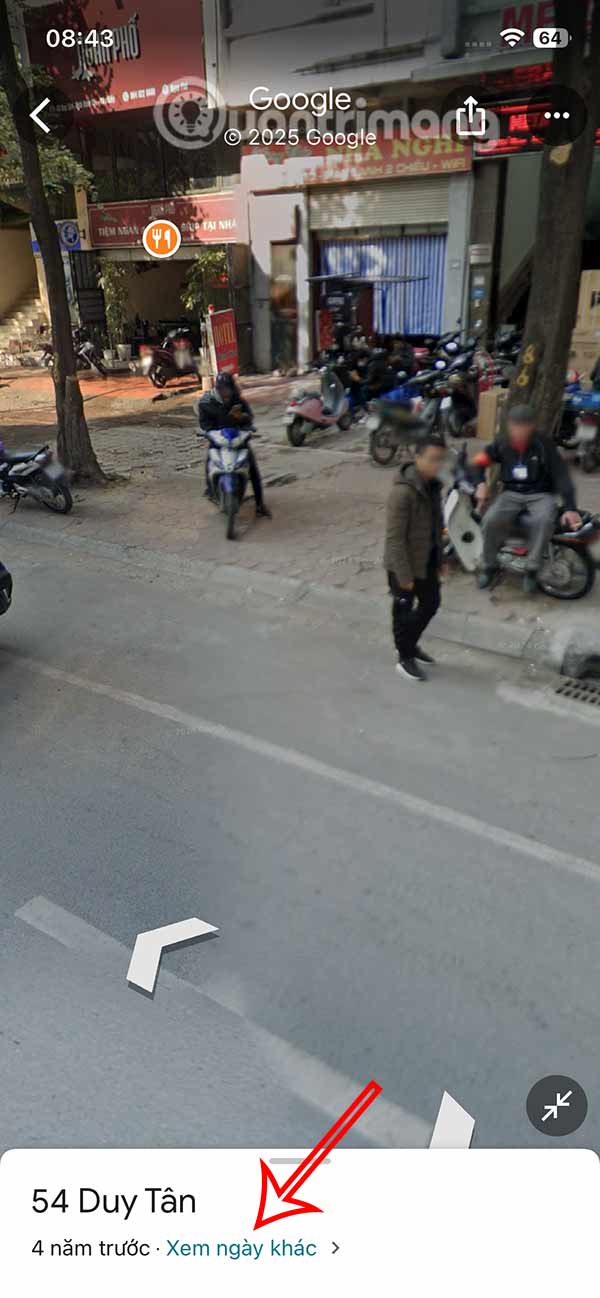
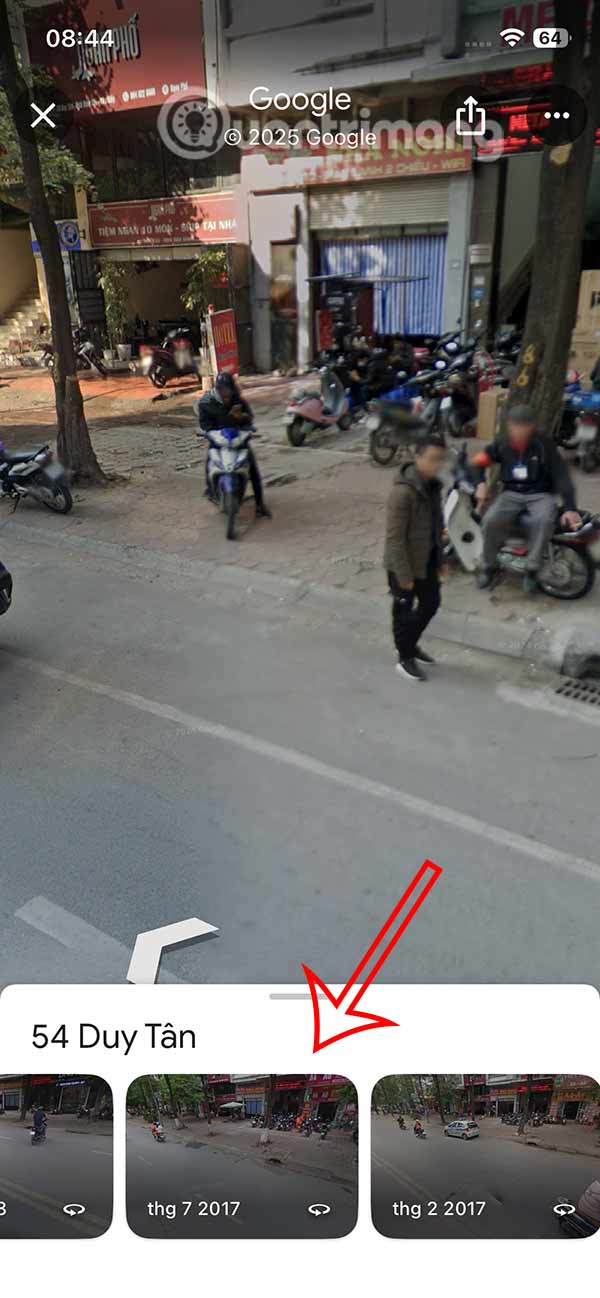
<p style="text-align: justify;">Nhấn lại vào bản đồ và bạn sẽ thấy&nbsp;<strong>tùy chọn điều chỉnh thời gian</strong>&nbsp;xem lại địa điểm này từ những năm trước ngay trên Google Maps. Ứng dụng bản đồ đề xuất một số thời điểm khác nhau tại vị trí này để bạn xem lại.</p>

<figure>
<div style="text-align: justify;"><img alt="Chọn thời gian trước đây " data-i="6" data-src="https://st.quantrimang.com/photos/image/2025/07/02/Google-Maps-xem-pho-nam-truoc-7.jpg" height="1298" src="https://st.quantrimang.com/photos/image/holder.png" width="600" /></div>
</figure>

<figure>
<div style="text-align: justify;"><img alt="Xem lại địa điểm Google Maps trước đây" data-i="7" data-src="https://st.quantrimang.com/photos/image/2025/07/02/Google-Maps-xem-pho-nam-truoc-8.jpg" height="1298" src="https://st.quantrimang.com/photos/image/holder.png" width="600" /></div>
</figure>

<p style="text-align: justify;">Chỉ cần nhấn vào năm khác để xem lại địa điểm xưa cũ mà bạn muốn trên Google Maps là xong nhé. Tùy theo địa điểm sẽ có những mốc thời gian quá khứ khác nhau.</p>

<p style="text-align: justify;"><img alt="Địa điểm Google Maps những năm trước" data-i="8" data-src="https://st.quantrimang.com/photos/image/2025/07/02/Google-Maps-xem-pho-nam-truoc-9.jpg" data-was-processed="true" height="649" src="https://st.quantrimang.com/photos/image/2025/07/02/Google-Maps-xem-pho-nam-truoc-9.jpg" width="300" /></p>

<h2 style="text-align: justify;">Hướng dẫn xem lại nhà cũ trên Google Maps PC</h2>

<p style="text-align: justify;"><strong>Bước 1</strong></p>

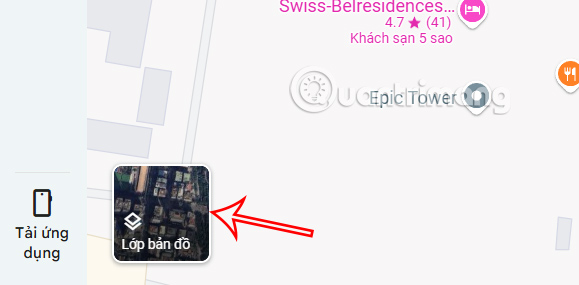
<p style="text-align: justify;">Tại giao diện trên Google Maps&nbsp;<a data-google-interstitial="false" data-google-vignette="false" href="https://quantrimang.com/cong-nghe/google-street-view-co-them-tinh-nang-co-may-thoi-gian-108857#">&nbsp;máy tính</a>, chúng ta nhấn vào&nbsp;<strong>mục Lớp bản đồ</strong>&nbsp;ở góc trái dưới cùng.</p>

<div style="text-align: justify;">Linh kiện máy tính</div>

<p style="text-align: justify;"><img alt="Lớp bản đồ trên Google Maps PC" data-i="9" data-src="https://st.quantrimang.com/photos/image/2025/07/02/Google-Maps-xem-pho-nam-truoc-10.jpg" data-was-processed="true" height="285" src="https://st.quantrimang.com/photos/image/2025/07/02/Google-Maps-xem-pho-nam-truoc-10.jpg" width="579" /></p>

<p style="text-align: justify;"><strong>Bước 2:</strong></p>

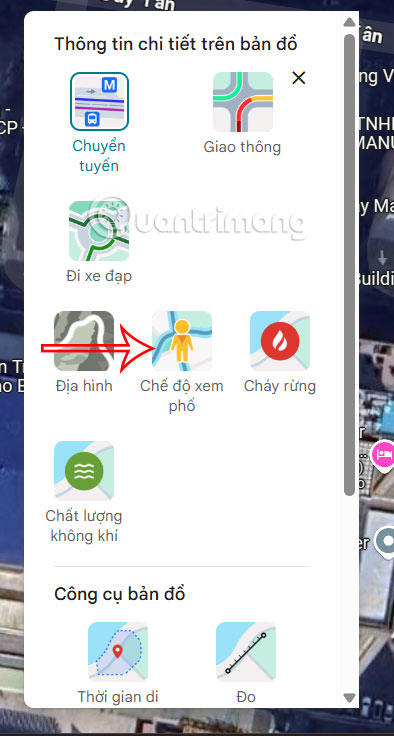
<p style="text-align: justify;">Bạn nhấn tiếp vào<strong>&nbsp;Xem thêm</strong>&nbsp;để mở rộng tùy chọn Lớp bản đồ, rồi nhấn vào<strong>&nbsp;Chế độ xem Phố</strong>.</p>

<p style="text-align: justify;"><img alt="Chế độ xem phố Google Maps PC" data-i="10" data-src="https://st.quantrimang.com/photos/image/2025/07/02/Google-Maps-xem-pho-nam-truoc-11.jpg" data-was-processed="true" height="654" src="https://st.quantrimang.com/photos/image/2025/07/02/Google-Maps-xem-pho-nam-truoc-11.jpg" width="350" /></p>

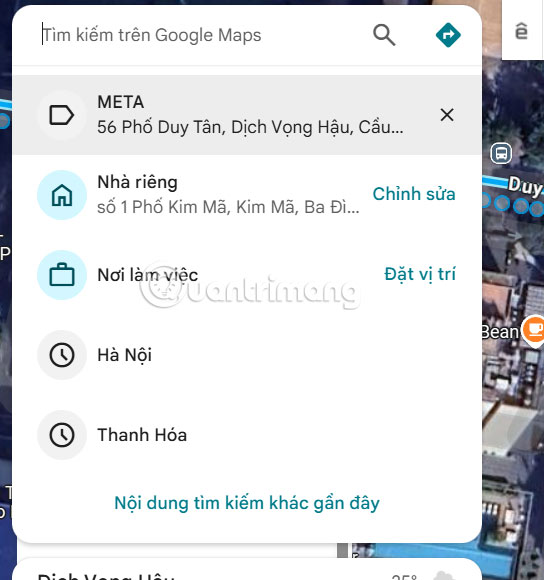
<p style="text-align: justify;">Bây giờ bạn cũng&nbsp;<strong>nhập địa điểm muốn xem trên Google Maps&nbsp;</strong>rồi nhấn vào kết quả để truy cập như bình thường.</p>

<p style="text-align: justify;"><img alt="Tìm địa điểm trên Google Maps PC" data-i="11" data-src="https://st.quantrimang.com/photos/image/2025/07/02/Google-Maps-xem-pho-nam-truoc-12.jpg" data-was-processed="true" height="533" src="https://st.quantrimang.com/photos/image/2025/07/02/Google-Maps-xem-pho-nam-truoc-12.jpg" width="500" /></p>

<p style="text-align: justify;"><strong>Bước 3:</strong></p>

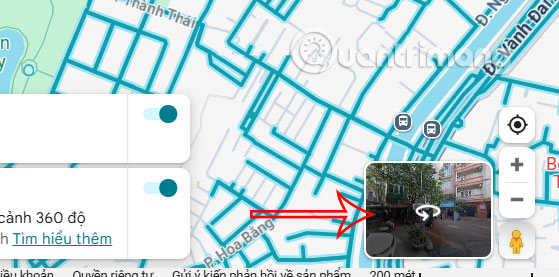
<p style="text-align: justify;">Sau đó bạn cũng<strong>&nbsp;nhấn vào hình ảnh của địa điểm đó</strong>&nbsp;để xem ở chế độ Phố trên Google Maps.</p>

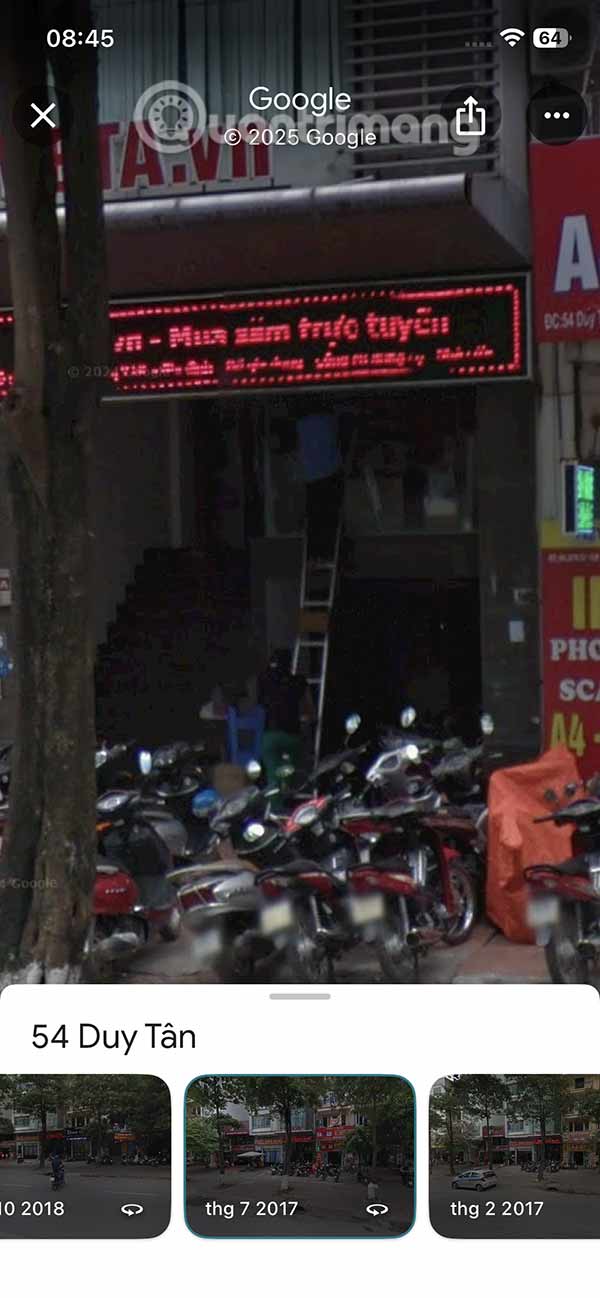
<p style="text-align: justify;"><img alt="Chuyển chế độ xem trên Google Maps PC" data-i="12" data-src="https://st.quantrimang.com/photos/image/2025/07/02/Google-Maps-xem-pho-nam-truoc-13.jpg" data-was-processed="true" height="268" src="https://st.quantrimang.com/photos/image/2025/07/02/Google-Maps-xem-pho-nam-truoc-13.jpg" width="540" /></p>

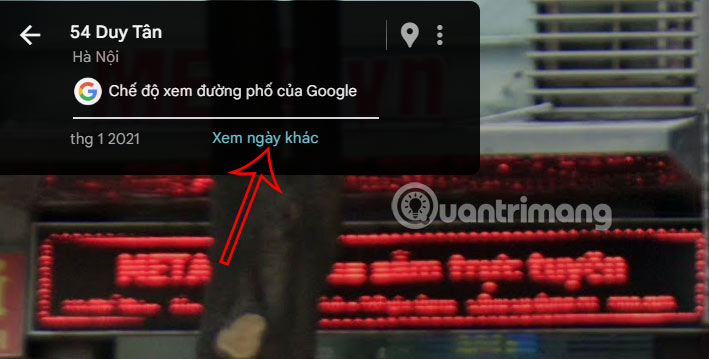
<p style="text-align: justify;">Ngay lập tức chúng ta sẽ thấy địa điểm hiển thị ở chế độ xem phố. Tại đây bạn di chuyển các hướng để xem địa điểm. Hoặc nhấn vào&nbsp;<strong>tùy chọn ngày tháng để đổi thời gian</strong>.</p>

<p style="text-align: justify;"><img alt="Đổi thời gian chế độ xem phố Google Maps PC" data-i="13" data-src="https://st.quantrimang.com/photos/image/2025/07/02/Google-Maps-xem-pho-nam-truoc-14.jpg" data-was-processed="true" height="304" src="https://st.quantrimang.com/photos/image/2025/07/02/Google-Maps-xem-pho-nam-truoc-14.jpg" width="600" /></p>

<div style="text-align: justify;"><iframe allow="autoplay" bis_chainid="16" bis_depth="0" bis_id="fr_req77h3ux2fcv5hzf82x5q" bis_size="{&#039;x&#039;:129,&#039;y&#039;:8377,&#039;w&#039;:694,&#039;h&#039;:280,&#039;abs_x&#039;:129,&#039;abs_y&#039;:8377}" height="280" loading="lazy" sandbox="allow-scripts allow-same-origin allow-forms allow-presentation allow-popups" title="Quảng cáo " width="694"></iframe></div>

<p style="text-align: justify;"><strong>Bước 4:</strong></p>

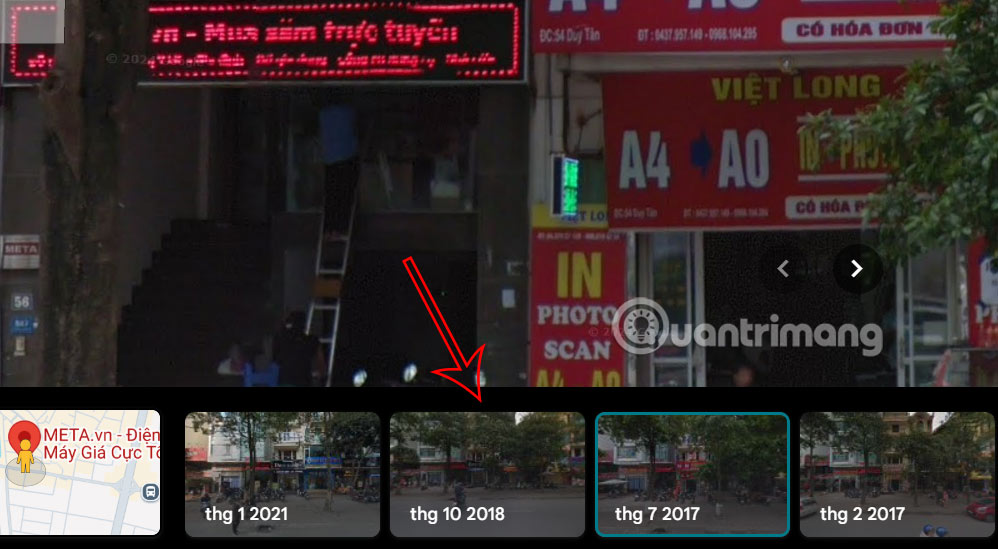
<p style="text-align: justify;">Chúng ta lựa chọn thời gian mình muốn xem địa điểm những năm trước đó trên Google Maps.</p>

<p style="text-align: justify;"><img alt="Xem nhà cũ trên Google Maps PC" data-i="14" data-src="https://st.quantrimang.com/photos/image/2025/07/02/Google-Maps-xem-pho-nam-truoc-15.jpg" data-was-processed="true" height="330" src="https://st.quantrimang.com/photos/image/2025/07/02/Google-Maps-xem-pho-nam-truoc-15.jpg" width="600" /></p>

<h2 style="text-align: justify;">Video hướng dẫn xem nhà cũ trên Google Maps</h2>

<p style="text-align: center;">
<video autoplay="autoplay" controls="controls" height="480" loop="loop" muted="muted" preload="metadata" src="https://e.xem.video/data/media/2025/07/02/Huong-dan-xem-lai-nha-cu-tren-Google-Maps-480p.mp4" width="650">&nbsp;</video>
</p>
		</div>
				<div id="author">
						<p>
				<strong>Nguồn tin:</strong>
				Quantrimang.com:
			</p>
		</div>
	</div>
	<div id="footer" class="clearfix">
		<div id="url">
			<strong>URL của bản tin này: </strong><a href="https://www.nguoicodonvn2008.info/vi/news/savefile/kien-thuc-may-tinh/huong-dan-xem-lai-nha-cu-tren-google-maps-10697.html" title="Hướng dẫn xem lại nhà cũ trên Google Maps">https://www.nguoicodonvn2008.info/vi/news/savefile/kien-thuc-may-tinh/huong-dan-xem-lai-nha-cu-tren-google-maps-10697.html</a>

		</div>
		<div class="clear"></div>
		<div class="copyright">
			&copy; .&#x3A; Nguoicodonvn2008.info - Cõi lòng người cô đơn &#x3A;.
		</div>
		<div id="contact">
			<a href="mailto:admin@nguoicodonvn2008.info">admin@nguoicodonvn2008.info</a>
		</div>
	</div>
</div>
        <div id="timeoutsess" class="chromeframe">
            Bạn đã không sử dụng Site, <a onclick="timeoutsesscancel();" href="https://www.nguoicodonvn2008.info/#">Bấm vào đây để duy trì trạng thái đăng nhập</a>. Thời gian chờ: <span id="secField"> 60 </span> giây
        </div>
        <div id="openidResult" class="nv-alert" style="display:none"></div>
        <div id="openidBt" data-result="" data-redirect=""></div>
		</script>
		<div class="car-top">
  <span><img src="https://www.nguoicodonvn2008.info/themes/default/images/car.png" alt=""></span>
</div>
<div id="run_cronjobs" style="visibility:hidden;display:none;"><img alt="cron" src="/index.php?second=cronjobs&amp;p=g0usKPEc" width="1" height="1" /></div>
<script src="https://www.nguoicodonvn2008.info/assets/js/jquery/jquery.min.js"></script>
<script>var nv_base_siteurl="/",nv_lang_data="vi",nv_lang_interface="vi",nv_name_variable="nv",nv_fc_variable="op",nv_lang_variable="language",nv_module_name="news",nv_func_name="savefile",nv_is_user=0, nv_my_ofs=-4,nv_my_abbr="EDT",nv_cookie_prefix="nv4c_e856T",nv_check_pass_mstime=1738000,nv_area_admin=0,nv_safemode=0,theme_responsive=0,nv_recaptcha_ver=2,nv_recaptcha_sitekey="",nv_recaptcha_type="image",XSSsanitize=1;</script>
<script src="https://www.nguoicodonvn2008.info/assets/js/language/vi.js"></script>
<script src="https://www.nguoicodonvn2008.info/assets/js/DOMPurify/purify3.js"></script>
<script src="https://www.nguoicodonvn2008.info/assets/js/global.js"></script>
<script src="https://www.nguoicodonvn2008.info/assets/js/site.js"></script>
<script src="https://www.nguoicodonvn2008.info/themes/default/js/news.js"></script>
<script src="https://www.nguoicodonvn2008.info/themes/default/js/main.js"></script>
<script src="https://www.nguoicodonvn2008.info/themes/default/js/custom.js"></script>
<script type="application/ld+json">
        {
            "@context": "https://schema.org",
            "@type": "Organization",
            "url": "https://www.nguoicodonvn2008.info",
            "logo": "https://www.nguoicodonvn2008.info/uploads/angel.gif"
        }
        </script>
<script src="https://www.nguoicodonvn2008.info/themes/default/js/bootstrap.min.js"></script>
<script type="text/javascript">
var $scrolltop = $('.car-top');
$scrolltop.on('click', function () {
    $('html,body').animate({
        scrollTop: 0
    }, 800);
    $(this).addClass("car-run");
    setTimeout(function(){ $scrolltop.removeClass('car-run');}, 1000);
    return false;
});
$(window).on('scroll', function ()
{ 
    if($(window).scrollTop() >= 200)
    {
        $scrolltop.addClass("show");
        $scrolltop.addClass("car-down");
    }
    else
    {
       $scrolltop.removeClass("show");
       setTimeout(function(){ $scrolltop.removeClass('car-down');}, 300);
    }
});
</script>
</body>
</html>