<!DOCTYPE html>
    <html lang="vi" xmlns="http://www.w3.org/1999/xhtml" prefix="og: http://ogp.me/ns#">
    <head>
<title>Hướng dẫn từng bước để xóa lịch sử router</title>
<meta name="description" content="Hướng dẫn từng bước để xóa lịch sử router - Savefile - Tin Tức -...">
<meta name="author" content=".: Nguoicodonvn2008.info - Cõi lòng người cô đơn :.">
<meta name="copyright" content=".: Nguoicodonvn2008.info - Cõi lòng người cô đơn :. [admin@nguoicodonvn2008.info]">
<meta name="robots" content="index, archive, follow, noodp">
<meta name="googlebot" content="index,archive,follow,noodp">
<meta name="msnbot" content="all,index,follow">
<meta name="generator" content="NukeViet v4.5">
<meta http-equiv="Content-Type" content="text/html; charset=utf-8">
<meta property="og:title" content="Hướng dẫn từng bước để xóa lịch sử router">
<meta property="og:type" content="website">
<meta property="og:description" content="Savefile - Tin Tức - https&#x3A;&#x002F;&#x002F;www.nguoicodonvn2008.info&#x002F;vi&#x002F;news&#x002F;savefile&#x002F;kien-thuc-may-tinh&#x002F;huong-dan-tung-buoc-de-xoa-lich-su-router-10266.html">
<meta property="og:site_name" content=".&#x3A; Nguoicodonvn2008.info - Cõi lòng người cô đơn &#x3A;.">
<meta property="og:url" content="https://www.nguoicodonvn2008.info/vi/news/savefile/kien-thuc-may-tinh/huong-dan-tung-buoc-de-xoa-lich-su-router-10266.html">
<link rel="shortcut icon" href="https://www.nguoicodonvn2008.info/favicon.ico">
<link rel="canonical" href="https://www.nguoicodonvn2008.info/vi/news/savefile/kien-thuc-may-tinh/huong-dan-tung-buoc-de-xoa-lich-su-router-10266.html">
<link rel="alternate" href="https://www.nguoicodonvn2008.info/vi/news/rss/" title="Tin Tức" type="application/rss+xml">
<link rel="alternate" href="https://www.nguoicodonvn2008.info/vi/news/rss/karaoke-dual/" title="Tin Tức - Karaoke Dual" type="application/rss+xml">
<link rel="alternate" href="https://www.nguoicodonvn2008.info/vi/news/rss/nhac-tre/" title="Tin Tức - Nhạc trẻ" type="application/rss+xml">
<link rel="alternate" href="https://www.nguoicodonvn2008.info/vi/news/rss/tru-tinh/" title="Tin Tức - Trữ tình" type="application/rss+xml">
<link rel="alternate" href="https://www.nguoicodonvn2008.info/vi/news/rss/nuoc-ngoai/" title="Tin Tức - Nước ngoài" type="application/rss+xml">
<link rel="alternate" href="https://www.nguoicodonvn2008.info/vi/news/rss/remix/" title="Tin Tức - Remix" type="application/rss+xml">
<link rel="alternate" href="https://www.nguoicodonvn2008.info/vi/news/rss/tam-su-tinh-yeu/" title="Tin Tức - Tâm sự tình yêu" type="application/rss+xml">
<link rel="alternate" href="https://www.nguoicodonvn2008.info/vi/news/rss/tho-suu-tam/" title="Tin Tức - Thơ sưu tầm" type="application/rss+xml">
<link rel="alternate" href="https://www.nguoicodonvn2008.info/vi/news/rss/cuoc-song/" title="Tin Tức - Cuộc sống" type="application/rss+xml">
<link rel="alternate" href="https://www.nguoicodonvn2008.info/vi/news/rss/phan-mem/" title="Tin Tức - Phần mềm" type="application/rss+xml">
<link rel="alternate" href="https://www.nguoicodonvn2008.info/vi/news/rss/kien-thuc-may-tinh/" title="Tin Tức - Kiến thức máy tính" type="application/rss+xml">
<link rel="alternate" href="https://www.nguoicodonvn2008.info/vi/news/rss/hoc-tap/" title="Tin Tức - Học tập" type="application/rss+xml">
<link rel="alternate" href="https://www.nguoicodonvn2008.info/vi/news/rss/tai-lieu/" title="Tin Tức - Tài liệu" type="application/rss+xml">
<link rel="alternate" href="https://www.nguoicodonvn2008.info/vi/news/rss/de-thi/" title="Tin Tức - Đề thi" type="application/rss+xml">
<link rel="preload" as="style" href="https://www.nguoicodonvn2008.info/assets/css/font-awesome.min.css" type="text/css">
<link rel="preload" as="style" href="https://www.nguoicodonvn2008.info/themes/default/css/bootstrap.non-responsive.css" type="text/css">
<link rel="preload" as="style" href="https://www.nguoicodonvn2008.info/themes/default/css/style.css" type="text/css">
<link rel="preload" as="style" href="https://www.nguoicodonvn2008.info/themes/default/css/style.non-responsive.css" type="text/css">
<link rel="preload" as="style" href="https://www.nguoicodonvn2008.info/themes/default/css/news.css" type="text/css">
<link rel="preload" as="style" href="https://www.nguoicodonvn2008.info/themes/default/css/custom.css" type="text/css">
<link rel="preload" as="script" href="https://www.nguoicodonvn2008.info/assets/js/jquery/jquery.min.js" type="text/javascript">
<link rel="preload" as="script" href="https://www.nguoicodonvn2008.info/assets/js/language/vi.js" type="text/javascript">
<link rel="preload" as="script" href="https://www.nguoicodonvn2008.info/assets/js/DOMPurify/purify3.js" type="text/javascript">
<link rel="preload" as="script" href="https://www.nguoicodonvn2008.info/assets/js/global.js" type="text/javascript">
<link rel="preload" as="script" href="https://www.nguoicodonvn2008.info/assets/js/site.js" type="text/javascript">
<link rel="preload" as="script" href="https://www.nguoicodonvn2008.info/themes/default/js/news.js" type="text/javascript">
<link rel="preload" as="script" href="https://www.nguoicodonvn2008.info/themes/default/js/main.js" type="text/javascript">
<link rel="preload" as="script" href="https://www.nguoicodonvn2008.info/themes/default/js/custom.js" type="text/javascript">
<link rel="preload" as="script" href="https://www.nguoicodonvn2008.info/themes/default/js/bootstrap.min.js" type="text/javascript">
<link rel="stylesheet" href="https://www.nguoicodonvn2008.info/assets/css/font-awesome.min.css">
<link rel="stylesheet" href="https://www.nguoicodonvn2008.info/themes/default/css/bootstrap.non-responsive.css">
<link rel="stylesheet" href="https://www.nguoicodonvn2008.info/themes/default/css/style.css">
<link rel="stylesheet" href="https://www.nguoicodonvn2008.info/themes/default/css/style.non-responsive.css">
<link rel="StyleSheet" href="https://www.nguoicodonvn2008.info/themes/default/css/news.css">
<link rel="stylesheet" href="https://www.nguoicodonvn2008.info/themes/default/css/custom.css">
<style type="text/css">
	body{background: #fff;}
</style>
    </head>
    <body>
<div id="print">
	<div id="hd_print">
		<h2 class="pull-left">.&#x3A; Nguoicodonvn2008.info - Cõi lòng người cô đơn &#x3A;.</h2>
		<p class="pull-right"><a title=".&#x3A; Nguoicodonvn2008.info - Cõi lòng người cô đơn &#x3A;." href="https://www.nguoicodonvn2008.info/">https://www.nguoicodonvn2008.info</a></p>
	</div>
	<div class="clear"></div>
	<hr />
	<div id="content">
		<h1>Hướng dẫn từng bước để xóa lịch sử router</h1>
		<ul class="list-inline">
			<li>Chủ nhật - 27/04/2025 22:52</li>
			<li class="hidden-print txtrequired"><em class="fa fa-print">&nbsp;</em><a title="In ra" href="javascript:;" onclick="window.print()">In ra</a></li>
			<li class="hidden-print txtrequired"><em class="fa fa-power-off">&nbsp;</em><a title="Đóng cửa sổ này" href="javascript:;" onclick="window.close()">Đóng cửa sổ này</a></li>
		</ul>
		<div class="clear"></div>
		<div id="hometext">
		</div>
				<div class="imghome">
			<img alt="Hướng dẫn từng bước để xóa lịch sử router" src="https://st.quantrimang.com/photos/image/2025/04/21/xoa-lich-su-router-3.jpg" width="460" class="img-thumbnail" />
		</div>
		<div class="clear"></div>
		<div id="bodytext" class="clearfix">
			<p style="text-align: justify;">Bài viết này hướng dẫn bạn cách xóa lịch sử router và giải thích loại dữ liệu mà router của bạn lưu.</p>

<h2 style="text-align: justify;">Làm thế nào để xóa lịch sử router Wi-Fi?</h2>

<p style="text-align: justify;">Rất ít&nbsp;router&nbsp;ghi lại lịch sử duyệt web thực tế của bạn. Nhiều nhất, chúng lưu trữ địa chỉ IP của các trang web bạn đã truy cập, nhưng điều đó vẫn tương đối bất thường đối với router trung bình.</p>

<p style="text-align: justify;">Tuy nhiên, nếu bạn muốn xóa lịch sử router Wi-Fi hoặc nhật ký hệ thống, quy trình này chỉ cách bạn vài bước nếu bạn biết nơi để tìm. Sau đây là những gì cần làm:</p>

<p style="text-align: justify;"><strong>Lưu ý</strong>: Các router khác nhau có cách thực hiện hơi khác nhau, mặc dù khái niệm chung là giống nhau. Hãy tìm các cụm từ tương tự nếu router của bạn không khớp với những gì được liệt kê ở đây.</p>

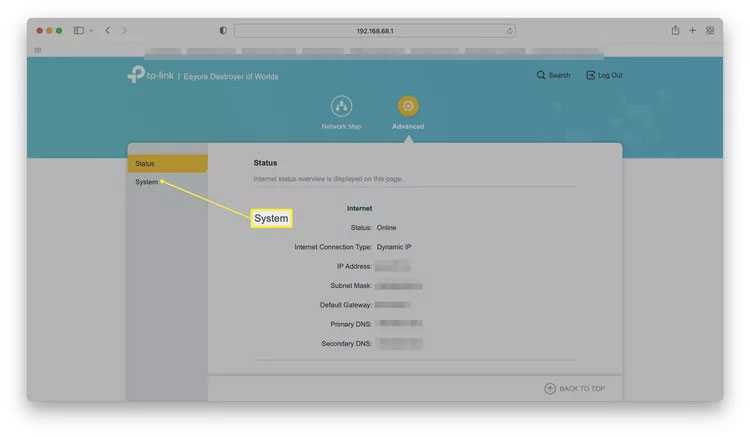
<p style="text-align: justify;">1. Đăng nhập vào router thông qua trình duyệt web.</p>

<figure>
<div style="text-align: justify;"><img alt="Giao diện dựa trên web của router làm nổi bật quy trình đăng nhập" data-i="0" data-src="https://st.quantrimang.com/photos/image/2025/04/21/xoa-lich-su-router-1.jpg" data-was-processed="true" height="437" src="https://st.quantrimang.com/photos/image/2025/04/21/xoa-lich-su-router-1.jpg" width="750" /></div>

<figcaption>
<div style="text-align: justify;">Giao diện dựa trên web của router làm nổi bật quy trình đăng nhập</div>
</figcaption>
</figure>

<p style="text-align: justify;"><strong>Lưu ý</strong>: Nhiều router không có tùy chọn này vì chúng được quản lý thông qua ứng dụng di động. Nếu router của bạn hoạt động theo cách đó, tùy chọn xóa lịch sử có thể khả dụng trong ứng dụng.</p>

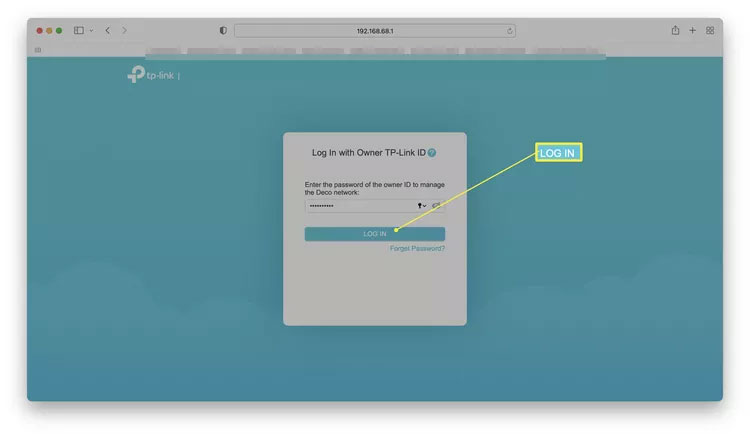
<p style="text-align: justify;">2. Nhấp vào&nbsp;<strong>Advanced</strong>.</p>

<figure>
<div style="text-align: justify;"><img alt="Giao diện router với tùy chọn Advanced được highlight" data-i="1" data-src="https://st.quantrimang.com/photos/image/2025/04/21/xoa-lich-su-router-2.jpg" data-was-processed="true" height="437" src="https://st.quantrimang.com/photos/image/2025/04/21/xoa-lich-su-router-2.jpg" width="750" /></div>

<figcaption>
<div style="text-align: justify;">Giao diện router với tùy chọn Advanced được highlight</div>
</figcaption>
</figure>

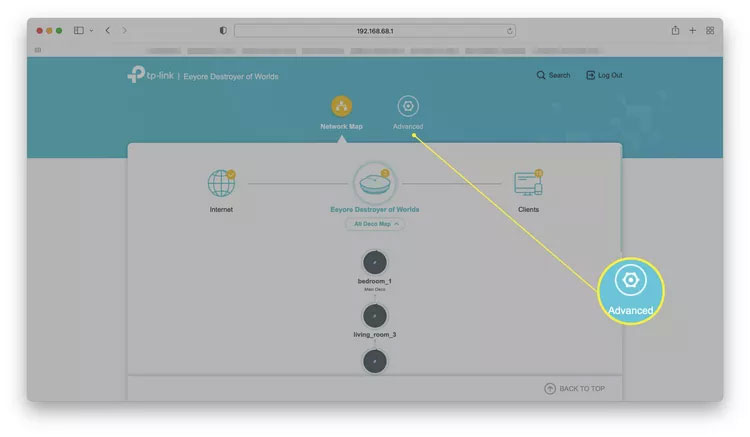
<p style="text-align: justify;">3. Nhấp vào&nbsp;<strong>System</strong>.</p>

<figure>
<div style="text-align: justify;"><img alt="Chọn System" data-i="2" data-src="https://st.quantrimang.com/photos/image/2025/04/21/xoa-lich-su-router-3.jpg" data-was-processed="true" height="437" src="https://st.quantrimang.com/photos/image/2025/04/21/xoa-lich-su-router-3.jpg" width="750" /></div>

<figcaption>
<div style="text-align: justify;">Chọn System</div>
</figcaption>
</figure>

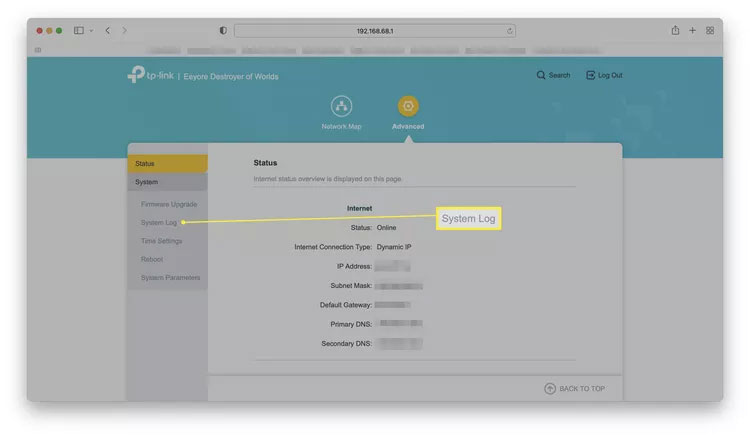
<p style="text-align: justify;">4. Nhấp vào&nbsp;<strong>System Log</strong>.</p>

<figure>
<div style="text-align: justify;"><img alt="Chọn System Log" data-i="3" data-src="https://st.quantrimang.com/photos/image/2025/04/21/xoa-lich-su-router-4.jpg" data-was-processed="true" height="437" src="https://st.quantrimang.com/photos/image/2025/04/21/xoa-lich-su-router-4.jpg" width="750" /></div>

<figcaption>
<div style="text-align: justify;">Chọn System Log</div>
</figcaption>
</figure>

<p style="text-align: justify;"><strong>Mẹo</strong>: Tùy thuộc vào router của bạn, mục này cũng có thể được gọi là Administration, History hoặc Logs.</p>

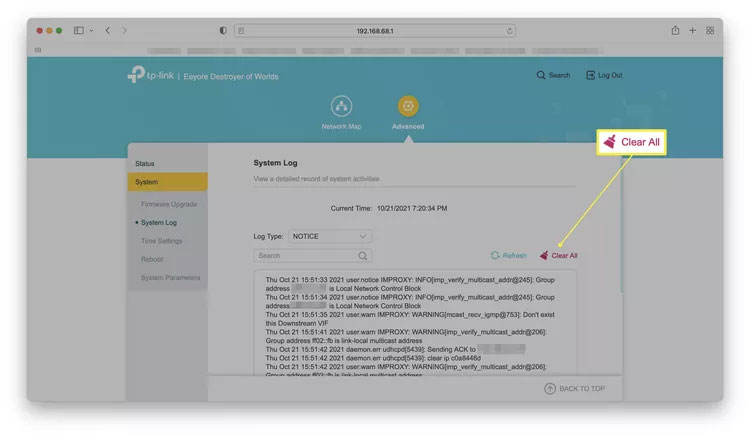
<p style="text-align: justify;">5. Nhấp vào&nbsp;<strong>Clear all</strong>&nbsp;hoặc&nbsp;<strong>Delete all</strong>.</p>

<figure>
<div style="text-align: justify;"><img alt="Chọn Clear all hoặc Delete all" data-i="4" data-src="https://st.quantrimang.com/photos/image/2025/04/21/xoa-lich-su-router-5.jpg" data-was-processed="true" height="437" src="https://st.quantrimang.com/photos/image/2025/04/21/xoa-lich-su-router-5.jpg" width="750" /></div>

<figcaption>
<div style="text-align: justify;">Chọn Clear all hoặc Delete all</div>
</figcaption>
</figure>

<p style="text-align: justify;">6. Nếu được nhắc, hãy xác nhận bằng cách chọn&nbsp;<strong>Yes</strong>&nbsp;hoặc&nbsp;<strong>Agree</strong>.</p>

<h2 style="text-align: justify;">Rút phích cắm router có xóa lịch sử không?</h2>

<p style="text-align: justify;">Điều đó tùy thuộc vào router. Hầu hết các router sẽ không lưu trữ lịch sử nhật ký nếu bạn rút phích cắm. Chúng có xu hướng chỉ lưu trữ các file cấu hình chính để router hoạt động sau khi bạn cắm lại. Các tính năng như vậy có nghĩa là việc mất điện không làm gián đoạn dịch vụ nhiều hơn mức cần thiết.</p>

<p style="text-align: justify;">Một số thương hiệu router sẽ lưu trữ lịch sử của người dùng, vì vậy, bạn nên kiểm tra xem bạn có model nào và bao gồm những tính năng nào. Có những ưu và nhược điểm khi lưu lịch sử nhật ký của bạn, ngay cả sau khi rút phích cắm. Bạn cũng có thể&nbsp;khôi phục cài đặt gốc cho router&nbsp;để xóa tất cả lịch sử.</p>

<h2 style="text-align: justify;">Router lưu giữ lịch sử trong bao lâu?</h2>

<p style="text-align: justify;">Thời gian router lưu trữ lịch sử của bạn thay đổi tùy thuộc vào thiết bị. Như đã đề cập, hầu hết các router chỉ lưu trữ nhật ký hệ thống của bạn, một số router còn lưu trữ&nbsp;<a data-type="internal" href="https://quantrimang.com/cong-nghe/dia-chi-ip-la-gi-143625" title="Địa chỉ IP là gì?">địa chỉ IP</a>&nbsp;của các trang web bạn đã truy cập.</p>

<p style="text-align: justify;">Các router lưu trữ một số dạng lịch sử cũng thường có tùy chọn về thời gian bạn muốn chúng lưu giữ thông tin đó. Bạn cũng có thể xóa thông tin khi cần, như mô tả ở trên.</p>

<p style="text-align: justify;">Kiểm tra router và hướng dẫn sử dụng của router để xem cài đặt mặc định để lưu trữ nhật ký hệ thống hoặc địa chỉ IP là bao lâu. Có thể dao động từ vài giờ đến vài tuần hoặc thậm chí vài tháng, tùy thuộc vào tần suất bạn sử dụng.</p>

<h2 style="text-align: justify;">Bạn có cần xóa lịch sử router của mình không?</h2>

<p style="text-align: justify;">Hiếm khi. Thực sự không cần xóa lịch sử router của bạn trừ khi bạn cảnh giác với việc người khác truy cập nhật ký hệ thống hoặc bạn có kế hoạch bán router của mình. Không giống như một số tác vụ bảo trì, điều này thực sự không cần thiết thực hiện thường xuyên.</p>
		</div>
				<div id="author">
						<p>
				<strong>Nguồn tin:</strong>
				Quantrimang.com:
			</p>
		</div>
	</div>
	<div id="footer" class="clearfix">
		<div id="url">
			<strong>URL của bản tin này: </strong><a href="https://www.nguoicodonvn2008.info/vi/news/savefile/kien-thuc-may-tinh/huong-dan-tung-buoc-de-xoa-lich-su-router-10266.html" title="Hướng dẫn từng bước để xóa lịch sử router">https://www.nguoicodonvn2008.info/vi/news/savefile/kien-thuc-may-tinh/huong-dan-tung-buoc-de-xoa-lich-su-router-10266.html</a>

		</div>
		<div class="clear"></div>
		<div class="copyright">
			&copy; .&#x3A; Nguoicodonvn2008.info - Cõi lòng người cô đơn &#x3A;.
		</div>
		<div id="contact">
			<a href="mailto:admin@nguoicodonvn2008.info">admin@nguoicodonvn2008.info</a>
		</div>
	</div>
</div>
        <div id="timeoutsess" class="chromeframe">
            Bạn đã không sử dụng Site, <a onclick="timeoutsesscancel();" href="https://www.nguoicodonvn2008.info/#">Bấm vào đây để duy trì trạng thái đăng nhập</a>. Thời gian chờ: <span id="secField"> 60 </span> giây
        </div>
        <div id="openidResult" class="nv-alert" style="display:none"></div>
        <div id="openidBt" data-result="" data-redirect=""></div>
		</script>
		<div class="car-top">
  <span><img src="https://www.nguoicodonvn2008.info/themes/default/images/car.png" alt=""></span>
</div>
<div id="run_cronjobs" style="visibility:hidden;display:none;"><img alt="cron" src="/index.php?second=cronjobs&amp;p=c566qhnX" width="1" height="1" /></div>
<script src="https://www.nguoicodonvn2008.info/assets/js/jquery/jquery.min.js"></script>
<script>var nv_base_siteurl="/",nv_lang_data="vi",nv_lang_interface="vi",nv_name_variable="nv",nv_fc_variable="op",nv_lang_variable="language",nv_module_name="news",nv_func_name="savefile",nv_is_user=0, nv_my_ofs=-4,nv_my_abbr="EDT",nv_cookie_prefix="nv4c_e856T",nv_check_pass_mstime=1738000,nv_area_admin=0,nv_safemode=0,theme_responsive=0,nv_recaptcha_ver=2,nv_recaptcha_sitekey="",nv_recaptcha_type="image",XSSsanitize=1;</script>
<script src="https://www.nguoicodonvn2008.info/assets/js/language/vi.js"></script>
<script src="https://www.nguoicodonvn2008.info/assets/js/DOMPurify/purify3.js"></script>
<script src="https://www.nguoicodonvn2008.info/assets/js/global.js"></script>
<script src="https://www.nguoicodonvn2008.info/assets/js/site.js"></script>
<script src="https://www.nguoicodonvn2008.info/themes/default/js/news.js"></script>
<script src="https://www.nguoicodonvn2008.info/themes/default/js/main.js"></script>
<script src="https://www.nguoicodonvn2008.info/themes/default/js/custom.js"></script>
<script type="application/ld+json">
        {
            "@context": "https://schema.org",
            "@type": "Organization",
            "url": "https://www.nguoicodonvn2008.info",
            "logo": "https://www.nguoicodonvn2008.info/uploads/angel.gif"
        }
        </script>
<script src="https://www.nguoicodonvn2008.info/themes/default/js/bootstrap.min.js"></script>
<script type="text/javascript">
var $scrolltop = $('.car-top');
$scrolltop.on('click', function () {
    $('html,body').animate({
        scrollTop: 0
    }, 800);
    $(this).addClass("car-run");
    setTimeout(function(){ $scrolltop.removeClass('car-run');}, 1000);
    return false;
});
$(window).on('scroll', function ()
{ 
    if($(window).scrollTop() >= 200)
    {
        $scrolltop.addClass("show");
        $scrolltop.addClass("car-down");
    }
    else
    {
       $scrolltop.removeClass("show");
       setTimeout(function(){ $scrolltop.removeClass('car-down');}, 300);
    }
});
</script>
</body>
</html>