<!DOCTYPE html>
    <html lang="vi" xmlns="http://www.w3.org/1999/xhtml" prefix="og: http://ogp.me/ns#">
    <head>
<title>Hướng dẫn tìm và xóa các file trùng lặp trên Windows</title>
<meta name="description" content="Hướng dẫn tìm và xóa các file trùng lặp trên Windows - Savefile - Tin Tức -...">
<meta name="author" content=".: Nguoicodonvn2008.info - Cõi lòng người cô đơn :.">
<meta name="copyright" content=".: Nguoicodonvn2008.info - Cõi lòng người cô đơn :. [admin@nguoicodonvn2008.info]">
<meta name="robots" content="index, archive, follow, noodp">
<meta name="googlebot" content="index,archive,follow,noodp">
<meta name="msnbot" content="all,index,follow">
<meta name="generator" content="NukeViet v4.5">
<meta http-equiv="Content-Type" content="text/html; charset=utf-8">
<meta property="og:title" content="Hướng dẫn tìm và xóa các file trùng lặp trên Windows">
<meta property="og:type" content="website">
<meta property="og:description" content="Savefile - Tin Tức - https&#x3A;&#x002F;&#x002F;www.nguoicodonvn2008.info&#x002F;vi&#x002F;news&#x002F;savefile&#x002F;kien-thuc-may-tinh&#x002F;huong-dan-tim-va-xoa-cac-file-trung-lap-tren-windows-1662.html">
<meta property="og:site_name" content=".&#x3A; Nguoicodonvn2008.info - Cõi lòng người cô đơn &#x3A;.">
<meta property="og:url" content="https://www.nguoicodonvn2008.info/vi/news/savefile/kien-thuc-may-tinh/huong-dan-tim-va-xoa-cac-file-trung-lap-tren-windows-1662.html">
<link rel="shortcut icon" href="https://www.nguoicodonvn2008.info/favicon.ico">
<link rel="canonical" href="https://www.nguoicodonvn2008.info/vi/news/savefile/kien-thuc-may-tinh/huong-dan-tim-va-xoa-cac-file-trung-lap-tren-windows-1662.html">
<link rel="alternate" href="https://www.nguoicodonvn2008.info/vi/news/rss/" title="Tin Tức" type="application/rss+xml">
<link rel="alternate" href="https://www.nguoicodonvn2008.info/vi/news/rss/karaoke-dual/" title="Tin Tức - Karaoke Dual" type="application/rss+xml">
<link rel="alternate" href="https://www.nguoicodonvn2008.info/vi/news/rss/nhac-tre/" title="Tin Tức - Nhạc trẻ" type="application/rss+xml">
<link rel="alternate" href="https://www.nguoicodonvn2008.info/vi/news/rss/tru-tinh/" title="Tin Tức - Trữ tình" type="application/rss+xml">
<link rel="alternate" href="https://www.nguoicodonvn2008.info/vi/news/rss/nuoc-ngoai/" title="Tin Tức - Nước ngoài" type="application/rss+xml">
<link rel="alternate" href="https://www.nguoicodonvn2008.info/vi/news/rss/remix/" title="Tin Tức - Remix" type="application/rss+xml">
<link rel="alternate" href="https://www.nguoicodonvn2008.info/vi/news/rss/tam-su-tinh-yeu/" title="Tin Tức - Tâm sự tình yêu" type="application/rss+xml">
<link rel="alternate" href="https://www.nguoicodonvn2008.info/vi/news/rss/tho-suu-tam/" title="Tin Tức - Thơ sưu tầm" type="application/rss+xml">
<link rel="alternate" href="https://www.nguoicodonvn2008.info/vi/news/rss/cuoc-song/" title="Tin Tức - Cuộc sống" type="application/rss+xml">
<link rel="alternate" href="https://www.nguoicodonvn2008.info/vi/news/rss/phan-mem/" title="Tin Tức - Phần mềm" type="application/rss+xml">
<link rel="alternate" href="https://www.nguoicodonvn2008.info/vi/news/rss/kien-thuc-may-tinh/" title="Tin Tức - Kiến thức máy tính" type="application/rss+xml">
<link rel="alternate" href="https://www.nguoicodonvn2008.info/vi/news/rss/hoc-tap/" title="Tin Tức - Học tập" type="application/rss+xml">
<link rel="alternate" href="https://www.nguoicodonvn2008.info/vi/news/rss/tai-lieu/" title="Tin Tức - Tài liệu" type="application/rss+xml">
<link rel="alternate" href="https://www.nguoicodonvn2008.info/vi/news/rss/de-thi/" title="Tin Tức - Đề thi" type="application/rss+xml">
<link rel="preload" as="style" href="https://www.nguoicodonvn2008.info/assets/css/font-awesome.min.css" type="text/css">
<link rel="preload" as="style" href="https://www.nguoicodonvn2008.info/themes/default/css/bootstrap.non-responsive.css" type="text/css">
<link rel="preload" as="style" href="https://www.nguoicodonvn2008.info/themes/default/css/style.css" type="text/css">
<link rel="preload" as="style" href="https://www.nguoicodonvn2008.info/themes/default/css/style.non-responsive.css" type="text/css">
<link rel="preload" as="style" href="https://www.nguoicodonvn2008.info/themes/default/css/news.css" type="text/css">
<link rel="preload" as="style" href="https://www.nguoicodonvn2008.info/themes/default/css/custom.css" type="text/css">
<link rel="preload" as="script" href="https://www.nguoicodonvn2008.info/assets/js/jquery/jquery.min.js" type="text/javascript">
<link rel="preload" as="script" href="https://www.nguoicodonvn2008.info/assets/js/language/vi.js" type="text/javascript">
<link rel="preload" as="script" href="https://www.nguoicodonvn2008.info/assets/js/DOMPurify/purify3.js" type="text/javascript">
<link rel="preload" as="script" href="https://www.nguoicodonvn2008.info/assets/js/global.js" type="text/javascript">
<link rel="preload" as="script" href="https://www.nguoicodonvn2008.info/assets/js/site.js" type="text/javascript">
<link rel="preload" as="script" href="https://www.nguoicodonvn2008.info/themes/default/js/news.js" type="text/javascript">
<link rel="preload" as="script" href="https://www.nguoicodonvn2008.info/themes/default/js/main.js" type="text/javascript">
<link rel="preload" as="script" href="https://www.nguoicodonvn2008.info/themes/default/js/custom.js" type="text/javascript">
<link rel="preload" as="script" href="https://www.nguoicodonvn2008.info/themes/default/js/bootstrap.min.js" type="text/javascript">
<link rel="stylesheet" href="https://www.nguoicodonvn2008.info/assets/css/font-awesome.min.css">
<link rel="stylesheet" href="https://www.nguoicodonvn2008.info/themes/default/css/bootstrap.non-responsive.css">
<link rel="stylesheet" href="https://www.nguoicodonvn2008.info/themes/default/css/style.css">
<link rel="stylesheet" href="https://www.nguoicodonvn2008.info/themes/default/css/style.non-responsive.css">
<link rel="StyleSheet" href="https://www.nguoicodonvn2008.info/themes/default/css/news.css">
<link rel="stylesheet" href="https://www.nguoicodonvn2008.info/themes/default/css/custom.css">
<style type="text/css">
	body{background: #fff;}
</style>
    </head>
    <body>
<div id="print">
	<div id="hd_print">
		<h2 class="pull-left">.&#x3A; Nguoicodonvn2008.info - Cõi lòng người cô đơn &#x3A;.</h2>
		<p class="pull-right"><a title=".&#x3A; Nguoicodonvn2008.info - Cõi lòng người cô đơn &#x3A;." href="https://www.nguoicodonvn2008.info/">https://www.nguoicodonvn2008.info</a></p>
	</div>
	<div class="clear"></div>
	<hr />
	<div id="content">
		<h1>Hướng dẫn tìm và xóa các file trùng lặp trên Windows</h1>
		<ul class="list-inline">
			<li>Thứ tư - 12/02/2020 23:56</li>
			<li class="hidden-print txtrequired"><em class="fa fa-print">&nbsp;</em><a title="In ra" href="javascript:;" onclick="window.print()">In ra</a></li>
			<li class="hidden-print txtrequired"><em class="fa fa-power-off">&nbsp;</em><a title="Đóng cửa sổ này" href="javascript:;" onclick="window.close()">Đóng cửa sổ này</a></li>
		</ul>
		<div class="clear"></div>
		<div id="hometext">
		</div>
				<div class="imghome">
			<img alt="Hướng dẫn tìm và xóa các file trùng lặp trên Windows" src="https://st.quantrimang.com/photos/image/2017/05/15/ung-dung-visiPics.jpg" width="460" class="img-thumbnail" />
		</div>
		<div class="clear"></div>
		<div id="bodytext" class="clearfix">
			<p style="text-align: justify;">Các tập tin trùng lặp đang lãng phí không gian quý giá trên ổ cứng máy tính của bạn - đặc biệt nếu bạn sử dụng ổ SSD. Các file trùng lặp này sẽ khiến bản sao lưu máy tính có dung lượng ngày càng lớn mà không giải quyết được vấn đề gì cả. Dưới đây là cách bạn có thể giải phóng không gian ổ đĩa.</p>

<p style="text-align: justify;">Mỗi chương trình Quản Trị Mạng đề cập dưới đây đều kèm theo link download trình cài đặt an toàn - sẽ không có bất kì công cụ xấu hay junkware nào đuợc cài đặt kèm theo.</p>

<div style="text-align: justify;">&nbsp;</div>

<h2 style="text-align: justify;">Duplicate Cleaner của&nbsp;Digital Volcano</h2>

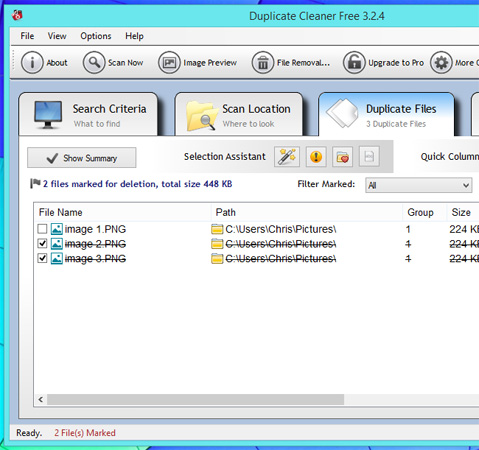
<p style="text-align: justify;">Duplicate Cleaner của hãng Digital Volcano cũng là một trong những lựa chọn bạn nên cân nhắc. Duplicate Cleaner sẽ quét máy tính của bạn và bất kì ổ đĩa ngoài nào để tìm kiếm các tập tin trùng lặp.</p>

<p style="text-align: justify;">Ưu điểm của ứng dụng này vượt qua ứng dụng dupeGuru bởi giao diện của nó.&nbsp;</p>

<p style="text-align: justify;"><img alt="Giao diện của Duplicate Cleaner Free 3.2.4" data-i="0" data-src="https://st.quantrimang.com/photos/image/2017/05/15/ung-dung-duplicate-cleaner-free.jpg" data-was-processed="true" height="450" src="https://st.quantrimang.com/photos/image/2017/05/15/ung-dung-duplicate-cleaner-free.jpg" title="Giao diện của Duplicate Cleaner Free 3.2.4" width="479" /></p>

<p style="text-align: justify;">Download :&nbsp;<strong><span style="color:rgb(192, 57, 43);">https://download.com.vn/duplicate-cleaner/download</span></strong></p>

<p style="text-align: justify;"><strong>Duplicate Cleaner Pro</strong>&nbsp;là phiên bản tính phí của&nbsp;Digital Volcano. Nếu bạn muốn tìm và xóa các file trùng lặp nhanh chóng, sẽ không có công cụ nào làm việc này tốt hơn Duplicate Cleaner Pro 4 đâu. Có thể bạn sẽ phải trả phí cho chương trình này, nhưng đổi lại nó rất dễ sử dụng và đầy đủ các tính năng.&nbsp;Digital Volcano đang kiếm tiền bằng phương thức cổ điển - cung cấp các sản phẩm chất lượng và hy vọng người dùng trả phí cho phiên bản nâng cấp với nhiều tính năng hơn.</p>

<p style="text-align: justify;">Bạn có thể tải bản dùng thử&nbsp;tại đây:&nbsp;<span style="color:rgb(192, 57, 43);"><strong>https://www.duplicatecleaner.com/download/DuplicateCleanerPro4_setup.exe</strong></span>&nbsp;và trải nghiệm xem có thích nó không.</p>

<h2 style="text-align: justify;">VisiPics</h2>

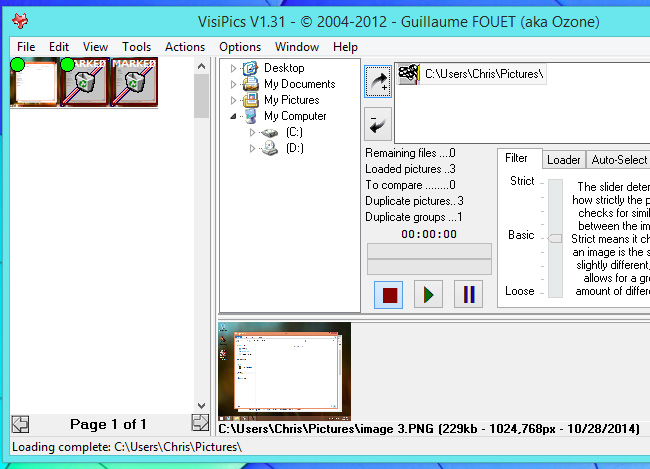
<p style="text-align: justify;">Sử dụng&nbsp;VisiPics để quét các tập tin hình ảnh giống nhau hoặc không hoàn toàn giống nhau, khác tên file và khác độ phân giải. Ví dụ,&nbsp;VisiPics sẽ tìm các file hình ảnh đã thay đổi kích cỡ hoặc chỉnh sửa và đánh dấu chúng là bản sao. VisiPics sẽ giúp bạn xóa những bản sao mà bạn không muốn sử dụng nữa.</p>

<p style="text-align: justify;">Nếu bạn có một bộ sưu tập hình ảnh lớn, VisiPics sẽ là một ứng dụng khá lý tưởng. Ứng dụng này cung cấp giao diện trực quan để xem xét và xóa bớt những bản sao có độ phân giải thấp, chỉ giữ lại ảnh có độ phân giải cao trong các ảnh bị trùng lặp.</p>

<p style="text-align: justify;"><img alt="Giao diện của VisiPics" data-i="1" data-src="https://st.quantrimang.com/photos/image/2017/05/15/ung-dung-visiPics.jpg" data-was-processed="true" height="469" src="https://st.quantrimang.com/photos/image/2017/05/15/ung-dung-visiPics.jpg" title="Giao diện của VisiPics" width="650" /></p>

<p style="text-align: justify;">Link download:&nbsp;Tải ứng dụng VisiPics:&nbsp;<strong><span style="color:rgb(192, 57, 43);">https://download.com.vn/visipics-1-3/download</span></strong></p>

<h2 style="text-align: justify;">Duplicate File Remover</h2>

<figure>
<div style="text-align: justify;"><img alt="Duplicate File Remover" data-i="2" data-src="https://st.quantrimang.com/photos/image/2020/02/13/tim-va-xoa-cac-file-trung-lap-tren-windows-1.jpg" data-was-processed="true" height="343" src="https://st.quantrimang.com/photos/image/2020/02/13/tim-va-xoa-cac-file-trung-lap-tren-windows-1.jpg" width="650" /></div>

<figcaption>
<div style="text-align: justify;">Duplicate File Remover</div>
</figcaption>
</figure>

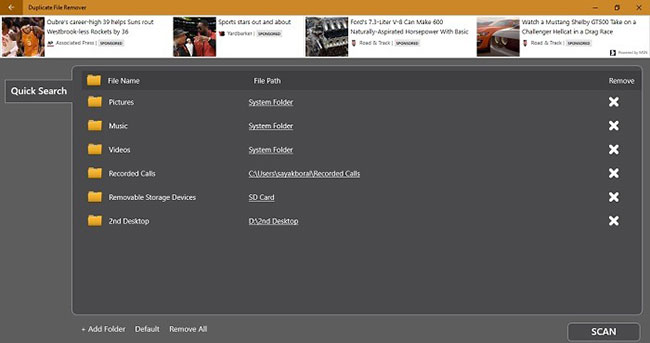
<p style="text-align: justify;">Mặc dù Duplicate Cleaner cho kết quả tuyệt vời, nhưng đôi khi chúng ta chỉ cần một phần mềm miễn phí để dọn dẹp vài thư mục. Để làm điều này, hãy cài đặt một ứng dụng Windows có tên là Duplicate File Remover.</p>

<ul>
	<li style="text-align: justify;">Tải Duplicate File Remover:&nbsp;<span style="color:rgb(192, 57, 43);"><strong>download.com.vn/duplicate-file-remover-1/download</strong></span></li>
</ul>

<p style="text-align: justify;">Nhấp vào&nbsp;<strong>“Add Folder”</strong>&nbsp;ở phía dưới để thêm bất kỳ thư mục nào từ máy tính. Chọn thư mục đó và nhấp vào&nbsp;<strong>Scan</strong>, sau đó chương trình sẽ đồng bộ tất cả các file trong thư mục đó.</p>

<p style="text-align: justify;">Loại bỏ các bản sao dành riêng cho thư mục không tốn nhiều thời gian như việc dọn dẹp toàn bộ ổ.</p>

<div style="text-align: justify;">&nbsp;</div>

<h2 style="text-align: justify;">Easy Duplicate Finder</h2>

<figure>
<div style="text-align: justify;"><img alt="Easy Duplicate Finder" data-i="3" data-src="https://st.quantrimang.com/photos/image/2020/02/13/tim-va-xoa-cac-file-trung-lap-tren-windows-2.jpg" data-was-processed="true" height="433" src="https://st.quantrimang.com/photos/image/2020/02/13/tim-va-xoa-cac-file-trung-lap-tren-windows-2.jpg" width="650" /></div>

<figcaption>
<div style="text-align: justify;">Easy Duplicate Finder</div>
</figcaption>
</figure>

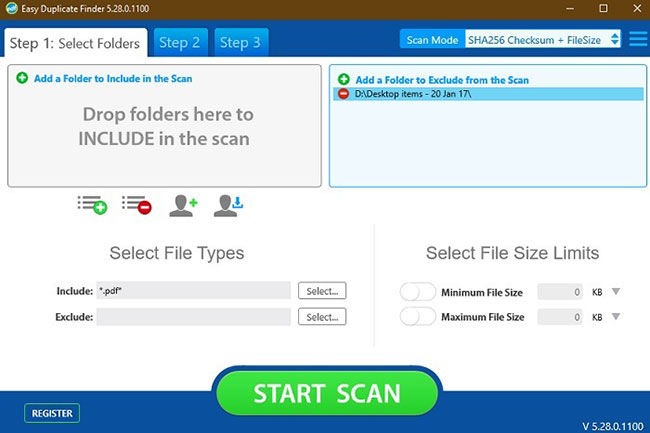
<p style="text-align: justify;">Easy Duplicate Finder là một lựa chọn khá tốt nếu bạn cần một công cụ để xử lý nhanh chóng một thư mục cụ thể. Việc tải xuống nhanh chóng và dễ dàng.</p>

<ul>
	<li style="text-align: justify;">Tải Easy Duplicate Finder:&nbsp;<span style="color:rgb(192, 57, 43);"><strong>download.com.vn/easy-duplicate-finder/download</strong></span></li>
</ul>

<p style="text-align: justify;">Bạn chỉ phải thêm vào một thư mục để thêm nó vào quá trình quét. Bạn có thể bao gồm hoặc loại trừ các loại file và đặt giới hạn kích thước file một cách dễ dàng.</p>

<p style="text-align: justify;">Khi các mục trùng lặp cụ thể của thư mục đã được xác định, bạn có thể giải quyết chúng bằng cách sử dụng danh sách kiểm tra dạng bảng đơn giản trong bước 3. Nó cũng cung cấp cho bạn bản xem trước trực tiếp của tất cả các file cần xóa, đây là một tính năng tuyệt vời.</p>

<h2 style="text-align: justify;">CloneSpy</h2>

<figure>
<div style="text-align: justify;"><img alt="CloneSpy" data-i="4" data-src="https://st.quantrimang.com/photos/image/2020/02/13/tim-va-xoa-cac-file-trung-lap-tren-windows-3.jpg" data-was-processed="true" height="413" src="https://st.quantrimang.com/photos/image/2020/02/13/tim-va-xoa-cac-file-trung-lap-tren-windows-3.jpg" width="650" /></div>

<figcaption>
<div style="text-align: justify;">CloneSpy</div>
</figcaption>
</figure>

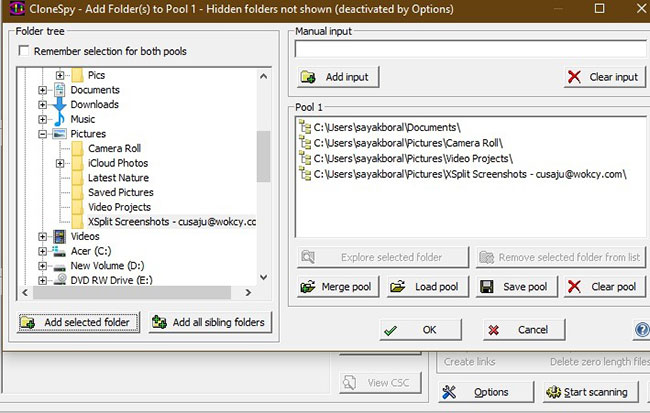
<p style="text-align: justify;">CloneSpy là một công cụ hoàn toàn miễn phí. Nó không chỉ cho phép bạn tìm kiếm các bản sao trong một thư mục mà còn hợp nhất nhiều thư mục. Điều này cung cấp cho bạn một cái nhìn toàn diện hơn về các file trùng lặp trong máy tính Windows.</p>

<ul>
	<li style="text-align: justify;">Tải CloneSpy:&nbsp;<span style="color:rgb(41, 128, 185);"><strong>download.com.vn/clonespy/download</strong></span></li>
</ul>

<p style="text-align: justify;">Khi bạn nhấn&nbsp;<strong>Start scanning</strong>, các file trùng lặp sẽ nhanh chóng được tìm ra. Bạn có thể xóa chúng đồng thời nếu bạn không thích xóa từng file theo cách thủ công.</p>

<h2 style="text-align: justify;">Auslogics Duplicate File Finder</h2>

<figure>
<div style="text-align: justify;"><img alt="Auslogics Duplicate File Finder" data-i="5" data-src="https://st.quantrimang.com/photos/image/2020/02/13/tim-va-xoa-cac-file-trung-lap-tren-windows-4.jpg" data-was-processed="true" height="437" src="https://st.quantrimang.com/photos/image/2020/02/13/tim-va-xoa-cac-file-trung-lap-tren-windows-4.jpg" width="650" /></div>

<figcaption>
<div style="text-align: justify;">Auslogics Duplicate File Finder</div>
</figcaption>
</figure>

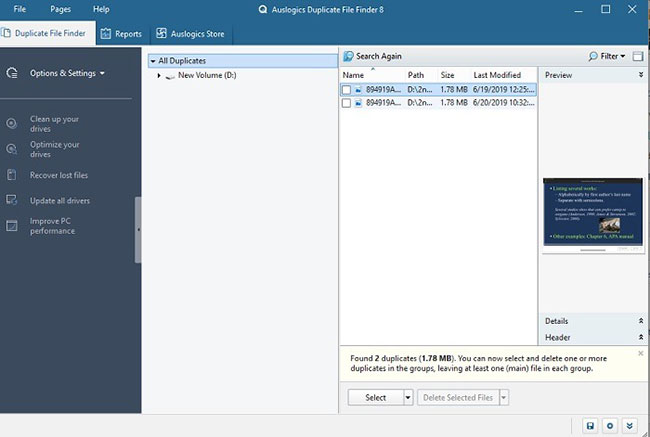
<p style="text-align: justify;">Auslogics Duplicate File Finder là một công cụ phần mềm miễn phí cực kỳ dễ dàng để phát hiện và xóa các file trùng lặp. Sau khi&nbsp;tải Auslogics Duplicate File Finder: <span style="color:rgb(192, 57, 43);"><strong>download.com.vn/auslogics-duplicate-file-finder/download</strong></span>, bạn có thể nhanh chóng thực hiện phân tích chi tiết. Điều mà nhiều người yêu thích ở phần mềm này là bạn có thể nhanh chóng chọn và bỏ chọn bất kỳ thư mục nào. Ngoại trừ Duplicate Cleaner (Pro), công cụ này mất ít thời gian nhất để thực hiện nhiệm vụ của mình.</p>

<p style="text-align: justify;">Chỉ có một nhược điểm. Trong quá trình cài đặt, bạn sẽ tìm thấy nhiều phần mềm add-on. Nếu bạn không muốn dùng chúng, chỉ cần nhớ bỏ chọn ngay từ đầu.</p>

<p style="text-align: justify;">Trên đây chưa phải là danh sách đầy đủ các ứng dụng tìm file trùng lặp cho Windows. Có rất nhiều chương trình khác, nhưng chúng thường kèm theo trình cài đặt với nhiều phần mềm quảng cáo gây rất nhiều phiền toái cho người dùng. Các tiện ích trên là những ứng dụng phổ biến, hoạt động hiệu quả mà không gây hại gì cho hệ thống máy tính của người dùng.</p>

<p style="text-align: justify;">Hãy nhớ là không được xóa file trùng lặp trong các thư mục hệ thống - ví dụ như&nbsp;<strong>C:\Program Files or C:\Windows&nbsp;</strong>nhé. Chỉ xóa những tập tin, dữ liệu cá nhân như tài liệu, hình ảnh, file nhạc, video hay những tập tin trùng lặp khác ngoại trừ các file hệ thống.</p>

<p style="text-align: justify;">Trên đây là những ứng dụng tìm và xóa file trùng lặp hiệu quả. Nếu bạn muốn sử dụng thì hãy click vào đường link đính kèm để download nhé!</p>
		</div>
				<div id="author">
						<p>
				<strong>Nguồn tin:</strong>
				Quantrimang.com
			</p>
		</div>
	</div>
	<div id="footer" class="clearfix">
		<div id="url">
			<strong>URL của bản tin này: </strong><a href="https://www.nguoicodonvn2008.info/vi/news/savefile/kien-thuc-may-tinh/huong-dan-tim-va-xoa-cac-file-trung-lap-tren-windows-1662.html" title="Hướng dẫn tìm và xóa các file trùng lặp trên Windows">https://www.nguoicodonvn2008.info/vi/news/savefile/kien-thuc-may-tinh/huong-dan-tim-va-xoa-cac-file-trung-lap-tren-windows-1662.html</a>

		</div>
		<div class="clear"></div>
		<div class="copyright">
			&copy; .&#x3A; Nguoicodonvn2008.info - Cõi lòng người cô đơn &#x3A;.
		</div>
		<div id="contact">
			<a href="mailto:admin@nguoicodonvn2008.info">admin@nguoicodonvn2008.info</a>
		</div>
	</div>
</div>
        <div id="timeoutsess" class="chromeframe">
            Bạn đã không sử dụng Site, <a onclick="timeoutsesscancel();" href="https://www.nguoicodonvn2008.info/#">Bấm vào đây để duy trì trạng thái đăng nhập</a>. Thời gian chờ: <span id="secField"> 60 </span> giây
        </div>
        <div id="openidResult" class="nv-alert" style="display:none"></div>
        <div id="openidBt" data-result="" data-redirect=""></div>
		</script>
		<div class="car-top">
  <span><img src="https://www.nguoicodonvn2008.info/themes/default/images/car.png" alt=""></span>
</div>
<div id="run_cronjobs" style="visibility:hidden;display:none;"><img alt="cron" src="/index.php?second=cronjobs&amp;p=k3g0PdUZ" width="1" height="1" /></div>
<script src="https://www.nguoicodonvn2008.info/assets/js/jquery/jquery.min.js"></script>
<script>var nv_base_siteurl="/",nv_lang_data="vi",nv_lang_interface="vi",nv_name_variable="nv",nv_fc_variable="op",nv_lang_variable="language",nv_module_name="news",nv_func_name="savefile",nv_is_user=0, nv_my_ofs=-4,nv_my_abbr="EDT",nv_cookie_prefix="nv4c_e856T",nv_check_pass_mstime=1738000,nv_area_admin=0,nv_safemode=0,theme_responsive=0,nv_recaptcha_ver=2,nv_recaptcha_sitekey="",nv_recaptcha_type="image",XSSsanitize=1;</script>
<script src="https://www.nguoicodonvn2008.info/assets/js/language/vi.js"></script>
<script src="https://www.nguoicodonvn2008.info/assets/js/DOMPurify/purify3.js"></script>
<script src="https://www.nguoicodonvn2008.info/assets/js/global.js"></script>
<script src="https://www.nguoicodonvn2008.info/assets/js/site.js"></script>
<script src="https://www.nguoicodonvn2008.info/themes/default/js/news.js"></script>
<script src="https://www.nguoicodonvn2008.info/themes/default/js/main.js"></script>
<script src="https://www.nguoicodonvn2008.info/themes/default/js/custom.js"></script>
<script type="application/ld+json">
        {
            "@context": "https://schema.org",
            "@type": "Organization",
            "url": "https://www.nguoicodonvn2008.info",
            "logo": "https://www.nguoicodonvn2008.info/uploads/angel.gif"
        }
        </script>
<script src="https://www.nguoicodonvn2008.info/themes/default/js/bootstrap.min.js"></script>
<script type="text/javascript">
var $scrolltop = $('.car-top');
$scrolltop.on('click', function () {
    $('html,body').animate({
        scrollTop: 0
    }, 800);
    $(this).addClass("car-run");
    setTimeout(function(){ $scrolltop.removeClass('car-run');}, 1000);
    return false;
});
$(window).on('scroll', function ()
{ 
    if($(window).scrollTop() >= 200)
    {
        $scrolltop.addClass("show");
        $scrolltop.addClass("car-down");
    }
    else
    {
       $scrolltop.removeClass("show");
       setTimeout(function(){ $scrolltop.removeClass('car-down');}, 300);
    }
});
</script>
</body>
</html>