<!DOCTYPE html>
    <html lang="vi" xmlns="http://www.w3.org/1999/xhtml" prefix="og: http://ogp.me/ns#">
    <head>
<title>Hướng dẫn thay đổi kích thước và vị trí Pagefile trên Windows</title>
<meta name="description" content="Hướng dẫn thay đổi kích thước và vị trí Pagefile trên Windows - Savefile - Tin Tức -...">
<meta name="author" content=".: Nguoicodonvn2008.info - Cõi lòng người cô đơn :.">
<meta name="copyright" content=".: Nguoicodonvn2008.info - Cõi lòng người cô đơn :. [admin@nguoicodonvn2008.info]">
<meta name="robots" content="index, archive, follow, noodp">
<meta name="googlebot" content="index,archive,follow,noodp">
<meta name="msnbot" content="all,index,follow">
<meta name="generator" content="NukeViet v4.5">
<meta http-equiv="Content-Type" content="text/html; charset=utf-8">
<meta property="og:title" content="Hướng dẫn thay đổi kích thước và vị trí Pagefile trên Windows">
<meta property="og:type" content="website">
<meta property="og:description" content="Savefile - Tin Tức - https&#x3A;&#x002F;&#x002F;www.nguoicodonvn2008.info&#x002F;vi&#x002F;news&#x002F;savefile&#x002F;kien-thuc-may-tinh&#x002F;huong-dan-thay-doi-kich-thuoc-va-vi-tri-pagefile-tren-windows-7811.html">
<meta property="og:site_name" content=".&#x3A; Nguoicodonvn2008.info - Cõi lòng người cô đơn &#x3A;.">
<meta property="og:url" content="https://www.nguoicodonvn2008.info/vi/news/savefile/kien-thuc-may-tinh/huong-dan-thay-doi-kich-thuoc-va-vi-tri-pagefile-tren-windows-7811.html">
<link rel="shortcut icon" href="https://www.nguoicodonvn2008.info/favicon.ico">
<link rel="canonical" href="https://www.nguoicodonvn2008.info/vi/news/savefile/kien-thuc-may-tinh/huong-dan-thay-doi-kich-thuoc-va-vi-tri-pagefile-tren-windows-7811.html">
<link rel="alternate" href="https://www.nguoicodonvn2008.info/vi/news/rss/" title="Tin Tức" type="application/rss+xml">
<link rel="alternate" href="https://www.nguoicodonvn2008.info/vi/news/rss/karaoke-dual/" title="Tin Tức - Karaoke Dual" type="application/rss+xml">
<link rel="alternate" href="https://www.nguoicodonvn2008.info/vi/news/rss/nhac-tre/" title="Tin Tức - Nhạc trẻ" type="application/rss+xml">
<link rel="alternate" href="https://www.nguoicodonvn2008.info/vi/news/rss/tru-tinh/" title="Tin Tức - Trữ tình" type="application/rss+xml">
<link rel="alternate" href="https://www.nguoicodonvn2008.info/vi/news/rss/nuoc-ngoai/" title="Tin Tức - Nước ngoài" type="application/rss+xml">
<link rel="alternate" href="https://www.nguoicodonvn2008.info/vi/news/rss/remix/" title="Tin Tức - Remix" type="application/rss+xml">
<link rel="alternate" href="https://www.nguoicodonvn2008.info/vi/news/rss/tam-su-tinh-yeu/" title="Tin Tức - Tâm sự tình yêu" type="application/rss+xml">
<link rel="alternate" href="https://www.nguoicodonvn2008.info/vi/news/rss/tho-suu-tam/" title="Tin Tức - Thơ sưu tầm" type="application/rss+xml">
<link rel="alternate" href="https://www.nguoicodonvn2008.info/vi/news/rss/cuoc-song/" title="Tin Tức - Cuộc sống" type="application/rss+xml">
<link rel="alternate" href="https://www.nguoicodonvn2008.info/vi/news/rss/phan-mem/" title="Tin Tức - Phần mềm" type="application/rss+xml">
<link rel="alternate" href="https://www.nguoicodonvn2008.info/vi/news/rss/kien-thuc-may-tinh/" title="Tin Tức - Kiến thức máy tính" type="application/rss+xml">
<link rel="alternate" href="https://www.nguoicodonvn2008.info/vi/news/rss/hoc-tap/" title="Tin Tức - Học tập" type="application/rss+xml">
<link rel="alternate" href="https://www.nguoicodonvn2008.info/vi/news/rss/tai-lieu/" title="Tin Tức - Tài liệu" type="application/rss+xml">
<link rel="alternate" href="https://www.nguoicodonvn2008.info/vi/news/rss/de-thi/" title="Tin Tức - Đề thi" type="application/rss+xml">
<link rel="preload" as="style" href="https://www.nguoicodonvn2008.info/assets/css/font-awesome.min.css" type="text/css">
<link rel="preload" as="style" href="https://www.nguoicodonvn2008.info/themes/default/css/bootstrap.non-responsive.css" type="text/css">
<link rel="preload" as="style" href="https://www.nguoicodonvn2008.info/themes/default/css/style.css" type="text/css">
<link rel="preload" as="style" href="https://www.nguoicodonvn2008.info/themes/default/css/style.non-responsive.css" type="text/css">
<link rel="preload" as="style" href="https://www.nguoicodonvn2008.info/themes/default/css/news.css" type="text/css">
<link rel="preload" as="style" href="https://www.nguoicodonvn2008.info/themes/default/css/custom.css" type="text/css">
<link rel="preload" as="script" href="https://www.nguoicodonvn2008.info/assets/js/jquery/jquery.min.js" type="text/javascript">
<link rel="preload" as="script" href="https://www.nguoicodonvn2008.info/assets/js/language/vi.js" type="text/javascript">
<link rel="preload" as="script" href="https://www.nguoicodonvn2008.info/assets/js/DOMPurify/purify3.js" type="text/javascript">
<link rel="preload" as="script" href="https://www.nguoicodonvn2008.info/assets/js/global.js" type="text/javascript">
<link rel="preload" as="script" href="https://www.nguoicodonvn2008.info/assets/js/site.js" type="text/javascript">
<link rel="preload" as="script" href="https://www.nguoicodonvn2008.info/themes/default/js/news.js" type="text/javascript">
<link rel="preload" as="script" href="https://www.nguoicodonvn2008.info/themes/default/js/main.js" type="text/javascript">
<link rel="preload" as="script" href="https://www.nguoicodonvn2008.info/themes/default/js/custom.js" type="text/javascript">
<link rel="preload" as="script" href="https://www.nguoicodonvn2008.info/themes/default/js/bootstrap.min.js" type="text/javascript">
<link rel="stylesheet" href="https://www.nguoicodonvn2008.info/assets/css/font-awesome.min.css">
<link rel="stylesheet" href="https://www.nguoicodonvn2008.info/themes/default/css/bootstrap.non-responsive.css">
<link rel="stylesheet" href="https://www.nguoicodonvn2008.info/themes/default/css/style.css">
<link rel="stylesheet" href="https://www.nguoicodonvn2008.info/themes/default/css/style.non-responsive.css">
<link rel="StyleSheet" href="https://www.nguoicodonvn2008.info/themes/default/css/news.css">
<link rel="stylesheet" href="https://www.nguoicodonvn2008.info/themes/default/css/custom.css">
<style type="text/css">
	body{background: #fff;}
</style>
    </head>
    <body>
<div id="print">
	<div id="hd_print">
		<h2 class="pull-left">.&#x3A; Nguoicodonvn2008.info - Cõi lòng người cô đơn &#x3A;.</h2>
		<p class="pull-right"><a title=".&#x3A; Nguoicodonvn2008.info - Cõi lòng người cô đơn &#x3A;." href="https://www.nguoicodonvn2008.info/">https://www.nguoicodonvn2008.info</a></p>
	</div>
	<div class="clear"></div>
	<hr />
	<div id="content">
		<h1>Hướng dẫn thay đổi kích thước và vị trí Pagefile trên Windows</h1>
		<ul class="list-inline">
			<li>Thứ hai - 27/11/2023 09:35</li>
			<li class="hidden-print txtrequired"><em class="fa fa-print">&nbsp;</em><a title="In ra" href="javascript:;" onclick="window.print()">In ra</a></li>
			<li class="hidden-print txtrequired"><em class="fa fa-power-off">&nbsp;</em><a title="Đóng cửa sổ này" href="javascript:;" onclick="window.close()">Đóng cửa sổ này</a></li>
		</ul>
		<div class="clear"></div>
		<div id="hometext">
		</div>
				<div class="imghome">
			<img alt="Hướng dẫn thay đổi kích thước và vị trí Pagefile trên Windows" src="https://st.quantrimang.com/photos/image/2023/11/27/doi-kich-thuoc-va-vi-tri-pagefilesys-3.jpg" width="460" class="img-thumbnail" />
		</div>
		<div class="clear"></div>
		<div id="bodytext" class="clearfix">
			<p style="text-align: justify;">Thỉnh thoảng, bạn sẽ thấy một bản sửa lỗi được Internet khuyến nghị yêu cầu bạn thay đổi vị trí và/hoặc kích thước của file pagefile hoặc file pagefile.sys trên PC Windows của bạn. Pagefile là một phần của bộ nhớ ảo trong hệ thống của bạn, được Windows sử dụng để mở rộng bộ nhớ khả dụng cho các tác vụ hàng ngày. Nếu bạn biết lý do tại sao mình được yêu cầu làm điều đó, hãy làm theo hướng dẫn này để thay đổi kích thước và vị trí của pagefile trong Windows.</p>

<h2 style="text-align: justify;">Thay đổi kích thước Pagefile trong Windows</h2>

<p style="text-align: justify;">Khi Windows sắp hết bộ nhớ vật lý (RAM), nó sẽ truy cập vào file hệ thống pagefile.sys và chuyển tất cả các bit bộ nhớ ít được sử dụng nhất vào file đó. Hệ thống có thể dọn sạch RAM vật lý cho bất kỳ tác vụ bổ sung nào. Windows tự động quản lý kích thước pagefile theo mặc định, vì vậy chỉ thực hiện thay đổi nếu bạn thực sự cần. Windows thường dành khoảng 1/8 tổng RAM hoặc 4GB (tùy theo mức nào lớn hơn) trên ổ cứng cho pagefile.</p>

<p style="text-align: justify;">Thực hiện theo các bước bên dưới để thay đổi kích thước pagefile:</p>

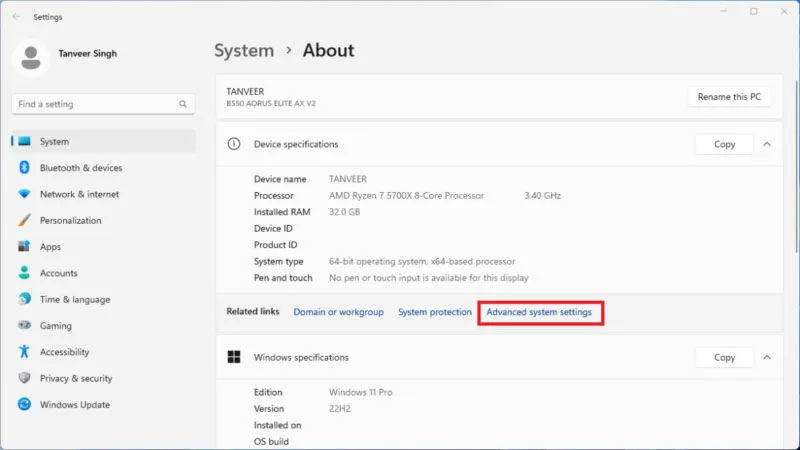
<p style="text-align: justify;">Nhấp chuột phải vào nút Windows, chọn&nbsp;<strong>System</strong>, sau đó chọn&nbsp;<strong>Advanced system settings</strong>.</p>

<figure>
<div style="text-align: justify;"><img alt="Vào cài đặt hệ thống Windows" data-i="0" data-src="https://st.quantrimang.com/photos/image/2023/11/27/doi-kich-thuoc-va-vi-tri-pagefilesys-1.jpg" data-was-processed="true" height="450" src="https://st.quantrimang.com/photos/image/2023/11/27/doi-kich-thuoc-va-vi-tri-pagefilesys-1.jpg" width="800" /></div>

<figcaption>
<div style="text-align: justify;">Vào cài đặt hệ thống Windows</div>
</figcaption>
</figure>

<div style="text-align: justify;"><iframe allowtransparency="true" data-google-container-id="a!2" data-google-query-id="CNDjjL2z5IIDFchTDwId6CwAAQ" data-load-complete="true" frameborder="0" height="0" hspace="0" id="aswift_1" marginheight="0" marginwidth="0" name="aswift_1" sandbox="" scrolling="no" vspace="0" width="694"></iframe></div>

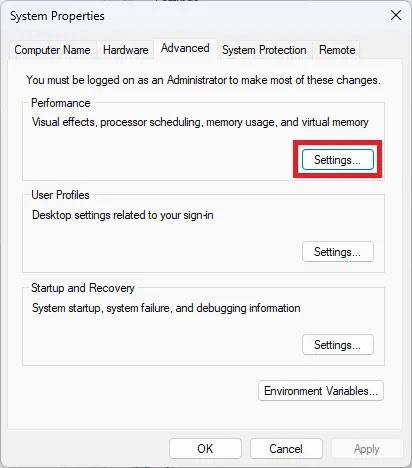
<p style="text-align: justify;">Trong&nbsp;<strong>Performance</strong>&nbsp;thuộc tab&nbsp;<strong>Advanced</strong>, hãy nhấp vào&nbsp;<strong>Settings</strong>.</p>

<figure>
<div style="text-align: justify;"><br />
<img alt="Cài đặt hệ thống Windows nâng cao" data-adbro-processed="true" data-i="1" data-src="https://st.quantrimang.com/photos/image/2023/11/27/doi-kich-thuoc-va-vi-tri-pagefilesys-2.jpg" data-was-processed="true" height="468" src="https://st.quantrimang.com/photos/image/2023/11/27/doi-kich-thuoc-va-vi-tri-pagefilesys-2.jpg" width="412" /></div>

<figcaption>
<div style="text-align: justify;">Cài đặt hệ thống Windows nâng cao</div>
</figcaption>
</figure>

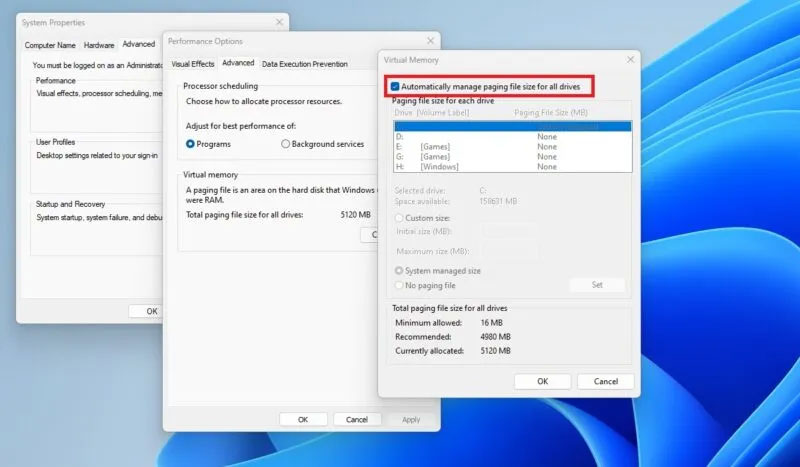
<p style="text-align: justify;">Trong&nbsp;<strong>Virtual memory</strong>&nbsp;thuộc tab&nbsp;<strong>Advanced</strong>, nhấp vào&nbsp;<strong>Change</strong>. Bỏ chọn&nbsp;<strong>Automatically manage paging file size for all drives</strong>&nbsp;trong cửa sổ&nbsp;<strong>Virtual Memory</strong>, chọn ổ paging file và nhấp vào nút bên cạnh&nbsp;<strong>Custom size</strong>. Nhập các giá trị&nbsp;<strong>Initial size</strong>&nbsp;và&nbsp;<strong>Maximum size</strong>&nbsp;cho pagefile của bạn và nhấp vào&nbsp;<strong>OK</strong>&nbsp;để lưu các thay đổi.</p>

<figure>
<div style="text-align: justify;"><img alt="Bộ nhớ ảo hệ thống Windows" data-i="2" data-src="https://st.quantrimang.com/photos/image/2023/11/27/doi-kich-thuoc-va-vi-tri-pagefilesys-3.jpg" data-was-processed="true" height="467" src="https://st.quantrimang.com/photos/image/2023/11/27/doi-kich-thuoc-va-vi-tri-pagefilesys-3.jpg" width="800" /></div>

<figcaption>
<div style="text-align: justify;">Bộ nhớ ảo hệ thống Windows</div>
</figcaption>
</figure>

<p style="text-align: justify;">Tốt nhất bạn nên khởi động lại hệ thống để những thay đổi có hiệu lực. Ngoài ra, nếu bạn gặp phải lỗi sử dụng nhiều bộ nhớ trong Windows, hãy thử tăng thêm bộ nhớ ảo, mặc dù cách này có thể không khắc phục được hoàn toàn sự cố.</p>

<div style="text-align: justify;"><iframe allowtransparency="true" data-google-container-id="a!3" data-google-query-id="CI_ardSz5IIDFQhGDwIdWC4ODA" data-load-complete="true" frameborder="0" height="0" hspace="0" id="aswift_2" marginheight="0" marginwidth="0" name="aswift_2" sandbox="" scrolling="no" vspace="0" width="694"></iframe></div>

<h2 style="text-align: justify;">Thay đổi vị trí Pagefile trong Windows</h2>

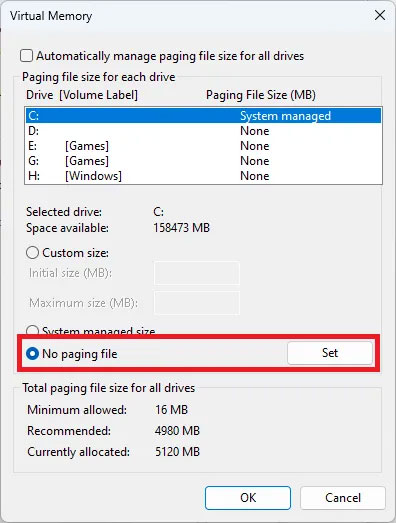
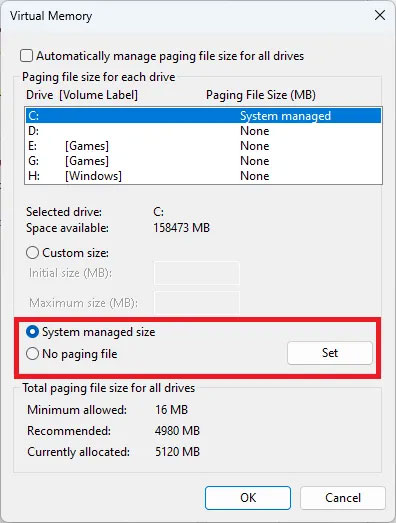
<p style="text-align: justify;">Để thay đổi vị trí pagefile, hãy làm theo các bước trên cho đến khi cửa sổ&nbsp;<strong>Virtual Memory</strong>&nbsp;mở ra, sau đó bỏ chọn hộp bên cạnh&nbsp;<strong>Automatically manage paging file size for all drives</strong>. Chọn ổ paging file mặc định, nhấp vào nút bên cạnh&nbsp;<strong>No paging file</strong>&nbsp;và nhấp vào&nbsp;<strong>Set</strong>&nbsp;để vô hiệu hóa paging file trên ổ bạn đã chọn một cách hiệu quả.</p>

<figure>
<div style="text-align: justify;"><img alt="Chọn No paging file" data-i="3" data-src="https://st.quantrimang.com/photos/image/2023/11/27/doi-kich-thuoc-va-vi-tri-pagefilesys-4.jpg" data-was-processed="true" height="523" src="https://st.quantrimang.com/photos/image/2023/11/27/doi-kich-thuoc-va-vi-tri-pagefilesys-4.jpg" width="396" /></div>

<figcaption>
<div style="text-align: justify;">Chọn No paging file</div>
</figcaption>
</figure>

<p style="text-align: justify;">Chọn ổ mà bạn muốn lưu trữ paging file, sau đó nhấp vào nút bên cạnh&nbsp;<strong>System managed size</strong>&nbsp;và nhấp vào&nbsp;<strong>Set</strong>&nbsp;để áp dụng các thay đổi. Nhấn&nbsp;<strong>OK</strong>&nbsp;và đóng tất cả các cửa sổ.</p>

<figure>
<div style="text-align: justify;"><img alt="Thay đổi vị trí pagefile" data-i="4" data-src="https://st.quantrimang.com/photos/image/2023/11/27/doi-kich-thuoc-va-vi-tri-pagefilesys-5.jpg" data-was-processed="true" height="523" src="https://st.quantrimang.com/photos/image/2023/11/27/doi-kich-thuoc-va-vi-tri-pagefilesys-5.jpg" width="396" /></div>

<figcaption>
<div style="text-align: justify;">Thay đổi vị trí pagefile</div>
</figcaption>
</figure>

<p style="text-align: justify;">Khởi động lại hệ thống của bạn để những thay đổi có hiệu lực.</p>
		</div>
				<div id="author">
						<p>
				<strong>Nguồn tin:</strong>
				Quantrimang.com
			</p>
		</div>
	</div>
	<div id="footer" class="clearfix">
		<div id="url">
			<strong>URL của bản tin này: </strong><a href="https://www.nguoicodonvn2008.info/vi/news/savefile/kien-thuc-may-tinh/huong-dan-thay-doi-kich-thuoc-va-vi-tri-pagefile-tren-windows-7811.html" title="Hướng dẫn thay đổi kích thước và vị trí Pagefile trên Windows">https://www.nguoicodonvn2008.info/vi/news/savefile/kien-thuc-may-tinh/huong-dan-thay-doi-kich-thuoc-va-vi-tri-pagefile-tren-windows-7811.html</a>

		</div>
		<div class="clear"></div>
		<div class="copyright">
			&copy; .&#x3A; Nguoicodonvn2008.info - Cõi lòng người cô đơn &#x3A;.
		</div>
		<div id="contact">
			<a href="mailto:admin@nguoicodonvn2008.info">admin@nguoicodonvn2008.info</a>
		</div>
	</div>
</div>
        <div id="timeoutsess" class="chromeframe">
            Bạn đã không sử dụng Site, <a onclick="timeoutsesscancel();" href="https://www.nguoicodonvn2008.info/#">Bấm vào đây để duy trì trạng thái đăng nhập</a>. Thời gian chờ: <span id="secField"> 60 </span> giây
        </div>
        <div id="openidResult" class="nv-alert" style="display:none"></div>
        <div id="openidBt" data-result="" data-redirect=""></div>
		</script>
		<div class="car-top">
  <span><img src="https://www.nguoicodonvn2008.info/themes/default/images/car.png" alt=""></span>
</div>
<script src="https://www.nguoicodonvn2008.info/assets/js/jquery/jquery.min.js"></script>
<script>var nv_base_siteurl="/",nv_lang_data="vi",nv_lang_interface="vi",nv_name_variable="nv",nv_fc_variable="op",nv_lang_variable="language",nv_module_name="news",nv_func_name="savefile",nv_is_user=0, nv_my_ofs=-4,nv_my_abbr="EDT",nv_cookie_prefix="nv4c_e856T",nv_check_pass_mstime=1738000,nv_area_admin=0,nv_safemode=0,theme_responsive=0,nv_recaptcha_ver=2,nv_recaptcha_sitekey="",nv_recaptcha_type="image",XSSsanitize=1;</script>
<script src="https://www.nguoicodonvn2008.info/assets/js/language/vi.js"></script>
<script src="https://www.nguoicodonvn2008.info/assets/js/DOMPurify/purify3.js"></script>
<script src="https://www.nguoicodonvn2008.info/assets/js/global.js"></script>
<script src="https://www.nguoicodonvn2008.info/assets/js/site.js"></script>
<script src="https://www.nguoicodonvn2008.info/themes/default/js/news.js"></script>
<script src="https://www.nguoicodonvn2008.info/themes/default/js/main.js"></script>
<script src="https://www.nguoicodonvn2008.info/themes/default/js/custom.js"></script>
<script type="application/ld+json">
        {
            "@context": "https://schema.org",
            "@type": "Organization",
            "url": "https://www.nguoicodonvn2008.info",
            "logo": "https://www.nguoicodonvn2008.info/uploads/angel.gif"
        }
        </script>
<script src="https://www.nguoicodonvn2008.info/themes/default/js/bootstrap.min.js"></script>
<script type="text/javascript">
var $scrolltop = $('.car-top');
$scrolltop.on('click', function () {
    $('html,body').animate({
        scrollTop: 0
    }, 800);
    $(this).addClass("car-run");
    setTimeout(function(){ $scrolltop.removeClass('car-run');}, 1000);
    return false;
});
$(window).on('scroll', function ()
{ 
    if($(window).scrollTop() >= 200)
    {
        $scrolltop.addClass("show");
        $scrolltop.addClass("car-down");
    }
    else
    {
       $scrolltop.removeClass("show");
       setTimeout(function(){ $scrolltop.removeClass('car-down');}, 300);
    }
});
</script>
</body>
</html>