<!DOCTYPE html>
    <html lang="vi" xmlns="http://www.w3.org/1999/xhtml" prefix="og: http://ogp.me/ns#">
    <head>
<title>Hướng dẫn tắt tiếng video Picture-in-Picture trên Chrome</title>
<meta name="description" content="Hướng dẫn tắt tiếng video Picture-in-Picture trên Chrome - Savefile - Tin Tức -...">
<meta name="author" content=".: Nguoicodonvn2008.info - Cõi lòng người cô đơn :.">
<meta name="copyright" content=".: Nguoicodonvn2008.info - Cõi lòng người cô đơn :. [admin@nguoicodonvn2008.info]">
<meta name="robots" content="index, archive, follow, noodp">
<meta name="googlebot" content="index,archive,follow,noodp">
<meta name="msnbot" content="all,index,follow">
<meta name="generator" content="NukeViet v4.5">
<meta http-equiv="Content-Type" content="text/html; charset=utf-8">
<meta property="og:title" content="Hướng dẫn tắt tiếng video Picture-in-Picture trên Chrome">
<meta property="og:type" content="website">
<meta property="og:description" content="Savefile - Tin Tức - https&#x3A;&#x002F;&#x002F;www.nguoicodonvn2008.info&#x002F;vi&#x002F;news&#x002F;savefile&#x002F;kien-thuc-may-tinh&#x002F;huong-dan-tat-tieng-video-picture-in-picture-tren-chrome-773.html">
<meta property="og:site_name" content=".&#x3A; Nguoicodonvn2008.info - Cõi lòng người cô đơn &#x3A;.">
<meta property="og:url" content="https://www.nguoicodonvn2008.info/vi/news/savefile/kien-thuc-may-tinh/huong-dan-tat-tieng-video-picture-in-picture-tren-chrome-773.html">
<link rel="shortcut icon" href="https://www.nguoicodonvn2008.info/favicon.ico">
<link rel="canonical" href="https://www.nguoicodonvn2008.info/vi/news/savefile/kien-thuc-may-tinh/huong-dan-tat-tieng-video-picture-in-picture-tren-chrome-773.html">
<link rel="alternate" href="https://www.nguoicodonvn2008.info/vi/news/rss/" title="Tin Tức" type="application/rss+xml">
<link rel="alternate" href="https://www.nguoicodonvn2008.info/vi/news/rss/karaoke-dual/" title="Tin Tức - Karaoke Dual" type="application/rss+xml">
<link rel="alternate" href="https://www.nguoicodonvn2008.info/vi/news/rss/nhac-tre/" title="Tin Tức - Nhạc trẻ" type="application/rss+xml">
<link rel="alternate" href="https://www.nguoicodonvn2008.info/vi/news/rss/tru-tinh/" title="Tin Tức - Trữ tình" type="application/rss+xml">
<link rel="alternate" href="https://www.nguoicodonvn2008.info/vi/news/rss/nuoc-ngoai/" title="Tin Tức - Nước ngoài" type="application/rss+xml">
<link rel="alternate" href="https://www.nguoicodonvn2008.info/vi/news/rss/remix/" title="Tin Tức - Remix" type="application/rss+xml">
<link rel="alternate" href="https://www.nguoicodonvn2008.info/vi/news/rss/tam-su-tinh-yeu/" title="Tin Tức - Tâm sự tình yêu" type="application/rss+xml">
<link rel="alternate" href="https://www.nguoicodonvn2008.info/vi/news/rss/tho-suu-tam/" title="Tin Tức - Thơ sưu tầm" type="application/rss+xml">
<link rel="alternate" href="https://www.nguoicodonvn2008.info/vi/news/rss/cuoc-song/" title="Tin Tức - Cuộc sống" type="application/rss+xml">
<link rel="alternate" href="https://www.nguoicodonvn2008.info/vi/news/rss/phan-mem/" title="Tin Tức - Phần mềm" type="application/rss+xml">
<link rel="alternate" href="https://www.nguoicodonvn2008.info/vi/news/rss/kien-thuc-may-tinh/" title="Tin Tức - Kiến thức máy tính" type="application/rss+xml">
<link rel="alternate" href="https://www.nguoicodonvn2008.info/vi/news/rss/hoc-tap/" title="Tin Tức - Học tập" type="application/rss+xml">
<link rel="alternate" href="https://www.nguoicodonvn2008.info/vi/news/rss/tai-lieu/" title="Tin Tức - Tài liệu" type="application/rss+xml">
<link rel="alternate" href="https://www.nguoicodonvn2008.info/vi/news/rss/de-thi/" title="Tin Tức - Đề thi" type="application/rss+xml">
<link rel="preload" as="style" href="https://www.nguoicodonvn2008.info/assets/css/font-awesome.min.css" type="text/css">
<link rel="preload" as="style" href="https://www.nguoicodonvn2008.info/themes/default/css/bootstrap.non-responsive.css" type="text/css">
<link rel="preload" as="style" href="https://www.nguoicodonvn2008.info/themes/default/css/style.css" type="text/css">
<link rel="preload" as="style" href="https://www.nguoicodonvn2008.info/themes/default/css/style.non-responsive.css" type="text/css">
<link rel="preload" as="style" href="https://www.nguoicodonvn2008.info/themes/default/css/news.css" type="text/css">
<link rel="preload" as="style" href="https://www.nguoicodonvn2008.info/themes/default/css/custom.css" type="text/css">
<link rel="preload" as="script" href="https://www.nguoicodonvn2008.info/assets/js/jquery/jquery.min.js" type="text/javascript">
<link rel="preload" as="script" href="https://www.nguoicodonvn2008.info/assets/js/language/vi.js" type="text/javascript">
<link rel="preload" as="script" href="https://www.nguoicodonvn2008.info/assets/js/DOMPurify/purify3.js" type="text/javascript">
<link rel="preload" as="script" href="https://www.nguoicodonvn2008.info/assets/js/global.js" type="text/javascript">
<link rel="preload" as="script" href="https://www.nguoicodonvn2008.info/assets/js/site.js" type="text/javascript">
<link rel="preload" as="script" href="https://www.nguoicodonvn2008.info/themes/default/js/news.js" type="text/javascript">
<link rel="preload" as="script" href="https://www.nguoicodonvn2008.info/themes/default/js/main.js" type="text/javascript">
<link rel="preload" as="script" href="https://www.nguoicodonvn2008.info/themes/default/js/custom.js" type="text/javascript">
<link rel="preload" as="script" href="https://www.nguoicodonvn2008.info/themes/default/js/bootstrap.min.js" type="text/javascript">
<link rel="stylesheet" href="https://www.nguoicodonvn2008.info/assets/css/font-awesome.min.css">
<link rel="stylesheet" href="https://www.nguoicodonvn2008.info/themes/default/css/bootstrap.non-responsive.css">
<link rel="stylesheet" href="https://www.nguoicodonvn2008.info/themes/default/css/style.css">
<link rel="stylesheet" href="https://www.nguoicodonvn2008.info/themes/default/css/style.non-responsive.css">
<link rel="StyleSheet" href="https://www.nguoicodonvn2008.info/themes/default/css/news.css">
<link rel="stylesheet" href="https://www.nguoicodonvn2008.info/themes/default/css/custom.css">
<style type="text/css">
	body{background: #fff;}
</style>
    </head>
    <body>
<div id="print">
	<div id="hd_print">
		<h2 class="pull-left">.&#x3A; Nguoicodonvn2008.info - Cõi lòng người cô đơn &#x3A;.</h2>
		<p class="pull-right"><a title=".&#x3A; Nguoicodonvn2008.info - Cõi lòng người cô đơn &#x3A;." href="https://www.nguoicodonvn2008.info/">https://www.nguoicodonvn2008.info</a></p>
	</div>
	<div class="clear"></div>
	<hr />
	<div id="content">
		<h1>Hướng dẫn tắt tiếng video Picture-in-Picture trên Chrome</h1>
		<ul class="list-inline">
			<li>Chủ nhật - 18/08/2019 10:46</li>
			<li class="hidden-print txtrequired"><em class="fa fa-print">&nbsp;</em><a title="In ra" href="javascript:;" onclick="window.print()">In ra</a></li>
			<li class="hidden-print txtrequired"><em class="fa fa-power-off">&nbsp;</em><a title="Đóng cửa sổ này" href="javascript:;" onclick="window.close()">Đóng cửa sổ này</a></li>
		</ul>
		<div class="clear"></div>
		<div id="hometext">
		</div>
				<div class="imghome">
			<img alt="Hướng dẫn tắt tiếng video Picture-in-Picture trên Chrome" src="https://st.quantrimang.com/photos/image/2019/08/18/tat-tieng-video-PIP-5.png" width="460" class="img-thumbnail" />
		</div>
		<div class="clear"></div>
		<div id="bodytext" class="clearfix">
			<p style="text-align: justify;">Trình duyệt Google Chrome đã có tính năng Picture-in-Picture để mở video trong cửa sổ nhỏ riêng biệt vừa hoạt động đa nhiệm, theo dõi những nội dung một cách rất thuận tiện. Tuy nhiên, các video ở chế độ PIP lại không thể tắt tiếng trong cửa sổ nhỏ, đôi khi gây bất tiện cho người dùng.</p>

<p style="text-align: justify;">May mắn là giờ bạn đã có thể dùng các thử nghiệm trong flag để thêm vào chức năng tắt tiếng các video PIP một cách nhanh chóng. Theo dõi bài viết này và Quantrimang.com sẽ hướng dẫn cho bạn cách làm.</p>

<p style="text-align: justify;">Lưu ý rằng, các tính năng trong&nbsp;<code>chrome://flags</code>&nbsp;đều là thử nghiệm, chưa hoàn toàn ổn định trên tất cả các thiết bị. Vậy nên, có khả năng bạn sẽ gặp một số lỗi nhỏ khi bật các flag trong này.</p>

<p style="text-align: justify;">Flag tắt tiếng các video PIP này hoạt cả trên tính năng tích hợp sẵn trong trình duyệt lẫn tiện ích mở rộng. Ở bài viết này, Quantrimang.com sẽ sử dụng tiện ích mở rộng làm ví dụ cho bạn đọc.</p>

<p style="text-align: justify;"><strong>Bước 1:</strong>&nbsp;Đầu tiên, mở Chrome của bạn, gõ vào thanh địa chỉ lệnh sau:</p>

<pre id="pre0">
<code>chrome://flags</code></pre>

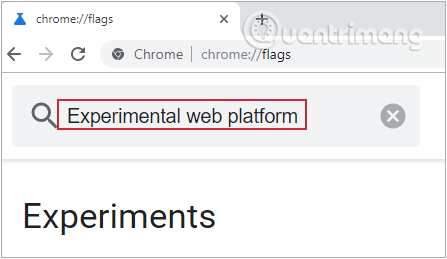
<p style="text-align: justify;"><strong>Bước 2:</strong>&nbsp;Từ trang hiện ra, bạn tìm&nbsp;<strong>Experimental web platform</strong>&nbsp;trong thanh tìm kiếm hoặc paste thẳng link sau vào Omnibox, nhấn Enter để đến flag này trực tiếp.</p>

<figure>
<div style="text-align: justify;"><img alt="Tìm Experimental web platform trong thanh tìm kiếm" data-i="0" data-src="https://st.quantrimang.com/photos/image/2019/08/18/tat-tieng-video-PIP-1.png" data-was-processed="true" height="259" src="https://st.quantrimang.com/photos/image/2019/08/18/tat-tieng-video-PIP-1.png" width="447" /></div>
</figure>

<pre id="pre1">
<code>chrome://flags/#enable-experimental-web-platform-features</code></pre>

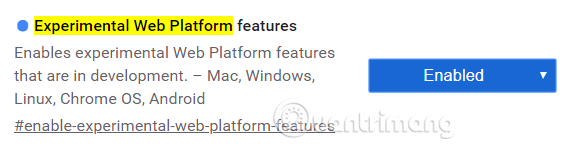
<p style="text-align: justify;"><strong>Bước 3:</strong>&nbsp;Vào hộp bên cạnh flag&nbsp;<strong>Experimental Web Platform</strong>&nbsp;và chọn&nbsp;<strong>Enabled.</strong></p>

<figure>
<div style="text-align: justify;"><img alt="Vào hộp bên cạnh flag và chọn Enabled." data-i="1" data-src="https://st.quantrimang.com/photos/image/2019/08/18/tat-tieng-video-PIP-2.png" data-was-processed="true" height="157" src="https://st.quantrimang.com/photos/image/2019/08/18/tat-tieng-video-PIP-2.png" width="583" /></div>
</figure>

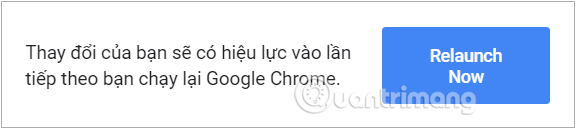
<p style="text-align: justify;"><strong>Bước 4:</strong>&nbsp;Để các thay đổi có hiệu lực, bạn phải khởi động lại Chrome. Nhấp vào nút&nbsp;<strong>Relaunch Now</strong>&nbsp;màu xanh lam ở cuối trang.</p>

<figure>
<div style="text-align: justify;"><img alt="Nhấp vào nút Relaunch Now màu xanh lam ở cuối trang." data-i="2" data-src="https://st.quantrimang.com/photos/image/2019/08/18/tat-tieng-video-PIP-3.png" data-was-processed="true" height="129" src="https://st.quantrimang.com/photos/image/2019/08/18/tat-tieng-video-PIP-3.png" width="576" /></div>
</figure>

<p style="text-align: justify;"><strong>Bước 5:</strong>&nbsp;Sau khi Chrome khởi động lại, bạn thêm video vào hàng đợi rồi nhấp vào biểu tượng tiện ích mở rộng PIP trên thanh công cụ để video hiện dưới dạng trình phát mini ở góc phải màn hình.</p>

<figure>
<div style="text-align: justify;"><img alt="Nhấp vào biểu tượng tiện ích mở rộng PIP trên thanh công cụ" data-i="3" data-src="https://st.quantrimang.com/photos/image/2019/08/18/tat-tieng-video-PIP-4.png" data-was-processed="true" height="82" src="https://st.quantrimang.com/photos/image/2019/08/18/tat-tieng-video-PIP-4.png" width="492" /></div>

<figcaption>
<div style="text-align: justify;">Nhấp vào biểu tượng tiện ích mở rộng PIP trên thanh công cụ</div>
</figcaption>
</figure>

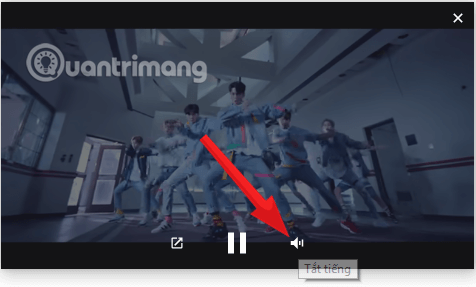
<p style="text-align: justify;">Bây giờ, di con trỏ qua trình phát mini và nhấp vào biểu tượng loa ở góc dưới bên trái và bạn đã có thể tắt tiếng video rồi đấy.</p>

<figure>
<div style="text-align: justify;"><img alt="Nhấp vào biểu tượng loa ở góc dưới bên trái để tắt tiếng video" data-i="4" data-src="https://st.quantrimang.com/photos/image/2019/08/18/tat-tieng-video-PIP-5.png" data-was-processed="true" height="287" src="https://st.quantrimang.com/photos/image/2019/08/18/tat-tieng-video-PIP-5.png" width="476" /></div>
</figure>

<p style="text-align: justify;">Chỉ đơn giản vậy thôi. Để bật lại tiếng, bạn nhấp tiếp vào biểu tượng loa để phát âm thanh trở lại.</p>
		</div>
				<div id="author">
						<p>
				<strong>Nguồn tin:</strong>
				Quantrimang.com
			</p>
		</div>
	</div>
	<div id="footer" class="clearfix">
		<div id="url">
			<strong>URL của bản tin này: </strong><a href="https://www.nguoicodonvn2008.info/vi/news/savefile/kien-thuc-may-tinh/huong-dan-tat-tieng-video-picture-in-picture-tren-chrome-773.html" title="Hướng dẫn tắt tiếng video Picture-in-Picture trên Chrome">https://www.nguoicodonvn2008.info/vi/news/savefile/kien-thuc-may-tinh/huong-dan-tat-tieng-video-picture-in-picture-tren-chrome-773.html</a>

		</div>
		<div class="clear"></div>
		<div class="copyright">
			&copy; .&#x3A; Nguoicodonvn2008.info - Cõi lòng người cô đơn &#x3A;.
		</div>
		<div id="contact">
			<a href="mailto:admin@nguoicodonvn2008.info">admin@nguoicodonvn2008.info</a>
		</div>
	</div>
</div>
        <div id="timeoutsess" class="chromeframe">
            Bạn đã không sử dụng Site, <a onclick="timeoutsesscancel();" href="https://www.nguoicodonvn2008.info/#">Bấm vào đây để duy trì trạng thái đăng nhập</a>. Thời gian chờ: <span id="secField"> 60 </span> giây
        </div>
        <div id="openidResult" class="nv-alert" style="display:none"></div>
        <div id="openidBt" data-result="" data-redirect=""></div>
		</script>
		<div class="car-top">
  <span><img src="https://www.nguoicodonvn2008.info/themes/default/images/car.png" alt=""></span>
</div>
<script src="https://www.nguoicodonvn2008.info/assets/js/jquery/jquery.min.js"></script>
<script>var nv_base_siteurl="/",nv_lang_data="vi",nv_lang_interface="vi",nv_name_variable="nv",nv_fc_variable="op",nv_lang_variable="language",nv_module_name="news",nv_func_name="savefile",nv_is_user=0, nv_my_ofs=-4,nv_my_abbr="EDT",nv_cookie_prefix="nv4c_e856T",nv_check_pass_mstime=1738000,nv_area_admin=0,nv_safemode=0,theme_responsive=0,nv_recaptcha_ver=2,nv_recaptcha_sitekey="",nv_recaptcha_type="image",XSSsanitize=1;</script>
<script src="https://www.nguoicodonvn2008.info/assets/js/language/vi.js"></script>
<script src="https://www.nguoicodonvn2008.info/assets/js/DOMPurify/purify3.js"></script>
<script src="https://www.nguoicodonvn2008.info/assets/js/global.js"></script>
<script src="https://www.nguoicodonvn2008.info/assets/js/site.js"></script>
<script src="https://www.nguoicodonvn2008.info/themes/default/js/news.js"></script>
<script src="https://www.nguoicodonvn2008.info/themes/default/js/main.js"></script>
<script src="https://www.nguoicodonvn2008.info/themes/default/js/custom.js"></script>
<script type="application/ld+json">
        {
            "@context": "https://schema.org",
            "@type": "Organization",
            "url": "https://www.nguoicodonvn2008.info",
            "logo": "https://www.nguoicodonvn2008.info/uploads/angel.gif"
        }
        </script>
<script src="https://www.nguoicodonvn2008.info/themes/default/js/bootstrap.min.js"></script>
<script type="text/javascript">
var $scrolltop = $('.car-top');
$scrolltop.on('click', function () {
    $('html,body').animate({
        scrollTop: 0
    }, 800);
    $(this).addClass("car-run");
    setTimeout(function(){ $scrolltop.removeClass('car-run');}, 1000);
    return false;
});
$(window).on('scroll', function ()
{ 
    if($(window).scrollTop() >= 200)
    {
        $scrolltop.addClass("show");
        $scrolltop.addClass("car-down");
    }
    else
    {
       $scrolltop.removeClass("show");
       setTimeout(function(){ $scrolltop.removeClass('car-down');}, 300);
    }
});
</script>
</body>
</html>