<!DOCTYPE html>
    <html lang="vi" xmlns="http://www.w3.org/1999/xhtml" prefix="og: http://ogp.me/ns#">
    <head>
<title>Hướng dẫn tắt hiển thị nội dung tab trên Google Chrome</title>
<meta name="description" content="Hướng dẫn tắt hiển thị nội dung tab trên Google Chrome - Savefile - Tin Tức -...">
<meta name="author" content=".: Nguoicodonvn2008.info - Cõi lòng người cô đơn :.">
<meta name="copyright" content=".: Nguoicodonvn2008.info - Cõi lòng người cô đơn :. [admin@nguoicodonvn2008.info]">
<meta name="robots" content="index, archive, follow, noodp">
<meta name="googlebot" content="index,archive,follow,noodp">
<meta name="msnbot" content="all,index,follow">
<meta name="generator" content="NukeViet v4.5">
<meta http-equiv="Content-Type" content="text/html; charset=utf-8">
<meta property="og:title" content="Hướng dẫn tắt hiển thị nội dung tab trên Google Chrome">
<meta property="og:type" content="website">
<meta property="og:description" content="Savefile - Tin Tức - https&#x3A;&#x002F;&#x002F;www.nguoicodonvn2008.info&#x002F;vi&#x002F;news&#x002F;savefile&#x002F;kien-thuc-may-tinh&#x002F;huong-dan-tat-hien-thi-noi-dung-tab-tren-google-chrome-1277.html">
<meta property="og:site_name" content=".&#x3A; Nguoicodonvn2008.info - Cõi lòng người cô đơn &#x3A;.">
<meta property="og:url" content="https://www.nguoicodonvn2008.info/vi/news/savefile/kien-thuc-may-tinh/huong-dan-tat-hien-thi-noi-dung-tab-tren-google-chrome-1277.html">
<link rel="shortcut icon" href="https://www.nguoicodonvn2008.info/favicon.ico">
<link rel="canonical" href="https://www.nguoicodonvn2008.info/vi/news/savefile/kien-thuc-may-tinh/huong-dan-tat-hien-thi-noi-dung-tab-tren-google-chrome-1277.html">
<link rel="alternate" href="https://www.nguoicodonvn2008.info/vi/news/rss/" title="Tin Tức" type="application/rss+xml">
<link rel="alternate" href="https://www.nguoicodonvn2008.info/vi/news/rss/karaoke-dual/" title="Tin Tức - Karaoke Dual" type="application/rss+xml">
<link rel="alternate" href="https://www.nguoicodonvn2008.info/vi/news/rss/nhac-tre/" title="Tin Tức - Nhạc trẻ" type="application/rss+xml">
<link rel="alternate" href="https://www.nguoicodonvn2008.info/vi/news/rss/tru-tinh/" title="Tin Tức - Trữ tình" type="application/rss+xml">
<link rel="alternate" href="https://www.nguoicodonvn2008.info/vi/news/rss/nuoc-ngoai/" title="Tin Tức - Nước ngoài" type="application/rss+xml">
<link rel="alternate" href="https://www.nguoicodonvn2008.info/vi/news/rss/remix/" title="Tin Tức - Remix" type="application/rss+xml">
<link rel="alternate" href="https://www.nguoicodonvn2008.info/vi/news/rss/tam-su-tinh-yeu/" title="Tin Tức - Tâm sự tình yêu" type="application/rss+xml">
<link rel="alternate" href="https://www.nguoicodonvn2008.info/vi/news/rss/tho-suu-tam/" title="Tin Tức - Thơ sưu tầm" type="application/rss+xml">
<link rel="alternate" href="https://www.nguoicodonvn2008.info/vi/news/rss/cuoc-song/" title="Tin Tức - Cuộc sống" type="application/rss+xml">
<link rel="alternate" href="https://www.nguoicodonvn2008.info/vi/news/rss/phan-mem/" title="Tin Tức - Phần mềm" type="application/rss+xml">
<link rel="alternate" href="https://www.nguoicodonvn2008.info/vi/news/rss/kien-thuc-may-tinh/" title="Tin Tức - Kiến thức máy tính" type="application/rss+xml">
<link rel="alternate" href="https://www.nguoicodonvn2008.info/vi/news/rss/hoc-tap/" title="Tin Tức - Học tập" type="application/rss+xml">
<link rel="alternate" href="https://www.nguoicodonvn2008.info/vi/news/rss/tai-lieu/" title="Tin Tức - Tài liệu" type="application/rss+xml">
<link rel="alternate" href="https://www.nguoicodonvn2008.info/vi/news/rss/de-thi/" title="Tin Tức - Đề thi" type="application/rss+xml">
<link rel="preload" as="style" href="https://www.nguoicodonvn2008.info/assets/css/font-awesome.min.css" type="text/css">
<link rel="preload" as="style" href="https://www.nguoicodonvn2008.info/themes/default/css/bootstrap.non-responsive.css" type="text/css">
<link rel="preload" as="style" href="https://www.nguoicodonvn2008.info/themes/default/css/style.css" type="text/css">
<link rel="preload" as="style" href="https://www.nguoicodonvn2008.info/themes/default/css/style.non-responsive.css" type="text/css">
<link rel="preload" as="style" href="https://www.nguoicodonvn2008.info/themes/default/css/news.css" type="text/css">
<link rel="preload" as="style" href="https://www.nguoicodonvn2008.info/themes/default/css/custom.css" type="text/css">
<link rel="preload" as="script" href="https://www.nguoicodonvn2008.info/assets/js/jquery/jquery.min.js" type="text/javascript">
<link rel="preload" as="script" href="https://www.nguoicodonvn2008.info/assets/js/language/vi.js" type="text/javascript">
<link rel="preload" as="script" href="https://www.nguoicodonvn2008.info/assets/js/DOMPurify/purify3.js" type="text/javascript">
<link rel="preload" as="script" href="https://www.nguoicodonvn2008.info/assets/js/global.js" type="text/javascript">
<link rel="preload" as="script" href="https://www.nguoicodonvn2008.info/assets/js/site.js" type="text/javascript">
<link rel="preload" as="script" href="https://www.nguoicodonvn2008.info/themes/default/js/news.js" type="text/javascript">
<link rel="preload" as="script" href="https://www.nguoicodonvn2008.info/themes/default/js/main.js" type="text/javascript">
<link rel="preload" as="script" href="https://www.nguoicodonvn2008.info/themes/default/js/custom.js" type="text/javascript">
<link rel="preload" as="script" href="https://www.nguoicodonvn2008.info/themes/default/js/bootstrap.min.js" type="text/javascript">
<link rel="stylesheet" href="https://www.nguoicodonvn2008.info/assets/css/font-awesome.min.css">
<link rel="stylesheet" href="https://www.nguoicodonvn2008.info/themes/default/css/bootstrap.non-responsive.css">
<link rel="stylesheet" href="https://www.nguoicodonvn2008.info/themes/default/css/style.css">
<link rel="stylesheet" href="https://www.nguoicodonvn2008.info/themes/default/css/style.non-responsive.css">
<link rel="StyleSheet" href="https://www.nguoicodonvn2008.info/themes/default/css/news.css">
<link rel="stylesheet" href="https://www.nguoicodonvn2008.info/themes/default/css/custom.css">
<style type="text/css">
	body{background: #fff;}
</style>
    </head>
    <body>
<div id="print">
	<div id="hd_print">
		<h2 class="pull-left">.&#x3A; Nguoicodonvn2008.info - Cõi lòng người cô đơn &#x3A;.</h2>
		<p class="pull-right"><a title=".&#x3A; Nguoicodonvn2008.info - Cõi lòng người cô đơn &#x3A;." href="https://www.nguoicodonvn2008.info/">https://www.nguoicodonvn2008.info</a></p>
	</div>
	<div class="clear"></div>
	<hr />
	<div id="content">
		<h1>Hướng dẫn tắt hiển thị nội dung tab trên Google Chrome</h1>
		<ul class="list-inline">
			<li>Thứ bảy - 02/11/2019 08:35</li>
			<li class="hidden-print txtrequired"><em class="fa fa-print">&nbsp;</em><a title="In ra" href="javascript:;" onclick="window.print()">In ra</a></li>
			<li class="hidden-print txtrequired"><em class="fa fa-power-off">&nbsp;</em><a title="Đóng cửa sổ này" href="javascript:;" onclick="window.close()">Đóng cửa sổ này</a></li>
		</ul>
		<div class="clear"></div>
		<div id="hometext">
		</div>
				<div class="imghome">
			<img alt="Hướng dẫn tắt hiển thị nội dung tab trên Google Chrome" src="https://st.quantrimang.com/photos/image/2019/11/02/tat-hien-thi-noi-dung-tab-chrome-78-3.png" width="460" class="img-thumbnail" />
		</div>
		<div class="clear"></div>
		<div id="bodytext" class="clearfix">
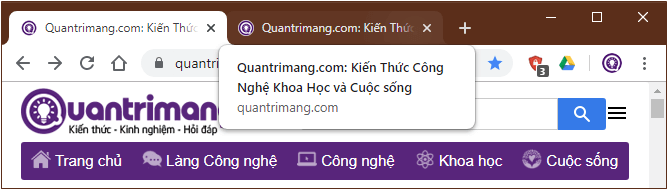
			<p style="text-align: justify;">Khi mở nhiều tab trên trình duyệt web, Google Chrome giúp bạn phân biệt các tab với nhau bằng hiển thị tiêu đề tab khi di chuột qua. Tuy nhiên, bắt đầu từ phiên bản 78, ngoài việc tiêu đề tab được hiển thị như mọi khi, bạn sẽ thấy xuất hiện thêm cả URL của trang web đó. Đây là cải tiến rõ ràng nhất có thể nhìn thấy của phiên bản này được đánh giá là khá hữu ích.&nbsp;</p>

<p style="text-align: justify;">Tính năng này được bật theo mặc định, tuy nhiên, nếu bạn cảm thấy không thích, thấy nó chiếm dụng quá nhiều diện tích trên màn hình thì có thể dễ dàng tắt nó đi bằng cách vô hiệu hóa Tab Hover Cards trong Chrome Flag.</p>

<figure>
<div style="text-align: justify;"><img alt="Tiêu đề tab được hiển thị cùng URL của trang khi di chuột qua tab" data-i="0" data-src="https://st.quantrimang.com/photos/image/2019/11/02/tat-hien-thi-noi-dung-tab-chrome-78-4.png" data-was-processed="true" height="190" src="https://st.quantrimang.com/photos/image/2019/11/02/tat-hien-thi-noi-dung-tab-chrome-78-4.png" width="668" /></div>

<figcaption>
<div style="text-align: justify;">Tiêu đề tab được hiển thị cùng URL của trang khi di chuột qua tab</div>
</figcaption>
</figure>

<p style="text-align: justify;">Vậy cách làm thế nào? Cùng theo dõi hướng dẫn dưới đây của Quantrimang.com để tắt hiển thị nội dung tab trên Google Chrome nhé!</p>

<h3 id="mcetoc_1dhgf2ij67" style="text-align: justify;">Tắt hiển thị nội dung tab Google Chrome khi di chuột qua&nbsp;</h3>

<p style="text-align: justify;"><strong>Bước 1</strong>:&nbsp;Mở trình duyệt Chrome trên máy tính của bạn.</p>

<p style="text-align: justify;"><strong>Bước 2</strong>: Tiếp theo nhập nội dung sau vào thanh địa chỉ rồi nhấn Enter.</p>

<pre id="pre0">
<code>chrome://flags</code></pre>

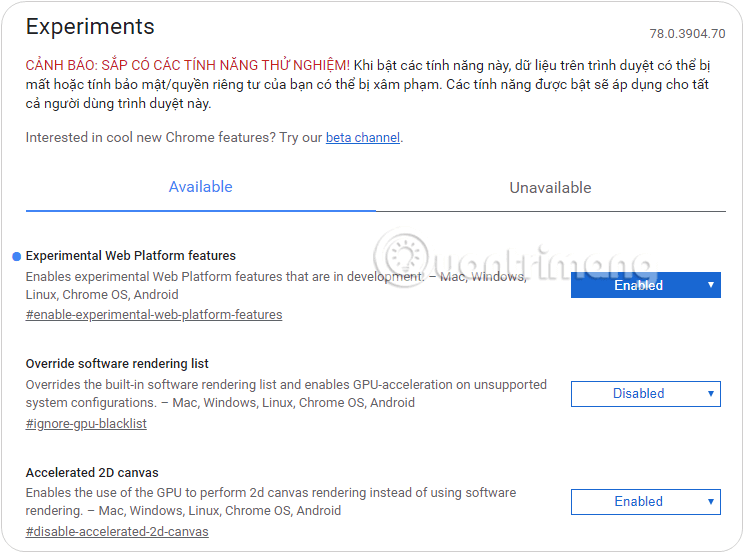
<p style="text-align: justify;">Lúc này trên màn hình hiển thị cửa sổ danh sách&nbsp;<strong>Experiments</strong>&nbsp;có sẵn. Có thể hiểu đây là phần có chứa các tính năng trong giai đoạn thử nghiệm của Google Chrome nên nó có thể bị loại bỏ bất cứ lúc nào nếu không phù hợp.</p>

<figure>
<div style="text-align: justify;"><img alt="Cửa sổ danh sách Experiments" data-i="1" data-src="https://st.quantrimang.com/photos/image/2019/11/02/tat-hien-thi-noi-dung-tab-chrome-78-1.png" data-was-processed="true" height="553" src="https://st.quantrimang.com/photos/image/2019/11/02/tat-hien-thi-noi-dung-tab-chrome-78-1.png" width="744" /></div>

<figcaption>
<div style="text-align: justify;">Cửa sổ danh sách Experiments</div>
</figcaption>
</figure>

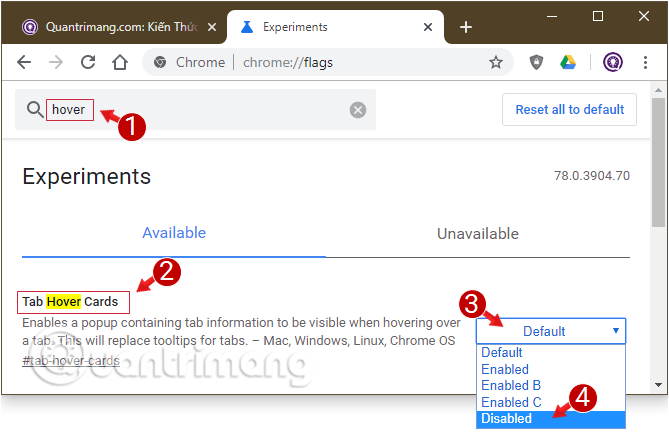
<p style="text-align: justify;"><strong>Bước 3</strong>: Tiếp theo tìm mục&nbsp;<strong>Tab Hover Cards</strong>&nbsp;bằng cách nhập từ khóa &quot;hover&quot;, click chọn từ&nbsp;<strong>menu drop-down</strong>&nbsp;bên trái tùy chọn<strong>&nbsp;Disabled</strong>.</p>

<figure>
<div style="text-align: justify;"><img alt="Vô hiệu hóa Tab Hover Cards" data-i="2" data-src="https://st.quantrimang.com/photos/image/2019/11/02/tat-hien-thi-noi-dung-tab-chrome-78-2.png" data-was-processed="true" height="432" src="https://st.quantrimang.com/photos/image/2019/11/02/tat-hien-thi-noi-dung-tab-chrome-78-2.png" width="669" /></div>

<figcaption>
<div style="text-align: justify;">Vô hiệu hóa Tab Hover Cards</div>
</figcaption>
</figure>

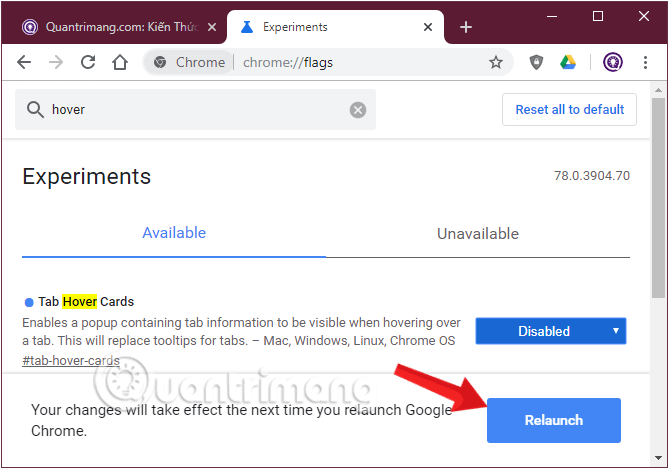
<p style="text-align: justify;"><strong>Bước 4</strong>:&nbsp;Cuối cùng click chọn nút&nbsp;<strong>Relaunch&nbsp;</strong>mới hiện ra trên cửa sổ trình duyệt để Chrome ghi nhận thay đổi bạn vừa thiết lập.</p>

<figure>
<div style="text-align: justify;"><img alt="Cuối cùng chọn Relaunch để áp dụng thay đổi" data-i="3" data-src="https://st.quantrimang.com/photos/image/2019/11/02/tat-hien-thi-noi-dung-tab-chrome-78-3.png" data-was-processed="true" height="469" src="https://st.quantrimang.com/photos/image/2019/11/02/tat-hien-thi-noi-dung-tab-chrome-78-3.png" width="669" /></div>

<figcaption>
<div style="text-align: justify;">Cuối cùng chọn Relaunch để áp dụng thay đổi</div>
</figcaption>
</figure>

<p style="text-align: justify;">Hãy mở lại trình duyệt để kiểm tra, nội dung trên tab của Chrome sẽ hiển thị sẽ giống với trước đây.</p>

<p style="text-align: justify;">Nếu muốn kích hoạt lại tính năng, bạn thực hiện tương tự và chọn tùy chọn&nbsp;<strong>Default&nbsp;</strong>ở bước 3.</p>

<p style="text-align: justify;">Đơn giản vậy thôi. Bạn hãy thử xem nhé!</p>

<p style="text-align: justify;">Chúc bạn thành công!</p>
		</div>
				<div id="author">
						<p>
				<strong>Nguồn tin:</strong>
				Quantrimang.com
			</p>
		</div>
	</div>
	<div id="footer" class="clearfix">
		<div id="url">
			<strong>URL của bản tin này: </strong><a href="https://www.nguoicodonvn2008.info/vi/news/savefile/kien-thuc-may-tinh/huong-dan-tat-hien-thi-noi-dung-tab-tren-google-chrome-1277.html" title="Hướng dẫn tắt hiển thị nội dung tab trên Google Chrome">https://www.nguoicodonvn2008.info/vi/news/savefile/kien-thuc-may-tinh/huong-dan-tat-hien-thi-noi-dung-tab-tren-google-chrome-1277.html</a>

		</div>
		<div class="clear"></div>
		<div class="copyright">
			&copy; .&#x3A; Nguoicodonvn2008.info - Cõi lòng người cô đơn &#x3A;.
		</div>
		<div id="contact">
			<a href="mailto:admin@nguoicodonvn2008.info">admin@nguoicodonvn2008.info</a>
		</div>
	</div>
</div>
        <div id="timeoutsess" class="chromeframe">
            Bạn đã không sử dụng Site, <a onclick="timeoutsesscancel();" href="https://www.nguoicodonvn2008.info/#">Bấm vào đây để duy trì trạng thái đăng nhập</a>. Thời gian chờ: <span id="secField"> 60 </span> giây
        </div>
        <div id="openidResult" class="nv-alert" style="display:none"></div>
        <div id="openidBt" data-result="" data-redirect=""></div>
		</script>
		<div class="car-top">
  <span><img src="https://www.nguoicodonvn2008.info/themes/default/images/car.png" alt=""></span>
</div>
<script src="https://www.nguoicodonvn2008.info/assets/js/jquery/jquery.min.js"></script>
<script>var nv_base_siteurl="/",nv_lang_data="vi",nv_lang_interface="vi",nv_name_variable="nv",nv_fc_variable="op",nv_lang_variable="language",nv_module_name="news",nv_func_name="savefile",nv_is_user=0, nv_my_ofs=-4,nv_my_abbr="EDT",nv_cookie_prefix="nv4c_e856T",nv_check_pass_mstime=1738000,nv_area_admin=0,nv_safemode=0,theme_responsive=0,nv_recaptcha_ver=2,nv_recaptcha_sitekey="",nv_recaptcha_type="image",XSSsanitize=1;</script>
<script src="https://www.nguoicodonvn2008.info/assets/js/language/vi.js"></script>
<script src="https://www.nguoicodonvn2008.info/assets/js/DOMPurify/purify3.js"></script>
<script src="https://www.nguoicodonvn2008.info/assets/js/global.js"></script>
<script src="https://www.nguoicodonvn2008.info/assets/js/site.js"></script>
<script src="https://www.nguoicodonvn2008.info/themes/default/js/news.js"></script>
<script src="https://www.nguoicodonvn2008.info/themes/default/js/main.js"></script>
<script src="https://www.nguoicodonvn2008.info/themes/default/js/custom.js"></script>
<script type="application/ld+json">
        {
            "@context": "https://schema.org",
            "@type": "Organization",
            "url": "https://www.nguoicodonvn2008.info",
            "logo": "https://www.nguoicodonvn2008.info/uploads/angel.gif"
        }
        </script>
<script src="https://www.nguoicodonvn2008.info/themes/default/js/bootstrap.min.js"></script>
<script type="text/javascript">
var $scrolltop = $('.car-top');
$scrolltop.on('click', function () {
    $('html,body').animate({
        scrollTop: 0
    }, 800);
    $(this).addClass("car-run");
    setTimeout(function(){ $scrolltop.removeClass('car-run');}, 1000);
    return false;
});
$(window).on('scroll', function ()
{ 
    if($(window).scrollTop() >= 200)
    {
        $scrolltop.addClass("show");
        $scrolltop.addClass("car-down");
    }
    else
    {
       $scrolltop.removeClass("show");
       setTimeout(function(){ $scrolltop.removeClass('car-down');}, 300);
    }
});
</script>
</body>
</html>